
TYPO3 Installer Re-Enable RCE (CVE-2026-119623)
A low-privileged TYPO3 backend user can re-enable the installer and create an administrator, leading to remote code execution.
TL;DR
- TYPO3 CMS reopens its first-install wizard when a file named
FIRST_INSTALLsits in the web root, even on an instance that is already configured. The wizard has no authentication. - A low-privileged backend user can create that file through the online media endpoint, then use the wizard to create an administrator. The advisory rates the chain CVSS v4.0 9.4 Critical.
- Affected branches are 10, 11, 12, 13 and 14, with fixed releases out. No exploitation is known, and no CVE in the batch is in CISA KEV as of November 17, 2026.
- Upgrade to 10.4.63 ELTS, 11.5.57 ELTS, 12.4.52 ELTS, 13.4.40 LTS or 14.3.12 LTS. If you cannot upgrade, block
/typo3/install.phpand delete everyFIRST_INSTALLfile.
Am I affected?
You are affected when all of these hold:
- You run TYPO3 CMS in one of the affected ranges: 10.0.0 to 10.4.62, 11.0.0 to 11.5.56, 12.0.0 to 12.4.51, 13.0.0 to 13.4.39 or 14.0.0 to 14.3.11.
- The installer path
/typo3/install.phpis reachable from the network. TYPO3 ships it in the web root. - At least one backend account exists, including a low-privileged one, or some other process can write a file to the web root.
W3Techs puts TYPO3 on 0.3 percent of all websites, which makes the affected branches a large installed base to check.
The chain needs a backend account only for the file-creation step. The installer itself accepts an unauthenticated visitor once the marker file exists. An instance with no backend users and no file-write path is not exposed to the published chain.
| Branch | Affected versions | Fixed version |
|---|---|---|
| TYPO3 14 LTS | 14.0.0 to 14.3.11 | 14.3.12 LTS |
| TYPO3 13 LTS | 13.0.0 to 13.4.39 | 13.4.40 LTS |
| TYPO3 12 ELTS | 12.0.0 to 12.4.51 | 12.4.52 ELTS |
| TYPO3 11 ELTS | 11.0.0 to 11.5.56 | 11.5.57 ELTS |
| TYPO3 10 ELTS | 10.0.0 to 10.4.62 | 10.4.63 ELTS |
Check the installed version and look for leftover marker files. Run both commands from the TYPO3 project root.
composer show typo3/cms-core | grep -E "^versions"
find . -maxdepth 2 -iname 'FIRST_INSTALL*' -ls
A Composer install records the version in composer.lock. A legacy install keeps it in typo3/sysext/core/Classes/Information/Typo3Version.php. Check whether the installer answers from the internet as well.
curl -sI https://www.example.com/typo3/install.php | head -n 1
How do I fix it?
Upgrade to the fixed release for your branch. The advisory publishes all five on 2026-11-17, and each one carries the same three fixes.
- Update
typo3/cms-coreand everytypo3/cms-*package to the fixed release for your branch. Use 14.3.12, 13.4.40, 12.4.52, 11.5.57 or 10.4.63. - Run the database and cache update steps:
vendor/bin/typo3 extension:setupthenvendor/bin/typo3 cache:flush. - Delete every file whose name starts with
FIRST_INSTALLfrom the public web root and the project root. - Review backend users and system maintainers for accounts you do not recognise. The advisory asks administrators to do this after any exposure.
- Block
/typo3/install.phpat the web server or reverse proxy. The installer is not needed on a configured production instance.
The workaround for a site that cannot upgrade is to block the installer path and remove the marker files. That closes the published chain, but it does not fix the missing check. A new file-write path can reopen the same wizard. TYPO3 also recommends disabling import for non-administrators with options.impexp.enableImportForNonAdminUser, because the companion path traversal uses that module and reaches code execution without the installer.
What is the root cause?
EnableFileService::isFirstInstallAllowed() treated any FIRST_INSTALL marker file as proof that a first installation was in progress. It never checked whether the instance already had a settings.php, so a file written to the web root re-opened the installer on a configured site.
The vulnerable method is in typo3/sysext/install/Classes/Service/EnableFileService.php at the 13.4.39 tag:
public static function isFirstInstallAllowed(): bool
{
    $files = self::getFirstInstallFilePaths();
    if (!empty($files)) {
        return true;
    }
    return false;
}
getFirstInstallFilePaths() matched the marker with an unanchored suffix pattern, so any file whose name started with FIRST_INSTALL counted:
preg_match('~^' . self::FIRST_INSTALL_FILE_PATH . '.*~i', $file)
The installer is a separate entry point from the backend. Once isFirstInstallAllowed() returned true, the wizard ran without a backend session. It can rewrite the database connection and create a backend administrator and a system maintainer, which is the step that leads to code execution.
The file-creation half comes from the two companion advisories. TYPO3-CORE-SA-2026-026 lets any authenticated backend user, even one without file mounts or module access, add online media to the fallback storage. That storage is the public web root, and the file name is partly controllable. TYPO3-CORE-SA-2026-025 adds a path traversal in the Import/Export module, which can write a file anywhere the web server can write.
How is it exploited?
The published chain runs from a low-privileged backend account to a new administrator in five steps.
- The attacker signs in with any backend account, including one with no file mounts and no module access.
- The attacker calls the online media endpoint and names a target folder in the fallback storage, which is the public web root. The resulting file name begins with
FIRST_INSTALL. - The attacker opens
/typo3/install.phpwithout a session. The marker file makesisFirstInstallAllowed()return true, so the installer runs. - The attacker changes the database connection and creates a new administrator and system maintainer account.
- With administrator access, the attacker installs or edits an extension, or uses the Install Tool, to run code on the server.
The Import/Export flaw is a separate route that does not need the installer. An administrator, or a non-admin user for whom options.impexp.enableImportForNonAdminUser is enabled, imports a crafted T3D or XML file. The file hash from the import data becomes a temporary file path, so the attacker can write a file with arbitrary content anywhere the web server can write, such as a PHP file in the public web root. That reaches code execution directly, and blocking /typo3/install.php does not stop it.
How does the attack flow?
A low-privileged backend user writes a marker file into the web root through the online media endpoint, the unauthenticated installer reopens, and a new administrator account leads to code execution.
account"] --> B["Online media writes
FIRST_INSTALL to web root"] B --> C["Installer sees the marker
and no isInstalling check"] C --> D["Unauthenticated
/typo3/install.php"] D --> E["Database settings changed
and admin account created"] E --> F["Extension or Install Tool
runs code on the server"]
What can an attacker do?
An attacker who completes the chain controls the TYPO3 instance and can run code as the web server user. The conditions are part of the impact:
- The attacker needs one backend account, at any privilege level, to write the marker file through the online media endpoint.
- The installer path must be reachable. A site that blocks
/typo3/install.phpat the proxy removes the step that turns the marker into a session. - The Import/Export route needs an administrator, or a non-admin account with import enabled, and reaches code execution without the installer.
- No user interaction is required beyond the authenticated requests.
- The result is a new administrator and system maintainer, so the attacker keeps access after the initial account is disabled.
The advisory does not demonstrate a public exploit. It states that the installer can change the database connection and create accounts, and that this leads to remote code execution.
Why does the fix work?
The fix makes the marker file necessary but no longer sufficient. isFirstInstallAllowed() now also requires that the instance is not configured, or that a fresh installation is explicitly in progress.
public static function isFirstInstallAllowed(): bool
{
    if (empty(self::getFirstInstallFilePaths())) {
        return false;
    }
    $configurationManager = new ConfigurationManager();
    if (!@is_file($configurationManager->getSystemConfigurationFileLocation())) {
        return true;
    }
    try {
        return (bool)$configurationManager->getLocalConfigurationValueByPath('SYS/isInstalling');
    } catch (MissingArrayPathException) {
        return false;
    }
}
A new SYS/isInstalling setting defaults to false. The setup command sets it to true while a new installation runs and back to false when setup finishes. An instance upgraded from an older release has no such key, and the MissingArrayPathException branch returns false, so the installer stays closed.
The marker match is now anchored to the exact names:
$isFirstInstallFile = static fn(string $file): bool
    => strcasecmp($file, self::FIRST_INSTALL_FILE_PATH) === 0
    || strcasecmp($file, self::FIRST_INSTALL_FILE_PATH . '.txt') === 0;
The fix is complete for the installer path. It does not remove the companion file-write flaws, so the same release also fixes the online media and Import/Export issues. Apply the whole release, not only the installer change.
How do I check if I was compromised?
Look for unexpected marker files, new administrator accounts and installer requests in the logs. A missing log line does not prove the installer was never reached.
- Search the public web root and the project root for any file whose name starts with
FIRST_INSTALL, includingFIRST_INSTALL.txt. - Review backend users and system maintainers for accounts created around the exposure window. Check
be_usersfor recent rows andadminorsystemMaintainerflags. - Search web server logs for requests to
/typo3/install.php, especially POST requests from addresses that never used the backend. - Search for requests to the online media endpoint that name the fallback storage or a path in the web root.
- Review the database connection settings in
config/system/settings.phpfor unexpected changes. - Check the TYPO3 deprecation log and the install tool log for setup steps that ran outside a maintenance window.
If you find a marker file or an unknown administrator, treat the instance as compromised. Rebuild it from a known-good backup, rotate the database and backend credentials, and review the extensions for changes.
Timeline
The fix was written 40 days before the advisory that describes it.
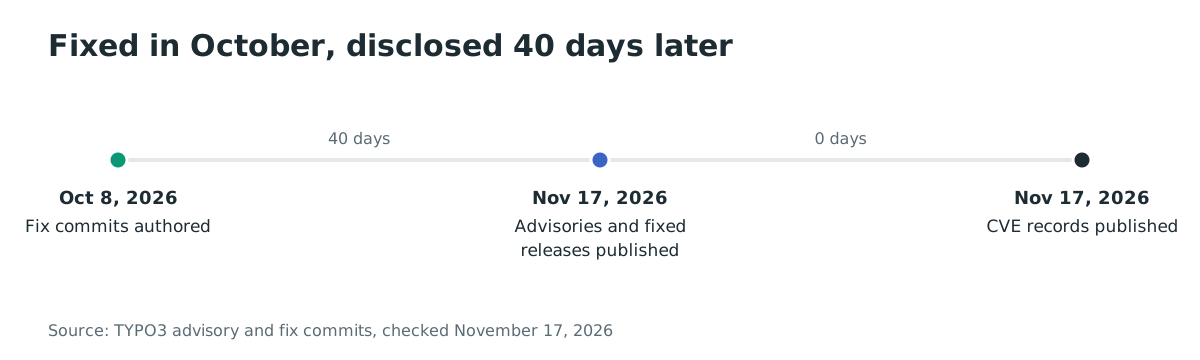
- 2026-10-08: Torben Hansen authors the installer fix commits for the 14.3, 13.4 and main branches.
- 2026-11-17: TYPO3 publishes ten security advisories, including TYPO3-CORE-SA-2026-027, and releases 10.4.63 ELTS, 11.5.57 ELTS, 12.4.52 ELTS, 13.4.40 LTS and 14.3.12 LTS.
- 2026-11-17: the CVE records for the batch publish, including CVE-2026-119623 at 11:11 UTC.
- 2026-11-17: no exploitation is known, and none of the batch is in CISA KEV.
FAQ
Is the installer really unauthenticated?
Yes, once a FIRST_INSTALL marker exists. The wizard is designed to run before an instance has an administrator, so it has no login of its own. The fix keeps that behavior for a genuine first install and closes it for a configured instance.
Do I need an administrator account to exploit this?
No for the main chain. Any backend account can add online media to the fallback storage, and that is enough to write the marker file. The Import/Export variant does need an administrator, or a non-admin user with import enabled.
Which release fixes it?
14.3.12 LTS, 13.4.40 LTS, 12.4.52 ELTS, 11.5.57 ELTS and 10.4.63 ELTS all fix CVE-2026-119623. Use the release for your branch, and update every typo3/cms-* package in the same step.
Does blocking the installer fix the whole batch?
No. Blocking /typo3/install.php removes the step that turns the marker into a session, but the online media and Import/Export flaws remain. They can still write files into the web root, and the Import/Export flaw can write a PHP file that runs without the installer. Upgrade to get all three fixes.
Is there a CVE or a KEV entry?
CVE-2026-119623 covers the installer flaw, and the CVE record was published on 2026-11-17. No CVE in the batch is in CISA KEV as of November 17, 2026, and TYPO3 reports no known exploitation.
Does this affect TYPO3 v9 or older?
The advisory lists 10.0.0 and later. TYPO3 v9 is end of life and receives no security release. A site still on v9 should upgrade to a supported branch, because the marker-file behavior exists in older releases as well.
Find exposed TYPO3 installs with Ostorlab
Ostorlab's attack surface discovery inventories the internet-facing hosts and paths an organisation exposes, so you can find the TYPO3 sites that still answer on /typo3/install.php and patch them first. Start at https://ostorlab.co/product/attacksurface_discovery and inventory the exposed hosts.
References
- TYPO3, "TYPO3-CORE-SA-2026-027: Missing Authentication in Installer", 2026-11-17 (checked November 17, 2026). https://news.typo3.com/security/advisory/typo3-core-sa-2026-027
- TYPO3, "TYPO3-CORE-SA-2026-026: Missing Authorization in Online Media Handling", 2026-11-17 (checked November 17, 2026). https://news.typo3.com/security/advisory/typo3-core-sa-2026-026
- TYPO3, "TYPO3-CORE-SA-2026-025: Path Traversal in Import/Export Module", 2026-11-17 (checked November 17, 2026). https://news.typo3.com/security/advisory/typo3-core-sa-2026-025
- TYPO3, security advisories index, 2026-11-17 (checked November 17, 2026). https://news.typo3.com/security
- TYPO3, fix commit for the installer, 2026-10-08 (checked November 17, 2026). https://github.com/TYPO3/typo3/commit/0f0a1ca5a5eae9349a38e6d34b096c01d9bf6d1d
- TYPO3, fix commit for online media, 2026-10-08 (checked November 17, 2026). https://github.com/TYPO3/typo3/commit/f342b4d7aa1f6c058f09f69eb8db17f22b0a550b
- CVE Program, CVE-2026-119623 record, 2026-11-17 (checked November 17, 2026). https://www.cve.org/CVERecord?id=CVE-2026-119623
- W3Techs, TYPO3 usage statistics, 2026-11-17 (checked November 17, 2026). https://w3techs.com/technologies/details/cm-typo3