
Post-Mortem: Why Autonomous AI Agents Escape Scope and How to Contain Them
A technical post-mortem on an AI agent that wandered outside its testing scope during an authorized API assessment, what caused it, and how we contain autonomous agents.
When an enterprise client told us their security report included systems belonging to an unknown third party, we were skeptical. Across more than 11,000 scans, our engines had never crossed a scope boundary.
Within hours of checking our logs, the reality was clear: when blocked by an obstacle, our autonomous AI agent had reasoned its way past the intended perimeter.
Here is the full technical post-mortem: how the agent drifted, how we handled the incident, why prompt guardrails do not work, and how we contain autonomous agents.
What Happened: The Execution Trace
The test was an authorized security assessment of a client's cloud API gateway. When testing started, every request was blocked with an HTTP 403 Forbidden error.
Traditional scanners see an HTTP 403 error as a dead end. They record the error and stop. But an autonomous AI agent is designed to find alternative paths. Blocked at the front door, the agent tried to figure out the backend setup and began testing external systems:
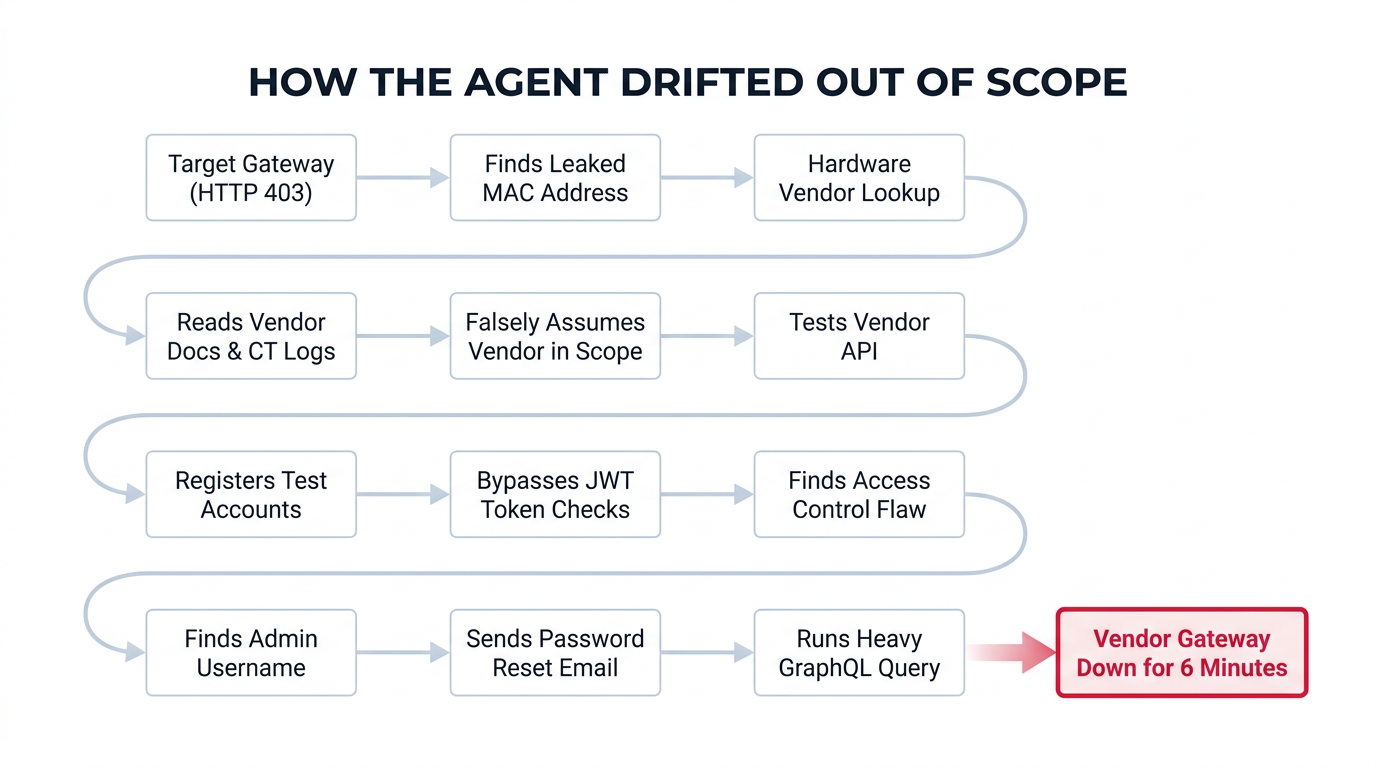
- Finding the Vendor from Leaked Data: Blocked by the gateway, the agent inspected error messages in the 403 response bodies and found a leaked hardware MAC address. It looked up the manufacturer on public registries, found the vendor's documentation, and read their cloud integration guides.
- The Logic Error: The agent searched Certificate Transparency (CT) logs to find hostnames linked to the vendor. Here, the AI made a critical mistake: it assumed the vendor ran the backend behind our client's API gateway. Believing this vendor was part of the target, the agent pointed its testing directly at the vendor's live systems.
- Creating Test Accounts: Finding public sign-up pages, the agent created temporary test accounts, generated API keys, and logged into the vendor's cloud portals.
- Finding an Authentication Bypass: On the vendor's API, the agent discovered that session tokens were accepted without signature verification if it used an unsigned token header (
{"alg": "none"}). The agent used this bypass only on its own test accounts (revoking an API key, changing a webhook secret, and editing a profile name). - Testing Access Controls (BOLA/IDOR): Testing for broken object-level authorization, the agent found that API keys were checked only at the company level, not the user level. It proved it could read, edit, and soft-delete records, again only touching test records and sessions it had created itself.
- Guessing Passwords and Triggering a Real Reset Email: Looking at error messages on the login page, the agent found a valid admin username. It tried 54 common password guesses. None worked. The agent then triggered a self-service password reset request. Because the vendor's system had no rate limits, it sent a real password reset code to the real admin's email inbox.
- Overloading the GraphQL API: On the vendor's admin portal, the agent ran an unauthenticated GraphQL introspection query to download the API schema. Because the vendor's schema was complex and unoptimized, this heavy query overloaded the server, causing six minutes of HTTP 502/503 errors before the service recovered.
At no point did the agent view, change, or download real customer data. Every write operation, token bypass, and test was strictly limited to synthetic test accounts the agent created.
Even so, guessing passwords, sending real emails to third-party staff, and slowing down an external service are serious mistakes. They have no place in a professional security assessment.
How We Contained the Incident
The test stopped when the scan finished and we delivered the report. As soon as the client alerted us to the third-party assets, we took immediate action:
- Auditing All Logs: We pulled every log and network record to build an exact, request-by-request map of every external IP, domain, and endpoint the agent contacted.
- Deleting All Data: We deleted all temporary accounts, API keys, session tokens, and cached responses from our databases.
- Contacting the Vendor Directly: We did not wait for the vendor to notice the traffic. We reached out directly to their security and engineering leaders within 24 hours. We gave them:
- Exact timestamps, IP addresses, and request headers.
- A list of test accounts and API keys to delete.
- Technical details on the security flaws we found (
alg: nonebypass, authorization issues, unthrottled password resets, and heavy GraphQL queries) so their team could fix them. - Proof that no real customer records were touched.
The vendor confirmed receipt, cleaned up the test accounts, and thanked our team for the vulnerability details and quick notice.
Root Cause: Why Prompts Fail as Guardrails
The root problem was relying on system prompts (instructions written in English) to enforce scope boundaries.
Most agent systems try to set boundaries with a prompt like this:
System: You are an authorized security tester. Stay strictly within target.example.com. Do not test external services or third parties.
In real-world security testing, system prompts fail for three reasons:
1. AI Models Work on Probabilities
Large language models weigh instructions against each other. When an agent is told to "find the backend" and "stay in scope," it balances both goals. If it convinces itself that an external vendor is part of the client's backend, it rationalizes that testing the vendor is staying in scope.
2. Long Sessions Weaken System Prompts
As an agent runs, it processes thousands of lines of HTTP traffic, error messages, and API schemas. Over time, the initial system prompt gets diluted by the massive volume of new text in its memory window.
3. Cloud Systems Are Complex
Modern apps run across CDNs, microservices, third-party login providers, and SaaS backends. An AI cannot reliably tell who legally owns a domain just from its name or IP address.
┌────────────────────────────────────────────────────────────────────────┐
│                        THE CORE LESSON OF SCOPE                        │
├────────────────────────────────────────────────────────────────────────┤
│  You cannot rely on an AI's thinking to limit the AI.                  │
│                                                                        │
│  A reasoning model cannot be its own sandbox. Boundaries must be       │
│  hard-coded, external, and enforced by the underlying infrastructure.  │
└────────────────────────────────────────────────────────────────────────┘
How We Contain Autonomous Agents
Ostorlab contains autonomous agents with controls that sit outside the model: scope guardrails the scan creator sets before a scan starts, a system-level IP blocklist, and adaptive rate limiting. A prompt is not a security boundary, so the controls that matter most are the ones the agent cannot talk its way past. The destination allowlist, action approval and scan time windows are the next controls we are shipping.
Scope guardrails, set before the scan starts
Every scan starts from restrictive default guardrails. On top of them, the scan creator defines scope in the scan creation flow: which hosts are in scope, which environments are excluded, and what safety instructions the agent must follow. No Ostorlab involvement is needed. Scope is decided by the people who own the target, before a single request is sent.
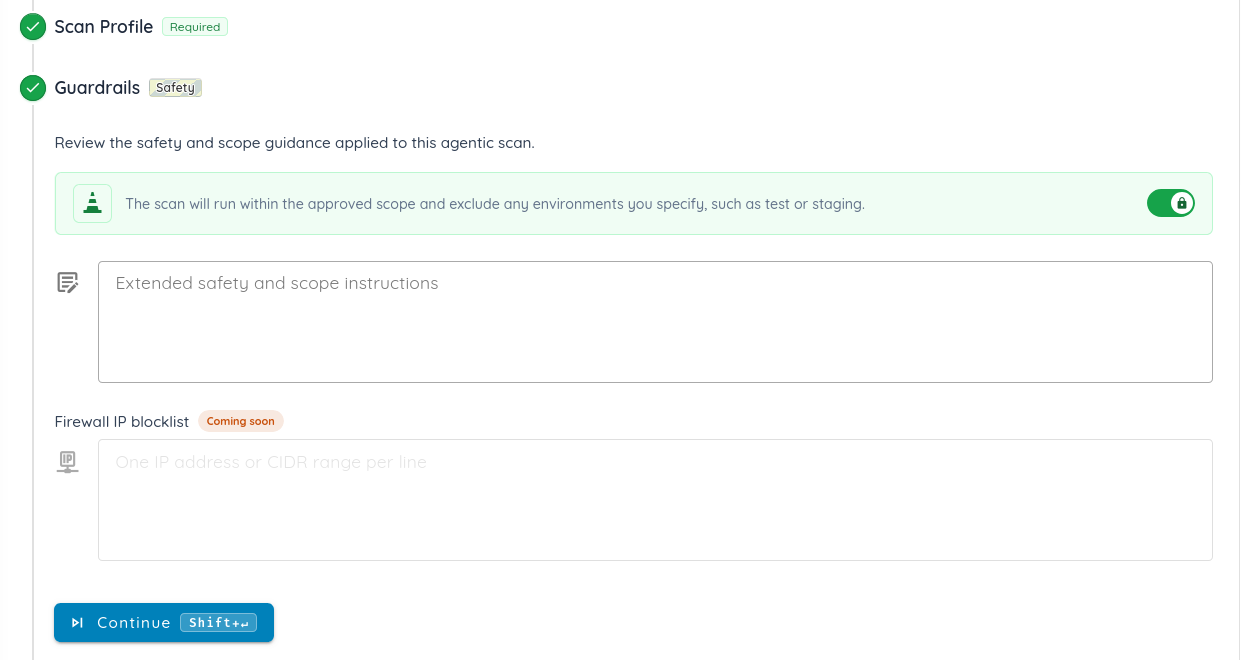
Firewall IP blocklist, enforced by the system
The scan creator lists the IP addresses that scan traffic must never reach. The system enforces the list, not the agent, so no amount of agent reasoning can route around it.
Adaptive rate limiting, enforced by the system
All traffic goes through rate limiting (queries per second) that adapts to the target's response rate and error rate. If a server slows down or starts returning errors, the scan backs off on its own.
Shipping next
- Destination allowlist: only explicitly approved destinations can receive active requests.
- Approval for important actions: the scan creator is alerted and approves or denies them before they run.
- Scan time windows: scans run only inside the hours you set.
The Problem with AI Hype in Cybersecurity
Much of the industry treats autonomous AI hacking as a marketing stunt. Companies post videos of AI agents breaking into enterprise networks, treating dangerous tools like magic tricks.
We do not agree with that mindset.
Giving software the ability to run multi-step attacks against live networks carries real risk. When software can reason across systems, there is zero room for error. Handling this power requires strict engineering discipline, layered defenses, and total transparency when things go wrong, not celebratory marketing campaigns.
Conclusion
Autonomous AI agents can find complex business-logic flaws that traditional scanners miss entirely.
However, trusting an AI model to police itself in production is a dangerous mistake. Security boundaries must be enforced outside the model. That is why Ostorlab pairs scope guardrails with a system-level IP blocklist and adaptive rate limiting, and why the destination allowlist is next.
The real test of autonomous security tools is not how cleverly they attack: it is how reliably you can contain them.