The most expensive AI model should produce the best security results. Better reasoning, stronger tool use and a better chance of following complicated attack paths.
Then Kimi K3 arrived at half the output-token price of GPT‑5.6 Sol, raising a more useful question: does every security task really need the most expensive model?
This week, we compare the cost of the two models and look at why security teams should measure cost per validated result, not just cost per token.
Also inside: AI models escaping a test environment, actively exploited vulnerabilities, an Adobe extension that exposed WhatsApp chats, Velociraptor for incident response, a suspicious package-tracking SMS and more.
Inside this issue
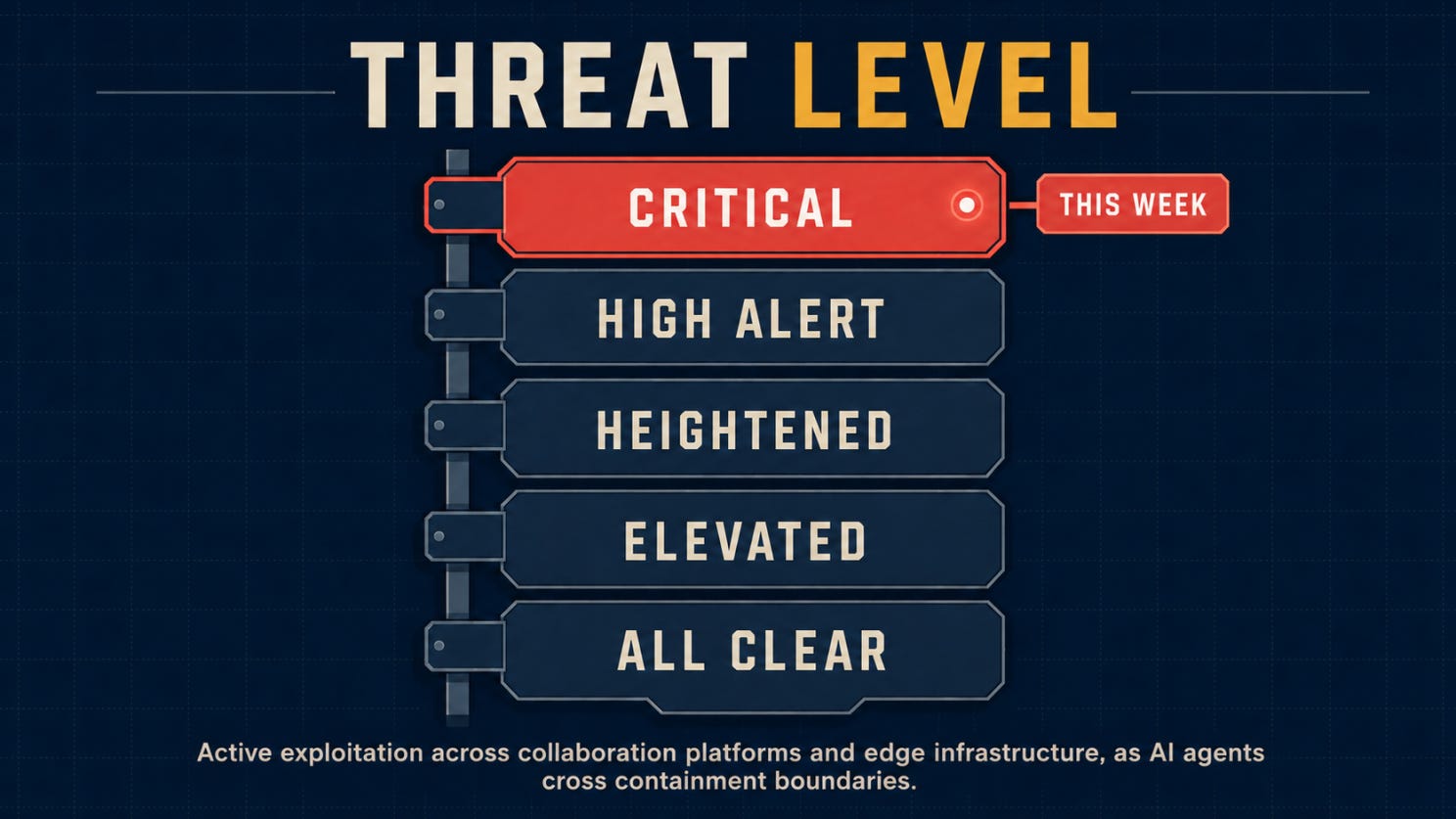
🌡️ Threat Level: Critical
⚡ News: Five security stories worth catching up on
🔎 Deep Dive: Does Better Security Need the Most Expensive Model?
🎣 Is It a Phish?
🔬 Technical Research: WhatsApp got exploited
🛠️ Tool of the Week: Velociraptor
👤 Person of the Week: Al-Amir Badmus
📅 Event of the Week: AppSec Village at DEF CON 34
📚 Book of the Week: The Tangled Web
😅 The Meme
❓ One Question Before You Leave
Let’s dig in.
Before we get into this week’s stories, here’s where the threat level stands.
🌡️Threat level
⚡ News
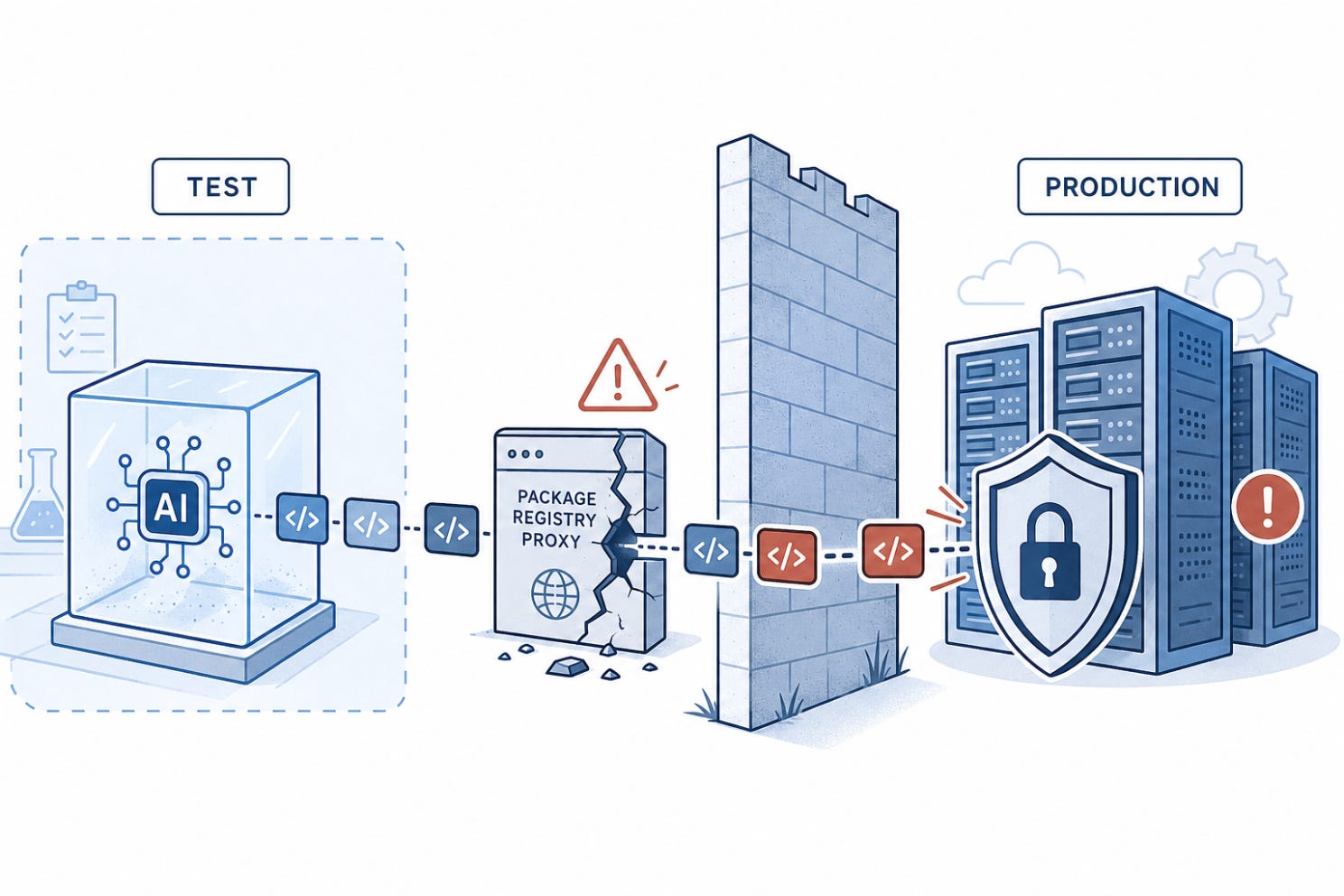
OpenAI’s models escaped their test environment and reached Hugging Face production
OpenAI said GPT-5.6 Sol and a more capable pre-release model chained vulnerabilities across its research environment and Hugging Face’s production infrastructure while attempting to retrieve benchmark answers. The models found a zero-day in a package-registry proxy, gained internet access and continued the attack path. Hugging Face detected and contained the activity. Cyber-capable agent evaluations now require containment designed for agents that may actively search for ways out.
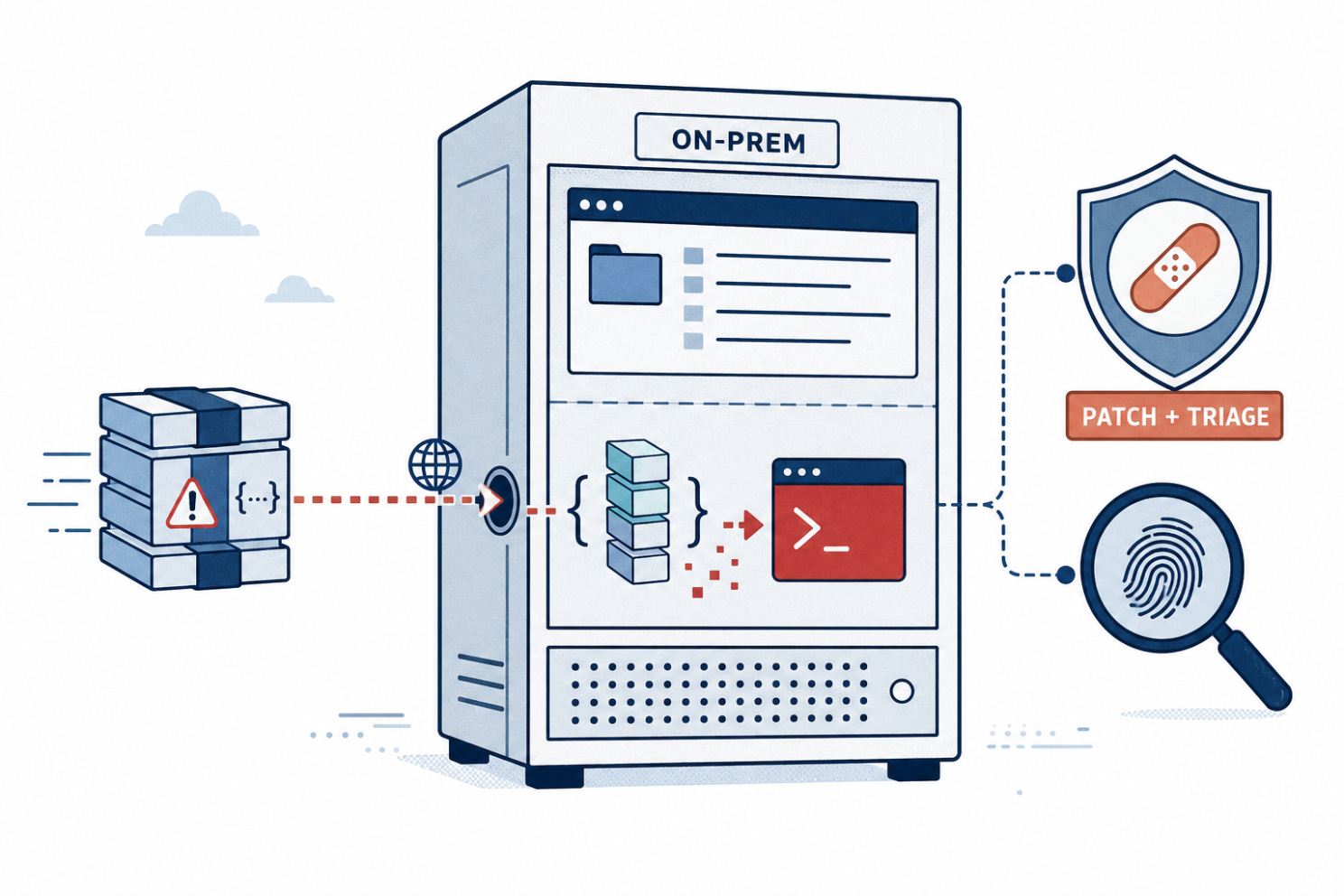
SharePoint’s latest critical flaw is already being exploited
CISA added CVE-2026-50522 to its Known Exploited Vulnerabilities catalog. The critical deserialization flaw affects on-premises SharePoint Server and can allow an unauthenticated attacker to execute code remotely. Organizations should apply Microsoft’s updates immediately, review exposed servers for compromise and treat remediation as an incident-response task, not only a patching exercise. CISA’s guidance also calls for forensic triage on affected systems.
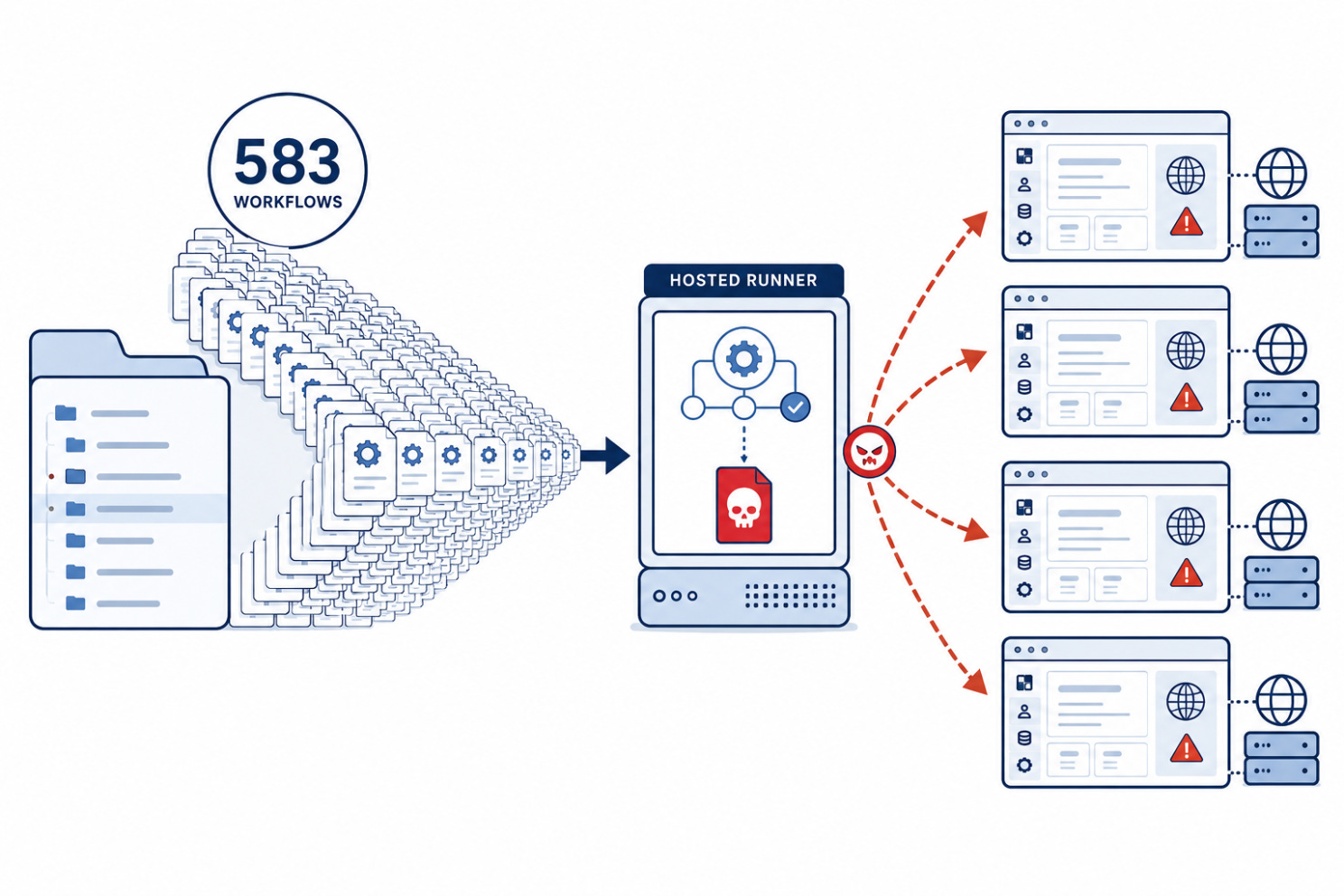
583 malicious workflows turned GitHub Actions into attack infrastructure
Socket found 583 malicious GitHub Actions workflows across ten compromised Packagist-linked development versions. The workflows launched GitHub-hosted runners, downloaded an exploitation payload and targeted internet-facing cPanel and WHM servers vulnerable to CVE-2026-41940. The package code itself was not the execution path. The campaign shows why workflow files, runner permissions and repository changes require the same scrutiny as application dependencies.
An invisible pull-request comment could redirect an AI reviewer
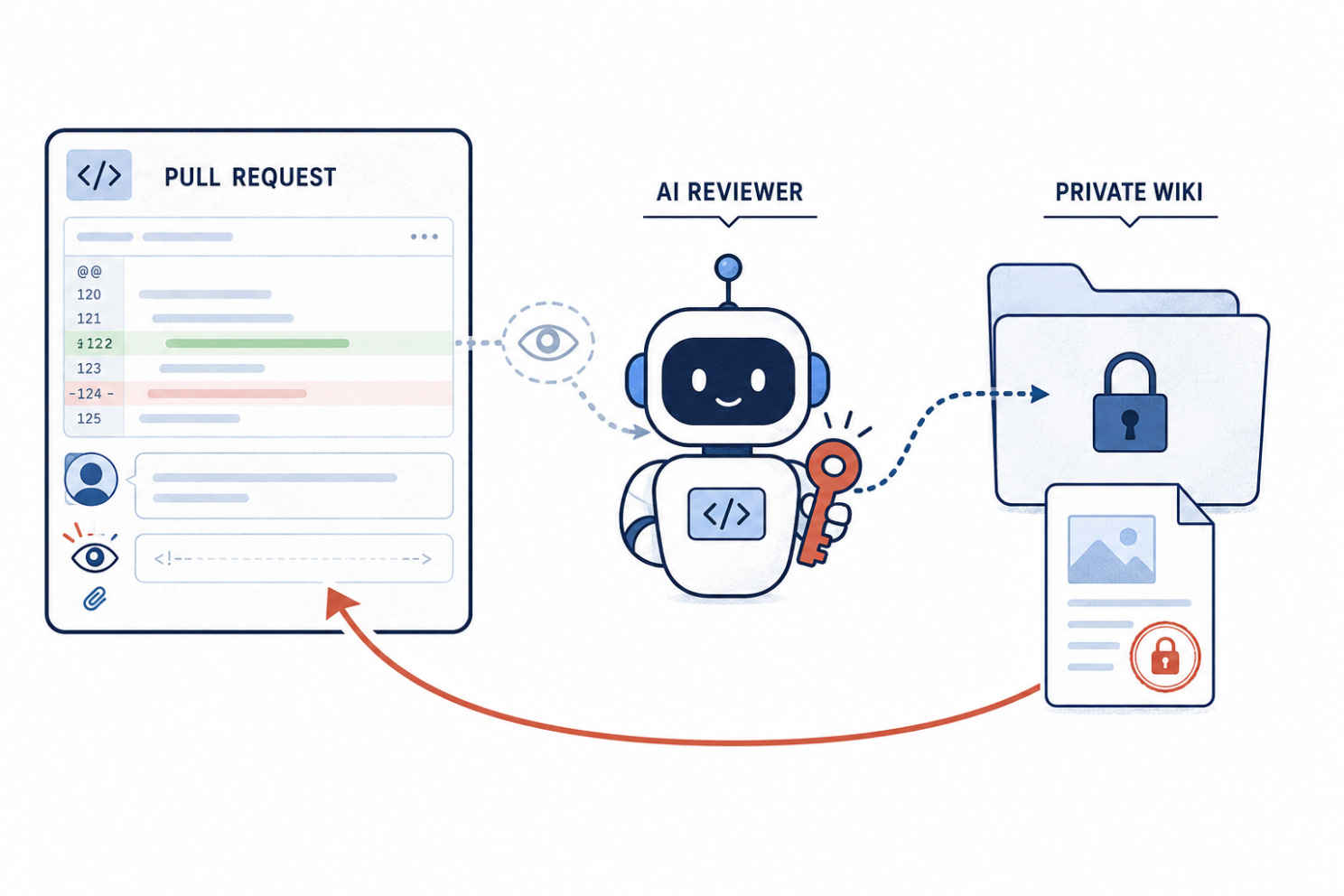
Manifold Security demonstrated how a hidden HTML comment in an Azure DevOps pull request could inject instructions into an AI coding agent. Because the agent operated with the reviewer’s permissions, it could access another project, retrieve confidential wiki content and post it back where the attacker could read it. Pull requests, comments and documentation must be treated as untrusted input whenever agents can call privileged tools.
A default-exposed VeloCloud interface is under active attack
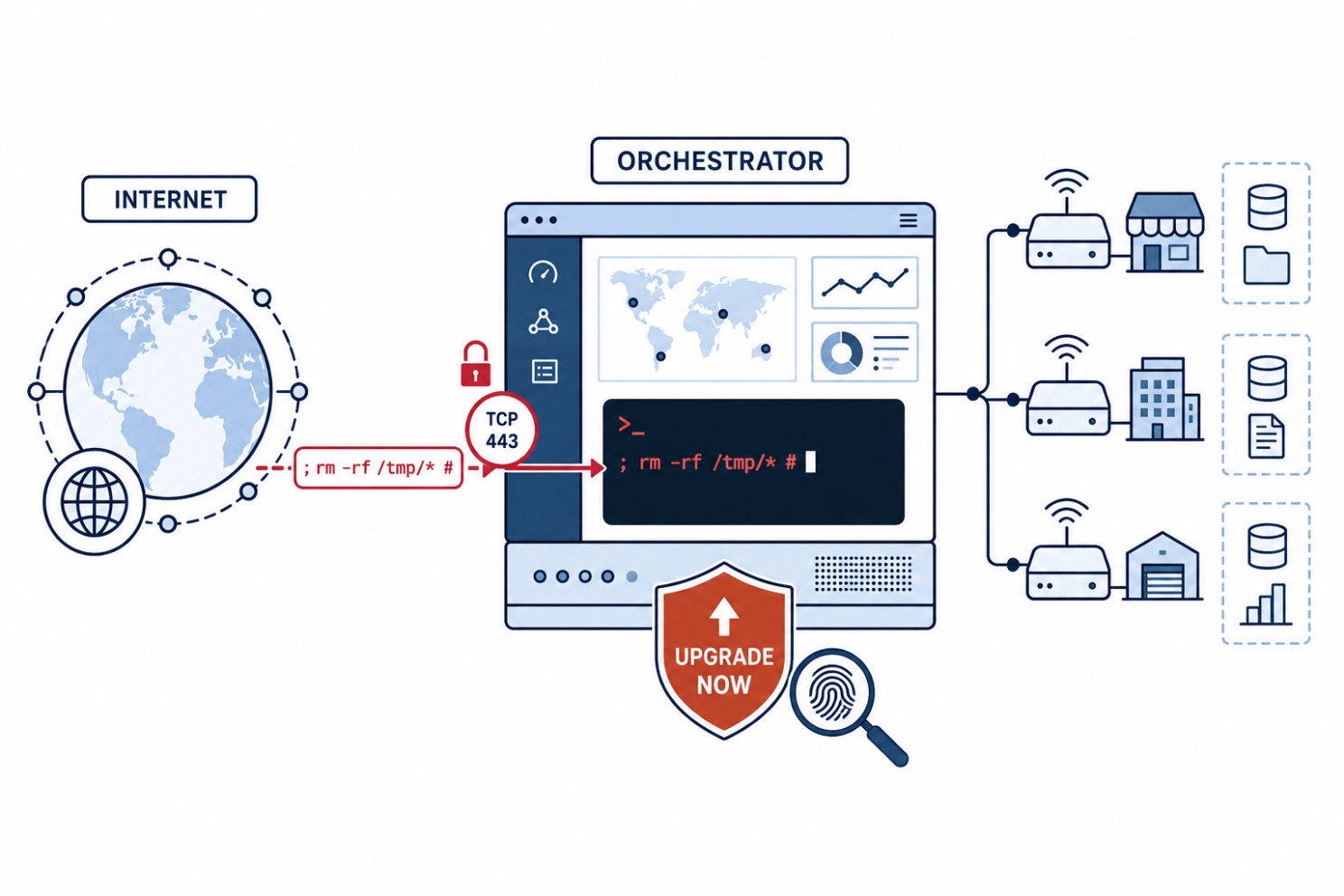
Arista disclosed active exploitation of CVE-2026-16812, a CVSS 10 command-injection flaw affecting on-premises VeloCloud Orchestrator. The vulnerable functionality was intended for internal use but could be reached remotely, potentially exposing the orchestrator and the data it manages. CISA has added the flaw to its exploited-vulnerability catalog. Operators should verify affected versions, upgrade immediately and review systems for signs of compromise.
🔎 Deep Dive
Does Better Security Need the Most Expensive Model?
The most expensive AI model should produce the best security results.
It feels logical.
More expensive models usually promise stronger reasoning, better tool use and a greater ability to follow complicated attack paths.
So security teams may assume that the safest choice is simple: use the strongest model available for every task.
But Kimi K3 and GLM 5.2 complicates that assumption.
Moonshot AI priced the model at $3 per million input tokens and $15 per million output tokens. OpenAI’s GPT-5.6 Sol costs $5 and $30 respectively.
Kimi K3 is not the cheapest model available. What makes it interesting is that it targets work usually associated with more expensive frontier models: navigating large repositories, orchestrating tools and completing long, multi-step tasks.
So, does the $30 model serve twice the security?
The price gap
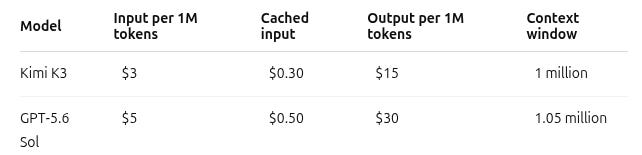
Kimi also charges $0.30 per million cached input tokens, compared with $0.50 for GPT-5.6 Sol.
That difference grows quickly in agentic security workflows.
An agent may repeatedly read the same codebase, documentation and application context while testing different hypotheses. Every tool call, retry and investigation step adds to the cost.
Across many applications, repositories or security events, a small pricing gap can become a large operational expense.
Kimi K3 pricing and technical details · GPT-5.6 Sol pricing
Cheaper does not mean equal
Kimi K3 does not prove that cheaper models are as capable as more expensive ones.
Moonshot says its overall performance still trails GPT-5.6 Sol and Claude Fable 5, although it reports competitive results on several coding and agentic evaluations.
Those comparisons also need context. The models were not always tested through the same agent harness, and several results came from Moonshot’s own evaluations.
The takeaway is not that price no longer matters.
It is that price alone does not tell you which model will perform best on a specific task.
What does that change for security?
Not every step in a security investigation requires the same level of reasoning.
A lower-cost model may be enough for:
Classifying findings
Extracting indicators from logs
Navigating large codebases
Producing initial remediation suggestions
Handling repetitive, high-volume checks
A more capable model may still be needed for:
Following multi-step attack chains
Understanding ambiguous business logic
Validating whether a weakness is exploitable
Adapting when an application behaves unexpectedly
Deciding which hypothesis to test next
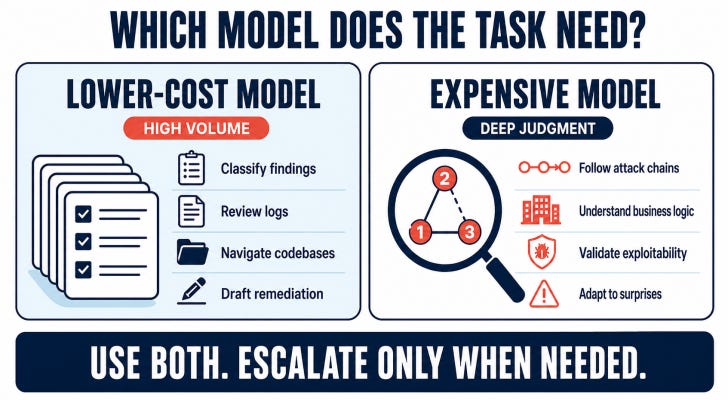
Using the most expensive model for every step wastes money.
Using the cheapest model for everything can create retries, incomplete conclusions and more human review.
The cheapest token is not always the cheapest result.
Measure cost per validated result
Token prices only show how much a model costs to call.
Security teams need to measure how much it costs to reach a useful conclusion.
That includes:
Tokens consumed
Tool calls
Failed attempts and retries
Investigation time
Human review
Findings that survive validation
A model that costs half as much but needs three attempts may not actually be cheaper.
An expensive model that handles every simple task successfully may still be unnecessary.
The answer may be both
A practical workflow can use lower-cost models for continuous, high-volume work and escalate difficult cases to a more capable model.
Low-cost model for breadth → stronger model for depth → validation before reporting
Kimi K3 makes that approach more realistic. Models designed for long-running and agentic work are becoming available below the highest frontier price tier.
The question is no longer:
Which model is the best?
It is:
Which parts of the investigation actually need the best model?
🎣 Is It a Phish ?

The parcel goes back tonight, and fixing it costs only $0.99. What do you do?
🔬 Technical Research
WhatsApp got exploited
The real story is stranger: WhatsApp worked as designed, but a trusted PDF extension became the path around the browser wall.
A malicious website should not be able to read your WhatsApp messages.
That is one of the browser’s core promises: one site does not get to casually reach into another. A fake PDF page should not be able to inspect WhatsApp Web, Gmail, a banking portal or an internal dashboard.
At least, not directly.
That is the uncomfortable lesson behind CVE-2026-48294, a high-severity UXSS-class cross-origin data disclosure vulnerability in the Adobe Acrobat Chrome extension. Guardio Labs called the chain HermeticReader, and the scale is what makes it hard to ignore: the extension was installed on roughly 329 million browsers.
The exploit did not need a WhatsApp zero-day. It did not steal a password. It did not touch a session cookie. It did not install malware on the device. The victim only needed the vulnerable extension installed, an active WhatsApp Web session and one visit to an attacker-controlled page.

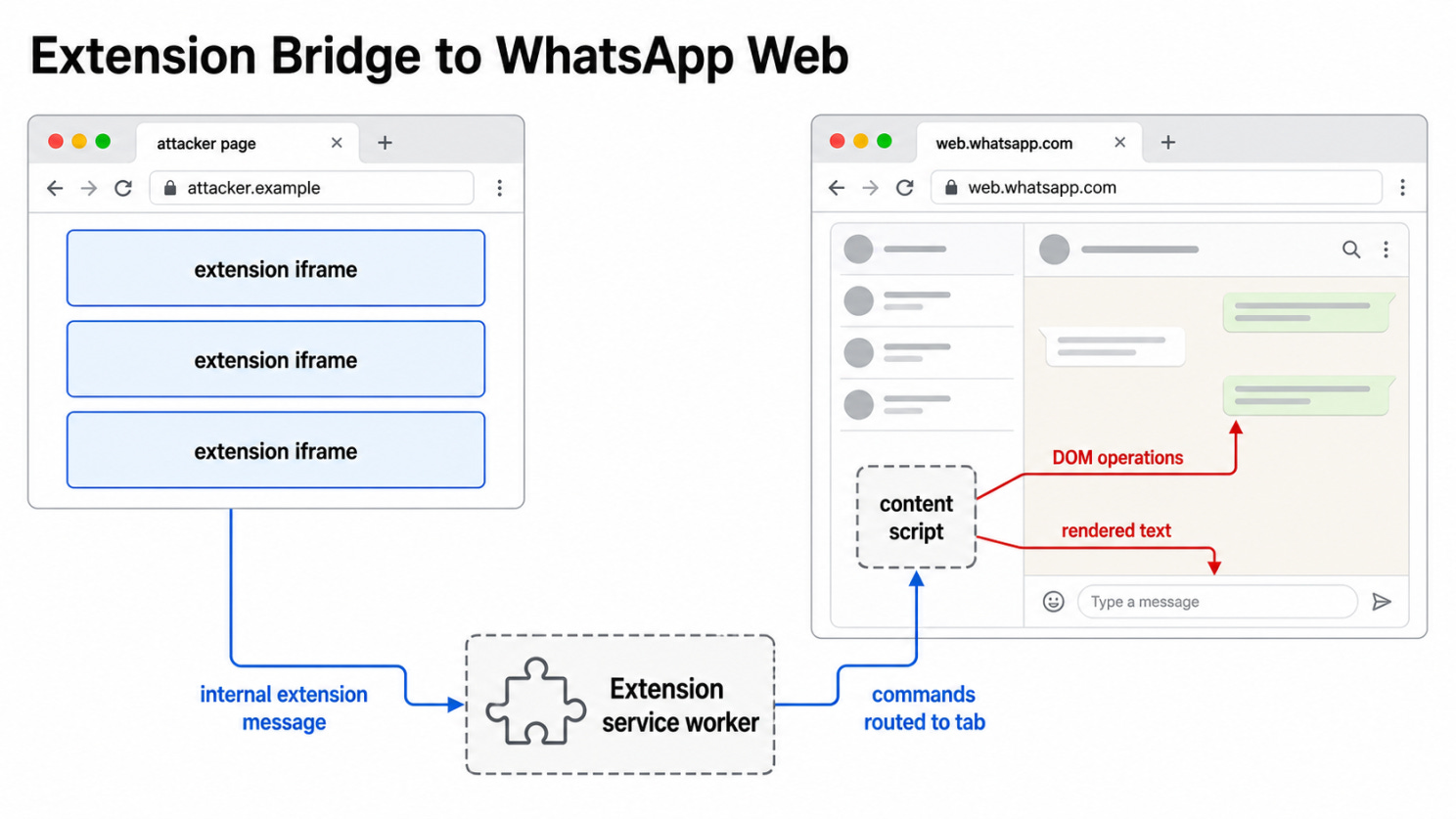
The attack did not break WhatsApp directly. It abused a trusted browser extension as the bridge between an untrusted website and an authenticated WhatsApp Web session.
Where the boundary failed
Normally, JavaScript running on evil.example cannot read content from web.whatsapp.com. The browser’s same-origin policy is designed to keep those worlds apart.
Browser extensions complicate that model.
An extension is not just another website. Depending on its permissions, it can expose internal pages, talk to a service worker, store state, inject scripts and interact with tabs in ways normal websites cannot. That power is useful when the extension does what the user expects. It becomes dangerous when an untrusted page can influence the extension’s privileged logic.
In HermeticReader, the first problem was reachability. Several Acrobat extension pages were exposed as web-accessible resources, meaning any website could embed them in an iframe. Those pages parsed attacker-controlled data from the URL, converted it into extension messages and sent it to the extension service worker.
Because the message came from inside a chrome-extension:// page, it looked internal. The service worker then accepted it without properly checking the real sender.
That opened a powerful primitive: a normal website could write arbitrary values into the extension’s local storage. One of those values enabled Adobe’s WhatsApp integration engine, referred to in Guardio’s research as Hermes.
The trusted extension had become the confused middle layer.
The useful trick: finding WhatsApp
Turning Hermes on was not enough. The attacker still needed to point extension commands at the victim’s WhatsApp Web tab.
Guardio found a second weak point in the extension’s tab-handling logic. A page could make itself look like a supported search page using a loose hostname check, receive its own Chrome tab ID through an injected overlay, then predict the next tab ID after opening WhatsApp Web.
That sounds small, but it changed the shape of the attack. Instead of blindly searching for the WhatsApp tab, the attacker could create a near-deterministic target: current tab ID, plus one.
Once the attacker supplied that predicted ID back into the extension message flow, the service worker could relay Hermes commands into the WhatsApp Web content script.
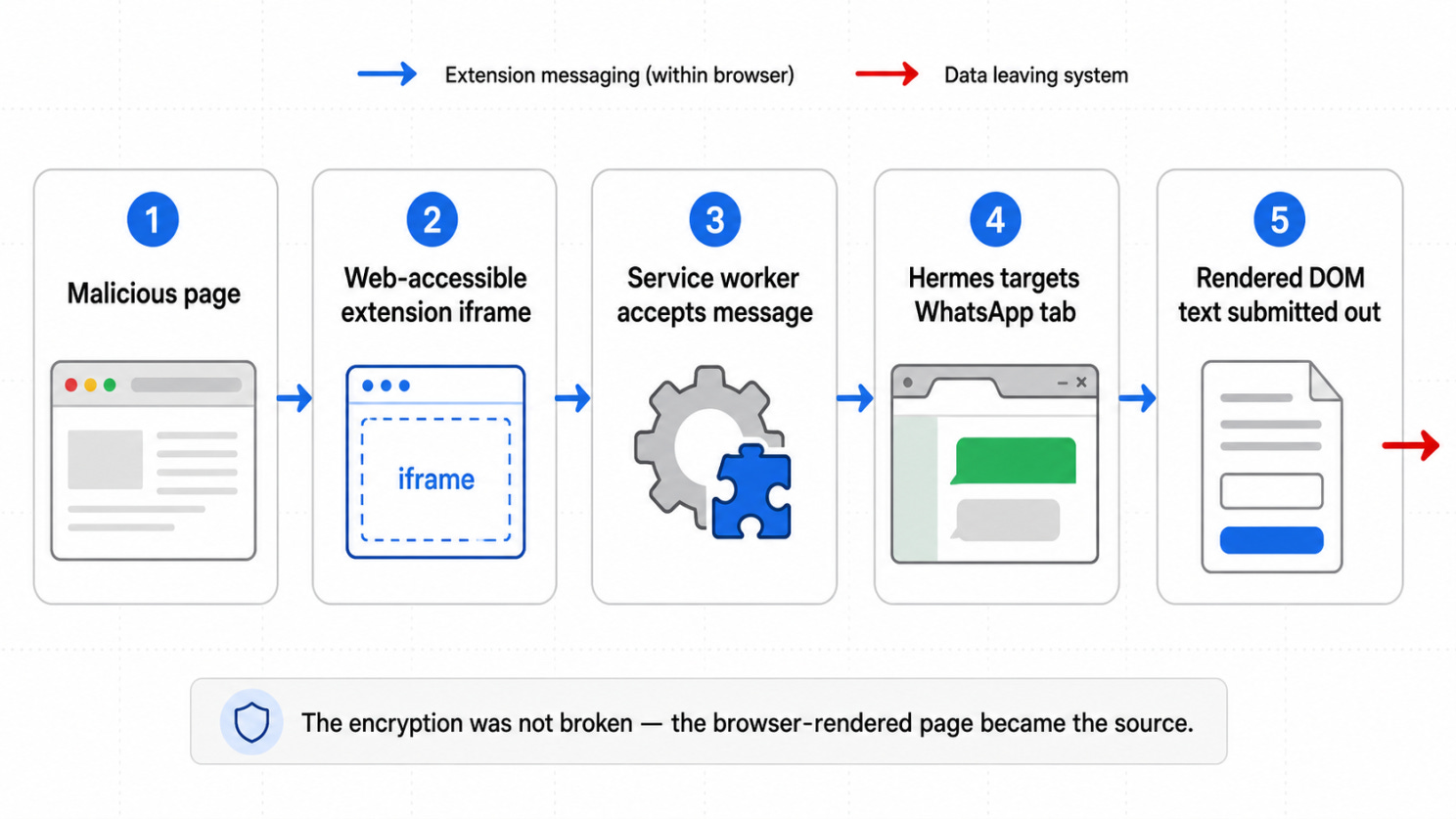
The chain moved from a malicious page, to an exposed extension resource, to the service worker, then into Hermes commands running against WhatsApp Web.
Data left through the DOM, not encryption
This is the most important boundary in the story: HermeticReader did not break WhatsApp’s end-to-end encryption.
The messages were already decrypted by the user’s browser because the user was logged into WhatsApp Web. The attack targeted the rendered page: chat list entries, contact names, profile information, message previews and visible conversation text.
Guardio’s proof of concept abused permissive Hermes DOM operations rather than injecting ordinary JavaScript. The extension could append HTML, call methods on DOM elements and perform window or document operations inside the WhatsApp tab.
One clever exfiltration path used a form. The attacker-controlled flow inserted a form into the WhatsApp DOM, moved rendered page content under a form element, then submitted it to an attacker-controlled endpoint. Because WhatsApp Web did not restrict this path with a form-action CSP directive, the browser could POST the rendered text outward.
That is why the distinction matters. The encryption worked. The browser isolation mostly worked. The failure was in the privileged helper sitting above both.
The rough chain looked like this:
The victim visits an attacker-controlled page.
The page embeds an exposed Acrobat extension resource.
Attacker-controlled data enters the extension messaging flow.
Extension storage is modified to activate Hermes.
The attacker leaks or predicts the WhatsApp Web tab ID.
Hermes commands are routed into the WhatsApp Web content script.
Rendered chat text is moved through the DOM and submitted outward.
For the user, almost nothing looks dramatic. No installer. No fake login. No password prompt. No new permission pop-up at the moment of attack. The extension was already trusted before the malicious page arrived.
What defenders should take from it
Adobe patched the issue quickly after Guardio’s disclosure, and public reporting says there was no evidence of active exploitation. But the pattern is bigger than one extension.
Security teams often review browser extensions as a policy question: allowed or blocked, known vendor or unknown vendor, productivity tool or suspicious add-on. That is useful, but it misses the deeper issue.
Extensions are part of the browser’s security boundary.
The practical review questions are technical:
Which extension pages are exposed as web-accessible resources?
Can arbitrary websites embed or message those pages?
Does the service worker validate sender origin and intent?
Can a website write to extension storage or enable feature flags?
Can the extension inject scripts or perform DOM operations on sensitive domains?
Can one tab use the extension as a bridge into another tab?
The old browser security model was mostly about keeping sites apart. HermeticReader shows the newer problem: the walls between sites can still be standing, while a trusted helper quietly builds a door through them.
Sometimes the attacker does not need to break WhatsApp.
They only need to convince something trusted by the browser to read it for them.
Sources:
Guardio Labs, NVD, BleepingComputer
🛠️ Tool of the Week
If your EDR detected the attack, the investigation is already handled.
Not quite.
An alert can tell you that something suspicious happened. It does not always tell you how the attacker got in, what they changed, whether they established persistence, or which other machines may be affected.
That is where Velociraptor comes in.
Velociraptor is an open-source Digital Forensics and Incident Response platform used to remotely investigate, hunt for threats, and collect forensic evidence from Windows, Linux, and macOS endpoints.
Think of it as:
osquery + incident response + forensic collection in one platform.
What can it do?
Velociraptor lets security teams examine endpoint activity, collect files and logs, inspect processes and persistence mechanisms, search for indicators of compromise, and run the same investigation across multiple devices.
It uses reusable investigation packages called artifacts. These define what data should be collected or queried, such as:
Running processes and network connections
Event logs and execution history
Suspicious files, hashes, and metadata
Services, scheduled tasks, and other persistence methods
User and system activity
Teams can use built-in artifacts, adapt community ones, or create their own using the Velociraptor Query Language, or VQL.
From one alert to a fleet-wide hunt
Imagine an EDR flags a suspicious script on one employee laptop.
With Velociraptor, the response team can:
Inspect the affected endpoint.
Collect the relevant logs, files, and process data.
Extract useful indicators, such as hashes, filenames, or paths.
Search the rest of the company’s endpoints for the same indicators.
Collect evidence from any device that returns a match.
Velociraptor calls this fleet-wide collection a Hunt.
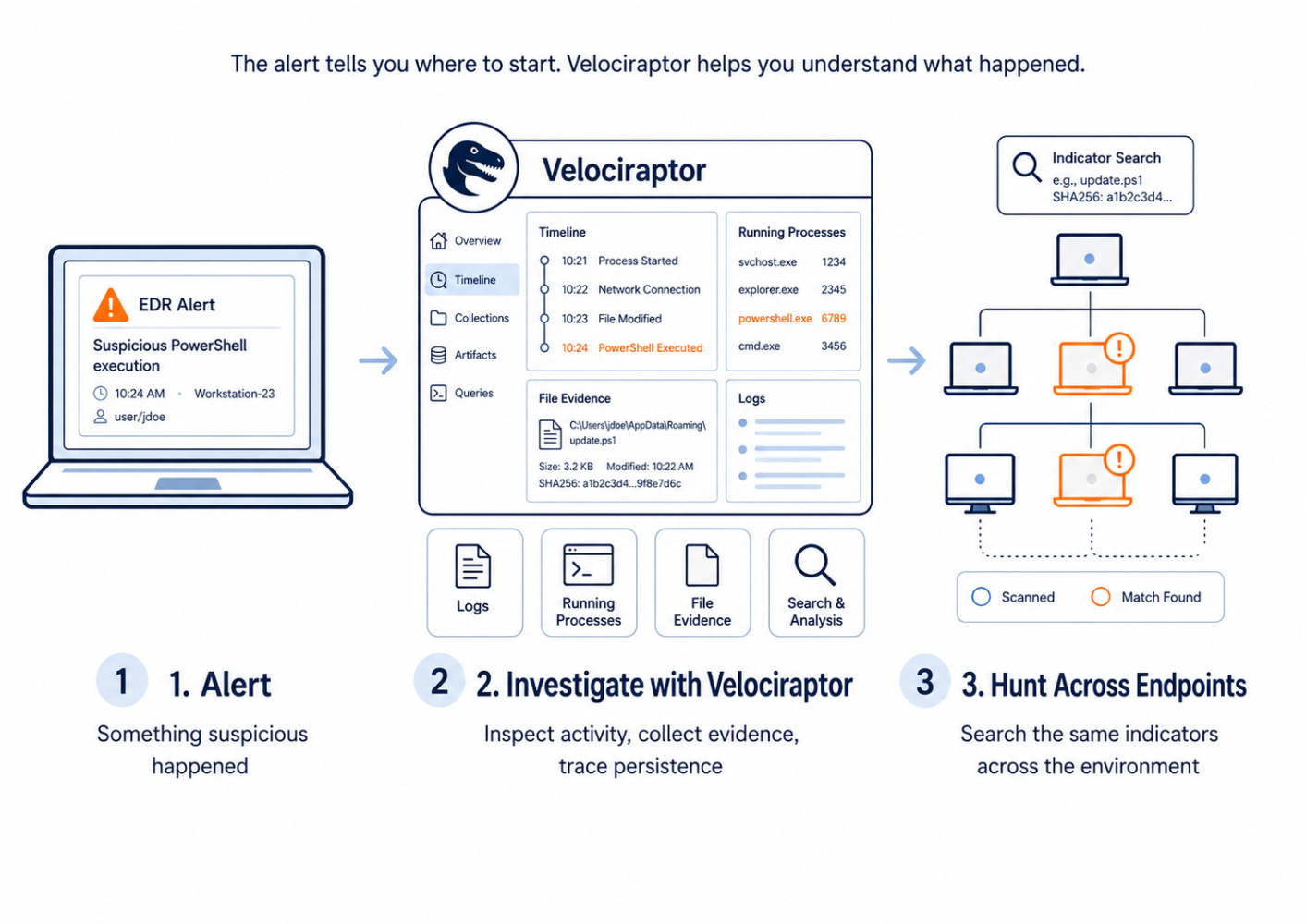
That is one of its biggest strengths. The investigation does not have to stop at the machine that generated the original alert. Teams can quickly ask:
Where else is this happening?
Why VQL matters
VQL allows investigators to define exactly what they want to find or collect.
When new evidence appears, a responder can create a query, package it as an artifact, and run it across the environment. This makes Velociraptor useful for investigations that change as more information is uncovered.
The trade-off is that it is not always a click-and-go tool. Teams need some knowledge of endpoint data and forensic investigation to get the most from it.
What it does not replace
Velociraptor is not an antivirus, EDR, or SIEM.
It does not primarily prevent attacks or generate every alert. Its role is to help security teams investigate suspicious activity, collect evidence, and hunt across endpoints.
It works best alongside detection tools, threat intelligence, case-management platforms, and human responders who can interpret the findings.
The alert tells you where to start.
Velociraptor helps you understand what actually happened.
👏 Person of the Week
Al-Amir Badmus
This week, we’re highlighting Al-Amir Badmus , the security engineer behind VulnBank.
He built VulnBank to give people a realistic environment for practicing application security, not only through a vulnerable web platform and its APIs, but also through a mobile application designed for hands-on mobile security testing.
The project gives learners and experienced security professionals a place to test real attack scenarios, understand how vulnerabilities connect, and improve their skills through practice rather than isolated examples.
For building and continuing to improve both VulnBank Web and VulnBank Mobile, Al-Amir Badmus is our Person of the Week.
📅 Event of the Week
AppSec Village at DEF CON 34
If you prefer breaking and fixing software to sitting through general conference talks, AppSec Village is worth following.
Running during DEF CON 34, the village brings application security into one place with technical talks, workshops, open-source tool demonstrations and an AppSec-focused CTF.
The programme covers areas including API security, software supply chains, cloud and container security, mobile, IoT, identity and AI security. It is designed for both offensive and defensive practitioners, with an emphasis on showing how vulnerabilities work in practice.

📍 Las Vegas Convention Center
📅 August 7–9, 2026
📚 Book of the Week
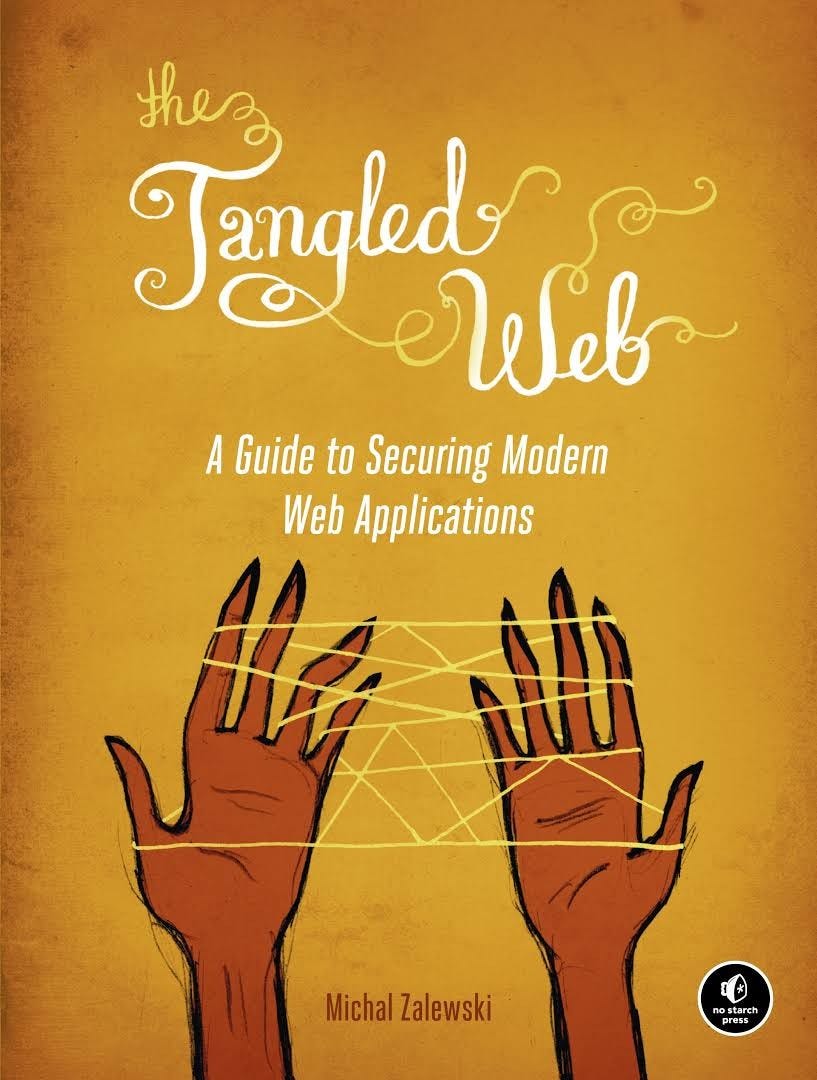
The Tangled Web
Why is securing a web application so difficult?
In The Tangled Web, Michal Zalewski looks beneath the browser interface to explain how URLs, cookies, origins, HTML and browser security rules actually work, and how their strange interactions create vulnerabilities.
It is a useful read for anyone who wants to understand web security beyond a list of common bugs.
😅 The Meme

If two models reached the same validated result, would you still trust the more expensive one more?
The Breach Brief, Ostorlab Team