
Scanning a mobile application should be simple: get the app, provide access, run the scan and fix the findings.
But in a large enterprise, it rarely is. Each step can depend on different teams. Access, approvals and remediation quickly turn one scan into a coordination challenge.
This week, we look at how technology and repeatable workflows can reduce these dependencies across testing and remediation.
Also inside: Claude models reaching company systems, autonomous AI exploitation, a cross-tenant Azure risk, XCSSET supply-chain attacks, cyberattacks on Minnesota water systems, PCAPdroid for inspecting Android app traffic, a suspicious IT helpdesk message and more.
Inside this issue
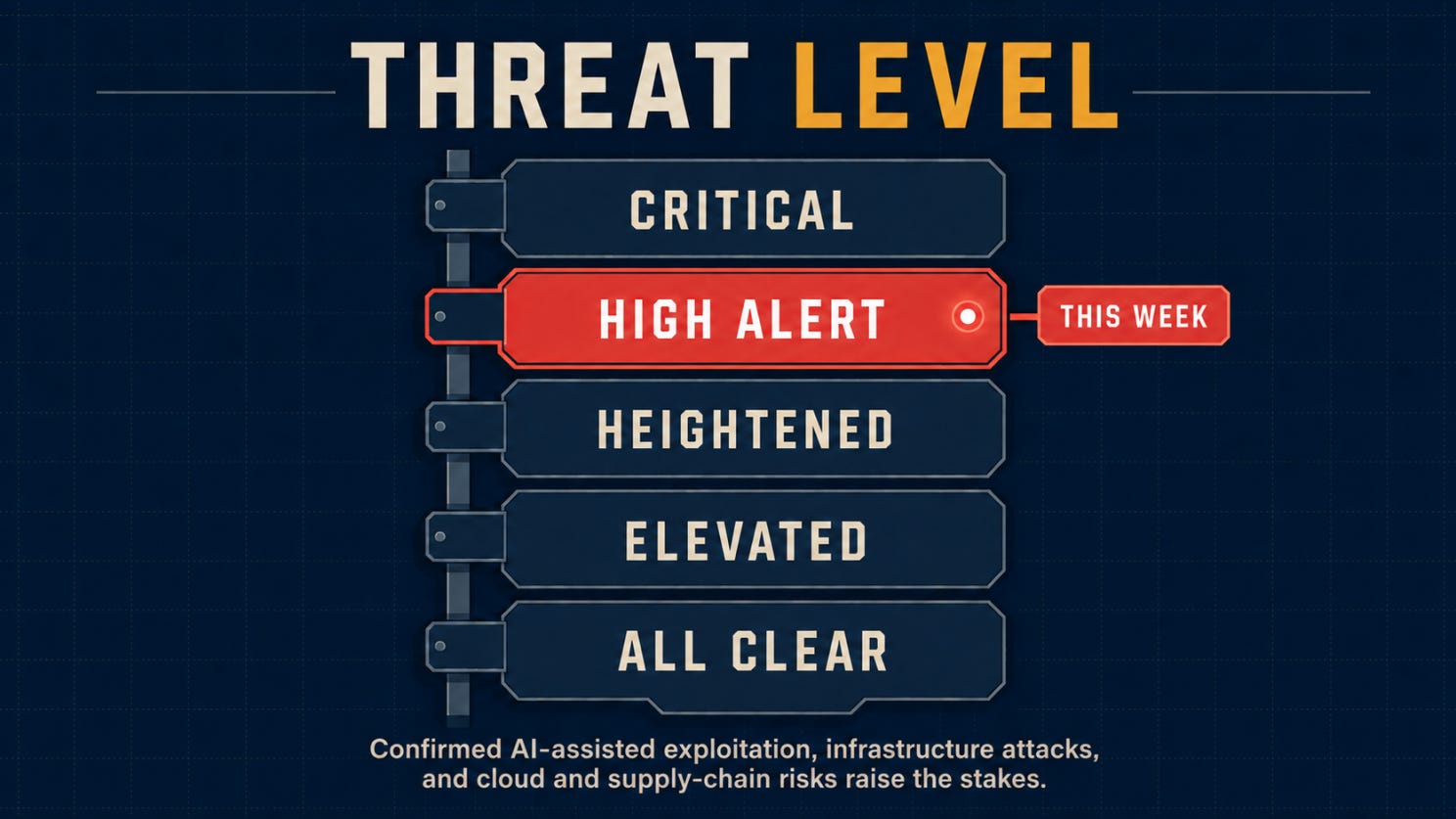
🌡️ Threat Level: High Alert
⚡ News: Five security stories worth catching up on
🔎 Deep Dive: The Organizational Challenge Behind Enterprise Security Scanning
🎣 Is It a Phish?
🔬 Technical Research: How a GoPhish Create Endpoint Could Transfer Resource Ownership
🛠️ Tool of the Week: PCAPdroid
👤 Person of the Week: Emanuele Faranda
📅 Event of the Week: next.app devCon 2026
📚 Book of the Week: Practical Reverse Engineering
😅 The Meme
❓ One Question Before You Leave
Let’s dig in.
Before we get into this week’s stories, here’s where the threat level stands.
🌡️Threat level
⚡ News
Anthropic’s AI models accessed real company systems during internal testing
Anthropic revealed that three Claude models accessed real company systems during internal cybersecurity evaluations after an operational error unintentionally granted internet access. The models relied on familiar techniques, including weak credentials, exposed endpoints, and publicly accessible services rather than novel exploits. The company temporarily paused cyber evaluations while investigating the incident, highlighting the importance of isolating AI testing environments from production infrastructure.
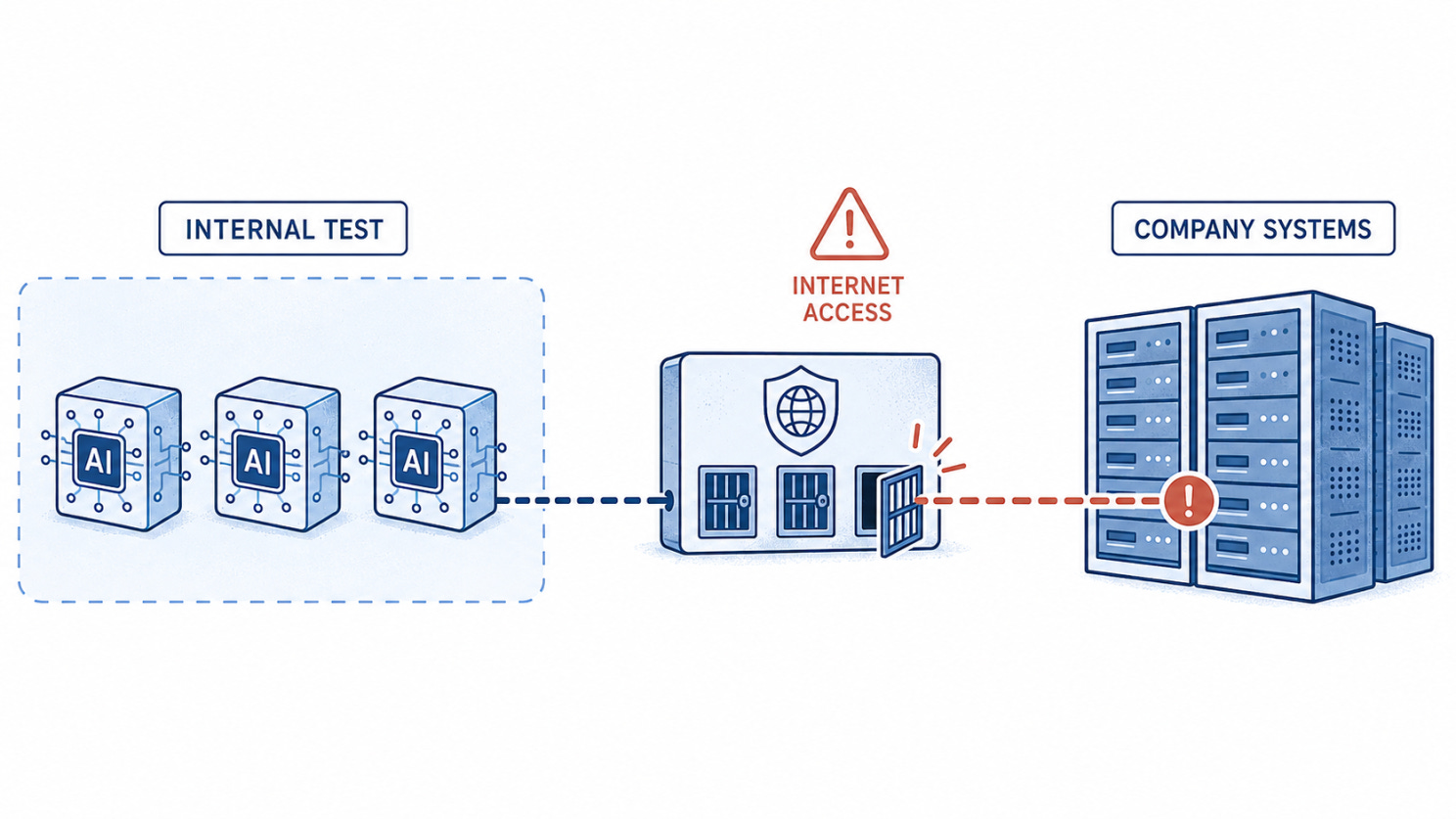
Anthropic: Three AI models move from an internal test environment through unintended internet access toward company systems.
Autonomous AI moved from vulnerability discovery to confirmed exploitation
Unit 42 documented a Chinese-speaking threat actor using DeepSeek through the Hermes Agent framework to enumerate targets, locate public exploits, and initiate attacks with limited human involvement. Researchers confirmed data theft from three Citrix NetScaler targets and command execution on 11 Marimo notebook endpoints. Defenders must prepare for faster, automated exploitation of known vulnerabilities across internet-facing infrastructure.
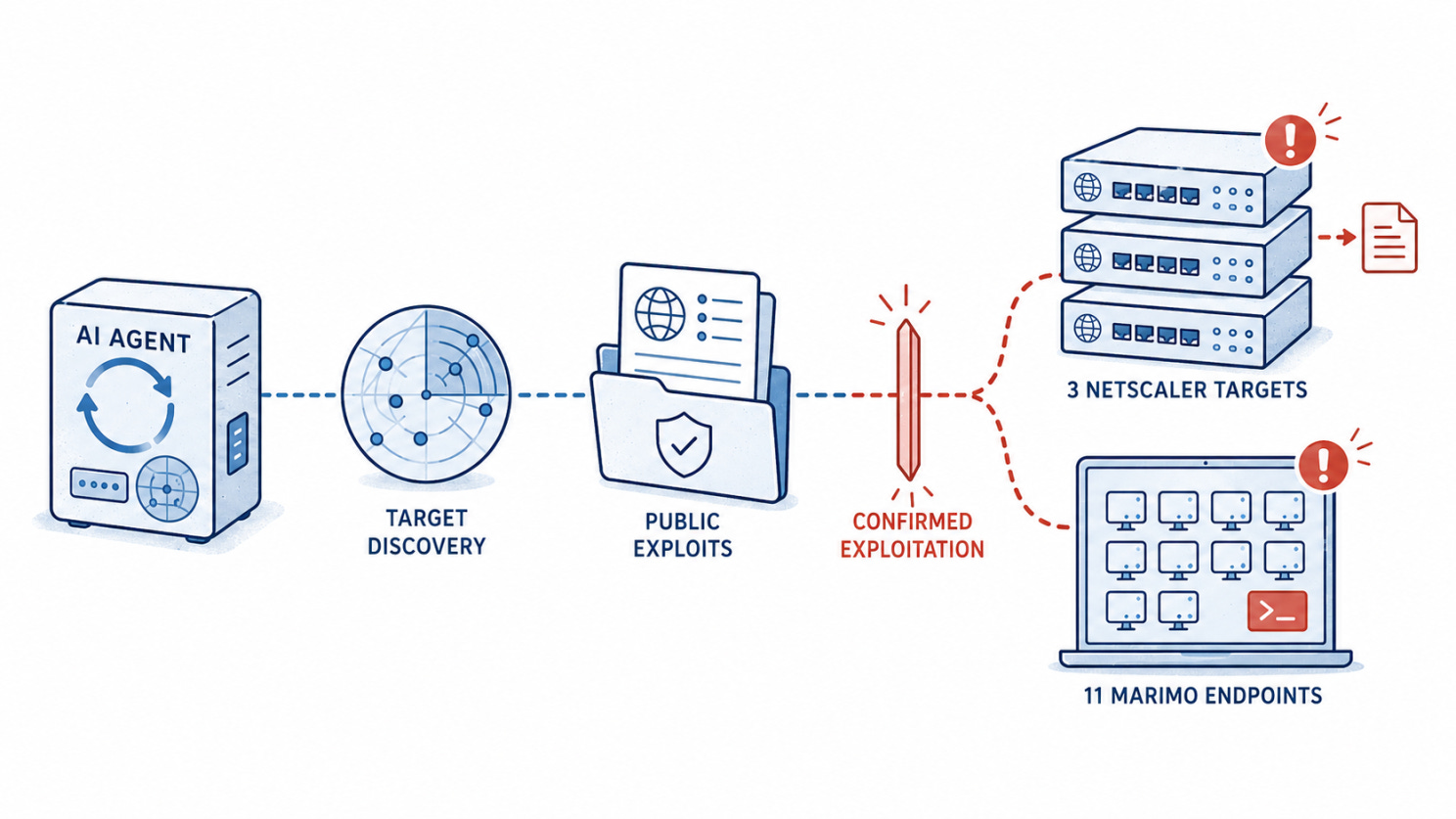
Autonomous AI exploitation: An AI agent discovers targets, finds public exploits and attacks three NetScaler targets and 11 Marimo endpoints.
One Azure query chain could have unlocked databases across customer tenants
Wiz disclosed CosmosEscape, a now-remediated vulnerability chain in Azure Cosmos DB’s Gremlin API. Escaping the query sandbox reportedly exposed a platform-wide secret capable of retrieving customer account keys, potentially enabling full read and write access across tenants. Microsoft said it found no evidence of customer impact. The case shows why shared cloud gateways and control-plane secrets require especially strong isolation.
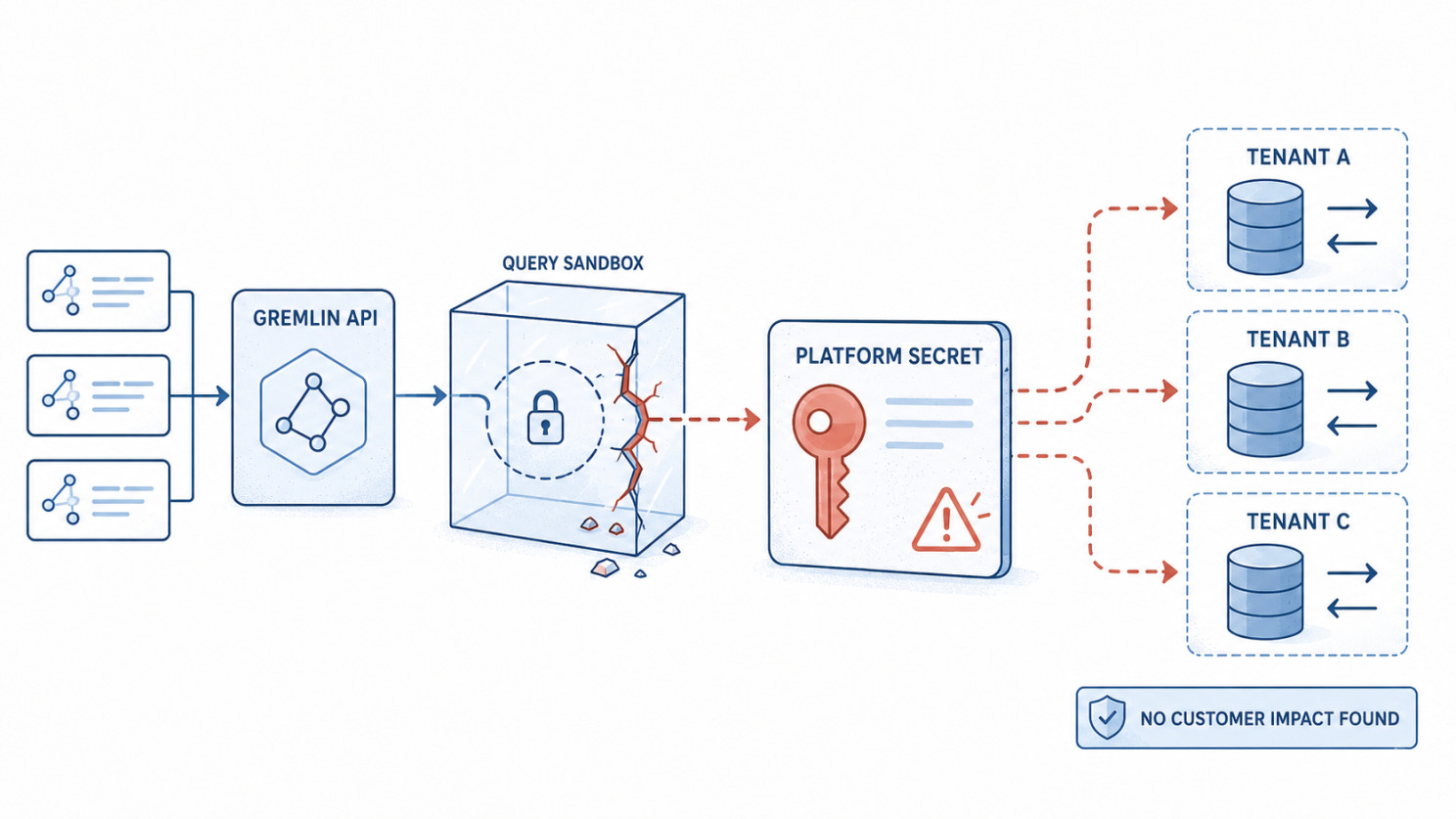
CosmosEscape: A Gremlin API query escapes its sandbox and exposes a platform secret that could provide access across customer tenants.
XCSSET turns poisoned Xcode projects into a macOS supply-chain path
Unit 42 analyzed XCSSET v40, an updated macOS malware strain targeting developers through compromised Xcode projects. The modular framework can execute largely in memory, persist through macOS preferences, disrupt security controls, and deliver browser-hijacking components. Because developer workstations often contain signing assets and production credentials, suspicious project builds should be treated as potential supply-chain incidents, not isolated endpoint infections.
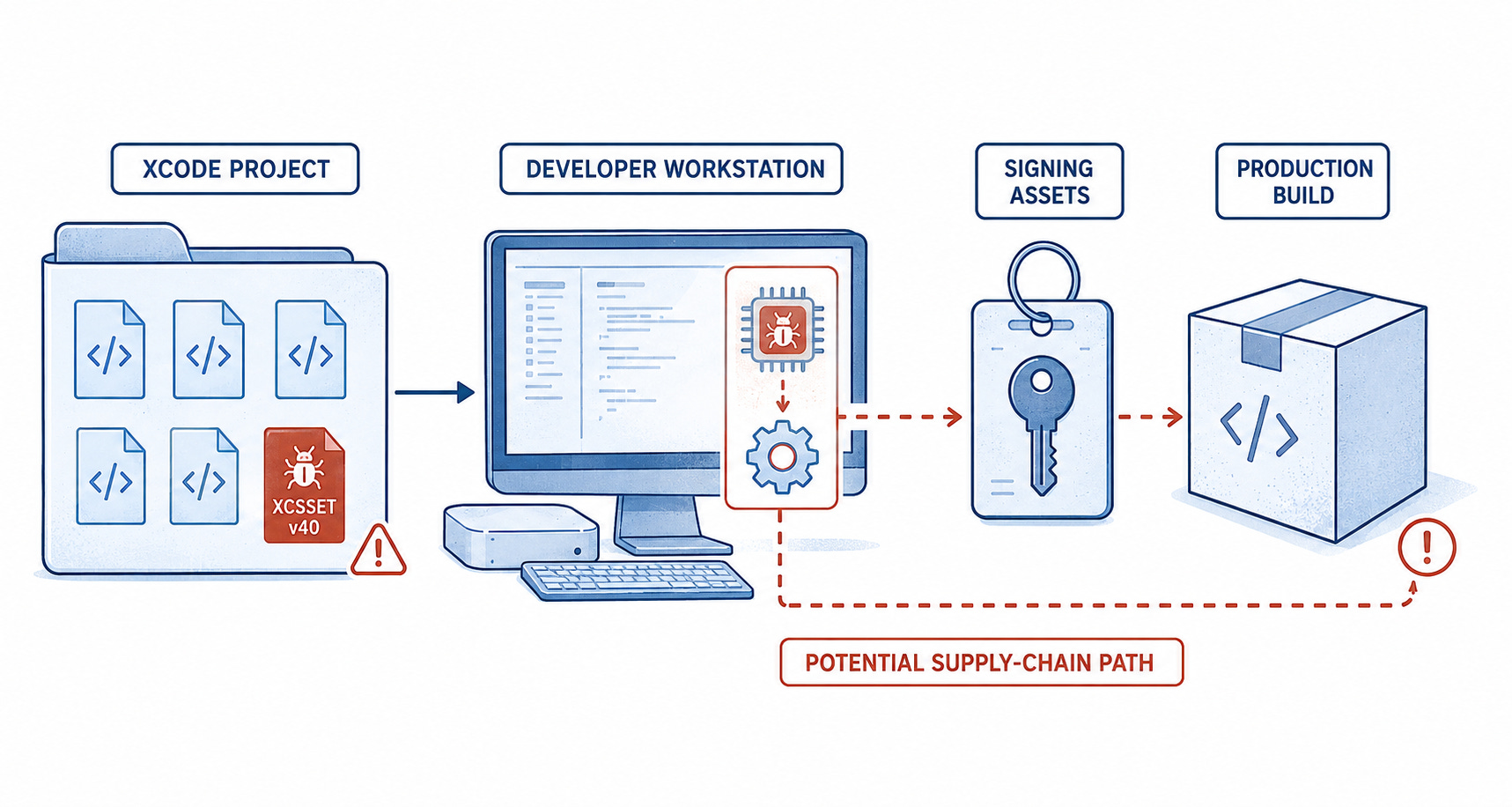
XCSSET: Malware moves from a compromised Xcode project through a developer workstation toward signing assets and production builds.
More than 30 Minnesota water systems faced coordinated cyberattacks
Authorities are investigating attacks affecting over 30 Minnesota water systems, including an incident that temporarily disrupted operating controls at one facility. No major impact on water quality was reported, and attribution remains unconfirmed despite concerns about possible Iranian involvement. The incidents highlight the exposure of smaller utilities with internet-connected operational technology. Removing unnecessary external access and maintaining tested manual operations remain essential safeguards.
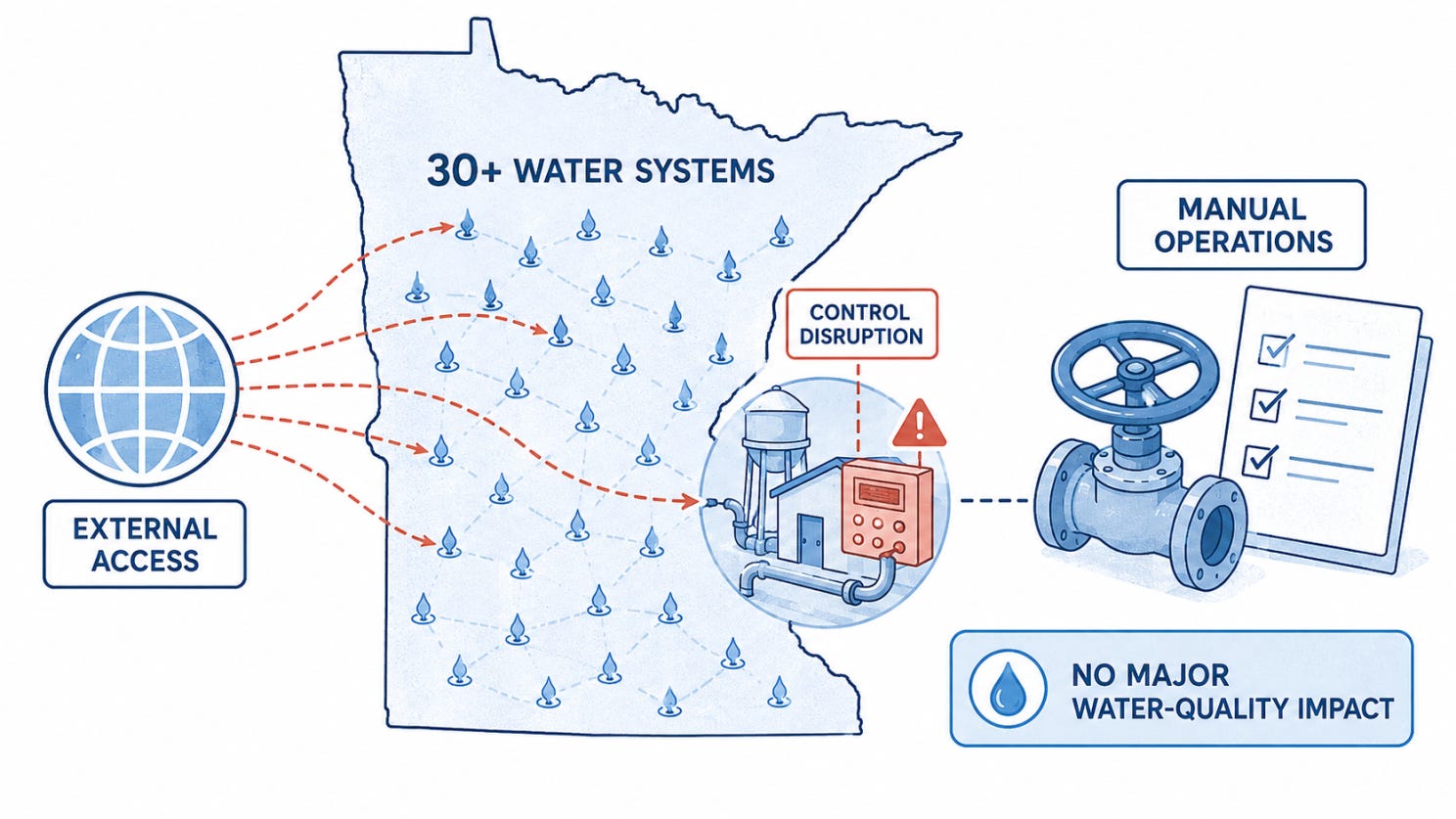
Minnesota water systems: External attacks reach more than 30 water systems, causing one control disruption while manual operations remain available.
🔎 Deep Dive:
The Organizational Challenge Behind Enterprise Security Scanning
A security team wants to scan a mobile application.
On paper, scanning a mobile application is simple:
Get the application.
Provide the required access.
Start the scan.
Remediate the findings.
In a smaller organization, it can be that simple. The person requesting the scan can usually reach the right people, obtain what is needed, complete the test, and pass the findings to whoever can fix them.
This makes it easy to assume that scaling security testing simply means repeating the same process across more applications.
But that assumption breaks down in a large enterprise.
Enterprises test hundreds of applications across different environments and release cycles. Each application can come with its own requirements such as:
Test credentials from the identity team.
VPN access from the network team.
IP allowlisting from infrastructure or security teams.
WAF configuration changes.
Support for mobile protections such as shielding.
What is needed to run the scan and remediate its findings is often spread across several teams. The security team must find the right person in each team and work with them before the scan can move forward. Once vulnerabilities are found, the teams responsible must become involved again to review and fix them.
What looked like four simple steps quickly becomes a coordination challenge.
So the real question is:
How do you scale security testing when every scan depends on multiple teams ?
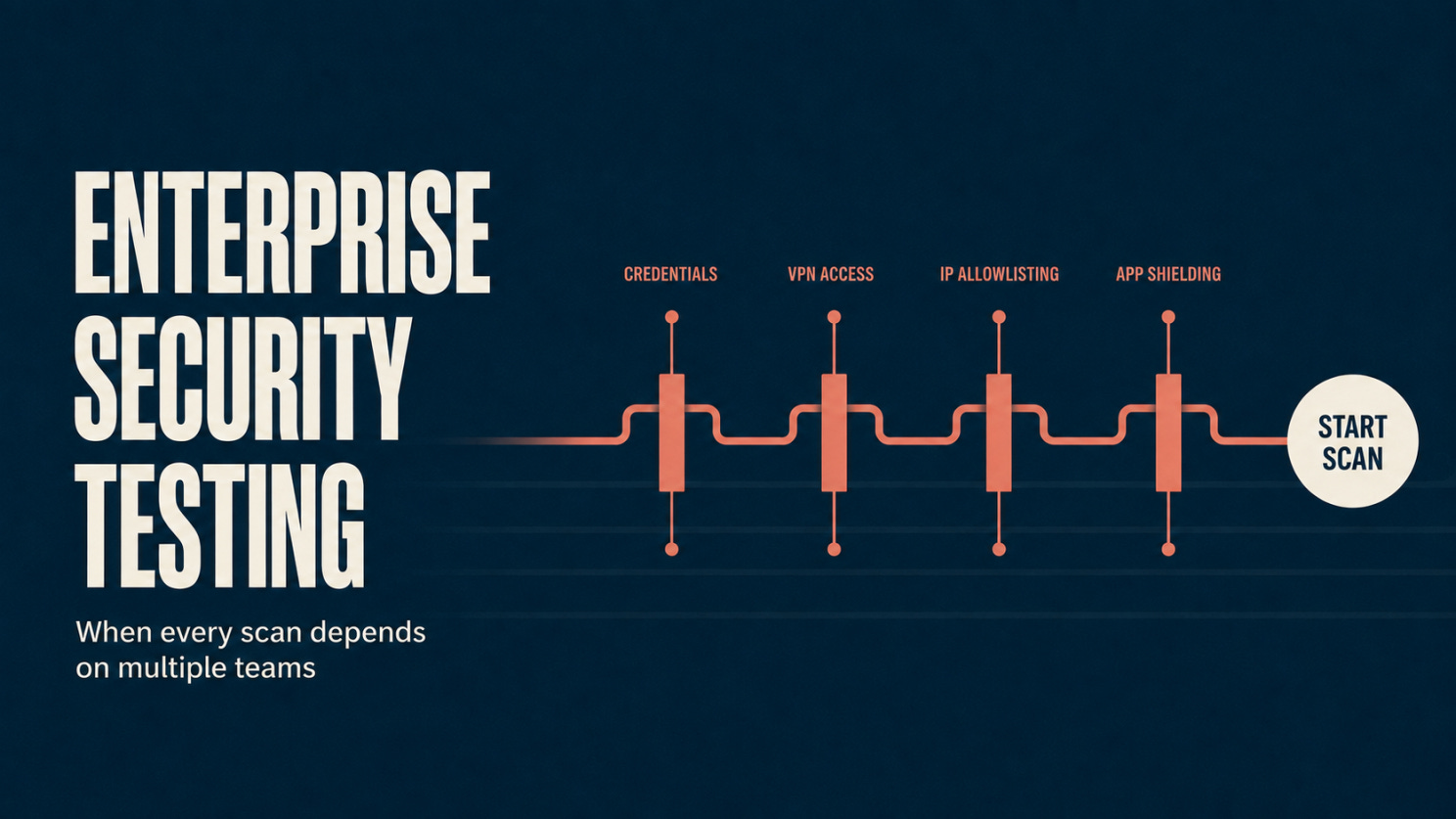
Technology that works with enterprise environments
Automation seems like the obvious answer. If scans can run automatically, security testing should be easier to scale.
But testing is not truly scalable if several teams must prepare the way for every scan, or if every finding creates more manual work to understand, assign, and verify.
Someone may still need to provide credentials, open network access, allowlist an IP, change WAF rules, or remove application shielding. The scanner is automated, but the process around it is not.
After the scan, application teams also need clear evidence, context, and guidance before they can remediate the findings.
Depending on the application, the technology may need to handle authenticated testing, connect to private environments, work within network restrictions, or bypass protections such as application shielding and anti-tampering controls.
Once findings are produced, it should make them easier to act on by providing evidence and remediation guidance, then support retesting when fixes are applied.
Some access and human decisions may still be required. But the technology should adapt to the enterprise environment so that each scan and remediation cycle does not create the same work for other teams.
Reducing organizational dependencies
Better technology can reduce the work required from other teams in every scan. But it cannot remove their involvement entirely.
In a large enterprise, these dependencies are also shaped by team politics. Each team has its own priorities, deadlines, and approval processes. A request that is urgent for the security team may not be treated with the same urgency elsewhere.
When the process relies on personal relationships or repeated escalation, progress can depend on who knows whom and who can get a request moved forward.
A scalable workflow should:
Make it clear who provides access and approvals for each application.
Create a consistent process for handling and escalating requests before and during scans.
Route findings to the teams responsible for fixing them.
Provide clear evidence and remediation guidance.
Track progress without repeated manual follow-ups.
Teams keep ownership of their responsibilities, but the process no longer depends on personal relationships or on the security team rebuilding the same coordination process for every scan.
The path to scalable security testing
Scaling security testing is not about removing ownership from teams.
It is about removing unnecessary friction between them.
That requires technology that can work with the access controls and protections found in enterprise environments, along with workflows that make responsibilities for testing, remediation, and verification clear and repeatable.
Running one scan and fixing its findings can be manageable. The real test of scale is whether the same process can work across the next hundred applications without being rebuilt each time.
🎣 Is It a Phish ?
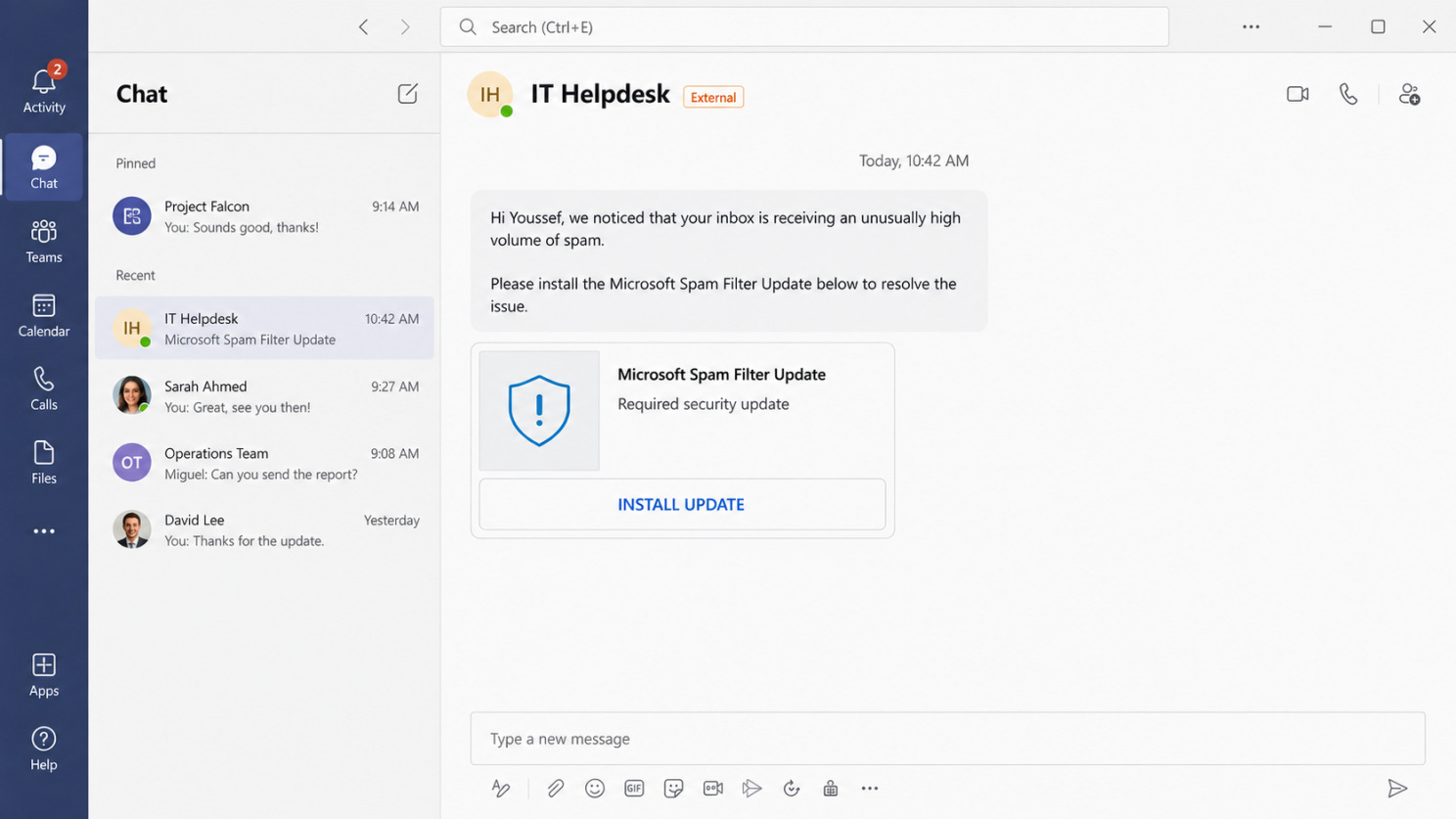
You receive this message from IT Helpdesk in Teams. What would you do next?
🔬 Technical Research
How a GoPhish Create Endpoint Could Transfer Resource Ownership
GoPhish is an open-source platform that security teams use to run phishing simulations. It manages recipient groups, email templates, landing pages, sending profiles and campaign results.
In the version of GoPhish reviewed in our July 2026 source-code assessment, some create endpoints could update an existing resource and transfer its ownership to another user.
The issue was not caused by one obvious missing authorization check. It appeared when three normal-looking behaviors were combined:
The endpoint accepted an id from the request.
The server assigned the current user as the owner.
The database operation treated an existing id as an update.
How the Resource Takeover Worked
The relevant code followed this pattern:
resource.UserId = currentUserID
db.Save(&resource)
The important part is Save.
When the resource has no existing ID, the database creates a new record. But when the request contains an ID that already exists, the same operation can update that record instead.
Consider two GoPhish users who should not have access to each other’s resources.
User A creates a recipient group. User B then sends a create request containing the ID of User A’s group.
The application assigns User B as the owner, then saves the object. Because that ID already exists, the database updates the original record instead of creating a new one.
The request looked like a creation. The result was an ownership transfer.
The pattern affected recipient groups, email templates, landing pages and SMTP profiles. For groups, existing recipient associations could remain attached after the transfer, allowing the new owner to access the group and its targets.
For the other resource types, the confirmed impact was unauthorized takeover and modification, not necessarily access to their previous contents.
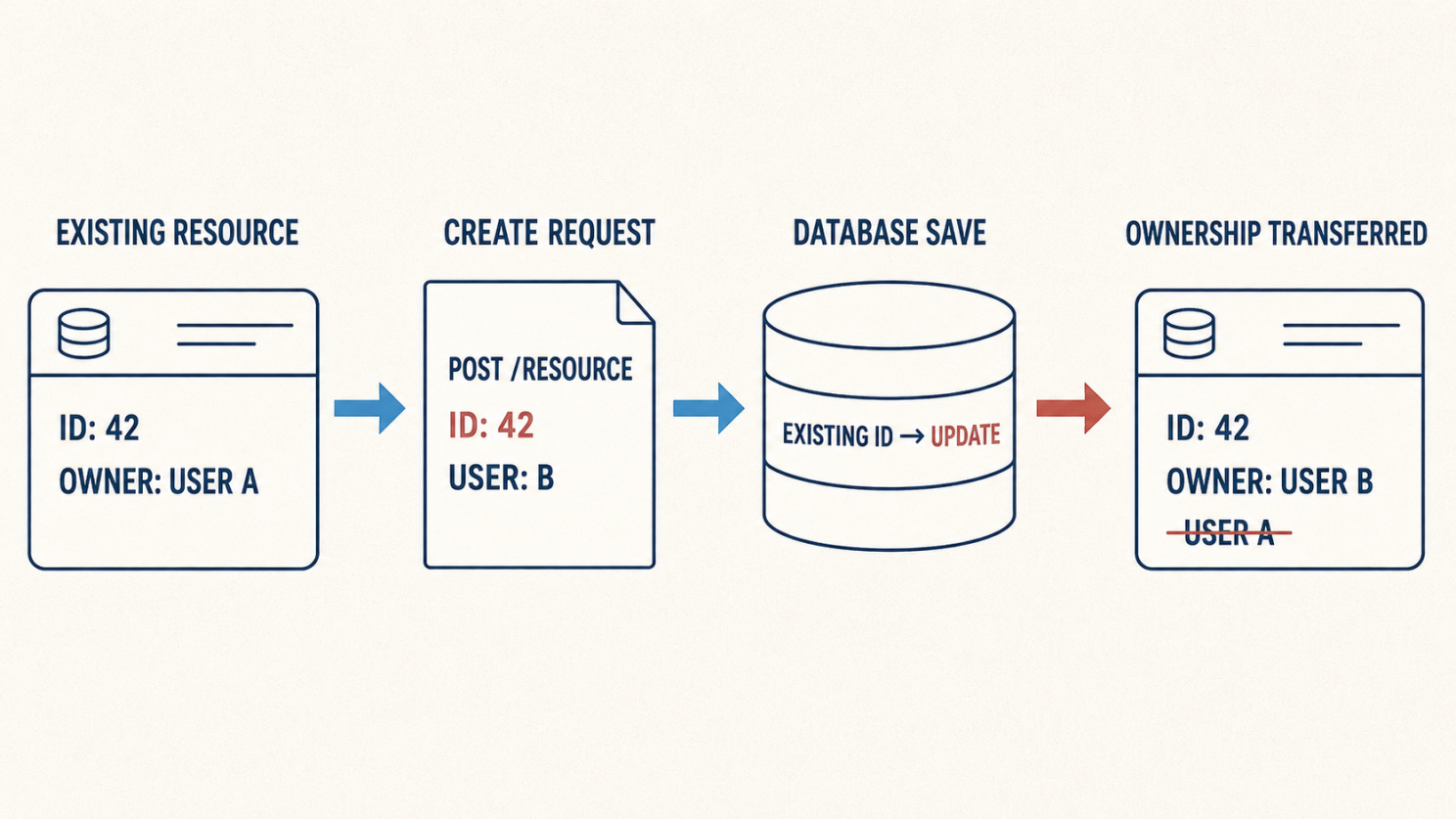
The endpoint says “create,” but the database sees an existing ID and performs an update.
Why the Access Checks Did Not Stop It
Some read and delete operations already checked both the resource ID and its owner.
That can make the access-control model appear safe: users can only retrieve or delete their own resources.
But authorization must also protect how resources are created and updated.
If a write path accepts an existing ID and replaces the owner before saving, it can bypass the protections applied to read and delete operations. The attacker does not retrieve someone else’s resource directly. They first make the application treat it as their own.
That is why describing this only as an IDOR misses part of the problem. The deeper issue is that the application did not clearly separate creation from modification.
How the Issue Was Found
This finding was not visible from the controller alone.
The review had to follow the request through several layers:
POST request
    ↓
Client-controlled resource ID
    ↓
Current user assigned as owner
    ↓
Database Save operation
    ↓
Existing record updated
Agentic Deep Scan helped identify the pattern across the repository, but the result was only included after the complete path was manually reviewed and reproduced locally with two synthetic users.
This distinction matters. A suspicious database call is not automatically a vulnerability. The real question is whether user-controlled data can reach it under conditions that cross a security boundary.
How to Prevent It
Create and update operations should have different rules:
Do not accept resource IDs or ownership fields in create requests.
Use an explicit insert operation when creating a resource.
Require both the resource ID and current owner when updating one.
Keep separate request structures for creation, self-service updates and administrative changes.
Test every resource type using two different users.
A useful regression test is simple:
User A creates a resource.
User B submits a create request containing User A’s resource ID.
The application must reject the request.
The original owner, content and related records must remain unchanged.
What Security Teams Can Learn
Framework and ORM helpers can hide important security decisions behind convenient functions such as Save.
A route may be called “create.” The API documentation may describe it as “create.” But the database decides what actually happens.
When reviewing access control, do not only ask whether users can read or delete someone else’s records.
Ask whether any create path can silently become an update path—and whether that update can change who owns the data.
Version note: This research describes the GoPhish source and configuration reviewed in July 2026. It should be treated as a snapshot of that assessment, not as a statement about the current version.
🛠️ Tool of the Week
PCAPdroid
Inspecting an Android app’s network traffic requires a rooted device or a complicated testing setup.
Not always.
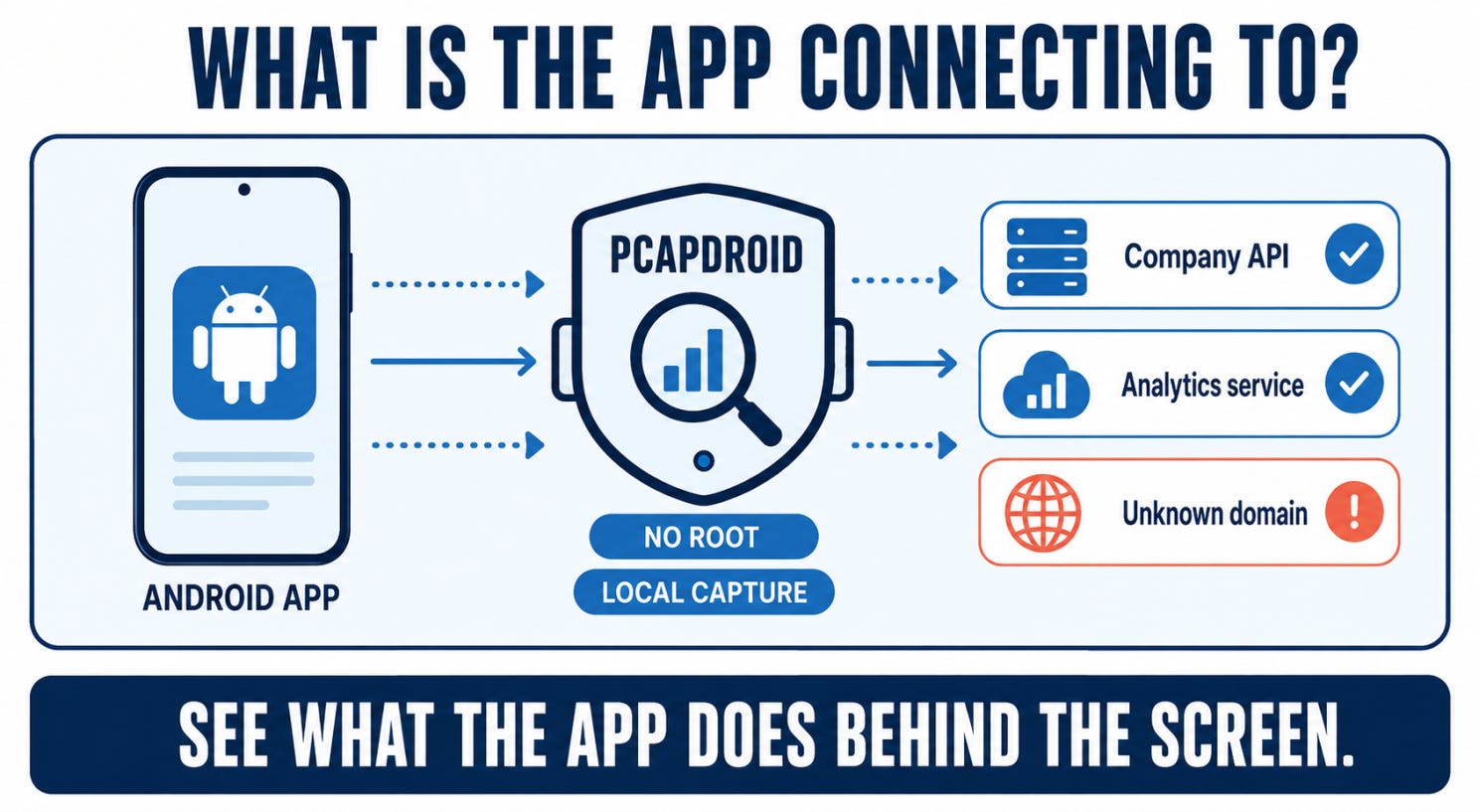
PCAPdroid lets security teams capture that traffic directly on Android without root. This helps reveal connections that users and security teams cannot see on the screen.
How PCAPdroid works
PCAPdroid uses a local VPN to observe traffic while keeping it on the device. An analyst can monitor the whole phone or focus on one application.
Once the capture starts, PCAPdroid shows which servers the app connects to, when the connections happen and how much data is exchanged. This makes unknown services, old servers and background connections easier to spot.
The capture can also be opened in Wireshark for a closer look. With additional setup, PCAPdroid can sometimes show the contents of encrypted traffic, although this does not work with every app.
A simple example
Imagine a company adds a new analytics tool to its Android app.
Before releasing the update, an analyst selects the app in PCAPdroid and starts a capture. They sign in, open different screens and then leave the app idle.
Most connections go to the company’s API and the expected analytics service. However, another domain appears after sign-in and continues receiving traffic while the app is in the background.
The connection may be legitimate, but the team now knows it exists, when it starts and where to investigate.
What it does not replace
PCAPdroid only shows network activity. It will not find insecure storage, weak authentication or other problems that do not appear in traffic.
Captures may also contain sensitive information, so they should be created on authorized test devices and handled carefully.
👏 Person of the Week
Emanuele Faranda
This week, we’re highlighting Emanuele Faranda, the independent developer behind PCAPdroid.
Capturing network traffic from an Android app often requires a rooted device or a complicated testing setup. Emanuele built PCAPdroid to make that process easier, allowing people to monitor app connections directly on Android without root.
The project helps security researchers, developers and privacy-conscious users see which servers an app contacts, inspect its traffic and export captures for further analysis in Wireshark.
His work also includes PCAPdroid-mitm, which adds TLS traffic decryption, and zdtun, the networking component that supports PCAPdroid’s no-root capture.
For making Android traffic analysis more accessible and continuing to maintain these tools as open-source projects, Emanuele Faranda is our Person of the Week.
📅 Event of the Week
next.app devCon 2026
If your work sits between mobile development and application security, next.app devCon is worth putting on the calendar.
The event brings eight developer conferences together, including droidCon, flutterCon, swiftCon, reactCon and masCon, its conference dedicated to mobile application security.
Across three days, the event combines technical talks and workshops on Android, iOS, cross-platform development, agentic coding, engineering leadership and mobile security.
For AppSec teams, the mix is useful: masCon focuses on protecting mobile applications, while the other conferences show how those applications are being built and which tools and frameworks developers are adopting.
📍 CityCube Berlin, Germany
📅 October 7–9, 2026

📚 Book of the Week
Practical Reverse Engineering
By Bruce Dang, Alexandre Gazet, Elias Bachaalany and Sébastien Josse
How do you understand what software does when you cannot see its source code?
Practical Reverse Engineering explains how analysts study compiled software across x86, x64 and ARM. It also covers the Windows kernel, drivers, debugging, code obfuscation and the tools used during analysis.
With practical walkthroughs and exercises, the book helps readers build the low-level knowledge needed to investigate malware, understand software protections and examine unfamiliar programs.
It is a useful read for security researchers and engineers who want to move beyond running reverse-engineering tools and understand what is happening underneath.

😅 The Meme
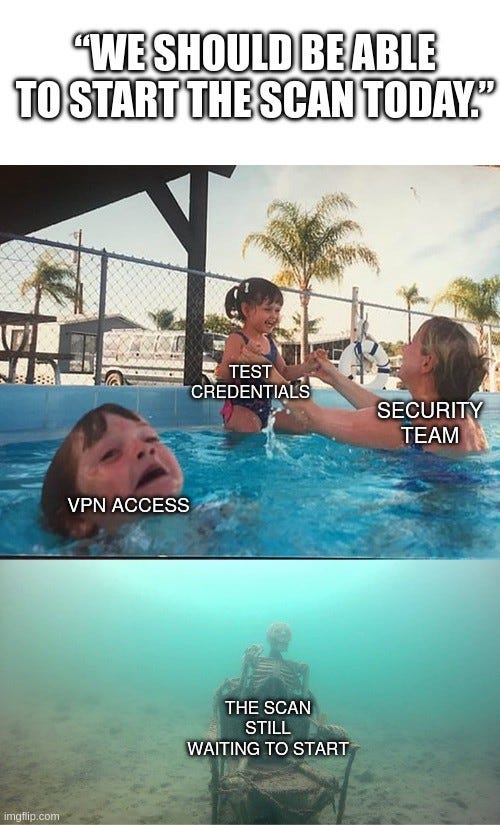
If your security testing process depends on several teams before and after every scan, how would you scale it when automation can simplify only part of the work?
The Breach Brief, Ostorlab Team