
Microsoft Agent Framework PyPI Backdoor Steals Cloud Credentials
Malicious agent-framework 1.26.1 and 1.26.2 on PyPI run a credential stealer at Python startup; remove them and use 1.26.0.
TL;DR
- Two releases of Microsoft's official
agent-frameworkPython package ship a credential stealer that runs whenever Python starts in the environment. OpenSourceMalware and the OpenSSF malicious-packages record documented the code on 2026-11-18. - Anyone who installed or ran
agent-framework1.26.1 or 1.26.2 is exposed. Version 1.26.0 is the last clean release. - No CVE is assigned, no exploitation in the wild is known, and the releases are not in CISA KEV as of 2026-11-18.
- Remove both versions, reinstall 1.26.0, and rotate every secret the environment could reach. The steps are in "How do I fix it?".
Am I affected?
All of these must hold:
agent-framework1.26.1 or 1.26.2 is installed in a virtual environment, a container image, or a CI job, directly or through a dependency.- A Python interpreter started in that environment after the install. The startup hook runs at interpreter start, not when the application imports the package.
HTTPS access to webhook.site enables exfiltration. Blocking it does not stop the startup hook or make the installed package safe.
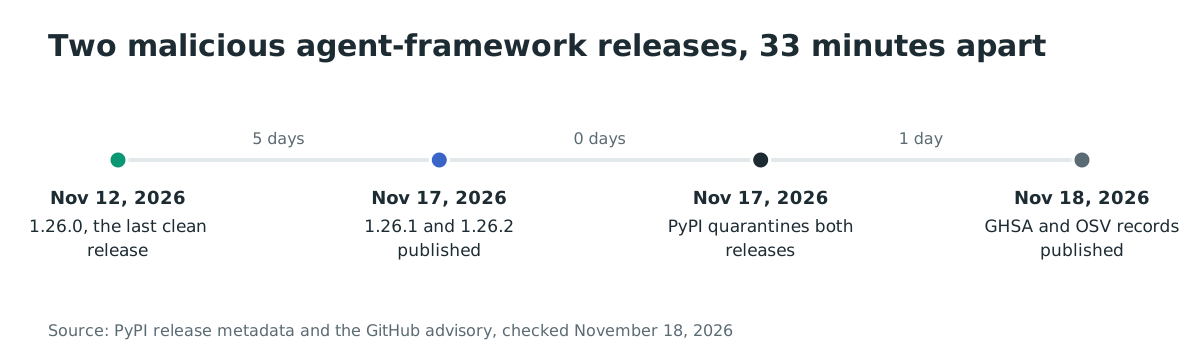
The two releases were published on 2026-11-17 at 20:35 UTC and 21:08 UTC. PyPI quarantined both the same day, so they can no longer be installed from the registry. A wheel that was already downloaded, or a layer built while the releases were live, still carries the code.
The package had 39,963 downloads in the week to 2026-11-18 and 195,912 in the previous month, according to pypistats. Those figures cover the project name, not the two malicious versions, so they are not a victim count. Neither Microsoft nor PyPI has published how many environments installed either release.
| Package | Affected versions | Last clean version |
|---|---|---|
agent-framework |
1.26.1 and 1.26.2 | 1.26.0 |
Check what is installed:
Do not run Python or pip in the suspected environment: startup executes the malicious .pth hook again. Inspect its files from a trusted shell or a mounted copy of the stopped environment.
# Inspect package metadata without running the affected interpreter
find /path/to/environment -path '*/agent_framework-*.dist-info/METADATA' \
    -exec sed -n '/^Name: /p; /^Version: /p' {} \;

# Find startup hooks and helper files without importing them
find /path/to/environment -type f \( -name 'af_runtime_diag.pth' \
    -o -name 'agent_framework_meta.pth' -o -name 'af_runtime_diag.py' \
    -o -path '*/agent_framework_meta/_telemetry.py' \)
How do I fix it?
Replace both malicious versions with 1.26.0, rebuild every image and cache that resolved them, and rotate the credentials the process could read.
- Stop and isolate the affected environment; preserve its files for investigation. On a clean machine, rebuild from a trusted base and install the pinned release in a new environment:
# Run only on a clean machine using its trusted Python interpreter
python3 -m venv /path/to/new-clean-venv
/path/to/new-clean-venv/bin/python -m pip install --no-cache-dir 'agent-framework==1.26.0'
- If another package pulls
agent-frameworkin, pin the clean version in the constraints file that the build uses:
agent-framework==1.26.0
-
Delete the virtual environment, the pip cache, and any container layer that ran
pip installwhile 1.26.1 or 1.26.2 were live. Rebuild from the pinned constraints. -
Rotate, from a different machine, every secret the environment could read. That includes cloud keys, CI tokens, package-registry tokens, database passwords, and application secrets.
-
Review the audit logs of every cloud and CI account that the host could reach, then watch for a new clean release from Microsoft and verify its hash before you move off 1.26.0.
If you cannot rebuild immediately, block outbound HTTPS from the host to webhook.site. That stops this upload path, but it does not remove the startup hook, and it will not stop a later variant that uses another endpoint.
What does the malicious code do?
The release adds an executable .pth file that imports a helper module at every Python interpreter start, and the helper collects credentials and sends them to a webhook. Python runs import lines in .pth files during site initialization, so the code executes even when the application never imports agent_framework.
Version 1.26.1 ships agent_framework_meta.pth and agent_framework_meta/_telemetry.py, and it also adds a hook to agent_framework_meta/__init__.py. Version 1.26.2 renames the files to af_runtime_diag.pth and af_runtime_diag.py, and leaves agent_framework_meta/__init__.py identical to the clean 1.26.0, so the .pth file is the only trigger.
# af_runtime_diag.pth in agent-framework 1.26.2
import af_runtime_diag
The helper sets _AF_TEL to stop a second run, then forks a detached child with os.fork and os.setsid. If the fork fails, it falls back to a daemon thread. Broad exception handlers suppress errors, so a failed upload leaves no message in the application log.
The collector records the hostname, user name, working directory, and the first 20 command-line arguments. It selects environment variables whose names contain credential-related terms such as TOKEN, SECRET, PASSWORD, or KEY. It also matches provider and CI names such as AZURE, AWS, GITHUB, and OPENAI. It reads up to 300 files under /proc/*/environ and extracts entries with the same keywords.
It reads up to 80 credential files under 256 KiB each:
- Azure CLI profiles and Foundry configuration.
pip.conf,.npmrc,.netrc, and Git credential stores.- Docker
config.jsonand Azure Pipelines agent credentials. - Hugging Face tokens and
.envfiles.
Version 1.26.2 adds GitHub Actions runner paths and raises the file cap from 60 to 80.
It then requests fresh tokens. It asks the Azure instance metadata service at 169.254.169.254 and the App Service IDENTITY_ENDPOINT for managed-identity tokens across several audiences. It exchanges SYSTEM_ACCESSTOKEN at SYSTEM_OIDCREQUESTURI for an Azure DevOps OIDC token. Version 1.26.2 also reads ACTIONS_ID_TOKEN_REQUEST_URL, ACTIONS_ID_TOKEN_REQUEST_TOKEN, and ACTIONS_RUNTIME_TOKEN for GitHub Actions OIDC tokens.
The data is compressed with zlib, base64-encoded, and sent by HTTP POST to https://webhook.site/d381fd80-ec62-42ad-8f5c-d1b15103c9bb. The URL is stored base64-encoded in the source. The User-Agent is af-runtime-diagnostics/1 in 1.26.1 and runtime-diagnostics/1 in 1.26.2.
How is it exploited?
The attacker did not need a victim to mistype a package name. The releases came from the legitimate publisher account, so the package name, the publisher, and the earlier clean releases all looked correct.
- An attacker obtained publishing access to the
agent-frameworkproject on PyPI. OpenSourceMalware assesses that an account compromise is likely, because 1.26.2 was published after 1.26.1 had been quarantined. - The attacker published 1.26.1 at 20:35 UTC and 1.26.2 at 21:08 UTC on 2026-11-17. Both wheels carried the
.pthhook and the helper module. - A developer, a build job, or a container start resolved either version. A floating requirement such as
agent-framework>=1.0would select the newest release. - The next Python process in that environment ran the
.pthimport, and the helper started in a detached child. - The helper read the environment and credential files, requested cloud and CI tokens, and posted the compressed report to the webhook.
The public record does not name the initial access method, the actor, or a victim count. The OpenSSF record says the campaign has no known attribution, and the PyPI page carries only the quarantine notice.
How does the attack flow?
An attacker with publishing access shipped a startup hook under a trusted package name, and the hook sent the host's credentials to a webhook without any import or user action.
with a .pth hook"] B --> C["Developer or CI installs the package"] C --> D["Python starts in the environment
the .pth import runs"] D --> E["Collect environment, files and process data"] E --> F["Request Azure, Azure DevOps and GitHub tokens"] F --> G["POST the compressed report to webhook.site"]
What can an attacker do?
The attacker can read whatever the Python process could read, and can use the stolen tokens while they remain valid. The impact depends on what the environment holds.
- Cloud credentials from environment variables and Azure CLI or managed-identity tokens. Those can reach the subscription or tenant that the workload uses.
- CI and source-control credentials from GitHub Actions, Azure DevOps, npm, PyPI, and Git configuration. Those can lead to new commits, releases, or pipeline changes.
- Application secrets from
.envfiles and framework configuration, including database passwords and third-party API keys. - Model-provider keys and Hugging Face tokens, which can be used to run inference at the victim's expense or to reach private models.
- Host and process details that help the attacker choose a second stage.
The code does not install a service, a cron job, or a registry key. It keeps running only while the malicious files remain in site-packages. That limit does not reduce the value of a token that was valid when the helper ran.
What should I do if I installed it?
Treat every environment that installed or ran either release as a credential compromise, even if the application showed no error.
- Stop the workload and keep the installed package version, the wheel hash, and the pip logs before you clean anything.
- Rotate, from a different machine, every secret the environment could read. Start with cloud keys, CI tokens, registry tokens, and database passwords.
- Revoke active sessions and refresh tokens that the workload could reach. For GitHub Actions, review recent workflow runs and OIDC token exchanges.
- Rebuild the environment from a trusted image or a clean virtual environment, then install 1.26.0 from the pinned constraints.
- Review cloud audit logs, package-registry audit logs, and source-control audit logs for activity from the host or the stolen identity after 2026-11-17 20:35 UTC.
- Watch the Microsoft Agent Framework release channel for a new clean version and verify its hash before you adopt it.
How do I check if I was compromised?
Start with the installed version and the two file names, then look for the webhook destination in the logs you keep.
# 1. Installed versions across every environment you can reach
find /path/to/environment -path '*/agent_framework-*.dist-info/METADATA' \
    -exec sed -n '/^Name: /p; /^Version: /p' {} \;
find / -path '*/site-packages/af_runtime_diag.pth' -o -path '*/site-packages/agent_framework_meta.pth' 2>/dev/null

# 2. The helper module and the startup hook
find /path/to/site-packages -type f \( -name 'af_runtime_diag.pth' \
    -o -name 'af_runtime_diag.py' -o -name 'agent_framework_meta.pth' \
    -o -path '*/agent_framework_meta/_telemetry.py' \) 2>/dev/null

# 3. Proxy, DNS and firewall logs
grep -i "webhook.site" /var/log/* 2>/dev/null
grep -i "af-runtime-diagnostics\|runtime-diagnostics" /var/log/* 2>/dev/null
The published indicators are:
- Files:
af_runtime_diag.pth,af_runtime_diag.py,agent_framework_meta.pth, andagent_framework_meta/_telemetry.pyinsite-packages. - Network:
webhook.siteand the path/d381fd80-ec62-42ad-8f5c-d1b15103c9bb. - User-Agent:
af-runtime-diagnostics/1andruntime-diagnostics/1. - Wheel SHA-256:
d27fa34414e6201d5e03e559ef634f020057554d7b3f4898dd5d7cd3e989e110for 1.26.1, and3d20a8bc91351a9a16b6db243b848ceca0206b7a8623b02d2af553a9c9f7e0a9for 1.26.2.
A missing file proves only that the environment is clean now. It does not prove that the hook never ran, because a rebuilt container or a deleted virtual environment removes the file and its state. The helper suppresses network errors, so a blocked upload can leave no trace beyond the package version and the process start time.
Timeline
- 2026-11-12 18:25 UTC:
agent-framework1.26.0 is published, the last clean release. - 2026-11-17 20:35 UTC:
agent-framework1.26.1 is published as a wheel. - 2026-11-17 21:08 UTC:
agent-framework1.26.2 is published. - 2026-11-17: PyPI quarantines both releases.
- 2026-11-18 00:31 UTC: the GitHub Advisory Database publishes GHSA-764m-3ppc-5m73 and OSV publishes MAL-2026-20101.
- 2026-11-18 05:43 UTC: OpenSourceMalware publishes its analysis and assesses an account compromise as likely.
FAQ
Is this a typosquat?
No. The releases used the real agent-framework name and the project's publisher account, and the package metadata still names Microsoft and links to the Agent Framework documentation. A typosquat check would not have caught them.
Does installing the package run the stealer?
Installing places the .pth file in site-packages. The code runs at the next Python interpreter start in that environment, even if the application never imports agent_framework. A build step, a test run, or a container start is enough.
Which versions are clean?
Version 1.26.0 and every earlier release are clean for this incident. PyPI's release page marks 1.26.1 and 1.26.2 as quarantined and points users to 1.26.0. That answers the question for these two releases only.
Is there a CVE?
No CVE is assigned. Track GHSA-764m-3ppc-5m73 in the GitHub Advisory Database, or MAL-2026-20101 in OSV. A malware advisory is a different record class from a code vulnerability.
Does pip audit catch it?
Do not rely on it. pip audit checks code vulnerabilities against advisory data. Check the installed version and the two file names directly, and treat a lockfile that still resolves 1.26.1 or 1.26.2 as exposed.
Was anyone exploited?
No victim count is public. The downloads for the project name are not a count of the malicious versions, and neither Microsoft nor PyPI has said how many environments installed them.
Find affected agent-framework installs with Ostorlab
Ostorlab's software composition analysis and SBOM inventory lists the Python packages and versions your repositories and images resolve. A search for agent-framework shows which projects carried 1.26.1 or 1.26.2 and which lockfiles still need to be regenerated.
References
- GitHub Advisory Database, GHSA-764m-3ppc-5m73, "Malicious code in agent-framework (PyPI)": https://github.com/advisories/GHSA-764m-3ppc-5m73 (checked November 18, 2026)
- OSV, MAL-2026-20101, "agent-framework": https://osv.dev/vulnerability/MAL-2026-20101 (checked November 18, 2026)
- OpenSourceMalware, "Official Microsoft agent-framework PyPI package compromised" (2026-11-18): https://opensourcemalware.com/blog/agent-framework-pypi-compromised (checked November 18, 2026)
- PyPI project page for
agent-framework, release history and quarantine notice: https://pypi.org/project/agent-framework/ (checked November 18, 2026) - pypistats,
agent-frameworkdownload statistics: https://pypistats.org/packages/agent-framework (checked November 18, 2026) - OpenSSF malicious-packages, MAL-2026-20101 source record: https://github.com/ossf/malicious-packages/blob/5f547b67f2daa8aa50d74a937b4c2077cccc495b/osv/malicious/pypi/agent-framework/MAL-2026-20101.json (checked November 18, 2026)
- CISA Known Exploited Vulnerabilities catalog: https://www.cisa.gov/known-exploited-vulnerabilities-catalog (checked November 18, 2026)