
Dokploy Compose Command Injection Reaches Host Root
A Dokploy member with service:create can pass a first command token that runs as root with the host filesystem mounted; no fixed release as of November 21.
TL;DR
- Dokploy validates the characters in a compose command but never the first word, so a member can make the deploy script run
docker runwith the host root mounted. - Every Dokploy release that accepts a compose command is affected, including 0.31.4, the current release. The attacker needs a member account with
service:createand access to one compose service. - The researcher rates each path Critical, CVSS v3.1 9.9, and published a live proof on 2026-11-21. No fix or CVE exists. No in-the-wild exploitation is known, and it is not in CISA KEV as of 2026-11-21.
- Restrict
service:createto trusted members, keep Dokploy off untrusted networks, and audit the compose commands stored in the database. See "How do I fix it?".
Am I affected?
All of these must hold:
- The deployment is self-hosted Dokploy, and the server container runs with the host Docker socket, which is the standard install.
- A non-owner, non-admin organisation member has the
service:createpermission. The default member role can create services, and a custom role can grant it. - That member can reach one compose service, either its own or one shared with the organisation.
- The compose service accepts a custom command in the command field.
A Dokploy administrator is not the threat model. The flaw lets an ordinary member cross the member-to-host boundary. A deployment that gives service:create only to administrators is not exposed through this path.
Dokploy is built for teams: an organisation owns projects, projects own environments, and environments own services. The member role exists so developers can deploy without holding the owner or admin role. That division is the product's access-control boundary, and the compose command field sits on the member side of it.
| Release | Affected | Fixed release |
|---|---|---|
| 0.29.13 to 0.31.4, including the current release | Yes | None as of 2026-11-21 |
| Before 0.29.13 | Yes, through the original command injection | None as of 2026-11-21 |
The 0.29.13 release added the character filter that this bypass defeats. Earlier releases accept the same command field without that filter, so they are also affected.
Check the running version and the members who can create services:
docker inspect dokploy --format '{{.Config.Image}}'
docker exec dokploy sh -c 'cat /app/package.json | grep version'
In the Dokploy interface, review each organisation's members and custom roles. A member with service:create can use this path. The API exposes the same permission set.
How do I fix it?
No fixed Dokploy release exists as of 2026-11-21. The current release, 0.31.4, still interpolates the unvalidated command. Until a fix ships, reduce who can reach the feature.
- Remove
service:createfrom every member who does not need to deploy services. Use a custom role for deployers instead of the default member role. - Remove untrusted members from organisations that own compose services.
- Keep the Dokploy interface and API off the public internet. Put them behind a VPN, an identity-aware proxy or an allow-list.
- Audit the compose commands already stored. A member may have used the path before this disclosure.
- Watch the Dokploy release notes for a fix that validates the command as an argument list, not as a string.
A reverse proxy that blocks the compose update endpoint reduces exposure, but it also blocks legitimate deployments. Treat it as a temporary control and keep the permission reduction.
The permission review is the durable control because it does not depend on a patch. List every organisation member and every custom role, then remove service:create wherever the member does not deploy. A deployer who only needs to restart a service can be given a narrower role. Record the change so the next access review starts from the reduced set.
What is the root cause?
The compose command is stored as free text, filtered for shell metacharacters, then interpolated into a docker command that runs through a shell. The filter never checks the command's first token.
The command field is a plain optional string in packages/server/src/db/schema/compose.ts at the 0.31.2 tag, lines 200 and 283. The builder reads it in packages/server/src/utils/builders/compose.ts:
// compose.ts, 0.31.2, lines 84-123 (abridged)
const UNSAFE_COMPOSE_COMMAND = /[;|`$(){}<>\n\\]/;

const sanitizeCommand = (command: string) => {
  const sanitizedCommand = command.trim();
  if (UNSAFE_COMPOSE_COMMAND.test(sanitizedCommand)) {
    throw new Error("Invalid characters in compose command: shell control characters are not allowed");
  }
  if (sanitizedCommand.includes("&")) {
    // ...
    const chains = sanitizedCommand.split("&&").map((cmd) => cmd.trim());
    const isSafeChain = chains.slice(1).every(
      (cmd) => cmd.startsWith("docker compose ") || cmd.startsWith("docker-compose "),
    );
    if (!isSafeChain) {
      throw new Error("Chained commands must strictly start with 'docker compose '");
    }
  }
  const parts = sanitizedCommand.split(/\s+/);
  return parts.map((arg) => arg.replace(/^"(.*)"$/, "$1")).join(" ");
};
The filter blocks semicolons, pipes, backticks, $(), braces, angle brackets, newlines and backslashes. It also checks the commands after &&. It does not check the first word, and the payload needs no metacharacter.
createCommand returns the sanitized string when the field is set. getBuildComposeCommand places it after docker:
// compose.ts, 0.31.2, line 128 and the deploy script
return `${sanitizeCommand(compose.command)}`;
// ...
env -i PATH="$PATH" HOME="$HOME" ${exportEnvCommand} docker ${command.split(" ").join(" ")} 2>&1
packages/server/src/services/compose.ts runs that script through execAsync, which wraps Node's child_process.exec and therefore /bin/sh. The Dokploy server process is root in its container, and the standard install mounts /var/run/docker.sock. A docker run that mounts / as a volume therefore writes to the host's root filesystem.
The path from the form to the shell is short. A deployment record is created, the builder assembles one bash script, and execAsync runs it with the server's privileges. No step parses the command into an argument list or compares the first word with an allow-list. The character filter is the only check, and it was written for a different payload shape.
The trust boundary is the point. A member is allowed to describe a deployment, not to choose the process that runs it. Once the command string reaches a shell, the member's text becomes the server's process, and the distinction between the two roles disappears.
The fix for CVE-2026-72884 added this filter in commit d48037a80 on 2026-07-20. It stopped the metacharacter payloads that the CVE described. It left the first-token path open.
How is it exploited?
- The attacker signs in as a member with
service:createand opens a compose service they can access. - The attacker sets the compose command field to a
docker runinvocation that mounts the host filesystem. The researcher's proof usedrun --rm -v /:/hostfs alpine touch /hostfs/tmp/canary. sanitizeCommandfinds no blocked character. The string has no semicolon, backtick,$, brace, angle bracket, newline or backslash.getBuildComposeCommandemitsdocker run --rm -v /:/hostfs alpine touch /hostfs/tmp/canary.- A deployment runs the script as root through
/bin/sh. - The container mounts the host's
/at/hostfsand writes the canary as root on the host.
The researcher also reported a second path through a raw compose file, which accepts privileged: true, a host mount and cap_add: SYS_ADMIN. This write-up covers the command field, which was verified in the published source.
The public proof is a live test on the researcher's own rig. It includes a control run of the vendor's regression suite, which rejects all 13 metacharacter payloads, and the first-token payload, which the same code accepts. The paper is linked in References.
How does the attack flow?
A member writes a command that starts with run instead of compose; the validator checks only the characters, and the deploy script runs the result as root with the host Docker socket.
compose command"] --> B["sanitizeCommand blocks
shell metacharacters"] B --> C["First token is
never validated"] C --> D["docker run with
host root mounted"] D --> E["Deploy script runs
as root via /bin/sh"] E --> F["Host filesystem
written as root"]
What can an attacker do?
A member who can create or edit a compose service can run a container as root with the host filesystem mounted read-write. That reaches the host's files, the Docker daemon and every container on it.
The impact needs all of these conditions:
- A member account with
service:create. - Access to at least one compose service.
- A deployment trigger, either the member's own action or the service's schedule.
- The standard install, where the server container holds the host Docker socket.
The demonstrated result is a root-owned file on the host. The same primitive can read host files, alter the Docker daemon's state, start privileged containers and reach other tenants' workloads. The researcher did not claim a production compromise and tested only on their own rig.
The host is the shared trust boundary. Every project on that server keeps its environment variables, volumes and database credentials on the same filesystem. A member who reaches the host can read them without touching another organisation's account.
No in-the-wild exploitation is known as of 2026-11-21. The issue has no CVE and is not in CISA KEV.
Why does the fix work?
No fix exists yet. A fix works only if it stops treating the command as a string and validates it as an argument list.
The safe shape is an allow-list of subcommands. The first token must be compose (or the configured compose binary), and the remaining tokens must be parsed as arguments, not re-joined into a shell string. A check that only blocks metacharacters leaves the first-token path open, as this case shows.
Until such a check ships, the control is permission-based: only trusted members can set a compose command, and the deployment runs where a member compromise does not reach the host.
How do I check if I was compromised?
No indicators of compromise are published. The researcher's canary is a test artifact, not an attacker indicator.
Review the stored compose commands and the deployments that ran them:
SELECT "composeId", "name", command
FROM compose
WHERE command <> ''
ORDER BY "createdAt" DESC;
Look for commands that start with run, exec, create or volume, and for -v /: or --privileged in the arguments. Review deployment logs for docker run lines that the service did not need.
The published payload uses --rm, so it leaves no container to inspect. The primary indicator is therefore a file created on the host outside the expected deployment paths, especially under /tmp and /root. For a variant that keeps its container, inspect every container for a host bind mount or the privileged flag:
docker ps -aq | xargs docker inspect --format '{{.Name}} {{.HostConfig.Binds}} {{.HostConfig.Privileged}}' | grep -E '/:|docker\.sock|true'
A container that mounts / or /var/run/docker.sock and was not created by a known deployment is a lead. The image name is chosen by the attacker, so do not filter on it.
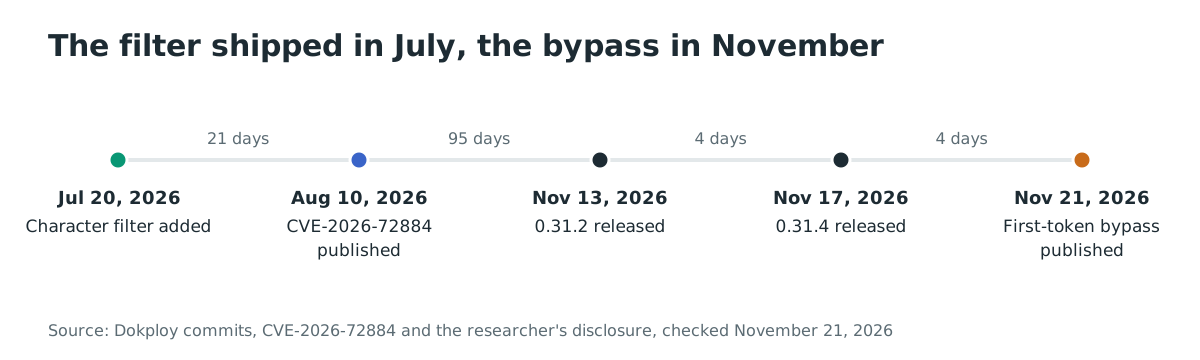
Timeline
- 2026-07-20: Commit d48037a80 adds
sanitizeCommandto Dokploy, the fix for CVE-2026-72884. - 2026-08-10: CVE-2026-72884 is published with CVSS v4.0 8.7.
- 2026-11-13: Dokploy 0.31.2 is released with the same first-token gap.
- 2026-11-17: Dokploy 0.31.4 is released, still without a first-token check.
- 2026-11-21: The researcher publishes the bypass and a live proof.
FAQ
Is this the same as CVE-2026-72884?
No. CVE-2026-72884 covered shell metacharacters in the compose command, and Dokploy fixed it in 0.29.13. This bypass uses the first token instead, so it passes the new filter without any metacharacter.
Do I need to be an administrator?
No. A non-owner, non-admin member with service:create is enough. The default member role can create services, and a custom role can grant the permission.
Is there a fixed release?
No. Dokploy 0.31.4, the current release as of 2026-11-21, still accepts the payload. The project has not published an advisory or a CVE for this path.
Does the attack need a scheduled deployment?
No. The member can trigger the deployment. A schedule only removes the need for a second action.
Can the attacker reach other organisations?
The demonstrated impact is the host, and the host holds every organisation's containers and volumes. A member of one organisation can therefore reach data outside their own organisation if the deployment runs on a shared host.
Is the flaw exploited in the wild?
No exploitation is known as of 2026-11-21. The issue is not in CISA KEV, and no CVE is assigned.
Find exposed Dokploy instances with Ostorlab
Dokploy is often reachable on the same host that runs production workloads. Ostorlab's attack surface discovery inventories the internet-facing services your organisation exposes, so you can find a Dokploy panel that should sit behind a VPN: https://ostorlab.co/product/attacksurface_discovery
References
- Researcher disclosure to oss-security, 2026-11-21: https://www.openwall.com/lists/oss-security/2026/11/21/3 (checked November 21, 2026)
- Researcher paper, "Two doors, same room": https://archive.org/details/knell-two-doors (checked November 21, 2026)
- Dokploy 0.31.2 source, command schema: https://github.com/Dokploy/dokploy/blob/v0.31.2/packages/server/src/db/schema/compose.ts (checked November 21, 2026)
- Dokploy 0.31.2 source, command builder: https://github.com/Dokploy/dokploy/blob/v0.31.2/packages/server/src/utils/builders/compose.ts (checked November 21, 2026)
- Dokploy 0.31.2 source, compose service: https://github.com/Dokploy/dokploy/blob/v0.31.2/packages/server/src/services/compose.ts (checked November 21, 2026)
- Dokploy 0.31.4 release: https://github.com/Dokploy/dokploy/releases/tag/v0.31.4 (checked November 21, 2026)
- CVE-2026-72884 record: https://www.cve.org/CVERecord?id=CVE-2026-72884 (checked November 21, 2026)
- Fix commit d48037a80: https://github.com/Dokploy/dokploy/commit/d48037a80203bb0ecaec4f5653aef75fcfdb656d (checked November 21, 2026)
- Dokploy access control,
service:create: https://github.com/Dokploy/dokploy/blob/v0.31.2/packages/server/src/lib/access-control.ts (checked November 21, 2026) - Docker Hub repository, 16,550,010 pulls: https://hub.docker.com/r/dokploy/dokploy (checked November 21, 2026)
- Dokploy repository, 38,636 stars: https://github.com/Dokploy/dokploy (checked November 21, 2026)
- CISA Known Exploited Vulnerabilities catalog, version 2026.11.20: https://www.cisa.gov/known-exploited-vulnerabilities-catalog (checked November 21, 2026)