
Dokploy Backup Command Injection to Host Root (CVE-2026-129433)
A Dokploy member can inject a shell command through a compose backup's serviceName and run it as root on the host. Fixed in 0.31.1.
TL;DR
- A Dokploy member can store a shell command in a compose backup's
serviceNameand have it run as root when the backup runs. The command runs in the Dokploy container, which mounts the host Docker socket. - Every Dokploy release before 0.31.1 is affected. The attacker needs a member account with the backup create permission and access to a compose service.
- CVE-2026-129433 is rated CVSS v3.1 9.9 and CVSS v4.0 9.4, Critical. The advisory has a public Python proof of concept; no in-the-wild exploitation is known, and the CVE is not in CISA KEV as of November 15, 2026.
- Upgrade to 0.31.1 or later. Until then, remove the backup create permission from members and restrict panel access; see "How do I fix it?".
Am I affected?
All of these must hold:
- You run self-hosted Dokploy before 0.31.1.
- An organization member has the backup create permission and access to a compose service. Dokploy's built-in member role grants backup create by default.
- At least one backup destination is registered in the organization. The member needs only the destination's ID, and the member role cannot manage destinations.
- The backup is enabled and its schedule fires. The advisory uses a one-minute schedule, so the command runs within 60 seconds.
A single-administrator install still carries the vulnerable code, but the administrator is already root-equivalent. The flaw matters where you give other people member accounts.
The CVE record lists every version before 0.31.1 as affected and gives no lower bound. The fix is commit b24006e16e95 in pull request #5908, merged November 11, 2026. Version 0.31.1 shipped on November 12, 2026, and 0.31.2 is the current release.
| Branch | Affected versions | Fixed version |
|---|---|---|
| Self-hosted Dokploy | Every release before 0.31.1 | 0.31.1 (November 12, 2026); 0.31.2 is the current release |
Dokploy Cloud runs the same code and receives the vendor's fixes. If you use the hosted service, ask Dokploy to confirm the build your organization runs.
Check the running image:
docker service inspect dokploy --format '{{.Spec.TaskTemplate.ContainerSpec.Image}}'
docker inspect dokploy --format '{{.Config.Image}}'
The first command reads the Swarm service that the official installer creates. The second reads a standalone container. The tag after the colon is the version. A latest tag or a digest does not tell you the version, so open the panel's Settings page as well.
How do I fix it?
Upgrade to 0.31.1 or later:
- Back up
/etc/dokployand the Dokploy database before you change the image. - Run the official updater, which pulls the latest stable image and updates the
dokployservice:
curl -sSL https://dokploy.com/install.sh | sh -s update
- Confirm the running image is 0.31.1 or later with the inspect command from "Am I affected?".
- If you pin a version, pull it and update the service explicitly:
docker pull dokploy/dokploy:v0.31.1
docker service update --image dokploy/dokploy:v0.31.1 dokploy
- If Dokploy runs as a standalone container rather than a Swarm service, remove the container and recreate it with the new image. Pulling the image alone does not replace a running container.
If you cannot upgrade yet, reduce the exposure:
- Remove the backup create and update permissions from every member who does not need them. Use the panel's role editor, or clear the legacy
canCreateServicesoverride for that member. - Audit every compose backup and delete or correct any
serviceNamethat contains characters outside letters, digits, dots, hyphens and underscores. - Keep the panel off the public internet, or allow only trusted networks to reach port 3000.
- Watch the server log for
Executing backup commandlines whose service filter contains shell metacharacters, using the checks in "How do I check if I was compromised?".
The workaround does not patch the code. An owner or administrator can still create the backup, but that account is already root-equivalent. Removing the permission from members is the part that helps.
What is the root cause?
Dokploy's compose backup feature stores the name of the compose service to back up. When the backup runs, getComposeContainerCommand() builds a docker ps command that finds the running container by its Compose labels, and interpolates the stored name inside a double-quoted --filter argument.
This is the function at v0.31.0, in packages/server/src/utils/backups/utils.ts, lines 144 to 153:
export const getComposeContainerCommand = (
    appName: string,
    serviceName: string,
    composeType: "stack" | "docker-compose" | undefined,
) => {
    if (composeType === "stack") {
        return `docker ps -q --filter "status=running" --filter "label=com.docker.stack.namespace=${appName}" --filter "label=com.docker.swarm.service.name=${appName}_${serviceName}" | head -n 1`;
    }
    return `docker ps -q --filter "status=running" --filter "label=com.docker.compose.project=${appName}" --filter "label=com.docker.compose.service=${serviceName}" | head -n 1`;
};
The value is never validated or escaped. It comes from the backups table, where serviceName is a plain text column (packages/server/src/db/schema/backups.ts, line 49). The tRPC input is built with createInsertSchema(backups, {...}). That call overrides prefix, customName, database, schedule and the service IDs, but not serviceName (apiCreateBackup, lines 180 to 200). The field therefore accepts quotes, semicolons, backticks and command substitutions.
getContainerSearchCommand() reads the stored value and passes it to getComposeContainerCommand() (lines 155 to 183). getBackupCommand() wraps the result in a bash script. The compose backup runner executes that script with execAsync(backupCommand, { shell: "/bin/bash" }) in packages/server/src/utils/backups/compose.ts, lines 53 to 57.
The vulnerable operation is the interpolation itself. The value sits inside double quotes, so a " in serviceName closes the quote. Everything after it is parsed as shell syntax.
How is it exploited?
- The attacker signs in to the panel with a member account.
- The attacker creates, or reuses, a compose service in a project the account can access.
- The attacker calls
backup.createwithbackupTypeset tocompose, the compose ID, any destination ID in the organization, and a craftedserviceName. - Dokploy stores the backup and schedules it.
- At the next tick,
getBackupCommand()builds the bash script, and bash runs thedocker pscommand followed by the injected command as root. - The command can use the mounted Docker socket to start a privileged container and mount the host filesystem.
The advisory publishes a Python proof of concept and the request sequence. The core of it is the stored value. This is the trimmed value from the advisory:
"serviceName": "svc\" ; id ; echo \""
The advisory's fuller value captures the output of id and sends it to a webhook. The same request sets schedule to */1 * * * * and enabled to true, so the command runs within a minute. The proof of concept requires only a member account and a destination ID, not the destination credentials.
How does the attack flow?
A member stores a shell command in a compose backup's service name, and the scheduled backup runs it as root through the Docker socket.
What can an attacker do?
The attacker runs arbitrary commands as root in the Dokploy container. On a standard install, that container has the host's Docker socket mounted read-write. The attacker can start a privileged container that mounts the host root filesystem, then read or change every file on the host. The advisory calls this full host compromise.
The same access reaches the panel's configuration under /etc/dokploy and the Docker secrets under /run/secrets, including the database password and the authentication secret. Those secrets give the attacker direct access to the panel's database and authentication.
These conditions must all hold:
- A member-level account on the panel.
- The backup create permission for that account. The default member role has it.
- Access to at least one compose service.
- A destination ID that belongs to the organization.
- A backup schedule that fires while the payload is stored.
The flaw is not unauthenticated. A member without the backup permission cannot create the backup. When the compose service is assigned to a remote server, Dokploy runs the backup script through execAsyncRemote on that server. The command executes there instead of on the panel host.
Why does the fix work?
The patch quotes every interpolated value with quote() from the shell-quote package, so bash receives each filter as one argument. This is the change in getComposeContainerCommand():
    if (composeType === "stack") {
-       return `docker ps -q --filter "status=running" --filter "label=com.docker.stack.namespace=${appName}" --filter "label=com.docker.swarm.service.name=${appName}_${serviceName}" | head -n 1`;
+       return `docker ps -q --filter "status=running" --filter ${quote([`label=com.docker.stack.namespace=${appName}`])} --filter ${quote([`label=com.docker.swarm.service.name=${appName}_${serviceName}`])} | head -n 1`;
    }
-   return `docker ps -q --filter "status=running" --filter "label=com.docker.compose.project=${appName}" --filter "label=com.docker.compose.service=${serviceName}" | head -n 1`;
+   return `docker ps -q --filter "status=running" --filter ${quote([`label=com.docker.compose.project=${appName}`])} --filter ${quote([`label=com.docker.compose.service=${serviceName}`])} | head -n 1`;
 };
quote() escapes the whole filter argument, including the label prefix and the value. A quote, semicolon or $() inside serviceName stays part of the argument and is never parsed as shell syntax.
The same commit quotes the rclone destination and the backup file paths in getBackupCommand() and keepLatestNBackups(), and adds guards that disable web-server backups and the keep-latest cleanup on Dokploy Cloud. The release notes list several sibling command-injection fixes in the same release, in the file mount, schedule, volume backup, database password and application build paths. The patch closes the serviceName path this CVE describes.
How do I check if I was compromised?
The server logs the full backup command before bash runs it. On a Swarm install, read the service log:
docker service logs dokploy 2>&1 | grep -i "Executing backup command"
On a standalone container, read the container log:
docker logs dokploy 2>&1 | grep -i "Executing backup command"
A legitimate serviceName is a plain Compose service name. On a Swarm install, these two searches print the lines whose service filter contains a semicolon, a $( or a backtick:
docker service logs dokploy 2>&1 | grep -i "Executing backup command" | grep -E 'service=[^|]*;'
docker service logs dokploy 2>&1 | grep -i "Executing backup command" | grep -E 'service=[^|]*(\$\(|`)'
On a standalone container, replace docker service logs dokploy with docker logs dokploy in both searches. The searches do not cover quotes, pipes or ampersands; check those with the panel inspection below.
Open the panel's backup list for each compose service and inspect the stored service name as well. A value that is not a plain name is a lead to check, not proof of execution. The backup deployment log also records the Executing backup command and Starting backup and upload to S3 lines.
No indicators of compromise are published for this CVE. A failed attempt still leaves the command string in the log, because Dokploy writes the log line before bash runs the script. If you find a hit, treat the host as compromised. Rotate the secrets in /etc/dokploy and /run/secrets, including the database password and the authentication secret, then rebuild the panel from a clean image.
Timeline
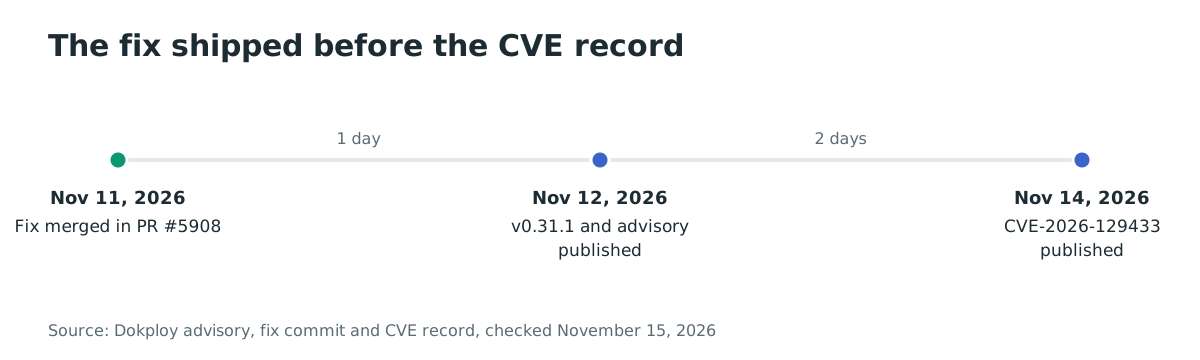
- 2026-11-11: Fix merged in pull request #5908, commit
b24006e16e95. - 2026-11-12: Dokploy v0.31.1 released; advisory GHSA-j329-jw7j-rxjm published with a public proof of concept.
- 2026-11-14: CVE-2026-129433 published.
FAQ
Does this affect me if I never created a compose backup?
Only if a member with the backup permission creates one with a crafted service name. The vulnerable code is present in every release before 0.31.1, so an account that can create the backup can trigger it. Remove that permission from members you do not trust.
Can an unauthenticated attacker exploit it?
No. The attacker needs a signed-in member account with the backup create permission and access to a compose service. The proof of concept in the advisory starts from a member login.
I upgraded to 0.31.1. Is the flaw fixed?
Yes for this path. The release quotes the service name and the other interpolated values in the backup commands. Version 0.31.2 is the current release and also contains the fix.
Was CVE-2026-129433 exploited in the wild?
No exploitation is reported in the advisory or the CVE record. The CVE is not in CISA KEV as of November 15, 2026, and the CVE record has no CISA exploitation assessment.
What does an attacker gain beyond the panel?
The Docker socket. Root in the Dokploy container can start a privileged container with the host filesystem mounted, which gives control of the host and of every service Dokploy manages. The panel's configuration under /etc/dokploy and the Docker secrets under /run/secrets also become readable.
Can I keep using Dokploy while I plan the upgrade?
Yes, if you remove the backup create and update permissions from members and keep the panel on a trusted network. An owner or administrator can still create the backup, so treat those accounts as root-equivalent.
References
- GitHub Security Advisory, "OS Command Injection via serviceName in Compose Backup", GHSA-j329-jw7j-rxjm (published November 12, 2026): https://github.com/Dokploy/dokploy/security/advisories/GHSA-j329-jw7j-rxjm (checked November 15, 2026)
- CVE Program record, CVE-2026-129433 (published November 14, 2026): https://www.cve.org/CVERecord?id=CVE-2026-129433 (checked November 15, 2026)
- Dokploy fix commit b24006e16e95 (merged November 11, 2026): https://github.com/Dokploy/dokploy/commit/b24006e16e95a10ce3daf739d06ac783e5c70ba0 (checked November 15, 2026)
- Dokploy pull request #5908, "fix(security): backup prefix/bucket/serviceName command injection": https://github.com/Dokploy/dokploy/pull/5908 (checked November 15, 2026)
- Dokploy release v0.31.1 (November 12, 2026): https://github.com/Dokploy/dokploy/releases/tag/v0.31.1 (checked November 15, 2026)
- Dokploy v0.31.0 backup utilities,
packages/server/src/utils/backups/utils.ts: https://github.com/Dokploy/dokploy/blob/v0.31.0/packages/server/src/utils/backups/utils.ts (checked November 15, 2026) - Dokploy v0.31.0 backup schema,
packages/server/src/db/schema/backups.ts: https://github.com/Dokploy/dokploy/blob/v0.31.0/packages/server/src/db/schema/backups.ts (checked November 15, 2026) - Dokploy v0.31.0 compose backup runner,
packages/server/src/utils/backups/compose.ts: https://github.com/Dokploy/dokploy/blob/v0.31.0/packages/server/src/utils/backups/compose.ts (checked November 15, 2026) - Dokploy official install script, which mounts
/var/run/docker.sock: https://dokploy.com/install.sh (checked November 15, 2026) - Dokploy Docker Hub repository, 16,328,179 pulls: https://hub.docker.com/r/dokploy/dokploy (checked November 15, 2026)
- Dokploy GitHub repository, 38,523 stars: https://github.com/Dokploy/dokploy (checked November 15, 2026)
- CISA Known Exploited Vulnerabilities catalog, version 2026.11.13: https://www.cisa.gov/sites/default/files/feeds/known_exploited_vulnerabilities.json (checked November 15, 2026)