Chrome Sandbox Escape: Android WebView Impact (CVE-2026-9998)
Chrome 148 fixes two sandbox escapes, including a Skia SkSL flaw that ships in Android WebView; fixed in 148.0.7778.215/216, with no known exploitation.
TL;DR
- Chrome 148 fixed two High-severity sandbox escapes. CVE-2026-9997 is a use-after-free in the touch input path, and CVE-2026-9998 is an integer wraparound in Skia's SkSL compiler. Google shipped both fixes on 2026-05-27.
- CVE-2026-9997 affects desktop Chrome on Windows, Linux and ChromeOS. CVE-2026-9998 is in Skia and ships in Android WebView, where the GPU service runs inside the app's process.
- Neither flaw has known exploitation in the wild, and neither is in CISA KEV as of 2026-11-20. Google's automated report for CVE-2026-9998 says it had no working proof of concept.
- Update Chrome to 148.0.7778.215 (Linux, macOS) or 148.0.7778.216 (Windows), and update the Android WebView provider. See "How do I fix it?" for the in-app version check.
Am I affected?
You are affected when you run a Chrome or WebView build older than the fixed build for your platform, and the attacker has already compromised the renderer.
- Your Chrome desktop build is earlier than 148.0.7778.216 on Windows, or earlier than 148.0.7778.215 on macOS or Linux.
- Your Chrome for Android build is earlier than 148.0.7778.215.
- Your Android app renders web content through the system WebView, and the device's WebView provider is earlier than 148.0.7778.215.
- For CVE-2026-9997, the browser runs on Windows, Linux or ChromeOS with touch input. Android and WebView are not in scope for that flaw.
Both are sandbox escapes, so neither is an entry point on its own. An attacker needs a separate renderer compromise before either bug matters. CVE-2026-9998 reaches every build that compiles SkSL, which includes every Chrome and WebView build in the table.
Chrome is 66.97% of desktop browsers, and Android is 72.39% of the mobile operating system share (Statcounter, October 2026).
| Branch | Affected versions | Fixed version |
|---|---|---|
| Chrome, Windows | earlier than 148.0.7778.216 | 148.0.7778.216 or 148.0.7778.217 |
| Chrome, macOS | earlier than 148.0.7778.215 | 148.0.7778.215 or 148.0.7778.216 |
| Chrome, Linux | earlier than 148.0.7778.215 | 148.0.7778.215 |
| Chrome for Android | earlier than 148.0.7778.215 | 148.0.7778.215 or later |
| Android WebView | earlier than 148.0.7778.215 | 148.0.7778.215 or later |
Google's release note lists 148.0.7778.215 for Linux, 148.0.7778.215 or 148.0.7778.216 for macOS, and 148.0.7778.216 or 148.0.7778.217 for Windows. The CVE records use the single range "prior to 148.0.7778.216", and the Linux, Android and WebView builds 148.0.7778.215 already carry both fixes. ChromeOS is named in the CVE-2026-9997 report as affected, and it receives Chrome through its own platform update.
Other Chromium-based browsers carry the same engine. The Hong Kong Computer Emergency Response Team Coordination Centre (HKCERT) lists both CVEs in its Edge bulletin and gives Microsoft Edge 148.0.3967.97 as the fixed build.
Check the installed version on desktop:
# Linux
google-chrome --version

# macOS
"/Applications/Google Chrome.app/Contents/MacOS/Google Chrome" --version

# Windows PowerShell
(Get-Item "$env:ProgramFiles\Google\Chrome\Application\chrome.exe").VersionInfo.ProductVersion
Check Chrome for Android and the WebView provider over ADB:
adb shell dumpsys package com.android.chrome | grep versionName
adb shell dumpsys webviewupdate
The dumpsys webviewupdate output has a line that begins Current WebView package (name, version):. The version in parentheses is the provider build. An app can read the same value at runtime:
val info = WebViewCompat.getCurrentWebViewPackage(context)
Log.i("WebView", "${info?.packageName} ${info?.versionName}")
WebViewCompat.getCurrentWebViewPackage comes from the AndroidX WebKit library.
How do I fix it?
Install the fixed Chrome build for your platform, and update the WebView provider separately on Android.
- On desktop, open
chrome://settings/help. Chrome downloads the update and offers a restart. - On Debian or Ubuntu, run
sudo apt update && sudo apt install --only-upgrade google-chrome-stable. On Fedora, runsudo dnf upgrade google-chrome-stable. - Restart Chrome and confirm the build matches the fixed version for your platform in the table.
- On Android, open Google Play, select Chrome, and tap Update. Check the version under Settings, then About Chrome.
- Open Google Play, select Android System WebView, and tap Update. Confirm the provider version with
adb shell dumpsys webviewupdate.
An app cannot patch the WebView engine, because the provider is a separate system package. An app can refuse to run sensitive flows on an old provider:
- Read
WebViewCompat.getCurrentWebViewPackageat startup. - Compare
versionNamewith 148.0.7778.215. - Block the sensitive flow, or show an update prompt, when the provider is older.
That check limits what your app renders on a vulnerable device. It does not fix the engine, and it does not cover either CVE for other apps on the same device.
There is no workaround that removes the flaws. If you cannot update yet, reduce the chance of a renderer compromise.
- Disable JavaScript for untrusted content with
WebSettings.setJavaScriptEnabled(false). - Disable file access with
WebSettings.setAllowFileAccess(false). - Restrict navigation to your own origins in
WebViewClient.shouldOverrideUrlLoading.
Those settings cover neither CVE. They only remove common paths to the renderer compromise that both bugs need first.
What is the root cause?
CVE-2026-9997 is a use-after-free in the browser process, and CVE-2026-9998 is an integer wraparound in the compiler that turns a shader into GPU code.
The first flaw lives in RenderWidgetHostViewAura::ProcessAckedTouchEvent, in content/browser/renderer_host/render_widget_host_view_aura.cc. The browser acknowledges a touch event that the renderer marked as consumed. That acknowledgement dispatches the generated gesture synchronously. A focus change or a window activation during that dispatch can destroy the WebContents, and with it the view that is still on the stack.
// content/browser/renderer_host/render_widget_host_view_aura.cc, 148.0.7778.180
window_host->dispatcher()->ProcessedTouchEvent(
    touch.event.unique_touch_event_id, window_, result,
    input::InputEventResultStateIsSetBlocking(ack_result));
if (touch.event.touch_start_or_first_touch_move &&
    result == ui::ER_HANDLED && host()->delegate() &&
    host()->delegate()->GetInputEventRouter()) {
host() reads a member through this. The object is an aura::WindowDelegate, and its destruction path calls delete this. When the synchronous call returns, the object can already be gone, so the host() read uses freed memory.
The same fix also changes TouchEventAckQueue::ProcessAckedTouchEvents in components/input/render_widget_host_input_event_router.cc. That code copies an AckData record that holds raw pointers to the root view and the target view. It pops the queue and then calls the root view. If the call destroys the view, the copied pointers dangle.
// components/input/render_widget_host_input_event_router.cc, 148.0.7778.180
TouchEventAckQueue::AckData ack_data = ack_queue_.front();
ack_queue_.pop_front();

if ((!touch_emulator ||
     !touch_emulator->HandleTouchEventAck(ack_data.touch_event.event,
                                          ack_data.ack_result)) &&
    (client_->IsViewInMap(ack_data.root_view) ||
     client_->ViewMapIsEmpty())) {
  ack_data.root_view->ProcessAckedTouchEvent(ack_data.touch_event,
                                             ack_data.ack_result);
}
The second flaw is in calculate_count in Skia's src/sksl/analysis/SkSLGetLoopUnrollInfo.cpp. SkSL is Skia's shading language, and the compiler unrolls loops so that they satisfy the ES2 requirement. calculate_count estimates the trip count from the loop bounds. At the vulnerable revision it used double precision and cast the result to int.
// src/sksl/analysis/SkSLGetLoopUnrollInfo.cpp, Skia a2888b27
static int calculate_count(double start, double end, double delta, bool forwards, bool inclusive) {
    // ...
    double iterations = sk_ieee_double_divide(end - start, delta);
    double count = std::ceil(iterations);
    // ...
    return (int)count;
}
For for (int i = 2147483640; i < 2147483647; i += 100), the double calculation gives ceil(7 / 100), which is 1. On the GPU, i += 100 overflows the signed 32-bit integer and wraps to -2147483556. The condition fails only at exactly 2147483647, and steps of 100 from 2147483640 never land on that value, so the loop never terminates. The compiler has already accepted it with a count of 1, and an index such as arr[i - 2147483640] leaves the array.
How is it exploited?
CVE-2026-9997 turns a touch acknowledgement into a browser-process use-after-free, and CVE-2026-9998 turns a shader into an out-of-bounds write in the GPU service.
For CVE-2026-9997:
- The attacker compromises the renderer with a separate bug.
- The renderer acknowledges a touch start as consumed.
- The browser dispatches a gesture synchronously, and a focus change destroys the view.
ProcessAckedTouchEventdereferences the freed view.- The attacker turns the use-after-free into code execution in the browser process, outside the renderer sandbox.
For CVE-2026-9998:
- The attacker compromises the renderer with a separate bug.
- The renderer causes the GPU service to compile a shader with an
intloop whose bounds wrap. - The analysis counts one iteration in double precision, so the loop passes the ES2 termination check.
- The GPU runs the loop natively, the index wraps, and the array write goes out of bounds.
- The write corrupts memory in the GPU service. In WebView, that service runs in the app's process.
Google's Project Fortify report for CVE-2026-9998 calls its suggested steps theoretical. It says the project's tooling could not execute code or produce a functional proof of concept. Project Fortify is an experimental Chrome security project, and Google's FAQ covers the AI-generated security reports that Chrome teams now receive. Google still rated the flaw High and shipped the fix.
How does the attack flow?
A compromised renderer turns either a touch acknowledgement or a shader into code execution outside the renderer sandbox. In Android WebView, the shader path ends in the app's own process.
What can an attacker do?
CVE-2026-9997 gives an attacker who has already compromised the renderer a path to code execution in the browser process on Windows, Linux and ChromeOS. CVE-2026-9998 gives an out-of-bounds write in the GPU service. The browser process is outside the renderer sandbox.
The report describes a use-after-free that the attacker must turn into a read or write primitive. The exploit needs a touch start that the renderer marks as consumed, and a focus or window change that destroys the view.
The CVE-2026-9998 write corrupts the GPU service: a separate process outside the renderer sandbox in desktop Chrome, and the app's own process in Android WebView.
The same corruption lands in the app's address space with the app's permissions and data. The write targets shader-local memory, and Google's report calls the full chain theoretical.
Neither flaw gives remote code execution on its own. CISA's ADP enrichment in both CVE records gives CVSS v3.1 8.3, CVSS:3.1/AV:N/AC:H/PR:N/UI:R/S:C/C:H/I:H/A:H. The high attack complexity and the required user interaction match a chain that starts with a separate renderer bug.
Why does the fix work?
The touch fix checks that the view is still alive after the synchronous call, and the Skia fix makes the loop analysis model 32-bit wraparound.
For CVE-2026-9997, the patch takes a WeakPtr before the dispatch and returns when the factory has invalidated it:
       CHECK(!sent_ack);
+      auto weak_this = weak_ptr_factory_.GetWeakPtr();
       window_host->dispatcher()->ProcessedTouchEvent(
           touch.event.unique_touch_event_id, window_, result,
           input::InputEventResultStateIsSetBlocking(ack_result));
+      if (!weak_this) {
+        return;
+      }
       if (touch.event.touch_start_or_first_touch_move &&
The factory invalidates the weak pointer when the view is destroyed, so the function returns before host() reads the freed object. The router hunk pops the queue first and clears target_view on destruction, so no raw pointer survives the call.
For CVE-2026-9998, the patch adds a 32-bit path for int loops:
+static int calculate_count_int(int32_t start, int32_t end, int32_t delta,
+                               Inclusive inclusive) {
+    if (delta == 0) {
+        return kLoopTerminationLimit;
+    }
+    SkSafeMath math;
+    int roundUp = delta > 0 ? math.subInt(delta, 1) : math.addInt(delta, 1);
+    int width = math.subInt(end, start);
+    int iterations = math.addInt(width, roundUp) / delta;
+    // Check that we won't overflow while looping
+    math.addInt(start, math.mulInt(delta, iterations));
+    if (!math || iterations < 0 || iterations > kLoopTerminationLimit) {
+        return kLoopTerminationLimit;
+    }
+    return iterations;
+}
The analysis now simulates the loop with signed 32-bit arithmetic when the induction variable is an int. SkSafeMath::subInt catches the INT_MIN case that negating the delta would miss. If the simulated loop overflows, or the count exceeds the 100,000-iteration limit, the function returns the limit. The compiler then rejects the loop with "loop must guarantee termination in fewer iterations".
Float loops keep the double calculation, which is correct because floats do not wrap. The patch covers every comparison operator the analysis handles. Google shipped it in 148.0.7778.215 and 148.0.7778.216.
How do I check if I was compromised?
No indicators of compromise are published for either CVE, so a failed attempt may leave no trace, and a successful one would need the renderer compromise that came first.
- On desktop, open
chrome://crashesand look for repeated crash reports from the GPU process around a suspicious page load. - On Android, run
adb logcat -b crash -d | grep -Ei "chromium|webview"and look for crashes in the WebView provider or the app.
A crash is a lead, not proof. Neither Google's reports nor the CVE records list files, domains or log lines to match.
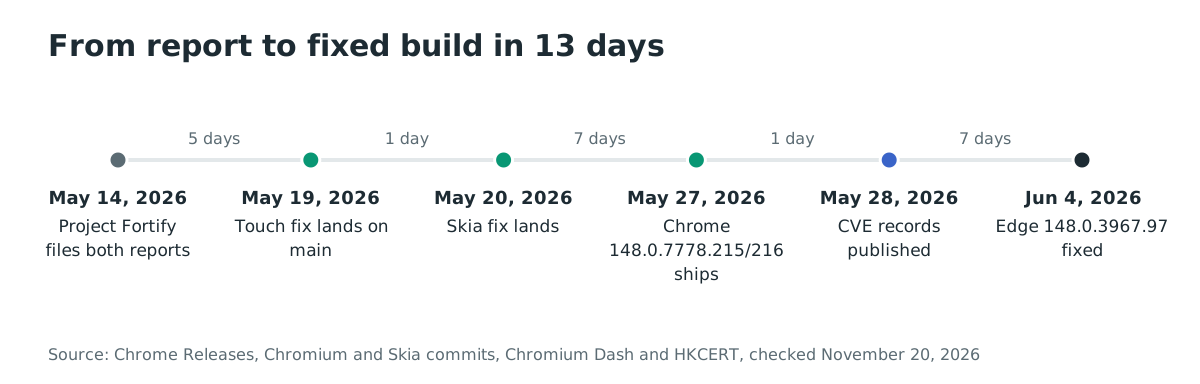
Timeline
- 2026-05-14: Google's Project Fortify files both reports. The Chrome release note credits Google on this date.
- 2026-05-19: The main fix for CVE-2026-9997 lands on the main branch.
- 2026-05-20: The Skia fix for CVE-2026-9998 lands, and the M148 cherry-pick of the touch fix lands.
- 2026-05-27: Chrome 148.0.7778.215 and 148.0.7778.216 ship, and WebView 148.0.7778.215 reaches the Play Store.
- 2026-05-28: The CVE records for both flaws are published.
- 2026-06-04: HKCERT's Edge bulletin, updated this day, gives Microsoft Edge 148.0.3967.97 as the fixed build.
Chrome shipped the fixed desktop and Android builds 13 days after the reports, and the CVE records followed the next day.
FAQ
Does CVE-2026-9997 affect Android WebView?
No. The report scopes the flaw to Aura on Windows, Linux and ChromeOS, and Android uses a different view class. The same commit hardened the shared touch-acknowledgement queue, but the use-after-free that earns the CVE is desktop-only.
Were either of these exploited in the wild?
No known exploitation is reported. Neither CVE is in CISA KEV: catalog version 2026.11.18 does not list them. CISA's SSVC block in each record, dated 2026-05-29, says "Exploitation: none".
Can an Android app patch its own WebView?
No. WebView is a system component that the Play Store updates through a provider package, and the app cannot replace the engine. The app can read the provider version and refuse to run sensitive flows on an old one.
Is CVE-2026-9998 an entry point on its own?
No. It is a sandbox escape, so it needs a separate renderer compromise first. That is why the CVSS vector has high attack complexity and required user interaction.
Why does a Skia bug count as a sandbox escape?
SkSL is compiled in the GPU service, which runs outside the renderer sandbox. In Android WebView, that service runs in the app's process. Memory corruption in either place crosses the boundary that the renderer sandbox draws.
Do I need to update Chrome if my app only uses WebView?
Yes. Chrome and WebView are separate providers with separate updates on most devices. Updating one does not update the other, so check both versions.
References
- Chrome Releases, "Stable Channel Update for Desktop", May 27, 2026: https://chromereleases.googleblog.com/2026/05/stable-channel-update-for-desktop_0877304591.html (checked November 20, 2026)
- CVE-2026-9997 record, CVE Program: https://www.cve.org/CVERecord?id=CVE-2026-9997 (checked November 20, 2026)
- CVE-2026-9998 record, CVE Program: https://www.cve.org/CVERecord?id=CVE-2026-9998 (checked November 20, 2026)
- Chromium fix for CVE-2026-9997, commit a1542142, May 20, 2026: https://chromium.googlesource.com/chromium/src/+/a154214297dcc12c53161999c010d66472127bad (checked November 20, 2026)
- Skia fix for CVE-2026-9998, commit f219800, May 20, 2026: https://skia.googlesource.com/skia/+/f21980088d33692a6191dc55f156eb1e3b9fbf40 (checked November 20, 2026)
- Project Fortify report for CVE-2026-9997, Chromium issue 513324041: https://issues.chromium.org/issues/513324041 (checked November 20, 2026)
- Project Fortify report for CVE-2026-9998, Chromium issue 513337118: https://issues.chromium.org/issues/513337118 (checked November 20, 2026)
- Chromium documentation, "Android WebView Architecture": https://chromium.googlesource.com/chromium/src/+/HEAD/android_webview/docs/architecture.md (checked November 20, 2026)
- Chrome Security Team, "AI-generated security bugs FAQ", April 2026: https://chromium.googlesource.com/chromium/src/+/main/docs/security/ai-generated-security-bugs-faq.md (checked November 20, 2026)
- Chromium Dash, WebView stable releases: https://chromiumdash.appspot.com/releases?platform=Webview (checked November 20, 2026)
- CISA, Known Exploited Vulnerabilities catalog, version 2026.11.18: https://www.cisa.gov/known-exploited-vulnerabilities-catalog (checked November 20, 2026)
- Statcounter, desktop browser market share, October 2026: https://gs.statcounter.com/browser-market-share/desktop/worldwide (checked November 20, 2026)
- Statcounter, mobile operating system market share, October 2026: https://gs.statcounter.com/os-market-share/mobile/worldwide (checked November 20, 2026)
- HKCERT, "Microsoft Edge Multiple Vulnerabilities", May 29, 2026, updated June 4, 2026: https://www.hkcert.org/security-bulletin/microsoft-edge-multiple-vulnerabilities_20260529 (checked November 20, 2026)
- Android Developers, "WebViewCompat": https://developer.android.com/reference/androidx/webkit/WebViewCompat (checked November 20, 2026)