
October 2026: From Security Findings to Tested Fixes
We added approvals to control dangerous actions, introduced Ticket Agent for autonomous triage and compliance automation, and extended finding workflows with Verify Fix and unreleased-build retesting.
Watch the October update
Choose English, French, Spanish, Japanese, or Simplified Chinese for the 72-second overview. Each version has localized on-screen text and captions; the product interface shown is in English.
Download this video · Read the transcript · Download captions
We added human approvals to control dangerous actions during an assessment and introduced Ticket Agent, a new way to build autonomous automation for triage and complex compliance work. We also extended scan setup, investigation tools, and finding actions so teams can carry an issue from testing through remediation and retesting.
This release covers additions since the September changelog.
We added approvals to control dangerous actions
An agent finds a possible SQL injection and asks: “Should I proceed with exploiting this SQL injection?” We added human approvals so you can decide how a potentially dangerous action should proceed. In the new Approvals tab, you can Approve, Deny, or provide custom instructions, such as “Use a read-only proof on staging; do not extract customer data.”
A waiting indicator highlights unanswered requests. While approval is pending, other tests continue. Only the action awaiting that decision is blocked. The same conversation can also give the agent context for an application-specific step.
Choose how unanswered approval requests are handled
We added approval modes so you can choose what happens when an agent requests a decision and no reviewer answers:
| If reviewers… | Choose… | When an agent requests a decision… |
|---|---|---|
| Need to answer before the requested action proceeds | Ask and block without an answer | Only the requested action stays blocked if no answer arrives in time; other tests continue. |
| Can provide guidance but need the scan to continue when unavailable | Ask and proceed without an answer | The agent can proceed with that action if no answer arrives in time. |
| Want the agent to work without requesting input | Run without asking | The agent does not request human input. |
These modes govern decisions requested by an agent; they do not automatically pause every tool call for review. We added these controls to supported Agentic Deep Scan, Mobile Shielding, and Single Vulnerability Assessment profiles, and extended Dig Deeper to carry the selected mode into a follow-up assessment.

View the full-size approval workflow.
We extended scan setup with scope and traffic controls
We extended scan setup so you can give an agentic assessment a more complete testing brief: which application to test, which accounts to use, which networks to exclude, and how much traffic is appropriate.
| Question in the brief | Where to express it |
|---|---|
| Where should testing focus? | Scope whitelist: permitted domains, wildcard domains, and IP addresses. |
| Which networks must never be contacted? | Outgoing IP/CIDR blocklist: firewall exclusions for those addresses and networks. |
| What else should the tester know? | Additional instructions: application context, test accounts, extra requirements, and actions or environments to avoid. |
| How much traffic is appropriate? | QPS (queries per second) in the supported profile’s Advanced Settings. Set the request-rate limit separately from the written instructions. |
| What should happen before a risky action? | Approval of actions: run without asking, ask and block without an answer, or ask and proceed without an answer. |
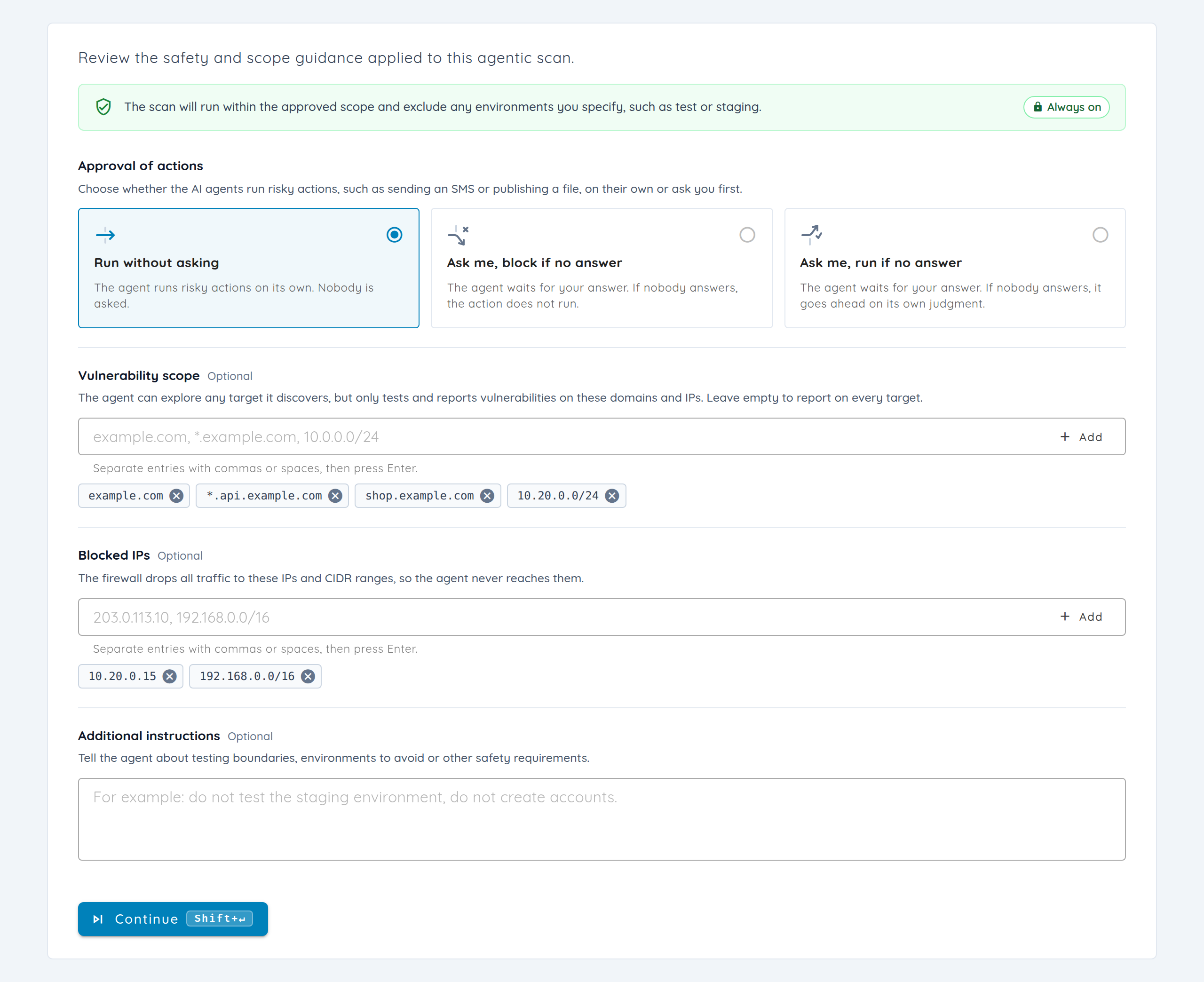
These controls act at different levels. The whitelist guides the agent through prompts; the IP/CIDR blocklist enforces firewall rules. Scope monitoring separately evaluates agent output for drift and raises alerts, with optional offensive-agent shutdown. Guardrail settings reset between new scans. We extended scope-instruction support to the relevant repository, multi-asset, and network scan flows.
We added mobile readiness checks and extended investigation tools
We added mobile readiness checks to surface installation, interface-access, and authentication problems before you interpret an assessment’s coverage. If a build cannot get past installation or login, you can investigate the setup problem first. Infrastructure failures can be retried on fresh devices, while application-caused installation failures are distinguished from device problems. Readiness failures do not automatically block every scan.
We extended device-session recovery so agents can revisit entry points and return the target app to the foreground when a session breaks during exploration. Session-authenticated device operations connect preparation to evidence collection. On-demand rooted Android emulators and expanded Android/iOS trace, log, decrypted-code, and application-data tools support deeper investigation; Flutter and JDWP fixes address incomplete instrumentation data and reconnects.
The application may also include code that needs a different testing approach: a Rust component or Swift source. We extended structured source reasoning to C++, Rust, and Swift, with dependency-aware planning and specialized native proof-of-concept execution. Broader read-only exposure checks cover more enterprise products, SMB, WebLogic T3, and SMTP; an exposure signal remains distinct from confirmed exploitation.
We introduced Ticket Agent for autonomous automation
We introduced Ticket Agent, a new advanced way to implement autonomous automation, from handling vulnerability triage to carrying out complex compliance workflows. Give an agent your instructions, reusable skills, connected tools, and event rules so it can work through the steps that would otherwise need repeated manual coordination.
For triage, that can mean reviewing findings against your team’s criteria, gathering their original evidence, and preparing the next action. For compliance, an agent can follow a control checklist, assemble the supporting evidence, identify gaps, and prepare output for review.
A few examples of workflows you can configure:
| The repetitive job | An agent you could write |
|---|---|
| Every completed scan needs your team’s triage rules applied. | Trigger on scan completion; review the relevant findings against your severity and ownership criteria, then prepare a triage summary. |
| Someone reports a possible false positive. | Use a comment event and a matching tag or status condition to start an evidence review. With the necessary assessment tools connected, request validation and write the result in your reporting format for review. |
| Audit evidence needs the same structure every time. | Start from the Compliance template, add a control checklist as a skill, gather evidence through connected tools, identify gaps, and prepare the compliance output for review. |
| High-priority tickets are nearing or breaching their SLO. | Use an SLO-breach or scheduled rule to gather the latest context and prepare an escalation summary. |
| A reopened ticket needs another investigation. | Trigger on reopening; compare the current evidence with the previous discussion and explain what needs another look. |
These are examples to configure with your prompts, conditions, and connected tools. A report of a false positive is a reason to investigate; the agent should record the validation evidence before recommending a status change.
We added Ticket Agent configuration to the AI Agents workspace, where you can choose the model, instructions, reusable skills, optional Git-backed memory, and MCP tools for each job. The Vulnerability Triage and Compliance templates provide starting points; their rules begin disabled for review.
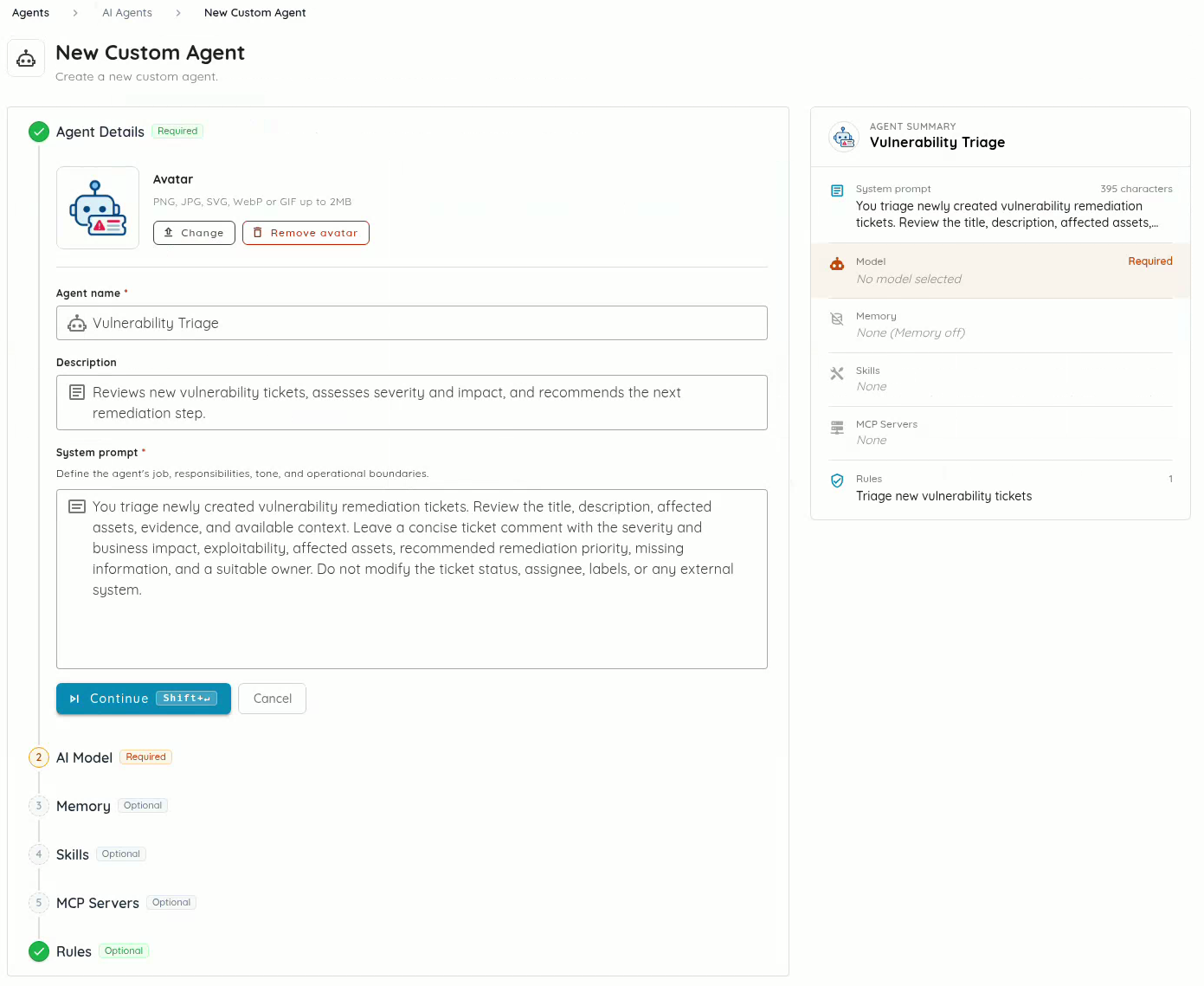
To try that workflow, start with an Assigned rule conditioned on Assignee is This agent. Assign a test ticket, review the result, and adjust the prompt before widening the rule. An agent can work alongside a human assignee, so the engineer responsible for the issue stays visible while the agent helps with the investigation.
Other rules can react to ticket creation, reopening, comments, SLO breaches, scan completion, or a schedule. Conditions narrow the work by priority, status, stream, tag, assignee, scan profile, or target. Reusable skills can include written instructions, GitHub folders, or uploaded archives; tools can come from remote MCP servers, local processes, or OXO. See the Ticket Agent setup guide for configuration and rule examples.

View the full-size remediation workflow.
During a triage meeting, several tickets may need their stream data updated together. If your team already uses Remediation Streams, we extended spreadsheet editing with multi-cell selection and batch copy/paste. Timeline pagination helps navigate larger stream collections. The Streams guide covers setup.
We extended investigation and finding triage
A finding arrives in a mobile report. Your engineer's first questions are practical: “How did testing get to that screen? Can I follow the reproduction? Is the affected code ours, or does it belong to an SDK?” We added replay and ownership controls, and extended Copilot’s finding context, to answer those questions before handing the issue to a team.
Follow the evidence back to the application
We added call-coverage replay to the existing exploration map so you can follow the journey through the application. Screenshots, captions, and a branching timeline show the recorded navigation sequence. For a finding behind login, you can inspect the path leading to that screen. Search and status filters locate interactions; a resizable timeline and the existing map view let you move between the sequence and the wider exploration.
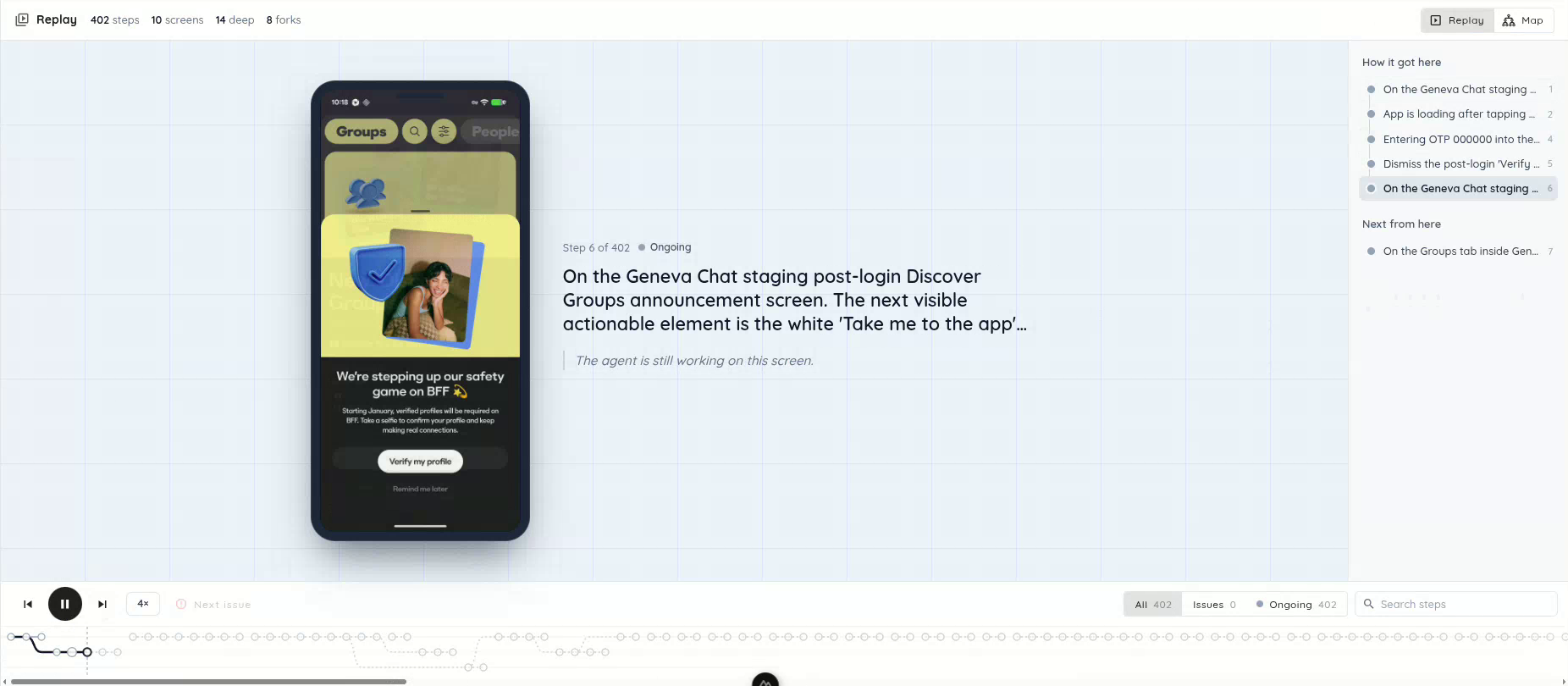
Replay the application journey, read the step context, and move through the branching timeline.
For the next question—“Explain this trace and the steps I need to reproduce it”—we extended Ask Copilot to carry the selected finding into the conversation. You can start from the issue on screen without copying its details into a new chat. Copilot streams progress, tool execution, and terminal activity, so you can follow the investigation, queue another question, or cancel a request. Expanded vulnerability tools, skills, memory, and longer tool outputs give it more context to work with.
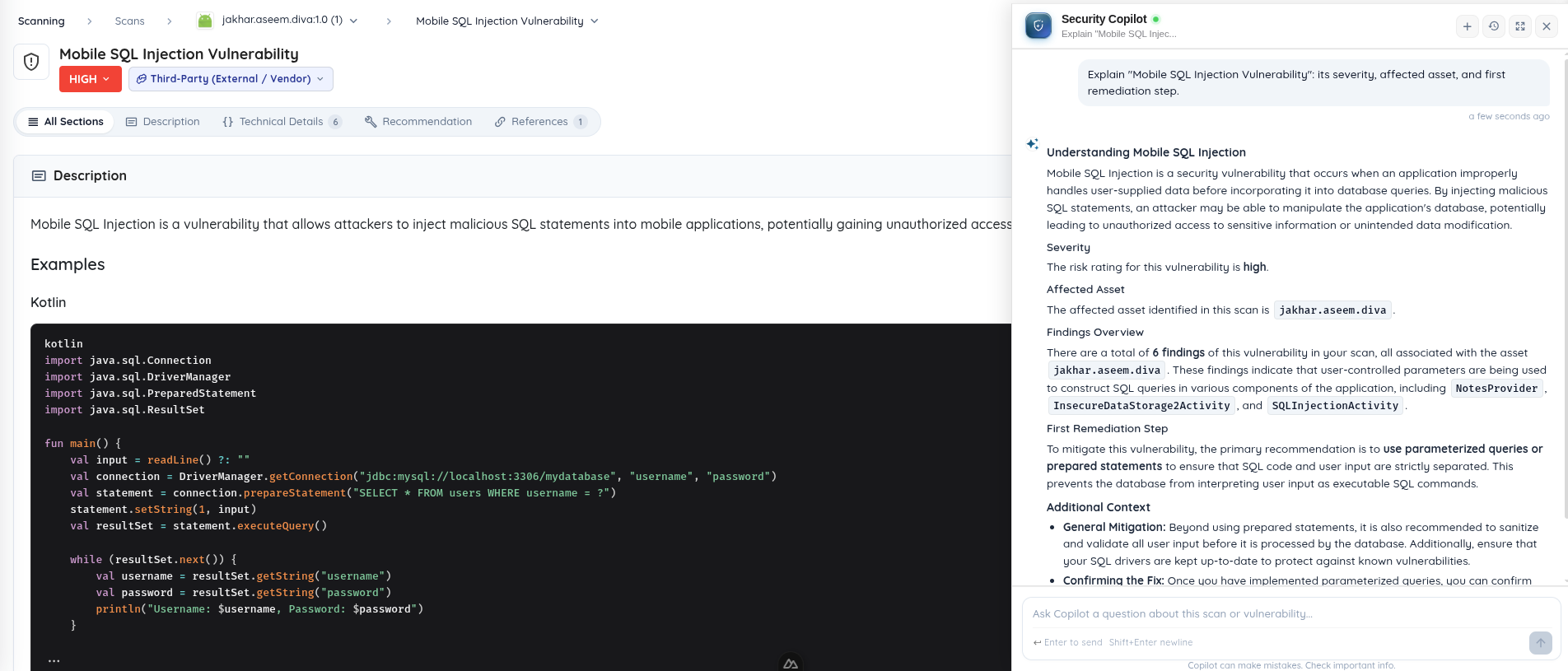
Ask Copilot opens a conversation with the selected finding already in context. Shown here with the DIVA demo application.
Separate actionable findings from noise
If the trace leads into a bundled SDK, your application team may need to raise the issue with its vendor. We added first-party or third-party classification and filters, with location drilldowns and SDK call traces to help make that ownership decision. You can correct the classification and request that Ostorlab report a third-party finding. The finding-review guide explains the surrounding workflow.
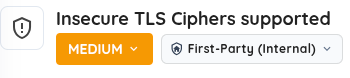
The ownership control distinguishes application findings from third-party findings.
Repeatedly dismissing the same placeholder credential or reviewing duplicate dependency advisories makes triage harder. We extended secrets analysis to filter more placeholders and client-configuration values. Dependency advisories are deduplicated and include fixed-version information; unpinned dependencies are skipped rather than assigned an invented version. Mobile analysis also recognizes Fragment-owned state and obfuscated Android fragments, suppresses AndroidX Biometric dummy-cipher alerts, and excludes framework-bundle ATS settings and loopback/emulator-only cleartext exceptions.
An engineer reviewing a storage finding needs to know whether a credential was actually written in cleartext. Runtime storage analysis detects those writes to Android SharedPreferences, masks the values, and excludes placeholders and encrypted values. For teams reviewing TLS requirements, expanded protocol, cipher, and CRYPTREC/IPA checks have individual explanations, with profile noncompliance reported separately from proven exploitability.
We added finding actions and extended fix verification
We added actions on a finding to start fix verification, request third-party reporting, or begin a fix in a connected repository. We extended retesting to accept an unreleased mobile candidate, so a patch can be assessed before it reaches an app store.
Start the next action from the finding
You have a finding open. The next step might be to verify your patch, ask Ostorlab to handle a vendor disclosure, or implement a fix in a connected repository. Those jobs should start where the evidence already is.
- A patch is ready? Click Verify Fix. Start the retest from the finding instead of reconstructing the brief. For a mobile app, upload the patched candidate even if the original assessment used the app-store version.
- The issue belongs to an SDK? Click Ask Ostorlab to Report. Request that Ostorlab handle reporting the third-party finding; your team does not have to reconstruct the issue for the vendor from scratch.
- Your repository is integrated? Start the fix action from the finding. Ask for a fix to be implemented using the connected code and finding context, then review the resulting changes through your normal engineering process.
“One click” is the starting point for the work: scanner or target selection, a confirmation, and review can still follow. The aim is to keep gathering context, investigating, and preparing the next step out of your manual to-do list.
For example, your Android engineer has a candidate patch, but the app-store version still contains the issue. In a traditional engagement, you would send the new build to the pentester and ask them to revisit the original proof of concept and look for bypasses. Verify Fix gives that handoff a starting point inside the finding.
We added Verify Fix to start a Single Vulnerability Assessment with the finding's location and weakness classification, plus instructions to retest the original proof of concept and investigate possible bypasses. Upload the candidate mobile build directly, including when the original scan used an app-store version. You can assess the patch before publishing it and select a scanner that can reach the updated target.
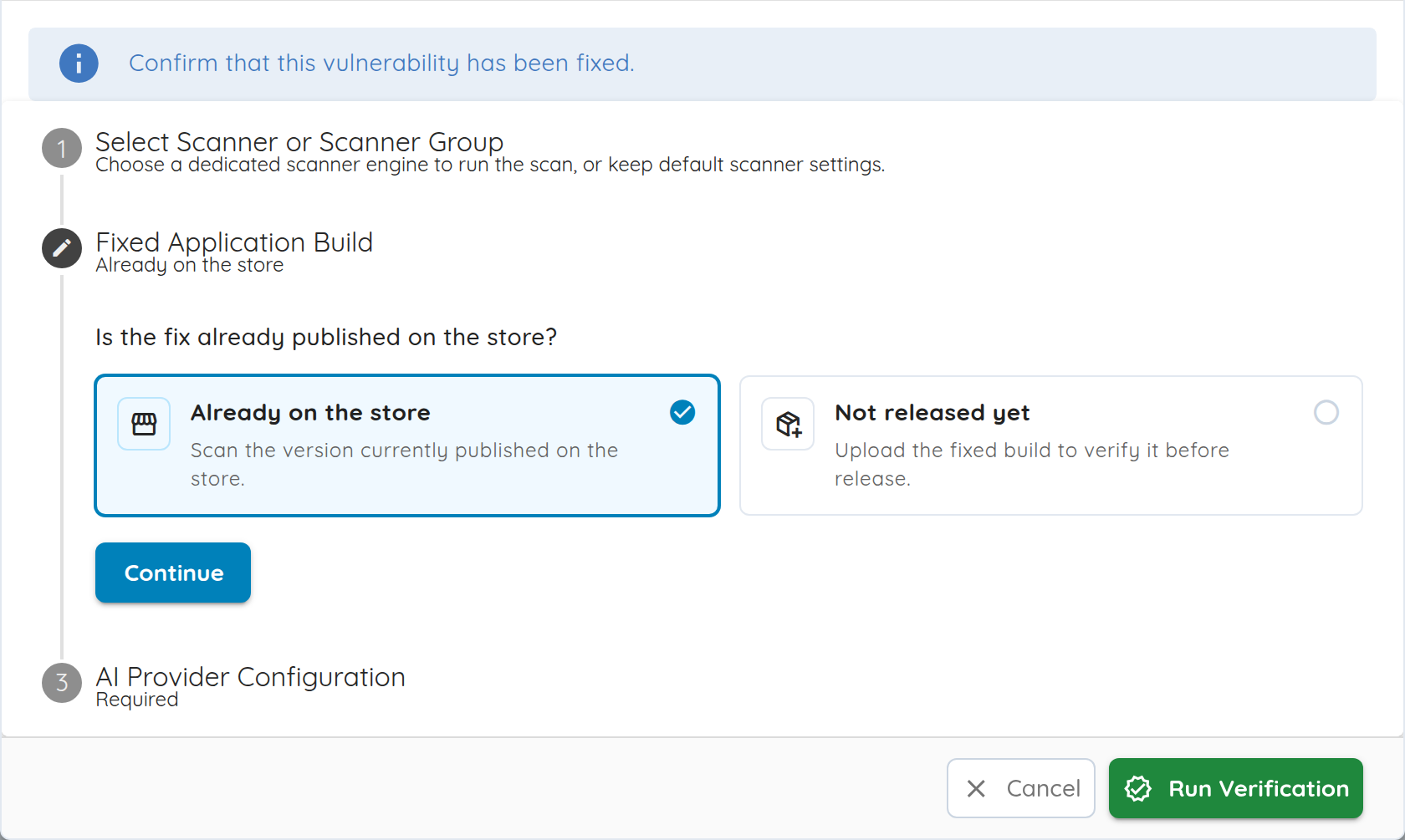
Open the finding, choose Verify Fix, select a scanner, and supply the updated target or build. The workflow supports mobile, web, and network findings. Its verdict is a best-effort assessment: review the resulting evidence before deciding whether to close the issue.
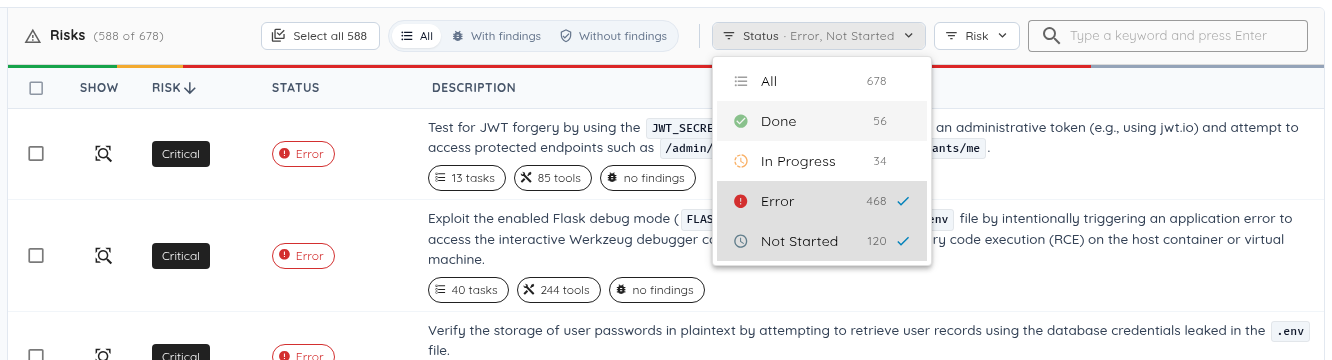
If a shared dependency update addresses findings across several applications, you may have a set of risks to revisit. We added server-side search, sorting, and status filters to find that set, plus cross-page selection and batch risk reruns to launch the follow-up assessments together. Multi-asset follow-ups also better preserve the original affected asset.
We extended MCP and integration controls
An engineer opens a ticket in their coding assistant and asks for help fixing it. A pasted description may leave out the HTTP exchange or stack trace that explains the issue. Meanwhile, the security team needs scan updates delivered to its own systems. We extended the connections that bring evidence and scan workflows into those tools.
Let coding assistants inspect the evidence and act on it
We extended the Ostorlab Platform MCP Server introduced in September so a connected coding assistant can retrieve more of the evidence behind a finding: HTTP traffic, packet captures, stack traces, source, logs, call-coverage nodes, and asset details. That gives an investigation access to the original material while the engineer works on a fix.
Connected clients can also create supported mobile, TestFlight, repository, source-archive, discovery, and multi-asset scans, stage uploaded files, and configure budgets. For teams already automating scan workflows, MCP now exposes supported CSV, SARIF, and scan-archive exports, integration configuration and testing, and management of scanner groups, monitoring schedules, and remediation-agent resources. Available tools depend on the API key's permissions and product configuration. The MCP setup guide covers clients, uploads, and pagination.
Fit delivery and repository access to your organization
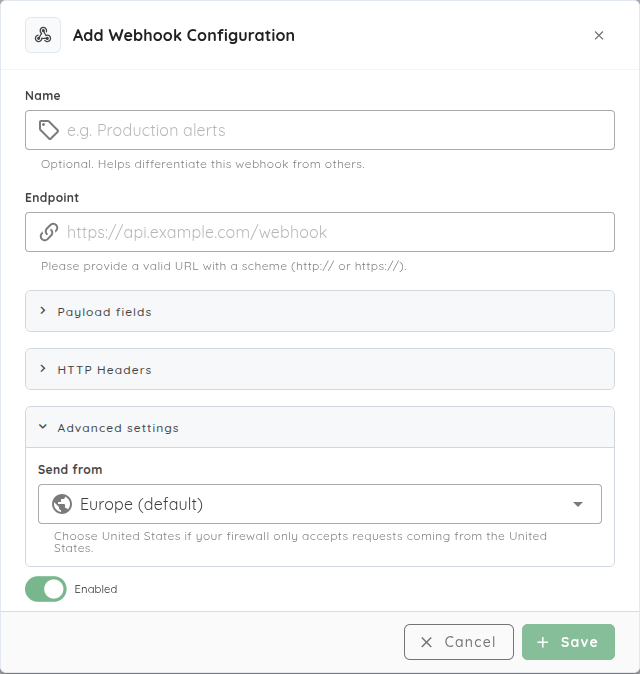
Suppose your scan notifications feed an internal service that accepts traffic only from approved origins and needs only a few payload fields. We extended webhooks so you can choose the scan fields sent to that receiver, give the destination a recognizable name, and select Europe or United States egress. Tests use the selected regional background job, so you can check the delivery path against the receiver's allowlist during setup.
If your platform team already manages GitHub App identities and credential rotation, it can now use customer-owned GitHub Apps for the repository integration. Configure installations, rename apps, rotate credentials, and disable or remove installations through that familiar lifecycle. Custom installations are verified with the App's credentials; the Ostorlab App connection verifies user access through GitHub OAuth. Supported installations can connect to multiple authorized Ostorlab organizations. See the GitHub integration guide.
We extended recurring assessments and model connections
Next month's assessment starts after the application has changed: the login flow is different, another service has joined the scope, and the team needs to know what happened in the last scheduled run. Returning pentesters need an updated brief. Recurring assessments need maintained knowledge and a clear record of their runs for the same reason.
Keep knowledge current and see when testing fails
If a retained knowledge entry still describes the old login flow, you can now edit it instead of carrying that stale context into later work. Persistent scan knowledge supports adding, editing, and deleting entries. Incremental folder browsing helps inspect larger knowledge workspaces without loading the entire tree.
When your weekly assessment includes a mobile app, its backend, and other assets, recurring multi-asset assessments can schedule heterogeneous collections and attack-surface checks. If a scheduled run fails, monitoring history now shows its execution status and expandable failure details, giving you a place to start investigating. See the monitoring guide.
For the next status meeting, the Cockpit surfaces pending action items and a daily change summary. Reports add clearer attack-scenario summaries, organization logos in PDFs, and expanded language support across tasks, reports, and transactional messages, helping share the assessment with the people responsible for the next step.
Plan consumption and choose where model inference runs
Before commissioning another assessment, a team needs to plan its scope and consumption. Scan-consumption estimates and supported token and risk budgets help with that planning. Copilot's estimation cards prefill the current targets and profile for review. Wallet tokens can be purchased by quantity; prepaid remediation-agent models use the same organization wallet, alongside the option to use your own provider key.
If your team already serves models through Ollama or an OpenAI-compatible server, BYOK can now connect to that service, including vLLM, LM Studio, and llama.cpp deployments. Configure the endpoint URL, model name, and an API key if required; the server must be reachable from the scanner. Supported autonomous testing and mobile exploration agents, as well as OXO, can use these connections.
An inference connection determines where model inference runs; it does not relocate platform orchestration, findings, or reporting. The BYOK guide explains setup alongside scanner configuration.
A temporary upload failure can also leave a team waiting for findings after testing has run. Improved finding-upload retries and failed-batch recovery address that handoff. Reliability work also covers authenticated crawling, API connections during rollouts, scanner cleanup, and device-health monitoring. Expanded Copilot secret redaction, organization-scoped asset and knowledge operations, and tighter integration permissions support these workflows.
We added everyday interface improvements
You switch between scan tabs, triage a batch of findings, paste the same stream values into several tickets, then return to your work after an interruption. We added the following controls and extended existing views to make those familiar tasks less fiddly:
| When you… | What is easier now |
|---|---|
| Work through a large risk list | Server-side search, sorting, pagination, multi-status filters, cross-page selection, and batch reruns. |
| Navigate a finding | Sticky section tabs, a wider search field, a selection-aware triage menu, and risk rating and description in the drawer. |
| Share or return to a scan | The open scan tab stays in its URL. |
| Edit tickets in a spreadsheet | Multi-cell selection, batch copy/paste, stream creation and editing, Delete/Backspace clearing, and draft persistence and recovery. |
| Return to your assigned work | A My tickets shortcut and filters preserved during editing. |
| Navigate a large workspace | Knowledge folders load incrementally; expanded file trees scroll; the selected filename is visible and image previews keep their proportions. |
| Switch context | The current item appears first in breadcrumb switchers; dropdown behavior is more consistent. |
| Create a scan | Clearer required, recommended, and optional steps; profile-specific settings; platform badges and clearer target identifiers. |
| Follow exploration | Replay search, status filters, and a resizable timeline alongside the existing map. |
| Set up notifications | Named webhooks, selectable payload fields, regional delivery, and clearer saved-webhook tests. |
| Follow Copilot’s work | Streamed progress and terminal activity, queued follow-up questions, and cancellation. |
| Read a report while sections load | Background loading keeps tab navigation responsive. |
Behind the scenes: better context, and what comes next
Memory that keeps useful investigation context
A later assessment should be able to pick up useful notes and proof-of-concept files from earlier work. Agents in the same assessment also need a shared view of the investigation instead of repeatedly rediscovering context.
We extended workspace memory around that problem: restoring saved files into the shared workspace, saving new and changed files, retrying recoverable sync failures, and finishing the final sync before an assessment ends. Direct object-storage transfers and batched file recording reduce the overhead of retaining that context. Scan-profile rollout is being staged; this is ongoing work on the memory foundation, alongside the knowledge editing and optional Ticket Agent memory described above.
Coming soon: Active Directory and RASP
An internal engagement often starts with a domain account and the question, “Where can this identity take an attacker?” We are preparing Active Directory testing for that workflow: Kerberos and certificate-services reasoning, permission and trust analysis, and planning paths between machines. Work also includes dedicated AD tooling and lockout-aware password-spray controls. Coming soon describes this testing experience; these underlying engineering changes do not mean the full workflow is generally available today.
We are also building Runtime Application Self-Protection (RASP) for mobile applications, extending security from assessment to protection while an app runs. The work brings together app hardening, runtime checks, and visibility into protection signals. The end-to-end protection workflow is coming soon and remains in development.
For an existing issue, start with Verify Fix on its finding in Ostorlab. For a recurring triage bottleneck, configure a Ticket Agent against a small set of tickets and review its output before broadening its rules.