
Your AI Pentester Now Asks Before It Takes a Risky Action
Agentic scans can now ask for your approval before a risky action. Choose how the agent handles it, answer from the Approvals tab, and decide what happens when nobody does.
The problem
An agentic scan tests your application the way a pentester would. It plans, tries things, and follows what it finds. That is what makes it thorough, and it is also why some teams hesitate to let it run on its own.
Most of what the agent does is harmless reconnaissance: it reads pages and looks at the responses. A few actions are different.
- Sending an SMS reaches a real person.
- Publishing a file changes what other people can see.
- Exploiting a SQL injection reads data that belongs to someone.
- Testing a host that nobody told it about leaves the scope of the assessment.
For those actions, a team may want a say before they run, without having to watch the whole scan.
What we built
We added approvals. An agent can now stop and ask you before a risky action, and the request waits for you in the scan. For example, the agent finds a possible SQL injection and asks: "Should I proceed with exploiting this SQL injection?"
You choose how the agent handles these actions, answer from the scan page, and decide what happens when nobody answers.
Choose how the agent handles risky actions
Approvals are a setting of the scan. When you create an agentic scan, open the Guardrails step. Under Approval of actions, you choose one of three options.
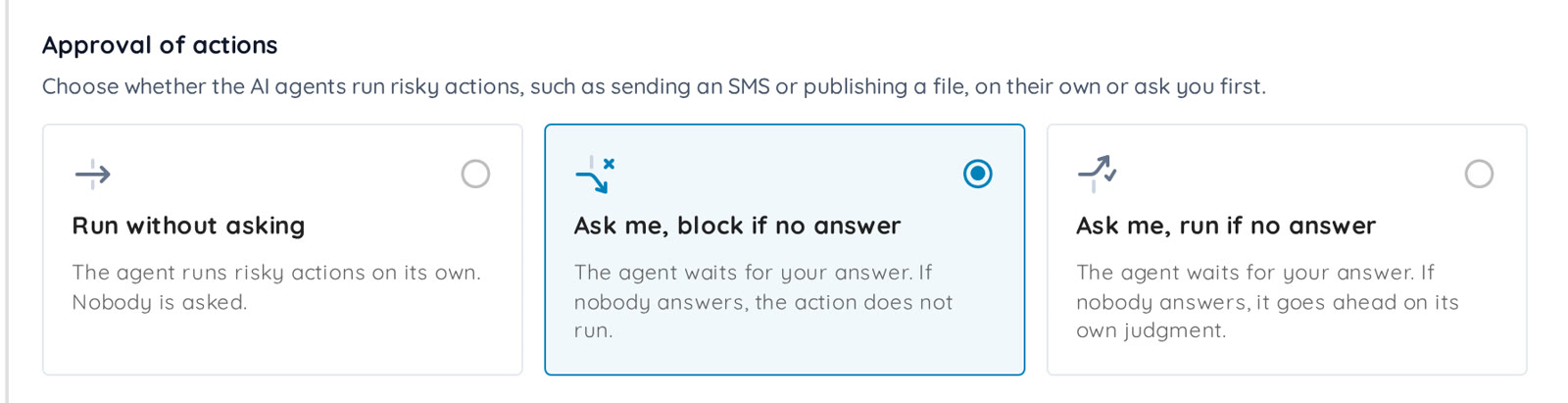
- Run without asking: the agent runs risky actions on its own. Nobody is asked. This is the default.
- Ask me, block if no answer: the agent waits for your answer. If nobody answers, the action does not run.
- Ask me, run if no answer: the agent waits for your answer. If nobody answers, it goes ahead on its own judgment.
The setting is available on the Deep Agentic Scan, Mobile Shielding and Single Vulnerability Assessment profiles. Dig Deeper carries it into a follow-up assessment.
The agent decides when to ask
The setting does not pause every tool call. The agent asks when it matters:
- before an action that reaches real people, such as sending an SMS or publishing content,
- before an action that is destructive or cannot be undone,
- before an action that leaves the scope of the scan,
- when it is blocked and cannot choose safely, for example when it cannot tell whether a target is in scope, or when it needs a credential or a code that only you have.
Each request is a message the agent writes: what it wants to do, and why.
Answer from the Approvals tab
When a scan has a person in the loop, its page gets an Approvals tab in the results menu, under Risks. An orange dot with the number of requests that wait for your answer shows that an agent needs you, and those requests come first.
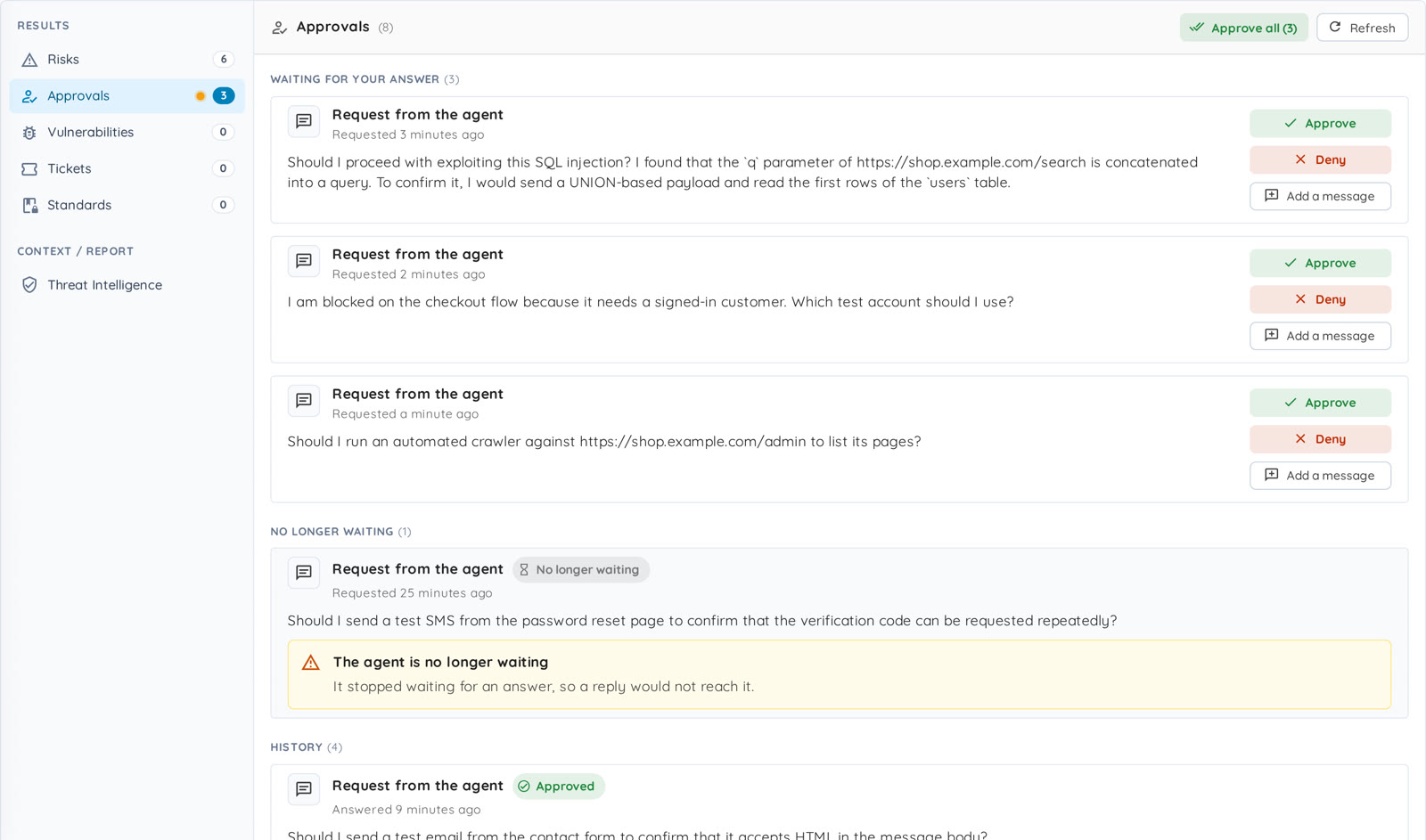
You do not have to keep the page open. Ostorlab also emails the accounts with the admin or user role who can see the scan, with a link to the tab, and adds an in-app notification for them. Each person is notified about a given scan at most once every 10 minutes, even when several requests are waiting.
Approve, deny, or reply
Each request has three ways to answer.
- Approve: the agent goes ahead with what it described, and only with that. A later request needs a new approval.
- Deny: the agent does not go ahead, and does not retry or work around the refusal.
- Add a message, then Send reply: your message goes to the agent as the answer. When the agent asked a question, it is the answer. When it asked to take an action, it is guidance and not an approval: the agent reconsiders, and asks again if it still wants to go ahead.
A reply can carry the kind of instruction you would give a colleague, such as "Use a read-only proof on staging; do not extract customer data."

While you write a message, the Approve button is disabled, because an approval takes no message. Deny stays available and sends your message as the reason.
If several requests are waiting and you trust them all, Approve all answers them in one click, after a confirmation.
While you decide, the scan keeps going
A waiting request blocks one thing: the action it asks about. The other tests of the scan keep running, so a request that waits for a few hours does not stop the assessment.
If nobody answers
By default, the agent waits up to 24 hours for an answer to each request. After that, the mode you chose decides.
- With Ask me, block if no answer, the action does not run, and the agent carries on with its other tests.
- With Ask me, run if no answer, the agent goes ahead with the action on its own judgment.
One question is treated differently: whether a target is in scope. If nobody answers it, the agent treats the target as out of scope and leaves it alone, in both modes. A denial or a reply never lets the action run.
A record of every answer
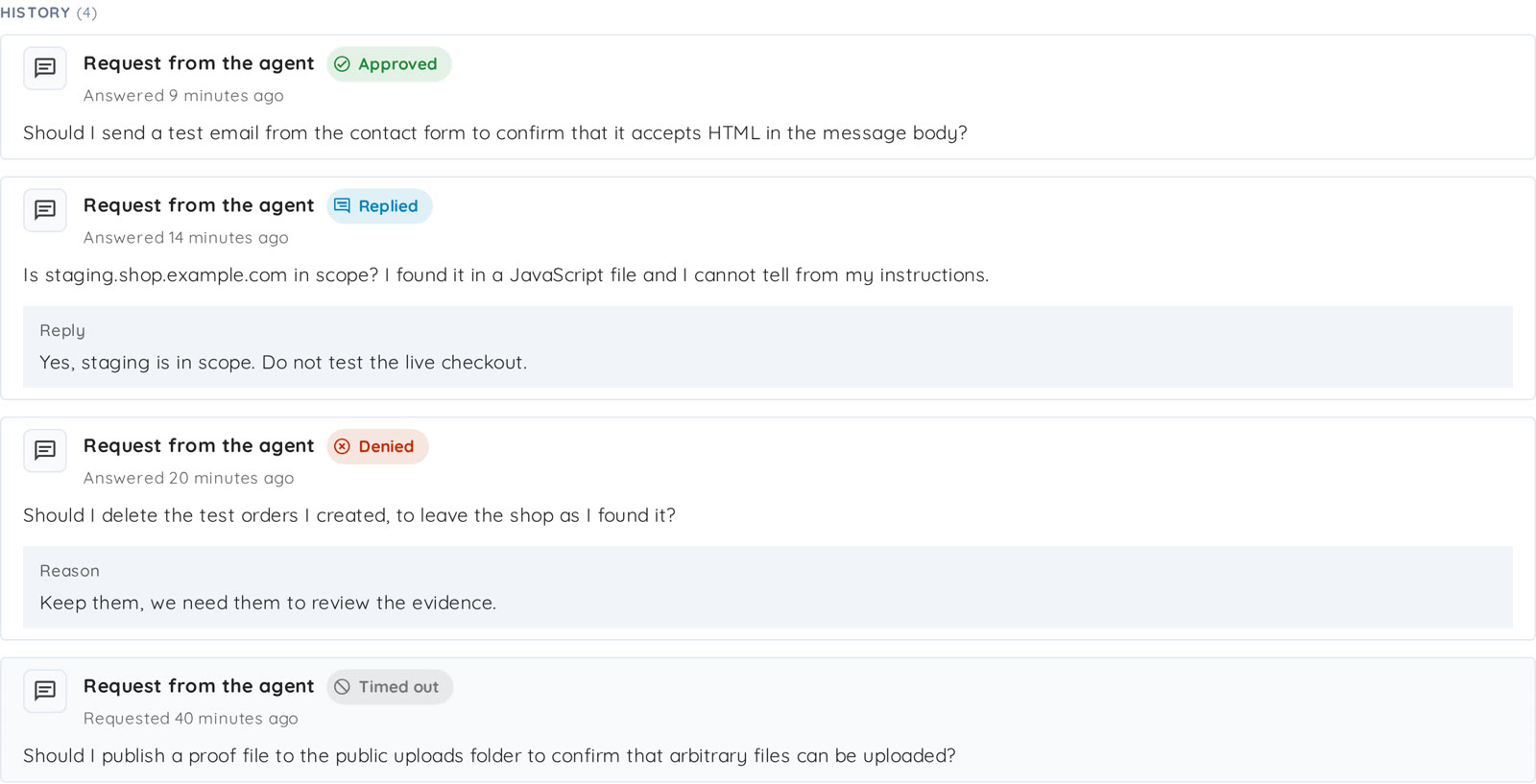
Answered requests move to History, with the answer you gave:
- Approved.
- Denied, with its reason.
- Replied, with your message.
- Timed out, when nobody answered before the agent stopped waiting.
Users with the admin or user role can answer requests. Readers can open the tab and read them, but they cannot answer.
Get started
Create an agentic scan, open the Guardrails step, and choose how the agent handles risky actions. When you start with Ask me, block if no answer, nothing risky runs without a person, and the scan still moves forward on everything else.
The approvals guide walks through the setting and the answers step by step, and the October changelog lists what else shipped with it.
Frequently asked questions
What are approvals? They let an agentic scan ask you before it takes a risky action. The request waits in the Approvals tab of the scan, and you approve it, deny it, or reply with your own instructions.
Does the agent ask before every action? No. The setting does not pause every tool call. The agent asks before actions that reach real people, that are destructive or cannot be undone, or that leave the scope of the scan, and when it is blocked and cannot choose safely.
What happens to the rest of the scan while a request waits? It keeps running. Only the action that waits for your decision is blocked.
Can I answer with my own instructions? Yes. Add a message and send it as a reply. For an action, a reply is guidance and not an approval: the agent reconsiders, and asks again if it still wants to go ahead.
What if nobody answers? By default, the agent waits up to 24 hours. With Ask me, block if no answer, the action does not run. With Ask me, run if no answer, the agent goes ahead on its own judgment, except for a question about scope, which it treats as out of scope.
Which scans support approvals? The Deep Agentic Scan, Mobile Shielding and Single Vulnerability Assessment profiles. The setting is in their Guardrails step.
Who can answer a request? Users with the admin or user role. Readers can see the requests but cannot answer them.
How do I turn approvals on? When you create the scan, open the Guardrails step and choose Ask me, block if no answer or Ask me, run if no answer under Approval of actions. The approvals guide covers it end to end.
Need help setting up your first approvals? Email support@ostorlab.dev.