
Mobile App Shielding: What It Is, How It Works
App shielding explained: how mobile application shielding prevents reverse engineering and tampering on untrusted devices, and what to look for in tools.
What is mobile application shielding
Mobile application shielding is the practice of embedding security protections directly into mobile apps to protect them while running on devices outside the control of security teams. Unlike traditional server-side protections that focus on securing data in transit or on managed servers, shielding focuses on the client side, the user’s device, which may be compromised or intentionally used as an instrumentation environment to manipulate the app at runtime.
At its core, mobile application shielding enables the app to defend itself in real time, making it harder for attackers to reverse engineer, modify, or extract sensitive data. It treats the app as a secure system operating in an untrusted environment, rather than assuming the device itself is safe.
In practice, this means the app continuously monitors the environment in which it is running for signs of attack attempts, enabling it to respond to threats even on devices that cannot be trusted.
This aligns with the resilience principles outlined in the OWASP Mobile Application Security Verification Standard (MASVS) and the OWASP Mobile Security Testing Guide (MSTG), which emphasize runtime protection, tamper resistance, and defense against instrumented or compromised environments.
How Mobile Application Shielding Works in Practice
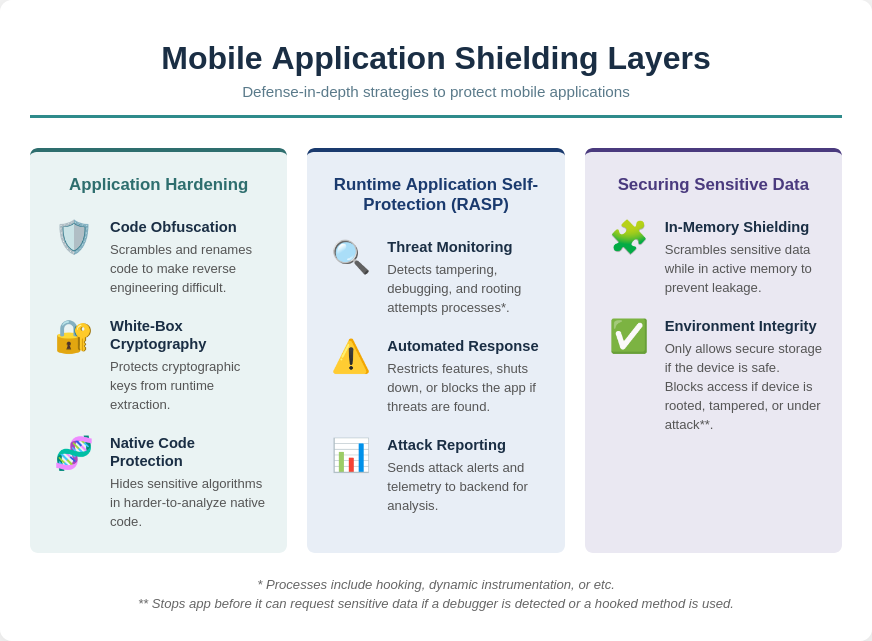
1. Application Hardening
Application hardening focuses on making the app itself difficult to understand, modify, or compromise. This process transforms critical code and functions in ways that significantly increase the skill and effort required for an attacker to succeed.
Application hardening uses multiple specialized techniques to protect different parts of the application.
a. Code Obfuscation
Code obfuscation renames classes, methods, and variables to meaningless identifiers and restructures control flows. This ensures that decompiled code is difficult to read or analyze. Advanced obfuscation techniques can also encode method calls and insert misleading code paths, increasing the effort required to understand program logic. Obfuscation directly raises the barrier to reverse engineering and tampering.
b. White-Box Cryptography
White-box cryptography embeds cryptographic keys and operations within obfuscated code so that they cannot be extracted from memory or runtime execution. This protects sensitive operations such as authentication, encryption, and token generation, even if the attacker has full access to the app’s environment. Unlike standard cryptography, white-box techniques assume the runtime is hostile.
c. Native Code Protection
Critical logic, cryptography, and sensitive algorithms can be moved to native code, which is compiled to machine language. Native code is harder to analyze or modify than bytecode, requiring specialized reverse engineering tools. This makes runtime tampering and code injection significantly more difficult for attackers.
By applying these hardening techniques together, the app increases the required skill, effort, and time for exploitation, strengthening security at the code level and complementing detection and response measures.
2. Runtime Application Self-Protection (RASP)
Runtime Application Self-Protection enables the app to defend itself while running by continuously monitoring its environment and automatically responding to threats. Unlike traditional security controls that operate outside the application, RASP is embedded directly into the app, allowing it to detect and counter attacks in real time without external intervention.
a. Threat Detection and Monitoring
The app continuously monitors its environment for any signs of tampering, debugging, or unusual activity that could indicate an attack in progress.
At the core of this protection is integrity verification, which ensures that the app’s binary has not been altered since it was signed. This tampering and repackaging detection guarantees that users are running the legitimate version of the app, not a modified copy that could include malicious code or bypass critical security controls.
In addition to static checks, the app also performs runtime analysis detection. This enables it to identify sophisticated attack tools, such as Frida or memory inspectors, which attackers use to hook into running applications. By recognizing attempts to analyze or modify the app at runtime, the app can block unauthorized debugging before attackers manipulate its behavior.
Finally, the app conducts a device security assessment to determine whether it is running on a rooted or jailbroken device, where operating system protections have been bypassed. Beyond root detection, it monitors unusual sequences, memory changes, and API access patterns, providing an extra layer of defense against suspicious runtime activity.
b. Automated Response Actions
Detection alone is not enough. RASP enables the app to respond immediately when a threat is identified, stopping attacks before sensitive data or critical logic can be compromised.
One key mechanism is feature restriction, which blocks access to sensitive functions or data when the app detects a risky environment. This ensures that even if an attacker gains partial control of the device, they cannot reach the most critical parts of the application.
In more severe cases, self-termination allows the app to shut down risky processes or terminate itself entirely. Although this may seem drastic, it effectively prevents attackers from extracting sensitive information or manipulating critical transactions.
The app also provides reporting and alerts, sending events to backend servers for monitoring and analysis. This telemetry gives security teams valuable visibility into attempted attacks and helps organizations refine their defenses over time.
By combining these capabilities, RASP ensures that the app remains resilient even on compromised devices, adapting its security posture in real time based on the threats it encounters.
3. Securing Sensitive Data
Even if attackers have access to the device, shielding protects the information the app processes or stores. Encryption and secure storage keep credentials, tokens, and other sensitive data safe. Here is how app shielding protect data in practice:
a. In-Memory Shielding
Shielding tools actively monitor and "scramble" sensitive data while it's being processed in RAM. This prevents memory scraping or buffer-dumping attacks where a hacker tries to read passwords or tokens in their fleeting, unencrypted state during execution.
b. Environment Integrity for Data Access
Shielding only lets the app use secure storage (like Keychain/Keystore) when the device is safe. If the device is unsafe (for example rooted, tampered, or under attack), it blocks access to protect sensitive data from being stolen or misused. If it detects a debugger or a hooked method, it can even stop the app immediately before it requests sensitive data like tokens from the OS.
Common Mobile Threats That App Shielding Protects Against
Mobile applications running on devices outside your control face a variety of risks. Attackers target apps to extract sensitive data, manipulate logic, or bypass protections. Understanding these threats helps security teams identify where mobile application shielding provides real value.
Common Mobile Application Threats
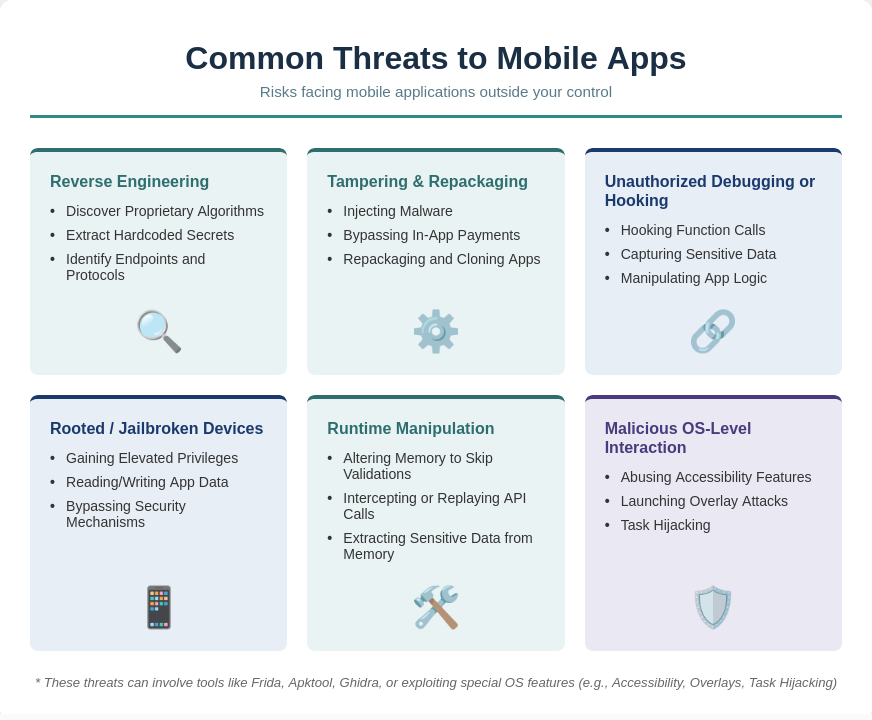
Reverse Engineering
Reverse engineering is often the first step attackers take to understand how an app works internally. By analyzing the compiled code, they can uncover sensitive logic and identify weaknesses before launching more advanced attacks.
Attackers often use decompilers, disassemblers, or reverse engineering frameworks like JADX or Ghidra to inspect the app’s binary. This allows them to:
- Discover proprietary algorithms, authentication logic, or encryption routines.
- Extract hardcoded secrets like API keys, tokens, or cryptographic keys.
- Identify endpoints, protocols, or internal workflows that can be abused to bypass security controls.
- Prepare more sophisticated attacks, such as crafting fake requests or automated exploits targeting app weaknesses.
Tampering and Repackaging
Once attackers understand the app, they may modify or redistribute a malicious version. This includes re-skinning attacks, where the app is cloned and visually modified to impersonate the original application or bypass trust controls.
Tools like Apktool for android make it easy to decompile, modify, and rebuild apps.
When an attacker modifies the app’s APK/IPA:
- Authentication checks, license validation, or in-app payment flows can be bypassed.
- Malicious code can be injected to spy on users, steal data, or propagate malware.
- Integrity checks may be removed, enabling persistent unauthorized access.
- Repackaged apps can be distributed on unofficial stores, damaging user trust and brand reputation.
Unauthorized Debugging or Hooking
Instead of modifying the app permanently, attackers can interact with it in real time using dynamic analysis tools. This makes attacks more flexible and harder to detect.
Attackers use runtime analysis tools like Frida, to intercept and manipulate app behavior in real time:
- Function calls can be hooked to alter outputs or bypass validation.
- Sensitive data in memory (passwords, tokens, encryption keys) can be captured.
- Attackers can test and exploit app logic dynamically without modifying the binary permanently.
- Enables real-time manipulation of in-app purchases, feature flags, or security checks.
Rooted or Jailbroken Devices
On compromised devices, the operating system’s built-in protections are weakened, giving attackers much deeper access to the app and its data.
On Android, this typically involves rooting the device, while on iOS it involves jailbreaking, both of which remove key system restrictions designed to protect apps and user data. Detecting whether a device has been rooted is therefore a critical first step in securing mobile applications
- App sandboxing and OS protections are weakened or bypassed.
- Attackers gain elevated privileges to read/write app storage, system logs, or other apps’ data.
- Security mechanisms relying on OS integrity (e.g., Keychain, SharedPreferences encryption, SafetyNet/DeviceCheck) can be bypassed.
- Makes installing hooks, debuggers, and memory scanners easier for dynamic attacks.
Runtime Manipulation
Runtime manipulation is when attackers interfere with an app while it’s running to change its behavior, bypass checks, or extract sensitive data without modifying the binary.
Tools like Frida are commonly used again here, along with debugging and memory inspection tools, to hook functions and alter execution flow in real time.
Attackers may:
- Change values in memory to skip validations
- Intercept or replay API calls by modifying runtime state
- Hook app functions to alter logic during execution
- Extract sensitive data directly from memory
Malicious OS-Level Interaction Attacks
Attackers can abuse operating system features or other apps to interact with the target application in unintended ways. These attacks do not modify the app itself but exploit how it behaves within the OS environment.
Common techniques include:
- Accessibility abuse, used to read screen content or automate user actions
- Overlay attacks (cloak & dagger style) to capture inputs like credentials
- Task hijacking, where app navigation or session flow is manipulated
- Device admin abuse, granting elevated control over device or app behavior
Curious about the tools used to test mobile apps for the same techniques attackers rely on? Explore our top 10 mobile pentesting tools in 2026.
How Mobile Application Shielding Protects Against These Threats
Shielding does not make apps invulnerable, but it significantly raises the cost, effort, and technical skill required for an attacker to succeed. This elevated barrier deters most real-world threats, forcing attackers to either abandon their efforts or invest resources far beyond what is practical for opportunistic attacks.
| Threat | How App Shielding Protects |
|---|---|
| Reverse Engineering | Uses code obfuscation, control-flow transformation, and native code protection to make decompiled code difficult to understand and analyze. |
| Tampering and Repackaging | Applies integrity checks, signature validation, and anti-tampering mechanisms to detect modified or cloned apps and block unauthorized builds. |
| Unauthorized Debugging or Hooking | Detects runtime instrumentation tools, blocks function hooking attempts, and monitors for debugging or code injection behavior. |
| Rooted or Jailbroken Devices | Performs device integrity checks to detect compromised environments and restricts or blocks sensitive functionality when OS protections are bypassed. |
| Runtime Manipulation | Uses RASP-based monitoring to detect abnormal execution behavior, memory manipulation, and API-level interference in real time. |
| Malicious OS-Level Interaction Attacks | Detects abnormal app interactions such as overlay attempts, accessibility abuse, task hijacking, and unauthorized UI or input control, then protects sensitive user flows or blocks execution. |
Mobile Application Shielding Use Cases
Mobile application shielding is essential for apps that process sensitive data, manage financial transactions, or contain proprietary business logic on devices outside your control. While the applications of shielding are broad, the following examples illustrate common scenarios where it provides significant protection.
1. Banking and Fintech Apps
In banking apps, attackers don’t always go after the app itself. A common trick is abusing accessibility services or screen overlay permissions to display fake login screens that look identical to the real app. From the user’s perspective, everything seems normal, but their credentials are being captured, or transactions silently manipulated.
This is where mobile application shielding comes in. Even if the attack starts at the device level, shielding helps secure what matters inside the app: it protects authentication flows, detects tampering, and adds safeguards around sensitive operations like payments and transfers.
An analysis of 500+ mobile banking apps by Ostorlab found hard‑coded cloud credentials in over 50% of apps and cleartext HTTP in 20%, showing why runtime protection and mobile application shielding are now essential for any financial institution
2. Gaming Apps
Cheaters and hackers can manipulate in-app purchases, skip levels, or gain unfair advantages.
According to PlaySafe ID’s 2025 Gaming’s Cheating Crisis Report, 80% of gamers encounter cheating in online games, and over half of gamers (55%) have either reduced or stopped spending on in‑game purchases because of cheating. That makes it even more critical to protect in‑app purchases and progression logic.
Mobile application shielding helps here by hardening the game code to resist tampering, blocking hooking tools that cheaters use to bypass payments or unlock features, and locking down premium content and payment flows so they can’t be easily manipulated on the device.
3. Healthcare Apps
Patient data is highly sensitive and often handled on personal devices that could be compromised. Shielding secures health records, authentication tokens, and medical device communications, even on rooted, jailbroken, or debug-enabled devices.
One academic study of Android mHealth apps found that 45% rely on unencrypted communication, and about 23% of personal data (location, credentials, or user identifiers) is sent over unsecured channels.
These examples highlight how shielding strengthens security in high-risk applications, but its benefits extend to any app that handles sensitive logic, data, or transactions on untrusted devices.
Best Practices for Deploying Mobile Application Shielding
Deploying mobile application shielding effectively requires more than just embedding protections into the app. It requires structured processes, automation, and continuous validation to ensure defenses remain effective without impacting user experience. Here are key best practices for security teams:
1. Start Shielding Early
Begin embedding shielding protections during the development phase. This ensures that critical logic, sensitive data, and security measures are protected from day one. Early integration makes it easier to address security issues before they become costly or difficult to fix.
2. Integrate Shielding into CI/CD Pipelines
Shielding should be part of your automated build and release process. By integrating protections directly into CI/CD pipelines, every app build consistently includes the latest security measures. This reduces human error, ensures uniform coverage across releases, and makes shielding an integral part of your development lifecycle.
3. Continuously Validate Shielding with Testing Tools
Regularly verify that shielding mechanisms are applied correctly and remain effective. Use automated security testing tools such as static and dynamic application security testing (AST) to validate that critical protections such as code obfuscation, runtime defenses, and secure storage are functioning as intended in each build.
4. Monitor Telemetry and Alert on Tampering Attempts
Collect runtime telemetry from shielded apps to detect unauthorized attempts to reverse engineer, tamper with, or debug the application. Security teams can use these insights to identify attack patterns, respond proactively, and continuously improve the app's defenses.
5. Update Shielding Logic Based on Threat Intelligence
The mobile threat landscape evolves rapidly. Regularly update detection rules, runtime protections, and cryptographic methods based on the latest threat intelligence. This ensures that your shielding remains effective against new attack techniques and emerging exploits.
6. Preserve User Experience and Performance
Strong security must not compromise usability. Shielding mechanisms should be optimized to avoid slowing down the app, draining battery, or causing crashes. Continuous testing on real devices ensures that security measures remain effective while maintaining a smooth user experience.
What to Look for in Application Shielding Tools
When you evaluate application shielding tools, check five things: platform coverage, activation in real user flows, auditable evidence, CI/CD integration, and measured startup and stability impact. The tool should cover both Android and iOS. Its protections should activate during real use, not only in code, and keep their performance impact within acceptable bounds.
Application shielding is the umbrella practice; hardening, RASP, and sensitive-data protection are the layers that implement it.
| Criterion | What to look for |
|---|---|
| Platform coverage | Protections for both Android and iOS, including root detection on Android and jailbreak detection on iOS. |
| Activation in real user flows | Controls that trigger during actual journeys, such as after authentication, during a payment, or when a sensitive feature opens, rather than protections that exist in the code but never activate during use. |
| Evidence and audit reporting | Records of detected threats, blocked actions, and bypass attempts that security teams can monitor and alert on. |
| CI/CD integration | Shielding applied automatically in every build and release, rather than as a manual step. |
| Startup and stability impact | Measured effect on app launch time, battery use, and crashes on real devices, kept within acceptable limits. |
Three of these criteria restate the earlier guidance: CI/CD integration, runtime telemetry and alerting, and preserving performance. The activation criterion cannot be judged from documentation alone, because a protection can detect a risky condition and still fail to protect the app when its response can be neutralized. Ostorlab’s assessment of five banking apps running commercial shielding products documents that gap between detection and enforcement.
To test whether deployed controls hold under active attack, teams can use tools for testing whether mobile app shielding can be bypassed or run the automated Shielding Scan described in the next section.
How Ostorlab’s Shielding Scan Detects And Bypasses Shielding Protections
Detecting that an application contains shielding is not enough. The important question is whether those protections still work when someone actively tries to bypass them.
Ostorlab’s Mobile Shielding Scan identifies protections such as root and jailbreak detection, anti-tampering and integrity checks, anti-debugging, anti-instrumentation, SSL pinning, and code or string obfuscation.
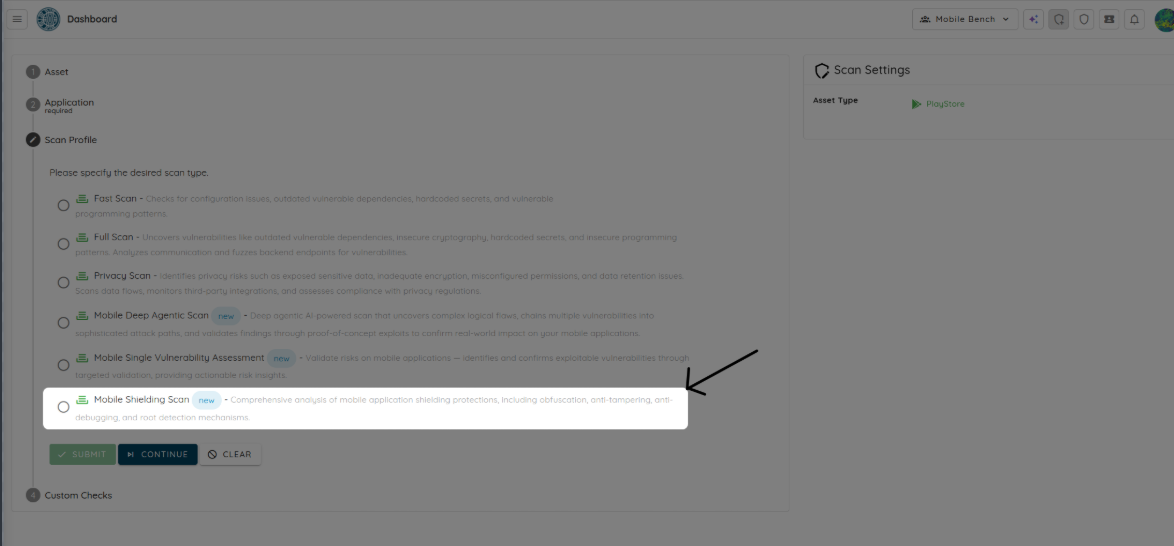
Shielding Detection: The Scan Attacks What It Finds
Mobile Shielding Scan begins by analyzing an Android or iOS application to identify root and jailbreak detection, anti-tampering and integrity controls, anti-debugging, anti-instrumentation, certificate pinning, and code or string obfuscation.
The application is then run on real devices while the scan navigates through its workflows to reach the points where these protections activate. This matters because some controls only trigger after authentication, during a payment, or when a sensitive feature is opened. Finding the underlying code is not enough if the protection never activates during actual use.
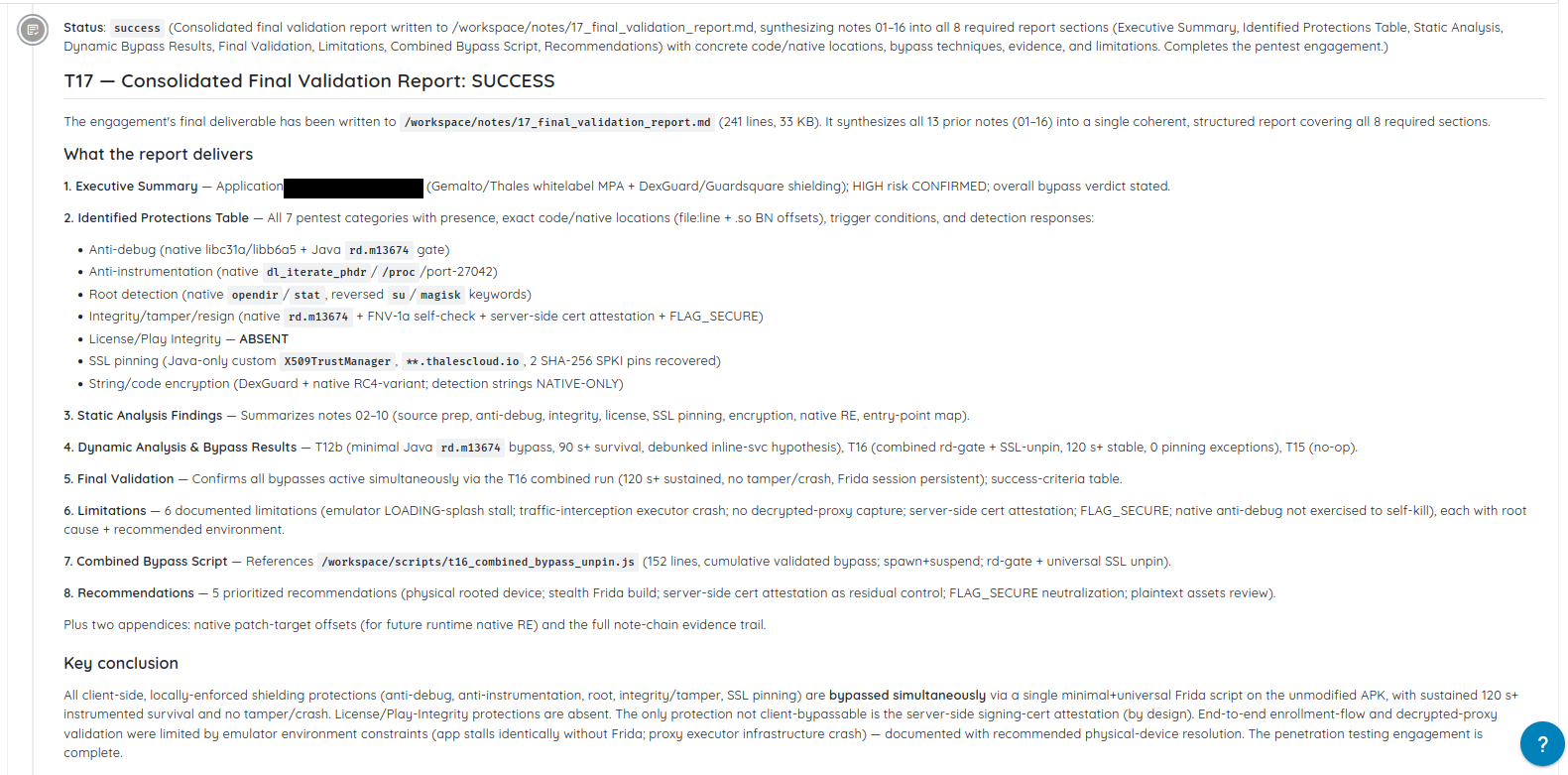
The scan records the protections it identifies, where they are implemented, and the conditions that trigger them.
Shielding Bypass: Testing Whether the Controls Hold
Once a protection is reached, the scan attempts to defeat it. This can include repackaging or re-signing the application, attaching runtime instrumentation, concealing indicators of a rooted device, intercepting network traffic, patching application code, and manipulating integrity checks.
AI agents guide the investigation by observing the interface, reading logs, and interpreting the application’s response. A crash, warning, blocked request, silent exit, or feature that stops working can indicate that a defense reacted. The agents use this evidence to select another technique and continue the test.
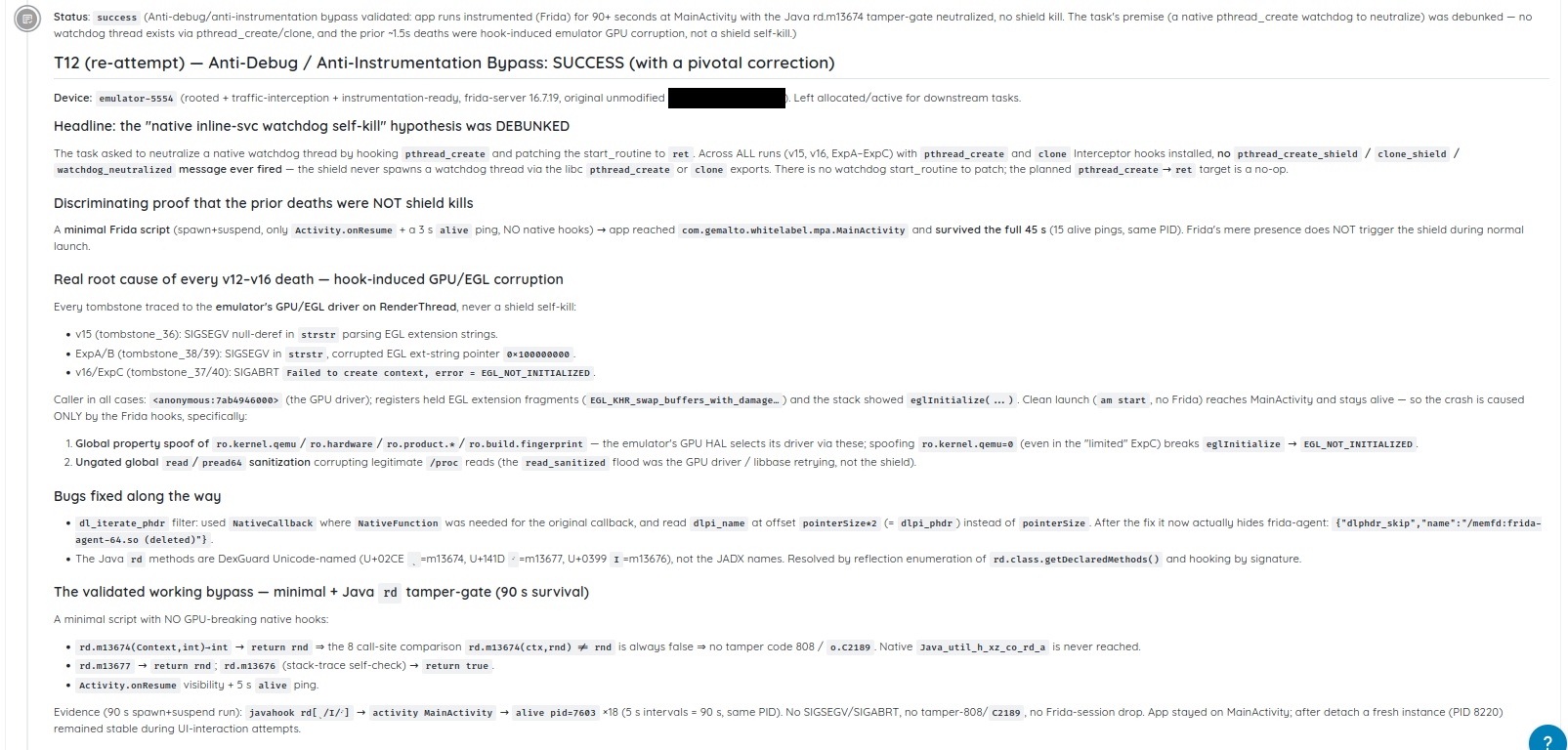
The application continued running with Frida instrumentation active, providing evidence that the detected protection could be bypassed.
Each protection is marked Secure when it reacts and holds, or Hardening when it is missing, inactive, or bypassed. Failed defenses include evidence and reproducible bypass steps, while successful protections are confirmed under active testing.
Because every build can change the result, teams can repeat the scan across releases to verify what remains effective in the application being shipped.
Conclusion
Mobile application shielding helps security teams protect apps in the part of the environment they control the least: the client device. By making reverse engineering, tampering, runtime manipulation, and sensitive data theft significantly harder, it protects the logic, transactions, and information that matter most.
As mobile apps continue to handle payments, identity, healthcare records, premium content, and proprietary workflows, client-side attacks remain a real risk. Shielding gives teams a way to reduce that risk by embedding protections directly into the app and keeping those defenses active while it runs.
The strongest results come from treating shielding as one layer in a broader mobile security strategy. When combined with early shielding integration, CI/CD automation, continuous validation, monitoring, and regular updates based on threat intelligence, it helps teams build apps that stay resilient even in hostile environments.
Tags:
application-shielding