How to Vet a Third-Party Mobile App Before You Allow It in Your Company
A five-step mobile app vetting checklist for security teams (permissions, trackers, malware, data flows, store reputation), plus how to vet any store app for free with an Ostorlab account.
How to Vet a Third-Party Mobile App Before You Allow It in Your Company
Quick answer: Mobile app vetting is the structured security, privacy, malware and trust review of an app before it's approved for company use. With a free Ostorlab account, you can vet any Android, iOS or HarmonyOS app from a public store and get its 0–100 risk score.
Employees install apps for messaging, expenses, field work and scanning documents. Each one then requests permissions, such as contacts, storage, clipboard and camera, on the same device that holds your company data. Most teams approve them based on the store rating, which says nothing about security.
How do you vet a third-party mobile app? Five checks before approval
- Check permissions against purpose. A PDF scanner doesn't need contacts, location or the microphone. Permissions that don't match the app's job are a red flag you can check before install.
- List the third-party SDKs and trackers. Analytics and ad SDKs often send device identifiers and usage data to companies the publisher never mentions.
- Look for malware and risky code. Check for known malware signatures, dynamic code loading, root detection evasion and obfuscated payloads.
- Follow the data. See which servers the app talks to, whether traffic is encrypted, and which countries the data goes to.
- Check the publisher and store metadata. Look at the developer's other apps, update frequency, and whether the privacy policy matches what the app actually does.
What decision do you make after the review?
Each review should end in one of four decisions. Decide in advance which scores you approve and which you send for a closer look. A malware hit is a reject whatever the score.
| Decision | When |
|---|---|
| Approve | Permissions, SDKs and data flows match the app's stated purpose, and no malware signatures hit. |
| Reject | The app shows malware or clear data abuse. |
| Monitor | It's acceptable today, but the next update could change that. |
| Escalate | The data flows raise compliance questions for legal or privacy review. |
How do you vet apps at scale without manual reviews?
Doing these checks by hand means unpacking the APK or IPA, reading the manifest, running the app in a sandbox and mapping every connection it makes. That takes hours per app, and again for each update. Ostorlab App Vetting runs those checks in one scan. It combines static analysis, sandboxed dynamic execution, malware detection, privacy and telemetry review, and store metadata into a 0–100 score. Reports can serve as evidence for vetting processes based on NIST SP 800-163.
Every app you vet appears in one list, with a score for each criterion, an overall score and a status:

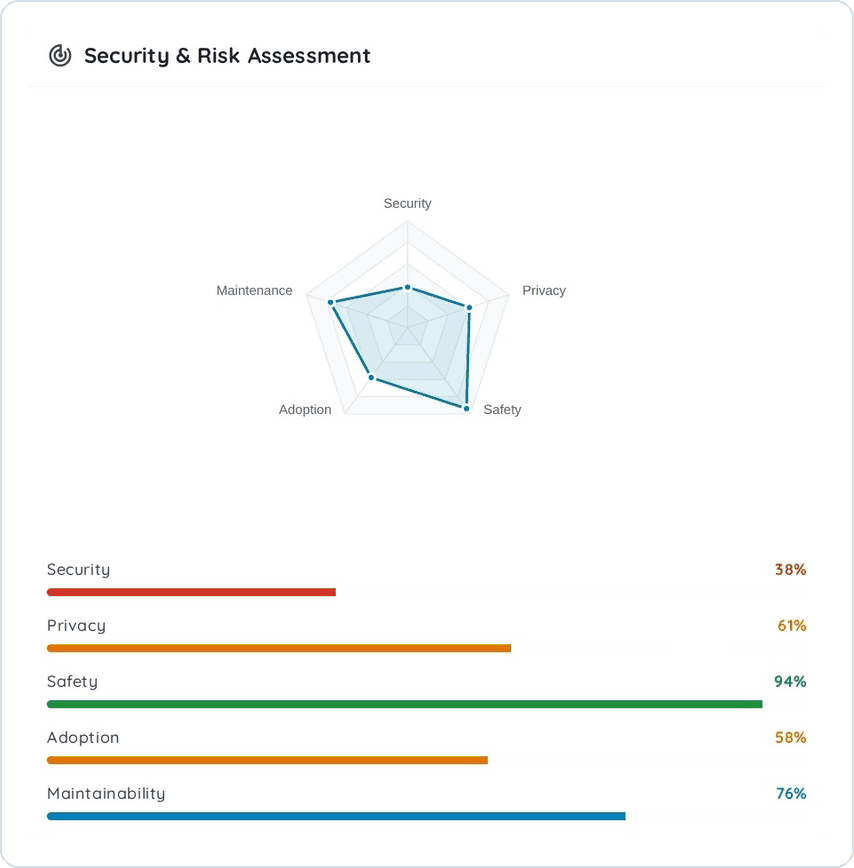
Open an app to see how its score breaks down across security, privacy, safety, adoption and maintainability:
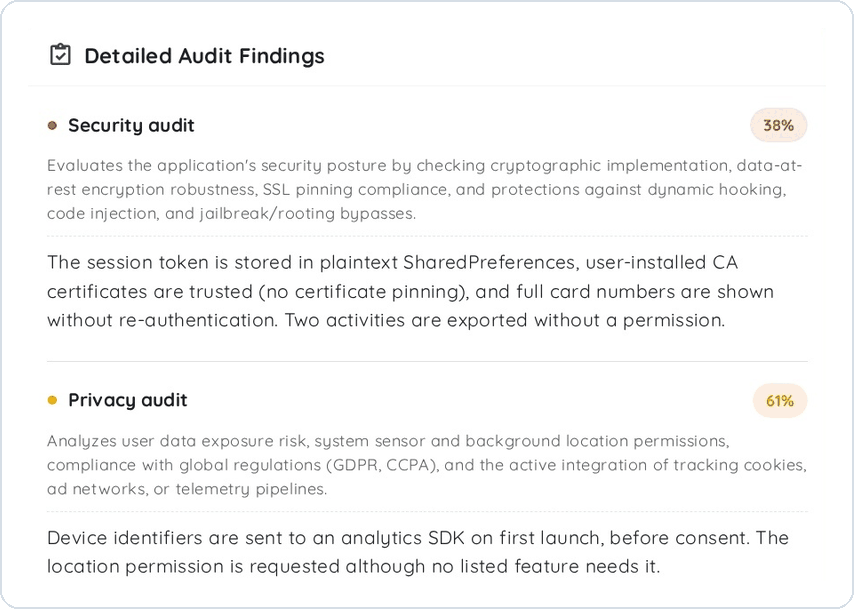
Each score comes with the findings behind it, so you can see why an app lost points before you decide:
Vet your first app for free: create a free Ostorlab account, search for the app on Google Play, the App Store or Huawei AppGallery, request a vetting scan, and get its 0–100 score when the scan is done. The full report behind the score comes with a paid plan.
For a longer look at the whole process, read The Definitive Guide to Mobile App Vetting.
FAQ
What is mobile app vetting? It's the structured security, privacy, malware and trust review of a mobile app before it's approved for company use.
How is app vetting different from mobile threat defense (MTD)? MTD protects enrolled devices after apps are installed. App vetting assesses the app package before it's approved.
Which apps can Ostorlab vet? Android, iOS and HarmonyOS apps published on Google Play, the App Store and Huawei AppGallery.
Is mobile app vetting free with Ostorlab? Yes. Create a free Ostorlab account and request vetting for a store app. You get its 0–100 score when the scan is done. The full report behind the score comes with a paid plan.