Cacti 4HTTP2SHELL: Unauthenticated RCE in Four Requests
Cacti 1.2.31 with guest access lets a visitor turn a saved graph setting into stacked SQL and a shell command; a branch patch has no release.
TL;DR
- A Cacti 1.2.31 guest can store SQL in a numeric graph setting, and the preview page runs it. Researcher ek0ms savi0r published the 4HTTP2SHELL chain on 2026-11-26.
- Cacti 1.2.31 installations with the guest account enabled and real-time graphing available are exposed. The guest account is off by default.
- No CVE or CVSS score is assigned. watchTowr reports active exploitation on 2026-11-27; the chain is not in CISA KEV as of 2026-11-29.
- Cacti merged a patch into the 1.2.31 branch on 2026-11-28, with no fixed release. Disable the guest account and restrict the interface until you apply it; see "How do I fix it?"
Am I affected?
You are exposed when a Cacti server runs the affected release, accepts guest sessions, and can run a real-time graph. All of these conditions must hold:
- Cacti Core 1.2.31 is installed. The researcher tested only this release, and earlier versions are not confirmed either way.
- The guest account is enabled. Cacti disables it by default starting with 0.8.7, so an administrator must have configured one.
- Real-time graphing is enabled and its cache directory exists and is writable. The setting
realtime_enableddefaults toon, and the default cache path iscache/realtime/. - At least one graph and its poller item exist, because the last request initializes a real-time graph for a valid graph id.
- The Cacti web interface is reachable from the attacker's network.
The chain does not need a login, an API key, or a form on a monitored device. It starts from the same guest session Cacti hands to an anonymous visitor.
| Branch | Affected versions | Fixed version |
|---|---|---|
| 1.2.x | Cacti 1.2.31 release | 1.2.31 branch, commit 8910e2a; no release published |
The 1.2.31 branch now carries the patch, but the latest GitHub release remains 1.2.31 from 2026-06-15. A tarball or package built from the release is still vulnerable.
Check the installed version from the command line:
cat /var/www/html/cacti/include/cacti_version
Check whether a guest user is configured and enabled. Adjust the database name and credentials for the installation:
mysql -u cacti -p cacti -e "SELECT s.value AS guest_id, u.username, u.enabled FROM settings s LEFT JOIN user_auth u ON u.id = s.value WHERE s.name = 'guest_user';"
A guest_id of 0, or no row, means no guest account is configured. Any other value means the setting points at a user; check that u.enabled is on.
Check the real-time settings and the cache directory:
mysql -u cacti -p cacti -e "SELECT name, value FROM settings WHERE name IN ('realtime_enabled','realtime_cache_path');"
ls -ld /var/www/html/cacti/cache/realtime
How do I fix it?
Apply the fix from Cacti pull request #9013 to the 1.2.31 tree, or install a later release when Cacti publishes one. The pull request was merged into the 1.2.31 branch on 2026-11-28, and it changes seven PHP files.
- Back up the Cacti directory and its database.
- Download the pull request diff and test that it applies to your tree:
cd /var/www/html/cacti
curl -L https://github.com/Cacti/cacti/pull/9013.diff -o /tmp/cacti-9013.diff
patch -p1 --dry-run < /tmp/cacti-9013.diff
- Apply the diff, then confirm that the new guard is present:
patch -p1 < /tmp/cacti-9013.diff
grep -n "function cacti_user_can_save_own_settings" lib/functions.php
- Run the Cacti upgrade check and a normal page load. The patch also changes the pagination helper used by graph previews and trees, so test both pages.
If your tree has local modifications, review the diff before you apply it. The patch may apply with offsets, and patch writes .rej files when a hunk fails. A failed hunk must be merged by hand.
If you cannot patch at once, disable the guest account. In the Cacti console, open Configuration, then Settings, then Authentication, and set Guest User to None. This removes the first request in the chain.
Restrict the Cacti web interface to trusted management networks as a second barrier. The published chain needs HTTP access to auth_profile.php, graph_view.php and graph_realtime.php.
Disabling real-time graphing also blocks the last request, because graph_realtime.php exits when realtime_enabled is off. This mitigation leaves the stored SQL write path in place, so it is weaker than disabling the guest account.
What is the root cause?
The guest profile endpoint stores a numeric preference without checking that its value is an integer. The graph preview page later treats that stored value as a SQL LIMIT fragment without filtering it.
Cacti lets a visitor use a shared guest account. The profile update action reads a setting name and value with get_nfilter_request_var(), which does no type validation. This is auth_profile.php at the 1.2.31 release, lines 50 to 59:
case 'update_data':
    $name  = get_nfilter_request_var('name');
    $value = get_nfilter_request_var('value');

    $current_tab = get_nfilter_request_var('tab');
    if ($current_tab == 'general') {
        api_auth_update_user_setting($name, $value);
    } else {
        api_plugin_hook_function('auth_profile_update_data', $current_tab);
    }

    break;
api_auth_update_user_setting() checks that the setting name exists, then writes the value with a prepared statement. The prepared statement protects the storage query, not the later use of the stored string. This is the same file, lines 190 to 202:
if (!empty($user)) {
    if ($name == 'full_name' || $name == 'email_address') {
        db_execute_prepared("UPDATE user_auth
            SET $name = ?
            WHERE id = ?",
            array($value, $user));
    } else {
        foreach($settings_user as $tab => $settings) {
            if (isset($settings[$name])) {
                db_execute_prepared('REPLACE INTO settings_user
                    (name, value, user_id)
                    VALUES (?, ?, ?)',
                    array($name, $value, $user));
The setting used by the chain is preview_graphs_per_page, which is meant to hold a small integer. The guest can store any string in it.
The preview page loads that setting as the default for the graphs request variable. This is lib/html_graph.php, lines 83 to 88:
'graphs' => array(
    'filter' => FILTER_VALIDATE_INT,
    'pageset' => true,
    'default' => read_user_setting('preview_graphs_per_page', 20)
    ),
The filter looks like a check, but it runs only when the request contains graphs. When the parameter is absent, validate_store_request_vars() copies the stored default into the request without calling filter_var(). The stored string therefore reaches the page unfiltered.
graph_view.php builds the limit by string concatenation at line 487:
$limit = (get_request_var('graphs')*(get_request_var('page')-1)) . ',' . get_request_var('graphs');
get_allowed_graphs() then wraps that string in LIMIT and appends it to a query. This is lib/auth.php, lines 1477 to 1478 and lines 1514 to 1526:
if ($sql_limit != '') {
    $sql_limit = "LIMIT $sql_limit";
} else {
    $sql_limit = '';
}
...
$graphs = db_fetch_assoc("SELECT gtg.local_graph_id, h.description, gt.name AS template_name,
    gtg.title_cache, gtg.width, gtg.height, gl.snmp_index, gl.snmp_query_id, gl.host_id, h.disabled,
    IF(gl.graph_template_id=0, 0, IF(gl.snmp_query_id=0, 2, 1)) AS graph_source
    FROM graph_templates_graph AS gtg
    INNER JOIN graph_local AS gl
    ON gl.id=gtg.local_graph_id
    LEFT JOIN graph_templates AS gt
    ON gt.id=gl.graph_template_id
    LEFT JOIN host AS h
    ON h.id=gl.host_id
    $sql_where
    $sql_order
    $sql_limit");
The database connection is PDO, and Cacti does not disable multi-statements. A semicolon in the stored value ends the SELECT, and the next statement runs.
The published chain uses that second statement to change poller_item.arg1. The real-time poller later reads the row and passes arg1 to exec_poll(). This is cmd_realtime.php, line 221:
$output = trim(exec_poll($item['arg1']));
exec_poll() calls popen() with the command string. This is lib/poller.php, lines 35 to 37:
if (function_exists('popen')) {
    if ($config['cacti_server_os'] == 'unix') {
        $fp = popen($command, 'r');
Four failures stack up. A guest can write a numeric setting as an arbitrary string. The stored default bypasses the request filter, the limit is concatenated into SQL, and the poller executes a database-stored command.
How is it exploited?
The published proof of concept takes four unauthenticated HTTP requests. It needs the guest account and a valid graph and poller item, and it uses lab-specific row identifiers.
- Request
auth_profile.php?tab=general&header=falsewith a fresh cookie jar. Cacti returns a guest session and a CSRF token, with no credentials needed. - POST to
auth_profile.php?tab=general&action=update_data&header=falsewithname=preview_graphs_per_page. The value starts with a digit and continues with a stacked SQL statement that stores an encoded command inpoller_item.arg1:
name=preview_graphs_per_page
value=1;UPDATE poller_item SET host_id=1,action=1,arg1=0x... WHERE local_data_id=1;--

GET  /cacti/auth_profile.php?tab=general&header=false
POST /cacti/auth_profile.php?tab=general&action=update_data&header=false

GET  /cacti/graph_view.php?action=preview&page=1&clear=1
GET  /cacti/graph_realtime.php?action=init&local_graph_id=1&ds_step=10&size=90
- Request
graph_view.php?action=preview&page=1&clear=1without agraphsparameter. The stored default becomes the limit, and PDO executes the appendedUPDATEonpoller_item. - Request
graph_realtime.php?action=init&local_graph_id=1&ds_step=10&size=90. The real-time poller reads the modifiedarg1and callspopen(). - The command runs as the user that runs the Cacti web server and poller. The researcher's lab ran both as root, and BleepingComputer notes that many deployments use a low-privileged web account instead.
The published proof of concept and the full command are in the researcher's repository. This post reproduces only the request shape and the stored payload.
How does the attack flow?
A guest writes SQL into a saved page-size setting, the preview page runs it as a stacked statement, and the real-time poller executes the command that the statement planted.
What can an attacker do?
An attacker who completes the chain runs operating-system commands as the account that runs the Cacti web server and poller. The researcher demonstrated id and hostname output and wrote a marker file in the lab, where both processes ran as root.
The impact depends on that account. watchTowr and BleepingComputer both note that a normal deployment often runs Cacti as www-data or apache, not root.
With command execution, the attacker can read the database credentials in include/config.php. Cacti also stores device credentials, SNMP community strings, and poller configuration in its database, and the chain can read or change those rows.
The attacker can modify the poller_item table to change what the poller runs, and can alter other monitoring data. The researcher notes that this can suppress alerts or change what operators see.
The Cacti host often reaches management networks that other systems cannot, so the shell can become a pivot. The published material demonstrates command execution and the database write. It does not publish a list of victim networks or a data-theft campaign.
Why does the fix work?
The patch denies guest sessions the profile write and validates numeric settings at write time. It also re-validates pagination values when they are read, so a stored string no longer reaches the SQL clause.
The first hunk makes every state-changing profile action a POST and rejects it unless the session belongs to a real user. This is the new guard in auth_profile.php:
+$action = get_request_var('action');
+
+if (in_array($action, array('save', 'update_data', 'clear_user_settings', 'reset_default', 'logout_everywhere'), true)) {
+   if ($_SERVER['REQUEST_METHOD'] !== 'POST') {
+       header('Allow: POST');
+       http_response_code(405);
+       exit;
+   }
+
+   if (!cacti_user_can_save_own_settings()) {
+       http_response_code(403);
+       exit;
+   }
+}
+
 switch ($action) {
cacti_user_can_save_own_settings() returns false when the session user is the guest account, so the guest can no longer call update_data. The same function also protects the graph settings save action in graph_view.php.
The second hunk validates a setting against the values the form offers. preview_graphs_per_page is a dropdown of page sizes, so cacti_user_setting_value_allowed() rejects a payload that is not one of those sizes before it is stored. For a setting with a numeric default outside a dropdown, the same function requires is_numeric():
+   if ($setting['method'] === 'drop_array' || $setting['method'] === 'drop_language') {
+       return isset($setting['array'][$value]) || (!empty($setting['none_value']) && (string) $value === '0');
+   }
+
+   if (isset($setting['default']) && is_numeric($setting['default'])) {
+       return is_numeric($value);
+   }
+
    return true;
 }
The patch also adds cacti_graph_pagination() and calls it when the preview page restores filters. The helper casts the page and row values with FILTER_VALIDATE_INT and replaces a failed row value with the default. That covers values already stored before the patch, and values restored from a session.
lib/html_utility.php adds html_graph_normalize_filters(), which runs the same pagination check and clamps the column count. lib/html_graph.php and lib/html_tree.php call it after validate_store_request_vars().
The fix closes the four-step chain. It does not remove every use of string-built SQL in Cacti, and it does not change the poller's trust in poller_item.arg1. A separate database write path to that table would still be dangerous.
How do I check if I was compromised?
Check for a non-numeric value in the two graph pagination settings. The user interface stores integers, so any other value is a strong lead:
SELECT user_id, name, value FROM settings_user
WHERE name IN ('preview_graphs_per_page','treeview_graphs_per_page')
AND value NOT REGEXP '^[0-9]+$';
Check the poller table for commands that do not match the configured data input methods. This query looks for shell metacharacters, and every hit needs a manual comparison with the expected command:
SELECT id, host_id, local_data_id, action, arg1 FROM poller_item
WHERE action = 1
AND (arg1 LIKE '%;%' OR arg1 LIKE '%&&%' OR arg1 LIKE '%|%');
Look for the warning the chain produces in the Cacti log and the PHP error log:
grep -Ei 'non-numeric|preview_graphs_per_page' /var/www/html/cacti/log/cacti.log
In the web server access log, search for these three request types, then check whether one client made them in sequence:
grep -E 'auth_profile\.php.*action=update_data|graph_view\.php.*action=preview|graph_realtime\.php.*action=init' /var/log/nginx/access.log
A sequence is a lead, not proof, because normal administrators also open the profile and preview pages. The strongest single indicator is a non-numeric pagination value in settings_user.
No vendor or researcher has published file hashes, IP addresses, or a full indicator set. A failed attempt may leave only a PHP warning, and a successful command may leave no file if it only reads data.
Timeline
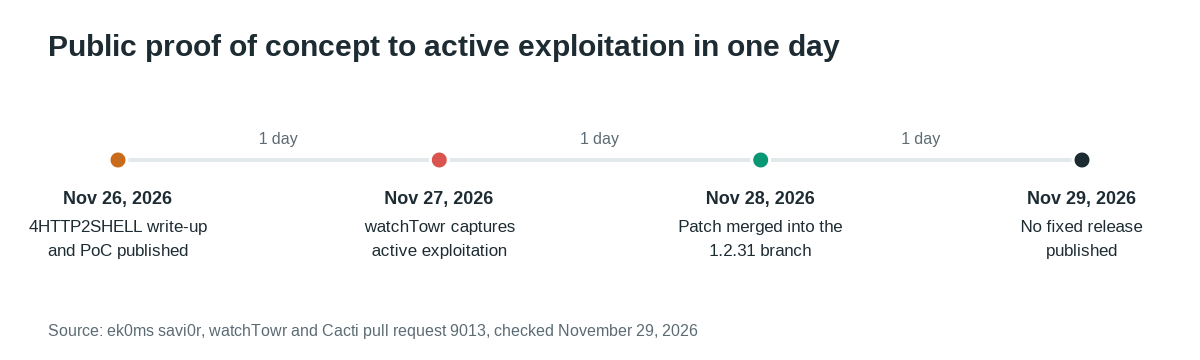
- 2026-11-26: ek0ms savi0r publishes the 4HTTP2SHELL write-up, proof of concept, and video; watchTowr publishes its FAQ at 20:09 UTC.
- 2026-11-27: watchTowr reports that its sensors captured active exploitation; The Hacker News and BleepingComputer publish articles.
- 2026-11-28: Cacti merges pull request #9013 into the 1.2.31 branch as commit 8910e2a.
- 2026-11-29: watchTowr's FAQ lists the issue as exploited in the wild, and Cacti has published no fixed release.
FAQ
Is there a CVE for 4HTTP2SHELL?
No. No CNA had assigned a CVE ID as of 2026-11-29, and the researcher and watchTowr use the names 4HTTP2SHELL and 4HTTP2ROOT. Without a CVE, the chain cannot appear in CISA KEV.
Does it affect Cacti versions before 1.2.31?
That is not confirmed. The researcher tested Cacti Core 1.2.31, and Cacti has not published an affected range. The guest account has been disabled by default since 0.8.7, but older releases may share the same code path.
Is it exploited in the wild?
watchTowr reports that its sensors captured active exploitation on 2026-11-27, and its FAQ lists the issue as exploited in the wild. No victim details, campaign name, or indicator set has been published by Cacti or watchTowr.
Does disabling the guest account stop the attack?
Yes. The chain starts with a guest session, and auth_profile.php?action=update_data needs that session. With Guest User set to None, the first request cannot obtain the session the payload needs.
Is the patch a new Cacti release?
No. Cacti merged the patch into the 1.2.31 branch on 2026-11-28, and the latest GitHub release is still 1.2.31 from 2026-06-15. Administrators must apply the diff or wait for a later release.
What privileges does the attacker gain?
The attacker gains the privileges of the account that runs the Cacti web server and poller. The researcher's lab ran both as root, while watchTowr and BleepingComputer note that many deployments use a low-privileged web account.
References
- ek0ms savi0r, "Four Requests to Root: A Cacti 0day", published 2026-11-26 (checked November 29, 2026): https://github.com/ekomsSavior/Sad-Girls-0day-Club/tree/main/4http2shell
- watchTowr, "Frequently Asked Questions About the Cacti Remote Code Execution (4HTTP2ROOT Zero-day)", published 2026-11-26, updated 2026-11-28 (checked November 29, 2026): https://watchtowr.com/intelligence/4http2root-cacti-zero-day-faq/
- The Hacker News, "Unpatched Cacti Zero-Day Enables RCE in Just Four HTTP Requests via Guest Access", published 2026-11-27 (checked November 29, 2026): https://thehackernews.com/2026/11/unpatched-cacti-zero-day-enables-rce-in.html
- BleepingComputer, "Unpatched Cacti zero-day with public PoC gives remote code execution", published 2026-11-27, updated 2026-11-28 (checked November 29, 2026): https://www.bleepingcomputer.com/news/security/unpatched-cacti-zero-day-with-public-poc-gives-remote-code-execution/
- Cacti, pull request 9013, "fix(security): protect profile changes and graph pagination on 1.2.31", merged 2026-11-28 (checked November 29, 2026): https://github.com/Cacti/cacti/pull/9013
- Cacti, commit 8910e2a, "fix(security): protect profile changes and validate graph pagination" (checked November 29, 2026): https://github.com/Cacti/cacti/commit/8910e2a
- Cacti source at the 1.2.31 release,
auth_profile.php(checked November 29, 2026): https://github.com/Cacti/cacti/blob/release/1.2.31/auth_profile.php - Cacti source at the 1.2.31 release,
lib/html_graph.php(checked November 29, 2026): https://github.com/Cacti/cacti/blob/release/1.2.31/lib/html_graph.php - Cacti source at the 1.2.31 release,
graph_view.php(checked November 29, 2026): https://github.com/Cacti/cacti/blob/release/1.2.31/graph_view.php - Cacti source at the 1.2.31 release,
lib/auth.php(checked November 29, 2026): https://github.com/Cacti/cacti/blob/release/1.2.31/lib/auth.php - Cacti source at the 1.2.31 release,
cmd_realtime.php(checked November 29, 2026): https://github.com/Cacti/cacti/blob/release/1.2.31/cmd_realtime.php - Cacti source at the 1.2.31 release,
lib/poller.php(checked November 29, 2026): https://github.com/Cacti/cacti/blob/release/1.2.31/lib/poller.php - Cacti, releases page, latest release 1.2.31 dated 2026-06-15 (checked November 29, 2026): https://github.com/Cacti/cacti/releases
- Cacti, upgrade script
install/upgrades/0_8_7.php, guest user default (checked November 29, 2026): https://github.com/Cacti/cacti/blob/release/1.2.31/install/upgrades/0_8_7.php - RavenAI, "Four Requests to Shell: Ek0ms's Cacti 0-Day Chain", published 2026-11-26 (checked November 29, 2026): https://ravenai.sh/blog/four-requests-to-shell-cacti
- CISA, Known Exploited Vulnerabilities Catalog, catalog version 2026.11.27 (checked November 29, 2026): https://www.cisa.gov/known-exploited-vulnerabilities-catalog
Keep reading