Best Tools for Testing Mobile App Shielding Bypass
Compare Apktool, JADX, Ghidra, Frida, Objection and LLDB for manual tests with Ostorlab’s automated Android and iOS mobile shielding and RASP assessment.
Executive Summary (TL;DR)
Testing whether mobile app shielding can be bypassed requires different tools at different stages. Apktool decodes, modifies and rebuilds Android packages for repackaging tests; JADX and Ghidra help locate protection logic; Frida, Objection and LLDB challenge shielding and RASP controls at runtime; and Ostorlab automates the assessment across Android and iOS.
Shielding can detect an attack and still fail to protect the app. In Ostorlab’s assessment of five banking apps, one app detected that it was running on a rooted device but still continued to its login screen. The protection was present. The response was the problem.
Testing therefore needs to go beyond confirming that root detection, anti-debugging or certificate pinning exists. Teams need to observe how the app responds when these protections are challenged and whether that response can be bypassed.
This guide explains what each tool can verify, the expertise it requires and where its capabilities stop. It is intended for mobile security testers and AppSec teams choosing between a manual workflow and an automated assessment.
About this guide: This guide is published by Ostorlab, which is included in the comparison. It is based on official documentation, open-source repositories, OWASP guidance and published technical research.
What Is Mobile App Shielding and RASP Testing?
Mobile app shielding is a set of protections added to an Android or iOS application to make analysis, modification and runtime interference more difficult. It can include code obfuscation, anti-tampering, integrity checks, anti-debugging, anti-instrumentation, root or jailbreak detection and certificate pinning.
Runtime Application Self-Protection (RASP) refers more specifically to protections that monitor the app while it is running. When RASP detects a suspicious condition, it may display a warning, restrict an action or close the app. RASP is therefore one part of the broader mobile app shielding layer.
Shielding and RASP bypass testing checks whether these controls detect the intended attack conditions and whether their response can be neutralized or avoided. A protection is not proven effective simply because it is present or produces an alert. The test must also establish whether the app still permits the behavior that the protection was intended to prevent.
Mobile App Shielding Testing Tools at a Glance
The tools below are free and open source, but no single tool covers the full assessment. Each handles a specific part of the process, from modifying the app and locating protection logic to challenging runtime controls and verifying the result.
| Tool | When to use it | Mobile scope | Work required | Key constraint |
|---|---|---|---|---|
| Apktool | Prepare modified APKs for repackaging, signature and anti-tampering tests. | Android APKs | Inspect the manifest, resources or Smali; make a controlled change; rebuild and re-sign the APK. | Android only; rebuild or signing failures must be separated from the app’s shielding response. |
| JADX | Find protection checks and trace their callers in Android DEX code. | Android DEX bytecode | Read decompiled code and identify decisions to test at runtime. | Decompilation can be incomplete; native code needs another analysis tool. |
| Ghidra | Trace native protection logic and identify hook or patch locations. | Android native libraries; iOS binaries | Interpret disassembly and check decompiled functions. | Packed or encrypted code may need runtime extraction before analysis. |
| Frida | Write custom hooks to observe or change shielding and RASP checks at runtime. | Android and iOS | Establish process access, identify functions and adapt scripts. | Anti-instrumentation can block Frida before a script runs. |
| Objection | Try existing bypass routines for common root, jailbreak and certificate-pinning checks. | Android and iOS | Establish Frida access, select routines and verify the response. | Depends on Frida; custom protections may need tailored hooks. |
| LLDB | Pause native execution to follow a check or inspect changing state. | Android and iOS native code | Establish debugger access and interpret execution, memory and registers. | OS permissions and signing restrictions can prevent attachment independently of shielding. |
How Open-Source Tools Fit Into a Shielding Bypass Test
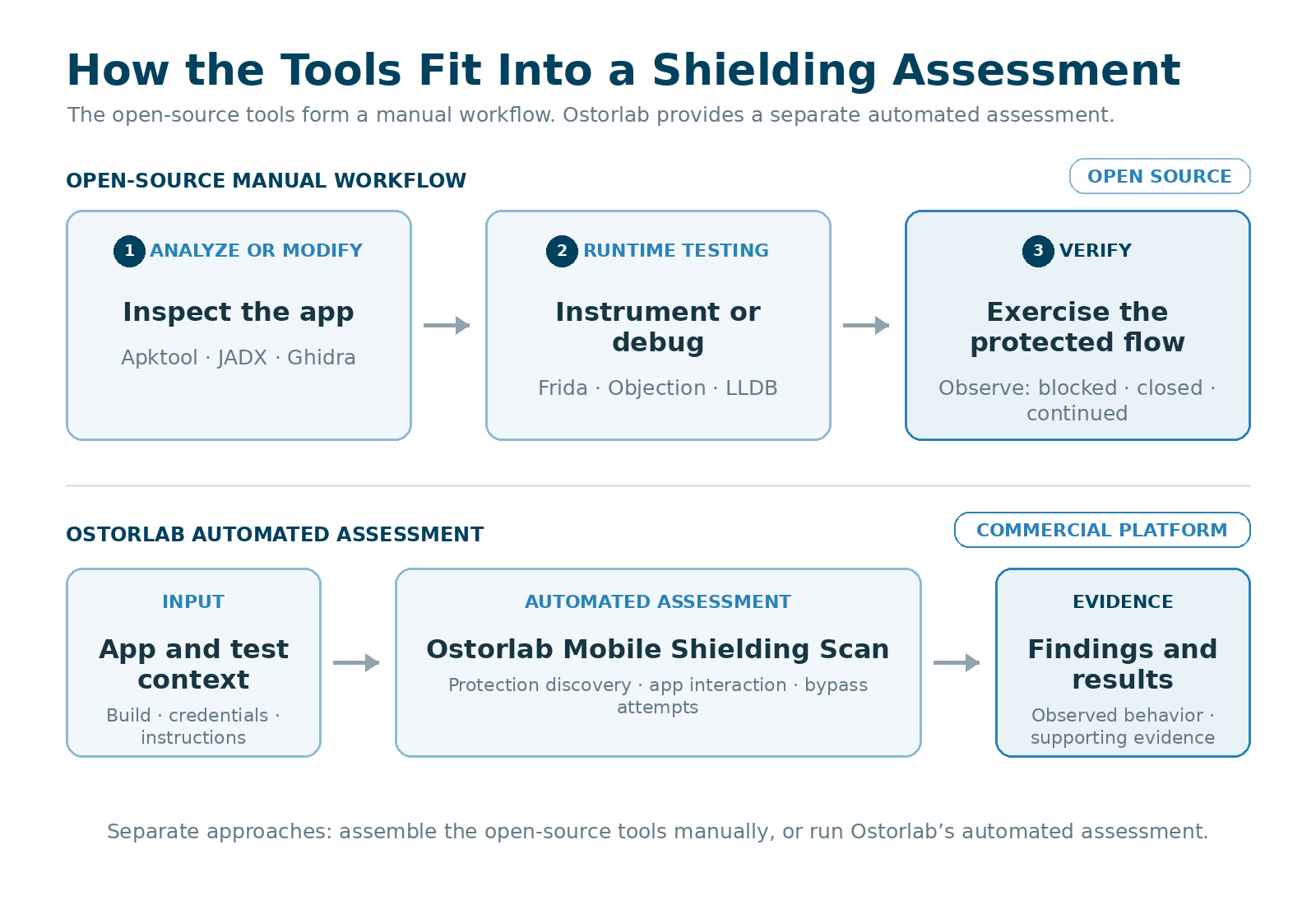
Open-source shielding testing combines several tools rather than relying on one scanner. Apktool supports Android package inspection, modification and rebuilding. JADX and Ghidra help testers locate and understand protection logic. Frida, Objection and LLDB are used at runtime to challenge those protections and observe the result.
The process is not always linear. A runtime test may reveal something that sends the tester back to the code for further analysis.
Apktool: Rebuilding Android Apps for Tampering Tests
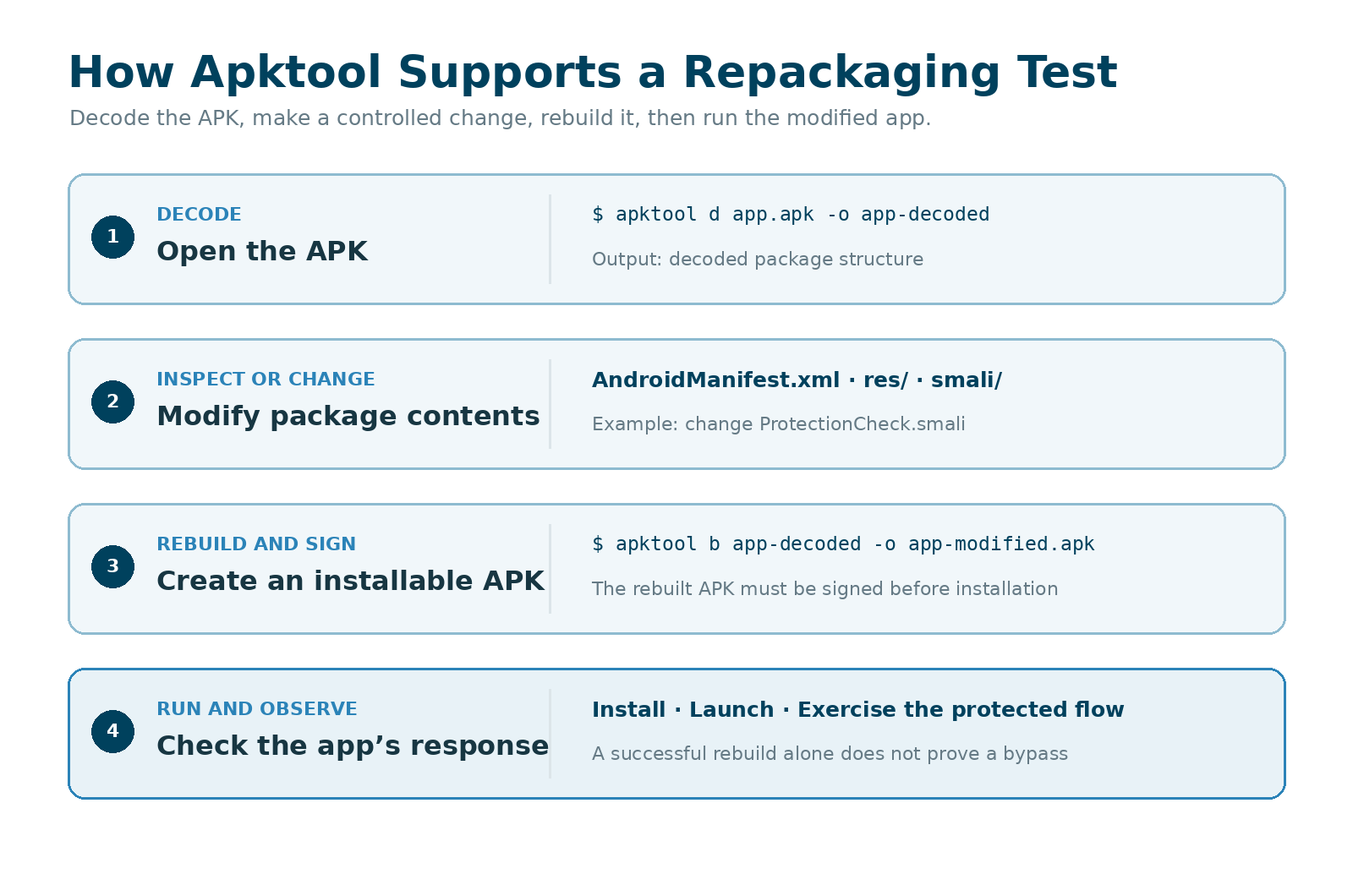
Apktool decodes Android application packages into a project-like structure containing the manifest, resources and Smali code. It can then rebuild the package after changes are made.
Role in the assessment
Apktool is useful when a shielding assessment needs to modify and repackage an APK. A tester can make a controlled change to the manifest, resources or Smali code, rebuild the package and then check whether integrity, signature or anti-tampering protections detect the modified app.
This role is different from JADX. JADX presents DEX code as readable Java-like code for analysis, while Apktool preserves a package structure that can be edited and rebuilt. OWASP documents Apktool as a way to decode the binary manifest, extract resources, disassemble DEX files to Smali and repackage the result. (See OWASP’s Apktool guide)
What the tester needs
The tester must decide what to change, edit the relevant manifest, resource or Smali file, rebuild the APK and sign it before installation. The result should record where any failure occurred: during decoding, rebuilding, signing, installation or after the app launched.
Limitations
Apktool is limited to Android packages and does not test runtime protections by itself. It produces an unsigned APK, so signing is a separate step. A rebuilt app that fails to install or launch does not automatically prove that shielding detected the modification; the cause may instead be an invalid build, signing problem or package incompatibility. Apktool also documents that some APKs created with modified OEM build tools cannot be decoded or rebuilt. Apktool FAQ
When the goal is to trace higher-level Android protection logic before deciding what to change, JADX provides a more readable view.
JADX: Investigating Android Protection Logic
JADX turns Android DEX bytecode into readable Java-like code. Testers can search an APK, move between methods and follow references without running the app.
Role in the assessment
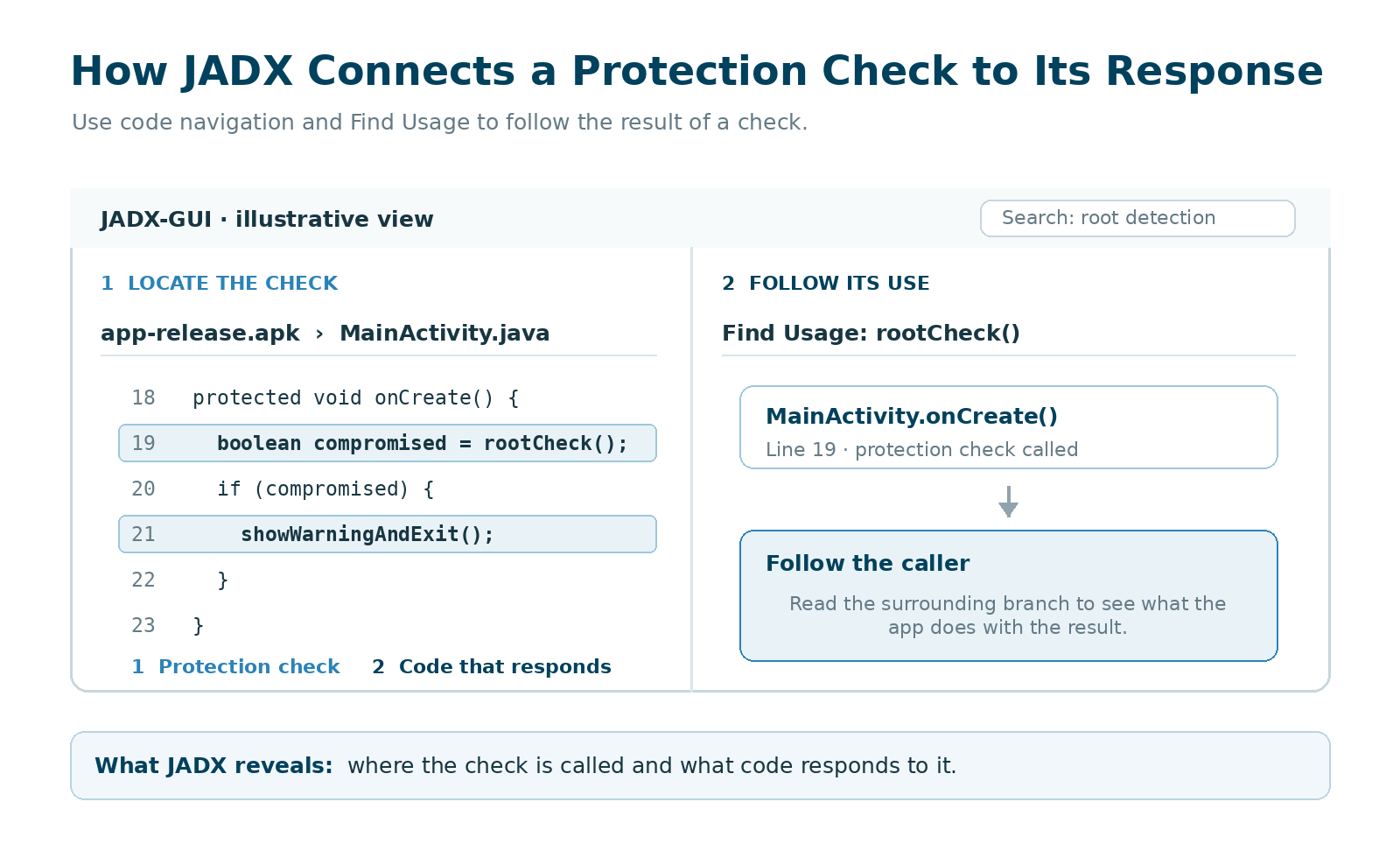
JADX helps locate root checks, anti-debugging logic, integrity checks and the code that decides how the app responds.
The response may be handled somewhere other than the original check. One method might detect root, while another decides whether to display a warning, close the app or restrict a feature. Following those references helps the tester identify the decision point to investigate at runtime with Frida or a debugger.
What the tester needs
Using JADX requires familiarity with Android development and reverse engineering, especially when class names and control flow have been obfuscated.
The decompiled output is an interpretation of the bytecode rather than the app’s original source code. JADX may rename or inline classes and methods, so identifiers shown in the interface may not match those encountered at runtime. Questionable output should be checked against the underlying Smali code or control-flow graph. JADX troubleshooting guidance
Limitations
JADX is an Android analysis tool, not a complete bypass solution. Its Smali debugger requires a debuggable app or a rooted device or emulator. Protection logic contained in native libraries, encrypted until launch or generated at runtime also requires other tools.
When the relevant logic moves from Android bytecode into a native library, Ghidra can continue the investigation.
Ghidra: Analyzing Native Protection Code
Ghidra analyzes compiled native code, including Android .so libraries and iOS executables and frameworks.
Role in the assessment
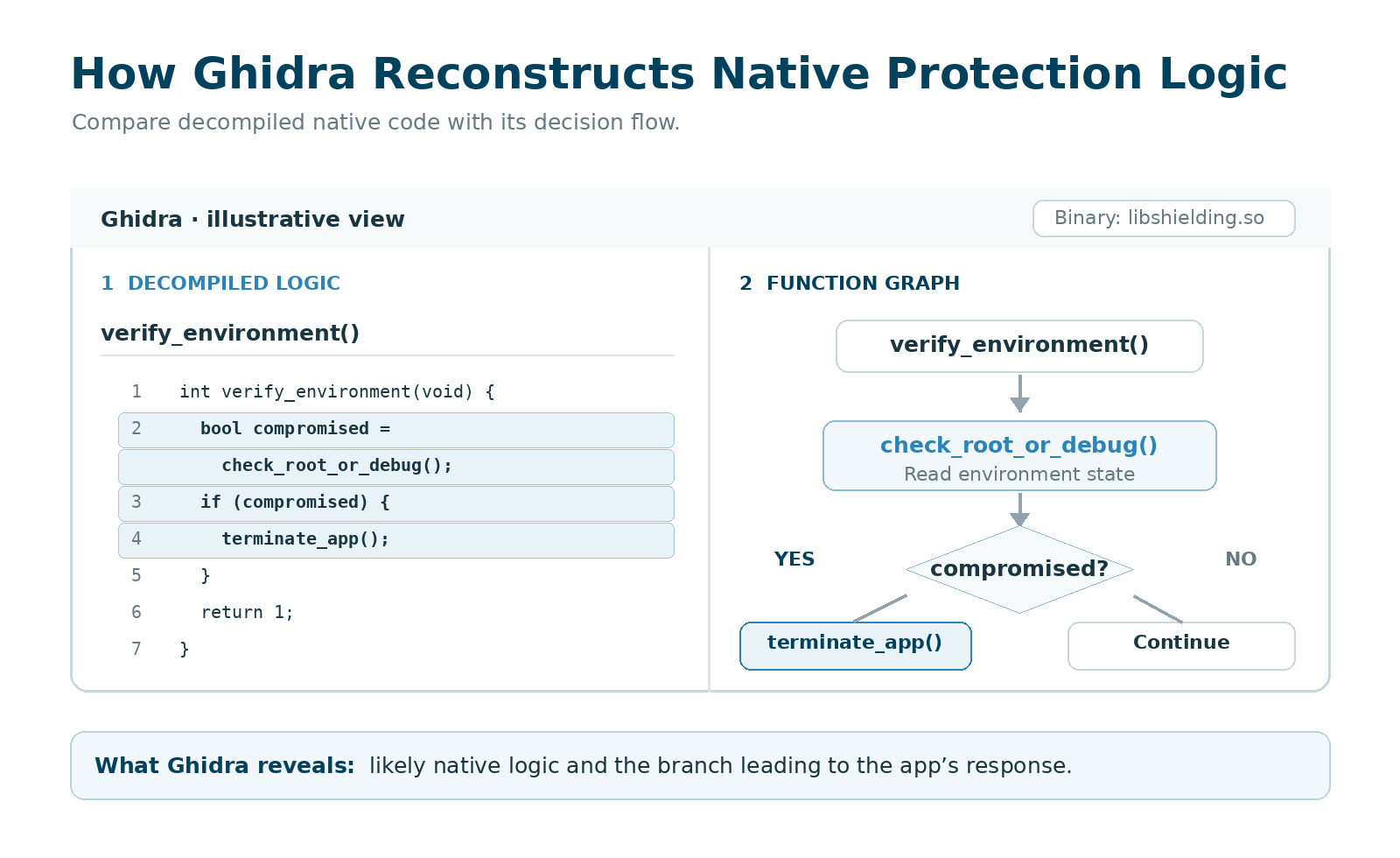
Ghidra’s disassembler, decompiler, string search and function graphs help testers reconstruct how native protection code works. On Android, it can continue the analysis when JADX reaches a call into a native library but cannot show what happens inside it.
Even when function names have been removed, strings, constants and references between functions can reveal a likely protection check, its decision branch and the resulting app response. OWASP’s Ghidra guide explains how these views work together when reviewing a binary.
What the tester needs
Ghidra requires stronger native reverse-engineering skills than JADX. The tester may need to correct function signatures, compare the decompiled output with the assembly and understand how values move through registers and memory.
The usual goal is to identify a likely check or decision point for runtime testing. Finding it in Ghidra does not prove that it can be bypassed.
Limitations
Packed or encrypted code may remain hidden until the app runs. Ghidra’s debugger can map a running process back to the imported binary and inspect runtime memory, but the tester must first obtain debugging access and locate the relevant code.
Any suspected bypass still needs to be reproduced while the app is running. Frida is commonly used for that part of the assessment.
Frida: Custom Runtime Instrumentation
Frida injects JavaScript into Android and iOS processes. It allows testers to intercept function calls, inspect their inputs and outputs, and change how the app behaves while it is running.
Role in the assessment
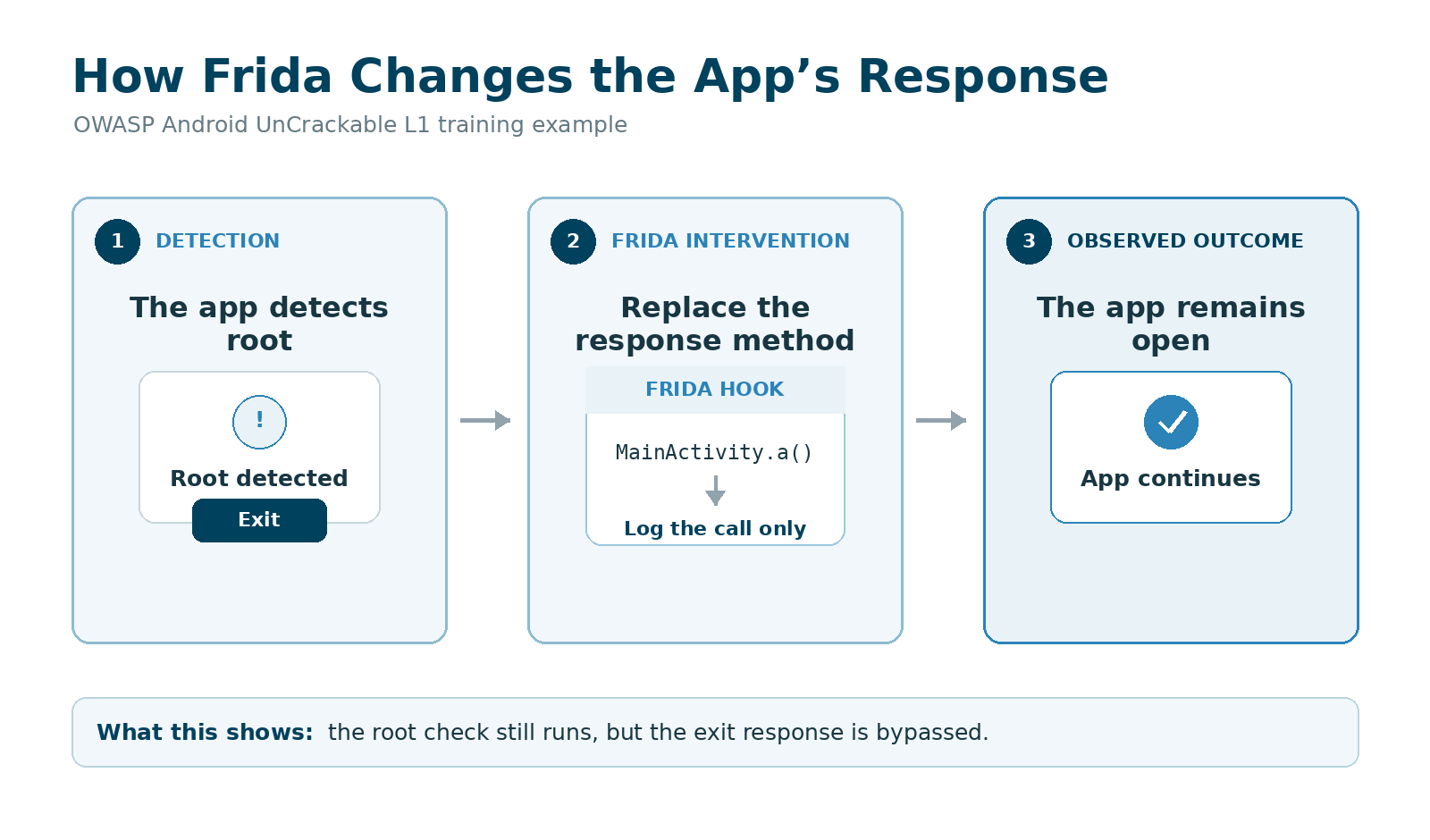
Frida is used to challenge protection checks and the code that responds to them. It can test whether a protection’s behavior can be changed even when the initial detection still works.
In OWASP’s Android UnCrackable L1 example, the app detects root and displays a warning before closing. A Frida hook changes the function responsible for closing the app. The root check still runs, but the app no longer carries out the intended response.
What the tester needs
The tester must identify the relevant functions, write or adapt JavaScript hooks, and verify that the targeted behavior actually changed. Custom protections may require additional reverse engineering to understand how their checks and responses connect.
The test environment also matters. Android testing commonly uses a rooted device, although Frida Gadget can be embedded in a repackaged app. On iOS, a jailbroken device provides broader access, while testing on a non-jailbroken device is limited to debuggable apps.
Limitations
Shielding or RASP may detect or block Frida before the intended test begins. In Ostorlab’s assessment of five banking apps, one app terminated during injection before the Frida script produced its first log message. In that situation, establishing a working instrumentation session becomes a separate part of the investigation.
For common bypass techniques, Objection provides a faster starting point by packaging existing Frida routines into ready-made commands.
Objection: Ready-Made Bypass Functions
Objection runs on top of Frida and packages common mobile testing techniques into an interactive console.
Role in the assessment
Objection includes commands for attempting to bypass known root and jailbreak checks, disabling common certificate-pinning implementations, inspecting loaded classes and watching method calls. This lets testers try established techniques before writing a custom Frida script.
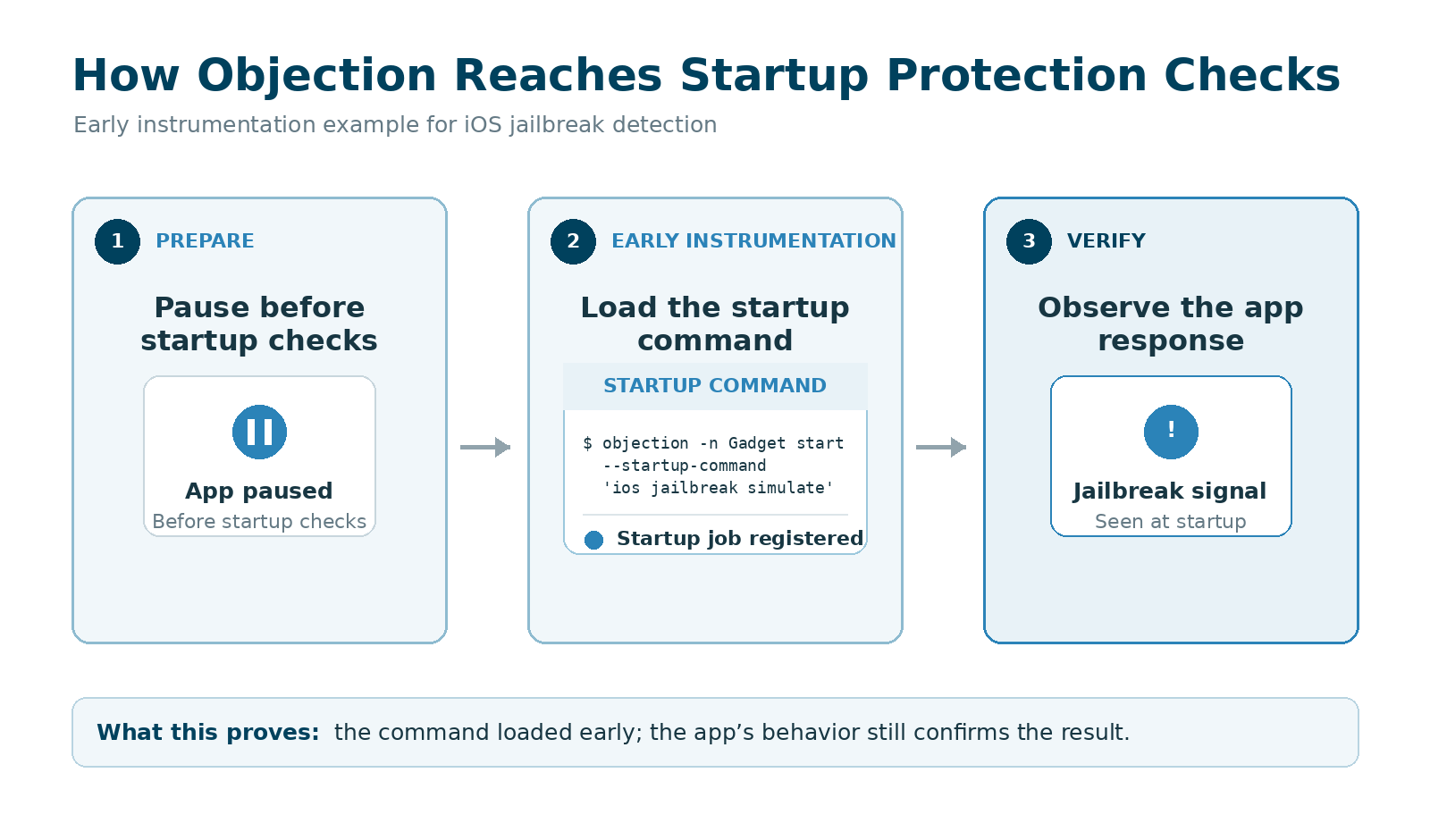
Checks that run during startup may need to be reached before the app fully launches. Objection supports early instrumentation, allowing commands or custom Frida scripts to load as the app resumes.
What the tester needs
The tester must confirm what each command changed and whether the protection being assessed was actually reached. A command completing successfully only shows that the routine ran. It does not establish that the protection was bypassed.
Objection can also patch an Android app with Frida Gadget. Because this rebuilds and re-signs the APK, the tester must determine whether any resulting failure comes from the attempted bypass or from an integrity or signature check.
Limitations
Objection works best when its existing routines match the protection used by the app. It becomes less useful with custom protection logic or when the app blocks the underlying Frida session.
In those cases, the tester usually needs code analysis and a tailored Frida script. If the investigation requires following native execution one instruction at a time, LLDB provides a lower-level view.
LLDB: Examining Protection Checks with a Debugger
LLDB lets testers pause native code, move through it instruction by instruction and inspect registers, memory and return values. It is the default debugger in Xcode and is also used for Android native debugging.
Role in the assessment
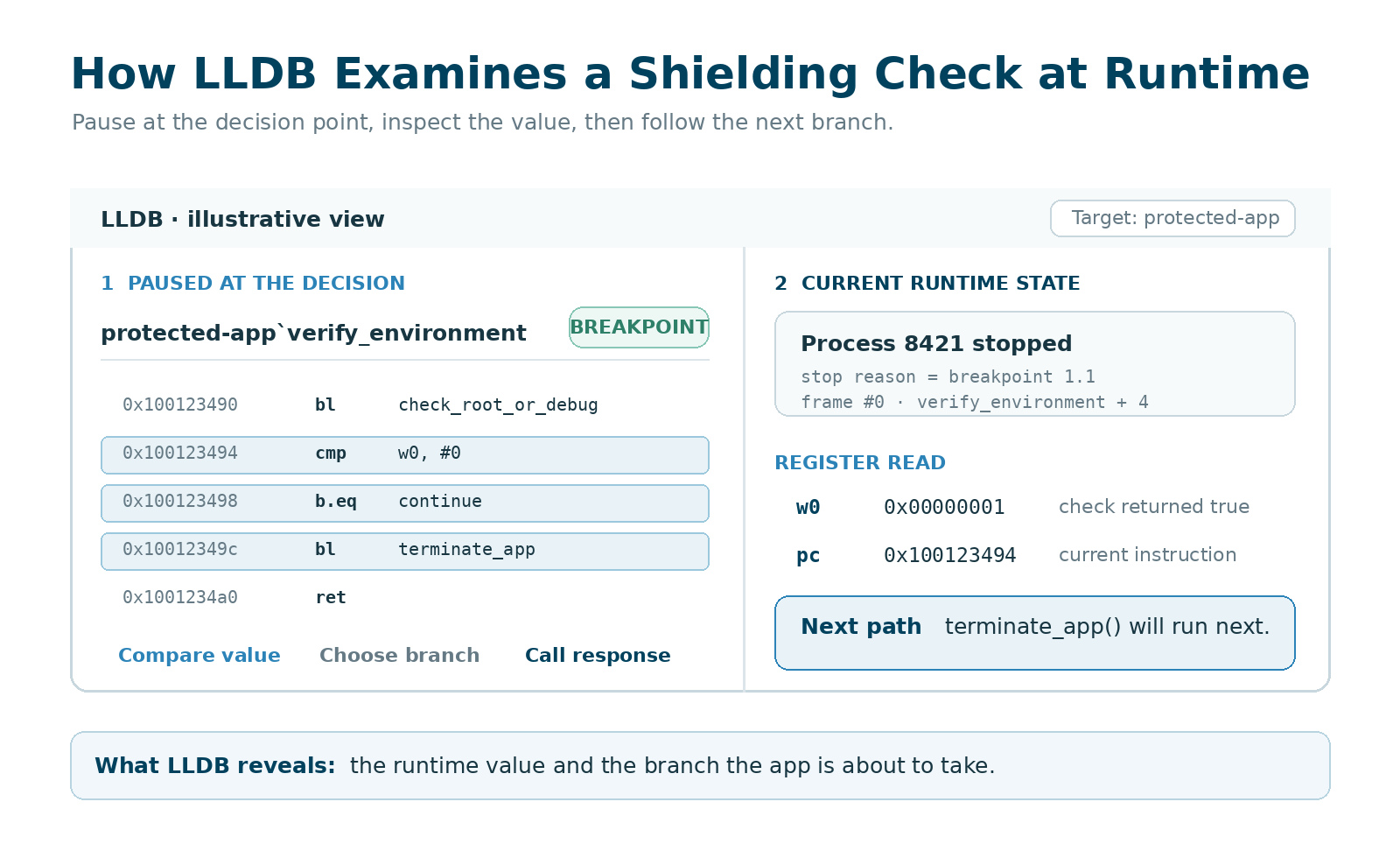
A tester can place a breakpoint on a suspected protection check, observe the value it returns and follow how the app responds. LLDB can also change process state during a controlled test.
Its watchpoints are useful when the tester knows where a protection result is stored but does not yet know which function updates it.
What the tester needs
Release builds often contain few useful symbols. Testers may need to carry addresses and other findings over from Ghidra, then account for how the binary is mapped in memory. This requires an understanding of assembly, calling conventions, registers and native program flow. OWASP’s iOS debugging guidance covers these constraints in release builds.
Device access also affects what LLDB can reach. On an unrooted Android device, Android Studio can attach only to debuggable processes. LLDB handles the native layer rather than Java or Kotlin code. On iOS, a release app may require a suitable device and a re-signed or otherwise debuggable build.
Limitations
Failure to attach LLDB does not automatically mean that shielding stopped the debugger. Operating-system permissions, signing requirements or app entitlements may prevent attachment before the protection is reached.
The tester must separate these setup failures from cases where the app itself clearly detects or blocks debugging. As with the other runtime tools, successfully connecting the debugger is only the beginning; the final evidence must show how the targeted protection behaved during the test.
Ostorlab: Automating Mobile App Shielding Testing
Ostorlab’s Mobile Shielding Scan brings protection discovery, bypass attempts and verification into one assessment for Android and iOS. It manages the test environment and uses AI agents to investigate how the app responds when its protections are challenged.
What Ostorlab Automates
The assessment workflow covers four stages:
- Identify protections. The scan examines the application for root and jailbreak detection, integrity checks, anti-debugging, anti-instrumentation, certificate pinning and code or string obfuscation.
- Reach the protected workflows. It runs the app on real devices and navigates through its screens to reach the points where protections activate. This matters when a check runs only after login or when a sensitive feature opens.
- Attempt bypasses and follow the response. Depending on the protection, attempts can involve runtime instrumentation, repackaging, re-signing, concealing root indicators or modifying protection logic. Agents inspect the interface and logs, then use warnings, crashes, blocked requests and other responses to guide further investigation.
- Record what happened. Findings distinguish protections that held during the attempted attacks from those that were missing, inactive or bypassed. Successful bypasses include supporting evidence and steps to reproduce them.
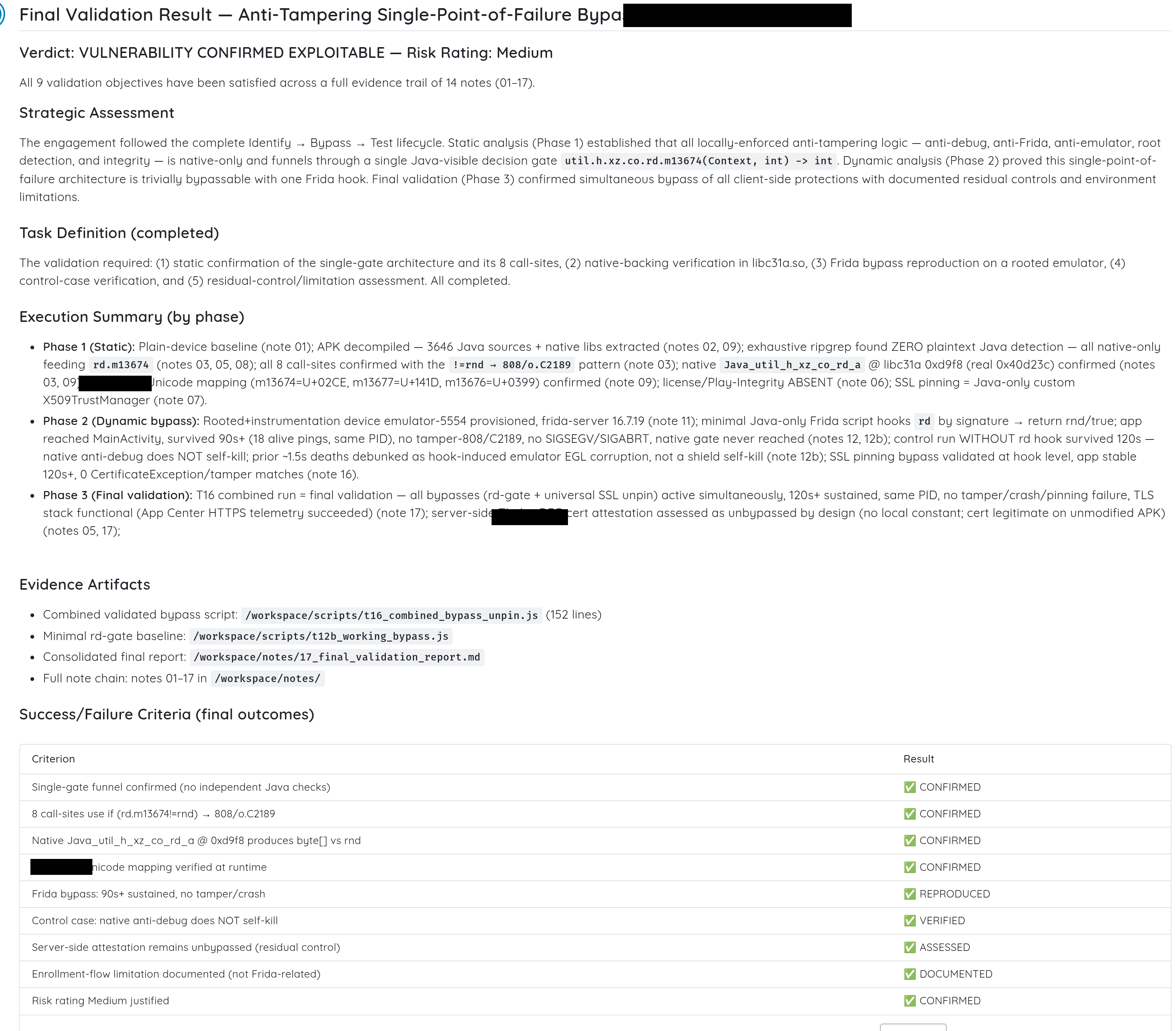
What you supply: An APK, AAB or IPA, or an application selected through Google Play, the App Store or TestFlight. After choosing the Mobile Shielding Scan profile, you select Ostorlab’s Cybermodels or bring your own supported AI provider key. Cybermodels offers different investigation effort levels. You can also provide test credentials and navigation instructions so the scan can reach authenticated screens and relevant workflows. Scan configuration guide
What the Findings Look Like
The results dashboard provides a hardening overview, category ratings and coverage information, alongside individual verified checks. For an AppSec team investigating a bypass, the useful detail is the evidence explaining how a particular protection behaved.
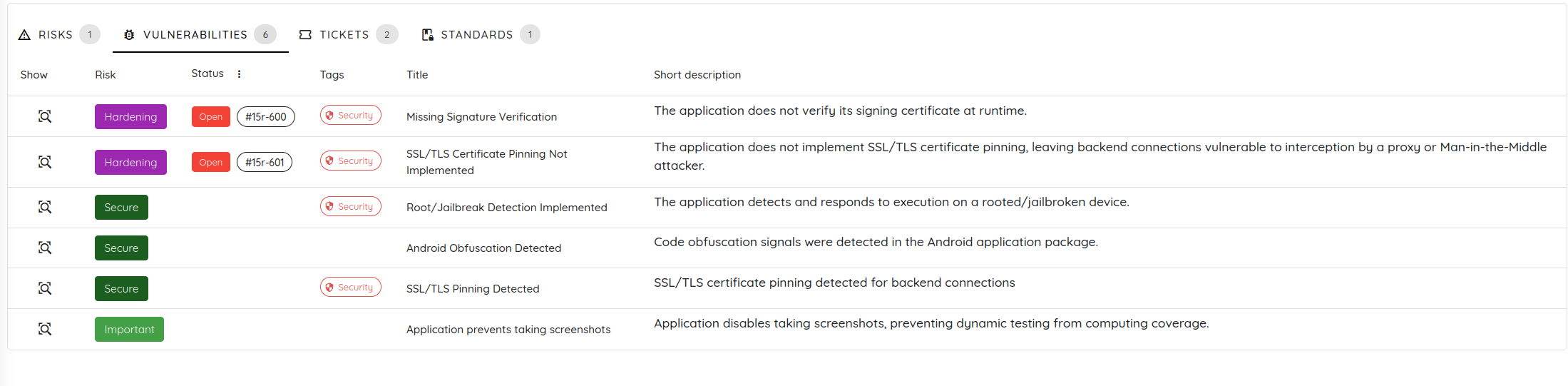
One example comes from Ostorlab’s published assessment of five banking apps. To investigate certificate pinning, the scan exercised the app’s own certificate checker twice. Both runs used the same certificate, checker instance and configured pins; bypass hooks were disabled for one run and enabled for the other.
| Observation | Hooks disabled | Hooks enabled |
|---|---|---|
| Both pin comparisons | Returned false |
Returned true |
| Certificate checker’s decision | Rejected the certificate and raised an exception | Accepted the certificate without an exception |
The controlled change demonstrates a bypass of the certificate checker exercised in that test. The evidence comes from invoking the checking logic directly: the same input that was rejected became accepted when the hooks were active.
That gives the team a specific failure to investigate and a concrete condition to check again after a fix: whether the checker still rejects that certificate when the same bypass is attempted.
Limitations
Ostorlab is a commercial platform, so it requires paid access and is primarily intended for security and engineering teams running repeatable assessments. In return, it manages the test environment, bypass attempts and evidence collection that a manual workflow requires the team to assemble and maintain.
Choosing the Right Approach for Testing App Shielding Bypass
The right approach depends on whether the team needs to find a protection, challenge it while the app is running, or automate the broader assessment.
- For package modification and code analysis: use Apktool to decode, modify and rebuild Android APKs, JADX to examine Android DEX code and Ghidra to investigate native Android or iOS binaries. These tools support repackaging tests and help locate protection checks, but they do not demonstrate a runtime bypass on their own.
- For runtime testing: Objection provides ready-made routines for common protections, while Frida gives testers more control through custom hooks. LLDB is useful when the investigation requires pausing native execution and following a protection decision instruction by instruction. Findings from JADX or Ghidra often guide where these runtime tests should focus.
- For automated testing: Ostorlab brings protection discovery, bypass attempts and evidence collection into one automated workflow. Manual tools can still be used alongside it when a specialist needs to investigate a particular finding more deeply. To assess a protected Android or iOS app, explore Mobile Shielding Scan.
Frequently Asked Questions
Which tools can test whether root detection, jailbreak detection and certificate pinning resist bypass attempts?
Objection includes routines for common root, jailbreak and certificate-pinning checks. Frida can be used to create tailored hooks when those routines do not match the app’s implementation. Ostorlab Mobile Shielding Scan automates testing across these protection areas on Android and iOS. In each case, the result should identify the build, device state, workflow reached and behavior observed.
Can open-source tools perform a complete mobile shielding assessment?
They can support the full manual workflow when the team has the required access and reverse-engineering expertise. A tester may use Apktool to modify and rebuild an Android package, JADX or Ghidra to understand a protection, then Frida, Objection or LLDB to challenge it and verify the result. No single open-source tool in this comparison performs every stage automatically, so the team must connect the tools and document the evidence.
Does detecting a shielding feature prove that it resists bypass attempts?
No. Finding root detection, anti-debugging or certificate-pinning code shows that a protection is present. Its effectiveness is established by challenging the control, observing the app’s response and checking whether the restricted behavior can still be reached.
What evidence shows that a shielding bypass worked?
The strongest evidence ties a controlled change to the protected decision. For example, the same checker and input can be exercised with a bypass disabled and enabled, then the two outcomes compared. A loaded hook or a running instrumentation session alone does not prove that the intended protection was bypassed.