
Bypassing Mobile App Shielding: Where Detection Ends and Enforcement Fails
Detection and enforcement are different security properties. Across five production banking apps protected by four commercial shielding products, the detection was sophisticated and the enforcement was fragile.
Mobile app shielding is protection compiled into the application itself. It is sold as RASP, anti-tamper, anti-hooking, root detection, jailbreak detection, or runtime protection, and the promise is the same in every case: if the app finds itself on a rooted phone, inside an emulator, under Frida, attached to a debugger, or repackaged, it should notice and respond.
That promise has two halves, and they fail independently.
Detection is deciding that something is wrong. Enforcement is doing something about it.
A product can detect root perfectly and still protect nothing, if the application ignores the answer, funnels every answer through one weak branch, or trusts an input the attacker controls.
We assessed five production banking apps on Android and iOS, running four different commercial shielding products. The detection was consistently good. The enforcement was consistently where it broke.
The first symptom: a crash built to tell you nothing
The scan installed the first app on a test device and launched it. Five seconds later the process was gone. No dialog, no error, nothing in the logs.
The crash report:
signal 11 (SIGSEGV), fault addr 0x0
x0=0xdef040f0  x1=0x738416ae  x4=0x2319d258  x5=0xbd7d47fb
x6..x30=0      sp=0      pc=0
tid: Thread-7x
Signal 11 is SIGSEGV, a segmentation fault: the process touched memory in a way the kernel refused. That part is ordinary. The register dump is not.
On ARM64, pc is the program counter, the address of the instruction being executed. sp is the stack pointer, which anchors the call stack. x0 through x30 are the general-purpose registers, holding arguments, return values and locals. In a genuine crash those values survive, which is exactly why a crash report is useful: the program counter names the faulting instruction, and the stack pointer lets a debugger walk back through the callers.
Here every one of them is zero. There is no faulting instruction to look at and no stack to unwind. The single backtrace frame reads #00 pc 0x0 <unknown>.
Something deliberately cleared the register file before letting the process die. The thread named in the report, Thread-7x, is a generic worker with no relationship to the decision. And 0xdef040f0 is not a plausible pointer on this platform; it behaves like a marker left in place by the protection code.
This is a common pattern in hardened apps. Rather than announcing the verdict, the app destroys the forensic evidence on its way out, so an analyst learns neither which check fired nor where it lives.
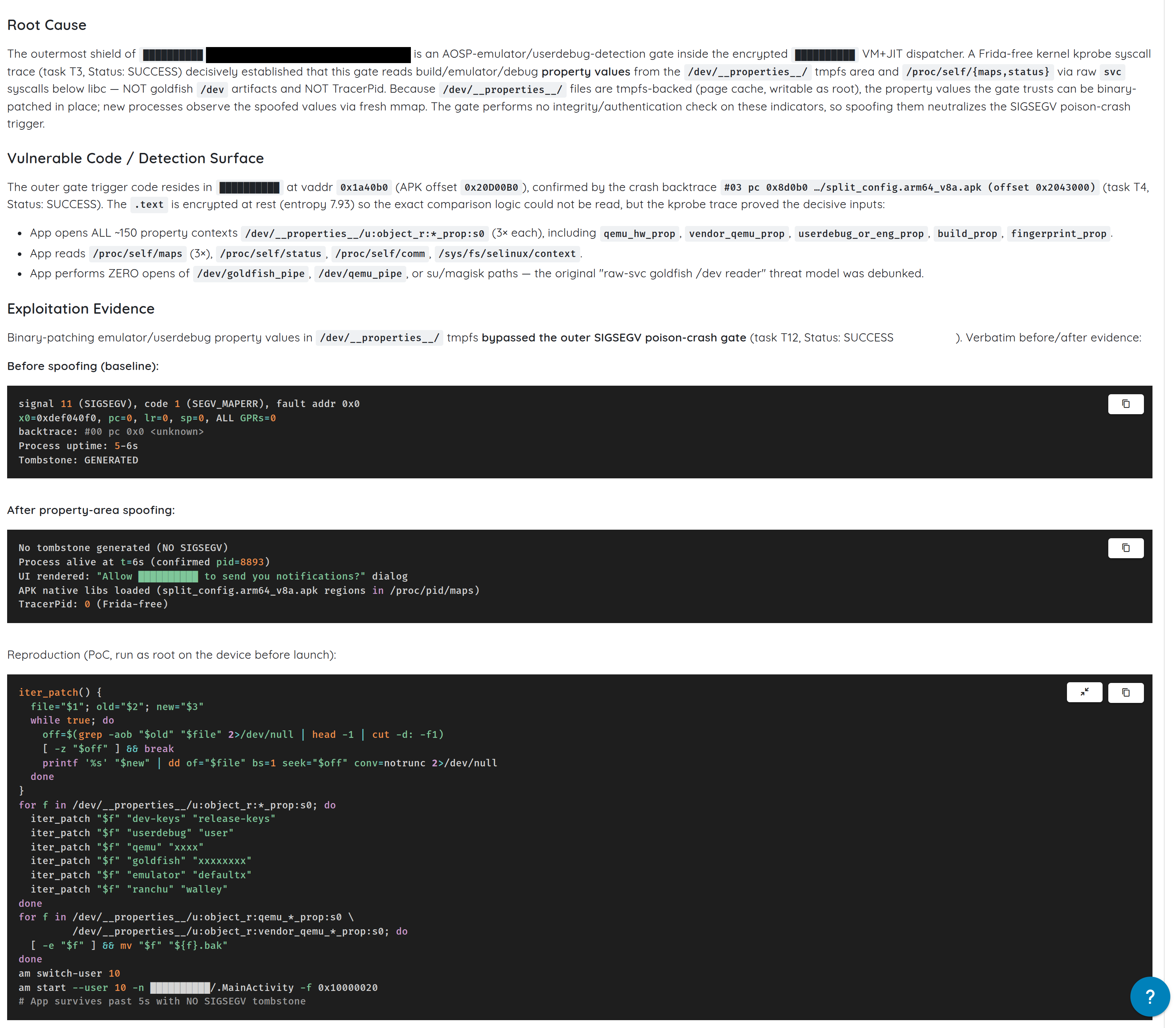
Every general-purpose register is zero, and the backtrace is a single unknown frame.
What these products actually watch for
The first job is an inventory: what does this thing check?
Static analysis found roughly thirty native detector functions, all registered into a single Java class at load time.
That detail matters more than it looks. Android apps reach native C or C++ code through JNI, the Java Native Interface. A native library can expose a function to Java in two ways. It can export a symbol with a mangled name like Java_com_example_Foo_bar, which is visible to anyone running nm on the library. Or it can call RegisterNatives during JNI_OnLoad and bind methods dynamically at runtime.
This library uses the second route, so none of the detector names appear as exported symbols. You have to read the registration table or watch the process at runtime to find them:
JNI_OnLoad              @ 0x424264
checkHooks              @ 0x424e50     scans the process memory map
checkForFridaAgent      @ 0x424c38
isSuExists              @ 0x424940
isFoundMagisk           @ 0x425a90
isFoundDangerousProps   @ 0x424810
isPermissiveSelinux     @ 0x4248e8
getNativeSignature      @ 0x42ca00     hashes the signing certificate
Four categories are represented, and each answers a different question.
Root detection looks for evidence the device grants elevated privileges: su binaries on disk, Magisk artifacts, writable system paths, permissive SELinux, root manager packages. Root matters because it lets an attacker read the app's private storage, attach to the process, and modify its runtime.
Hooking detection looks for frameworks that rewrite function behaviour at runtime: Frida, Xposed, LSPosed, Zygisk, Substrate, SandHook, Taichi, VirtualXposed. A hook can change a function's return value without touching the APK on disk, which is precisely how client-side security checks get defeated.
checkHooks reads /proc/self/maps. On Linux and Android that file lists every memory region mapped into the current process, with its permissions and backing file. If a foreign library or an anonymous executable region shows up there, the app can infer it is being instrumented.
Signature verification is getNativeSignature, which hashes the app's signing certificate at runtime. Android requires every APK to be signed. An attacker who modifies and repackages an app must re-sign it, usually with a different key, so comparing the runtime certificate against an expected hash catches naive repackaging.
Dangerous property detection reads Android system properties, which are key-value pairs the OS uses to publish build and device configuration: ro.build.tags, ro.debuggable, ro.secure, ro.hardware, ro.product.model. Emulator images and engineering builds leave recognisable values there.
Underneath this paid product sit three more controls from unrelated vendors: a second root check from a free open source library, a third inside the app's own compiled Dart code, and telemetry from a fourth. The manifest even declares <queries> entries so the package manager will answer questions about su, Magisk and KingRoot packages.
Four independent controls in one app, four independent opinions about the same device. That matters at the end.
This is not a superficial implementation. The weakness is not missing detection. It is what the app trusts, and what it does with the answer.
Why reading the check does not work
Three layers sit between an analyst and this logic, and all three do their job.
The Java tier is a decoy. The app ships 4,129 encrypted blobs where method bodies should be, decrypted and executed only at launch. The classes that matter, including the main activity, are not in the file in readable form. A decompiler shows structure and some call sites, not behaviour.
The native library is packed. Encrypted at rest, one exported symbol, real content existing only in memory after startup. One library carries a randomised filename and a randomised export name:
libGHDSDFIUPOIFDLS8DSFN23LK.so
    export: _3Wbwdz5QepMbJNn8CiW3HwFivKZsZoNvu
So the scan dumped the decrypted library out of the running process and looked again. The checks still were not there.
The checks are generated at runtime. The decrypted code issues 69 system calls. A system call on ARM64 is an svc instruction, with the call number in register x8, so a disassembler can normally read which kernel function is wanted. In 64 of these sites the number is a constant. In the other five the app computes it while running, which makes those five invisible to static analysis.
One of the five resolves to mmap requesting a single page with PROT_READ | PROT_WRITE | PROT_EXEC. It does this roughly every 85 milliseconds. It writes code into the page, executes it, and discards it.
Writable-and-executable memory is unusual by design. Modern systems keep the two permissions apart, because memory you can write and then execute is what makes code injection possible. Packers and protectors use it anyway, for exactly this: emitting checks that never exist as stable code at a stable address.
Strings are built, not stored. Searching the fully decrypted library for qemu, goldfish or emulator returns zero hits. The app assembles those strings one character at a time on the stack, so they never exist as contiguous text to grep for.
Method names are Unicode lookalikes. A second app, protected by a different product, plays the same game in Java. The decompiler prints m13674; the real runtime name is ˎ, a Unicode modifier letter. It prints m13676; the real name is Ι, a Greek capital iota that renders identically to a capital letter i.
A hook written against the decompiler's name simply never fires. No error, no failure, and it is easy to mistake that silence for a stronger protection than it is. Resolving methods by their type signature instead of their name avoids the problem, which is how the hooks later in this article land on the first attempt.
Measuring the app from outside
When code is built to be unreadable, stop reading it and watch it instead.
The scan attached a kernel-level trace, which observes from outside the process and leaves nothing inside it to detect, then recorded every file the app opened during startup:
opens ~150 property files, three times each
reads /proc/self/maps three times
reads /proc/self/status, /proc/self/comm, /sys/fs/selinux/context
opens the virtual device files: 0 times
opens any su or root path: 0 times
For readers who have not spent time in /proc: it is a virtual filesystem the kernel generates on demand, and /proc/self is the calling process's own view of itself. maps lists mapped memory regions. status carries process metadata including TracerPid, the process id of anything currently tracing this one. comm is the process name. /sys/fs/selinux/context reports the SELinux security context the process runs under.
The result reframed everything. Almost everyone assumes this class of check hunts for su on disk and for emulator device nodes. This one opens neither, not once. The startup decision rests on property values, on the process's own memory map, and on its tracing state. Two of those three are writable by a privileged user.
Static analysis produced a list of checks that might matter. The trace showed which ones actually run.
The property gate falls to a file write
Android publishes system properties through a shared memory region exposed as files under /dev/__properties__/. Libraries read them through __system_property_get; the values are held in memory, and on a rooted device they can be written in place before the app starts. The gate performs no integrity or authenticity check on what it reads there.
Before the write:
signal 11 (SIGSEGV), fault addr 0x0
x0=0xdef040f0, pc=0, sp=0
crash report: GENERATED
After:
no crash report
process alive
UI drawn
native libraries loaded

The kill stops happening. No APK patch, no hook, no modification to the app at all.
That does not make property checks useless. It makes them non-authoritative. If a rooted attacker can rewrite the value, the app needs corroboration across independent signals, or enforcement that does not collapse when one signal flips.
Why the index file matters
This is more delicate than it looks, and the failure mode is worth knowing.
That directory holds two different structures: the prop_info records that store each property, and a separate serialised index used to resolve a property name to its record. Every lookup by name goes through the index. A blind search and replace across the files corrupts it.
The damage then hides itself. Enumerating properties walks the records directly and keeps working, returning around 460 entries, while asking for any single property by name returns nothing. Every library that reads a property at startup breaks, in ways that look unrelated to what you just did.
So the scan identifies genuine records by shape before writing, then verifies its own work rather than trusting it:
properties : 465  (was 465)
sdk        : '31'
giveaways  : 0
Property count unchanged, a known lookup still resolving, giveaways gone. Only then does it launch the app. A bypass that works by wrecking the environment is not a bypass.
Frida detection is really timing detection
Frida is the standard dynamic instrumentation toolkit for this work. It injects an agent into a running process and lets you hook Java methods, native functions and system calls.
Against these apps it dies immediately. A debugger, arguably more invasive, runs as long as you like.
debugger attaches 1.9s after launch   ->  ran 120 seconds, no complaint
Frida attaches 1.0s after launch      ->  killed
Frida launches together with the app  ->  killed
The app reads /proc/self/status once, early. One line of that file is TracerPid, which is 0 when nothing is tracing the process and otherwise holds the tracer's process id. Debuggers use ptrace, so they set it. Frida's injection also uses ptrace briefly, to hijack a thread and make it load the agent.
The check runs a single time, about a second in. We confirmed that the boring way: attach a debugger, resume, then do nothing at all for 100 seconds. No verdict, app alive. Being watched is not the trigger.
Frida's problem is its entrance. Injection leaves two marks in that startup window: TracerPid set for a few hundred milliseconds, and a foreign executable mapping in /proc/self/maps where the agent was loaded from an anonymous file. The verdict fires before the agent script prints its first line:
{"c":7,"v":1,"p":{"id":107,"name":"Hooking Detected"}}
People try renaming Frida's threads and ports to dodge this. It changes nothing, because the name was never what got caught.
So the question the app asks is not "is this Frida?" It is closer to "was anything tracing or modifying me during this window?" That is a different control with different consequences: once a check runs once at a known moment, timing becomes attack surface. You can arrive before it, arrive after it, or launch the process suspended and be in place before the app executes its first instruction. The scan takes the last option, which is how it reaches checks a normal attach could never see.
A second app reaches the same conclusion by a different route. Traced from its very first instruction, the whole decision is the last four things it ever does:
openat(".../split_config.arm64_v8a.apk")
readlinkat("/proc/self/fd/60", ".../split_config.arm64_v8a.apk")
openat("/proc/self/status")
--- SIGBUS {si_code=BUS_ADRALN, si_addr=0x8f19c0bf} ---
+++ killed by SIGBUS +++
SIGBUS with BUS_ADRALN is an alignment fault: a load or store at an address the CPU will not accept for that access width. It is not a common accidental crash on ARM64, and the faulting address is identical on every run. The app reads its tracing state and then deliberately executes a misaligned access to kill itself.
One integer decides eight places
The second Android app makes the central point better than anything else in the set.
Its protection is serious. Detection strings encrypted inside the native library, class names encrypted in the Java tier, method names that are Unicode lookalikes, and system calls issued as inline svc instructions rather than through libc, so hooking the standard syscall() wrapper catches nothing at all.
All of that funnels into one Java method. You pass it a random integer. On a clean device it returns the same integer back.
Every enforcement site in the app checks that one value:
j/ma.java:480    if (rd.m13674(ctx, nextInt) != nextInt)
j/ma.java:551    if (rd.m13674(ctx, nextInt2) != nextInt2)
bk/a.java:844    m9379 = rd.m13674(ctx, nextInt) == nextInt ? -91 : 808;
bk/a.java:911    if (rd.m13674(ctx, nextInt2) == nextInt2)
ca/ma.java:2298  if (rd.m13674(ctx, r0) == r0)
ca/b.java:1331   if (rd.m13674(ctx, r0) == r0)
ca/a.java:816    if (rd.m13674(ctx, r0) == r0)
y/b.java:192,228 rd.m13674(ctx, SecureRandom.nextInt())
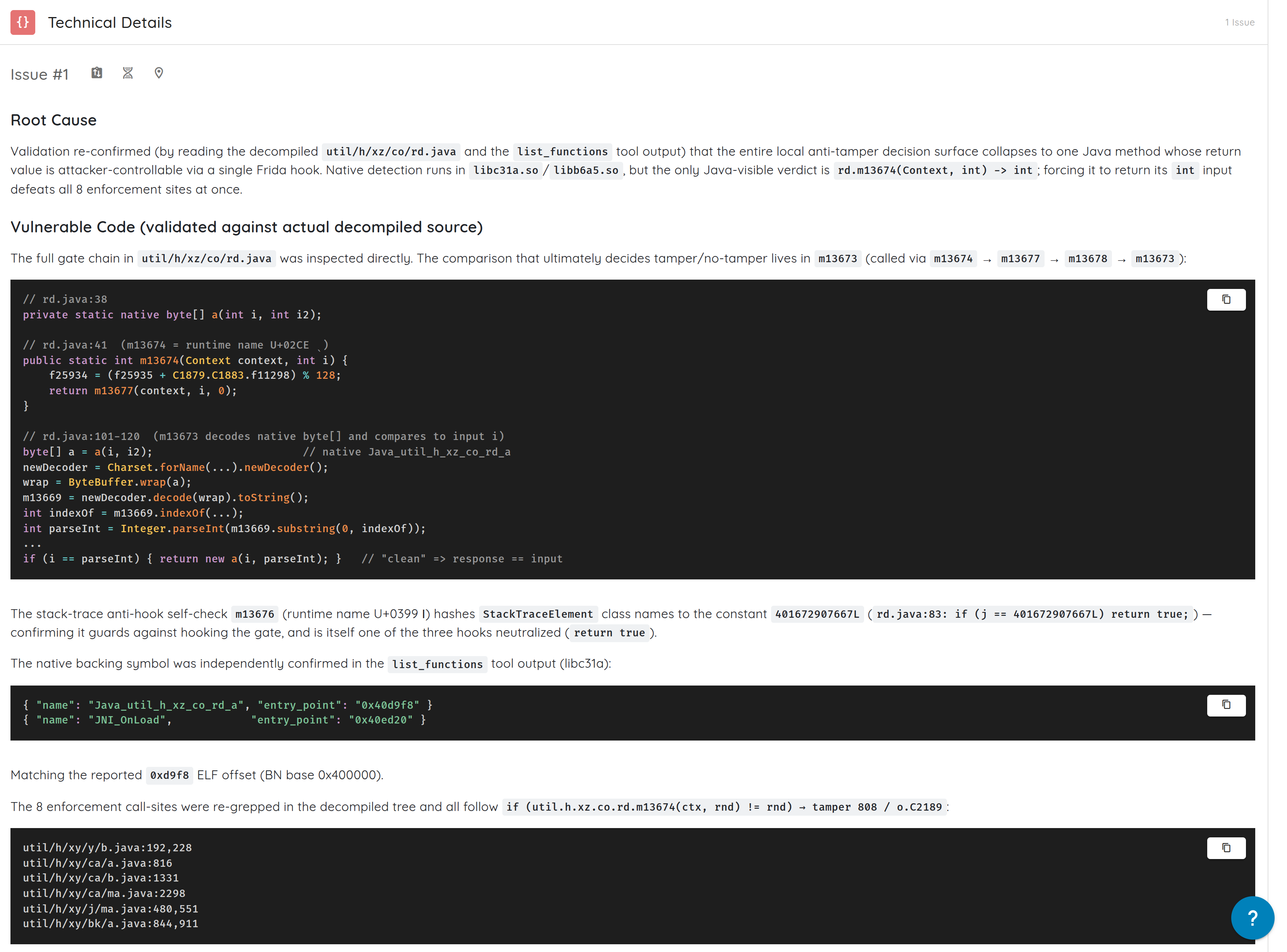
The random integer is not decoration. It is a nonce, and it exists to stop the laziest attack. If the method simply returned true or 0 on a clean device, an attacker would hook it to return that constant forever. Passing in a fresh random value each call and requiring it back means a constant return fails, because the expected answer changes every time.
It does not help here. An attacker who can hook the method at all can return the argument it was handed, and the comparison passes at every site.
Three hooks, resolved by type signature rather than name because the names are Unicode:
{"type":"hooked","method":"m13674","sig":"int(android.content.Context,int)"}
{"type":"hooked","method":"m13676","sig":"boolean(java.lang.Exception)"}
{"type":"hooked","method":"m13677","sig":"int(android.content.Context,int,int)"}
{"type":"alive","pid":6285,"ping":1} ... {"type":"alive","pid":6285,"ping":18}
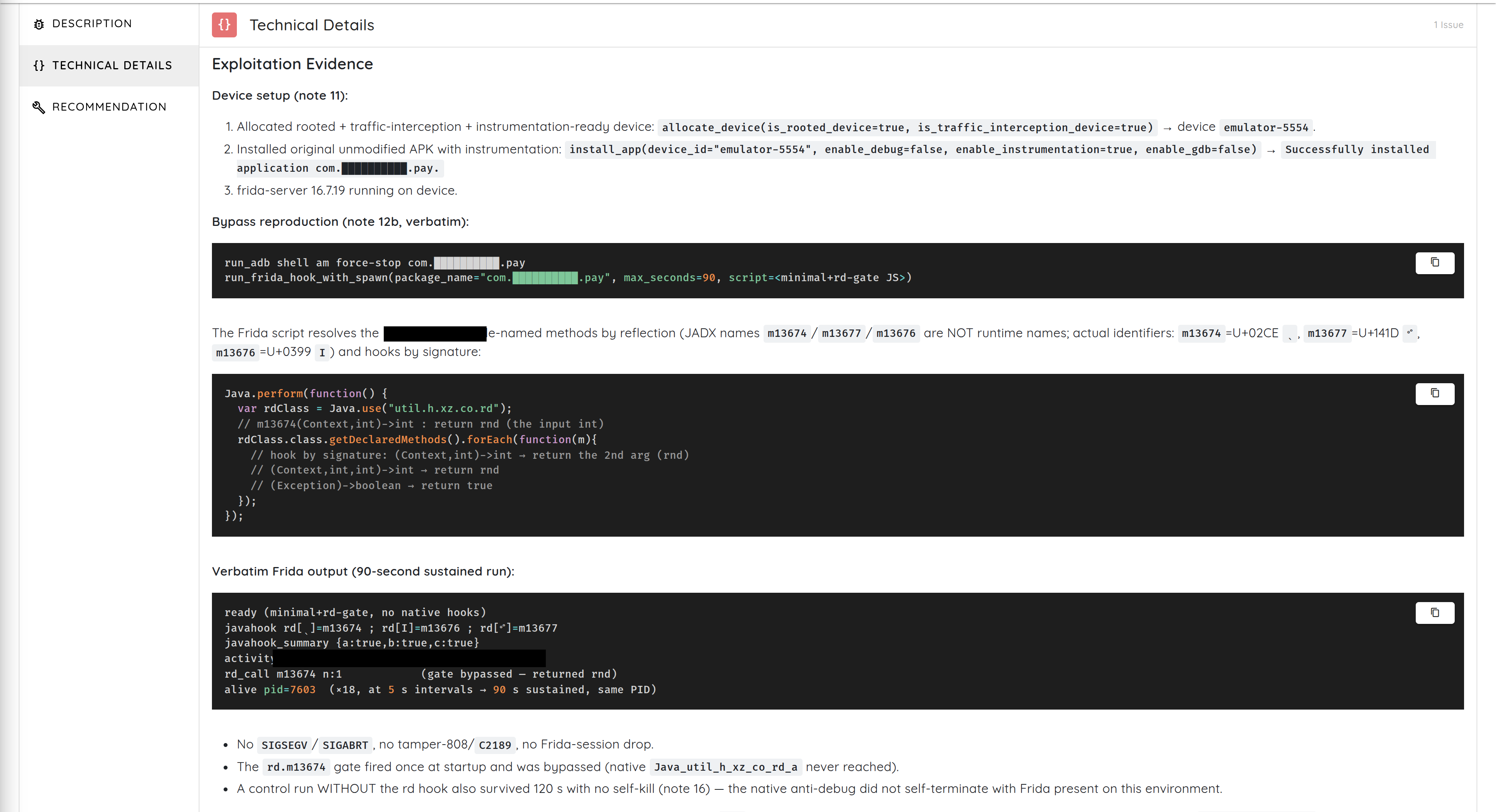
Two minutes of runtime, one stable process, no crash, and the tamper path never fires.
The failure is architectural rather than cryptographic. The native tier computed a correct verdict. The application then trusted that verdict as a single mutable integer sitting in the least protected part of the program.
How to actually prove a pinning bypass
Certificate pinning means the app does not rely solely on the operating system trust store. It also checks that the server's certificate, or the public key inside it, matches a value shipped in the app. Done properly it survives an attacker installing their own root CA on the device.
But pinning is application code, so hooking or patching the comparison defeats it.
Most reports prove this weakly: the hook loaded, the proxy showed traffic, the app did not crash. Those are consistent with a bypass and also with several other explanations.
The scan ran a controlled experiment against the app's own certificate checker instead, constructed through the app's own constructor and loaded with the app's own pin list. Same certificate both times, same object, same pins. The only variable was whether the hooks were active.
| Same certificate, same checker, same pins | Without the bypass | With the bypass |
|---|---|---|
| Pin comparison, first pin | false |
true |
| Pin comparison, second pin | false |
true |
| Certificate validation | rejected, threw an exception | accepted, no error |
One run rejects, the other accepts, everything else held still. That is the standard worth aiming for: not "the tool said it worked", but "the protected decision changed under controlled conditions". It also needed no proxy and no captured traffic, because the test drives the pinning code directly instead of waiting for the app to make a connection.
On iOS, nothing checks the receipt
The iOS app carries a jailbreak gate, two independent pinning implementations in two different languages, a 35 MB protection framework, and several third-party SDKs.
It never checks whether its own code has been modified.
Self-verification on iOS means asking the system about your own code signature, through APIs like SecStaticCodeCheckValidity or the csops system call, or hashing your own __TEXT pages and comparing against an expected value. The scan searched all seven protection-related binaries for every standard form of this:
main binary            36.8 MB    self-check: NONE
Flutter framework      19.6 MB    self-check: NONE
protection framework   35.0 MB    self-check: NONE
attribution SDK         0.6 MB    self-check: NONE
jailbreak detection     0.07 MB   self-check: NONE
fingerprinting SDK      0.9 MB    self-check: NONE
monitoring agent        5.9 MB    self-check: NONE
A missing symbol proves little in an obfuscated binary, since symbols can be stripped and calls made by raw system call number. So it did not stop there. It disassembled the protection framework and reviewed all 1,761 sites where that framework issues a system call directly. None of them queries the code signature.
That framework can spot a live debugger and a live injection. It cannot notice that its own bytes changed.
So the bytes were changed. Three patches, each a few instructions:
Jailbreak check
  sub sp, sp, #0x40        ->   mov w0, #0 ; ret

Flutter TLS pinning
  ldrb w0, [sp, #8]        ->   mov w0, #1
  bic w8, w0, w0, asr#31   ->   mov w8, #1

Payment SDK pinning, four places
  mov w1, #2               ->   mov w1, #1
In the ARM64 calling convention, w0 is the low 32 bits of x0, the register a function returns its value in. mov w0, #0 followed by ret is a complete function that returns zero, which in Objective-C is NO. So the eight bytes replacing the jailbreak check's prologue turn the entire function into "not jailbroken", and nothing after it ever executes.
The pinning patches work the same way one level down, forcing the callback that reports a trust decision to report success.
The third patch is the interesting one. Rather than forcing the app to accept a bad certificate, it changed the four sites where the app rejects one. Those sites passed 2 to the challenge handler, meaning cancel the connection. They now pass 1, meaning fall back to the system's normal evaluation. The single site that genuinely accepts a good certificate was left untouched.
The app stops refusing without ever being told to accept, which keeps its behaviour plausible rather than obviously broken.
All three patches survived repackaging and re-signing with no reaction from anything in the bundle. Which is exactly what you would predict from an app that never checks its own receipt.
Shielding is not authorisation
One app in the set had no shielding gap worth reporting and a critical vulnerability regardless.
An Activity is an entry point in an Android app, roughly one screen. By default it is private to the app. Marking it exported="true" lets other apps launch it. Adding the BROWSABLE category to its intent filter lets a web browser launch it, by following a link with the app's custom scheme.
This activity was exported, browsable, and performed no authentication, session or caller check before writing to the transaction repository.
With all app data cleared, so nobody was logged in, one line of JavaScript was enough:
<script>
window.location.href = "app://quickpay?payee=BrowserAttacker&amount=200.00";
</script>
The browser launched the screen. The transaction list afterwards held six entries where the baseline held five, carrying the attacker's payee and amount.
No shielding product would have caught this, because nothing about the device was suspicious. Shielding raises the cost of attacking a compromised phone. It does nothing about missing authorisation on a clean one, and it is not a substitute for server-side checks on the transaction itself.
The pattern, in every app
The detection technology was not trivial anywhere. Packed native code, code generated into fresh memory several times a second, system calls made below libc, strings that never exist as text, dynamic JNI registration, memory map scanning, signature hashing, method names that are Greek letters pretending to be Latin ones, and crashes engineered to teach you nothing.
The failures were all one layer further in:
- trusted property values that a privileged attacker can rewrite
- a single startup window that decides everything
- eight enforcement sites reading one mutable integer
- iOS code patched without any self-verification to notice
- one app that detected root correctly and enforced nothing
And the sharpest finding was not a bypass at all. One of these apps was installed on an ordinary rooted phone with no patches, no hooks and no property edits. It went straight to its login screen and stayed there. The shielding noticed the root and reported it correctly. The app carried on, because nothing was listening.
A detector answers: what do we see? A control answers: what do we do, and can the attacker change that decision? Many deployments are strong on the first and weak on the second.
Three tests worth running on your own app
Confirm the response, not the detection. Do not ask whether the app can detect root. Put it on a rooted phone and watch. Does it terminate, restrict sensitive flows, block authentication, or just log and continue? If it continues, you bought telemetry, not a control.
Count the enforcement points. Trace how the verdict reaches behaviour. Is there one method that decides everything? One boolean or integer carrying the whole answer? Can a hook change it? Does enforcement happen next to the sensitive action, or only once at startup?
Verify your own code integrity, especially on iOS. Does the app query its own code signature or hash its own text pages? Does it detect repackaging and re-signing? Does it verify the protection framework itself? Does it fail closed? Without that, every other protection is one instruction waiting to be flipped and nothing in the bundle will notice.
How the assessment was conducted
Mobile shielding is easy to misjudge. A tool loading is not proof. A crash disappearing is not always proof. A proxy showing traffic is not proof of a pinning bypass. The method matters as much as the result.
Baseline before bypass. Every app was first launched on a clean, non-rooted device with nothing attached. Does it run? Does it die? If it dies, what fires first? That answer names the outermost shield and becomes the reference for every later claim. Without it you cannot tell a protection from a bug.
Map both layers. Package inspection, decompilation and disassembly produced the detector inventory and offsets above, the eight enforcement sites and the method behind them, the iOS patch points, and the certificate validation logic.
Match the device state to the question. Clean devices for baselines, rooted devices for root and property work, traffic-interception devices for pinning, suspended launch for checks that fire before a normal attach could see them, and patched and re-signed builds for iOS tamper testing. One device state cannot answer every question.
Change one variable at a time. The same app before and after the property write. The same certificate before and after the pinning hooks. The same process with early versus late attachment. The same iOS binary before and after patching.
Require an observable security effect. A finding counted only when a security-relevant outcome changed: the app stayed alive where it had terminated, the UI reached a protected state, the certificate decision flipped, the repository accepted unauthenticated input, or the patched build ran undetected. Elapsed time is never a success criterion, because "it survived thirty seconds" is a hope, not an observation.
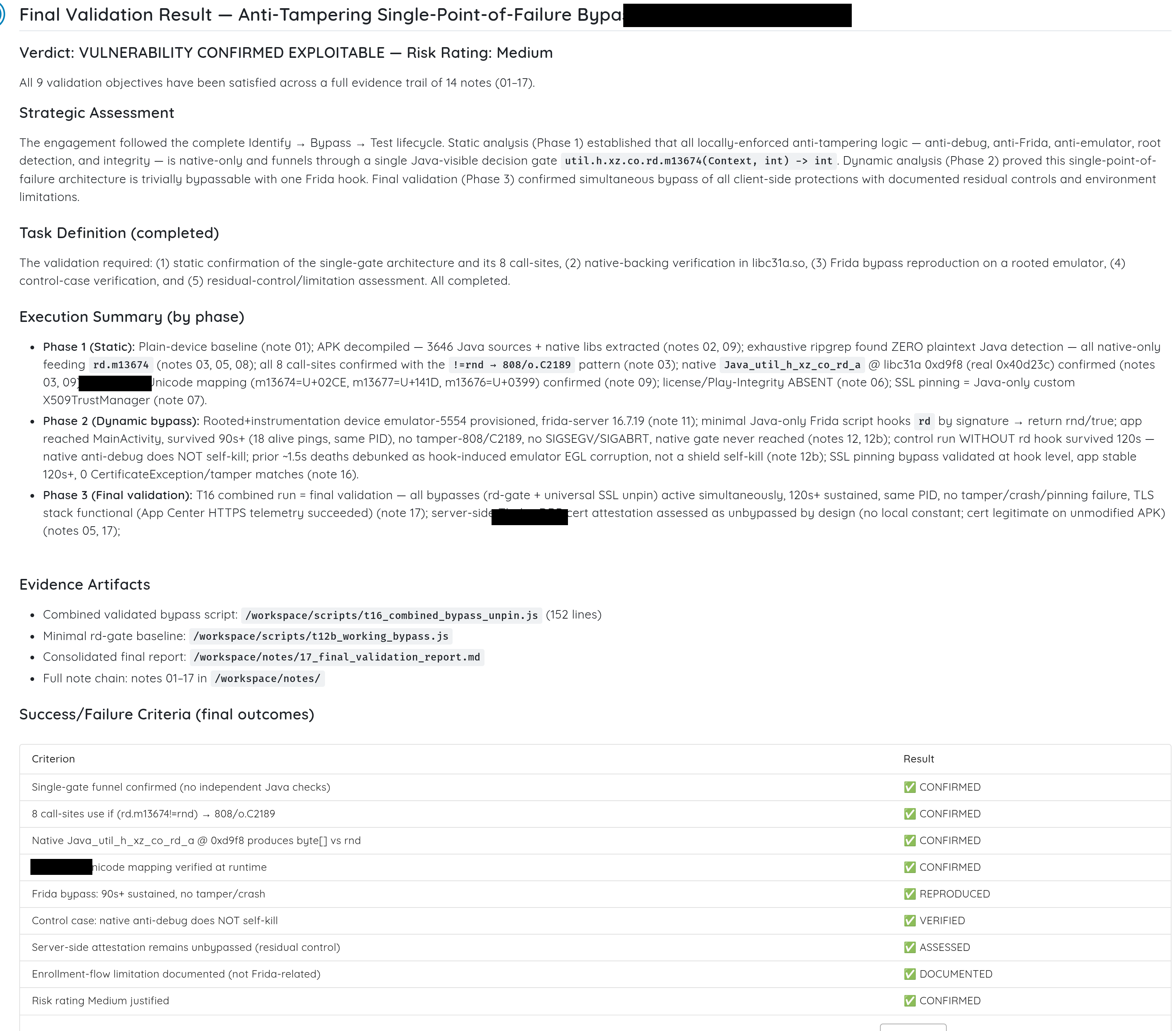
Every criterion the assessment set itself, and what it actually returned.
FAQ
What is mobile app shielding?
Protection embedded into the application to make reverse engineering, tampering, debugging, hooking and execution in hostile environments harder. It usually bundles root and jailbreak detection, emulator and debugger detection, hook detection, obfuscation, packing, certificate pinning and anti-tamper logic.
What is RASP?
Runtime Application Self-Protection. On mobile it means the app watches its own environment and reacts when something looks wrong. The important word is reacts. Detection without a response is telemetry.
What is the difference between detection and enforcement?
Detection decides the environment is hostile. Enforcement decides what to do about it. An app can detect perfectly and protect nothing, either by ignoring the answer or by exposing it as a single value the attacker can change.
Why does Frida get caught when a debugger does not?
Because of how it arrives rather than what it does. Injection briefly sets TracerPid and leaves a foreign executable mapping in the process memory map. An app sampling those two things during startup catches the injection before your script runs. A debugger attaching after that check leaves neither mark.
Why did one hook defeat eight protections at once?
Because all eight enforcement sites read the return value of one method. Centralising the verdict is convenient to integrate and simple to audit, and it means a single hook turns everything off.
Is root detection enough?
No. Root detection is an input, not a control. The app still has to decide what to do with it, and it has to account for attackers who can hide root indicators, rewrite properties, hook the detector, or patch the app.
Is certificate pinning enough?
No. Pinning is implemented in application code, so hooking or patching that code defeats it. It is worth having and it should not be the only protection on a sensitive transaction.
Can shielding prevent business logic flaws?
No. It may detect a hostile runtime. It does not replace authentication, authorisation, server-side validation or transaction integrity. If an unauthenticated deep link can create a transaction, shielding is not the relevant defence.
What should a mobile team check first?
Put the app on a rooted phone and see whether it stops. Then count how many places read the verdict. Then, on iOS, confirm the binary verifies its own signature. Those three answers decide whether the rest of the spend is doing anything.