SeaweedFS SFTP Empty Password Auth Bypass (CVE-2026-133464)
SeaweedFS SFTP accepts an empty password for key-only users because ConstantTimeCompare matches two empty slices; fixed in 4.46.
TL;DR
- SeaweedFS's SFTP server compares the stored password with the supplied one using
subtle.ConstantTimeCompare, which returns a match for two zero-length slices. A user provisioned for public-key-only login has an empty stored password, so an empty password authenticates as that user. - Every SeaweedFS release through 4.45 is affected when the SFTP server is enabled,
passwordis in the authentication methods (the default), and at least one user has no password. - The CVE record rates the flaw CVSS v3.1 9.1 Critical (CWE-287). The public advisory includes a working proof of concept; no in-the-wild exploitation is published and the CVE is not in CISA KEV as of 2026-11-25.
- Upgrade to 4.46 or later; 4.55 is current. See "How do I fix it?" for the workaround when password authentication must stay on.
Am I affected?
You are exposed when a SeaweedFS SFTP server accepts password authentication and at least one SFTP user has no password. A zero-length password matches that user's empty stored password.
All of these conditions must hold:
- The deployment runs SeaweedFS 4.45 or earlier.
- The SFTP server is enabled with
weed sftp,weed server -sftporweed filer -sftp. passwordis in the-sftp.authMethodslist. The default ispassword,publickey.- At least one SFTP user has an empty
passwordfield. This is the normal setup for a user that authenticates with a public key or a certificate. - The attacker knows a valid username. Usernames often match a home directory, a tenant or a service name.
A user with a non-empty password is not bypassed by an empty one; the empty slice does not equal a non-empty secret. The flaw is specifically the key-only user whose stored password is empty.
| Component | Affected versions | Fixed version |
|---|---|---|
| SeaweedFS SFTP server | 4.45 and earlier | 4.46 (current 4.55) |
The GitHub advisory's "Patched versions" field says "None", while the CVE record and the fix commit place the fix in 4.46. The release 4.46 contains the commit, so use 4.46 or later. The repository has 36,257 stars and the official chrislusf/seaweedfs image has 46,571,555 Docker Hub pulls (checked 2026-11-25).
Check the running version and the SFTP flags:
weed version
ps -ef | grep '[w]eed' | grep -E 'sftp|authMethods'
Check the user store for key-only users. The advisory's example store is a JSON array:
jq '.[] | select((.password // "") == "") | .username' users.json
Any username printed by that command can be authenticated with an empty password when the conditions in "Am I affected?" hold. If your store uses a different top-level shape, adapt the filter to it.
How do I fix it?
Upgrade to SeaweedFS 4.46 or later and restart the SFTP server. The current release is 4.55.
- Replace the binary or the container image with 4.46 or later.
- Restart
weed sftp,weed server -sftporweed filer -sftpso the new binary serves the port. - Confirm the version with
weed version. - Run the
jqcheck from "Am I affected?" again. The upgrade fixes the comparison; it does not add passwords to key-only users, so those users remain key-only and are now safe from the empty-password path.
For a container deployment, pull the new image and recreate the container:
docker pull chrislusf/seaweedfs:4.55
docker rm -f seaweedfs
docker run --name seaweedfs -p 2022:2022 -p 9333:9333 -p 8888:8888 chrislusf/seaweedfs:4.55 server -dir=/data -filer -sftp
The docker run line is an example; keep the ports, volumes and flags your deployment already uses. Pulling the image alone does not replace a running container.
If you cannot upgrade yet, remove password from -sftp.authMethods and keep publickey, then restart. Key-only users then authenticate only with their key, and the empty-password comparison is never reached. The cost is that users who rely on password authentication can no longer log in until you add a non-empty password for them and re-enable the method.
A second workaround is to give every SFTP user a non-empty password, even the users that normally authenticate with a key. This keeps password authentication available but removes the empty stored value the flaw matches. It also means those users now have a password that can be guessed or reused, so the first option is cleaner.
Restrict the SFTP port (2022 by default) to the networks that need it. This reduces exposure but does not fix the comparison.
What is the root cause?
FileStore.ValidatePassword compared the stored and supplied passwords with subtle.ConstantTimeCompare. That function returns 1 when both slices have the same length and content, so two zero-length slices compare equal and the function returned true for a key-only user.
The SFTP server's password callback calls ValidatePassword with whatever the client sent. The function looked up the user and then compared the two byte slices:
func (s *FileStore) ValidatePassword(username string, password []byte) bool {
    user, err := s.GetUser(username)
    if err != nil {
        return false
    }
    return subtle.ConstantTimeCompare([]byte(user.Password), password) == 1
}
The user store treats password as optional because a user can instead carry publicKeys. A key-only user therefore has user.Password == "". When the client sends an empty password, []byte(user.Password) and password are both zero-length slices. ConstantTimeCompare documents that it returns 1 for two slices of equal length whose contents are equal, and two empty slices satisfy that condition.
Nothing upstream rejected the empty value. The password authenticator called ValidatePassword directly. The server wired the password callback whenever "password" was in the enabled auth methods, and the SSH library invoked the callback for a password request regardless of its length.
The flaw is not a timing leak. The constant-time comparison is doing exactly what it says; the missing check is that neither side is empty.
How is it exploited?
A remote attacker who knows a valid key-only username opens an SSH session to the SFTP port and authenticates with a zero-length password.
- The attacker connects to the SFTP port, 2022 by default.
- The attacker sends the username of a key-only user and an empty password.
- The SSH server calls the password callback because
passwordis an enabled method. ValidatePasswordcompares the empty stored password with the empty supplied one and returnstrue.- The attacker receives an SFTP session with that user's home directory, permissions and path scope.
The advisory publishes a complete reproduction with a two-user users.json, a host key and a Python client. The client tries an empty password for the key-only user and a wrong password, then reads and writes a file over the session. The relevant part is the authentication attempt:
import paramiko

for user, pw in [("keyonly", ""), ("keyonly", "wrong"), ("haspass", ""), ("haspass", "s3cret")]:
    t = paramiko.Transport(("127.0.0.1", 2022))
    t.connect(hostkey=None)
    try:
        t.auth_password(user, pw)
        ok = t.is_authenticated()
    except paramiko.ssh_exception.AuthenticationException:
        ok = False
    print(user, repr(pw), "->", "OK" if ok else "denied")
    t.close()
The advisory's recorded output is keyonly '' -> OK, keyonly 'wrong' -> denied, haspass '' -> denied and haspass 's3cret' -> OK. That is the bypass: the key-only user accepts the empty password and rejects a wrong one.
No in-the-wild exploitation is published as of 2026-11-25. The advisory credits kaii-k as the reporter. The proof of concept is the reporter's, not a weaponized exploit.
How does the attack flow?
An empty password reaches the password callback, matches the empty stored password through ConstantTimeCompare, and returns an authenticated SFTP session as the key-only user.
What can an attacker do?
An attacker who authenticates as a key-only user gets that user's SFTP session, which can list, read, write, rename and delete files inside the user's permitted paths.
The conditions from "Am I affected?" still apply: an affected release, the SFTP server enabled, password authentication enabled, a key-only user and a known username. The attacker needs no key and no secret.
The impact follows the user's configuration. A user whose permissions grant read and write on a home directory exposes that directory. A user whose homeDir is / and whose permissions cover the filer namespace exposes the whole namespace the filer serves. The advisory describes the session as having the user's home directory and path permissions, not as root on the host.
The flaw gives file access, not command execution by itself. An attacker who can write to a path the host later executes can turn the write into code execution. Such a path could be a script or a configuration file consumed by another service. That second step depends on the deployment, and the advisory does not demonstrate it.
Why does the fix work?
The fix rejects an empty stored or supplied password before the constant-time comparison, so two empty slices can no longer produce a match.
 func (s *FileStore) ValidatePassword(username string, password []byte) bool {
    user, err := s.GetUser(username)
    if err != nil {
        return false
    }

+   // An empty stored or supplied password is never a match: a public-key-only
+   // user has no password, and equal-length zero slices would otherwise compare equal.
+   if len(user.Password) == 0 || len(password) == 0 {
+       return false
+   }
    // Compare plaintext password using constant time comparison for security
    return subtle.ConstantTimeCompare([]byte(user.Password), password) == 1
 }
The guard runs before the comparison and returns false when either side is empty. A key-only user therefore cannot authenticate with a password at all, which is the intended behavior: that user is provisioned for a public key or a certificate. A user with a real password still compares normally, and an empty supplied password is rejected for that user too.
The fix is complete for the comparison path the advisory describes. It does not add rate limiting to the SFTP server or change the default authentication methods; those are separate hardening decisions.
How do I check if I was compromised?
No indicators of compromise are published. The SFTP server's own logs are the first place to look, because a successful empty-password login is an authentication event for a key-only user.
Check the server log for password authentications by users you provisioned for keys only. The log format depends on how weed is started; search for the username and the authentication method rather than a fixed line shape.
grep -Ei 'sftp|ssh' /var/log/seaweedfs.log | grep -i 'keyonly'
On a container deployment, read the container log:
docker logs seaweedfs 2>&1 | grep -Ei 'password|auth' | grep -i 'keyonly'
A login by a key-only user is a lead. Correlate it with the files that user can reach and with the access time of the files in that scope. An SFTP session can read and write without leaving a file behind, so the absence of new files is not proof that nothing happened.
Review the filer or S3 access log for requests from the SFTP user's identity around the same time. If the user's scope reaches the whole namespace, check for new or modified objects outside the user's normal directory.
If you find a session you cannot account for, rotate the credentials that the exposed files contained, remove any files the attacker added, and upgrade before you reopen the port.
Timeline
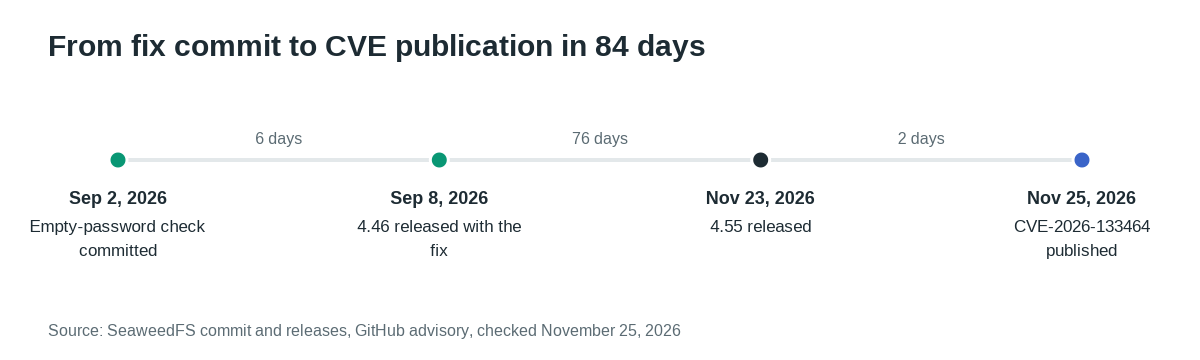
- 2026-09-02: Chris Lu commits the empty-password check (commit 3cdfe648).
- 2026-09-08: SeaweedFS 4.46, the first release with the fix, is published.
- 2026-11-23: SeaweedFS 4.55, the current release, is published.
- 2026-11-25: The GitHub advisory and CVE-2026-133464 are published.
FAQ
Is CVE-2026-133464 exploited in the wild?
No in-the-wild exploitation is published as of 2026-11-25. The CVE is not in CISA KEV, and the public advisory contains a proof of concept rather than attack reporting.
Is the SFTP server enabled by default?
No. The SFTP server starts only with weed sftp, weed server -sftp or weed filer -sftp. A deployment that never enables it is not exposed on the SFTP port.
Does the flaw affect users with a real password?
No. An empty supplied password does not match a non-empty stored password. The bypass is specific to a user whose stored password is empty, which is the key-only setup.
Which version fixes it?
SeaweedFS 4.46 contains the fix. The GitHub advisory's patched-version field says "None", but the CVE record, the fix commit and the 4.46 release agree that 4.46 is the first fixed release. The current release is 4.55.
Can I keep password authentication and still fix it?
Yes. Upgrade to 4.46 or later; the fix rejects the empty value while leaving password authentication available for users that have a real password. If you cannot upgrade, remove password from -sftp.authMethods or give every user a non-empty password.
Does the proof of concept need a valid key?
No. The reproduction authenticates with an empty password and no key. That is the point of the flaw: a user provisioned for keys only accepts a password it should never accept.
References
- GitHub advisory GHSA-q9rj-8p2j-whg4, "SFTP accepts an empty password for any user configured without a password (public-key-only users)" (checked November 25, 2026)
- CVE-2026-133464 record (checked November 25, 2026)
- Fix commit 3cdfe648eb14e20fa5383b52076b38af94dbbc8c (checked November 25, 2026)
- SeaweedFS 4.46 release (checked November 25, 2026)
- SeaweedFS 4.55 release (checked November 25, 2026)
- SeaweedFS repository (checked November 25, 2026)
- SeaweedFS Docker image on Docker Hub (checked November 25, 2026)
- CISA Known Exploited Vulnerabilities catalog (checked November 25, 2026)
Keep reading