ScreenConnect Client RCE Exploited in the Wild (CVE-2026-84869)
A malicious ScreenConnect guest can push a file that a technician's host client runs without a prompt; fixed in 26.6.5.
TL;DR
- A malicious guest in a ScreenConnect Support or Access session can push a file that the technician's host client writes and runs without a prompt. The CVE record rates CVE-2026-84869 CVSS v3.1 9.9 Critical.
- ScreenConnect host clients and Access agents before 26.6.5 are affected, and servers are not. Huntress observed exploitation against MSP technicians between 2026-10-20 and 2026-11-16.
- CISA added the CVE to its Known Exploited Vulnerabilities catalog on 2026-09-11, with a federal due date of 2026-09-14. The attackers are not publicly attributed.
- Upgrade every host client and Access agent to 26.6.5 or later, then reinstall the host clients. Removing the
TransferFilespermission is a temporary mitigation, not the fix.
Am I affected?
All of these conditions must hold for a technician workstation to be exposed:
- The workstation runs a ScreenConnect host client older than 26.6.5, or an Access agent older than 26.6.5.
- A technician joins a Support or Access session that contains a malicious guest. The guest can be on an attacker-controlled machine, or it can be an extra guest in a real customer session.
- The session allows the guest to send files to the host. The default role and session-group permissions decide this, and the
TransferFilespermission is the one ConnectWise names.
The vulnerable code runs on the technician's machine, not on the ScreenConnect server. A cloud-hosted server that ConnectWise has already updated does not fix an old host client. A current on-premises server does not fix one either, because the host client is a separate installation.
| Component | Affected versions | Fixed version |
|---|---|---|
| ScreenConnect host client | All versions before 26.6.5 | 26.6.5 |
| ScreenConnect Access agent | All versions before 26.6.5 | 26.6.5 |
| ScreenConnect server | Not affected by this CVE | Not applicable |
The CVE record rates the flaw CVSS v3.1 9.9 Critical (CVSS:3.1/AV:N/AC:L/PR:L/UI:N/S:C/C:H/I:H/A:H) with CWE-862 Missing Authorization and CWE-269 Improper Privilege Management. ConnectWise labels the severity Important and the priority High, and says the flaw is being targeted.
On Windows, read the file version of the installed client. The host client usually sits under a ScreenConnect Client (<id>) folder, and the visible executable can be ScreenConnect.WindowsClient.exe:
Get-ChildItem 'C:\Program Files*\ScreenConnect*','C:\Program Files*\ConnectWise*' -Recurse -Include 'ScreenConnect*.exe' -ErrorAction SilentlyContinue |
  Select-Object FullName, @{n='Version';e={$_.VersionInfo.FileVersion}}
On macOS, read the bundle version of the client application:
mdls -name kMDItemVersion "/Applications/ScreenConnect Client.app" 2>/dev/null
For a managed fleet, query the installed product version instead of trusting the server's version page. In an RMM or software inventory tool, filter on the ScreenConnect client product and compare every result with 26.6.5.
How do I fix it?
Upgrade the ScreenConnect server that delivers the client, then reinstall every host client and update every Access agent. The server upgrade alone does not replace the client on a technician's machine.
- Upgrade an on-premises server to 26.6.5 with the vendor's upgrade guide. A cloud instance needs no server action because ConnectWise has updated it.
- Reinstall the host client on every technician workstation with the vendor's reinstall procedure. Reinstalling is what moves the client to the fixed build.
- Update every Access agent with the vendor's Access agent procedure.
- Confirm the result with the version check in "Am I affected?". A client that still reports a version older than 26.6.5 is still exposed, even if the server is current.
If the upgrade cannot happen today, remove the TransferFiles permission from every role and session group, as ConnectWise advises. Older builds may label it TransferFilesInSession. Repeat the change for each role, because one role left with file transfer keeps the path open. This is exposure reduction only. It does not fix the client, and it does not remove a rogue client that is already installed.
What is the root cause?
The host client processed guest-initiated file-transfer and execution actions without checking that the host user had authorized them. ConnectWise describes the defect as a client-side file-transfer handling condition in Support and Access sessions. It says the actions could be processed without proper authorization or Host confirmation, including through elevated execution actions.
The trust boundary that failed is between the guest side of a session and the technician's local client. A ScreenConnect session can carry files in both directions, and the technician normally decides which files move and which run. In a vulnerable client, a guest could ask the host client to transfer a file and run it. The client did not require the technician's approval before doing so.
The host client runs in the technician's session and can use elevated execution. The action therefore inherited the technician's access.
ConnectWise has not published the client source or a patch diff. The advisory, the CVE record and Huntress's telemetry describe the behavior, not the exact function that lacked the check. That limits the root-cause analysis to the authorization boundary: the client trusted an action that arrived from the guest side of an active session.
The flaw is not a server vulnerability and does not require a compromised ScreenConnect server. An attacker only needs a guest seat in a session that a vulnerable technician joins.
How is it exploited?
An attacker who holds a guest seat waits for a technician to join, pushes a file, and lets the technician's own client run it. Huntress documented the full chain on 2026-11-12, when a technician at one managed service provider joined a blank-named Access session.
- Attacker-controlled guests join or spray sessions on an MSP's ScreenConnect server. Huntress saw 688,000 run-file requests for files named
update.batorupdate_<8hex>.batacross 42 servers from 29 IP addresses between 2026-10-20 and 2026-11-16. - A technician joins a session that contains the guest. The guest can be the session's own endpoint, or an extra guest inside a real customer support session.
- The guest pushes a batch file, for example
update_224ac089.bat. The host client writes it into the technician'sDocuments\...\Tempfolder. - The host client runs the file without a prompt. In the observed chain, the batch script relaunched itself hidden, decoded a Telegram bot token and chat ID, and reported the new host to the operator.
- The script downloaded
WindowsUpdate.msifrommasterdarky[.]com, unpacked it withmsiexec /a, enabled theseclogonservice, and launched a rebranded ScreenConnect client throughrunas /trustlevel:0x20000. - The rogue client connected to the attacker's relay at
masterdarky[.]comon port 8041. The full sequence took about nine seconds.
Huntress also observed attempts to write Sync.bat into the technician's Startup folder through a path traversal in the pushed file name. The traversal was part of the file-transfer request, not a separate server flaw. A Mac client rejected the Windows Startup path in one of those attempts.
How does the attack flow?
A malicious guest turns the technician's own ScreenConnect client into the execution path. The guest pushes a file, the client writes and runs it without confirmation, and the payload installs a second remote-access client that the attacker controls.
a Support or Access session"] --> B["Guest pushes
update_<8hex>.bat"] B --> C["Host client writes the file
to Documents\\...\\Temp"] C --> D["Host client runs the file
with no host prompt"] D --> E["Batch downloads
WindowsUpdate.msi"] E --> F["Rogue ScreenConnect client
connects to attacker relay"]
What can an attacker do?
An attacker who reaches a technician workstation can act as that technician, and an MSP technician usually holds the keys to many customer environments. Huntress describes the workstation as a hub with RMM consoles, saved credentials and access to every customer.
- Run code as the technician. The pushed file runs with the host client's privileges, including elevated execution where the client offers it. That gives the attacker a foothold on the workstation without a password or a second exploit.
- Install persistent remote access. The observed chain installed a second, rebranded ScreenConnect client that connected to the attacker's relay. That client survives independently of the legitimate MSP session and looks like a Windows update.
- Reach customer environments. A technician's RMM console, password vault and saved sessions can expose customer endpoints. The advisory and Huntress do not publish a victim count for customer environments, and the post does not claim one.
- Persist through the Startup folder. The
Sync.batpath traversal attempted to place a script in the technician's Startup folder, where it would run at the next logon.
These conditions are listed in full here. The attacker needs a guest seat in a session the technician joins, a host client older than 26.6.5, and file-transfer permission that lets the guest send a file. The attacker does not need the technician's password, a compromised ScreenConnect server, or a login as the technician. A session that the technician never joins gives the guest no execution path.
The impact stops at the technician's workstation and whatever that workstation can reach. ConnectWise says ScreenConnect servers are not impacted. The post does not claim server compromise, and it does not claim that every observed intrusion used this CVE.
Why does the fix work?
ConnectWise says ScreenConnect 26.6.5 strengthens client and session handling for file-transfer and file-execution actions. The change closes the guest-to-host execution path by requiring the authorization and confirmation that the vulnerable client skipped.
Before 26.6.5: guest file-transfer request -> host client writes and runs the file -> no host confirmation
26.6.5 and later: guest file-transfer request -> host client requires the host-side authorization and confirmation before execution
The vendor has not published a diff, so the exact check cannot be reviewed. The advisory's language, the fixed release and the mitigation all point at the same boundary. Removing TransferFiles removes the guest's ability to send the file, which is why it reduces exposure, but it does not restore the missing confirmation for other session actions.
The fix is complete only when every host client and Access agent is on 26.6.5 or later. Updating the server alone leaves the vulnerable client in place. Reinstalling the host client is therefore part of the fix, not an optional cleanup step.
How do I check if I was compromised?
Start with the artifacts Huntress published, then check whether a host was connected when a guest sent a file. A hit on a file name is a lead, because some names can appear in legitimate support work. The wclient_ folder and the wupdate_ MSI are stronger indicators.
On a technician workstation, run these checks in PowerShell:
Get-ChildItem "$env:USERPROFILE\Documents" -Recurse -Include 'update*.bat','marker.txt','Sync.bat','Run-Lateral.bat','svc_payload.cmd' -ErrorAction SilentlyContinue
Get-ChildItem "$env:TEMP" -Filter 'wupdate_*.msi' -ErrorAction SilentlyContinue
Get-ChildItem "$env:LOCALAPPDATA" -Directory -Filter 'wclient_*' -ErrorAction SilentlyContinue
Get-ChildItem "$env:APPDATA\Microsoft\Windows\Start Menu\Programs\Startup"
Get-Service seclogon | Select-Object Status, StartType
The published indicators, from the Huntress report:
- Relay and payload host:
masterdarky[.]com - SHA-256 of
WindowsUpdate.WindowsClient.exe:f8871b1561d5c77c297378a7f49c84de52a01ff297395544f0e95d13ef972841 - Install path:
%LOCALAPPDATA%\wclient_<8hex>\Windows Update Agent\WindowsUpdate.WindowsClient.exe - Temporary MSI path:
%TEMP%\wupdate_<8hex>.msi - File names:
update.bat,update_<8hex>.bat,marker.txt,Run-Lateral.bat,svc_payload.cmd - Traversal path:
../../../AppData/Roaming/Microsoft/Windows/STARTM~1/Programs/Startup/Sync.bat
On the server, work from a copy of App_Data\Session.db. Huntress maps RanFiles to EventType 85, SentFiles to EventType 86, guest connections to ProcessType 2 and host connections to ProcessType 1. List the tables first so you query the schema your build uses:
sqlite3 Session.db ".tables"
Then look for a guest RanFiles or SentFiles event that overlaps with a host connection. A high volume of RanFiles from one guest session, a blank session name, or a pushed path containing ../ are the patterns Huntress reports. The event is a lead unless a host was connected. If no indicators are present, an attempt that arrived while no technician was connected may leave nothing beyond the guest session record.
Timeline
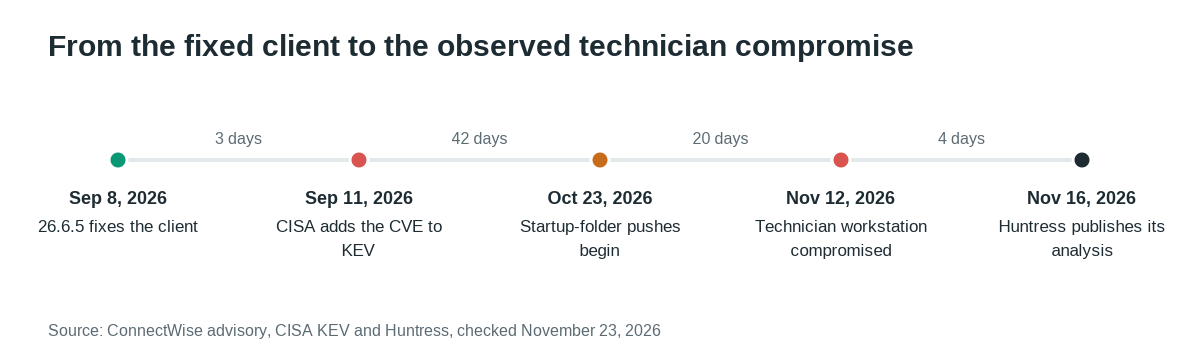
- 2026-09-08: ConnectWise published the ScreenConnect 26.6.5 security bulletin and CVE-2026-84869.
- 2026-09-11: CISA added CVE-2026-84869 to the Known Exploited Vulnerabilities catalog, with a federal due date of 2026-09-14.
- 2026-10-20 to 2026-11-16: Huntress observed the guest file-transfer spray and the technician exploitation window.
- 2026-11-12: Huntress observed a technician workstation compromised in about nine seconds.
- 2026-11-16: Huntress published its analysis of the campaign.
FAQ
Is the ScreenConnect server affected? No. ConnectWise says ScreenConnect servers are not impacted. The vulnerable code runs in the host client and the Access agent on the technician's machine.
Does upgrading the server fix the technician clients? No. The server delivers the client, but the installed host client keeps its version until it is reinstalled. Check each workstation and reinstall the client on 26.6.5 or later.
Can a guest exploit this without the technician clicking anything? Yes. The technician only has to join the session. Huntress says the host client ran the guest-pushed file without a prompt, and the technician did not approve the transfer.
Is removing the TransferFiles permission a fix?
No. It removes the guest's ability to send the file, which reduces exposure, but it does not repair the client. ConnectWise calls it a temporary mitigation until the update is applied.
Is CVE-2026-84869 exploited in the wild? Yes. CISA added it to KEV on 2026-09-11, and Huntress documented a successful technician compromise on 2026-11-12. The attacks are not publicly attributed to a named group.
Does this affect ScreenConnect Cloud customers? ConnectWise updated the cloud servers, so there is no server action. Technicians still need host clients and Access agents on 26.6.5 or later, because the flaw is in the client.
References
- ConnectWise security bulletin, "ScreenConnect 26.6.5 Security Patch", published 2026-09-08 (checked November 23, 2026): https://www.connectwise.com/company/trust/security-bulletins/2026-09-08-screenconnect-bulletin
- ConnectWise disclosure, "CVE-2026-84869", published 2026-09-08 (checked November 23, 2026): https://github.com/ConnectWise-Advisories/Disclosures/blob/main/CVE-2026-84869/README.md
- CVE-2026-84869 record, published 2026-09-08 (checked November 23, 2026): https://www.cve.org/CVERecord?id=CVE-2026-84869
- CISA Known Exploited Vulnerabilities catalog, CVE-2026-84869 added 2026-09-11 (checked November 23, 2026): https://www.cisa.gov/known-exploited-vulnerabilities-catalog
- Huntress, "CVE-2026-84869 in ScreenConnect Exploited to Run Malicious Files on MSP Technician Accounts", published 2026-11-16 (checked November 23, 2026): https://www.huntress.com/blog/cve-2026-84869-screenconnect-technician-exploitation
- The Hacker News, "Hackers Exploit Critical ScreenConnect Flaw to Hijack MSP Technician PCs Without Warning", published 2026-11-23 (checked November 23, 2026): https://thehackernews.com/2026/11/hackers-exploit-critical-screenconnect.html
- ConnectWise, "Reinstall the host client" (checked November 23, 2026): https://docs.connectwise.com/ScreenConnect_Documentation/Get_started/Host_client/Reinstall_the_host_client
- ConnectWise, "Upgrade an on-premises installation" (checked November 23, 2026): https://docs.connectwise.com/ScreenConnect_Documentation/On-premises/Get_started_with_ScreenConnect_On-Premise/Upgrade_an_on-premises_installation
Keep reading