Introducing Mobile Shielding That Can Resist AI Attacks
Ostorlab has launched Mobile Shielding Scan, an automated, AI-powered testing solution designed specifically for shielding detection and validation. It gives security teams streamlined, continuous validation of critical iOS and Android runtime protections, identifying whether security shields are actually present and if they can withstand real-world attacks. This empowers organizations with an automated, scalable, and powerful way to continuously validate RASP tools and mobile self-defense layers across every release.
Picture the first hour after your next mobile release. The build passed, the shielding controls look active, anti-tampering is enabled, root detection is present, and SSL pinning is configured. From the company’s side, the app looks protected. From someone else’s side, it has just become a file they can download, unpack, inspect, modify, instrument, repackage, and run again.
That is the part mobile security teams cannot afford to forget. A stranger does not need your source code or your infrastructure to test your defenses. They only need the app you already shipped. Once the binary is in their lab, the question is no longer just whether protection exists. The question is whether the protection can be bypassed while the app keeps running normally.
The uncomfortable truth is that many mobile security failures do not begin with missing defenses. They begin with defenses that exist, look active, and are trusted by the organization, but have not been continuously challenged after release.
Traditional vulnerability scanners excel at static code analysis, but modern mobile application risks frequently surface at runtime. To bridge this gap, Ostorlab is introducing the Mobile Shielding Scan. This automated, AI-powered testing solution specializes in shielding detection, evaluating how well a mobile app defends itself and whether those defenses actually hold up under real-world attacks.
The scan operates directly on the binary level to answer two core questions for every protection in an app:
1. Is the protection actually present? (Shielding Detection)
2. Does it actually hold up when attacked? (Shielding Validation)
It turns "we think our app is protected" into "we tested it, and here's the proof".
Why Validate Shielding Mechanics?
Mobile security testing is moving from checkbox compliance to real-world validation. That changes the paradigm. The hard part is no longer just injecting security features; the hard part is executing continuous shielding detection to prove they work under active exploitation.
Security teams need to know if their runtime defenses can be stripped away, whether their application is blind to jailbroken devices, and if commercial shielding investments are yielding real protection.
Relying on vendor promises offers a false sense of security. A minor configuration mistake or a subtle change in the compilation pipeline can completely neutralize a shielding layer without throwing an error during assembly. For many organizations, discovering a broken defense after a production breach is one more operational nightmare in a security program that already has enough fires to fight.
The Mobile Shielding Scan removes that blind spot. Ostorlab manages the automated exploitation layer while security teams gain instant clarity on shielding detection, weakness exposure, and standards mapping directly from the Portal.
Regulatory and Compliance Mandates
Verifying mobile application self-defense is no longer just a structural best practice. Global regulatory frameworks are making it a strict mandate for highly regulated sectors. Relying on unverified configurations leaves organizations exposed to non-compliance penalties:
- EU DORA (Digital Operational Resilience Act): This framework requires financial entities to identify, protect against, detect, respond to, and recover from ICT risks. It applies to banks and other financial firms operating within the European Union.
- MAS TRM Guidelines (Singapore): The Monetary Authority of Singapore explicitly calls for stringent mobile-app controls. These include anti-tampering, anti-hooking, code obfuscation, integrity checks, certificate pinning, and device binding, which are commonly implemented through RASP (Runtime Application Self-Protection) or app-shielding tools.
- PCI Mobile/Payment Guidance & PCI DSS 4.0: Updated payment card industry standards push organizations to actively prevent tampering, reverse engineering, runtime attacks, and unauthorized changes in payment applications. RASP validation is a standard way to satisfy these rigorous regulatory expectations.
Key Benefits
- Automated Shielding Detection: Scans the application to verify if security features are actually present.
- Automated Exploitation Analysis: Replaces theoretical checklists with active, runtime attack simulations to break those defenses.
- Real-Device Evaluation: Deploys and executes binaries on actual physical devices to observe genuine runtime behavior.
- Continuous Release Validation: Automates a process that previously required manual specialist engagements, enabling shielding checks on every release.
- Commercial Shielding Audit: Validates if third-party commercial shielding vendors are delivering the protection you paid for.
- Standard Mapping: Aligns testing findings directly with recognized global mobile security standards.
Shielding Detection Matrix: Protections Covered vs. AI-Powered Bypass
When configuring a Mobile Shielding Scan, the system runs shielding detection across both Android and iOS platforms before deploying an AI analyst to actively attempt bypasses.
| Shielding Type Detected | What It Does | AI Bypass Method Execution |
|---|---|---|
| Anti-tampering / Integrity | Detects code modification, repackaging, or re-signing. | Modifies binary structure; monitors if the app blocks execution or terminates silently. |
| Root & Jailbreak Detection | Identifies compromised environments that expose local app data. | Simulates privileged environments; tests if the app refuses to run on compromised OS layers. |
| Anti-instrumentation / Debugging | Resists live hooks designed to extract secrets or alter execution. | Injects live debuggers and hooks; AI adapts runtime logic to subvert active detection routines. |
| Anti-cloning / Install Source | Verifies installation origin; blocks unauthorized distribution. | Installs packages outside official app stores; evaluates sideloading defenses. |
| Code & Data Obfuscation | Assesses visibility of application logic and embedded secrets. | Parses compiled binaries; determines if operational code is exposed or properly hidden. |
| Network Protection (SSL Pinning) | Refuses intercepted or fraudulent network connections. | Orchestrates man-in-the-middle attacks; checks if the app rejects invalid certificate chains. |
If your team wants static analysis, standard scanners are there. If your team wants deep shielding detection to see if your application defenses survive an active, adaptive adversary, the Mobile Shielding Scan is the smoother path.
How the AI-Powered Shielding Detection & Bypass Engine Works
Detecting that a protection exists is easy; proving whether it can be bypassed is the hard and valuable part. The Mobile Shielding Scan includes an AI-powered exploitation capability that goes beyond reading static code.
The runtime testing lifecycle operates through three distinct phases:
1. Environment Deployment
The scan provisions a clean, controlled runtime environment on real mobile hardware. The app binary is installed, initialized, and monitored to establish a baseline for performance, memory mapping, and network call behaviors.
2. Adaptive Shielding Detection & Exploitation Loops
An AI analyst interacts with the application, observing how it reacts at every step. Rather than executing a static script, the AI watches the live screen and interprets warnings, crashes, and refusals. If an anti-debugging defense blocks a standard hook, the AI interprets that response and dynamically adapts its approach, mirroring the judgment and persistence of a skilled human attacker.
3. Concrete Verification
When a protection can be broken, the scan demonstrates that it was broken, providing explicit proof of bypass. If the defense holds, its strength is validated, giving teams confidence that their shielding layers are working effectively under pressure.
Actionable Security Deliverables
The results of a Mobile Shielding Scan are delivered in clear, actionable formats inside the Ostorlab Portal:
- Strength Ratings: Clear indicators that separate robust defenses from weak, easily bypassed vulnerabilities.
- Proof of Bypass: Concrete evidence where defenses failed, removing operational ambiguity around risk.
- Confirmation of Strength: Validation of successful defenses, confirming that security investments are functional.
- Standards Mapping: Findings are aligned directly to recognized mobile security frameworks.
This structural breakdown eliminates the guesswork from mobile engineering, giving developers the precise insights required for remediation.
How to Run a Mobile Shielding Scan
To launch an automated validation of your application defenses, follow the step-by-step guide below:
Step 1: Connect Assets and Select the Scan Profile
1. Select Scanning -> New Scan.
2. Select the target asset source: search and select the application directly from the PlayStore / AppStore, or upload your pre-compiled binary (APK/AAB/IPA) or select TestFlight.
3. Under the scan profile options, select Mobile Shielding Scan. This configures the engine to run specialized static and dynamic hardening tests.
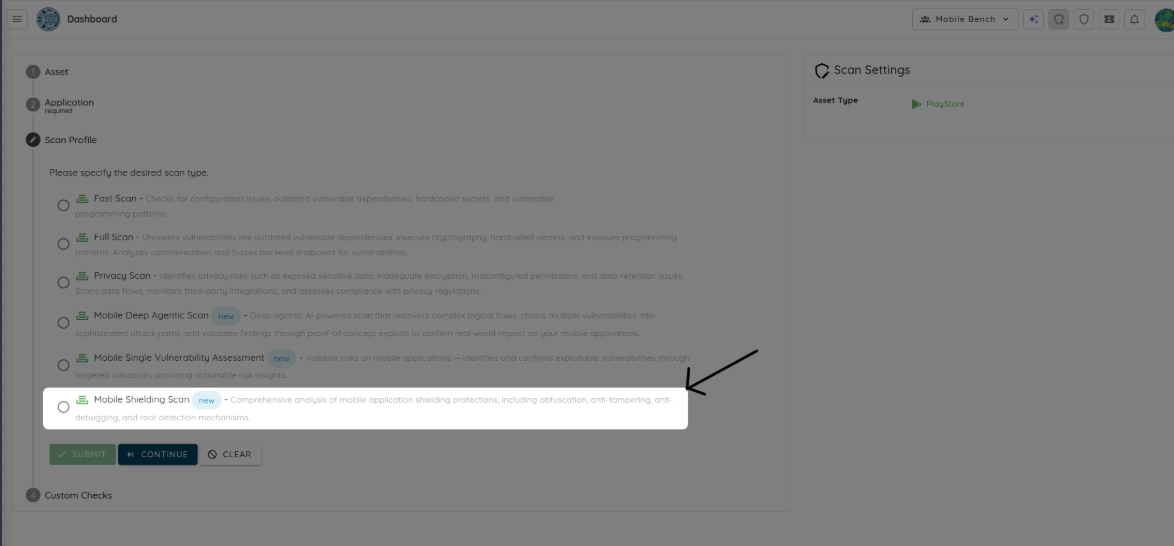
4. Click Continue.
Step 2: Configure the AI Provider & Effort
The Mobile Shielding Scan is an agentic, AI-driven scan that can run using Ostorlab’s Cybermodels or your custom API key via Bring Your Own Key (BYOK).
1. Select the AI provider you want to use for the scan.
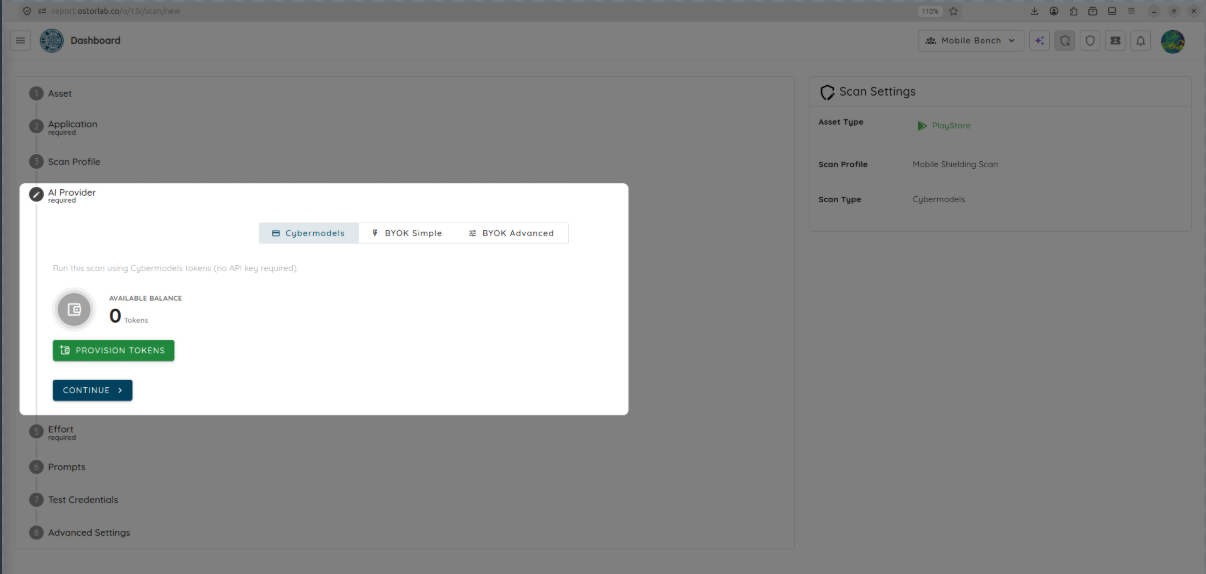
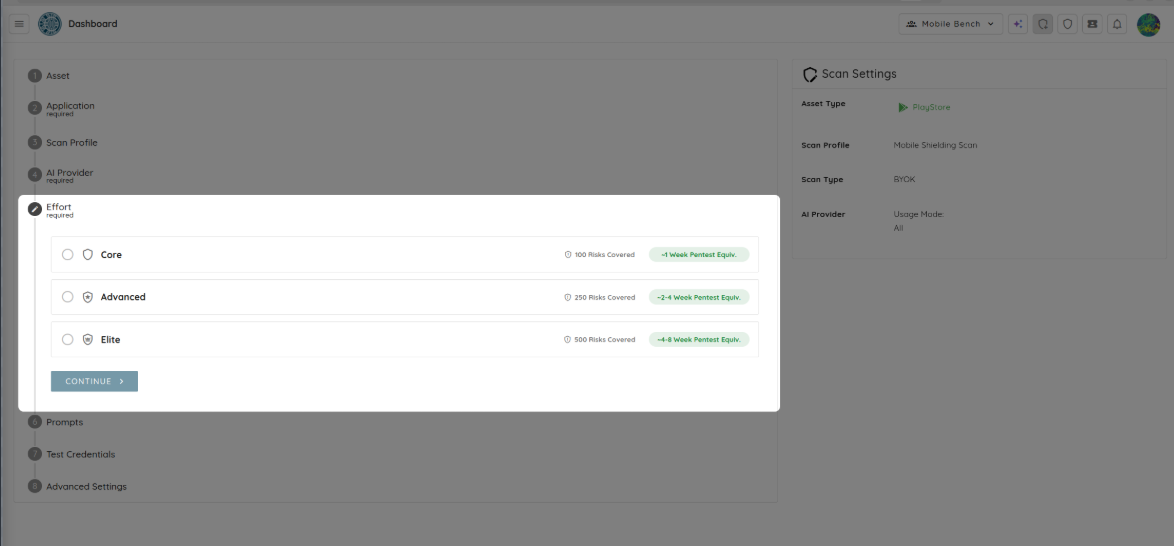
2. If you choose Cybermodels (Token-based), choose from three preset effort levels based on the complexity and size of your application:
- Core (200 tokens): Rapid baseline verification of standard hardening indicators.
- Advanced (500 tokens): Deep exploration of binary resilience with moderate execution coverage.
- Elite (1000 tokens): Exhaustive, highly parallelized assessment simulating a large, coordinated reverse-engineering effort.
- If you choose Bring Your Own Key (BYOK), select a pre-configured AI provider key from your profile to run the scan.
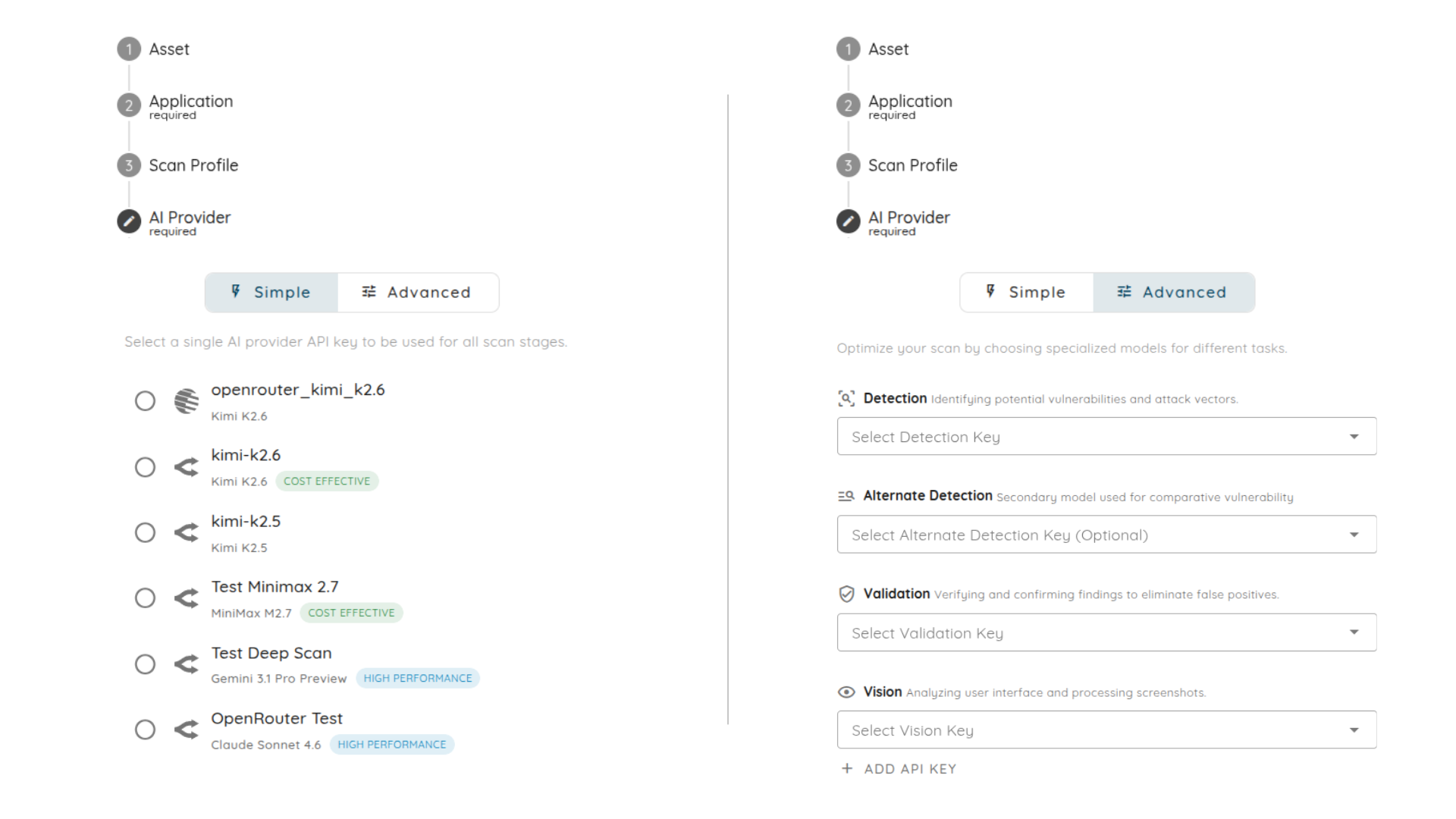
3. Click Continue.
Step 3: Add Prompts & Test Credentials (Optional)
1. Add or select custom UI automation Prompts to steer agent interaction.
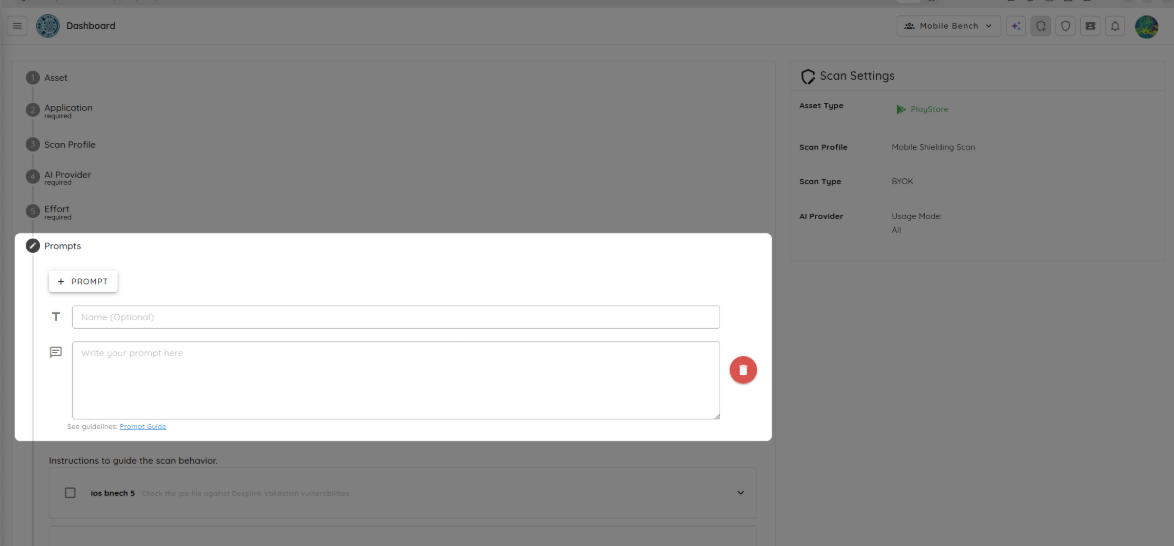
2. If your application requires authentication, select or create Test Credentials so the agent can successfully bypass login gateways and test the shielding controls in post-authenticated states.
3. Click Submit to queue and launch your scan.
Step 4: Reviewing Scan Results
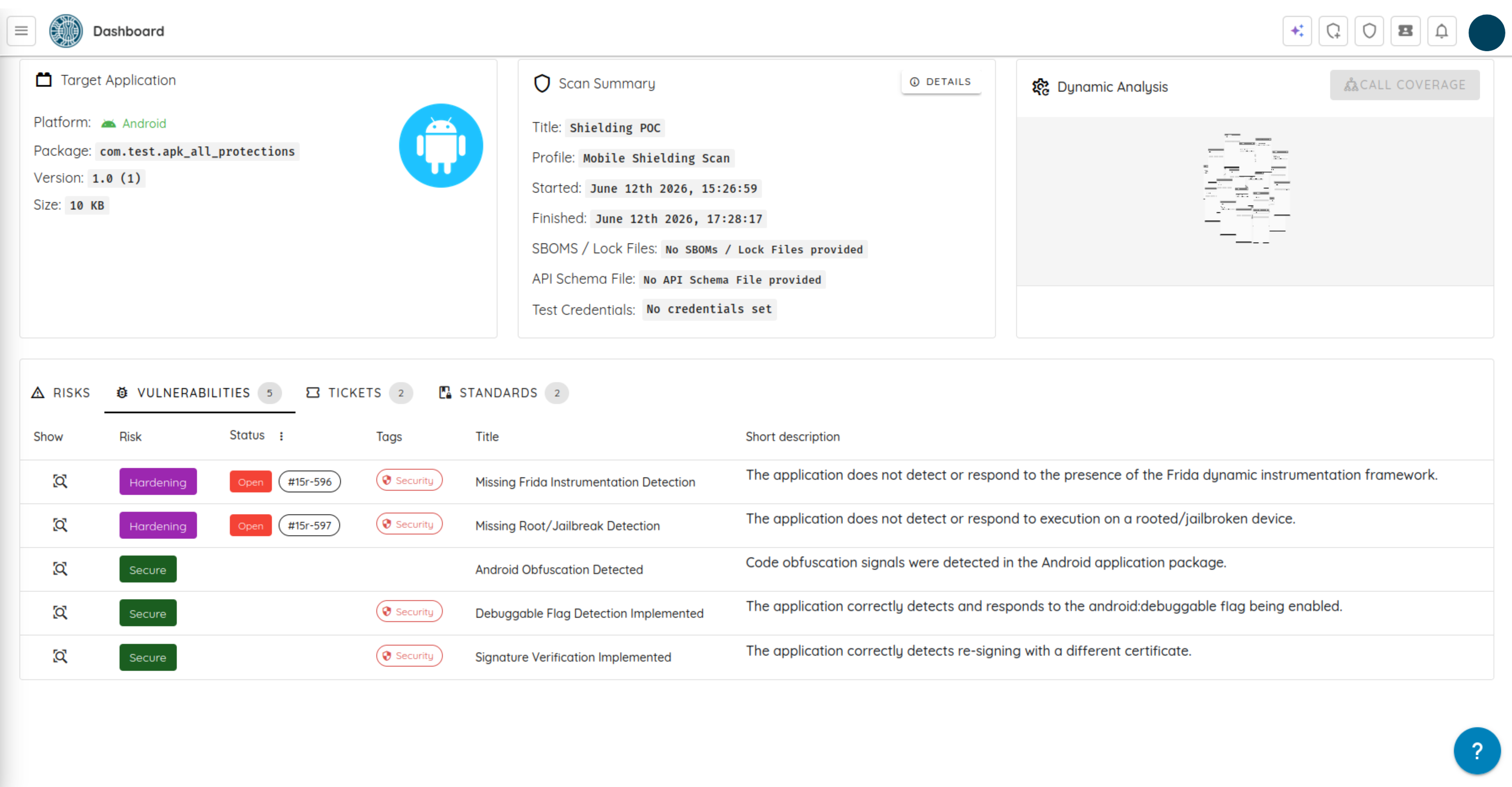
Once the assessment is complete, the dashboard displays a comprehensive overview of your binary's defensive posture:
- Security Hardening Score: An overall coverage score (from 0% to 100%) indicating the effectiveness of binary protections.
- Vector Analysis: Specific pass/fail ratings and detailed coverage stats for Obfuscation, Anti-Tampering, and Anti-Debugging.
- Validated Shielding Features: A detailed ledger of successfully verified checks, including String Encryption, Code Protection, Jailbreak Detection, and Integrity Verification.
Governed Depth for Mission-Critical Apps
The Mobile Shielding Scan is designed for teams that need deeper security verification without losing operational speed. The goal is not chaotic automation; the goal is governed depth: deeper reasoning, bounded execution, and clear proof of security.
Security teams can leverage this scan to support:
- Finding the weak links in layered mobile defenses before attackers do.
- Validating financial services, digital banking, and payment applications against reverse engineering.
- Protecting healthcare applications carrying sensitive patient data from running on compromised devices.
- Hardening gaming and media applications against intellectual property theft, code tampering, and cloning.
- Ensuring compliance with highly regulated mobile enterprise deployment mandates.
It gives development teams the automated depth they want, executive leadership the validation they need, and fewer reasons to guess whether an app is secure before it hits the app store, making it a rare win for both security and sanity.
Deploy Your First Mobile Shielding Scan
The Mobile Shielding Scan capability is now available in the Ostorlab Portal. Do not leave your runtime defenses to guesswork or raw assumptions. Run a new mobile shielding scan.