
Contact Form Entries: Unauthenticated RCE (CVE-2026-115867)
The Contact Form Entries plugin through 1.5.5 lets an unauthenticated visitor copy an attacker-chosen file into its uploads folder; 1.5.6 fixes it.
TL;DR
- The Contact Form Entries plugin copies a file reference from a Ninja Forms submission into its uploads folder without checking the source or the extension. A visitor can make it copy an executable file.
- WordPress.org reports 60,000+ active installations. Every site running the plugin through 1.5.5 with a tracked Ninja Forms form is exposed.
- Wordfence rates it CVSS v3.1 9.8 Critical. No exploitation is known and no public proof of concept exists; the CVE is not in CISA KEV as of 2026-11-29.
- Update to 1.5.6 or later; 1.5.7 is current. See "How do I fix it?" for the uploads-directory checks that decide whether the upload can execute.
Am I affected?
A WordPress site is exposed to the arbitrary file copy when it runs the affected plugin and tracks a Ninja Forms form that an unauthenticated visitor can submit. All of these conditions must hold:
- The Contact Form Entries plugin is installed and active at version 1.5.5 or earlier.
- A Ninja Forms form is tracked by the plugin, so the
ninja_forms_after_submissionhook runscreate_entry_na()for its submissions. - The attacker can submit that form without an account.
The file copy becomes remote code execution if the web server also executes PHP files in wp-content/uploads/crm_perks_uploads/ or a subdirectory of it. Apache with the plugin's .htaccess honored blocks PHP execution; Nginx, some LiteSpeed configurations, and Apache with AllowOverride None do not. Blocking PHP execution does not prevent the arbitrary file copy.
The advisory rates the attack unauthenticated, with CVSS vector CVSS:3.1/AV:N/AC:L/PR:N/UI:N/S:U/C:H/I:H/A:H. The attacker does not need a WordPress account or a session.
The plugin's own .htaccess is a partial mitigation, not a guarantee. The plugin places it in wp-content/uploads/crm_perks_uploads/ when it creates the directory. The advisory notes that it does not cover every web server configuration and is not restored if an administrator deletes it.
| Branch | Affected versions | Fixed version |
|---|---|---|
| 1.5.x | 1.5.5 and earlier | 1.5.6; current release 1.5.7 |
Check the installed version with the WordPress CLI:
wp plugin get contact-form-entries --field=version
wp plugin list --name=contact-form-entries --fields=name,status,version
The first command prints the version and exits non-zero when the plugin is absent. The second shows whether the plugin is active. On a multisite network, add --url=https://example.com for the site you are checking.
Check the uploads directory and whether an .htaccess file is present:
ls -ld wp-content/uploads/crm_perks_uploads
ls -la wp-content/uploads/crm_perks_uploads/.htaccess
How do I fix it?
Update the plugin to 1.5.6 or later, then confirm the version and the uploads directory. The 1.5.6 release fixes the arbitrary file upload through Ninja Forms, and 1.5.7 is the current release on WordPress.org.
- Back up the site and the database.
- In WordPress, open Plugins, find Contact Form Entries, and update it. The plugin is distributed through WordPress.org, so the update appears in the dashboard.
- From the command line, run the update and confirm the version:
wp plugin update contact-form-entries
wp plugin get contact-form-entries --field=version
- If you manage the plugin with Composer, update the package that provides it and redeploy the plugin directory. Updating a lock file without deploying the new files leaves the vulnerable code in place.
If you cannot update at once, remove the plugin or disable entry tracking for Ninja Forms. Both stop the vulnerable submission handler from running.
You can also block PHP execution under wp-content/uploads/ at the web server. Add a rule for Nginx, or an equivalent rule for your server, instead of relying on the plugin's .htaccess:
location ~* ^/wp-content/uploads/.*\.(php|php3|php4|php5|php7|phtml|pl|py|pyc|pyo|phar)$ {
    deny all;
    return 403;
}
This blocks execution but does not stop the file write. An attacker could still place files in the uploads directory and serve them as static content, so treat it as a barrier and not a fix.
Deleting the uploads directory or its .htaccess is not a remediation. The plugin creates the directory again, and the advisory notes that the .htaccess is not restored if it is removed. Restore the file from a clean copy if it is missing.
What is the root cause?
The plugin takes a file reference from an unauthenticated Ninja Forms submission and passes it to PHP's copy(). It does not check that the reference points to a file Ninja Forms stored, and it does not restrict the destination extension.
The vulnerable handler is create_entry_na() in contact-form-entries.php at version 1.5.5, lines 806 to 817. For every field in the submission, it copies a file_upload field's value into $upload_files, then passes the array to copy_files():
foreach($data['fields'] as $v){
    $field_id=$v['id'];
   if(!empty($v['value'])){
       if($v['type'] == 'file_upload'){
      $upload_files[$field_id]=$v['value'];
       }else{
       $lead[$field_id]=$v['value'];
       }
   }
}
if($track){
$upload_files=$this->copy_files($upload_files);
}
$v['value'] is the field value supplied with the Ninja Forms submission. The advisory says it is attacker-controlled and can be a stream-wrapper URI. The plugin does not check that the value is a local upload created by Ninja Forms.
copy_files() then treats each value as a filesystem path or a PHP stream wrapper. This is the same file, lines 1369 to 1395:
foreach($file_arr as $file){
if(empty($file)){
      continue;
  }
  if(strpos($file,$base_url) === 0){
  $file=str_replace($base_url,trim(ABSPATH,'/'),$file);
  }

$file_name_arr=explode('/',$file);
$file_name=$file_name_arr[count($file_name_arr)-1];
$file_name=sanitize_file_name($file_name);
$file_name = wp_unique_filename( $upload_path, $file_name );
$dest=$upload_path.'/'.$file_name;

$copy=copy($file,$dest);
copy() accepts local paths and stream wrappers. For an http:// or ftp:// source, PHP needs allow_url_fopen enabled. A php:// wrapper is always available. The function does not use wp_handle_upload() or wp_check_filetype(), so it does not apply WordPress's normal upload rules.
The destination name is the last segment of the source string. WordPress's sanitize_file_name() cleans characters such as spaces and slashes, but it does not remove an executable extension such as .php. wp_unique_filename() only avoids a name collision, and chmod($dest, 0644) makes the file readable.
The plugin writes to wp-content/uploads/crm_perks_uploads/YYYY/MM/. Its installer places an .htaccess at the top of that directory to turn off PHP handlers. This is includes/install.php, lines 73 to 87:
<Files *>
  SetHandler none
  SetHandler default-handler
  Options -ExecCGI
  RemoveHandler .cgi .php .php3 .php4 .php5 .phtml .pl .py .pyc .pyo
</Files>
<IfModule mod_php5.c>
  php_flag engine off
</IfModule>
The rules work only when the web server reads .htaccess and honors AllowOverride. Nginx ignores the file, LiteSpeed can miss it in some configurations, and Apache with AllowOverride None ignores it. A server that serves the uploads directory through PHP-FPM with a broad location ~ \.php$ block can execute the copied file.
How is it exploited?
An unauthenticated visitor submits a tracked Ninja Forms form whose file upload field carries an attacker-chosen source. The plugin copies that source into a web-accessible directory with its original extension.
- The attacker finds a Ninja Forms form on the site that the plugin tracks. The plugin hooks
ninja_forms_after_submission, so a normal front-end submission reachescreate_entry_na(). - The attacker submits the form with a
file_uploadfield whose value is a stream-wrapper URI or a URL to a file the attacker controls. The advisory identifies this value as attacker-controlled and says the plugin accepts stream-wrapper URIs. copy_files()passes the value tocopy(). PHP reads the source and writes it towp-content/uploads/crm_perks_uploads/YYYY/MM/<name>, where<name>is the last segment of the source string.sanitize_file_name()leaves a.php,.phtmlor.php5suffix in place. The file is readable and sits under the site's web root.- The attacker requests the new file. On a server that executes PHP in that directory, the request runs the file. On a server that blocks execution, the attacker still has a static file hosted on the site.
No public proof of concept or request body has been published as of 2026-11-29. The advisory and the 1.5.6 diff identify the input and the copy path. They do not publish a payload, and this post does not build one.
The attack needs a form that accepts submissions from the attacker. A form restricted to logged-in users, or a site that has disabled entry tracking for Ninja Forms, does not expose the same entry point.
How does the attack flow?
A form submission carries a file reference into a copy helper that writes it under the uploads directory, and the web server decides whether the copied file executes.
What can an attacker do?
On a server that executes PHP in the uploads directory, the attacker runs code as the WordPress web user. That account can read wp-config.php, connect to the WordPress database, and modify site files that the web user owns.
On a server that blocks PHP execution there, the attacker can still write an attacker-controlled file into the site's web root. The file can be served as HTML, a phishing page, or malware, and it inherits the site's domain and reputation.
The advisory describes remote code execution as possible because the destination extension is not restricted. It does not claim that every configuration executes the file. The .htaccess rules block execution on the configurations they cover.
The plugin stores contact-form entries in the WordPress database. A successful upload does not by itself prove that the attacker read those entries or took over an administrator account. Check the site for other changes before drawing that conclusion.
Why does the fix work?
Version 1.5.6 stops using the submitted field value as the copy source. It takes the local paths from the Ninja Forms file metadata and accepts only paths whose real path contains ninja-forms.
The relevant hunk is in contact-form-entries.php:
      if(!empty($v['value'])){
          if($v['type'] == 'file_upload'){
-        $upload_files[$field_id]=$v['value'];
+             $files=array();
+             if(!empty($v['files'])){
+              foreach($v['files'] as $file){
+                  if(!empty($file['tmp_name'])){
+                      $f_path=realpath($file['data']['file_path']);
+                      if(strpos($f_path,'ninja-forms') !== false){
+                      $files[]=$f_path;
+                      }
+                  }
+              }
+             }
+        $upload_files[$field_id]=$files;
          }else{
          $lead[$field_id]=$v['value'];
          }
      }
The new code reads $v['files'], which Ninja Forms fills with the uploaded file's temporary name and path. It resolves the path with realpath() and keeps it only when the resolved path contains ninja-forms. The submitted $v['value'] no longer reaches copy_files().
The patch also changes how the destination name is split on Windows paths:
-                $file_name_arr=explode('/',$file);
+                  $file_sep='/';
+                  if(strpos($file,'\\') !== false){
+                   $file_sep='\\';
+                  }
+                $file_name_arr=explode($file_sep,$file);
That second change keeps the file name extraction consistent when the source path uses backslashes. It is not the security boundary; the source restriction is.
The fix is narrow. It does not add an extension allowlist to copy_files(), and it relies on Ninja Forms to keep its temporary files under a path containing ninja-forms. It closes the reported path because the attacker can no longer choose an arbitrary source.
How do I check if I was compromised?
Look for executable files under the plugin's uploads directory. A clean install should contain only the files users uploaded through forms, plus index.html and .htaccess.
find wp-content/uploads/crm_perks_uploads -type f \( -iname '*.php' -o -iname '*.php3' -o -iname '*.php4' -o -iname '*.phtml' -o -iname '*.php5' -o -iname '*.php7' -o -iname '*.phar' \) -print
List recently changed files and compare them with the site's normal form uploads:
find wp-content/uploads/crm_perks_uploads -type f -mtime -30 -printf '%TY-%Tm-%Td %TH:%TM %p\n' | sort
Search the web server access log for requests to that directory:
grep -Ei 'crm_perks_uploads/.*\.(php|php3|php4|phtml|php5|php7|phar)' /var/log/nginx/access.log
A hit is a lead. The plugin writes normal form uploads to the same tree, and an attacker may have used a name that looks ordinary. Check the file contents and the time against the site's form submissions.
Check the WordPress user list and the plugin settings for changes the web user could make. Rotate the WordPress salts, the database password, and any API keys stored in wp-config.php if you find an executable file.
No vendor or researcher has published file hashes, source domains, or a full indicator set. The advisory describes the mechanism, not a campaign.
Timeline
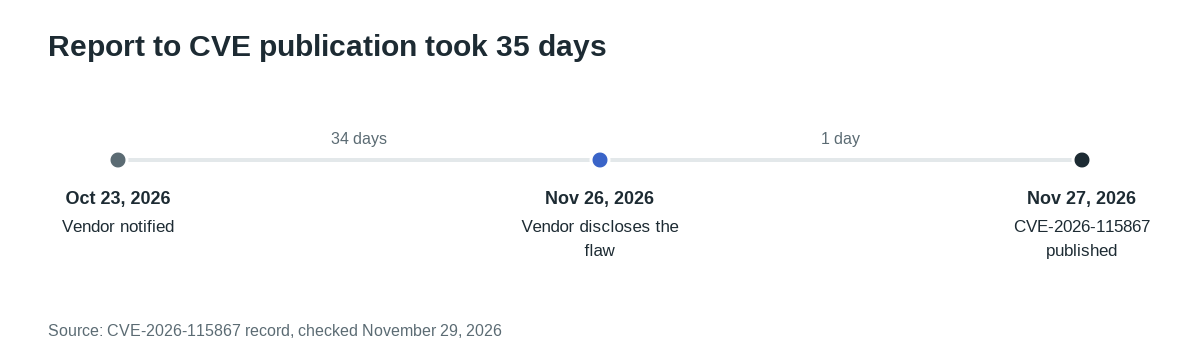
- 2026-10-23: Wordfence records the vendor notification.
- 2026-11-26: The vendor discloses the flaw.
- 2026-11-27: The CVE record is published with the CVSS v3.1 9.8 score.
FAQ
Does every site with the plugin expose the flaw?
No. The site needs a tracked Ninja Forms form that an unauthenticated visitor can submit, and the uploads directory must be reachable. A site without Ninja Forms, or with entry tracking disabled for that form, does not expose the same entry point.
Does the attack need a WordPress account?
No. Wordfence rates the attack unauthenticated and assigns PR:N. The attacker submits the public form; no WordPress login is required.
Is there a public exploit?
No public proof of concept or request body was published as of 2026-11-29. The advisory and the fix identify the vulnerable input and the copy path, and no exploitation is known.
Does updating fix files already uploaded?
No. The update stops new copies through this path. Run the find command in "How do I check if I was compromised?" and remove any executable file you did not expect.
Which version fixes it?
1.5.6 fixes the arbitrary file upload. The current release is 1.5.7, which also fixes an Elementor print-view issue and an XSS issue.
Does the plugin's .htaccess block the attack?
Only on web servers that read it and allow PHP handler overrides. Nginx ignores it, LiteSpeed can miss it in some configurations, and Apache with AllowOverride None ignores it.
References
- Wordfence, CVE-2026-115867 record, published 2026-11-27 (checked November 29, 2026): https://www.cve.org/CVERecord?id=CVE-2026-115867
- Wordfence, vulnerability entry for the Contact Form Entries plugin (checked November 29, 2026): https://www.wordfence.com/threat-intel/vulnerabilities/id/581b8b40-6333-4bb6-8584-de1dc3af2b45
- WordPress.org, "Database for Contact Form 7, WPforms, Elementor forms" plugin page, version 1.5.7 and 60,000+ active installations (checked November 29, 2026): https://wordpress.org/plugins/contact-form-entries/
- Contact Form Entries source at version 1.5.5,
contact-form-entries.php(checked November 29, 2026): https://plugins.trac.wordpress.org/browser/contact-form-entries/tags/1.5.5/contact-form-entries.php - Contact Form Entries source at version 1.5.5,
includes/install.php(checked November 29, 2026): https://plugins.trac.wordpress.org/browser/contact-form-entries/tags/1.5.5/includes/install.php - Contact Form Entries version 1.5.6 package (checked November 29, 2026): https://downloads.wordpress.org/plugin/contact-form-entries.1.5.6.zip
- WordPress.org, Contact Form Entries changelog, entries 1.5.6 and 1.5.7 (checked November 29, 2026): https://wordpress.org/plugins/contact-form-entries/#developers
- WordPress developer reference,
sanitize_file_name()(checked November 29, 2026): https://developer.wordpress.org/reference/functions/sanitize_file_name/ - PHP manual,
copy()and stream wrappers (checked November 29, 2026): https://www.php.net/manual/en/function.copy.php - CISA, Known Exploited Vulnerabilities Catalog, catalog version 2026.11.27 (checked November 29, 2026): https://www.cisa.gov/known-exploited-vulnerabilities-catalog
Keep reading