AutoGPT Platform Auth Bypass via Default JWT Key (CVE-2026-130169)
AutoGPT Platform 0.6.26 through 0.7.4 ships a public default JWT key, so anyone can forge an admin token; 0.8.0 removes the path.
TL;DR
- AutoGPT Platform verifies HS256 tokens with a JWT key that ships in its default environment file. Anyone who reads the repository can sign a token for any user or an administrator.
- Releases 0.6.26 through 0.7.4 are affected when the deployment kept the default key. The 0.8.0 release removes the shared-secret path.
- The CVE record rates the flaw CVSS v3.1 10.0 Critical. The advisory includes a working proof of concept; no exploitation in the wild is reported, and it is not in CISA KEV as of November 24, 2026.
- Upgrade to AutoGPT Platform 0.8.0 or later, remove the old key from every environment file, and rotate the credentials the platform stores.
Am I affected?
You are affected if all of these conditions hold:
- You run a self-hosted AutoGPT Platform release from 0.6.26 through 0.7.4.
- Your deployment copied
backend/.env.defaultorautogpt_platform/.env.defaultto an environment file and kept theJWT_VERIFY_KEYline unchanged. - The backend API is reachable by the attacker. The default Docker Compose deployment publishes the backend on the host.
JWT_JWKS_URLis set, because the affected versions refuse to start without it. The JWKS path runs alongside the shared-secret path, so a default install accepts both.
The advisory says the single-container Docker image published from v0.7.1 ships no default JWT key. It uses one only during a legacy-authentication migration that the operator configures. The affected shape is the platform deployment built from the repository's Docker Compose files.
AutoGPT Platform is the workflow automation product from Significant Gravitas. It runs AI agents that connect to tools and services, and it stores each user's agent graphs, execution history and credentials. The repository has 188,156 stars and 45,822 forks on GitHub.
| Release line | Affected versions | Fixed version |
|---|---|---|
| 0.6 and 0.7 | 0.6.26 through 0.7.4 | 0.8.0 |
| 0.8 and later | None | Not affected; 0.8.0 is the first fixed release |
The current release is 0.12.0, published on 2026-11-19. Any release from 0.8.0 onward carries the fix.
Check the deployment tag and the running backend environment:
git -C AutoGPT describe --tags --always
docker compose -f docker-compose.platform.yml ps
docker exec <backend-container> printenv JWT_VERIFY_KEY
Check both environment files in the repository checkout:
grep -n '^JWT_VERIFY_KEY=' autogpt_platform/backend/.env autogpt_platform/.env
A result that shows your-super-secret-jwt-token-with-at-least-32-characters-long means the published key was in use. An empty result on 0.7.4 or earlier means the backend used an empty string, and the HS256 path rejected every symmetric token. An empty result on 0.8.0 or later is normal, because the setting no longer exists.
How do I fix it?
Upgrade to AutoGPT Platform 0.8.0 or later; the current release is 0.12.0. The 0.8.0 release removes the shared-secret verification path and stops shipping a default key.
- Fetch the release tags and check out a fixed platform release:
cd AutoGPT
git fetch --tags
git checkout autogpt-platform-beta-v0.8.0
-
Read the 0.8.0 release notes before you restart. The release changes three other default keys:
ENCRYPTION_KEY,UNSUBSCRIBE_SECRET_KEYandBETTER_AUTH_SECRET. The backend does not start on the values that.env.defaultused to contain, so follow the migration steps in the release notes. -
Pull the new images and recreate the containers:
cd autogpt_platform
docker compose -f docker-compose.platform.yml pull
docker compose -f docker-compose.platform.yml up -d
-
Remove the
JWT_VERIFY_KEYline frombackend/.envandautogpt_platform/.env. The fixed backend no longer reads it, but a later downgrade or a copied file would restore the weakness. -
Rotate the credentials the platform stores. The advisory says an attacker could read agent graphs, execution history, stored credentials and workspace files. Rotate every tool credential, OAuth token and API key that an agent could reach.
-
Sign in again. The upgrade invalidates the tokens issued by the old verification path.
If you cannot upgrade yet, replace JWT_VERIFY_KEY in both environment files with a long random value and restart the backend. That stops forgery with the published string, but the HS256 path remains. Anyone who learns the new value can still forge tokens, so the workaround is a stopgap, not a fix. Restrict the backend port to trusted networks while you plan the upgrade.
What is the root cause?
The backend accepts HS256 tokens signed with a JWT verification key that ships as a public default, so a deployment that keeps the default trusts tokens anyone can mint.
AutoGPT Platform separates the frontend, the backend API and an authentication service. The backend verifies the session token on every API request. In the affected releases, it supports two verification paths: asymmetric tokens from the platform auth service, and legacy HS256 tokens signed with a shared secret.
The shared secret comes from the environment. In autogpt_platform/autogpt_libs/autogpt_libs/auth/config.py at release 0.7.4, the settings object reads it like this:
self.JWT_VERIFY_KEY: str = os.getenv(
    "JWT_VERIFY_KEY", os.getenv("SUPABASE_JWT_SECRET", "")
).strip()
self.JWT_ALGORITHM: str = os.getenv("JWT_SIGN_ALGORITHM", "HS256").strip()
The default environment file shipped the value:
JWT_VERIFY_KEY=your-super-secret-jwt-token-with-at-least-32-characters-long
A deployment that copied the file and did not edit the line used a string that anyone can read on GitHub.
parse_jwt_token() in autogpt_platform/autogpt_libs/autogpt_libs/auth/jwt_utils.py chooses the verification key from the token header:
algorithm = header.get("alg", "")
if algorithm.startswith("HS"):
    if not settings.JWT_VERIFY_KEY:
        raise ValueError("Invalid token: symmetric tokens are not accepted")
    key = settings.JWT_VERIFY_KEY
    algorithms = [settings.JWT_ALGORITHM]
The else branch handles asymmetric tokens. It fetches the signing key from JWT_JWKS_URL and uses the algorithms in JWT_JWKS_ALGORITHMS. Both branches then call:
payload = jwt.decode(
    token,
    key,
    algorithms=algorithms,
    audience=audience,
)
An HS256 token reaches the first branch. The key is the published secret, and the algorithm is the JWT_ALGORITHM default, HS256. jwt.decode() verifies the signature and the aud claim. The caller then checks the role claim for administrative routes.
verify_user() performs that check:
if admin_only and jwt_payload.get("role") != "admin":
    raise HTTPException(status_code=403, detail="Admin access required")
A token that sets role to admin passes. Nothing binds the token to an account that exists, because the decoded payload supplies the user identity.
The config.py comment already warned that a leaked shared secret lets anyone forge tokens and impersonate users. The default file made the secret public.
How is it exploited?
- The attacker reads
JWT_VERIFY_KEYfrom the public repository. - The attacker builds an HS256 JWT with the claims the backend expects. The payload carries
sub,email,role,audset toauthenticated,iatandexp. - The attacker sends the token as
Authorization: Bearer <token>to any authenticated endpoint. parse_jwt_token()sees the HS256 header, loads the published key and verifies the signature.verify_user()accepts the payload. For an admin route, the attacker setsroletoadmin.- The request runs with the identity in the token. The attacker reads or changes the data the identity can reach.
The advisory publishes a Python proof of concept that signs a regular token with role: authenticated and a second token with role: service_role. The admin check compares role with admin, so a token that sets role: admin also passes. The advisory's text describes both a regular user token and an admin token.
No exploitation in the wild is reported. The CVE record and the advisory describe the flaw and the proof of concept, not attacks.
How does the attack flow?
One token signed with the public default key passes signature verification and the role check, so an unauthenticated attacker acts as any user or as an administrator.
with role admin"] B --> C["Sends Authorization bearer
to the backend API"] C --> D["parse_jwt_token verifies
with the published key"] D --> E["verify_user accepts
the role claim"] E --> F["Reads agent graphs and credentials"] F --> G["Changes data and runs agents
billed to any user"]
What can an attacker do?
A forged token gives the attacker the identity it names, including an administrator. The advisory lists the actions that identity can take.
- Impersonate any user and read that user's agent graphs and execution history.
- Read the stored credentials and workspace files that the agents can reach.
- Change agent graphs and execution history.
- Forge an administrator token for admin-only routes, including credit management and rate limits.
- Run agents billed to any user and drain that user's credit balance.
These actions need the conditions in "Am I affected?": an affected release, the published key in use, and network reach to the backend. They need no account and no user interaction.
The advisory does not describe code execution on the host. The impact is the data and the agent actions the forged identity can reach. The advisory's proof of concept stops at a successful authenticated request.
Why does the fix work?
The fix removes the shared-secret verification path and the default key, so the backend accepts only asymmetric tokens from the platform auth service.
The commit 18fde1b965 removes the JWT_VERIFY_KEY setting and the HS256 branch:
-        self.JWT_VERIFY_KEY: str = os.getenv(
-            "JWT_VERIFY_KEY", os.getenv("SUPABASE_JWT_SECRET", "")
-        ).strip()
-        self.JWT_ALGORITHM: str = os.getenv("JWT_SIGN_ALGORITHM", "HS256").strip()
-    algorithm = header.get("alg", "")
+    algorithm = header.get("alg")
+    if not isinstance(algorithm, str):
+        raise ValueError("Invalid token: signing algorithm is not accepted")
     if algorithm.startswith("HS"):
-        if not settings.JWT_VERIFY_KEY:
-            raise ValueError("Invalid token: symmetric tokens are not accepted")
-        key = settings.JWT_VERIFY_KEY
-        algorithms = [settings.JWT_ALGORITHM]
-    else:
-        if not settings.JWT_JWKS_URL:
-            raise ValueError("Invalid token: asymmetric tokens are not accepted")
-        try:
-            key = _get_jwks_client().get_signing_key_from_jwt(token).key
-            algorithms = settings.JWT_JWKS_ALGORITHMS
-        except jwt.PyJWKClientError as e:
-            if (
-                settings.JWT_VERIFY_KEY
-                and not settings.JWT_ALGORITHM.startswith("HS")
-                and algorithm == settings.JWT_ALGORITHM
-            ):
-                key = settings.JWT_VERIFY_KEY
-                algorithms = [settings.JWT_ALGORITHM]
-            else:
-                raise ValueError(f"Invalid token: {str(e)}") from e
+        raise ValueError("Invalid token: symmetric tokens are not accepted")
+    if algorithm not in settings.JWT_JWKS_ALGORITHMS:
+        raise ValueError("Invalid token: signing algorithm is not accepted")
+
+    try:
+        key = _get_jwks_client().get_signing_key_from_jwt(token).key
+    except jwt.PyJWKClientError as e:
+        raise ValueError(f"Invalid token: {str(e)}") from e
The commit also deletes the JWT_VERIFY_KEY line from backend/.env.default.
The new code rejects every HS256, HS384 and HS512 token before it looks up a key. A token signed with the old public string fails at the algorithm check. The only accepted path is the JWKS key set, which the platform auth service controls.
The fix is complete for the shared-secret path. It does not rotate the credentials that were exposed while the default key was in use. It also does not remove the other default keys that the 0.8.0 release changes, so the operator must follow the release notes for those.
How do I check if I was compromised?
The advisory publishes no indicators of compromise. Check whether the published key was in use, then look for requests that the forged identities could have made.
First, confirm the key state on the running backend and in both environment files:
docker exec <backend-container> printenv JWT_VERIFY_KEY
grep -n '^JWT_VERIFY_KEY=' autogpt_platform/backend/.env autogpt_platform/.env
A value equal to the published string means the backend accepted tokens signed with it. On 0.8.0 or later, the setting is gone.
Review the backend and reverse-proxy logs for authenticated requests to admin routes. The routes to check include credit management, rate limits and user administration. Look for requests whose token subject or role does not match an account you know.
grep -Ei 'admin|credit|rate.?limit|users' /var/log/nginx/access.log
A hit is a lead, not proof. Legitimate administrators use the same routes. Compare the source addresses and the timestamps with your operators' activity.
Review the agent graphs, execution history, stored credentials and workspace files for changes that no operator made. Check credit balances and rate-limit settings for unexpected values. If the default key was in use and the backend was reachable, treat every credential an agent could reach as exposed. Rotate those credentials, then rebuild the deployment from the fixed release.
Timeline
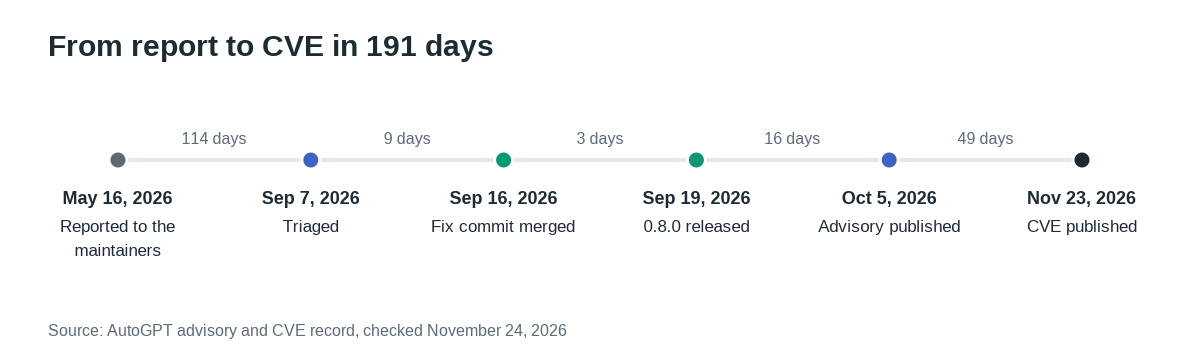
- 2026-05-16: the issue is reported to the AutoGPT maintainers.
- 2026-09-07: the report is triaged.
- 2026-09-16: the fix commit
18fde1b965is merged. - 2026-09-19: AutoGPT Platform 0.8.0 is released with the fix.
- 2026-10-05: the repository advisory GHSA-24q6-6h89-f9p7 is published.
- 2026-11-23: CVE-2026-130169 is published.
FAQ
Does this affect the AutoGPT agent or the Platform?
The Platform. The advisory covers AutoGPT Platform releases 0.6.26 through 0.7.4. The classic AutoGPT agent is a different codebase.
Is the single-container Docker image affected?
No. The advisory says the single-container image published from v0.7.1 ships no default JWT key. It uses one only during a legacy-authentication migration that the operator configures.
Do I need an account to exploit it?
No. The attacker forges a token and sends it to the backend. The only conditions are the default key in use and network reach to the backend.
Is there a public proof of concept?
Yes. The advisory includes Python code that signs user and admin tokens with the default key. It also describes the requests that show the bypass.
Has it been exploited in the wild?
No exploitation is reported, and it is not in CISA KEV as of November 24, 2026. The advisory and the CVE record do not describe attacks.
What if I upgraded but left the old environment file?
The 0.8.0 backend no longer reads JWT_VERIFY_KEY, so the old value is inert. Remove it anyway, and rotate the credentials the platform stored while the default was in use.
Find exposed AutoGPT Platform APIs with Ostorlab
Ostorlab's web agentic deep scan maps the API surface of an AutoGPT Platform deployment, including the authenticated routes this flaw reaches. Use it to see which deployments are exposed before you upgrade: https://www.ostorlab.co/product/web_agentic_deep_scan
References
- Significant Gravitas, "Hardcoded Default JWT Secret Enables Complete Authentication Bypass", GHSA-24q6-6h89-f9p7, published October 5, 2026 (checked November 24, 2026): https://github.com/Significant-Gravitas/AutoGPT/security/advisories/GHSA-24q6-6h89-f9p7
- CVE record, CVE-2026-130169, published November 23, 2026 (checked November 24, 2026): https://www.cve.org/CVERecord?id=CVE-2026-130169
- Fix commit
18fde1b965, "remove legacy HS256 verification path", merged September 16, 2026 (checked November 24, 2026): https://github.com/Significant-Gravitas/AutoGPT/commit/18fde1b9656c475ed279824193131a11c6780f9a - AutoGPT Platform 0.8.0 release notes, published September 19, 2026 (checked November 24, 2026): https://github.com/Significant-Gravitas/AutoGPT/releases/tag/autogpt-platform-beta-v0.8.0
- AutoGPT repository, 188,156 stars and 45,822 forks (checked November 24, 2026): https://github.com/Significant-Gravitas/AutoGPT
- CISA Known Exploited Vulnerabilities catalog, catalog version 2026.11.23 (checked November 24, 2026): https://www.cisa.gov/known-exploited-vulnerabilities-catalog
Keep reading