WordPress Core Upgrade-Window RCE, Fixed in 7.1.4 (CVE-2026-119977)
WordPress 4.7 to 7.1.3 stages core updates in a predictable, web-served path that unauthenticated attackers race to execute code; fixed in 7.1.4.
TL;DR
- A flaw in the WordPress core updater lets an unauthenticated attacker execute code during the seconds-long window in which WordPress unpacks a core update. Versions 4.7.0 through 7.1.3 are affected. Umut Bayram of Picus Security disclosed it responsibly.
- Wordfence's CVE record scores the flaw 8.1 High, CVSS:3.1/AV:N/AC:H/PR:N/UI:N/S:U/C:H/I:H/A:H, and WordPress's own advisory rates the same race Low. Wordfence blocked 62,969 attacks targeting it in 24 hours by October 30.
- The fix shipped in WordPress 7.1.4, released October 28, 2026, and backported to every branch back to 4.7. No compromise is reported, and the CVE is not in CISA's Known Exploited Vulnerabilities (KEV) catalog as of October 31, 2026.
- Update to 7.1.4 or to your branch's backport now, then hunt your web-server logs for requests to PHP files under
wp-content/upgrade. Unpatched sites open a vulnerable window on every update, including the update to 7.1.4 itself.
Am I affected?
All of these must hold for the unauthenticated attack:
- You run WordPress 4.7.0 through 7.1.3, in any branch listed below.
- Your site applies core updates through the WordPress updater, which unpacks a full update package into
wp-content/upgrade/on the web server. - That directory is web-accessible, which Wordfence notes is true on many servers, and its files run as PHP.
- The attacker wins the race: they must reach the staged files between unpacking and cleanup, a window Wordfence observed lasting only seconds in lab environments.
The path is predictable on every affected version, so the fourth condition is about timing, not knowledge. The attacker needs no account on the site and no interaction from anyone on it.
| Branch | Affected versions | Fixed version |
|---|---|---|
| WordPress 7.1.x | 7.1.0 through 7.1.3 | 7.1.4 |
| WordPress 7.0.x | 7.0.0 through 7.0.7 | 7.0.8 |
| WordPress 6.9.x | 6.9.0 through 6.9.10 | 6.9.11 |
| WordPress 6.8.x | 6.8.0 through 6.8.11 | 6.8.12 |
| WordPress 6.7.x | 6.7.0 through 6.7.10 | 6.7.11 |
| WordPress 6.6.x | 6.6.0 through 6.6.10 | 6.6.11 |
| WordPress 6.5.x | 6.5.0 through 6.5.13 | 6.5.14 |
| WordPress 6.4.x | 6.4.0 through 6.4.13 | 6.4.14 |
| WordPress 6.3.x | 6.3.0 through 6.3.13 | 6.3.14 |
| WordPress 6.2.x | 6.2.0 through 6.2.14 | 6.2.15 |
| WordPress 6.1.x | 6.1.0 through 6.1.15 | 6.1.16 |
| WordPress 6.0.x | 6.0.0 through 6.0.17 | 6.0.18 |
| WordPress 5.9.x | 5.9.0 through 5.9.19 | 5.9.20 |
| WordPress 5.8.x | 5.8.0 through 5.8.18 | 5.8.19 |
| WordPress 5.7.x | 5.7.0 through 5.7.20 | 5.7.21 |
| WordPress 5.6.x | 5.6.0 through 5.6.22 | 5.6.23 |
| WordPress 5.5.x | 5.5.0 through 5.5.23 | 5.5.24 |
| WordPress 5.4.x | 5.4.0 through 5.4.24 | 5.4.25 |
| WordPress 5.3.x | 5.3.0 through 5.3.26 | 5.3.27 |
| WordPress 5.2.x | 5.2.0 through 5.2.29 | 5.2.30 |
| WordPress 5.1.x | 5.1.0 through 5.1.27 | 5.1.28 |
| WordPress 5.0.x | 5.0.0 through 5.0.30 | 5.0.31 |
| WordPress 4.9.x | 4.9.0 through 4.9.34 | 4.9.35 |
| WordPress 4.8.x | 4.8.0 through 4.8.33 | 4.8.34 |
| WordPress 4.7.x | 4.7.0 through 4.7.38 | 4.7.39 |
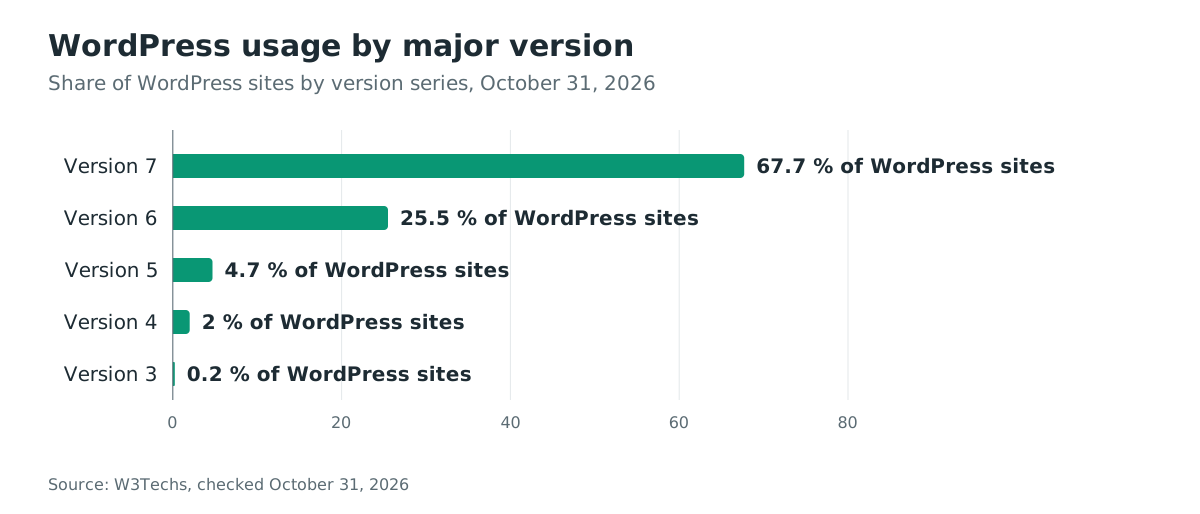
WordPress runs 39.5% of all websites. W3Techs’s October 31 survey shows the version distribution, but these major-version totals do not distinguish patched releases from vulnerable ones. Use the branch table above to assess your site.
Check the version of every site you run. With the command line:
wp core version
Without it, read the version in the dashboard under Dashboard, then Updates, or in the At a Glance box. To inspect the staging directory’s HTTP response, request it from a machine you control, with your own site's host:
curl -s -o /dev/null -w "%{http_code}\n" https://your-site.example/wp-content/upgrade/
A directory response alone cannot establish whether staged PHP files are reachable. A 200 may be an index page rather than a directory listing; a 403 or 404 for the directory does not prove that individual files are blocked. Verify the server configuration and install a fixed release.
How do I fix it?
Update every site to its branch's fixed version, or to 7.1.4:
- Take a backup of the site and its database.
- Update from the dashboard: Dashboard, Updates, Update Now. WordPress 7.1.4 is a security release, so sites with automatic background updates receive it automatically, as the release post states.
- Or update from the command line:
wp core update
Alternatively, to stay on the 7.0 branch, use this command instead of the one above:
wp core update --version=7.0.8
Use your branch’s fixed version from the table above; do not run both commands.
- After updating, delete any leftovers under
wp-content/upgrade/that the updater did not clean up itself.
For sites that cannot update yet, one workaround closes the web reachability condition:
- Deny web access to the staging directory at the web server. For nginx, inside the server block:
location ^~ /wp-content/upgrade/ { return 403; }
- For Apache, in the site's configuration or
.htaccess:
RedirectMatch 403 ^/wp-content/upgrade/
The workaround covers this CVE only. It blocks the staged files over the web, so neither the installer nor any other staged PHP file runs. It does nothing for any other flaw, and it must stay in place until the site reaches a fixed version.
The index.php file that fixed WordPress writes into the upgrade folder stops directory listing only. Direct requests to the random working-directory name still work, which is why a server-level block is stronger.
What is the root cause?
The updater unpacks every core update into a working directory whose name is derived from the package file name alone, inside a folder the web server serves. In WordPress 7.1.3, WP_Upgrader::unpack_package() builds the path from the package with nothing unpredictable in it, at wp-admin/includes/class-wp-upgrader.php line 378:
$upgrade_folder = $wp_filesystem->wp_content_dir() . 'upgrade/';
// ...
// We need a working directory - strip off any .tmp or .zip suffixes.
$working_dir = $upgrade_folder . basename( basename( $package, '.tmp' ), '.zip' );
A core update package named wordpress-7.1.4.zip is therefore unpacked to wp-content/upgrade/wordpress-7.1.4, a path an attacker can compute before the update starts. The package contains the full WordPress tree, including wp-admin/setup-config.php, the installation wizard.
The wizard is the second half of the flaw. setup-config.php refuses to run only when a wp-config.php file already exists next to it, at wp-admin/setup-config.php lines 58 to 60:
// Check if wp-config.php has been created.
if ( file_exists( ABSPATH . 'wp-config.php' ) ) {
    wp_die(
A release package ships wp-config-sample.php, not wp-config.php, so the staged tree never triggers that guard. An unauthenticated request for the staged wizard during the upgrade window runs it. It writes a wp-config.php into the staging tree from the submitted form values: database name, user, password, host and table prefix. WordPress 7.1.4 changed all three links in this chain, as the next section shows.
How is it exploited?
The attacker polls the predictable staging path for the staged installer until the site unpacks an update, wins the seconds-long race and turns the staged installer into code execution. No proof-of-concept code is public, and Wordfence has published only the request patterns it blocked; the steps come from the affected source, the fix and Wordfence's description:
- The attacker computes the staging path for the version their target is about to install, such as
/wp-content/upgrade/wordpress-7.1.4/, and polls it forwp-admin/setup-config.php. Wordfence saw two sources poll small groups of sites for roughly 14.5 hours, and others test many staging-directory and version-name variations. - When the site's updater unpacks the package, the polls start hitting the staged wizard. The window lasts only seconds in lab environments, so the attack is repeated polling, not a single crafted request.
- The staged wizard runs, because the staged tree contains no
wp-config.php. The attacker completes its form with database settings that point at a database they control, and the wizard writes those settings into awp-config.phpinside the staging tree. - The attacker then interacts with the staged WordPress copy against their own database, as Wordfence describes. Through the staged admin screens, which include plugin and theme upload, they progress to PHP code execution.
- Separately, before 7.1.4, the update's copy step installed files from the working directory into the site root while skipping only
wp-contentandwp-includes/version.php. Awp-config.phpwritten by the attacker into the working directory would therefore be copied to the site root. There it executes on every request and points the live site at the attacker's database. - WordPress deletes the working directory after the upgrade, and the window closes. A config swap that survived step 5 persists; anything left only in the staging tree does not.
Wordfence's conditions for success match these steps:
- a full-package update containing the installer files
- public web and PHP access to the staging tree
- a predictable or discovered staging path
- enough time to complete the attack before WordPress cleans up the temporary files
How does the attack flow?
An unauthenticated attacker polls the predictable staging path during a site's update, reaches the staged installer, and turns it into code execution before cleanup. The missing check in the flow is the unpredictability the working directory never had.
wp-content/upgrade/wordpress-7.1.4"] B --> C["Attacker polls the
staged setup-config.php"] C --> D["Staged tree has no
wp-config.php: guard passes"] D --> E["Wizard writes attacker-controlled
wp-config.php into the tree"] E --> F["Staged copy runs against
the attacker's database"] F --> G["Plugin upload through the
staged admin: PHP execution"] E --> H["missing check: copy step installs
the staged wp-config.php at the root"] H --> I["Live site loads the
attacker's config"]
What can an attacker do?
A winner of the race executes PHP code on the web server, as the WordPress process user, during the upgrade window. On versions before 7.1.4 they can also persist a config swap past the window. The attack needs no account, no privileges and no interaction from anyone on the site.
The WordPress security team rates the issue Low and Wordfence scores it 8.1 High; the difference is the race, which the vector records as attack complexity High.
What is known about real use is narrower. Wordfence blocked 62,969 requests targeting the flaw in 24 hours by October 30, 2026, which are attempts, not compromises. No successful compromise has been reported by Wordfence, by press coverage or by WordPress, and the CVE is not in the KEV catalog as of October 31, 2026.
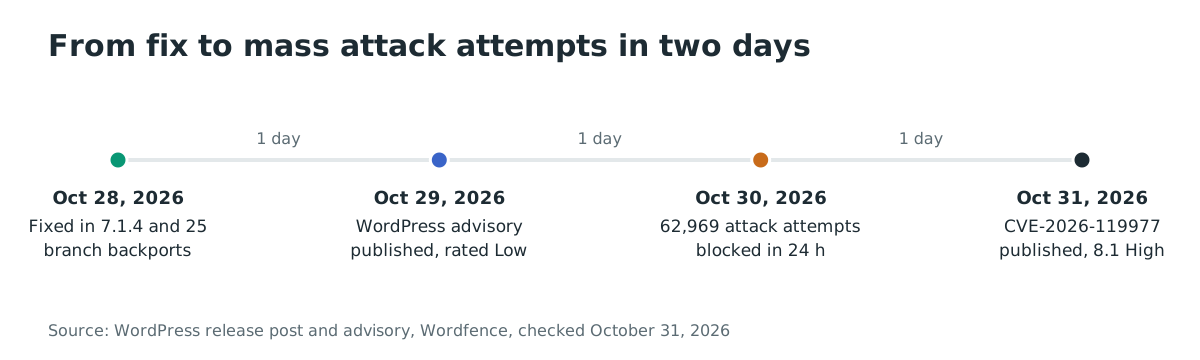
The speed is the story: mass attack attempts arrived two days after the fix shipped, while sites were still moving to 7.1.4.
Why does the fix work?
WordPress 7.1.4 breaks the chain at three points in commit b625b2d49c6a, "Upgrade/Install: Improve the handling of the upgrade working directory":
        $upgrade_folder = $wp_filesystem->wp_content_dir() . 'upgrade/';

-       // Clean up contents of upgrade directory beforehand.
+       // Clean up contents of upgrade directory beforehand, keeping its index.php.
        $upgrade_files = $wp_filesystem->dirlist( $upgrade_folder );
        if ( ! empty( $upgrade_files ) ) {
            foreach ( $upgrade_files as $file ) {
+               if ( 'index.php' === $file['name'] ) {
+                   continue;
+               }
+
                $wp_filesystem->delete( $upgrade_folder . $file['name'], true );
            }
        }

-       // We need a working directory - strip off any .tmp or .zip suffixes.
-       $working_dir = $upgrade_folder . basename( basename( $package, '.tmp' ), '.zip' );
+       /*
+        * The upgrade directory is web-served. Keep it from being listed, as core does
+        * for wp-content and its plugins and themes directories, so the name of the
+        * working directory created below cannot be discovered from a directory index.
+        */
+       if ( ! $wp_filesystem->exists( $upgrade_folder . 'index.php' ) ) {
+           $wp_filesystem->put_contents( $upgrade_folder . 'index.php', "<?php\n// Silence is golden.\n", FS_CHMOD_FILE );
+       }
+
+       // We need a working directory.
+       $working_dir = $upgrade_folder . $this->get_working_dir_name( $package );
The new private method appends a random suffix:
    private function get_working_dir_name( $package ) {
        // Strip off any .tmp or .zip suffixes.
        $name = basename( basename( $package, '.tmp' ), '.zip' );

        return $name . '-' . wp_generate_password( 16, false );
    }
The third change is in update-core.php, where the copy step's skip list gains the file the attacker writes:
-   $skip              = array( 'wp-content', 'wp-includes/version.php' );
+   $skip              = array( 'wp-content', 'wp-includes/version.php', 'wp-config.php' );
The random suffix removes the predictable path, which no attacker can compute in advance. The index.php file removes the directory index as a way to discover the random name. The skip-list entry means that even an attacker who finds the directory can no longer have their wp-config.php installed at the site root.
The fix is complete for this chain in the updater, and every branch backport carries the same three changes. It does not remove web access to the upgrade folder itself. That is why the server-level block in "How do I fix it?" remains worthwhile defense in depth.
How do I check if I was compromised?
Search your web-server access logs for the request pattern of this attack. On nginx, the default log is one line per request with the path in it:
# Nginx: requests to PHP files under the staging path, case-insensitive; decode encoded paths separately.
grep -iE "wp-content/upgrade/[^ ]+\.php" /var/log/nginx/access.log
On Apache, substitute your access log path. A staging path in the request, setup-config.php in particular, is what this flaw looks like:
# Apache: any request to the staged installer, on any version name.
grep -iE "wp-content/upgrade/.*/setup-config\.php" /var/log/apache2/access.log
Decode percent-encoded paths before judging them, since Wordfence reports attackers vary the staging-directory and version-name spellings. A single hit is a lead, not proof; legitimate clients have no reason to request these paths, so investigate the source address and what followed. Then check for what a successful race leaves behind:
# Any PHP file left in the staging tree.
find wp-content/upgrade -name "*.php" | sort
One index.php containing // Silence is golden. is what fixed WordPress itself writes there. Any other PHP file, and especially a wp-config.php, is a lead to investigate. Wordfence also advises looking for unfamiliar administrator accounts, plugins you did not install and PHP files you do not recognize. An attack that failed may leave no trace beyond the poll itself.
Timeline
- 2026-10-28: WordPress releases 7.1.4 with fix commit b625b2d49c6a, and backports the fix to every branch from 7.0.8 to 4.7.39.
- 2026-10-29: WordPress publishes its advisory, GHSA-4w3m-c66w-69mg, rating the race condition Low, and credits Umut Bayram of Picus Security.
- 2026-10-30: The Hacker News reports Wordfence’s tally of 62,969 blocked attacks in 24 hours; no compromise is reported.
- 2026-10-31: The CVE record, CVE-2026-119977, is published by Wordfence with a CVSS v3.1 score of 8.1 High. The flaw is not in CISA's KEV catalog as of this date.
FAQ
Does updating to 7.1.4 expose my site during that very update?
Yes, for the seconds the update takes. The code that runs an update is the version installed before it, so the update to 7.1.4 still stages into a predictable path. Attacks at that moment require an attacker already polling your site, which is what Wordfence observed. Update immediately rather than delay, and keep the server-level block from "How do I fix it?" in place during the change window.
My site runs an old branch. Do I have to jump to 7.1.4?
No. WordPress backported the fix to every branch back to 4.7, so 7.0.8, 6.9.11 and every other backport in the branch table in "Am I affected?" carry the same three changes. Branch-jumping carries its own compatibility risk, so the backport for your branch is the smaller change.
Why do WordPress and Wordfence disagree on severity?
WordPress rates the underlying race condition Low, and Wordfence's CVE record scores it 8.1 High with attack complexity High. Both describe the same unauthenticated path to code execution; the Low rating weighs the seconds-long window, and the High rating weighs the impact of winning it. Either way, the fix is the same and the attack telemetry is real.
What did Wordfence actually observe?
Wordfence blocked 62,969 requests targeting this flaw in 24 hours by October 30, 2026. Two of the largest sources polled small groups of sites for roughly 14.5 hours, and other sources tried many staging-directory and version-name variations. These are attempts that a firewall product blocked, not confirmed compromises, and no victim has been reported.
Are automatic updates enough?
They are the delivery mechanism for the fix, and the release post confirms security releases update automatically where background updates are supported. The exposure they leave is the update window itself. Pair them with the log checks in this post after the update, and with the server-level block if the staging directory is web-reachable.
Find your WordPress deployments before attackers poll them
Ostorlab's web agentic deep scan inventories your web applications and their framework versions. It shows which of your sites run WordPress 4.7.0 through 7.1.3, so you can drive them to a fixed version before the next update window opens.
References
- WordPress security advisory GHSA-4w3m-c66w-69mg, "A race condition during core updates that could lead to remote code execution", published October 29, 2026, with the per-branch fixed-version matrix: https://github.com/WordPress/wordpress-develop/security/advisories/GHSA-4w3m-c66w-69mg (checked October 31, 2026)
- CVE-2026-119977 record, published by the Wordfence CNA with CVSS v3.1 8.1: https://www.cve.org/CVERecord?id=CVE-2026-119977 (checked October 31, 2026)
- WordPress 7.1.4 release post, October 28, 2026, crediting Umut Bayram for the upgrade-process report: https://wordpress.org/news/2026/10/wordpress-7-1-4/ (checked October 31, 2026)
- Fix commit b625b2d49c6a, "Upgrade/Install: Improve the handling of the upgrade working directory", in WordPress 7.1.4: https://github.com/WordPress/WordPress/commit/b625b2d49c6a (checked October 31, 2026)
- WordPress 7.1.3 source, the vulnerable
WP_Upgrader::unpack_package()working-directory derivation andsetup-config.php's existing-config guard: https://raw.githubusercontent.com/WordPress/WordPress/7.1.3/wp-admin/includes/class-wp-upgrader.php and https://raw.githubusercontent.com/WordPress/WordPress/7.1.3/wp-admin/setup-config.php (checked October 31, 2026) - Wordfence analysis of the 7.1.4 security release, "WordPress 7.1.4 Patches Unauthenticated Upgrade-Window RCE; Exploitation Attempts Detected After Release", October 29, 2026: https://www.wordfence.com/blog/2026/10/wordpress-7-1-4-security-release-rce/ (checked October 31, 2026)
- The Hacker News, "WordPress RCE Flaw Draws Nearly 63,000 Attack Attempts in Just 24 Hours", October 30, 2026, quoting Wordfence's Alex Thomas and the 62,969 blocked attacks: https://thehackernews.com/2026/10/wordpress-rce-flaw-draws-nearly-63000.html (checked October 31, 2026)
- Wordfence threat-intelligence entry for the WordPress Core 4.7-7.1.3 upgrade-window RCE: https://www.wordfence.com/threat-intel/vulnerabilities/wordpress-core/wordpress-core-470-713-unauthenticated-upgrade-window-staged-installer-remote-code-execution (checked October 31, 2026)
- CISA Known Exploited Vulnerabilities catalog, JSON feed, searched for CVE-2026-119977: https://www.cisa.gov/sites/default/files/feeds/known_exploited_vulnerabilities.json (checked October 31, 2026)
- W3Techs usage statistics for WordPress, 39.5% of all websites and the version distribution: https://w3techs.com/technologies/details/cm-wordpress (checked October 31, 2026)