VMware ESX I/O Filter RCE: Unauthenticated (CVE-2026-123910)
Two unauthenticated 9.8 RCE flaws (CVE-2026-123910, CVE-2026-123911) in the VMware ESX I/O filter service; fixed in 9.1.2, 9.0.2.0200 and 8.0 U3m.
TL;DR
- Two memory-safety flaws in the ESX I/O filter service let an unauthenticated network attacker execute code on the host. Broadcom rates both CVSS v3.1 9.8 Critical.
- ESX 9.1.x before 9.1.2, 9.0.x before the 9.0.2 express patch and 8.0 before 8.0 U3m are affected. VMware Cloud Foundation and Telco Cloud deployments inherit the affected ESX builds.
- Broadcom does not report exploitation. Neither CVE is in CISA KEV as of 2026-11-26, and no public proof of concept is linked. The flaws need no credentials or user interaction.
- Install the fixed ESX build for your branch. ESX 8.x operators who cannot patch yet have a documented interim network restriction; see "How do I fix it?" for its limits.
Am I affected?
You are exposed when an affected ESX host runs the vulnerable I/O filter service on a network an attacker can reach. The host must also lack the fixed build for its branch.
All of these conditions must hold:
- You run ESX 9.1.x, 9.0.x or 8.0 earlier than the fixed build for that branch, or ESX 7.0, or a VMware Cloud Foundation, vSphere Foundation or Telco Cloud deployment that contains one of those ESX builds.
- An attacker can reach the host's I/O filter service over the network. On ESX 8.x, the service is
IOFilterVPon TCP port 9080. - The host has not applied the fixed build in the table.
The vSAN Witness Appliance runs ESX and is affected. Update it with the other hosts in the cluster. VMware Cloud Foundation 9.1.1 is not protected from these two CVEs; it only resolves the guest RPC issue CVE-2026-123916. ESX 7.0 is affected and has no public fixed build. Broadcom covers 7.0 only through extended support.
| Product and branch | Affected versions | Fixed version |
|---|---|---|
| VMware ESX 9.1.x | Before ESXi-9.1.2.0-25946735 |
ESXi-9.1.2.0-25946735 |
| VMware ESX 9.0.x | Before ESXi-9.0.2.0200-25953133 |
ESXi-9.0.2.0200-25953133 |
| VMware ESX 8.0 | Before ESXi80U3m-25926933 |
ESXi80U3m-25926933 |
| VMware Cloud Foundation 5.x | ESX before 8.0 U3m | 5.2.5 plus ESX 8.0 U3m |
| VMware Telco Cloud Platform 5.0.x and 5.1.x; Telco Cloud Infrastructure 3.0 | Per Broadcom KB463501 | Per Broadcom KB463501 |
| VMware ESX 7.0 | All releases | No public build; contact Broadcom under extended support |
Check the running build from an SSH session on the host or from the ESXi Shell:
esxcli system version get
The output prints the version. It also prints the build and update level. Compare the build number with the fixed builds in the table. A host on 8.0 U3m or 9.1.2 is fixed for both CVEs. A host on 9.0.2 needs the express patch build ESXi-9.0.2.0200-25953133, not only the 9.0.2 release.
On ESX 8.x, list the hosts allowed to reach the I/O filter service:
esxcli network firewall ruleset allowedip list -r iofiltervp
An empty list with the default allowed-all setting means every reachable host may connect. Run the same command after the restriction in "How do I fix it?" to confirm that only the vCenter Server remains. From a host that should not manage ESX, test the port directly:
nc -vz <esx-host> 9080
On Windows, use Test-NetConnection -ComputerName <esx-host> -Port 9080. A successful connection from a host that is not the vCenter Server is the condition to remove first. The advisory does not publish a port for 9.x. Use the version check there and treat any unfixed host as exposed until you confirm the network path.
How do I fix it?
Install the fixed ESX build for your branch: ESXi-9.1.2.0-25946735 for 9.1.x, ESXi-9.0.2.0200-25953133 for 9.0.x and ESXi80U3m-25926933 for 8.0. Patches are cumulative, so a later build on the same branch includes both fixes.
- Record the branch and build with
esxcli system version get. - Download the fixed ESX image for your branch from Broadcom's VMSA-2026-0011 advisory.
- Put the host into maintenance mode and evacuate its virtual machines according to your change policy.
- Apply the image through vSphere Lifecycle Manager, or from the ESXi Shell with
esxcli software profile update. The image's profile name comes from the image itself:esxcli software sources profile list -d /path/to/<build>.zip esxcli software profile update -d /path/to/<build>.zip -p <profile-from-the-list> - Reboot the host and confirm the new build with
esxcli system version get. - Update every host in the cluster, including the vSAN Witness Appliance. On VMware Cloud Foundation 5.x, use the asynchronous patching process in Broadcom KB88287. On 9.x, update both vCenter and ESX. Telco Cloud operators follow KB463501.
- Confirm that the I/O filter service is reachable only from the systems that need it.
The advisory lists no workaround. Broadcom's support knowledge base publishes an interim network restriction in KB463535 for ESX 8.x, and it limits the IOFilterVP service to the vCenter Server:
- Log in to the ESX 8.x host over SSH or the ESXi Shell as root.
- Disable the allowed-all rule for the service:
esxcli network firewall ruleset set -r iofiltervp --allowed-all false - Allow the vCenter Server address:
esxcli network firewall ruleset allowedip add -r iofiltervp -i <vCenter-IP> - Verify the allowed list:
esxcli network firewall ruleset allowedip list -r iofiltervp
Treat this as a delay, not a fix. Broadcom says restricting network access to the ESX I/O filter service resolves only a small portion of the issues in the advisory. It warns that the restriction may negatively impact cluster operation, workload availability and storage.
The knowledge base article covers ESX 8.x only, so it does not give 9.x operators a documented workaround. A vCenter Server that is compromised or on an untrusted network can still reach the service. The code remains vulnerable until the fixed build is installed.
What is the root cause?
Both flaws are memory-safety defects in the ESX I/O filter service, a host-side component that supports the I/O filters vCenter installs to inspect or redirect a virtual machine's storage traffic.
Broadcom describes CVE-2026-123910 as a heap out-of-bounds write (CWE-787) and CVE-2026-123911 as a use-after-free (CWE-416) in that service. A heap out-of-bounds write stores data beyond the end of an allocated heap buffer. A use-after-free reads or writes memory after it has been freed. Either defect can corrupt a data structure that the service uses later.
The service is part of the vSphere APIs for I/O Filtering framework, usually called VAIO. A filter runs on the ESX host and sits in the storage path of the virtual machines it is attached to. The service is reachable over the network because vCenter manages filters through it. On ESX 8.x, Broadcom's workaround article names the service IOFilterVP and its port, TCP 9080.
Broadcom publishes no source code and no patch diff for either CVE. It also does not name the function or the request format. The advisory does not name the message or field that reaches the vulnerable path.
The public record is the component and the two bug classes. It also carries the CVSS vectors and the impact statement. That is the limit of the public root-cause material, and this post does not fill the gap with speculation.
The credits are public. Broadcom credits CrowdStrike for CVE-2026-123910 and NiNi of DEVCORE, working with TrendAI Zero Day Initiative, for CVE-2026-123911.
How is it exploited?
An attacker who can reach the I/O filter service sends input that triggers the out-of-bounds write or the stale-memory access. The input corrupts the service's memory, and the attacker may execute code on the host. No public request sequence exists.
- Reach the ESX host's I/O filter service over the network. On ESX 8.x it listens on TCP 9080; the advisory does not name the port for 9.x.
- Send a request that reaches the vulnerable processing path. The exact message and field are not public.
- Trigger the heap write beyond the buffer for CVE-2026-123910, or the use of freed memory for CVE-2026-123911.
- Corrupt memory that the service uses for its own state or control flow.
- Broadcom says a network attacker may execute code on the host as a result.
The CVSS vector records network access with low attack complexity. It also records no privileges and no user interaction. The advisory does not describe a crash or a denial of service. It also does not describe a specific payload.
No public proof of concept, exploit code or in-the-wild report is linked from the advisory, the CVE records or the vendor Q&A. This post includes no exploit code.
How does the attack flow?
An unauthenticated attacker reaches the ESX I/O filter service over the network, triggers a memory-safety defect, and may run code on the host.
no bounds check"] B --> D["Use-after-free
stale pointer"] C --> E["Memory corruption"] D --> E E --> F["Code execution on the ESX host"]
What can an attacker do?
An unauthenticated attacker with network access can execute code on the ESX host through either CVE. Broadcom's impact statement does not name the privilege level of that code, so this post does not claim root access or a virtual machine escape.
The conditions are listed in full here. The attacker must reach the I/O filter service. The host must run an affected build. The fixed build must be missing. The CVSS vector requires no credential and no user interaction, and Broadcom's advisory says network access to ESX is enough.
Host code execution is serious because the ESX host runs the virtual machines and mediates their storage and network. The advisory states code execution on the host, not a specific post-exploitation action. Broadcom does not publish a proof of concept, a victim report or an exploitation timeline.
The same advisory also fixes other ESX and vCenter issues, including CVE-2026-123912, a local XHCI USB out-of-bounds write that needs administrative privileges inside a virtual machine. That flaw is a separate issue with a local attack vector and is not covered by this post.
Why does the fix work?
Broadcom's fixed ESX builds replace the vulnerable I/O filter service and resolve both CVEs. The advisory lists the fixed build for each supported branch, and patches are cumulative.
Broadcom publishes no patch diff, so the specific bounds check or object-lifetime fix cannot be inspected. The claim that the fixed builds close both bugs rests on the vendor's advisory and release notes, not on an independent comparison of the service binaries.
The network restriction works by removing reachability. It does not repair the service: it is documented only for ESX 8.x and can break cluster operations that need the service. The fixed build is the only complete remediation.
How do I check if I was compromised?
No public indicators of compromise are published. The advisory, the CVE records and the vendor Q&A name no file and no hash. They also name no IP address and no log line.
These checks find the conditions an attempt would leave behind, not proof of compromise:
- On ESX 8.x, list the hosts allowed to reach the service and look for entries other than the vCenter Server:
esxcli network firewall ruleset allowedip list -r iofiltervp. - Search the host logs for the service name and for unexpected restarts:
grep -i iofilter /var/log/vmkernel.log /var/log/hostd.log. - Review network flow records for TCP 9080 connections from hosts that are not vCenter.
- Review vCenter tasks and events for I/O filter operations and for new or changed filter registrations.
- Look for unexpected host reboots or crash dumps in the period you are investigating.
Memory corruption can crash the service, so a restart or a crash dump is a lead, not proof. An attempt that failed may leave no trace. If you find evidence of host code execution, treat the host as compromised. Preserve its logs and rebuild it from a trusted image.
Timeline
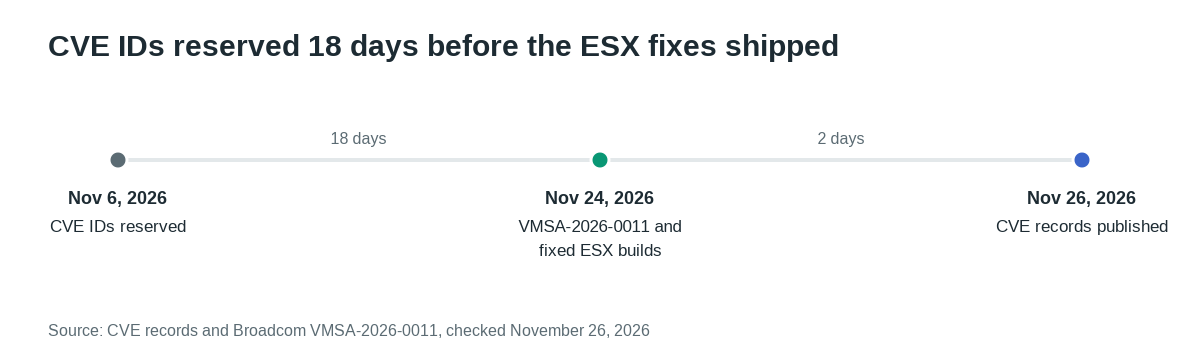
- 2026-11-06: Broadcom reserves the CVE IDs for the two ESX flaws.
- 2026-11-24: Broadcom publishes VMSA-2026-0011 and the fixed ESX builds.
- 2026-11-26: The CVE records for CVE-2026-123910 and CVE-2026-123911 are published.
FAQ
Are CVE-2026-123910 and CVE-2026-123911 exploited in the wild?
Broadcom does not report exploitation, and neither CVE is in CISA KEV as of 2026-11-26. No public proof of concept is linked from the advisory or the CVE records. The absence of a report is not proof that nobody has tried.
Do I need credentials or access to a virtual machine?
No. Both CVSS vectors record no privileges and no user interaction, and Broadcom says network access to ESX is enough. That separates these two flaws from CVE-2026-123912, which needs local administrative privileges inside a virtual machine.
Which build fixes both CVEs?
ESX 9.1.2 build ESXi-9.1.2.0-25946735, the 9.0.2 express patch build ESXi-9.0.2.0200-25953133, and 8.0 U3m build ESXi80U3m-25926933. VMware Cloud Foundation 5.x is fixed in 5.2.5 with ESX 8.0 U3m.
Is restricting port 9080 enough?
It removes the network path on ESX 8.x when only vCenter needs the service. Broadcom warns that it can affect cluster operations, workload availability and storage. The vendor says patching is the better path. The workaround article covers 8.x only. It does not repair the code.
Does ESX 9.1.1 protect me?
No. VMware Cloud Foundation 9.1.1 resolves only CVE-2026-123916 from this advisory. ESX 9.1.1 is still affected by CVE-2026-123910 and CVE-2026-123911, so install ESX 9.1.2.
Is there a public proof of concept?
No. The advisory, the CVE records and the vendor Q&A publish no request, payload or exploit code for either flaw. Treat a claim of a working exploit as unverified until a primary source publishes it.
References
- Broadcom, "VMSA-2026-0011: VMware ESX, vCenter, Workstation, Fusion, and Avi Load Balancer updates address multiple vulnerabilities", published November 24, 2026 (checked November 26, 2026): https://support.broadcom.com/web/ecx/support-content-notification/-/external/content/SecurityAdvisories/0/39626
- Broadcom, "VMSA-2026-0011: Questions & Answers", published November 24, 2026 (checked November 26, 2026): https://brcm.tech/vmsa-2026-0011-qna
- Broadcom, "Manual interim workaround for CVE-2026-123910 and CVE-2026-123911 on ESXi", article 463535 (checked November 26, 2026): https://knowledge.broadcom.com/external/article/463535/manual-interim-workaround-for-cve2026123.html
- CVE-2026-123910 record, published November 26, 2026 (checked November 26, 2026): https://www.cve.org/CVERecord?id=CVE-2026-123910
- CVE-2026-123911 record, published November 26, 2026 (checked November 26, 2026): https://www.cve.org/CVERecord?id=CVE-2026-123911
- VMware ESX 9.1.2 release notes (checked November 26, 2026): https://techdocs.broadcom.com/us/en/vmware-cis/vcf/vcf-9-0-and-later/9-1/release-notes/vmware-cloud-foundation-9-1-2-0-release-notes/esx-9-1-2-0-release-notes.html
- VMware ESX 9.0.2.0200 release notes (checked November 26, 2026): https://techdocs.broadcom.com/us/en/vmware-cis/vcf/vcf-9-0-and-later/9-0/release-notes/patch-releases-9-0-0-x/vsphere/esx/esx-9-0-2-0200-release-notes.html
- VMware ESX 8.0 U3m release notes (checked November 26, 2026): https://techdocs.broadcom.com/us/en/vmware-cis/vsphere/vsphere/8-0/release-notes/esxi-update-and-patch-release-notes/vsphere-esxi-80u3m-release-notes.html
- CISA Known Exploited Vulnerabilities catalog, version 2026.11.25, 1,805 entries (checked November 26, 2026): https://www.cisa.gov/known-exploited-vulnerabilities-catalog
- SecurityWeek, "VMware Updates Patch Critical ESX, vCenter Vulnerabilities", published November 24, 2026 (checked November 26, 2026): https://www.securityweek.com/vmware-updates-patch-critical-esx-vcenter-vulnerabilities/
Keep reading