
TeamViewer RCE via Screen Size, Fixed in 15.83 (CVE-2026-111585)
A malicious TeamViewer host runs code on the viewer that connects to help it, through one truncated screen-size multiply; update every client to 15.83.
TL;DR
- The screen decoder of TeamViewer clients multiplies the host-announced screen size in 32-bit arithmetic. A malicious or compromised host can therefore run code on the viewer that connects to it. Remedio disclosed the research on October 29, 2026, and TeamViewer fixed it in 15.83.
- Every client component before 15.83 is affected. That covers the Full Client and Host on Windows, Linux and macOS, the Windows Portable client and the Android Remote Control app, plus the legacy 15.64, 14.7 and 13.2 lines. The vendor says TeamViewer is installed on more than 2.5 billion devices.
- Bulletin TV-2026-1011 rates the flaw High, CVSS v3.1 8.8, and publishes no proof of concept. Two more flaws ride in the same 15.83 release, an out-of-bounds write reachable from session recordings and a local privilege escalation to root on macOS.
- TeamViewer states it is not aware of any exploitation in the wild, and the flaw is not in CISA's Known Exploited Vulnerabilities catalog as of November 2, 2026. Update every client to 15.83, or to the fixed legacy build, and read on for what to check.
Am I affected?
You are exposed when the first condition holds and at least one of the other two applies:
- A TeamViewer client component is on a version older than 15.83. The affected components are the Full Client and the Host on Windows, Linux and macOS, the Windows Portable client, and the Android Remote Control app.
- For CVE-2026-111585, the attacker is the remote host in a session your operator accepts. That host can be attacker-operated, or a real machine whose session traffic or account has been taken over. The compromise happens as the session opens, before any work starts.
- For the recording path, CVE-2026-92372, a user opens a crafted TeamViewer session recording, a
.tvsfile, from an untrusted source on a Linux or macOS Full Client.
| Branch | Affected versions | Fixed version |
|---|---|---|
| Full Client and Host, Windows, Linux, macOS | before 15.83 | 15.83 (October 27, 2026) |
| Portable client, Windows | before 15.83 | 15.83 |
| Remote Control app, Android | before 15.83 | 15.83 |
| Legacy 15.64, Windows 7 and 8 | before 15.64.10 | 15.64.10 |
| Legacy 14.7, Windows, Linux, macOS | before 14.7.48868 | 14.7.48868 |
| Legacy 13.2, Windows | before 13.2.36231 | 13.2.36231 |
| Legacy 13.2, Linux | before 13.2.154008 | 13.2.154008 |
| Legacy 13.2, macOS | before 13.2.154007 | 13.2.154007 |
Remedio tested the Windows viewer at 15.80.6.0 and found it affected, and observed the vulnerable constructor still present in 15.82.6.0, so the boundary is genuinely 15.83. Check what you run:
(Get-Item "C:\Program Files\TeamViewer\TeamViewer.exe").VersionInfo.FileVersion
On Android, the app version appears in Settings under Applications, or in the Play Store listing. The Android Remote Control app carries the same screen-decompression flaw, so include managed phones in the version sweep.
How do I fix it?
Update every client component to 15.83, or to the fixed legacy build for its line:
- Update the Full Client and Host from the application's update prompt, or download 15.83 from the vendor and install it over the existing client.
- Replace the Portable client with the 15.83 build from the vendor's knowledge base, since portable installs do not self-update.
- Update the Android Remote Control app from the Play Store, and confirm the version reads 15.83 or later.
- For hosts pinned to the legacy lines, apply the fixed build for that line, which the bulletin's fixed-versions section links per platform.
There is no configuration workaround, because accepting sessions is the product's normal mode of operation and the flaw fires when the session opens. The limit of any mitigation is plain. Restricting which partners may connect reduces who can attack you, but every host your operators still help remains a possible source of the malicious geometry.
What is the root cause?
The viewer allocates its screen bitmap with a size that wraps in 32-bit arithmetic. The bounds checks that guard later writes read the untruncated dimensions. The component is CBitmapBuffer, the viewer's fallback decode surface when no hardware video decoder is used for the session.
The session opens with a DisplayParams message from the host carrying a width, a height and a color depth. The viewer allocates the bitmap from those numbers, and the write path follows:
// width, height, bpp_bits all originate in the peer
// DisplayParams message, unchecked.
// stored at plane+0x20, NOT truncated
stride = (bpp_bits * (width + 0x10)) >> 3;
// 32-bit multiply: wraps mod 2^32
plane.byteSize = (uint32)(stride * (height + 0x10));
// allocates the WRAPPED size
buf = operator_new[]( (ulong)(stride * (height + 0x10)) );
The multiply is evaluated in 32 bits, wraps, and only the wrapped remainder reaches the allocation. The stored width and height keep the host's full values. The rectangle checks in the run-length decoders then compare each update against the declared dimensions, never against the allocated bytes:
if ((D_height < y2) || (D_width < x2))
    return "invalid rectangle";
// D_width / D_height are the DECLARED dims (untruncated)
// otherwise, for y in [y1, y2):
// write pixels at base + y*stride + (x*bpp >> 3)
Nothing on the path enforces an upper bound on the announced geometry. The host therefore picks dimensions that make the allocation and the permission to write differ by almost 2 to the power 32. The host can also steer the viewer onto this surface at will. It refuses to negotiate the AV1 or H.264 video codecs, forcing the lossless tile path the bitmap surface serves.
How is it exploited?
The published research walks the attack from one accepted session:
- The attacker operates a host, or takes over the port of a real one, and the victim's viewer connects to help. The victim accepts the session; that is the single interaction the CVSS vector records as UI:R.
- The host refuses the video-codec negotiation, so the viewer falls back to
CBitmapBufferand the RLE tile decoders. DisplayParamsannounces a 32768 by 32768 screen at 32 bits per pixel. The intended size is 4,299,162,624 bytes; the wrapped allocation is 4,195,328 bytes, about 4 MB, and the surface still claims 32,784 rows.- A single screen update whose rectangle covers the full declared size makes the decoder write the whole surface into that buffer. On stock Windows this is a clean, repeatable crash: remote denial of service over an ordinary session.
- For code execution, the attacker shrinks the allocation on purpose. Announcing a width of 0xFFFFFFF5 with a height of 1 at 8 bits per pixel wraps the allocation, by the research's measurement, to a buffer of roughly 0x440 bytes. That lands it in a small heap size class next to groomable objects.
- The overflow corrupts a live object the viewer later calls through a pointer in its own first field. Overwriting that pointer redirects the call, and the research routed it through a stack pivot to
WinExec, defeating both control-flow guard and DEP.
The demonstrated code execution ran on the shipping binaries with the client current at the time (before 15.83) and its usual defenses on. In the demonstration, the corrupting bytes were placed by a host-side hook that drives the identical code path and stands in for the wire tile payload during the heap-grooming step.
How does the attack flow?
One accepted session is the whole attack surface, and the wrapped allocation turns the host's screen geometry into control of the viewer's process.
to help a hostile host"] --> B["Host refuses video codecs,
viewer falls back to CBitmapBuffer"] B --> C["DisplayParams announces
32768 x 32768 at 32 bpp"] C --> D["Size multiply wraps in 32 bits,
small allocation, full canvas
missing check"] D --> E["Full-surface rectangle writes
past the allocation"] E --> F["Crash at will, or heap grooming
to code execution on the viewer"]
What can an attacker do?
The demonstrated ceiling is code execution in the viewer's process, on the account running it, at the moment a session opens:
- The attacker can crash the viewer whenever it wants, a remote denial of service reached over a normal session.
- With size-class grooming, the attacker converts the same write into execution of a program of their choosing on the viewer. The demonstration ran on Windows clients current at the time (before 15.83) with control-flow guard and DEP enabled.
- The recording path of CVE-2026-92372 extends the same impact to Linux and macOS Full Clients through a crafted
.tvssession recording the user opens, no host required. - Separately, CVE-2026-92374 gives a local attacker with low privileges on macOS root, through a time-of-check-to-use race and symlink handling in the privileged installer helper.
The conditions for the main flaw are few and specific: the attacker must control the host side of a session the operator accepts, or a port the viewer connects to. The operator sees a normal session opening, and the compromise needs no password theft and no further interaction.
Why does the fix work?
TeamViewer is closed source, so no patch diff is public. The bulletin fixes the flaw in 15.83 for every current product and backports to the three legacy lines. Remedio verified the boundary from the outside: the constructor was still present in 15.82.6.0, and 15.83 resolves the issue.
What the fix has to do follows from the root cause. The allocation and the bounds checks read two different numbers for the same surface, so a complete fix makes every write validate against the bytes actually allocated. It also validates the announced geometry against an upper bound before the bitmap is created.
The vendor's rating of the bulletin as Important, with an update to the latest version as the single remedy, matches that scope.
How do I check if I was compromised?
Neither the bulletin nor the research publishes indicators of compromise. The traces follow from the published mechanics of the attack:
Get-WinEvent -LogName Application | Where-Object { $_.Message -match "TeamViewer" } | Select -First 20
Crashes of TeamViewer.exe in the application log, if unexplained, mark the denial-of-service variant. The code-execution variant launches its payload as a child of the viewer. Review process-creation telemetry for any process whose parent is TeamViewer.exe or TeamViewer_Desktop.exe that the operator cannot account for.
Review the connection records in the TeamViewer Management Console for sessions with untrusted partners around any such event, and treat the operator's account as compromised if a payload ran.
For the recording path, search managed endpoints for .tvs files from untrusted sources and delete them after updating. A crafted recording opened before the update has the same effect as a hostile host.
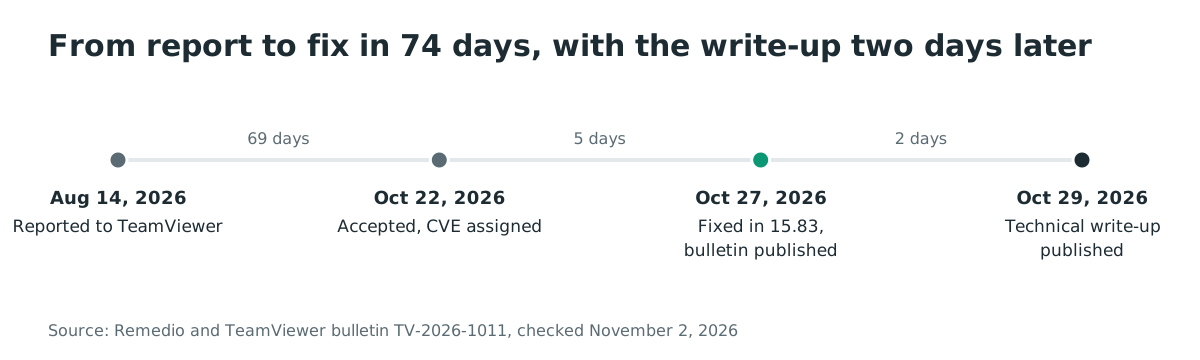
Timeline
- 2026-08-14: Remedio reports the viewer flaw to TeamViewer Product Security.
- 2026-10-22: TeamViewer accepts the finding at CVSS v3.1 8.8 and assigns CVE-2026-111585.
- 2026-10-27: TeamViewer releases 15.83, publishes bulletin TV-2026-1011 and the three CVE records, and rates the bulletin Important.
- 2026-10-29: Remedio publishes the technical write-up, by Omri Dar.
- 2026-11-02: TeamViewer states no known exploitation, and the flaws are not in CISA's Known Exploited Vulnerabilities catalog.
FAQ
Is the Android app affected?
Yes. The Android Remote Control app carries the same remote-control screen flaw, prior to version 15.83, per the bulletin's affected-products list. Managed phones that use TeamViewer to control other devices need the same update.
Does a strong TeamViewer password stop this?
No. The attack rides inside a session the operator deliberately accepts. The host never needs the viewer's password, and the compromise happens as the session opens, before any authentication the viewer performs toward the host matters.
What about session recordings?
A crafted .tvs recording is a second delivery path on Linux and macOS, tracked as CVE-2026-92372 with the same 8.8 rating. Treat recordings from untrusted sources like programs, because on unpatched clients that is what they are.
Is this the same bug class as the TightVNC viewer flaw?
Yes, the same week produced two independent disclosures of the same pattern in remote-access viewers. The host announces a screen geometry, the viewer truncates the size computation, and the decode path writes past the allocation. SSD Secure Disclosure published the TightVNC flaw with a public exploit on October 29, 2026. Any remote-access tool that sizes a buffer from peer-announced dimensions deserves the same question.
What about MeshCentral?
Separately, and not a vulnerability disclosure, the maintainers of the open-source remote-management server MeshCentral published an urgent security release on October 23, 2026. The release note warns of an active attacker taking over servers and their remote clients, and urges immediate upgrades to 1.3.1.
That release note is the entire disclosure; no advisory or CVE exists for it. It is the same corner of the attack surface, the trust a support tool places in the machine it connects to.
Was it exploited in the wild?
TeamViewer states it is not aware of any active exploitation at the time of publication. The flaws were not in CISA's Known Exploited Vulnerabilities catalog as of November 2, 2026. The research demonstration is a lab result, not a field report.
References
- TeamViewer security bulletin TV-2026-1011, the three CVEs and the fixed-version matrix: https://www.teamviewer.com/en/resources/trust-center/security-bulletins/tv-2026-1011/ (issued October 27, 2026; checked November 2, 2026)
- Remedio research, "Remote Code Execution in TeamViewer", the full technical write-up: https://remedio.io/research/vulnerability-disclosures/remote-code-execution-in-teamviewer/ (published October 29, 2026; checked November 2, 2026)
- CVE-2026-111585 record, TeamViewer CNA, CVSS v3.1 8.8: https://www.cve.org/CVERecord?id=CVE-2026-111585 (published October 27, 2026; checked November 2, 2026)
- CVE-2026-92372 record, the session-recording path: https://www.cve.org/CVERecord?id=CVE-2026-92372 (published October 27, 2026; checked November 2, 2026)
- CVE-2026-92374 record, the macOS local privilege escalation: https://www.cve.org/CVERecord?id=CVE-2026-92374 (published October 27, 2026; checked November 2, 2026)
- SSD Secure Disclosure, "TightVNC Viewer Pre-auth RCE", the same-week disclosure of the same viewer pattern: https://ssd-disclosure.com/tightvnc-viewer-pre-auth-rce/ (published October 29, 2026; checked November 2, 2026)
- MeshCentral 1.3.1 release note, the urgent-upgrade warning for an active attack: https://github.com/Ylianst/MeshCentral/releases/tag/1.3.1 (published October 23, 2026; checked November 2, 2026)
- TeamViewer companion bulletin TV-2026-1012, Remote Management add-ons: https://www.teamviewer.com/en/resources/trust-center/security-bulletins/tv-2026-1012/ (checked November 2, 2026)
- CISA Known Exploited Vulnerabilities catalog, feed checked for CVE-2026-111585, CVE-2026-92372 and CVE-2026-92374: https://www.cisa.gov/known-exploited-vulnerabilities-catalog (checked November 2, 2026)