
SignDrop: Windows CLFS Privilege Escalation to SYSTEM
A public Windows CLFS proof of concept turns logfile authentication into SYSTEM privileges on patched Windows 11 and Server 2025, with no fix yet.
TL;DR
- A public proof of concept called SignDrop abuses the Windows Common Log File System authentication feature to turn a standard user into SYSTEM on patched Windows 11 and Server 2025. Researcher MSNightmare published it on November 10, 2026.
- Affected systems are Windows 11 25H2, 26H1, 26H2 and Windows Server 2025 with CLFS authentication Mode 0 or 1. The published chain also needs Windows Defender enabled.
- No CVE, advisory or fix exists. An independent test confirmed the exploit works but is not reliable for operations. No attacks are reported, and it is not in CISA KEV as of November 13, 2026.
- Do not disable CLFS authentication: Mode 2 or 3 reopens the memory-corruption flaws the mitigation exists to stop. Keep it on, restrict local standard-user access, and watch for a Microsoft advisory. See "How do I fix it?".
Am I affected?
You are exposed when all of these hold:
- The device runs Windows 11 25H2, 26H1 or 26H2, or Windows Server 2025. The researcher tested Windows 11 26H2, a 26H2 Experimental build and a Windows Server 2025 Experimental build.
- The CLFS authentication mode is 0 (enforced) or 1 (learning). Microsoft enables the mitigation by default and moves a system from learning to enforcement after 90 days, so both modes are in scope.
- Windows Defender is enabled. The published chain coerces the Defender update engine to open the attacker-prepared log.
- A local standard user can run code on the device. The flaw is a local privilege escalation, not a remote attack.
Older Windows releases do not have the CLFS authentication feature, so the SignDrop path does not apply to them. Their CLFS driver still parses log files, and the memory-corruption flaws the mitigation was built to stop remain a separate risk.
| Product | Affected versions | Fixed version |
|---|---|---|
| Windows 11 | 25H2, 26H1, 26H2 | None |
| Windows Server | 2025 | None |
| Older Windows releases | CLFS authentication feature absent | SignDrop does not apply; CLFS memory-corruption flaws remain |
Read the CLFS authentication mode on the device:
reg query "HKLM\SYSTEM\CurrentControlSet\Services\CLFS\Authentication" /v Mode
PowerShell reads the same value:
Get-ItemProperty 'HKLM:\SYSTEM\CurrentControlSet\Services\CLFS\Authentication' -Name Mode
A Mode of 0 or 1 is in the researcher's claimed scope. A Mode of 2 means an administrator disabled the mitigation, and 3 means the system disabled it. Neither value makes the device safe: both let CLFS parse tampered log files, which is the memory-corruption exposure the mitigation was introduced to reduce.
Check the Windows build with winver or:
Get-ComputerInfo | Select-Object WindowsProductName, WindowsVersion, OsBuildNumber
How do I fix it?
No fix exists. Microsoft has not assigned a CVE, published an advisory or shipped a patch, and the November 2026 security updates do not address SignDrop.
- Keep CLFS authentication enabled. Leave
Modeat 0 or 1. Do not set it to 2 or 3 to avoid this flaw, because that reopens the CLFS memory-corruption path. - Restrict local logon and standard-user accounts to the people who need them. The published chain starts from a standard user session.
- Watch Microsoft's Security Update Guide and the CLFS authentication support article for a CVE, an advisory or a changed mitigation.
- Check for the artifacts in "How do I check if I was compromised?" on devices where a standard user could run code.
There is no proven workaround that blocks the published chain while leaving the mitigation on. Windows Defender's tamper protection does not help in the published path, because the chain asks Defender's own privileged process to create the file. Removing local code execution, for example by moving untrusted users to a remote session or a separate device, removes the precondition but is not always practical.
Microsoft's support article describes the mitigation and the registry values. It also warns that disabling the mitigation lets CLFS parse unauthenticated log files, which is why the setting must stay on.
What is the root cause?
The CLFS driver creates the authentication file for a log in the context of whichever process opens the log, but gives the new file the original log's permissions, so a privileged opener can be made to create a SYSTEM-owned file that a standard user can write.
CLFS is the Common Log File System, a kernel-mode logging subsystem in Windows. Microsoft added an authentication mitigation in October 2025. The driver attaches a hash-based message authentication code to a log file, using a key stored in the registry and readable only by administrators and SYSTEM.
Each log can have an associated container and a .cnpf companion file that holds recovery data. The companion file is created with the same security attributes as the original log, according to Microsoft's documentation.
The published analysis describes what happens when a log with an associated container is opened. The driver opens the associated container too. If the associated file is empty and its authentication file is absent, CLFS creates the .cnpf file.
The creation runs in the context of the process that opened the log, so a privileged process creates the file as SYSTEM. The new file inherits the original log's discretionary access control list, which the standard user controls.
The second part is the redirection. An object manager symbolic link can point the .cnpf path at a location the attacker chooses. When the privileged process opens the log, CLFS follows the link and creates the file at the attacker's path, still as SYSTEM and still with the original log's permissions.
The researcher's example opens \CLFS\??\C:\test\t, which opens t.blf and its associated container.
Microsoft's documentation defines the mode values:
- 0: the mitigation is enforced. CLFS refuses log files with missing or invalid authentication codes.
- 1: learning mode. CLFS opens log files and writes authentication codes when they are missing.
- 2: an administrator disabled the mitigation.
- 3: the system disabled the mitigation.
Modes 0 and 1 are the vulnerable configurations because the authentication file is created in both.
How is it exploited?
- A standard user creates a CLFS log and an associated container with paths the user controls, and arranges for the associated container to be empty so its authentication file is missing.
- The user creates an object manager symbolic link that redirects the
.cnpfcreation to a path the user can reach. - The user coerces a privileged process to open the log. The published proof of concept calls Windows Defender's update interface,
ServerMpUpdateEngineSignature. - CLFS creates the
.cnpffile in the privileged process's security context, so the file is owned by SYSTEM. The new file inherits the original log's discretionary access control list, which the user can write. - The user writes to the SYSTEM-created file and chains the write into a SYSTEM shell.
The published repository includes the proof-of-concept code and the writeup. The researcher tested it on Windows 11 26H2, a Windows 11 26H2 Experimental build and a Windows Server 2025 Experimental build. The repository says the technique can work against any antimalware engine whose process runs with elevated privileges; that broader claim has not been independently tested.
The independent assessment by 78researchlab, reported by The Hacker News, found that the exploit works but does not run reliably enough for operational use. Running it changes every User Account Control prompt to open a standard user shell and a SYSTEM shell, which makes the attack noticeable to anyone at the device.
How does the attack flow?
A standard user prepares a CLFS log and a redirected companion path, then coerces Defender to open the log so CLFS creates a SYSTEM-owned file that the user can write.
a CLFS log and container"] --> B["Object manager symlink
redirects the .cnpf path"] B --> C["Defender update interface
opens the prepared log"] C --> D["CLFS creates .cnpf
as SYSTEM"] D --> E["The file inherits the log's
user-controlled permissions"] E --> F["Standard user writes
to the SYSTEM-owned file"] F --> G["Write chains to
a SYSTEM shell"]
What can an attacker do?
A local standard user can obtain SYSTEM privileges on an affected device. That is the highest local privilege on a Windows workstation or server, and it lets the attacker read other users' data, change system configuration, load drivers and disable security software.
The conditions are part of the impact:
- The attacker needs a standard user session and the ability to run code on the device.
- The CLFS authentication mode must be 0 or 1.
- Windows Defender must be enabled for the published chain, because the chain uses Defender's update interface to open the log.
- The published chain is a local privilege escalation. It does not give remote access by itself, and it does not spread to other devices.
The researcher says the technique can be used against any antimalware engine that runs a privileged process. That claim is broader than the published test, which used Defender on specific Windows builds. The independent test confirms a SYSTEM shell on the tested builds, not reliable exploitation on every configuration.
Why does the fix work?
No fix exists, so this section describes what a patch has to change. A complete fix has to stop a privileged opener from creating a file with permissions the opener does not control.
Three changes would close the published path:
- Create the authentication file in the security context of the original log's owner, or re-check the opener's identity before creating it.
- Do not inherit a discretionary access control list that the log's creator controls when the file is created in a privileged context.
- Validate the associated container path against the log's directory, and refuse object manager redirection for a privileged creation.
Microsoft has not published a patch or a CVE. Until it does, keeping the mitigation enabled is the control that preserves the protection the feature was introduced for. Disabling it trades a local privilege escalation for the memory-corruption flaws the mitigation was built to stop.
How do I check if I was compromised?
No indicators of compromise have been published, and no attacks are reported. The published exploit is noticeable, so these checks look for the state it creates.
- Look for
.cnpffiles in unexpected locations, especially under user-writable directories and with SYSTEM ownership. A companion file normally sits beside its log. - Look for object manager symbolic links that point from a CLFS path to a user-writable location. WinObj or a similar object manager viewer shows the
\CLFSnamespace. - Check for a change in User Account Control behavior. The published exploit changes UAC prompts to open a standard user shell and a SYSTEM shell.
- Review Defender and system events around unexpected log file opens, and look for new local accounts or services created after a standard user session.
- Review the device for unexpected SYSTEM processes or drivers loaded outside a maintenance window.
A failed attempt may leave no trace. If a check hits, preserve the disk image and rebuild the device rather than cleaning it in place.
Timeline
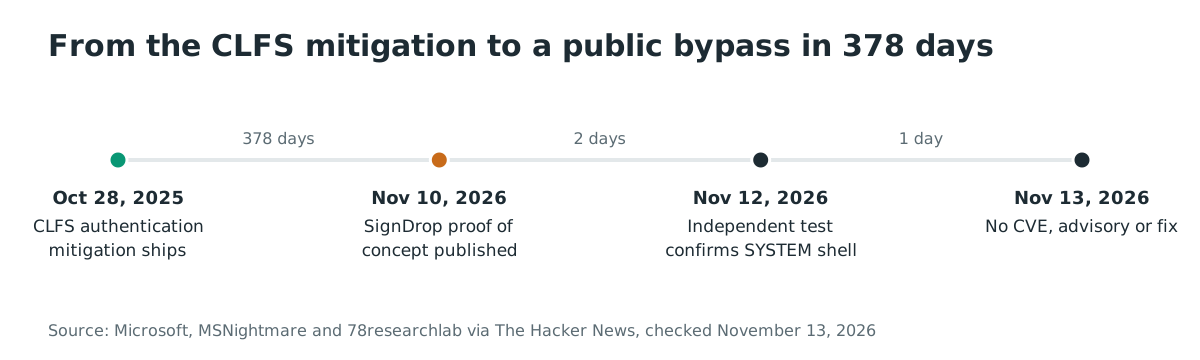
- 2025-10-28: Microsoft ships the CLFS authentication mitigation in Windows 11 25H2, 26H1 and Windows Server 2025 updates (KB 5056852).
- 2026-11-10: MSNightmare publishes the SignDrop proof of concept and writeup on GitHub.
- 2026-11-12: The Hacker News reports the flaw and 78researchlab's independent test, which found the exploit works but is unreliable.
- 2026-11-13: No CVE, no Microsoft advisory and no fix. The flaw is not in CISA KEV.
FAQ
Is there a CVE for SignDrop?
No. Microsoft has not assigned a CVE, published an advisory or released a fix as of November 13, 2026. The researcher calls it a zero-day, and the public repository is the only technical record.
Does it affect Windows 10?
The CLFS authentication feature is in Windows 11 25H2, 26H1, 26H2 and Windows Server 2025. Older releases do not have the feature, so the SignDrop path does not apply. Their CLFS driver still has memory-corruption flaws, which are a separate risk.
Can it be exploited remotely?
No. The published chain starts from a standard user session on the device and needs local code execution. It is a local privilege escalation, not a remote code execution flaw.
Should I disable CLFS authentication to protect against it?
No. Setting the mode to 2 or 3 disables the mitigation and lets CLFS parse tampered log files, which reopens the memory-corruption flaws the feature was built to stop. Keep the mode at 0 or 1.
Does Defender tamper protection block the exploit?
Not in the published chain. The chain asks Defender's own update interface to open the log, so the file creation happens inside the trusted Defender process. The researcher says this is what lets the technique bypass self-defense, and the independent test confirms the SYSTEM shell on the tested builds.
Is it exploited in the wild?
No attacks are reported as of November 13, 2026. The exploit is public, but the independent test found it unreliable and noticeable, and the CISA KEV catalog does not list it.
References
- MSNightmare, SignDrop proof of concept and technical writeup, published 2026-11-10: https://github.com/MSNightmare/SignDrop (checked November 13, 2026)
- Microsoft, "Common Log File System (CLFS) Authentication Mitigation", KB 5056852, original publish date 2025-10-28, the mode values and the security attributes of the companion file: https://support.microsoft.com/en-us/servicing/os/windows/2025/03/common-log-file-system-clfs-authentication-mitigation (checked November 13, 2026)
- The Hacker News, "New SignDrop Zero-Day Exploit Turns Windows CLFS Security Feature Into SYSTEM Access", 2026-11-12, the exploit chain, the independent test and the affected builds: https://thehackernews.com/2026/11/new-signdrop-zero-day-exploit-turns.html (checked November 13, 2026)
- CISA Known Exploited Vulnerabilities catalog JSON feed, checked for SignDrop on November 13, 2026 (not listed): https://www.cisa.gov/sites/default/files/feeds/known_exploited_vulnerabilities.json (checked November 13, 2026)
- Microsoft Security Update Guide, checked for a SignDrop CVE or advisory on November 13, 2026 (none): https://msrc.microsoft.com/update-guide (checked November 13, 2026)