
Plone Unauthenticated RCE, Fixed in 6.2.3 (Hotfix 20261110)
A five-flaw chain lets an anonymous visitor run code on Plone 6.0 to 6.2 and older sites; the November 10 package updates and hotfix close it.
TL;DR
- A chain of five flaws lets an anonymous visitor run code on a Plone site. The versioning modifier classes publish their edit method without a permission check, and four packages open whole Python modules to restricted code.
- Every supported release is affected: Plone 6.2, 6.1 and 6.0, and older versions back to 4.3 through the hotfix package.
- The lead flaw is rated CVSS v3.1 9.8 Critical and CWE-862. No CVE is assigned yet, no exploitation is known, and the flaws are not in CISA's Known Exploited Vulnerabilities catalog as of November 11, 2026.
- Update the five packages to the fixed versions, or install Products.PloneHotfix20261110 and restart every Zope instance. See "How do I fix it?".
Am I affected?
All of these must hold:
- You run Plone 6.2, 6.1 or 6.0, or an older release back to 4.3. The advisory lists every supported release and says older versions are affected too.
- Your site has
Products.CMFEditions, the versioning package that provides theportal_modifiertool. Plone includes it by default. - An attacker can reach the site over HTTP. The entry point is the
portal_modifierobject, which Zope acquisition makes reachable below any folder.
The chain works without an account. One of the flaws also runs when an editor saves versioned content, so a site that is not directly exposed still has an internal path. The vendor says the full set of package updates is the recommended fix; the hotfix covers older releases that no longer receive package updates.
The official plone/plone-backend container image has 486,034 pulls on Docker Hub, a signal of how many deployments run the stack this advisory covers.
| Branch | Affected versions | Fixed package set |
|---|---|---|
| Plone 6.2 | Every release before 6.2.3 | Products.CMFPlone 6.2.3, Products.CMFEditions 5.0.2, Products.MimetypesRegistry 4.0.2, plone.batching 3.0.3, plone.restapi 10.2.1 |
| Plone 6.1 | Every release before 6.1.6 | Products.CMFPlone 6.1.6, Products.CMFEditions 4.0.7, Products.MimetypesRegistry 3.0.2, plone.batching 2.0.8, plone.restapi 9.15.8 |
| Plone 6.0 | Every release before 6.0.16 | Products.CMFPlone 6.0.16, Products.CMFEditions 4.0.7, Products.MimetypesRegistry 3.0.2, plone.batching 2.0.8, plone.restapi 9.15.8 |
| Plone 4.3 to 5.2 | All releases | No package updates; install Products.PloneHotfix20261110 |
Check the installed packages from the virtual environment or buildout that runs Zope:
pip show Products.CMFPlone Products.CMFEditions Products.MimetypesRegistry plone.batching plone.restapi
# Buildout: print the pinned versions
bin/buildout annotate | grep -E 'Products.CMFPlone|Products.CMFEditions|Products.MimetypesRegistry|plone.batching|plone.restapi'
# Constraints or requirements files used to build the instance
grep -R -E 'Products.CMFPlone|Products.CMFEditions|Products.MimetypesRegistry|plone.batching|plone.restapi' constraints.txt requirements.txt buildout.cfg
The new @@check-modifier-conditions page on the Plone site root is the quickest way to see whether a modifier condition was changed. Sign in as a Manager and open https://your-site/@@check-modifier-conditions. It compares the current conditions with the defaults and offers to revert them.
How do I fix it?
Update every package in the row for your Plone branch, then restart all Zope instances. If you run an older release, install the hotfix instead.
- On Plone 6.2, install the fixed set:
pip install -U "Products.CMFPlone==6.2.3" "Products.CMFEditions==5.0.2" "Products.MimetypesRegistry==4.0.2" "plone.batching==3.0.3" "plone.restapi==10.2.1" - On Plone 6.1, install the fixed set:
pip install -U "Products.CMFPlone==6.1.6" "Products.CMFEditions==4.0.7" "Products.MimetypesRegistry==3.0.2" "plone.batching==2.0.8" "plone.restapi==9.15.8" - On Plone 6.0, install the fixed set:
pip install -U "Products.CMFPlone==6.0.16" "Products.CMFEditions==4.0.7" "Products.MimetypesRegistry==3.0.2" "plone.batching==2.0.8" "plone.restapi==9.15.8" - In Buildout, pin the same versions in the
[versions]section and rerunbin/buildout. In a constraints file, use the double-equals form, for exampleProducts.CMFPlone==6.2.3. - On any release from 4.3 to 6.2 that cannot take the package updates, install the hotfix and restart every Zope instance:
pip install Products.PloneHotfix20261110The hotfix works on Python 2.7 and Python 3. If the package index cannot find it under that spelling, use the normalized nameproducts-plonehotfix20261110. - Restart all Zope instances, not only the first one. The fix is loaded at process start.
If you cannot update yet, block every URL that contains portal_modifier at the reverse proxy. Zope acquisition makes the object reachable below any folder, so block it anywhere in the path, not only at the site root.
- In nginx, add a regex location before the catch-all location:
location ~ portal_modifier { return 403; } - In Apache with
mod_rewrite, add the rule before the proxy rule:RewriteEngine On RewriteRule portal_modifier - [F,L] - Keep the rule after the update. The pre-announcement recommends it, and it costs nothing.
The proxy rule is a stopgap. Apache, nginx and Traefik decode percent-encoding before matching, so /%70ortal_modifier is caught. Varnish does not decode the path, so the Varnish rule needs the encoded forms too. The rule does not fix the sandbox escapes if another route reaches restricted code.
What is the root cause?
The chain starts because Plone's versioning modifiers never declared who may call their methods. A modifier is a SimpleItem wrapper around a versioning operation. Zope publishes a method that has a docstring unless a security declaration protects it. ConditionalModifier.edit and ConditionalTalesModifier.edit had no declaration, so an anonymous visitor could call them.
The vulnerable class in Products/CMFEditions/Modifiers.py at 5.0.1 is:
class ConditionalModifier(SimpleItem):
    """This is a wrapper for a modifier."""

    modifierEditForm = PageTemplateFile(
        "www/modifierEditForm.pt", globals(), __name__="modifierEditForm"
    )

    def edit(self, enabled=None, title="", REQUEST=None):
        """See IConditionalModifier."""
        self.title = title

        if enabled is not None and (
            enabled == "True" or (isinstance(enabled, bool) and enabled)
        ):
            self._enabled = enabled
        else:
            self._enabled = False
ConditionalTalesModifier inherits from it and adds the condition:
class ConditionalTalesModifier(ConditionalModifier):
    """This is a wrapper with a tales condition for a modifier."""

    def edit(self, enabled=None, condition=None, title="", REQUEST=None):
        """See IConditionalTalesModifier."""
        ConditionalModifier.edit(self, enabled, title)
        if condition is not None and condition != self.getTalesCondition():
            self._condition = Expression(condition)
Expression(condition) compiles the attacker's string as a TALES expression. The expression is evaluated later in isApplicable, which the versioning machinery calls when it decides whether a modifier applies:
    def isApplicable(self, obj, portal=None):
        """See IConditionalTalesModifier."""
        if not self._enabled or not self.getTalesCondition() or self.isBroken():
            return False

        context = createExpressionContext(obj, portal)
        return self._condition(context)
On its own, the missing permission check lets an anonymous visitor change a condition and trigger it. The second half of the chain is the sandbox escape. Restricted Python is supposed to expose only names that a package explicitly declares public. Four packages instead opened whole modules with allow_module, which publishes every name in the module, including the modules and functions it imported.
Products.CMFPlone at 6.2.2 opened three modules:
    allow_module("Products.CMFPlone.utils")
    # ...
    allow_module("Products.CMFPlone.browser.navtree")
    # ...
    allow_module("OFS.ObjectManager")
Products.MimetypesRegistry opened its common module:
allow_module("Products.MimetypesRegistry.common")
plone.batching opened its own package:
allow_module("plone.batching")
plone.restapi opened the standard library json module:
allow_module("json")
The json module is harmless for serialization, but some of its functions can call protected methods on objects, so it also widened what restricted code could do. The import graph is the point: a module opened this way publishes the helpers it imported, and those helpers can reach os. The vendor's advisory says the exposed names let restricted code reach modules such as os and escape the sandbox.
How is it exploited?
- The attacker sends a request to a
portal_modifierobject and calls itseditmethod. The method is publishable because the class has no security declaration. - The request sets
enabledand aconditionvalue.ConditionalTalesModifier.editstores the value as a compiledExpression. - The attacker triggers the modifier, or waits for an editor to save versioned content that makes the versioning machinery call
isApplicable. isApplicableevaluates the stored condition with the privileges of the process or the editor who saved the content.- Restricted Python would normally stop the expression at the sandbox boundary. The blanket
allow_moduledeclarations expose the modules and imports that lead toos, so the expression escapes the sandbox and runs a command. - The command runs as the Zope process user. On a default deployment that user owns the Plone instance, its database connection and its uploaded files.
No public exploit code is available. The advisory says a working proof of concept exists and was shared with the vendor, but it does not publish the request sequence. The steps above follow the advisory's description and the code path in the fixed packages.
How does the attack flow?
The attack turns one unauthenticated request into a stored TALES expression, then abuses the broad module declarations to evaluate that expression outside the restricted sandbox.
no permission declaration"] B --> C["TALES condition stored
as an Expression"] C --> D["isApplicable evaluates
the condition"] D --> E["allow_module exposes
imported helpers"] E --> F["Restricted Python reaches os"] F --> G["Code runs as the Zope process user"]
What can an attacker do?
An attacker who reaches the chain can run code with the privileges of the Zope process that serves the Plone site. The advisory says the anonymous path can run code on the server, and the same condition can run with an editor's privileges when that editor saves versioned content.
The impact includes:
- Reading and modifying site content and the files the Zope process can reach.
- Reading configuration and secrets available to the process, including database connection settings.
- Running commands on the host as the Plone service account.
- Using the site as a foothold into the network that reaches its database and internal services.
The conditions are the same as in "Am I affected?": an affected release, the portal_modifier tool reachable over HTTP, and no update or proxy block. The CMFEditions advisory rates the lead flaw CVSS v3.1 9.8 Critical, CVSS:3.1/AV:N/AC:L/PR:N/UI:N/S:U/C:H/I:H/A:H, and CWE-862. The advisory does not say the flaw gives root on the host. It says code runs on the server, and the process privileges bound what that code can do.
Why does the fix work?
The fix closes the anonymous entry point and narrows the sandbox in the same release. The first change adds a security declaration to the modifier classes in Products.CMFEditions 5.0.2:
 class ConditionalModifier(SimpleItem):
     """This is a wrapper for a modifier."""

+    security = ClassSecurityInfo()
+
     modifierEditForm = PageTemplateFile(
         "www/modifierEditForm.pt", globals(), __name__="modifierEditForm"
     )

+    @security.protected(ManagePortal)
     def edit(self, enabled=None, title="", REQUEST=None):
         """See IConditionalModifier."""
@security.protected(ManagePortal) means Zope checks the Manage portal permission before it calls edit. An anonymous visitor no longer passes. The accessors get ViewManagementScreens, and the size-guard hooks become private.
The second change replaces each blanket allow_module with an explicit list. In plone.batching 3.0.3:
-from AccessControl import allow_module
+from AccessControl import ModuleSecurityInfo
 from plone.batching.batch import Batch

-allow_module("plone.batching")
+# Only declare Batch public.  Do not use allow_module here: that would make
+# every name in this module available to restricted code, including
+# imported names like allow_class.
+ModuleSecurityInfo("plone.batching").declarePublic("Batch")
 allow_class(Batch)
Products.CMFPlone 6.2.3 replaces allow_module("Products.CMFPlone.utils") with a ModuleSecurityInfo object and a list of public names. Products.MimetypesRegistry 4.0.2 declares only MimeTypeException public. plone.restapi 10.2.1 removes allow_module("json") entirely. The sandbox still exposes the names the templates and scripts need, but not the modules those names import.
The fix is complete for the five packages the vendor names. A third-party add-on that calls allow_module on its own module can still widen the sandbox; the advisory does not cover those add-ons. Check your add-ons for the same pattern if you run untrusted code.
How do I check if I was compromised?
Start with the new condition checker. As a Manager, open https://your-site/@@check-modifier-conditions on the site root. The page lists every modifier whose condition differs from the default, shows the current value, and offers to revert it. A difference is a lead, not proof: defaults changed over time, and an administrator or add-on may have set a condition on purpose.
Search the web server logs for requests to the modifier tool. Decode percent-encoding and match case-insensitively, because Zope acquisition makes the object reachable at any depth and an attacker can encode the path:
grep -iE 'portal[_%]?modifier' /var/log/nginx/access.log
grep -iE 'portal(%5F|_)modifier' /var/log/apache2/access.log
A request that contains the marker is worth opening: it shows the source address, the method and the response code. A 200 on an edit request to a modifier object is a stronger lead than a 404 from a scanner. The advisory publishes no indicators of compromise, and a failed attempt may leave no trace beyond the request line.
If the checker shows a changed condition you did not set, revert it, rotate the secrets the Zope process could read, and review the site for modified content. If you confirm code execution, treat the server as compromised and rebuild it from a known-good backup, because code execution can leave backdoors outside the files the checker inspects.
Timeline
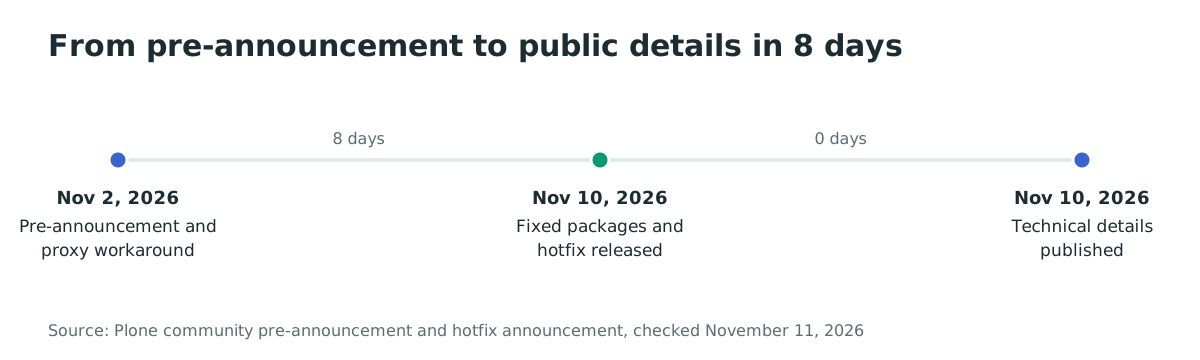
- 2026-11-02: Plone publishes a pre-announcement and the
portal_modifierproxy workaround. - 2026-11-10 13:26 UTC: the fixed packages and Products.PloneHotfix20261110 are uploaded to PyPI.
- 2026-11-10 13:30 UTC: the public advisory describes the five flaws and the fixed versions.
FAQ
Is there a CVE?
No CVE is assigned as of November 11, 2026. The five advisories are published with GHSA identifiers, and the announcement says CVE numbers were requested. Track the GHSA entries rather than waiting for a CVE before you update.
Does this affect Plone 5 or Plone 4?
Yes. The advisory says older versions are affected back to at least Plone 4.3. Plone 5.2 and earlier are out of security support, so the supported path for those releases is the hotfix package, not a package update.
Do I need all five package updates?
Update the four critical packages and plone.restapi if it is installed. The announcement says you can skip plone.restapi if you do not use it; it is the medium-severity companion that widens the permission bypass, not the entry point. The other four are needed for the chain the advisory describes.
Is it exploited in the wild?
No exploitation is known as of November 11, 2026. The vendor published the technical details on the release day, and the pre-announcement warned that current AI tools could turn the description into a working exploit quickly. Treat the window between the pre-announcement and your update as exposure.
Can I keep the proxy block instead of updating?
The proxy block stops requests whose path contains portal_modifier, and the vendor recommends keeping it after the update. It does not fix the sandbox escapes if another route reaches restricted code, and it does not cover an internal editor path that triggers a stored condition. Use it as a stopgap, not as the fix.
Does the hotfix work on Python 2.7?
Yes. The hotfix package supports Python 2.7 and Python 3, and it works on Plone 4.3, 5.0, 5.1, 5.2, 6.0, 6.1 and 6.2.
Find exposed Plone sites with Ostorlab
Ostorlab's web agentic deep scan maps an internet-facing Plone site, its reachable endpoints and its exposed components, so you can see which instances still answer before you patch them. Run it against the sites in your inventory and use the results to prioritize the ones that are reachable from the internet.
References
- Plone security hotfix 20261110 announcement: https://community.plone.org/t/plone-security-hotfix-20261110/23313 (checked November 11, 2026)
- Pre-announcement and proxy workaround: https://community.plone.org/t/pre-announcement-plone-security-fix-20261110/23303 (checked November 11, 2026)
- Products.CMFEditions advisory GHSA-67qm-q795-jh7h: https://github.com/plone/Products.CMFEditions/security/advisories/GHSA-67qm-q795-jh7h (checked November 11, 2026)
- Products.CMFPlone advisory GHSA-92qw-564p-pmg6: https://github.com/plone/Products.CMFPlone/security/advisories/GHSA-92qw-564p-pmg6 (checked November 11, 2026)
- Products.MimetypesRegistry advisory GHSA-xcj2-cmp9-fj62: https://github.com/plone/Products.MimetypesRegistry/security/advisories/GHSA-xcj2-cmp9-fj62 (checked November 11, 2026)
- plone.batching advisory GHSA-6hcx-c235-cxh3: https://github.com/plone/plone.batching/security/advisories/GHSA-6hcx-c235-cxh3 (checked November 11, 2026)
- plone.restapi advisory GHSA-vgxm-pwch-89q6: https://github.com/plone/plone.restapi/security/advisories/GHSA-vgxm-pwch-89q6 (checked November 11, 2026)
- Products.PloneHotfix20261110 on PyPI: https://pypi.org/project/Products.PloneHotfix20261110/ (checked November 11, 2026)
- Products.CMFEditions 5.0.2 source: https://github.com/plone/Products.CMFEditions/blob/5.0.2/src/Products/CMFEditions/Modifiers.py (checked November 11, 2026)
- plone.batching 3.0.3 source: https://github.com/plone/plone.batching/blob/3.0.3/src/plone/batching/init.py (checked November 11, 2026)
- Products.CMFPlone 6.2.3 source: https://github.com/plone/Products.CMFPlone/blob/6.2.3/src/Products/CMFPlone/init.py (checked November 11, 2026)
- plone.restapi 10.2.1 source: https://github.com/plone/plone.restapi/blob/10.2.1/src/plone/restapi/init.py (checked November 11, 2026)
- Plone backend container pull count: https://hub.docker.com/r/plone/plone-backend (checked November 11, 2026)