A tampered Claude Code extension in Cursor’s marketplace and a hijacked vendor script on Polymarket, a few hours apart.
On October 29, two things went wrong a few hours apart, in two very different places.
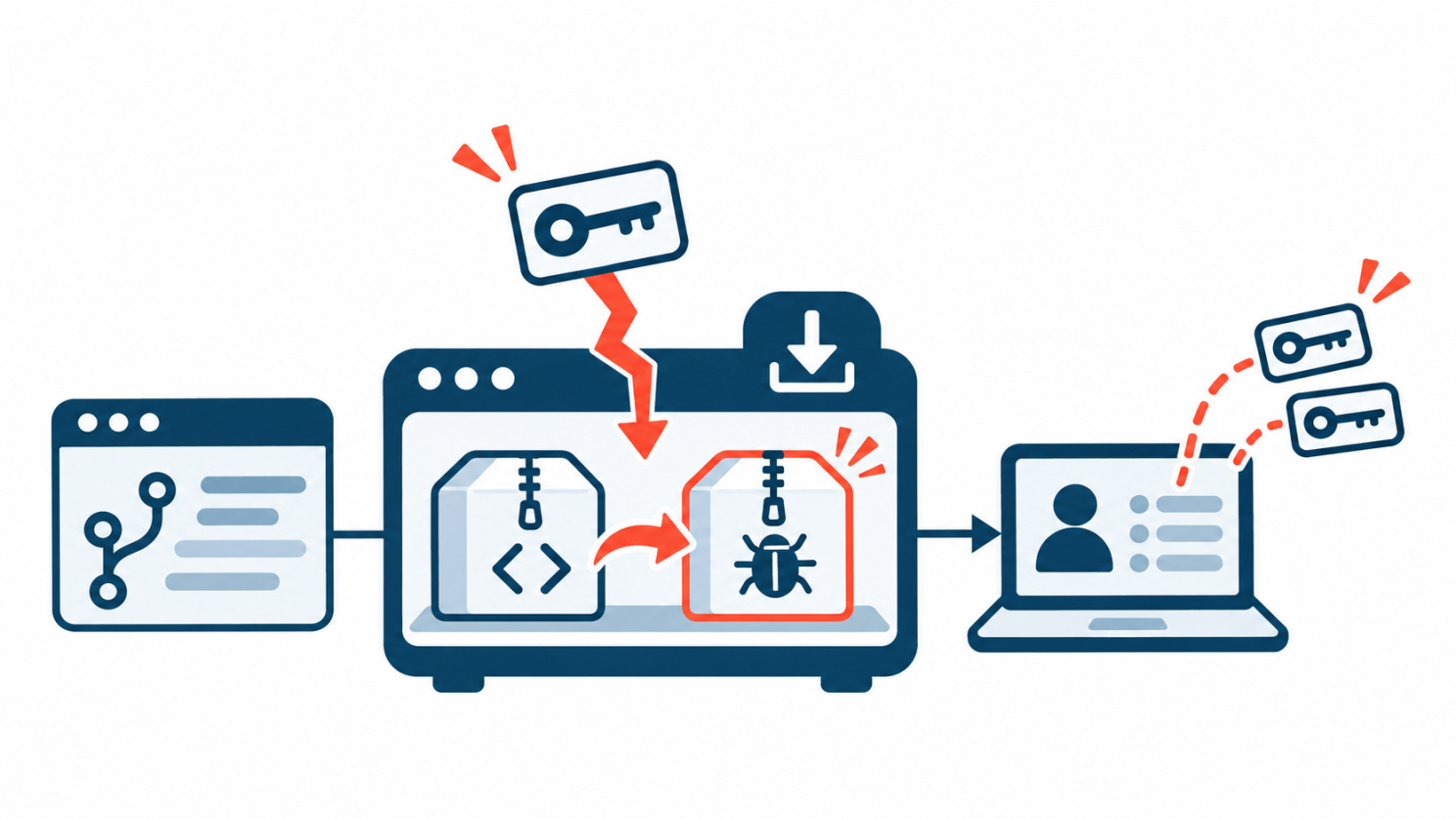
In the morning, Cursor’s extension marketplace started serving a tampered copy of the Claude Code extension. Almost every byte of it was Anthropic’s real code, plus a small loader that installed an SSH backdoor.
That afternoon, a performance-monitoring script that Polymarket loaded from its vendor, DebugBear, was replaced. Instead of measuring page speed, it used logged-in traders’ sessions to sell their positions and move their funds. Analysts traced about $2.57 million to the attacker’s wallet.
Nobody installed anything strange. Developers accepted an update to a familiar extension. Traders opened the site they always use. The label was right. The recipe had changed.
So this issue asks: what does “trusted source” mean when someone else can change what it delivers? The Deep Dive looks at what a marketplace would have to check beyond the publisher’s name, and Technical Research explains how the Polymarket drainer reused the page’s own trading client.

Inside this issue
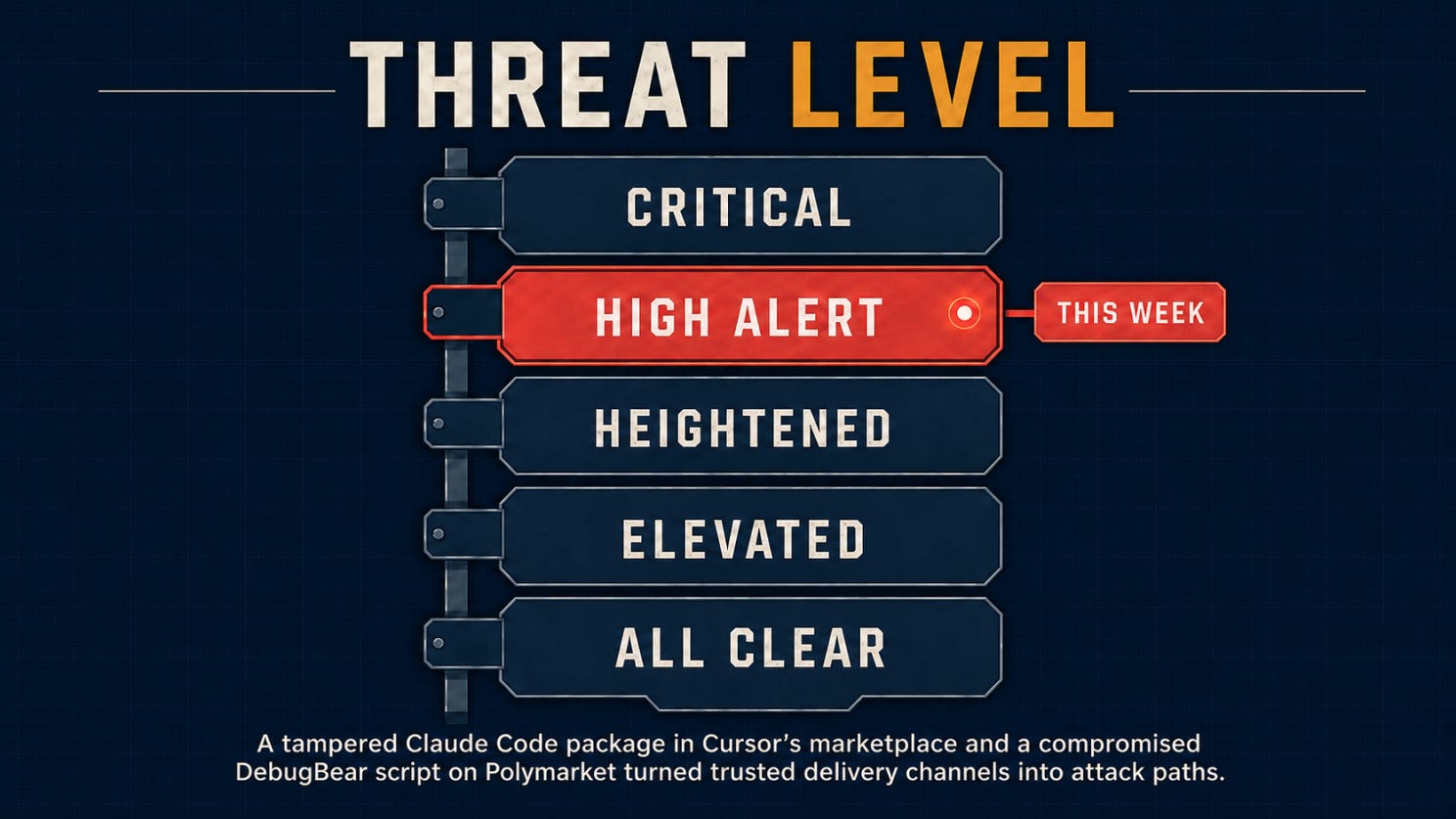
🌡️ Threat Level: High Alert
⚡ News: FBI ties the Binance theft to North Korea, LiteLLM and OVHcloud CLI releases swapped, Storm-0940 targets Microsoft 365 tenants through a backup vendor
🔎 Deep Dive: The Publisher Was Legitimate. The Update Was Tampered With.
🎣 Is It a Phish?
🔬 Technical Research: It Measured Page Speed. Then It Sold Your Positions.
🛠️ Tool of the Week: osquery
👏 Person of the Week: Paul McCarty
📅 Event of the Week: Open Source SecurityCon 2026
📚 Book of the Week: Software Supply Chain Security
😅 The Meme
❓ One Question Before You Leave
Let’s dig in.
🌡️Threat Level
⚡Section 01: News
Crypto, supersized
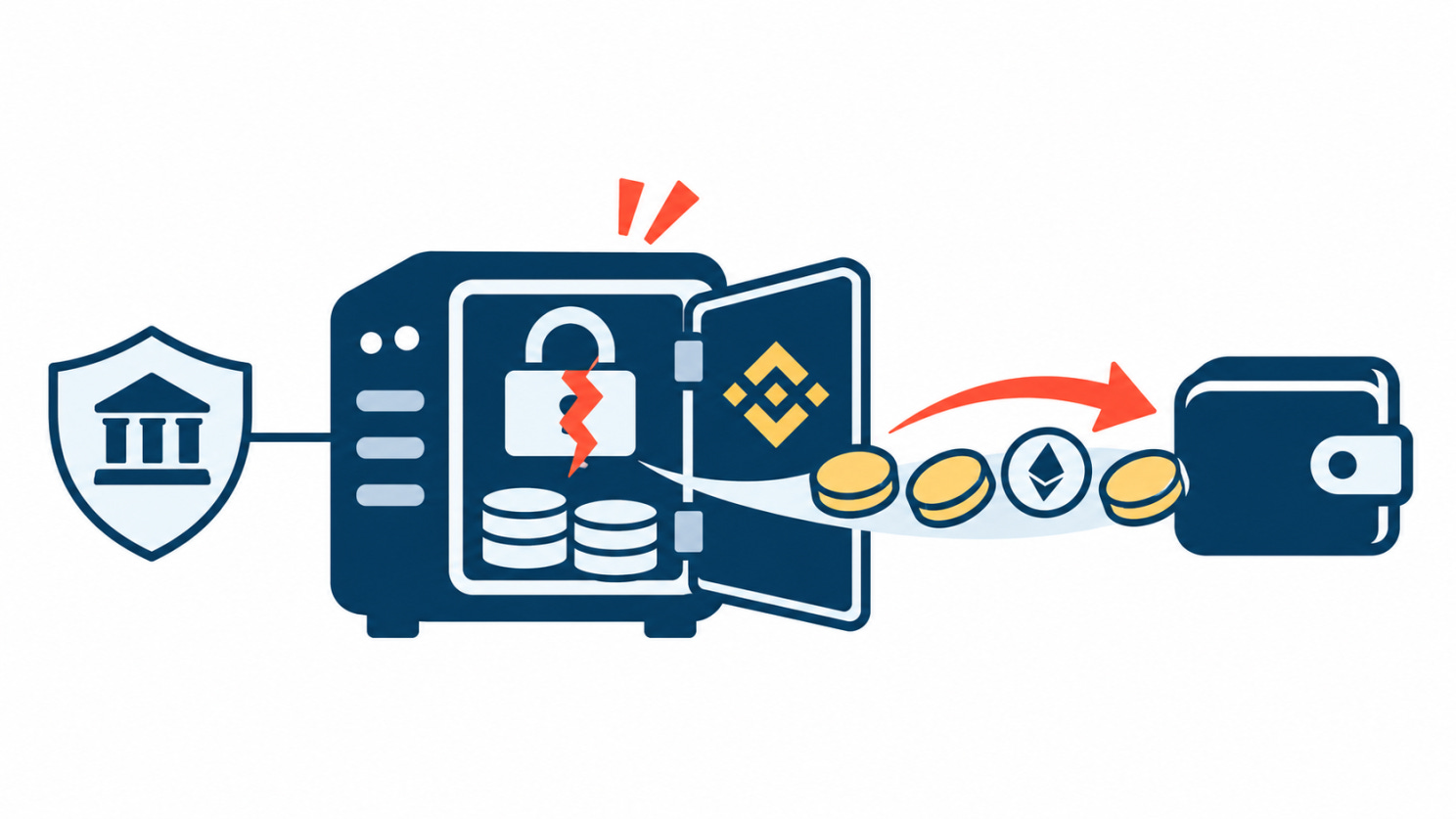
FBI ties the $6.3 billion Binance theft to North Korea
Binance has confirmed a theft of about $6.3 billion, the largest crypto theft on record. Blockchain intelligence firms TRM Labs and Chainalysis attributed it to TraderTraitor, a North Korean group, and on October 31 the FBI confirmed it, naming the same actors behind the $1.5 billion Bybit hack in 2025.
Early reports blamed a single compromised laptop. Binance has since said its investigation found additional points of breach, and the entry point is still unclear. Binance says it has replaced about 90% of the stolen funds with company money, and Tether says it froze about $1.57 billion in assets tied to the theft.
According to the FBI, most of the stolen assets are being converted into ether, and it expects the rest to move through DeFi platforms and instant swap services.
Why it matters: The previous record, Bybit, was set by the same group less than two years ago. This theft is roughly four times larger. TraderTraitor isn’t an opportunistic crew that got lucky once. It’s a state unit that keeps finding its way into the companies holding the most money.
Look at what could be stopped and what couldn’t. Tether froze $1.57 billion because Tether can freeze tokens it issues. Ether has no issuer to call. Every hour the attackers spend converting stolen tokens into assets nobody can freeze shrinks what can be recovered, which is why the conversion is already underway.
The changing story about the entry point matters too. “One compromised laptop” was a clean explanation, and it was wrong, or at least incomplete. Early explanations of big breaches often are. Until the full path is known, nobody can say which controls failed.
If you work in or near crypto or fintech, treat TraderTraitor’s documented playbook as a direct threat: fake recruiters, take-home coding tests and malicious packages aimed at engineers. Keep signing infrastructure off the laptops engineers use every day, and set up contacts with stablecoin issuers before you need a freeze, not after.
Stopping the theft is the first line of defense. Once tokens become ether, the window for the second one closes.
FBI attribution (BleepingComputer) · TRM Labs and Chainalysis attribution · Binance investigation update (ITPro)
Releases, reheated
LiteLLM and OVHcloud CLI releases swapped for secret stealers
On October 21, malicious builds of LiteLLM version 1.107.0 were published to PyPI, along with compromised container images, after attackers got hold of GitHub CLI OAuth tokens. LiteLLM is a widely used gateway between applications and AI model providers. The PyPI exposure window was about two hours. Microsoft’s analysis found the payload ran through Python startup hooks, so a machine that only installed the package could leak secrets without ever importing it.
Two days earlier, on October 19, an attacker used a hijacked contributor account to replace the downloads in five OVHcloud CLI releases (v0.11.0 to v0.15.0) on GitHub with secret-stealing builds, for up to 94 minutes. The attacker never touched OVHcloud’s build pipeline. Release immutability was turned off, so the files could simply be swapped. OVHcloud removed them, published a clean v0.16.0 as an immutable release and turned the setting on.
Why it matters: In both cases, the attack happened at the last step: the release people download. The OVHcloud attacker didn’t touch the build pipeline at all, and the LiteLLM builds were published with stolen tokens. Reviewing source code or securing CI wouldn’t have caught either one.
Short windows are less reassuring than they sound. Two hours and 94 minutes are short for a human, but CI pipelines that pull the latest version run constantly. And with LiteLLM, installing was enough. Every build runner and laptop that pulled 1.107.0 handed over whatever secrets it held, including the API keys an AI gateway exists to manage.
The OVHcloud case also shows how long attackers wait. As Paul McCarty found (more in this issue’s Person of the Week), the account used to swap the releases had been compromised for seven months. Stolen developer credentials don’t expire just because nobody has used them yet.
Pin dependencies by hash, not just by version, and wait a few days before adopting brand-new releases where you can. If you maintain a project, turn on immutable releases and use short-lived publishing tokens. If you installed either tool during its window, rotate every secret the machine could reach, from a clean machine.
A clean repository tells you what the maintainers wrote. It doesn’t tell you what you downloaded.
LiteLLM compromise (SecurityWeek) · OVHcloud CLI compromise (SecurityWeek) · GlassWorm link (Dark Reading)
Backups, with a side of access
Storm-0940 used a backup vendor’s app access to target 2,250 Microsoft 365 tenants
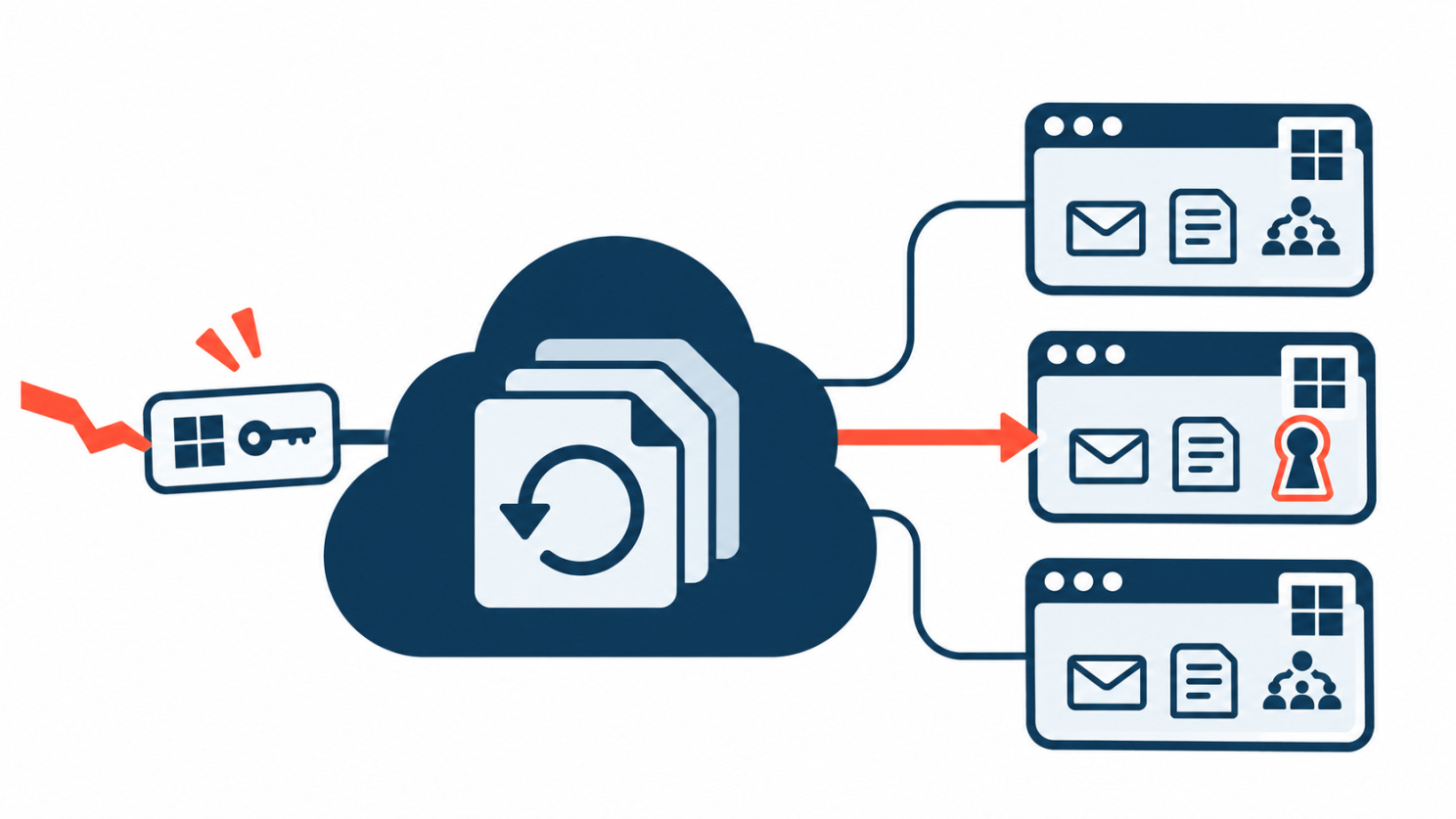
ConnectWise disclosed a breach of its Cloud Backup service (formerly SkyKick) on October 16. On October 21, Microsoft attributed the follow-on activity to Storm-0940, a China-aligned group.
Cloud Backup lets IT service providers back up their clients’ Microsoft 365 data, so its apps already had consent in those tenants. The attackers used the identities of those apps to try to sign in to more than 2,250 tenants. Microsoft said most attempts failed, but the group gained privileged persistence at a number of organizations, in some cases less than three hours after first targeting them. China denied the allegations.
Why it matters: No user was phished and no MFA prompt was skipped, because none was involved. Apps sign in with their own secrets or certificates, and in many tenants the sign-in policies and alerts are built around people. App sign-ins often sit outside both.
The access itself was the prize. A backup app needs to read mail, files and sites across the whole tenant, which is exactly the access an attacker wants. One consent, granted once by an administrator, can cover everything.
“Most attempts failed” isn’t much comfort either. The service-provider model means one vendor connects to thousands of tenants, so even a small success rate adds up. And under three hours from first attempt to persistence leaves little time to react.
Persistence is the part that outlasts the fix. Once attackers held privileged access, they could add their own credentials, apps or role assignments. Removing the vendor’s app doesn’t remove any of those.
Review which third-party apps hold consent in your tenant and what permissions they have. Check app sign-in logs and look for credentials, apps or role assignments added since mid-October. If a service provider manages your tenant, ask them directly whether they used Cloud Backup.
Revoking the vendor’s access is the easy step. The useful question is what was added while it was there.
Microsoft attribution (Dark Reading)
🔎Section 02: Deep Dive
The Publisher Was Legitimate. The Update Was Tampered With.
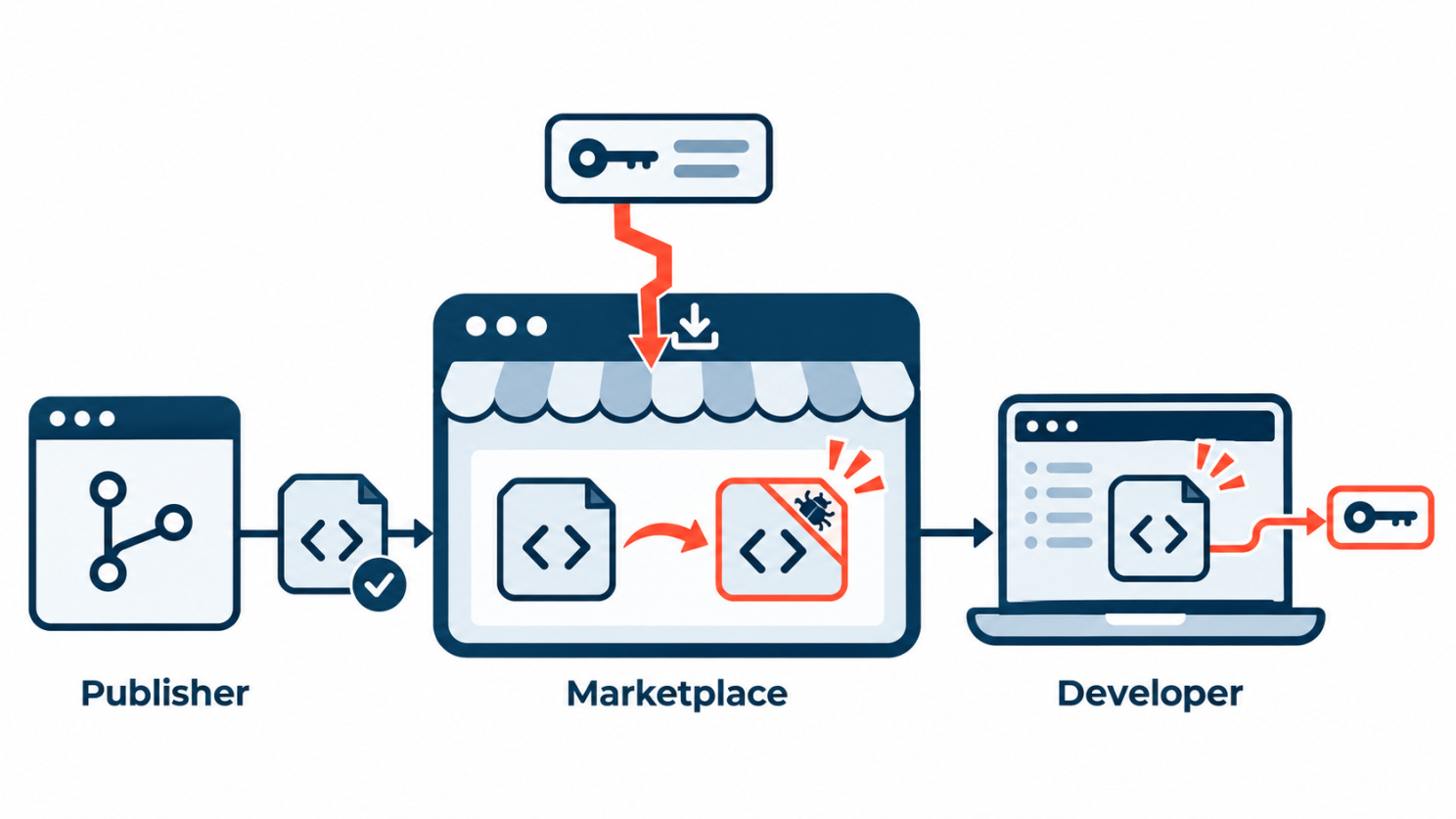
Developers who installed the Claude Code extension from Cursor’s marketplace on October 29 did what they’re told to do. They used the store built into their editor, picked an extension from a well-known publisher, and accepted the update. For about 11 hours, that was enough to get an SSH backdoor.
The publisher was real. So was the store. What changed was the package in between, and the tampered package reached users despite the distribution controls in place.
What happened
Cursor said a malicious actor “used access to Cursor’s marketplace to publish a tampered extension targeting Cursor’s users.” The tampered builds, versions 2.1.312 and 2.1.313 for Windows and macOS, were available from about 2:27 a.m. to 1:35 p.m. PT and reached at most 5,000 users. Cursor removed them, temporarily suspended its whole extension marketplace, audited access and rotated keys.
Anthropic said the versions on its official channels are not affected, that 2.1.313 was never published to Open VSX, the Microsoft Visual Studio Marketplace or any of its official hosts, and that the incident was “not a compromise of Anthropic’s systems or employee laptops.” It shipped a clean 2.1.314. Neither company has said how the attacker got publishing access.
What the tampered build did
According to StepSecurity’s analysis, the attacker took Anthropic’s clean 2.1.312 build and prepended a 7,386-byte loader to its extension.js. The rest of the file matched the original. The loader wasn’t obfuscated and ran under plain Node.js as soon as the extension loaded, with no Claude conversation needed.
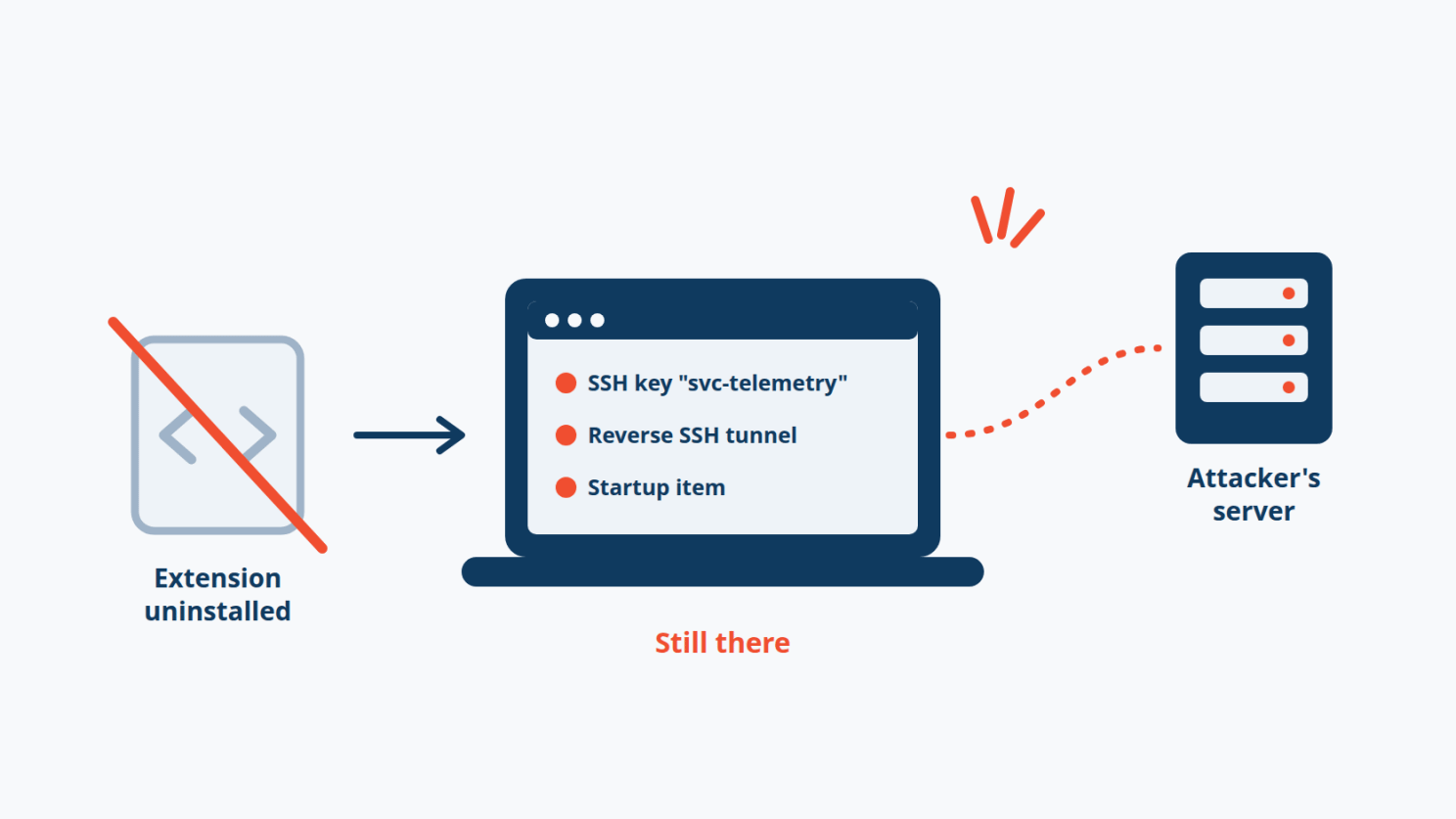
In six stages, it collected host details and the names of environment variables matching patterns like KEY, TOKEN and AWS, added an SSH key labeled svc-telemetry to ~/.ssh/authorized_keys, turned on SSH, opened a reverse tunnel to 134.209.82.225, set up persistence (a LaunchAgent named com.apple.sysmond on macOS, a SysMon scheduled task on Windows), and reported its status to the attacker’s server.
Removing the extension removes none of that.
What a marketplace has to verify beyond the publisher’s name
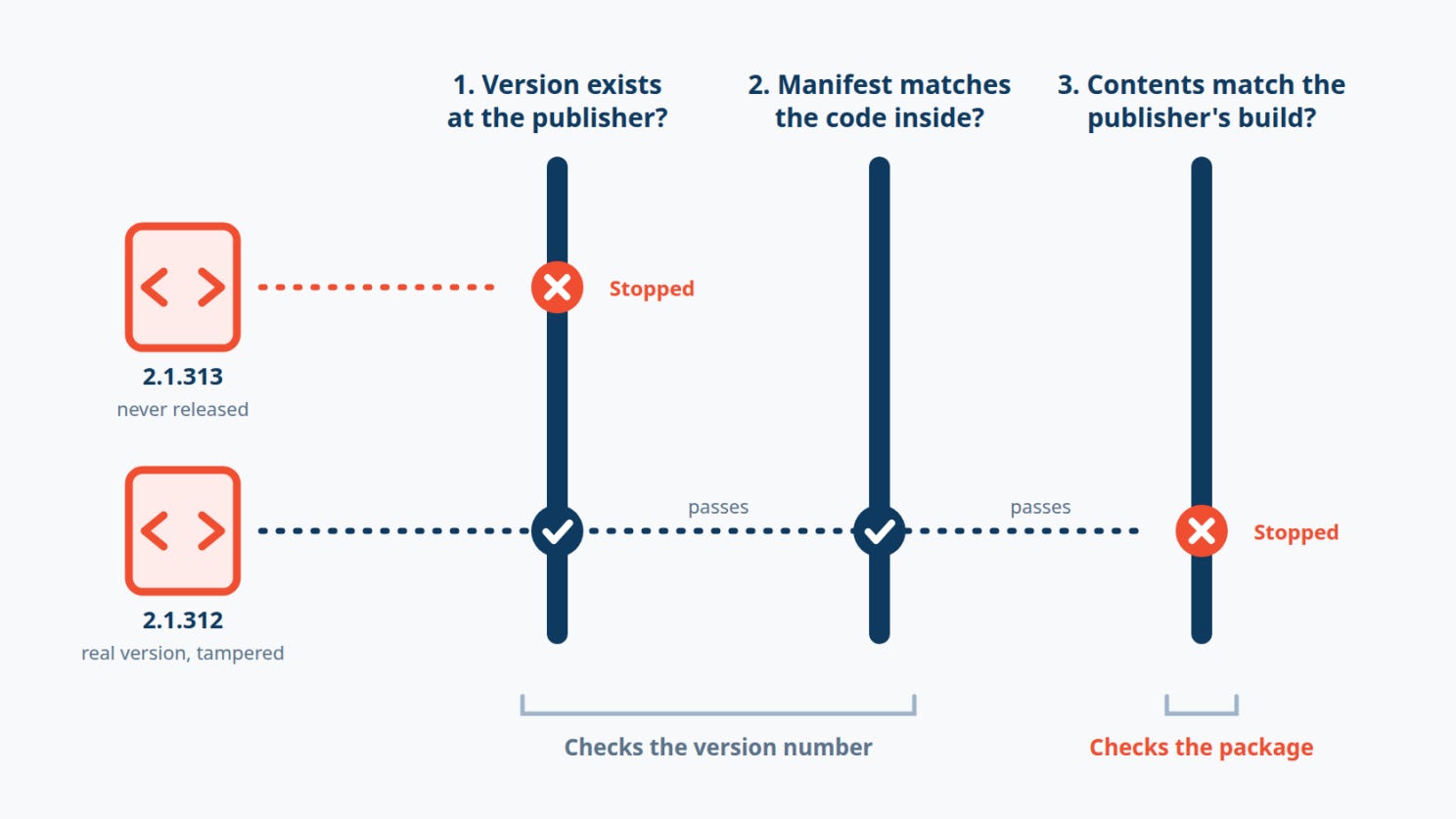
A listing tells you who wrote the original code. It doesn’t tell you who built or uploaded this particular package. The Cursor case points to three checks that the name alone can’t replace. Two of them only check version numbers and would have caught the fake 2.1.313. Only the third checks the contents, and it’s the one that would also have caught the tampered 2.1.312, which carried a real version number.
1. Does this version exist at the source? Version 2.1.313 was never released through any of Anthropic’s official channels. A store that serves a copy of someone else’s extension can refuse any version the publisher never shipped. That catches 2.1.313, but not a tampered copy of 2.1.312, a version that does exist.
2. Does the package agree with itself? The “2.1.313” bundle still reported version:”2.1.312” internally. Only the repackaged manifest carried the higher number, and that was enough to make editors treat it as an update. A mismatch between the manifest and the code inside it is cheap to detect and is a strong sign of repackaging. Again, this only helps when the attacker bumps the version.
3. Is this the publisher’s actual artifact? This is the check that covers both versions. The tampered 2.1.312 differed from Anthropic’s real 2.1.312 by a single block at the top of one file, which spawned ssh, wrote to authorized_keys and created startup items. Comparing each package’s hash against the publisher’s own release, and diffing updates against the previous version for new process execution, network tunnels or persistence, looks at what the package is rather than what it’s called.
Publisher signatures are the cleanest way to do that third check, but only if the signature comes from the publisher. If a store re-signs or re-hosts a package itself, a valid signature only proves that the store served it.
Two competing timelines
The attacker needed minutes: auto-update delivered the loader and it ran on load. Defenders needed about 11 hours to take the versions down, and each affected developer still has to remove the persistence, rotate every credential from a clean machine and decide whether to rebuild. Auto-update keeps most developers patched, so turning it off isn’t the answer. Checking what it installs is.
The four priorities
For security teams: Know which editors your developers use and which marketplace each one pulls from. On machines with production access, allowlist or pin extensions, and treat those laptops as production-access devices, with monitoring to match. Keep an extension incident playbook ready: check for persistence, rotate from a clean machine, rebuild when in doubt.
For marketplace operators: Check each package’s contents against the publisher’s own release before serving it, not just its version number. Reject versions the publisher never shipped and manifest mismatches, and review updates that add new capabilities. Protect publishing access like a production deploy key.
For extension publishers: Publish a clear list of official distribution channels, with hashes or signatures that stores and users can check against. When a tampered copy appears, say quickly and plainly where the real one lives, as Anthropic did here.
For developers: After any extension incident, compare the versions you have installed with the publisher’s own release notes or changelog, and check the marketplace you actually installed from. If your version isn’t listed by the publisher, treat the machine as affected.
The tension at the center
Almost all of the code that ran on those machines was Anthropic’s. Every signal developers are trained to trust, the name, the store, the familiar update prompt, pointed the right way.
Until stores can show that what they serve is what the publisher actually released, “it came from the official marketplace” describes where a package came from. It doesn’t tell you what it is.
🎣Section 03: Is It a Phish ?
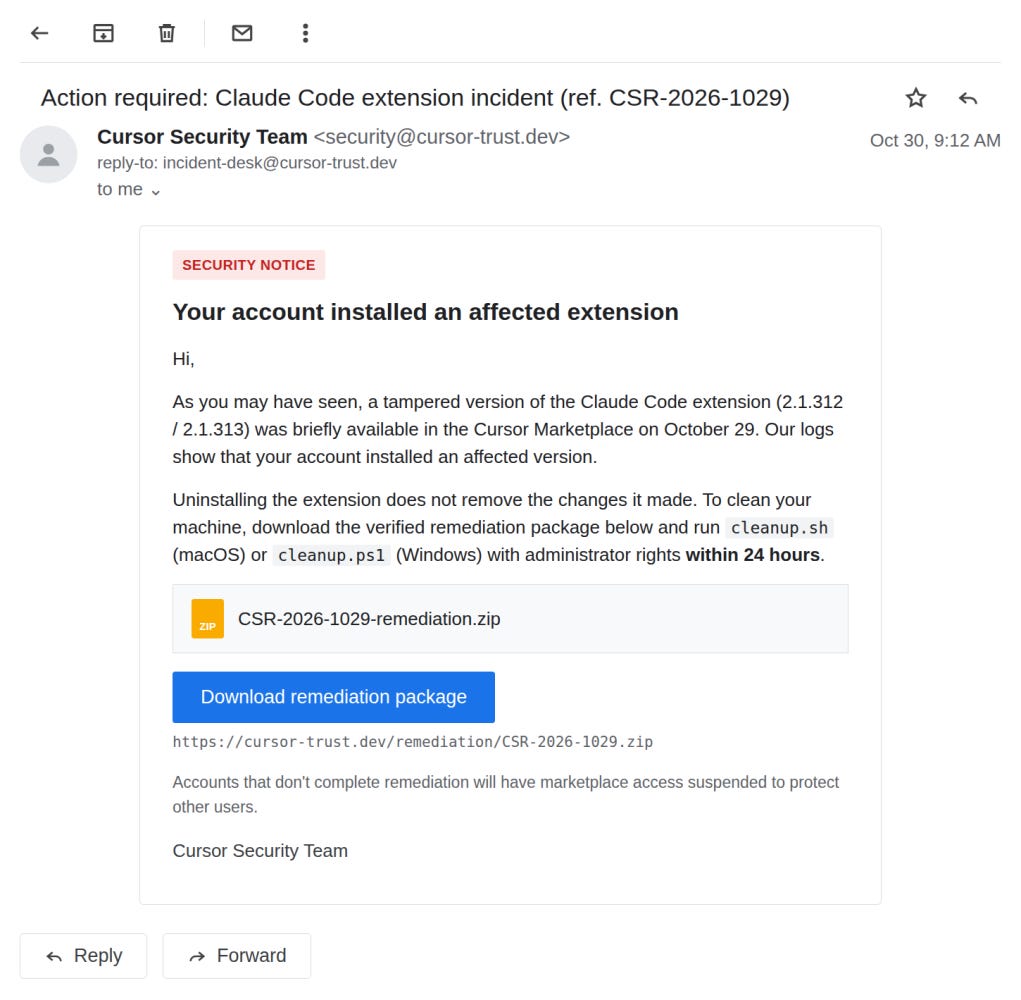
Legitimate or phish?
🔬Section 04: Technical Research
It Measured Page Speed. Then It Sold Your Positions.
On October 29, the performance-monitoring script that Polymarket loaded from its vendor, DebugBear, was replaced. The new file didn’t steal passwords or keys. It found the trading client already running in each logged-in trader’s browser and used it to drain their account.
Researchers recovered the script, and it was plain, unobfuscated JavaScript. That makes it unusually easy to see how it worked. This breakdown draws on analyses by ohey.ca, Report URI and Dancho Danchev.
The facts
Polymarket’s pages loaded DebugBear’s Real User Monitoring (RUM) script from cdn.debugbear[.]com without an integrity check. Around 16:54 UTC, the server answering for that URL changed: the response headers switched from Google Cloud Storage’s to nginx-style ones, and the file became a wallet drainer. DebugBear later said attackers had compromised its DNS records. Polymarket removed the script in a build at 17:59 UTC and went into cancel-only mode a few minutes later.
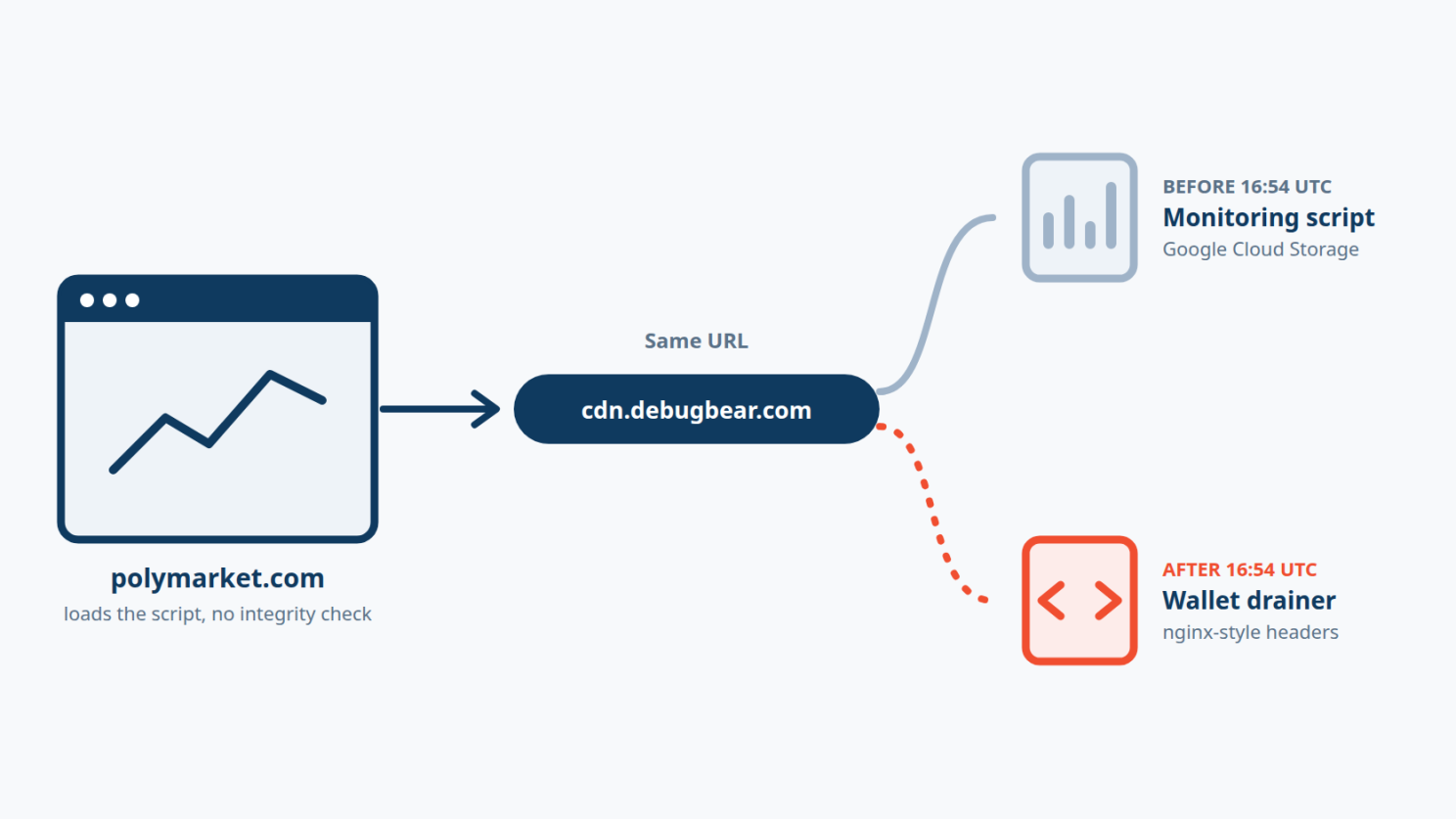
BleepingComputer traced about $2.57 million to the attacker’s wallet, and GoPlus Security counted roughly 700 affected deposit wallets. Polymarket said “one of our third party providers was compromised” and that it is fully reimbursing affected traders.
How the drainer worked
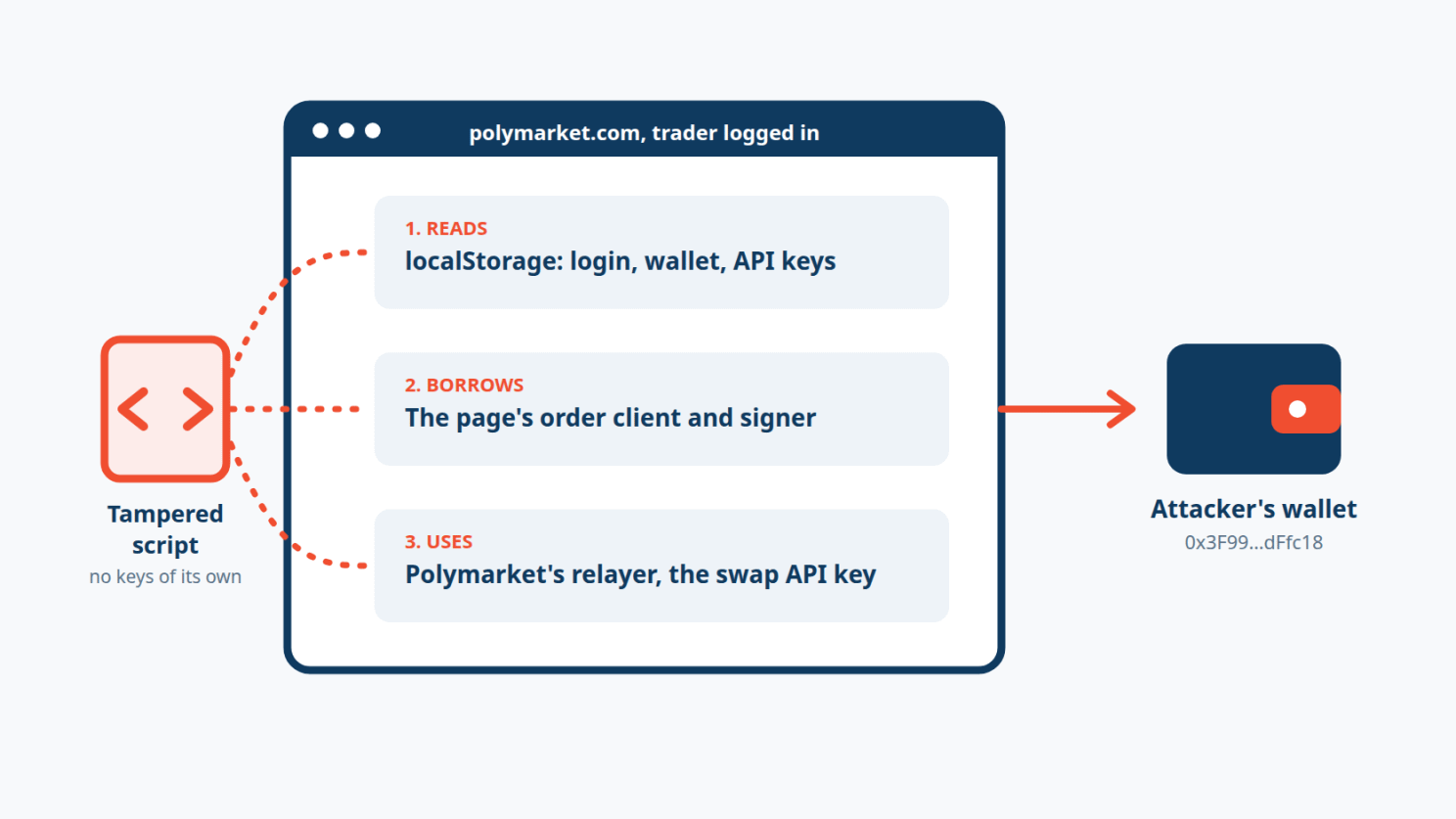
1. Find a logged-in trader. The script read three keys that Polymarket’s own app writes to localStorage: polymarket.auth.params (login type and wallet), polymarket.auth.proxyWallet (deposit wallet) and poly_clob_api_key_map (trading API credentials). No session, no attack. It also called Polymarket’s own /api/geoblock endpoint and skipped visitors who were blocked from trading.
2. Borrow the page’s trading client. The script carried no keys of its own. Instead, it walked React’s internal component tree, through the __reactFiber$ properties React attaches to DOM elements, looking for an object with a postOrder method and a createOrder or createMarketOrder method. That object was Polymarket’s live order client, complete with the user’s signer. Simplified, the search looked like this:
// Simplified illustration of the technique, not the attacker's exact code
for (const el of document.querySelectorAll("*")) {
  const key = Object.keys(el).find(k => k.startsWith("__reactFiber$"));
  // walk el[key] and its parents, return the first object that has
  // postOrder() and createOrder(), plus a signer
}
If the client wasn’t there yet, it retried 15 times, 250 ms apart, then reloaded the page to force the app to create one.
3. Load its settings. It asked data.debugbear[.]com/metrics/init for instructions. That endpoint returned a 404 during the attack, so the hard-coded defaults ran:
return{recipient:N,minimalPerPosition:10,minimalToProcess:10,priorityToken:"POL"}N is the attacker’s Polygon address, 0x3F99139F1C5854bb628c2e576Aaf638e99dFfc18. Accounts worth less than $10 were left alone.
4. Report the account first. Before moving anything, it posted the portfolio value, cash balance and every position to /metrics/submit, along with the wallets, login type, OS, IP and country.
5. Drain it, two ways. For browser-wallet users, it built one EIP-712 batch that moved every position above $10 to the attacker with a single safeBatchTransferFrom call, and submitted it through Polymarket’s own relayer. That batch appeared as a wallet signature request, so these users had to approve it. Email-login accounts followed a different path, with no wallet prompt: it sold positions with fill-and-kill orders at 97% of the price, then 50%, then the minimum tick, and swept the cash.
6. Cash out. It swapped the cash to POL through fun.xyz, using the API key from Polymarket’s own frontend, with the attacker as recipient. Each transfer was reported to /metrics/update or /metrics/handle with its transaction hash.
Where the boundary failed
Every step used something Polymarket’s page legitimately had: its storage keys, its order client, its relayer, its swap provider’s API key. A third-party script runs with the full privileges of the page that loads it, so the monitoring script and the trading interface were effectively the same program.
Polymarket’s Content Security Policy didn’t help, because every host the drainer used was already allowed. script-src-elem permitted cdn.debugbear[.]com, and connect-src permitted data.debugbear[.]com, *.polymarket.com, *.alchemy.com and *.fun.xyz. As Report URI put it, “nothing was going to be blocked anyway.”
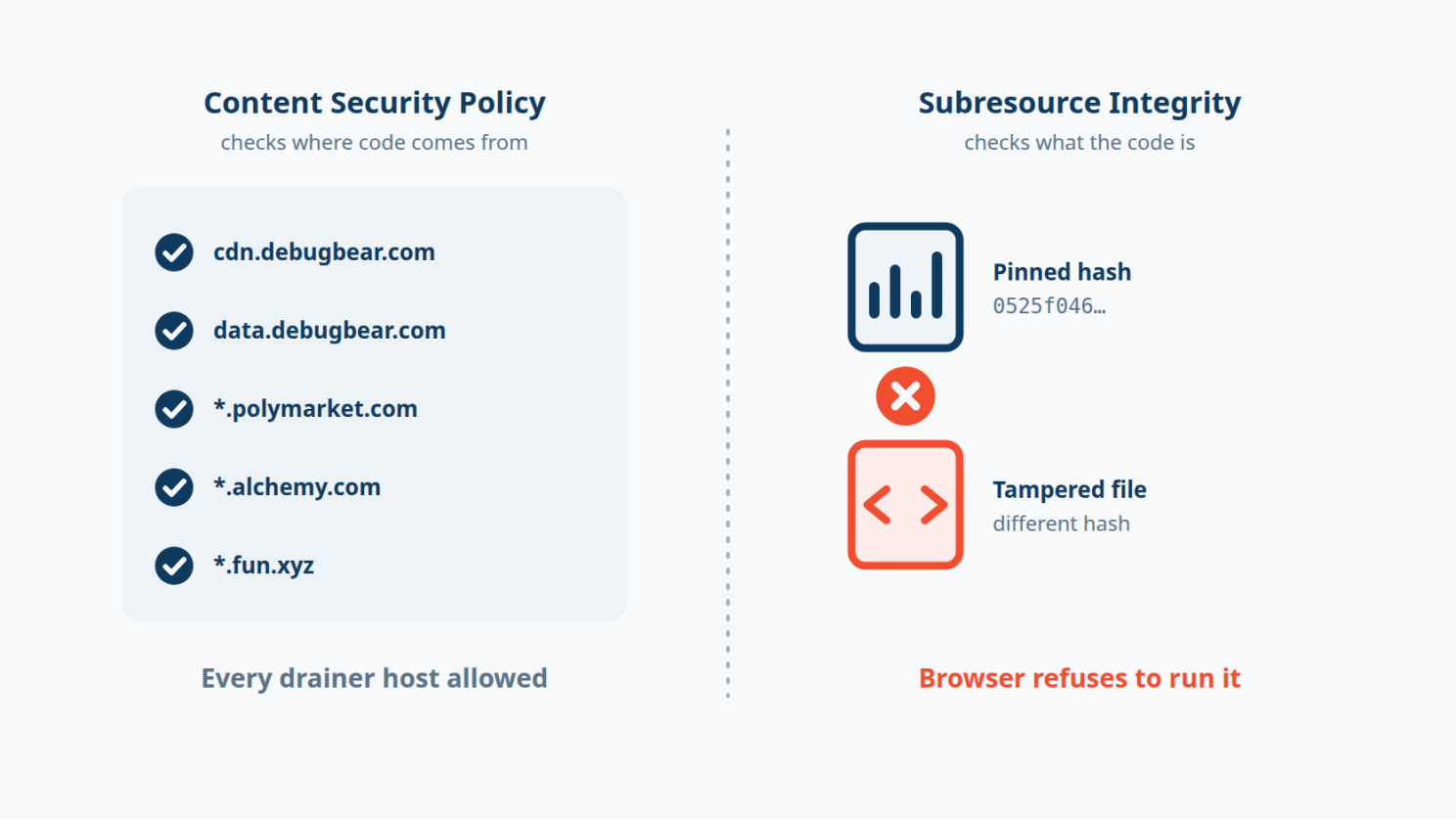
The page trusted a URL, not a file. The URL never changed, so nothing on Polymarket’s side had to change for the attack to work.
The step-by-step attack chain
[DebugBear URL now serves drainer] -> [polymarket.com loads it, no SRI]
   -> [Reads localStorage: login, wallet, CLOB keys] -> [Finds React order client + signer]
   -> [Reports portfolio to /metrics/submit] -> [Sells or batch-transfers positions]
   -> [Swaps cash to POL via fun.xyz] -> [Attacker wallet]
What defenders should take from it
Pin third-party scripts with Subresource Integrity: The tampered file had a different hash from the clean one (0525f046…). An integrity attribute on the script tag would have made the browser refuse to run it. If a vendor’s script changes too often to pin, self-host a reviewed copy instead.
Don’t treat a CSP allowlist as integrity: CSP controls where code loads from, not what the code is. Add hash-based controls and a reporting endpoint, so a changed script raises an alert even when its host is allowed.
Keep monitoring scripts off pages that can move money: RUM and analytics rarely need to run where a user can trade or withdraw. Load them on marketing pages, or in a sandboxed iframe that can’t reach the app’s state.
Require a fresh user action for high-value operations: Selling everything or moving funds should need a confirmation the user actively gives, ideally with a phishing-resistant authenticator such as a passkey or hardware security key, so code already in the page can’t do it silently.
Alert on impossible behavior: Hundreds of accounts liquidating within minutes is a signal. Have a way to pause high-value actions fast, as Polymarket did with cancel-only mode.
🛠️Section 05: Tool of the Week
Can you check every developer laptop for the same backdoor in minutes?
When an incident like the Cursor extension hits, the question isn’t just “did we install it?” It’s “did anything it left behind survive?” osquery answers that kind of question across many machines at once.

osquery is an open-source tool, originally built at Facebook and now hosted by the Linux Foundation, that exposes the operating system as a set of database tables. Instead of writing a different script for each OS, you ask questions in SQL: which SSH keys are authorized, which LaunchAgents and scheduled tasks exist, which processes are running and where they connect.
# Quickstart (macOS)
brew install --cask osquery
osqueryi
-- macOS: look for the LaunchAgent named in the Cursor incident
SELECT label, path, program_arguments FROM launchd WHERE label = 'com.apple.sysmond';
-- Windows: look for the SysMon scheduled task and the Startup folder fallback
SELECT name, action, path, enabled FROM scheduled_tasks WHERE name LIKE '%SysMon%';
SELECT name, path FROM startup_items WHERE name LIKE '%sysmon%';
-- macOS and Linux: list authorized SSH keys for every local user, and look for svc-telemetry
SELECT u.username, k.key_file, k.comment
FROM users u JOIN authorized_keys k USING (uid);
-- Windows: no authorized_keys table, so find the key files and open them
SELECT path, mtime FROM file
WHERE path LIKE 'C:\Users\%\.ssh\authorized_keys'
OR path = 'C:\ProgramData\ssh\administrators_authorized_keys';The authorized_keys table doesn’t exist on Windows. There, the query above only finds the key files, so check each one for the svc-telemetry key, or pull them from your config-management inventory.
Know what it won’t tell you. osquery shows you what’s on a machine right now. It won’t tell you what an attacker already did with a stolen credential, and a clean result after cleanup doesn’t mean nothing was taken. Use it to find affected machines fast, then follow up with credential rotation and, where the tunnel connected, a rebuild.
👏Section 06: Person of the Week
Paul McCarty
This week we’re highlighting Paul McCarty, founder of OpenSourceMalware, an open, community-driven database of malicious packages found in registries like npm, PyPI, RubyGems and Open VSX.
When a package or extension turns malicious, defenders need to know fast: which versions, which indicators, and whether the same attacker has done this before. OpenSourceMalware puts that threat intelligence in the open, so anyone can look up a suspicious package instead of waiting for a vendor report.
His work showed up in this issue’s news. After the OVHcloud CLI compromise, McCarty tied the attack to the GlassWorm campaign through a Solana wallet address used in earlier GlassWorm operations, and found that the developer account used to swap the releases had been compromised for seven months.
For keeping track of malicious packages in the open, where every defender can use the findings, Paul McCarty is our Person of the Week. 👏
📅Section 07: Event of the Week
Open Source SecurityCon 2026
Open Source SecurityCon is a one-day event co-hosted by the Cloud Native Computing Foundation and the Open Source Security Foundation (OpenSSF), held alongside KubeCon + CloudNativeCon North America.
Its tracks cover supply chain security, secure software development, identity and access, architecture and policy, and open source public policy. OpenSSF and CNCF are home to much of the tooling for verifying what you install, including TUF, in-toto and Sigstore, so this is where the people building package signing and build verification compare notes.
📍 Salt Lake City, Utah (Salt Palace Convention Center) 📅 November 9, 2026

📚Section 08: Book of the Week
Everything you didn’t write, but still ship
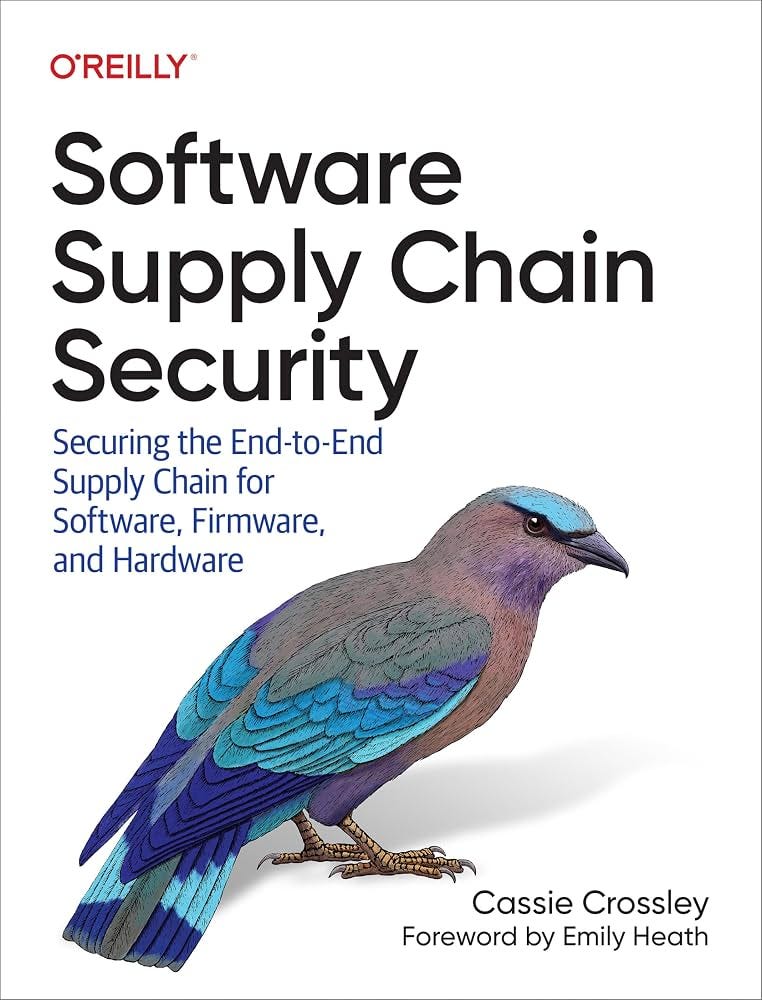
Software Supply Chain Security: Securing the End-to-End Supply Chain for Software, Firmware, and Hardware by Cassie Crossley covers the code, components and services an organization depends on but doesn’t build itself.
Crossley walks through the whole chain, from the components and tools you depend on to how software is built, signed, distributed and updated, and where attackers can step in along the way. It covers practical controls like software bills of materials, build integrity and vendor risk, and it’s written for people who have to put those controls in place, not just talk about them.
For mapping the code you ship without having written it, Software Supply Chain Security is a good place to start.
😅Section 09: The Meme
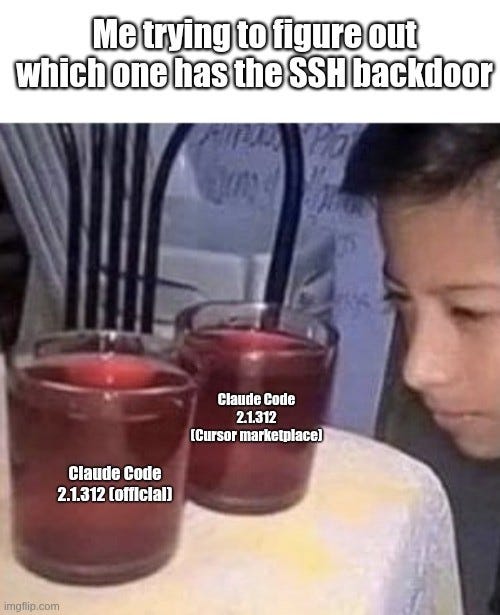
If one of your vendors’ scripts or one of your developers’ extensions changed this morning, how would you find out?
That’s it for this issue. Check your extensions, list your third-party scripts, and we’ll see you next issue.
The Breach Brief, Ostorlab Team