
Listmonk 2FA Bypass, Fixed Only in 7.0 Beta (CVE-2026-128332)
listmonk 6.0.0 through 6.2.0 lets an attacker with a password bypass TOTP 2FA; the only fixed release is 7.0.0-beta.2.
TL;DR
- Two bugs in listmonk defeat TOTP two-factor authentication: one skips the code after a password reset, the other lets an attacker keep guessing codes. VulnCheck published CVE-2026-128333 and CVE-2026-128332 on November 13, 2026.
- listmonk 6.0.0 through 6.2.0 and 7.0.0-beta.1 are affected. Both bugs need a valid password or a completed reset, and an account with TOTP enabled.
- The score is CVSS v4.0 9.1 Critical and CVSS v3.1 7.4 High. No exploitation is known, and neither CVE is in CISA KEV as of November 13, 2026.
- Upgrade to 7.0.0-beta.2, the only release with both fixes. The 6.x line has no patch; if you cannot move to the beta, rate-limit the admin login endpoints. See "How do I fix it?".
Am I affected?
You are exposed when all of these hold:
- You run listmonk 6.0.0 or later, up to and including 6.2.0, or 7.0.0-beta.1.
- At least one account, especially an administrator, has TOTP two-factor authentication enabled.
- For CVE-2026-128332, the attacker knows that account's password. For CVE-2026-128333, the attacker can complete a password reset for it, for example by reading its email.
- The
/admininterface is reachable by the attacker.
listmonk 5.x and earlier are outside the advisory's affected range. An account without TOTP has no second factor to bypass, so the reset bug leaves only the password in the way. The brute-force bug needs a six-digit code to guess and a password to start.
Only one of the two branches has a fixed release. The 7.0 beta is fixed; the 6.x line has no backport.
| Branch | Affected versions | Fixed version |
|---|---|---|
| 6.x | 6.0.0 through 6.2.0 | None; the fix is only in 7.0.0-beta.2 |
| 7.0 beta | 7.0.0-beta.1 | 7.0.0-beta.2 (2026-11-10) |
Check the running version. The binary and the official Docker image both answer --version:
# Binary install
/path/to/listmonk --version

# Docker
docker exec <container> /listmonk/listmonk --version
List the accounts that have 2FA enabled. Run this against the listmonk database:
docker exec -i <postgres-container> psql -U listmonk -d listmonk \
  -c "SELECT username, type, twofa_type FROM users WHERE twofa_type <> 'none';"
An empty result means no account uses TOTP, and neither bug gives an attacker more than the password already does.
How do I fix it?
Upgrade to 7.0.0-beta.2. It is the only release that contains both fixes.
- Back up the database before you start. The 7.0 release changes settings and the admin interface, and the project asks for a backup in its upgrade notes:
docker exec -i <postgres-container> pg_dump -U listmonk listmonk > listmonk-backup.sql - For Docker, change the image tag in the compose file from
listmonk/listmonk:latesttolistmonk/listmonk:beta, then run the upgrade:docker compose down docker compose pull docker compose run --rm app ./listmonk --upgrade docker compose up -d app db - For a binary install, stop listmonk, replace the binary with the 7.0.0-beta.2 build from the release page, run the database upgrade and start listmonk again:
./listmonk --upgrade ./listmonk --version - For a source install, check out the
v7.0.0-beta.2tag and build the binary with the project's Makefile. Run--upgradeafter the build, as in step 3. - Test the admin login after the upgrade, including the 2FA prompt. Then confirm that the running version reports 7.0.0-beta.2.
The 7.0 release is a beta with breaking changes. The admin interface is rewritten, the settings API changes the app.from_email shape, and SES and Azure webhooks change their requirements. Read the release notes before you upgrade a production install, and stage the change first.
If you cannot move to the beta, rate-limit the two login endpoints at the reverse proxy and restrict /admin to trusted networks. A limit on POST /admin/login and POST /admin/login/twofa slows the brute force. It does not close the reset bypass, because that path never asks for a code.
What is the root cause?
listmonk keeps short-lived authentication tokens in an in-memory map in internal/tmptokens. The admin login flow in cmd/auth.go uses that map for both the password-reset token and the 2FA token. Both bugs come from how those tokens are counted and consumed.
The reset bug is in doResetPassword. After a successful password change, the function deletes the user's sessions and then creates a new session directly:
    // Invalidate all existing sessions for the user after password reset.
    if err := a.core.DeleteUserSessions(user.ID, ""); err != nil {
        a.log.Printf("error destroying sessions after password reset for user_id=%d: %v", user.ID, err)
    }

    // Log the user in directly without forcing a manual login right after password change.
    if err := a.auth.SaveSession(user, "", c); err != nil {
        return err
    }

    // Redirect to the admin page.
    return c.Redirect(http.StatusFound, uriAdmin)
The function never reads user.TwofaType. A user who resets a password is signed in at once, even when the account has TOTP enabled. An attacker who can complete a reset therefore gets a full session without a code.
The brute-force bug is in the token counter. TwofaPage calls tmptokens.Check(token) on every request to /admin/login/twofa. Check increments a per-token counter and deletes the token when the count passes 15:
    // Increment the rate limit counter.
    token.Count++

    // Check if max attempts exceeded.
    if token.Count > maxTries {
        delete(tokens, id)
        return nil, Err
    }
That limit looks like a rate limit, but it is attached to the token, not to the user. doLogin mints a new token on every password login:
        // Set the token.
        tmptokens.Set(token, twofaTokenTTL, user.ID)
Set creates a fresh Token with a zero Count, and the login endpoint has no attempt cap of its own. An attacker with the password can request a new token after every 15 guesses, so the counter starts at zero again and again.
How is it exploited?
The reset path needs a completed password reset. The brute-force path needs the account password. Both end with a session for a TOTP-protected account.
CVE-2026-128333, the reset bypass:
- The attacker asks listmonk to send a password-reset email for the target account, or otherwise obtains a reset link that was already sent.
- The attacker opens the link and submits a new password to
/admin/resetwith the emailed token. doResetPasswordverifies the token, updates the password and deletes existing sessions.- The same function calls
SaveSessiondirectly, so the response sets a session cookie without a TOTP prompt. - The attacker now holds an authenticated session as that account.
CVE-2026-128332, the TOTP brute force:
- The attacker submits the known username and password to
POST /admin/login. - listmonk accepts the password, mints a 2FA token with a zero counter and redirects to
/admin/login/twofa. - The attacker submits up to 15 codes to
POST /admin/login/twofa. The token is deleted after the fifteenth check. - The attacker repeats from step 1. Each password login creates a new token and another 15 guesses.
- A correct code creates the session, and the attacker stops.
No public proof of concept is published, and neither path needs a malformed request. The only pacing on /admin/login is a 100-millisecond minimum response time.
How does the attack flow?
An attacker who knows a password, or can complete a reset, turns either path into an authenticated admin session without a TOTP code.
The loop is the brute-force bug: a new password login resets the attempt counter. The direct edge is the reset bug: the post-reset login skips the 2FA page entirely.
What can an attacker do?
An attacker who reaches an administrator session controls the listmonk installation that the account can manage. That includes subscriber lists and their personal data, campaigns, templates, settings, and other user accounts. The Super Admin role can change installation-wide settings, including the outgoing email configuration.
The reset path requires the attacker to complete a password reset, which normally means reading the target's email. The brute-force path requires the account password and many login requests. Both require network access to /admin, and both work only on an account that has TOTP enabled. Without TOTP there is no second factor to bypass, and the impact is the same as any stolen password.
VulnCheck's advisory does not describe a path from the admin session to code execution on the host. Treat the impact as full control of the listmonk data and configuration, not of the server.
Why does the fix work?
The two commits close both paths. The reset flow now goes through the same function as a normal password login, and the TOTP counter is keyed to the user rather than to a single token.
The reset fix routes the post-reset login through finishPasswordLogin:
    // Log the user in directly without forcing a manual login right after password change.
-   if err := a.auth.SaveSession(user, "", c); err != nil {
-       return err
-   }
-
-   // Redirect to the admin page.
-   return c.Redirect(http.StatusFound, uriAdmin)
+   return a.finishPasswordLogin(c, user, uriAdmin)
 }
finishPasswordLogin checks user.TwofaType and, for a TOTP account, creates a 2FA token and redirects to /admin/login/twofa instead of saving a session. A password reset can no longer skip the code.
The brute-force fix gives every user one shared attempt budget:
 func (a *App) doTwofaVerify(c *echo.Context, token string, userID int, next string) error {
+   // Share a budget across all login tokens for this user. Only requests with a
+   // valid password-authenticated token reach here. New logins do not reset it.
+   attemptKey := fmt.Sprintf("twofa-attempts:%d", userID)
+   tmptokens.SetNX(attemptKey, twofaTokenTTL, nil)
+   if _, err := tmptokens.Check(attemptKey); err != nil {
+       return echo.NewHTTPError(http.StatusTooManyRequests, a.i18n.T("globals.messages.invalidValue"))
+   }
+
    totpCode := strings.TrimSpace(c.FormValue("totp_code"))
SetNX creates the key only when it does not exist or has expired, so a new login does not reset the count. Check was also changed to keep an exhausted token until it expires instead of deleting it, which stops SetNX from recreating the budget key. The same commit replaced the reset-token Get comparison with a constant-time Match that consumes the token only when the value matches.
The two commits cover both advisories. The reset-token changes are hardening around the same flow, not a third vulnerability.
How do I check if I was compromised?
Neither VulnCheck nor the maintainer has published indicators of compromise. A failed attempt can leave no trace, because listmonk does not log every failed TOTP check.
Look for repeated login traffic in the reverse proxy or web server logs in front of listmonk. A brute-force attempt shows many POST /admin/login requests followed by POST /admin/login/twofa requests from one address, and many redirects to /admin/login/twofa:
grep -E 'POST /admin/login(/twofa)?' access.log | awk '{print $1}' | sort | uniq -c | sort -rn | head
Check the session table for sessions created at times nobody was working, and compare them with the users' loggedin_at values:
docker exec -i <postgres-container> psql -U listmonk -d listmonk \
  -c "SELECT created_at, data FROM sessions ORDER BY created_at DESC LIMIT 20;"
Ask the administrators whether they received a password-reset email they did not request. A completed reset changes the account password and destroys the old sessions, so a reset nobody asked for is the clearest sign of the reset path.
Timeline
- 2026-06-26: listmonk 6.2.0 is released, the newest stable before the fixes.
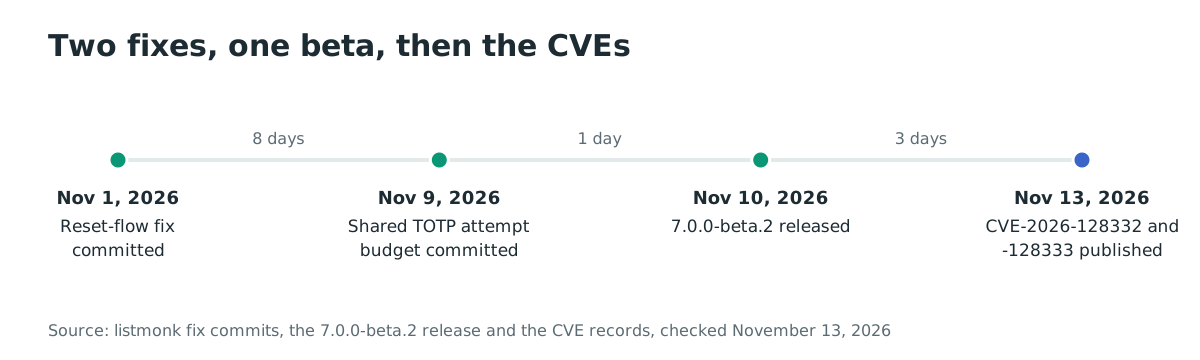
- 2026-11-01: commit 14b25edc routes the post-reset login through the 2FA prompt.
- 2026-11-09: commit 3f62a55c adds the per-user TOTP attempt budget and the reset-token hardening.
- 2026-11-10: listmonk 7.0.0-beta.2 is released with both fixes.
- 2026-11-13: VulnCheck publishes CVE-2026-128333 and CVE-2026-128332.
FAQ
Does this affect every listmonk installation?
No. Only 6.0.0 through 6.2.0 and 7.0.0-beta.1 are affected, and only accounts with TOTP enabled expose a second factor to bypass. An installation without 2FA is exposed to password theft in the usual way.
Is there a fix for the 6.x line?
No. The maintainer fixed both bugs in 7.0.0-beta.2, and no 6.x release carries them. The newest stable release, 6.2.0, was published on 2026-06-26.
Do I have to run a beta?
For a patched build, yes. The 7.0.0-beta.2 release is a beta with breaking changes to settings and webhooks, so back up the database and test it before a production upgrade. A reverse-proxy rate limit and a network restriction on /admin reduce exposure but do not close the reset path.
Can I mitigate without upgrading?
Partly. Rate-limit POST /admin/login and POST /admin/login/twofa, and restrict /admin to trusted addresses. That slows the brute force. The reset bypass remains, because the vulnerable code runs after a successful reset and never asks for a code.
Should I rotate credentials after upgrading?
If you cannot rule out a compromise, yes. Reset the administrator passwords, rotate the settings secrets such as the SMTP credentials, and sign out every session. The bugs give an attacker a session, not a persistent implant.
How many guesses does an attacker get?
Fifteen per password login, and a new login creates a new token. A six-digit TOTP code has 1,000,000 possible values, so the attacker needs many logins, but the application does not stop the repetition.
References
- CVE-2026-128332 record, TOTP brute-force through the 2FA endpoint: https://www.cve.org/CVERecord?id=CVE-2026-128332 (checked November 13, 2026)
- CVE-2026-128333 record, 2FA bypass through the password-reset flow: https://www.cve.org/CVERecord?id=CVE-2026-128333 (checked November 13, 2026)
- VulnCheck advisory for CVE-2026-128332, with the affected range and credit: https://www.vulncheck.com/advisories/listmonk-6.0.0-before-7.0.0-beta.2-totp-brute-force-via-admin-login-twofa (checked November 13, 2026)
- VulnCheck advisory for CVE-2026-128333, with the affected range and credit: https://www.vulncheck.com/advisories/listmonk-6.0.0-before-7.0.0-beta.2-2fa-bypass-via-password-reset-flow (checked November 13, 2026)
- GitHub advisory GHSA-p42g-4rv2-xg2f for CVE-2026-128332: https://github.com/advisories/GHSA-p42g-4rv2-xg2f (checked November 13, 2026)
- GitHub advisory GHSA-h254-fw2f-gggx for CVE-2026-128333: https://github.com/advisories/GHSA-h254-fw2f-gggx (checked November 13, 2026)
- Fix commit 14b25edc, which sends the post-reset login through the 2FA prompt: https://github.com/knadh/listmonk/commit/14b25edc31614a1d661e3af72b3d46b887931534 (checked November 13, 2026)
- Fix commit 3f62a55c, which adds the shared TOTP attempt budget: https://github.com/knadh/listmonk/commit/3f62a55c13dbc679b29238e890e4b90d6d4996d8 (checked November 13, 2026)
- listmonk 7.0.0-beta.2 release, with the upgrade commands and breaking changes: https://github.com/knadh/listmonk/releases/tag/v7.0.0-beta.2 (checked November 13, 2026)
- listmonk 6.2.0 release, the last stable before the fixes: https://github.com/knadh/listmonk/releases/tag/v6.2.0 (checked November 13, 2026)
- Vulnerable
tmptokens.CheckandSetat the 7.0.0-beta.1 tag: https://github.com/knadh/listmonk/blob/v7.0.0-beta.1/internal/tmptokens/tmptokens.go (checked November 13, 2026) - Vulnerable
doResetPasswordanddoLoginat the 7.0.0-beta.1 tag: https://github.com/knadh/listmonk/blob/v7.0.0-beta.1/cmd/auth.go (checked November 13, 2026) - listmonk Docker Hub page, the source of the pull count: https://hub.docker.com/r/listmonk/listmonk (checked November 13, 2026)
- listmonk repository, the source of the star count: https://github.com/knadh/listmonk (checked November 13, 2026)
- CISA Known Exploited Vulnerabilities catalog, checked for both CVE IDs: https://www.cisa.gov/known-exploited-vulnerabilities-catalog (checked November 13, 2026, catalog version 2026.11.10)