
HarmonyOS Next Security Testing: Tools and Risks
How HarmonyOS Next security testing differs from Android: ArkTS, DSoftBus, testing tools, SafetyDetect, ArkGuard, common flaws and OWASP MASVS mapping.
Introduction
With nearly one billion devices running HarmonyOS, security testing has become essential for many teams working on mobile applications. However, with the introduction of HarmonyOS Next, a major shift has happened: Android compatibility is no longer included. This is important because it means the system no longer relies on the Android runtime or framework that most security tools are built for. As a result, many Android testing tools either stop working or produce incomplete results. This is why security testing now needs approaches that are designed specifically for HarmonyOS rather than assuming Android-based behavior.
What is HarmonyOS Next
HarmonyOS Next (HarmonyOS 5.0) is one of Huawei’s latest versions, launched in 2024, where it moves away from Android and becomes a fully independent operating system. Earlier HarmonyOS versions still included Android components, which allowed Android apps to run. However, HarmonyOS Next removes this compatibility completely. It is built entirely on Huawei’s own system, including its own kernel (HongMeng). As a result, it no longer supports Android apps and only runs applications developed specifically for HarmonyOS (.app).
Why HarmonyOS Next Security Testing Is Different from Android
HarmonyOS shares surface-level similarities with Android, including an app store (AppGallery), a permission system, and support for native code. However, its internal architecture is completely different, which directly impacts how security testing must be done.
Application runtime and ArkTS
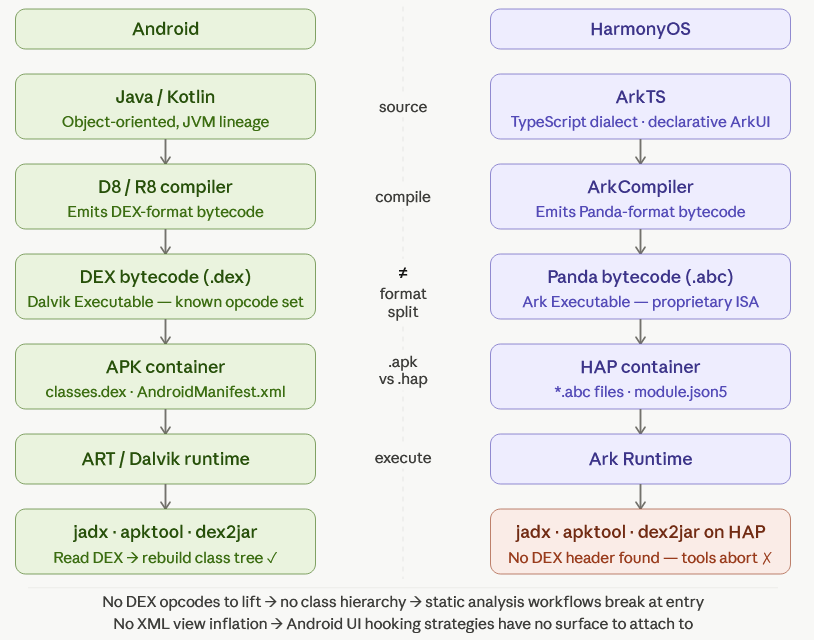
HarmonyOS applications are built using ArkTS (Ark TypeScript), a TypeScript-based language designed by Huawei for building apps through the ArkUI framework. It uses a declarative UI approach, meaning developers describe what the interface should look like instead of manually controlling every rendering step.
Instead of compiling into Android’s DEX bytecode, ArkTS applications are compiled into Panda bytecode (.abc). This makes all Android security tools incompatible. Static analysis tools built for Java/Kotlin, as well as reverse engineering workflows designed for DEX files, don’t directly apply here.
Inter-process communication and DSoftBus
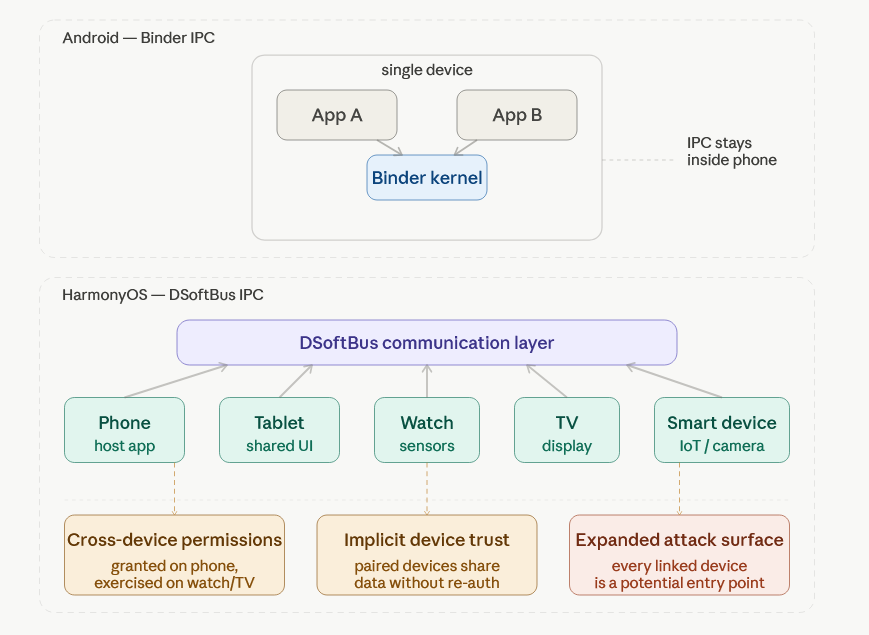
Instead of Android’s Binder system, HarmonyOS uses DSoftBus, a communication layer designed for cross-device interaction.
This changes the model from apps talking inside a single phone to apps and services interacting across multiple devices. So security testing is no longer just about one device in isolation, but also how data moves between connected devices.
The biggest shift in HarmonyOS is that it is built around multiple devices working together.
Unlike Android, where a phone, tablet, or watch are separate environments, HarmonyOS allows apps and services to run across phones, tablets, watches, TVs, and other connected devices.
This means the attack surface is no longer limited to one device. You’re also dealing with what happens when devices trust each other and share data.
HarmonyOS permissions can also extend across devices, not just stay on one device.
So an app is not only asking for access to things on the phone itself, but sometimes to capabilities that involve other connected devices in the ecosystem. That makes permission behavior harder to reason about and easier to misuse if not carefully checked.
HarmonyOS NEXT Security Testing Tools
HarmonyOS security testing tools are still in early development compared to the mature Android ecosystem. Here are some of the most important tools available today:
| Category | Tool / Resource | Primary Purpose | Key Capabilities | Limitations |
|---|---|---|---|---|
| Official Huawei Tools | AppGallery Cloud Testing | Automated Baseline Checks | Checks for known configuration issues and vulnerability patterns. | Not a replacement for in-depth or manual security assessments. |
| DevEco Studio | Integrated Development Environment (IDE) | Debugging utilities, device emulators, and performance profilers. | Lacks built-in SAST or DAST for dedicated security analysis. | |
| Bug Bounty Program | External Security Research | Incentivizes independent researchers to find and report vulnerabilities. | Not suitable for internal, continuous, or automated testing workflows. | |
| Community and Emerging Tools | ArkTS Decompilers | Reverse Engineering | Allows for the inspection of compiled code and application logic. | Early-stage development; requires manual configuration. |
| Fuzzing Utilities | IPC Security Testing | Tests Inter-Process Communication for crashes or vulnerabilities. | Often lacks stability and CI/CD integration. | |
| Security Testing Platforms | Ostorlab | Automated Vulnerability Scanner | Automated analysis of HarmonyOS applications, including ArkTS/.abc artifacts; detects common security issues and misconfigurations; integrates into security testing workflows. | Complements but does not replace manual security review. |
Automated HarmonyOs & Huawei AppGallery Vulnerability scanning with Ostorlab
To complement manual testing and address gaps in existing tooling, automated scanning can provide consistent and repeatable coverage of HarmonyOS-specific risks.
For teams needing repeatable, scalable coverage, Ostorlab's vulnerability scanner supports HarmonyOS apps and Huawei AppGallery scanning directly. Scans target HarmonyOS-specific risk classes including:
- Exported Ability hijacking and implicit Want interception
- Distributed Soft Bus abuse (cross-device data leakage, remote Ability invocation)
- JavaScript interface injection via ArkUI WebView
- Insecure data storage in Preferences or RDB without encryption
- Hardcoded keys and weak cryptography bypassing HUKS
- Buffer overflows and use-after-free in native NAPI modules
- Vulnerable third-party HAR/HAP packages in the supply chain
Note : These risk classes are specific to HarmonyOS architecture and are not typically covered by Android-focused scanners. For definitions, refer to Huawei’s official glossary.
Findings are delivered with proof-grade evidence so teams can verify risk quickly and prioritize remediation. It integrates into existing AppSec pipelines for pre-release validation and continuous, version-based security assessment
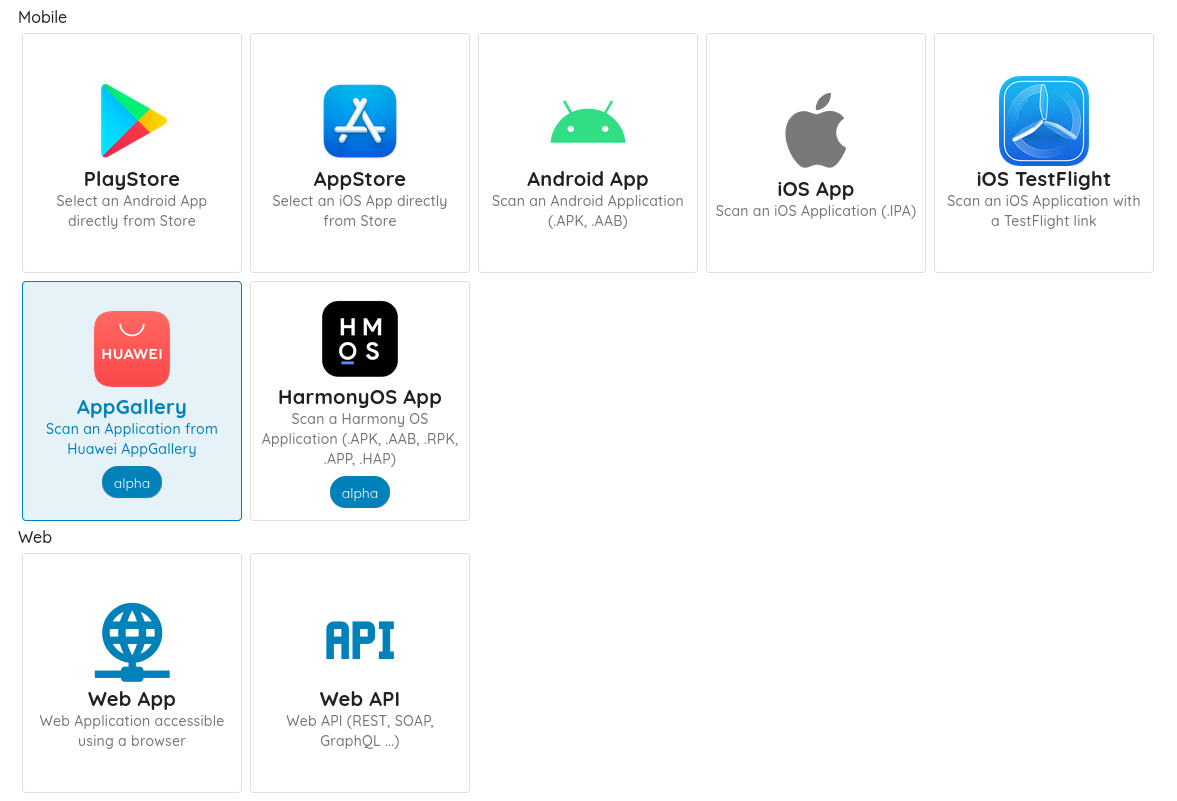
You can scan an AppGallery app (no need to log in) from ostorlab.co, or upload .HAP / .APP packages directly via an account.
Key HarmonyOS NEXT Security Features
HarmonyOS includes built-in features that affect how apps are secured and tested. These are not tools, but system-level controls that define how apps run, what they can access, and how data is protected.
While these features provide security mechanisms, they still require correct implementation and validation during testing
Runtime Security: HarmonyOS SafetyDetect API
HarmonyOS provides SafetyDetect, a runtime security framework that allows applications to evaluate device posture at runtime. It includes four main capabilities:
| API | Technical Purpose | Security Validation Focus |
|---|---|---|
| SysIntegrity | Detects rooted/tampered device state. | Verification is device-side only. Auditors must check if the app logic can be manipulated locally to return a "clean" status, as it lacks native server-side attestation. |
| URLCheck | Scans URLs against threat intelligence. | Verify the app terminates the session on a malicious return rather than just logging a bypassable warning. |
| AppsCheck | Detects malicious/risk apps on-device. | Confirm the app uses this to shield sensitive actions (e.g., detecting screen scrapers) rather than for passive telemetry. |
| UserDetect | Distinguishes human interactions from Bots. | Ensure the resulting token is validated on the backend to prevent bypasses via native API (NAPI) injection. |
These APIs can be integrated into application logic to enforce trust decisions dynamically. However, teams deploying globally should note that certain SafetyDetect features, including Wi-Fi-related detection, may be limited to mainland China. Validate API behavior in your target deployment regions before relying on these controls in production security architecture.
Data Encryption Levels in HarmonyOS
HarmonyOS uses a multi-level encryption system that lets developers control when app data can be accessed. Some data is always available, while more sensitive data can require user authentication each time it’s accessed.
This model gives more control than typical Android defaults and is similar to data protection systems in iOS.
In practice, the encryption level you choose affects both security and how easily users can access the app.
| Level | Name | Behavior | Typical Use |
|---|---|---|---|
| EL1 | Always on | Data accessible while the device is powered on | Non-sensitive system or app data |
| EL2 | After first unlock | Available after first device unlock and remains accessible while device is running, even when locked | Background services (alarms, system functions) |
| EL3 | After initial unlock | Accessible after at least one unlock; remains available even when screen is locked | Low-sensitivity features (accessibility, emergency data) |
| EL4 | Unlocked only | Only accessible when the device is actively unlocked; locks again when screen turns off | Default for most application data |
| EL5 | Authenticate every access | Requires user authentication every time data is accessed | Highly sensitive data (credentials, health, financial info) |
Mapping HarmonyOS Data Encryption Levels to iOS
For easier understanding, these levels can be loosely compared to how iOS handles data protection, but they are not equivalent. On iOS, there are no EL1–EL5 levels. Instead, data access depends on device state and authentication. In simple terms: always-available system data on iOS is closest to EL1, data that becomes available after first unlock is similar to EL2–EL3, data that requires the device to be actively unlocked is similar to EL4, and data that requires authentication every time (Face ID / Touch ID) is closest to EL5.
Code Protection: ArkGuard Obfuscation
HarmonyOS applications compiled to Panda bytecode can be statically analyzed if extracted from a device. To raise the bar for reverse engineering, Huawei provides ArkGuard, an obfuscation tool that renames symbols and reduces code readability during the build process.
ArkGuard increases the effort required for static analysis but should not be treated as a security boundary on its own.
Effective protection for sensitive applications requires a layered approach:
1. Move sensitive logic to backend systems where possible
2. Verify application integrity at runtime using SysIntegrity or equivalent
3. Restrict functionality on compromised or rooted devices
4. Implement anti-debugging mechanisms where the risk profile warrants it
5. Combine ArkGuard with runtime protection, not in place of it
Main HarmonyOS Security Testing Vulnerabilities
Based on both platform architecture and Ostorlab's scanning findings, the most significant risk areas for HarmonyOS applications are:
| Security Risks | Description |
|---|---|
| Exported Ability Hijacking | HarmonyOS Abilities (like Android Activities/Services) can be abused if improperly exported, allowing malicious apps to invoke them and bypass access controls. |
| Distributed Soft Bus Abuse | Misconfigured DSoftBus (cross-device communication layer) can lead to data leakage, unauthorized remote Ability invocation, and cross-device task hijacking. |
| ArkUI WebView Injection | Unsafe JavaScript bridges in ArkUI WebView may allow untrusted web content to call native APIs, requiring HarmonyOS-specific testing adaptations. |
| Insecure Local Data Storage | Sensitive data stored in Preferences or RDB without proper encryption can be exposed on compromised devices; commonly found in automated scans. |
| Supply Chain Risk via HAR/HAP Packages | Vulnerable third-party dependencies inside HAR (Harmony Archive) and HAP (Harmony Ability Package) modules introduce supply chain risks as the ecosystem grows. |
| Weak Cryptography and Hardcoded Credentials | Bypassing HUKS (Huawei Universal Keystore) or embedding secrets in code leads to weak cryptographic security and exposed credentials. |
OWASP MASVS Mapping for HarmonyOS
The table below maps OWASP MASVS categories to their HarmonyOS equivalents to help teams adapt existing test plans.
| OWASP MASVS Category | HarmonyOS Status | Notes |
|---|---|---|
| MASVS-STORAGE: Sensitive data storage | Applies with adaptation | HarmonyOS encryption levels (EL1-EL5) replace Android's file-based encryption model. Test that sensitive data is stored at EL4 or EL5, not left at platform defaults. |
| MASVS-CRYPTO: Cryptography | Applies directly | HUKS(HarmonyOS Universal Keystore) replaces Android Keystore. Test for hardcoded keys, weak algorithms, and whether HUKS is used correctly or bypassed entirely. |
| MASVS-AUTH: Authentication | Applies directly | SysIntegrity attestation is device-side only, unlike Android's server-verifiable tokens. Backend verification must be tested separately. |
| MASVS-NETWORK: Network communication | Applies directly | Standard TLS testing applies. Additionally test DSoftBus traffic between devices, which has no Android equivalent. |
| MASVS-PLATFORM: Platform interaction | Applies with adaptation | Exported Ability testing replaces Activity/Service export testing. Intent-based testing maps loosely to Want-based invocation in HarmonyOS. |
| MASVS-CODE: Code quality | Applies with adaptation | Static analysis tooling differs entirely. DEX-based tools do not apply. Panda bytecode requires ark_disasm and ArkTS-specific decompilers. |
| MASVS-RESILIENCE: Anti-tampering and obfuscation | Applies with adaptation | ArkGuard provides obfuscation but no runtime integrity equivalent to Android's SafetyNet/Play Integrity at the server level. Star Shield handles installation-time verification only. |
| Distributed/cross-device attack surface | No OWASP equivalent | DSoftBus, distributed permissions, and cross-device Ability invocation have no direct MASVS mapping and require HarmonyOS-specific threat modeling. |
Frequently Asked Questions
Q: What is an Ability in HarmonyOS?
An Ability is a core component of a HarmonyOS app, similar to an Activity or Service in Android. It represents a specific function of an app, such as a screen or a background task, depending on how it is designed.
From a security perspective, Abilities can be exposed to other apps or even other devices. If they are not properly configured, they may be invoked without proper authorization, which can lead to unintended behavior or data exposure.
Q: What is a microkernel, and why does HarmonyOS use one?
A microkernel handles only essential tasks like thread scheduling and inter‑process communication, while moving services such as camera, networking, and storage into isolated user‑mode processes. HarmonyOS uses its own microkernel, HongMeng, to limit damage if one service is compromised, since attackers cannot easily pivot to the rest of the system. This contrasts with traditional Linux‑based kernels, which run most services in a single privileged kernel space**.**
Q: How does HarmonyOS security compare to Android?
HarmonyOS applies formal verification to parts of the system to prove that certain vulnerability classes cannot occur. At the same time, its HongMeng microkernel is significantly smaller than a traditional Linux kernel, limiting the amount of code that can be targeted by attackers.
Q: How does Huawei handle security updates and patching for HarmonyOS apps and system components?
Huawei releases monthly security updates for HarmonyOS and EMUI that fix multiple CVEs across the system and built-in apps. These patches cover issues such as high‑severity race conditions in media modules and permission bypasses in file management.
Q: What is Star Shield, and what does it protect against?
Star Shield is a HarmonyOS NEXT security framework that enforces strict app vetting and code‑signature checks at the system level. Every app must be signed and verified by Huawei before installation, which blocks most unauthorized access to sensitive data and largely eliminates sideloading vectors that existed in earlier Android‑compatible versions of HarmonyOS.
Getting started with HarmonyOS scans on Ostorlab
If you want to run the automated scanning described above on your own HarmonyOS app, here is what you need and where the coverage ends.
What you need.
- The app, from AppGallery or as a file. In the New Scan menu, pick AppGallery and search for your app by name or bundle name, or pick HarmonyOS App and upload the package. Supported HarmonyOS files are
.HAP,.APP,.RPK,.APKand.AAB. You can also scan an AppGallery app from ostorlab.co without logging in. - A scan profile. Fast runs a quick static analysis, Full runs static, dynamic and backend analysis, and Privacy Scan looks for privacy risks. You can optionally upload an SBOM or a lock file for extended dependency detection.
- Test credentials, for logged-in flows. Add them in the Set scan credentials step so dynamic analysis reaches the screens behind login. See authenticated scans for the supported credential types.
What you get. Findings for the HarmonyOS risk classes listed earlier in this guide, with the technical evidence to verify and prioritize them. A HarmonyOS app can also be the mobile asset of a multi-asset scan, which tests it together with its APIs, web back end and source code in one scan; a multi-asset scan takes at most one mobile app.
Coverage boundaries.
- The Mobile Shielding Scan, which validates obfuscation, anti-tampering, anti-debugging and root or jailbreak detection, is documented for Android and iOS apps.
- As the tools table above notes, automated scanning complements manual security review of HarmonyOS apps; it does not replace it.
Evidence. Introducing HarmonyOS App Scans + Huawei AppGallery Scans describes the launch of HarmonyOS and AppGallery scanning, and the step-by-step guides for store scans and file scans show each screen.
Next step. Run a free scan of your app from AppGallery on ostorlab.co, or book a demo to plan testing across your Android, iOS and HarmonyOS releases.
Conclusion
HarmonyOS provides a modern security architecture with strong foundational components. But the ecosystem's tooling, testing methodologies, and regional feature availability require security teams to adapt their existing practices rather than apply Android workflows directly.
The key takeaways for any team testing HarmonyOS applications:
- Panda bytecode requires new static analysis tooling, existing DEX pipelines don't apply
- DSoftBus introduces cross-device attack surfaces not present in Android
- SysIntegrity's runtime-only trust model requires backend reinforcement for high-risk apps
- Data encryption levels should be deliberately chosen, not left to defaults
- Automated scanning with Ostorlab provides baseline coverage across HarmonyOS-specific risk classes
Ostorlab is a mobile application security testing platform supporting Android, iOS, and HarmonyOS. Security teams use Ostorlab to continuously assess apps and detect vulnerabilities across the full application lifecycle. Try Ostorlab for free →
Tags:
HarmonyOS