GeoServer Unauthenticated RCE Chain, Exploited (CVE-2026-129245)
A predictable remember-me key plus four WFS and JDBC flaws give unauthenticated attackers remote code execution on default GeoServer installs.
TL;DR
- Five GeoServer flaws chain from an anonymous WFS request to command execution on a default install. The last step forges an administrator session from a leaked password digest and a predictable remember-me key.
- GeoServer 3.0.0 to 3.0.1 and 2.28.0 to 2.28.5 are affected, and so is 2.27.6 and earlier. The fixes are 3.0.2, 2.28.6 and 2.27.7.
- GeoServer rates CVE-2026-129245 CVSS v4.0 9.2 Critical. watchTowr reports exploitation attempts in the wild, and none of the five CVEs is in CISA KEV as of 2026-11-25.
- Upgrade to the fixed release for your branch, set the same remember-me key on every cluster node, and check the data directory for stored queries you did not create.
Am I affected?
All of these conditions must hold for the full chain to work as demonstrated:
- Your GeoServer instance accepts network requests on its WFS endpoint and its REST API.
- The stock
adminaccount is enabled in thedefaultuser service, which is the account the chain forges a session for. - Your release is in one of the affected ranges in the table. The chain works on a default install with no extensions and no configuration changes.
The file-read step (CVE-2026-120705) and the service-rule bypass (CVE-2026-129243) do not need the administrator account. The JDBC deserialization step needs an administrator session, which the remember-me forgery supplies.
| Branch | Affected versions | Fixed version |
|---|---|---|
| 3.0.x | 3.0.0 to 3.0.1 | 3.0.2 |
| 2.28.x | 2.28.0 to 2.28.5 | 2.28.6 |
| 2.27.x and earlier | 2.27.6 and earlier | 2.27.7 |
Check the running version from the REST API, which needs an administrator account:
curl -s -u admin:YOUR_PASSWORD http://HOST:8080/geoserver/rest/about/version.xml \
  | grep -o '<Version>[^<]*</Version>'
You can also open the web interface, choose About GeoServer, and read Build Information. For the official container, run the same request against the published port; pulling a new image does not change the running container.
How do I fix it?
Upgrade to the fixed release for your branch. The five chain CVEs are fixed together, so an upgrade covers every step.
- For the official container, pull the fixed tag. Recreate the container rather than restarting it:
docker pull geoserver/geoserver:3.0.2, thendocker compose up -d --force-recreate geoserver. - For a WAR deployment, download the fixed WAR from geoserver.org, replace
geoserver.warin the servlet container, and restart Tomcat. - In a cluster, set the same
GEOSERVER_REMEMBERME_KEYon every node. Fixed releases generate a random key at each start, so existing remember-me cookies stop working after a restart.
If you cannot upgrade now, GeoServer suggests two workarounds. Block service parameter values that contain / at a reverse proxy, and remove rememberme from the web filter chain in the security settings. The first closes the x/WFS bypass, and the second removes the cookie path. Neither fixes the JDBC deserialization or the other flaws in the same releases, so treat them as temporary.
What is the root cause?
GeoServer is a Java web application that publishes geospatial data through OGC services, including the Web Feature Service (WFS) at /geoserver/wfs. A WFS stored query is a named query saved on the server. The chain abuses the way GeoServer resolves a service name, saves and reloads a stored query, signs its remember-me cookie, and reads JDBC user properties.
The service name is checked twice, under two spellings (CVE-2026-129243). Dispatcher.findService strips everything before / to choose the service, so service=x/WFS dispatches to WFS. The security callback then compares that same request value, which still reads x/WFS, against rules written for wfs.
public Operation operationDispatched(Request request, Operation operation) {
    String service = request.getService(); // still x/WFS
    List<ServiceAccessRule> rules = dao.getRules();
    ServiceAccessRule bestMatch = null;
    for (ServiceAccessRule rule : rules) {
        if (rule.getService().equals(ServiceAccessRule.ANY)
                || rule.getService().equalsIgnoreCase(service)) { // no wfs match
            if (rule.getMethod().equals(ServiceAccessRule.ANY)
                    || rule.getMethod().equalsIgnoreCase(method)) {
                bestMatch = rule;
            }
        }
    }
    // if there is a matching rule apply it
    if (bestMatch != null) { // no match, no role check
No rule matches x/WFS, so bestMatch stays null and the role check is skipped. The default rules restrict CreateStoredQuery and DropStoredQuery to administrators. An anonymous caller can now create a stored query.
Escaped text becomes XML again (CVE-2026-120705). The built-in GetFeatureById stored query substitutes the caller's ID into an XML template with plain string replacement. The template holds <fes:ResourceId rid='${ID}'/>, so a quote in the value closes the attribute and adds elements. The request parser decodes < into <, and GeoTools appends that character data without escaping. When the accepted query is saved, QueryExpressionTextTypeBinding.encode() parses the value again.
SAXParser saxp = XMLUtils.newSAXParserFactory(null).newSAXParser();
saxp.parse(new InputSource(new StringReader(qe.getValue())), h); // reparses text as markup
The reload parser is built with DTD support off and XInclude tied to that flag, so setXIncludeAware(!supportDTD) enables XInclude. At startup, before the application context exists, GeoServer installs NullEntityResolver, which advertises every protocol. A saved xi:include can therefore read file: paths such as security/config.xml and the default users.xml.
The cookie needs a key and a digest, not the password (CVE-2026-129245). GeoServer reads the remember-me signing key from security/config.xml. The release data directory ships the key geoserver. Spring Security builds the cookie signature from the user name, expiry, stored password digest and that key.
String data = username + ":" + tokenExpiryTime + ":" + password + ":" + getKey();
MessageDigest digest = MessageDigest.getInstance(algorithm.getDigestAlgorithm());
return new String(Hex.encode(digest.digest(data.getBytes())));
The file read returns both config.xml and users.xml, and the stock administrator is admin@default. An attacker computes a valid signature and exchanges the cookie for an administrator session, without cracking the password.
A database value becomes a Java object (CVE-2026-129242). With that session, the attacker uploads an HSQLDB database through the REST API. The attacker then registers a JDBC user service that points at it. When GeoServer loads a user, it reads each property with getObject().
ps2 = getDMLStatement("userprops.selectForUser", con);
ps2.setString(1, username);
rs2 = ps2.executeQuery();
while (rs2.next()) {
    String propName = rs2.getString(1);
    Object propValue = rs2.getObject(2); // gets property as an object
    u.getProperties().put(propName, propValue == null ? "" : propValue);
}
For an HSQLDB OTHER column, the driver deserializes the stored bytes in InOutUtil.deserialize() with a plain ObjectInputStream and no object filter. The attacker's object graph runs during the lookup. Eye Security demonstrated a shorter variant that reaches administrator code execution through SQLite JDBC extension loading (CVE-2026-120704).
How is it exploited?
- Send an anonymous WFS request with a stored-query ID longer than the filesystem allows. The error report includes the absolute data-directory path (CVE-2026-129244).
- Send
service=x/WFSwith aCreateStoredQueryrequest whose query text contains an escapedxi:include. The dispatcher treats it as WFS, the access check sees no matching rule, and the query is saved (CVE-2026-129243). - Call
DescribeStoredQueries. The saved query is reparsed with XInclude enabled and readssecurity/config.xmlandusers.xml(CVE-2026-120705). The response carries both files. - Build a remember-me cookie for
admin@defaultfrom the leaked key and password digest, and exchange it for an administrator session (CVE-2026-129245). - Upload an HSQLDB database and register a JDBC user service through the REST API. Trigger a user lookup, and the HSQLDB driver deserializes the stored object and runs the command (CVE-2026-129242).
CryptoCat published a proof of concept that runs the whole chain against the official container. The command comes from that repository.
python3 geoserver_preauth_rce.py -u http://127.0.0.1:18080/geoserver -c id
Against the official 3.0.0 container it printed uid=0(root) gid=0(root) groups=0(root), because that image runs GeoServer as root. The chain also ran on OpenJDK 17 under Jetty 12 and on Java 21.
How does the attack flow?
The attacker turns one anonymous WFS request into an administrator session, then into command execution as the GeoServer process.
no matching rule"] --> B["Anonymous stored query
escaped xi:include"] B --> C["DescribeStoredQueries
XInclude reads config.xml and users.xml"] C --> D["Forged remember-me cookie
admin@default session"] D --> E["Upload HSQLDB via REST
register JDBC user service"] E --> F["getObject deserializes
no object filter"] F --> G["Command execution
as the GeoServer user"]
What can an attacker do?
A successful chain runs arbitrary commands with the operating-system permissions of the GeoServer process. CryptoCat's run against the official 3.0.0 container returned a root shell. Eye Security verified its SQLite variant on Linux and Windows hosts.
The attacker also gains everything the GeoServer process can read. That includes the data directory, the security configuration, the user and role databases, and any credentials stored in service configuration.
The full chain needs network access to the WFS endpoint and the REST API, and the stock admin account in the default user service. The file read and the service-rule bypass work without an account. The final JDBC step needs the administrator session that the cookie forgery provides.
GeoServer's advisory also names a separate administrator path through SQLite JDBC extension loading (CVE-2026-120704). That one needs an administrator session to begin with, and it does not add reach to an unauthenticated attacker on its own.
Why does the fix work?
The fixes close each step separately. GeoServer 3.0.2, 2.27.7 and 2.28.6 carry all of them.
The dispatcher now replaces the request's service name with the resolved service ID before the security callback runs.
     req.setServiceDescriptor(serviceDescriptor);
+    // don't set it if it was never provided in the first place
+    if (req.getService() != null) {
+        req.setService(serviceDescriptor.getId());
+    }
     return fireServiceDispatchedCallback(req, serviceDescriptor);
The callback now sees WFS, so the wfs.CreateStoredQuery rule matches and the anonymous request is rejected.
The stored-query parser now installs the catalog's entity resolver instead of the process-wide NullEntityResolver.
     StoredQuery parseStoredQuery(Resource file, Parser p) throws Exception {
         p.setRootElementType(WFS.StoredQueryDescriptionType);
+        EntityResolver entityResolver = getEntityResolver();
+        if (entityResolver != null) {
+            p.setEntityResolver(entityResolver);
+        }
The query text is still reparsed, but its xi:include elements can no longer open file: references. The catalog resolver applies the configured protocol allow-list.
The JDBC services now read property values as text.
     while (rs2.next()) {
         String propName = rs2.getString(1);
-        Object propValue = rs2.getObject(2);
+        String propValue = rs2.getString(2);
         u.getProperties().put(propName, propValue == null ? "" : propValue);
     }
An OTHER value now comes back as its string form, so the driver never hands the stored bytes to ObjectInputStream. The same change covers the bulk property load and the role service.
The remember-me key no longer comes from the data directory.
-public static final String DEFAULT_KEY = "geoserver";
+public static final String KEY_PROPERTY = "GEOSERVER_REMEMBERME_KEY";
+private static final int RANDOM_KEY_BYTES = 32;
+private static final SecureRandom SR = new SecureRandom();
+private static final String resolvedKey = resolveKey();
If GEOSERVER_REMEMBERME_KEY is unset, the fixed release generates a random 32-byte key at startup. A file read no longer reveals the key, and an old forged cookie stops working after the restart.
The overlong stored-query ID is rejected before it reaches the filesystem, and the exception no longer carries the cause. That closes the path disclosure (CVE-2026-129244).
How do I check if I was compromised?
Start with the stored queries, because the chain must save one to read files. List every query file in the data directory and compare it with the queries your administrators created.
find "$GEOSERVER_DATA_DIR" -path '*/wfs/query/*.xml' -type f \
  -printf '%TY-%Tm-%Td %TH:%TM %p\n' | sort
Then search the access logs for the two spellings and the long identifier. A hit on service=x/WFS is a strong lead, because legitimate clients send service=WFS. Very long storedQuery_id values and repeated DescribeStoredQueries calls from the same address are also worth checking.
grep -Ei 'service=x%2fWFS|service=x/WFS|storedQuery_id=.{200,}' access.log
Finally, review the security settings for JDBC user or role services you did not create, and look for database files uploaded to the data directory around the same time. Administrator sessions created through a remember-me cookie also deserve a look.
No indicators of compromise have been published for this campaign. An attempt that failed before it saved a query may leave nothing beyond the request in the access log.
Timeline
The private report came 115 days before the first public exploitation report, and the fixes shipped in the middle.
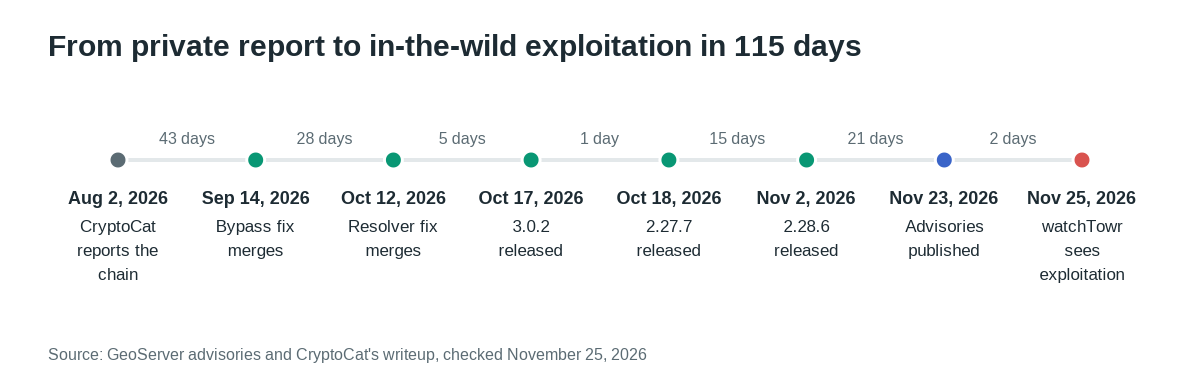
- 2026-08-02: CryptoCat reports the five-step chain to the GeoServer team through a private advisory.
- 2026-09-14: The service-rule bypass fix, pull request 9922, merges.
- 2026-09-24: The remember-me configuration fix, pull request 10008, merges.
- 2026-09-29: Eye Security reports its own three-step chain to the GeoServer team.
- 2026-10-12: The stored-query entity-resolver fix, pull request 9928, merges.
- 2026-10-17: GeoServer 3.0.2 is released.
- 2026-10-18: GeoServer 2.27.7 is released for the end-of-life 2.27 branch.
- 2026-11-02: GeoServer 2.28.6 is released.
- 2026-11-16: GitHub assigns a CVE to each of the five advisories.
- 2026-11-23: GeoServer publishes the five advisories and its November security update.
- 2026-11-25: watchTowr reports exploitation attempts in the wild.
FAQ
Does changing the administrator password stop the chain?
No. The forged cookie uses the stored password digest, and the file read returns the current digest from users.xml. A new password changes the digest but not the attacker's ability to read it.
Is GeoServer Cloud affected? Yes for the same releases. GeoServer published a GeoServer Cloud 3.0.2 on the same day as the 3.0.2 server release, and the fix list is the same.
Does blocking the REST API stop the chain?
No. Blocking /rest removes the upload and JDBC registration step, but the file read and the administrator session forgery still work. Upgrade, or apply both documented workarounds and treat the instance as exposed.
Are the CVE records published? Not yet. GitHub assigned the five identifiers on 2026-11-16, but the CVE List and NVD returned no record for them when checked on 2026-11-25. The details and scores in this post come from the GeoServer repository advisories and the project's security update.
Is the chain in CISA KEV? No. The catalog version of 2026-11-25 does not list any of the five CVEs, even though watchTowr reports exploitation attempts.
Which release should I run? Run 3.0.2 on the stable branch, 2.28.6 on the maintenance branch, or 2.27.7 if you still run the end-of-life 2.27 branch. All three fix every step of the chain.
Find exposed GeoServer servers with Ostorlab
GeoServer is often published straight to the internet for partners and map users, so the first task is knowing which hosts run it. Ostorlab attack surface discovery inventories exposed servers so you can find every GeoServer instance and patch the ones that answer from outside.
References
- GeoServer, "GeoServer Security Update - November 2026", https://geoserver.org/vulnerability/2026/11/23/cve-update.html (checked November 25, 2026)
- GeoServer, "GeoServer 3.0.2 Release", https://geoserver.org/announcements/vulnerability/2026/10/19/geoserver-3-0-2-released.html (checked November 25, 2026)
- GeoServer advisory GHSA-hgm3-wq4h-8vvq, "Predictable remember-me key allows administrator session forgery", https://github.com/geoserver/geoserver/security/advisories/GHSA-hgm3-wq4h-8vvq (checked November 25, 2026)
- GeoServer advisory GHSA-rv5g-g2r9-58rj, "Service security rules bypassed with a prefixed service name such as x/WFS", https://github.com/geoserver/geoserver/security/advisories/GHSA-rv5g-g2r9-58rj (checked November 25, 2026)
- GeoServer advisory GHSA-39mw-5chv-jh47, "Unauthenticated WFS GetFeatureById XML injection", https://github.com/geoserver/geoserver/security/advisories/GHSA-39mw-5chv-jh47 (checked November 25, 2026)
- GeoServer advisory GHSA-9wf2-fcgq-vxhq, "Deserialization in JDBC user and role services allows administrator code execution", https://github.com/geoserver/geoserver/security/advisories/GHSA-9wf2-fcgq-vxhq (checked November 25, 2026)
- GeoServer advisory GHSA-4v26-c537-jvxc, "WFS stored query exception discloses data directory path", https://github.com/geoserver/geoserver/security/advisories/GHSA-4v26-c537-jvxc (checked November 25, 2026)
- GeoServer advisory GHSA-wc3v-48j7-xf57, "Remote Code Execution via SQLite JDBC Extension Loading in GeoServer JDBC Security Configuration", https://github.com/geoserver/geoserver/security/advisories/GHSA-wc3v-48j7-xf57 (checked November 25, 2026)
- CryptoCat, "GeoServer Pre-Authentication RCE via WFS and HSQLDB", https://cryptocat.me/blog/research/analysis/geoserver_preauth_rce/ (checked November 25, 2026)
- Eye Security, "Unauthenticated remote code execution vulnerability in GeoServer", https://labs.eye.security/unauthenticated-remote-code-execution-vulnerability-in-geoserver/ (checked November 25, 2026)
- watchTowr, "Frequently Asked Questions About the GeoServer Multiple Vulnerabilities", https://watchtowr.com/intelligence/geoserver-cve-2026-129245-faq/ (checked November 25, 2026)
- The Hacker News, "Hackers Exploit Two GeoServer Flaws as Researchers Warn of Unauthenticated RCE Chains", https://thehackernews.com/2026/11/hackers-exploit-two-geoserver-flaws-as.html (checked November 25, 2026)
- CryptoCat, GeoServer pre-authentication RCE proof of concept, https://github.com/Crypto-Cat/geoserver-unauth-rce-poc (checked November 25, 2026)
- CISA, Known Exploited Vulnerabilities catalog, https://www.cisa.gov/known-exploited-vulnerabilities-catalog (checked November 25, 2026)
Keep reading