ChatGPT Shared-Link Account Takeover via MathLive Sandbox Escape
A shared ChatGPT link ran attacker JavaScript inside the victim session through MathLive unchecked messages; OpenAI fixed it on October 26.
TL;DR
- A malicious public ChatGPT share link could run the attacker's JavaScript inside the signed-in session of whoever opened it, letting the attacker act as that ChatGPT account. Parameter Security reported the chain to OpenAI on October 18, 2026.
- Anyone who opened an attacker's shared conversation before October 26, 2026 was a potential victim: no app install, no workspace join and no sign-in through the attacker were needed, only opening the link.
- OpenAI rated the report P1, and fixed it server-side on October 26, 2026 across both versions of the web frontend. No CVE is assigned, and no real-world abuse is reported.
- ChatGPT’s fix is deployed. Teams embedding MathLive should audit their own message handlers; the disclosure does not establish their patch status.
Am I affected?
As a ChatGPT user, all of these must have held at once:
- You opened a ChatGPT conversation shared through a public
/share/link that came from an untrusted source, before October 26, 2026. - The conversation was crafted to carry both a graph and an HTML Preview.
- In the most reliable version of the attack, you clicked ChatGPT's Preview button once after the page opened. In a later version, opening the link was the only step; Parameter reproduced that automatic path three times, including after a hard refresh.
The flaw was in ChatGPT's web frontend and is fixed there, so opening a crafted share today does not run the payload. Parameter ran its private-chat proof between separate accounts it controlled, and reports no real-world use of the flaw.
If you build a web application that embeds MathLive, the library used to render ChatGPT's interactive graphs, a separate exposure applies:
- Your page loads MathLive, which installs a
postMessagelistener for its on-screen math keyboard. - Attacker-influenced content can run in a frame on the same page, for example an embedded preview, a sandboxed widget or user-authored HTML.
- The listener processes a message that changes keyboard settings, because MathLive's top-level controller accepted the message from any origin.
Check whether your projects embed MathLive:
grep -A1 '"node_modules/mathlive"' package-lock.json
grep -rn "mathlive" --include=*.ts --include=*.js --include=*.vue --include=*.tsx src | head -20
How do I fix it?
ChatGPT users have nothing to install or reset. OpenAI rolled the fix out across two versions of the web frontend, and by October 26, 2026 both rejected the cross-frame MathLive messages the attack relied on.
For your own MathLive integrations, the public disclosure does not identify a fixed upstream version. The npm registry lists v0.111.1 as latest; GitHub Releases still labels v0.100.0 as latest, so that page alone is not a reliable package-version inventory. Do not assume an upgrade fixes this chain without checking the relevant message handlers. Apply Parameter’s defensive lessons at the integration level:
- Verify the sender before processing any state-changing message: check both
event.origin, the sender's web address, andevent.source, the exact window that was given permission. - Treat cross-window settings as data, never as HTML: keyboard layouts and similar structures must not be assigned to
innerHTMLin the receiving page. - Keep dynamically created documents sandboxed whenever their content can be influenced by an untrusted frame, so a crafted
srcdociframe cannot inherit your page's identity. - Treat content security policy as a backup control, not the only barrier after attacker-controlled HTML reaches the main site.
These steps address the integration boundary. Check the library’s advisories and release notes, and verify the relevant message-handling behavior in the version you deploy.
What is the root cause?
The Preview sandbox held; a second feature in the same page, MathLive's on-screen keyboard, left a door open across it. Parameter's writeup documents the chain end to end.
ChatGPT renders an HTML code block through its Preview feature inside a restricted frame on a separate web address, so the frame cannot read the signed-in page around it. An interactive graph in the same conversation loads MathLive, a math typesetting library, into the main chatgpt.com page. Loading MathLive installs a listener for messages about its virtual keyboard. Parameter found that this listener accepted a message that changed the keyboard layout from any sender, and that the layout could carry raw HTML. The deminified control flow was equivalent to:
window.addEventListener("message", (event) => {
  if (event.data?.type !== "mathlive#virtual-keyboard-message") return;
  if (!validateOrigin(event.origin, this.originValidator)) return;
  this.handleMessage(event.data, event.source);
});

if (message.action === "update-setting" && message.layouts) {
  this.layouts = message.layouts;
}
Parameter states that the top-level controller used an origin policy of none, meaning any web address could send the message. It also did not require the update-setting message to come from a previously approved window. Layout normalization preserved the markup field, so the attacker's HTML survived. When the keyboard is shown, the layout reaches an HTML sink in the real ChatGPT page:
keyboardContainer.innerHTML = MathfieldElement.createHTML(keyboardHtml);
The createHTML helper looked like a sanitizer but acted as an identity wrapper that marked the string as trusted and passed it through unchanged. In Parameter's summary, three design decisions turned this into a full exploit:
- MathLive accepted a state-changing message without proving which frame sent it.
- The message format allowed raw HTML as keyboard-layout data.
- That HTML could create an unsandboxed document inheriting the
chatgpt.comidentity.
How is it exploited?
- The attacker authors a ChatGPT conversation that contains a genuine interactive graph and, later in the same conversation, an assistant-authored HTML block. The graph loads MathLive into the main page; the HTML block is rendered as a Preview.
- The attacker publishes the conversation through ChatGPT's normal sharing feature and sends the victim the public
/share/<id>link by email, chat, ticket or social post. - The victim opens the link. The Preview frame sends two messages to the main page. An
update-settingmessage replaces a virtual keyboard layout with attacker HTML, and ashowmessage makes MathLive render it. - MathLive writes the HTML to
innerHTMLin the mainchatgpt.compage. The inserted HTML is aniframewith asrcdocattribute and nosandboxattribute, so the browser creates a fresh document that inherits thechatgpt.comidentity. - ChatGPT's content security policy blocks inline scripts but allows scripts from
www.youtube.com. The frame loads a YouTube oEmbed URL whose JSONP-style callback parameter carries the attacker's JavaScript, and the endpoint returns it inside its own validation error response. - The callback runs inside the new frame as
chatgpt.com, with the victim's signed-in session, and can call ChatGPT's authenticated APIs directly.
The message-sending code and the YouTube URL are published in Parameter's writeup, and the two code excerpts above come from it.
How does the attack flow?
A share link loads a graph that installs a trusted listener, and the sandboxed Preview uses it to push attacker HTML into the main page, where an allowed YouTube script finishes the job.
with a graph and a Preview"] --> B["Victim opens the
public /share link"] B --> C["The graph loads MathLive
into chatgpt.com"] C --> D["Preview sends update-setting
postMessage (origin unchecked)"] D --> E["MathLive writes layout HTML
to innerHTML (no sanitizing)"] E --> F["Unsandboxed srcdoc iframe
inherits chatgpt.com identity"] F --> G["YouTube JSONP script runs
(CSP allows youtube)"] G --> H["Attacker JS acts as the victim:
reads private chats, any action"]
What can an attacker do?
The payload ran with the same authenticated access as the real ChatGPT page, so its reach was not limited to what happened to be on screen. Parameter demonstrated three concrete capabilities:
- It enumerated the victim's recent conversations by calling
GET /backend-api/conversations. - It retrieved the content of a private conversation that had never been shared with the attacker, by calling the conversation detail endpoint.
- It sent a selected piece of that conversation to a server the researchers controlled, through an ordinary image request.
The payload parsed the page's own bootstrap data to obtain the session access token and account ID, and used them in request headers. Parameter's assessment is that this amounted to full control of the victim's account through the web app. The researchers wrote: "essentially, we could perform any action on behalf of the victim's ChatGPT account". The limit is what the authenticated frontend can do, not the endpoints the proof chose.
The conditions were modest: an ordinary ChatGPT account for the attacker to author the conversation, a delivery channel for the link, and one victim interaction at most. OpenAI classified the report P1 after reproducing both the code execution and the private-chat proof.
Why does the fix work?
OpenAI's fix makes the main page stop trusting the sender. Both versions of the web frontend now reject the cross-frame MathLive messages the report used. An untrusted Preview can therefore no longer replace a keyboard layout and inject HTML into the signed-in page. The fix is server-side; users install nothing. During the rollout, OpenAI also changed the content security policy, which blocked part of the chain while one frontend version still needed the update.
The YouTube step was a workaround for the content security policy, not the cause, as Parameter notes. Blocking that one endpoint would have removed one path to JavaScript while leaving an untrusted Preview able to push HTML into the main site. The fix therefore targets the message boundary, which every payload variant had to cross.
How do I check if I was compromised?
Parameter does not publish a reliable retrospective detection procedure for this exploit. Because the payload used the victim’s existing browser session, a normal-looking session history cannot rule out exploitation. If you suspect unauthorized activity, review active sessions in ChatGPT’s Security settings and follow OpenAI’s account-security guidance. Investigate potentially exposed secrets and available organizational logs according to your incident-response process; do not assume a private-chat read generates a data-export event.
For your own MathLive integrations, the audit is code-side rather than log-side: search for every postMessage listener that handles settings, and confirm each one checks the sender. A listener that processes a message without verifying event.origin and event.source is the same class of flaw, whatever the page.
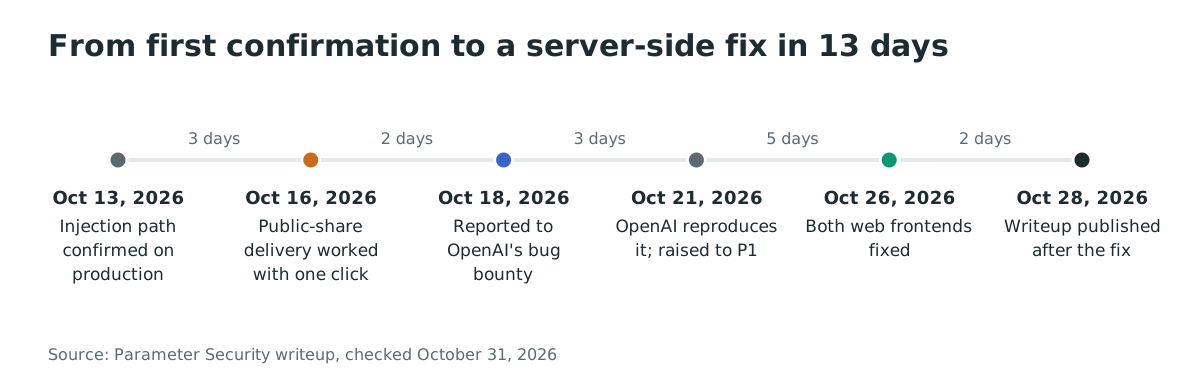
Timeline
- 2026-10-13: Parameter confirms the MathLive message-to-HTML path against ChatGPT's production code.
- 2026-10-14: The chain is reproduced through the normal UI and upgraded to arbitrary JavaScript.
- 2026-10-16: Public-share delivery is confirmed between separate accounts and workspaces, with one Preview click.
- 2026-10-17: Automatic Preview from share navigation is confirmed and reproduced after a hard refresh.
- 2026-10-18: Parameter submits the report to OpenAI's bug bounty program.
- 2026-10-19: The controlled private-chat disclosure proof is added.
- 2026-10-21: OpenAI reproduces the issue and raises severity from P2 to P1.
- 2026-10-22: OpenAI reports one web frontend fixed while the second is still being updated.
- 2026-10-23: Content security policy changes block part of the chain while one frontend update remains.
- 2026-10-26: OpenAI confirms both frontends reject the reported messages, resolves the issue and awards a total bounty of 5,000 US dollars.
- 2026-10-28: Parameter publishes the technical writeup.
FAQ
Do ChatGPT users need to do anything?
No. The fix is on OpenAI's side, deployed across both versions of the web frontend, and nothing needs installing or resetting.
Was it exploited in the wild?
No real-world use is reported. Parameter ran the private-chat proof between its own separate accounts, and The Hacker News reported on October 31, 2026 that the firm does not report any real-world use. The severity came from the demonstrated capability, not from observed abuse.
Is MathLive itself fixed?
The disclosure does not identify a fixed MathLive release. Check the installed package and its message-handling behavior; the GitHub Releases page is not a complete list of npm releases. Apply the integration-level checks above.
Why did the Preview sandbox not stop this?
The sandbox did stop direct access: code inside Preview could not read the main ChatGPT page. The way in was a second feature in the same page. The graph loaded MathLive, and MathLive's keyboard listener accepted instructions from any frame, which let the untrusted Preview hand HTML to the trusted page.
How big was the exposure?
ChatGPT's web frontend is one of the most-used applications on the web; OpenAI itself reported 700 million weekly active users in September 2025. Every signed-in user who might open a shared link was in scope until October 26, 2026. Reach does not mean impact here: no real-world abuse is reported.
Could the payload do more than read chats?
Yes. The payload called ChatGPT's own authenticated APIs with the victim's session, so it could reach anything the normal frontend reaches, not just conversations. Parameter demonstrated reading a private chat and exfiltrating a selected value, and assessed the primitive as the ability to perform any action on behalf of the account.
Find where your own apps embed MathLive with Ostorlab
If your web applications embed MathLive, the first question is where. Ostorlab's software composition analysis builds the dependency inventory of your projects, so a scan tells you which applications pull in MathLive and where the integration-level review in "How do I fix it?" needs to happen.
References
- Parameter Security, Do the Math: How We Took Over ChatGPT Accounts, October 28, 2026: https://www.parameter.ai/labs/we-found-a-gap-at-openai (checked October 31, 2026)
- The Hacker News, A Shared ChatGPT Link Could Run Attacker Code in Your Session and Read Private Chats, October 31, 2026: https://thehackernews.com/2026/10/a-shared-chatgpt-link-could-run.html (checked October 31, 2026)
- MathLive security advisories: https://github.com/arnog/mathlive/security/advisories (checked October 31, 2026)
- MathLive: https://registry.npmjs.org/mathlive/latest ; https://github.com/arnog/mathlive/releases
- MathLive package page with weekly download figures: https://www.npmjs.com/package/mathlive (checked October 31, 2026)
- OpenAI, How people are using ChatGPT (2025-09-15): https://openai.com/index/how-people-are-using-chatgpt/