
Deep Agentic Scan (BYOK), New CI Integrations, Scan Filters & Performance
This release highlights Agentic Deep Scan with BYOK (Bring Your Own AI Key), adds Harness + Bitrise CI documentation, introduces scan filtering by tags and owners, and delivers major performance improvements across tickets and scans.
Highlights
- Agentic Deep Scan with BYOK (new)
- Harness + Bitrise CI integration (new)
- Scan filtering by Tags and Owners (new)
- Major performance improvements across Tickets and Scans
1- Agentic Deep Scan with BYOK (Bring Your Own AI Key)
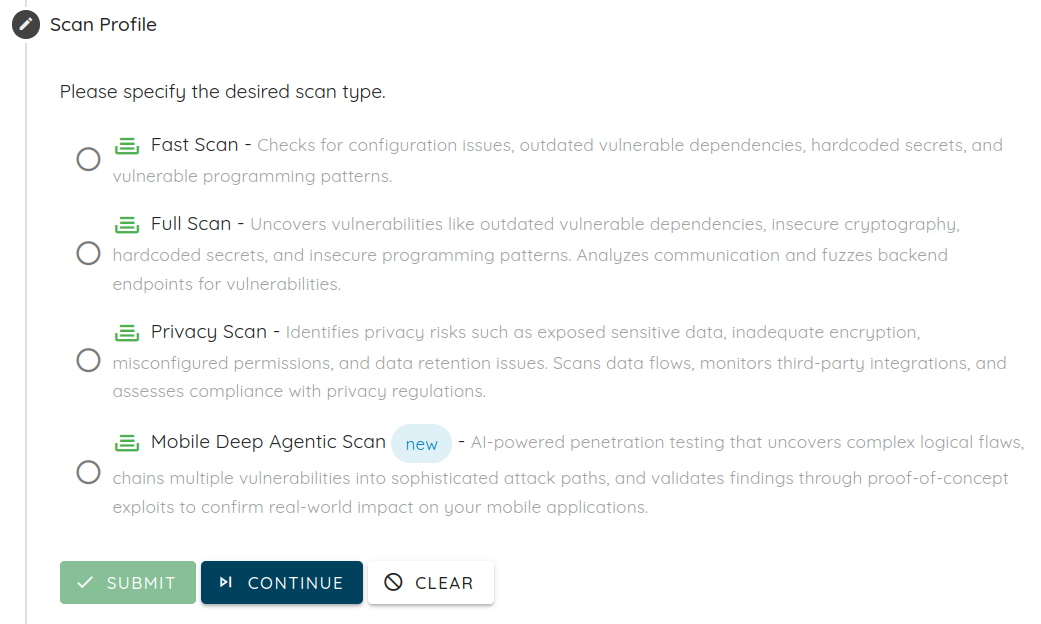
Agentic Deep Scan is our next-generation vulnerability scanner designed to simulate real-world attacks and uncover truly exploitable vulnerabilities (not just surface-level signals). It’s built to cover the places where exploitability depends on workflow logic and runtime behavior, and it ships with proof-grade evidence plus verification retesting to keep remediation honest and fast.
What Agentic Deep Scan covers
Agentic Deep Scan assesses real attacker paths across the full system, not a single layer:
- Mobile targets: iOS + Android apps (including authenticated flows with 2FA/OTP with the right setup), plus the APIs behind the app and embedded third-party SDKs.
- Web targets: Web apps plus the APIs behind them and critical third-party integrations, including authenticated flows with SSO/MFA with setup.
Why it’s different (and why it’s higher signal)
Advanced detection for complex vulnerability classes: Finds issues legacy techniques often miss, especially in signup/onboarding/checkout/refunds/account workflows, authorization patterns (e.g., BOLA/BFLA, IDOR-style), session/token handling, runtime tampering/abuse scenarios, and attack chains that escalate impact across components.
Exploitability-first output: Findings are validated and de-duplicated before they reach your team and include proof-grade evidence (screenshots, request/response logs, reproduction steps) so engineering can verify risk quickly.
Low false positives: A hybrid approach (static + deep dynamic validation, and exploitation checks where appropriate) focuses reports on issues that can be demonstrated under realistic conditions.
BYOK (new)
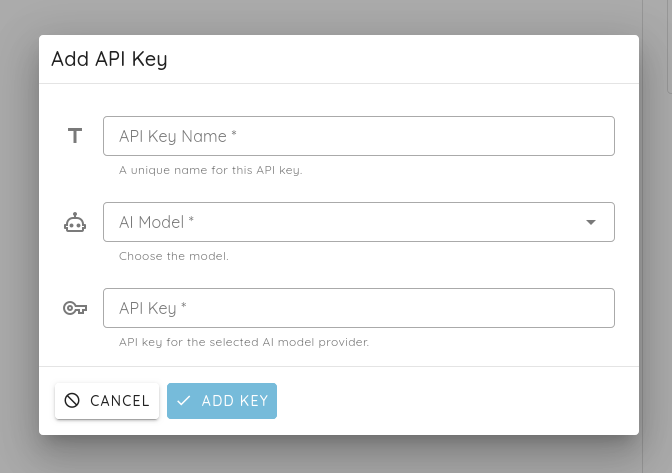
BYOK lets you run Agentic Deep Scan using your own AI provider key, keeping usage and spend aligned with your organization’s policies. You can select your preferred model/provider credentials, so deep exploration stays predictable and controllable.
What you receive
- Proof-grade evidence: Screenshots, request/response logs, and step-by-step reproduction.
- Risk context and prioritization: Severity, impact, and attacker path (including chaining context when relevant).
- Developer-ready remediation guidance: Practical fixes and defensive recommendations.
- Verification retesting: After fixes ship, retesting confirms the underlying issue is resolved and risk is truly reduced.
Learn more:
2- New Integrations
Harness CI Integration
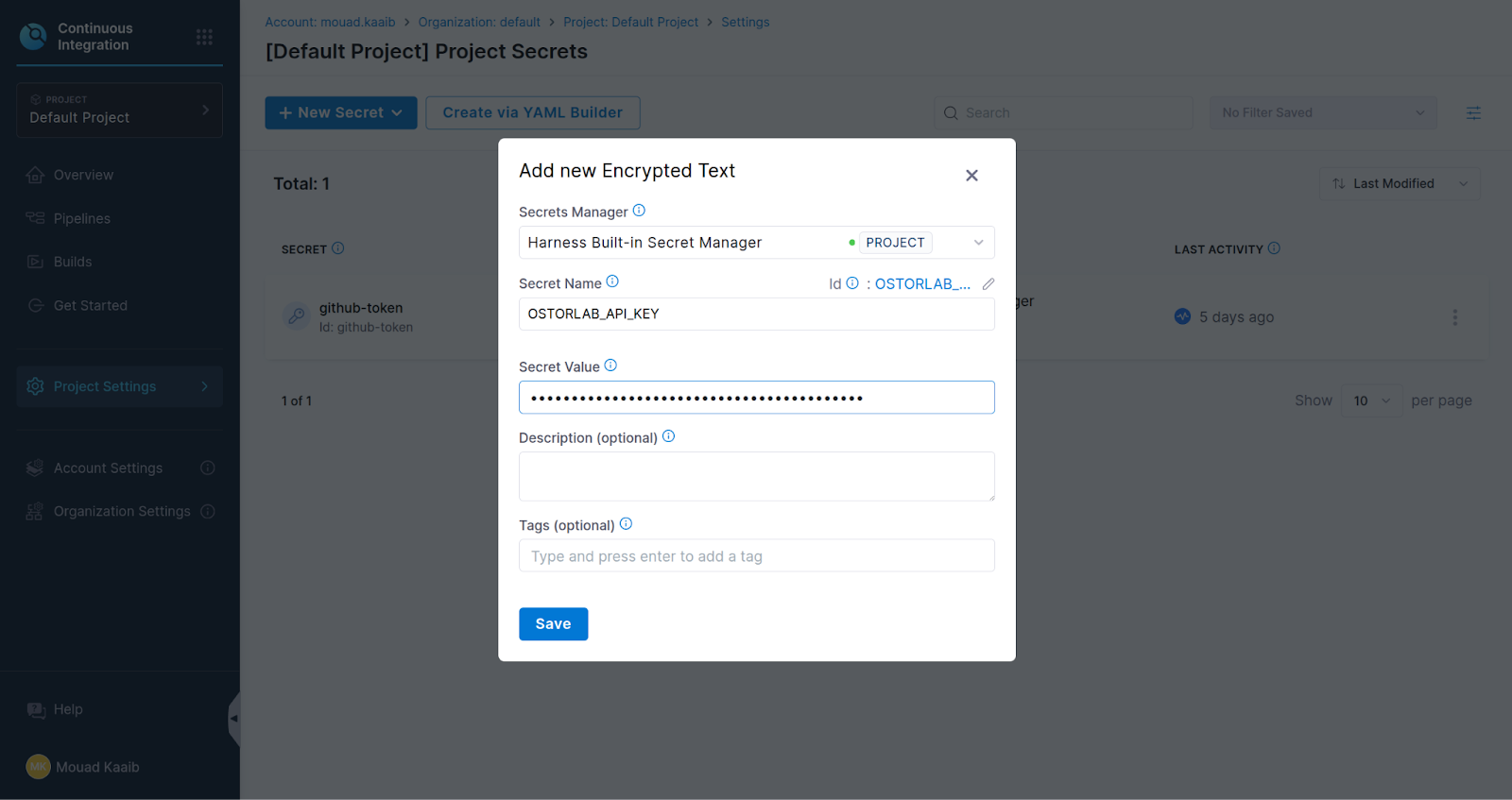
Added step-by-step documentation for integrating Ostorlab automated scanning into Harness CI pipelines, including API key configuration, environment variables, and running ci-scan commands.
Read the full documentation
Bitrise CI Integration
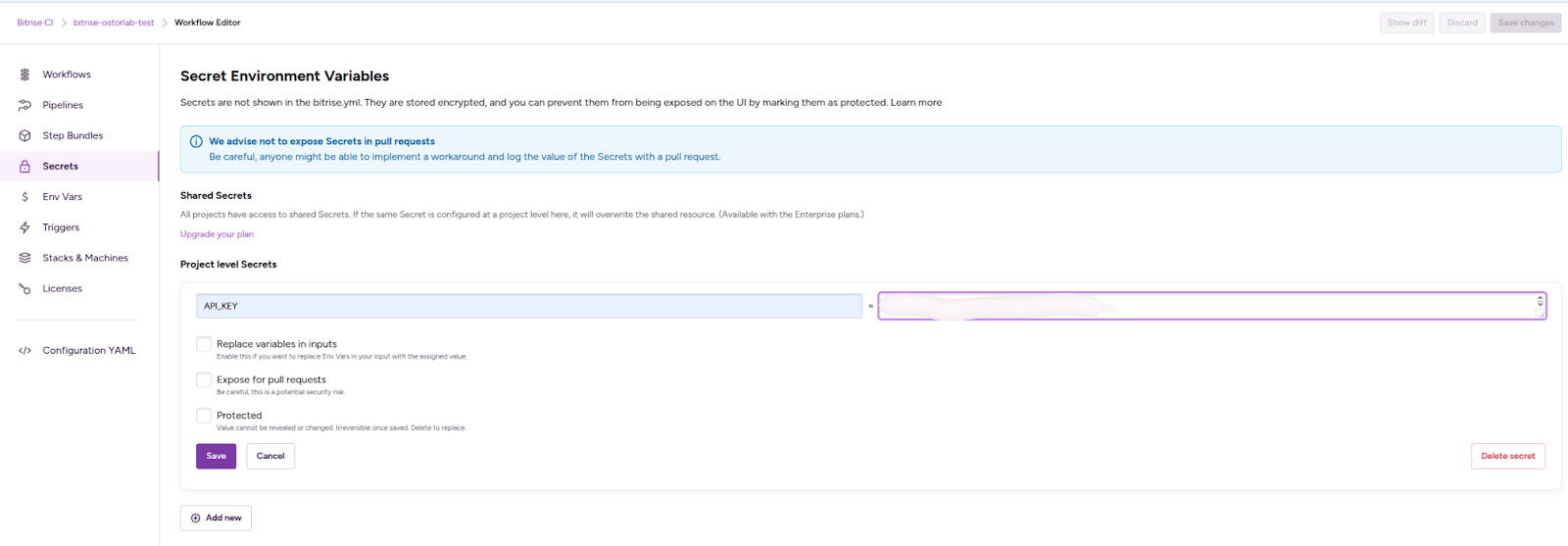
Added full documentation for integrating mobile security scanning into Bitrise workflows: generating API keys, configuring secrets, adding a Script step, and running the Ostorlab CLI.
Bitrise is now listed as a supported integration across applicable plans.
Read the full documentation
3- Scan Filtering Enhancements
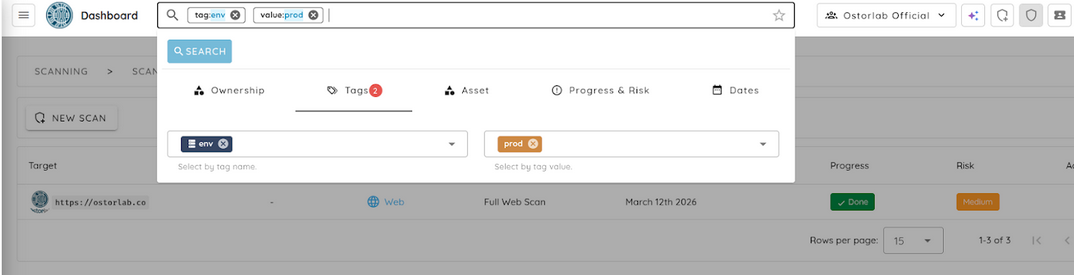
Filter Scans by Tags
Scans can now be filtered by the global tags attached to their linked assets. Added a Tags filter panel in Scans search to filter by tag name and/or tag value.
Filter Scans by Owners
Added filtering by owner IDs when listing scans, enabling teams to quickly surface scans belonging to specific owners.

4- Scan Reporting Improvements
Scan Report Data Tabs
The scan detail page now includes dedicated tabs for Scope, Methodology, and Conclusion sourced from AI-generated report data. The Summary tab also displays the report’s AI-generated summary (when available). Tabs are only shown when content is available.
View Sample Report?
5- SSO Improvements
Email-Based SSO Login
Users can now initiate SSO login using their email address. The platform extracts the domain, matches it to the corresponding SAML configuration, and generates the redirect URL. The SSO login form UI has also been improved.
SAML Configuration UX
The SAML domain field is now auto-populated from the authenticated user’s email (or from organization users during SSO configuration). SAML creation now returns a clear error when a domain already exists, and includes an explicit uniqueness check to prevent duplicates.
6- UI/UX & Performance Improvements
Tickets Page Performance
The remediation tickets page has been significantly optimized for better performance and smoother interaction, especially when handling large datasets. The title input was refactored into a dedicated component that only commits changes on blur or when pressing Enter, preventing costly re-renders on every keystroke. An unnecessary deep watcher that previously traversed the tags array during each reactive update has been removed, further improving efficiency, and animations have also been disabled to reduce visual jitter during large table renders. In addition, grouping chips are now displayed in view mode for better clarity, and search and filtering behavior has been fixed so filters correctly hide non-matching groups when grouping by priority, status, or tag, while removing filters reliably triggers a refresh to ensure accurate results.
Remediation & Ticket Fixes
Several issues across remediation and ticket workflows have been resolved to improve reliability and user experience. Ticket tags now save correctly following a fix to an emit mismatch, and the unassign user flow has been corrected. The “Assign Me” action now properly updates the UI, ensuring changes are reflected immediately. Display issues have also been addressed, with \<pre> blocks no longer overflowing the ticket details container. Jira custom field mappings now populate as expected after resolving a v-model event mismatch. Additionally, remediation page filters now apply correctly on initial navigation, and grouping selectors no longer display [object Object], resulting in clearer and more consistent behavior.
Navigation & Layout
Navigation and layout improvements have been implemented across the application. The navigation drawer accordion now closes any previously open group, ensuring only one section is expanded at a time. Missing alert status chips have been fixed, and alert filter badge behavior has been corrected. The OTP input now auto-focuses during login, and users are redirected to the login page after logout. The “Switch Plan?” confirmation dialog issue has been resolved and now appears as expected, and tooltips have been added for truncated finding titles in risk breadcrumbs to improve readability. Additionally, the scroll-based app bar elevation now updates correctly as users navigate.
Shared Reports
Shared scan reports now show only actionable vulnerabilities (Open or Reopen). Redundant network requests in the vulnerability details dialog have been eliminated when data is already available.
Scan Creation
Scan creation issues have been addressed to improve stability and usability. The scan creation loading dialog not displaying has been fixed, along with a stack overflow error when clearing the scan creation form. Leftover UI code that caused a runtime crash in the Web API scan form has been removed, and the issue where the “Add” button remained disabled after selecting a store app in the new asset dialog has been resolved.
7- Agentic Deep Scan / Auto-Exploit Improvements
Agentic Deep Scan and Auto-Exploit have received several improvements to enhance reliability and performance. NVD API key handling has been fixed to resolve CVE lookup failures, and GitHub code search token wiring has been corrected to prevent authorization errors. Execution limits have been increased to avoid premature termination. Secret key detection has been enhanced using entropy-based analysis, reducing false positives. The system now supports multiple instances of the same agent running simultaneously by assigning distinct Docker service names, and multiple crash fixes have been applied to address dependency incompatibilities.
8- Bug Fixes & Enhancements
Various bug fixes and enhancements have been applied to improve stability and usability. Scan distribution chart rendering issues have been fixed, and column sorting in the scan list table now works correctly. The organization tags combobox infinite loading problem has been resolved. Inventory search panels have been migrated away from deprecated APIs, and the owner dropdown duplication issue has been fixed. Asset table selection checkbox states and edit modal unselect behavior have been corrected. Alert table checkboxes no longer trigger unintended navigation, and middle-click and Ctrl/Cmd+click now open items in a new tab as expected. Finally, iOS AnyConnect agent behavior has been fixed to keep Cisco AnyConnect in the foreground during dynamic analysis.