
Android Intent Redirection: Attacks and Fixes
How intent redirection lets attackers reach unexported Android components, leak data via setResult() and abuse PendingIntents, plus six ways to prevent it.
Intent redirection is a class of vulnerability in Android applications where a malicious actor tricks a victim app into forwarding or dispatching an Intent on its behalf. Because the forwarded intent executes under the victim app's identity and permissions, the attacker can reach unexported components, steal sensitive data, or escalate privileges — all without holding any special permissions of its own.
This vulnerability is consistently ranked among the most impactful findings in Android bug-bounty programs and has affected high-profile applications including TikTok and various Google first-party apps.
How Intent Redirection Works
At its core, the attack exploits a proxy pattern: a victim application receives an intent from an external (attacker-controlled) source and, without adequate validation, uses part of that intent to start another activity, send a broadcast, or bind a service.
Attack Flow
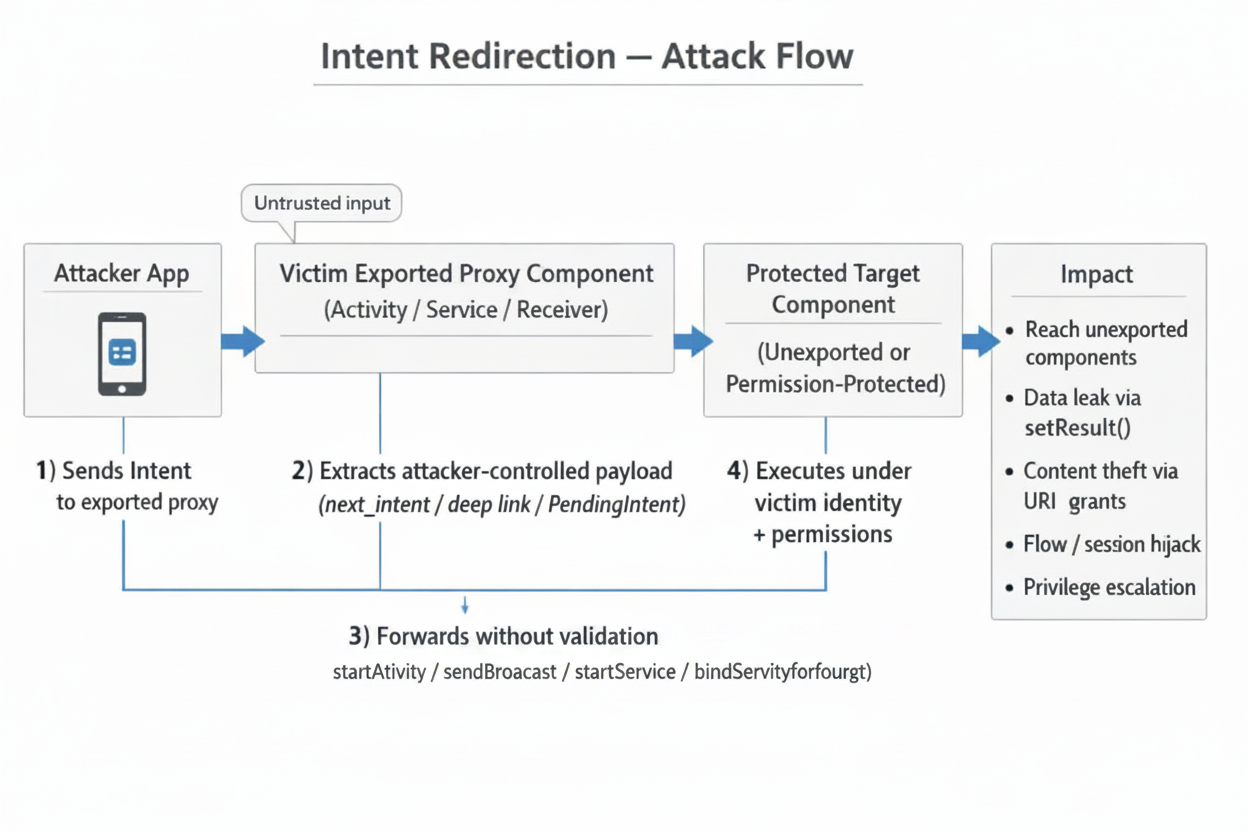
The Core Misuse Pattern
The simplest vulnerable code looks like this:
// VULNERABLE — Unvalidated intent forwarding
Intent forward = getIntent().getParcelableExtra("next_intent");
startActivity(forward);
The victim blindly trusts the next_intent extra and launches whatever component the attacker specifies — including the victim's own unexported activities.
Vulnerable Code Patterns
1. Unvalidated Intent Forwarding
// VULNERABLE
class RouterActivity : AppCompatActivity() {
    override fun onCreate(savedInstanceState: Bundle?) {
        super.onCreate(savedInstanceState)
        val target = intent.getParcelableExtra<Intent>("target")
        target?.let { startActivity(it) }   // No validation at all
        finish()
    }
}
2. setResult() Data Leak
// VULNERABLE — Returns internal data to the caller
public class LeakyActivity extends AppCompatActivity {
    @Override
    protected void onCreate(Bundle savedInstanceState) {
        super.onCreate(savedInstanceState);
        Intent next = getIntent().getParcelableExtra("next");
        startActivityForResult(next, 1001);
    }

    @Override
    protected void onActivityResult(int req, int res, Intent data) {
        super.onActivityResult(req, res, data);
        // Forwards internal data straight back to the (attacker) caller
        setResult(res, data);
        finish();
    }
}
3. Deep Link Exploitation
// VULNERABLE — Deep link handler forwards without checking scheme/host
class DeepLinkActivity : AppCompatActivity() {
    override fun onCreate(savedInstanceState: Bundle?) {
        super.onCreate(savedInstanceState)
        val uri = intent.data
        val redirect = Intent(Intent.ACTION_VIEW, uri)
        // Attacker can craft: myapp://redirect?url=intent://...
        startActivity(redirect)
    }
}
Attack Scenarios
Scenario 1 — Accessing Unexported Components
An attacker crafts an intent targeting the victim's unexported InternalSettingsActivity:
Intent inner = new Intent();
inner.setComponent(new ComponentName(
    "com.victim.app",
    "com.victim.app.InternalSettingsActivity"
));

Intent outer = new Intent();
outer.setComponent(new ComponentName(
    "com.victim.app",
    "com.victim.app.RouterActivity"  // exported proxy
));
outer.putExtra("target", inner);
startActivity(outer);
Scenario 2 — Content Provider Data Theft
The attacker leverages URI permission grants to read the victim's private content provider:
val inner = Intent().apply {
    data = Uri.parse("content://com.victim.app.provider/private_data")
    flags = Intent.FLAG_GRANT_READ_URI_PERMISSION
}

val outer = Intent().apply {
    component = ComponentName("com.victim.app", "com.victim.app.ProxyActivity")
    putExtra("next_intent", inner)
}
startActivityForResult(outer, 0)
// onActivityResult receives the private data
Scenario 3 — Authentication / Session Hijack
If the victim app has an exported activity that forwards a result from an internal login flow, the attacker can intercept the authentication token returned via setResult().
Scenario 4 — Deep Link Chaining
An attacker chains multiple deep links across apps, using each app as a stepping stone to ultimately reach a protected component in a high-value target.
PendingIntent Redirection
While classic Intent redirection exploits an app that forwards an attacker-supplied Intent under its own identity, PendingIntent redirection flips the attack around: the victim app is tricked into handing out a PendingIntent that the attacker can weaponize. Because a PendingIntent executes its wrapped Intent with the creator's UID and permissions, an attacker who obtains a mutable or empty PendingIntent effectively borrows the victim app's identity.
Understanding the PendingIntent Security Model
A PendingIntent is a capability token, not a data object. The Intent, flags, and creator UID live inside system_server; the app only holds a binder handle.
- Creator: calls
PendingIntent.getActivity()→system_serverstores the record and returns a handle. - Recipient: receives the handle via IPC (Intent extra, notification, etc.).
- Dispatch: when
.send()is called,system_serverlooks up the record and fires the wrapped Intent with the creator's UID, not the sender's.
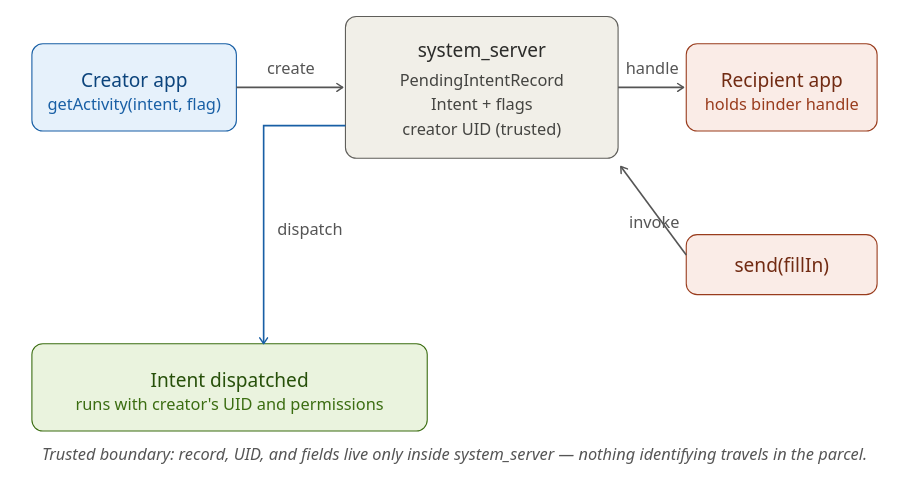
This design makes PendingIntent safe to pass around by default — which is why it's the recommended mitigation for classic Intent redirection. The vulnerability arises only when the creator treats this capability token as harmless data.
The Vulnerable Pattern
PendingIntent redirection occurs when a victim app:
- Creates a PendingIntent with
FLAG_MUTABLE(or omits flags on pre-Android 12 targets, where mutable was the default), AND - Wraps an implicit Intent (no explicit component set), AND
- Exposes the PendingIntent to an attacker — by placing it in a broadcast, a notification action, an exported service response, or an Intent returned to a caller.
An attacker who receives the mutable PendingIntent can call .send(Context, int, Intent fillInIntent) with a fillInIntent that supplies the missing component, action, data, or extras. The system merges the fillIn fields into the original Intent according to the rules in Intent.fillIn(), and dispatches the result with the creator's UID.
Practical impact includes:
- Launching the victim's non-exported activities, services, or providers.
- Reading or writing the victim's private
content://URIs by grantingFLAG_GRANT_READ_URI_PERMISSIONthrough the fillIn. - Sending broadcasts as the victim to receivers that trust the victim's signature or package name.
- Triggering privileged internal flows (account management, settings changes, in-app purchase callbacks).
A Concrete Example
// Vulnerable code inside VictimApp
Intent intent = new Intent();                         // implicit — no component
PendingIntent pi = PendingIntent.getActivity(
    this, 0, intent,
    PendingIntent.FLAG_MUTABLE | PendingIntent.FLAG_UPDATE_CURRENT);

Intent deliver = new Intent("com.victim.HAND_OUT_TOKEN");
deliver.putExtra("token", pi);
sendBroadcast(deliver);                               // attacker receives pi
The attacker's receiver obtains the PendingIntent and exploits it:
// Inside AttackerApp
PendingIntent pi = intent.getParcelableExtra("token", PendingIntent.class);

Intent fillIn = new Intent();
fillIn.setClassName("com.victim", "com.victim.internal.AdminActivity");
fillIn.putExtra("cmd", "wipe");

pi.send(context, 0, fillIn);      // launches VictimApp's internal activity as VictimApp
Even though AdminActivity is not exported, the launch succeeds because the system performs it under VictimApp's UID.
Why This Is Distinct from Classic Intent Redirection
| Aspect | Classic Intent Redirection | PendingIntent Redirection |
|---|---|---|
| Attacker supplies | A raw Intent to the victim |
Nothing — attacker receives a token from the victim |
| Victim's role | Extracts an Intent and dispatches it | Hands out a PendingIntent that wraps an implicit, mutable Intent |
| Identity under which the Intent runs | The victim (confused deputy) | The victim (capability delegation) |
| Primary mitigation | Validate/filter the forwarded Intent; use PendingIntent instead | Use FLAG_IMMUTABLE; use explicit Intents |
The damage is the same — code executes as the victim — but the attack shape is inverted. Classic redirection requires an input path where the victim accepts attacker data. PendingIntent redirection requires an output path where the victim leaks a capability.
Mitigation Strategies
1. Validate with resolveActivity()
Before forwarding any intent, verify it resolves to a safe, expected component:
val forwarded = intent.getParcelableExtra<Intent>("next")
forwarded?.let {
    val resolved = it.resolveActivity(packageManager)
    if (resolved != null && resolved.packageName == packageName) {
        // GOOD — only allow intents targeting our own package
        startActivity(it)
    }
}
2. Component Allowlist
Maintain an explicit set of permitted target components:
private val ALLOWED_TARGETS = setOf(
    "com.myapp.HomeActivity",
    "com.myapp.SettingsActivity"
)

fun safeForward(intent: Intent) {
    val target = intent.getParcelableExtra<Intent>("target") ?: return
    val comp = target.component?.className
    if (comp in ALLOWED_TARGETS) {
        startActivity(target)
    }
}
3. Use IntentSanitizer (AndroidX)
The Jetpack IntentSanitizer API provides a declarative, builder-style API for stripping dangerous fields:
val sanitizer = IntentSanitizer.Builder()
    .allowComponent(ComponentName(this, HomeActivity::class.java))
    .allowAction(Intent.ACTION_VIEW)
    .allowDataWithAuthority("myapp.example.com")
    .allowExtra("safe_key", String::class.java)
    .build()

val clean = sanitizer.sanitizeByFiltering(untrustedIntent)
startActivity(clean)
4. Restrict Exported Components
Review your AndroidManifest.xml and ensure components are only exported when truly necessary:
<!-- GOOD — not exported; cannot be reached externally -->
<activity
    android:name=".InternalSettingsActivity"
    android:exported="false" />

<!-- If exported is required, protect with a permission -->
<activity
    android:name=".RouterActivity"
    android:exported="true"
    android:permission="com.myapp.permission.INTERNAL" />
5. Immutable PendingIntents
Always use FLAG_IMMUTABLE unless the PendingIntent genuinely needs to be mutable:
val pi = PendingIntent.getActivity(
    context, 0, intent,
    PendingIntent.FLAG_IMMUTABLE or PendingIntent.FLAG_UPDATE_CURRENT
)
6. Strip Dangerous Intent Flags
Before forwarding, remove flags that could grant URI permissions:
fun stripDangerousFlags(intent: Intent): Intent {
    intent.removeFlags(
        Intent.FLAG_GRANT_READ_URI_PERMISSION or
        Intent.FLAG_GRANT_WRITE_URI_PERMISSION or
        Intent.FLAG_GRANT_PERSISTABLE_URI_PERMISSION or
        Intent.FLAG_GRANT_PREFIX_URI_PERMISSION
    )
    return intent
}
Common Misconceptions
| Misconception | Reality |
|---|---|
"Setting android:exported=false makes my component safe." |
If an exported proxy activity forwards intents to it, the component is effectively reachable. |
| "I validate the intent action, so I'm protected." | Attackers control all fields — component, data URI, extras, flags. Validating only the action is insufficient. |
| "Permission checks on the target component will block the attacker." | The forwarded intent runs under the victim app's identity, which already holds the required permissions. |
"Only startActivity() is vulnerable." |
sendBroadcast(), startService(), bindService(), and startActivityForResult() are all susceptible. |
| "Deep links are safe because they only open web URLs." | The intent:// scheme allows constructing arbitrary intents from a URI, bypassing typical URL assumptions. |
Real-World Impact
- TikTok (2022): Researchers demonstrated that a chain of intent redirections could hijack user accounts by reaching unexported activities handling authentication tokens. The finding earned a significant bug-bounty payout.
- Google Security Bulletins: Multiple Android Security Bulletins have addressed intent redirection flaws in system-level components, underscoring that even first-party code is not immune.
- Bug Bounty Trends: Intent redirection consistently appears in top Android vulnerability categories across platforms like HackerOne and Bugcrowd, with payouts reflecting its high impact.
Conclusion: Defense in Depth
No single fix eliminates intent redirection risk. A layered approach is essential:
- Minimize exports — only export components that genuinely need external access.
- Validate all forwarded intents — use
resolveActivity(), component allowlists, orIntentSanitizer. - Strip dangerous flags — remove URI grant flags before forwarding.
- Use immutable PendingIntents — default to
FLAG_IMMUTABLE. - Protect sensitive results — never return internal data via
setResult()to unverified callers. - Integrate static analysis — tools like Android Lint and Semgrep can catch misconfigurations in CI/CD before they ship.
By treating every externally received intent as untrusted input and applying these controls consistently, Android developers can effectively neutralize intent redirection as an attack vector.