
We Built an AI Agent for Our Own Backlog. Now It's Yours.
How a small agent that turned bug tickets into pull requests became Ostorlab's ticket agent: an AI teammate you give a job, a model, and rules for when it runs.
The problem
At Ostorlab, we build tools that find problems — in mobile apps, web apps, APIs and code. That is the job, and it comes with a cost: every problem we find becomes a ticket.
Our own platform is no different. Errors show up in our logs, bugs get reported, scans find issues, and each one turns into a ticket. And the tickets kept coming.
Many of them were not hard. A stack trace pointed to the exact line, the error message said what went wrong, and the fix was often a few lines of code. But someone still had to stop what they were doing: open the ticket, read it, find the code, write the fix, test it, and open a pull request.
So the simple tickets waited — not because they were hard, but because everyone was busy with harder work. A small fix could sit for days, and the backlog grew. Not with hard problems, but with easy ones that nobody had time for.
The opportunity
When we looked closer at those tickets, we noticed something. Many of them were not written by people at all. They were generated automatically, from error logs and scan results, and those sources already capture the details: the error message, the stack trace, the file, the line. The tickets already said what broke, where it broke, and often why.
We had designed those tickets to give our engineers everything they need to start a fix. And what an engineer needs to start a fix, we realized, is also what an AI agent needs. The information was there. What was missing was time.
That made us ask a simple question: what if an agent could pick up the ticket and start the fix?
Coding agents could already read code, follow an error, and write a fix. Most of them still waited for a developer to open them and type a prompt. We wanted something different. We did not want another tool for engineers to remember to use; we wanted the work to start where it already lived, in the ticket.
A ticket comes in, an agent picks it up, a pull request comes out, and an engineer reviews it. The engineer stays in control and just skips the repetitive part. And because each ticket goes to its own agent, the work scales with the backlog: as many agents run in parallel as there are tickets to handle.
The first version
We started small, on purpose. We built one agent with one job: read a bug ticket and open a pull request that fixes it.
We called it Rubberduck. Not everyone on the team loves the name. It stuck anyway.
The flow was simple. An engineer assigned a ticket to Rubberduck, the same way they would assign it to a teammate. Then the agent took over:
- It read the ticket and its comments.
- It found the right code.
- It worked out what went wrong.
- It wrote a fix and opened a pull request.
- It left a comment on the ticket with a link to that pull request.
If a reviewer asked for a change, they did not need a new tool. They left a comment, like they would for any colleague, and Rubberduck read it and updated its work.
That was it. No dashboard, no settings — one agent, one job. It was not perfect, but it was good enough for us to put to work on real tickets.
Using it ourselves
We gave Rubberduck real tickets from our own backlog, and it started opening pull requests. Some were good, some were not, and each mistake taught us something.
Find the cause, not the symptom. Early fixes sometimes hid the error instead of solving it. So we taught the agent to work like a careful engineer: read the error, trace it back to its real cause, reproduce it, then fix it.
Write for humans. The first pull request titles were often just the error message copied from the ticket. Hard to read in a long list. Now the agent writes a short title that says what it fixed.
Say when you don't know. Sometimes a ticket did not have enough information. The agent would guess, and guesses make bad fixes. We taught it to stop and ask. Now it can report that a ticket is fixed, partly fixed, blocked, or needs more context.
Finish the job. A pull request with failing tests is not a fix. So the agent now waits for the checks to pass, and fixes what breaks.
Follow our rules. Every team has its own way of writing code. We gave the agent our style guides. We also gave it a memory, so a lesson learned on one ticket helps on the next one.
Keep secrets out of reach. The agent needs access to our code, but it should never see our passwords or secrets. So we moved them out of the agent's reach entirely: they are injected at runtime, so the agent can use them but never read them.
We stopped thinking of Rubberduck as an experiment when its pull requests started showing up in our review queue next to everyone else's. We reviewed them the same way. It had become part of the team.
The bigger realization
Once Rubberduck worked, people on the team started asking for more:
"Can it sort new tickets by how urgent they are?" "Can it check our findings against our compliance rules?" "Can it review open tickets every Monday?"
These were good ideas, but Rubberduck could not do them. Its job was built into it: it fixed code, and nothing else. We had already built a second agent, one that planned work instead of writing code, and it had the same problem — its job was built in too. We could keep building a new agent for every new job, but that would never end.
Using Rubberduck took no setup. Building each new agent did: you had to write a long configuration file by hand, where every name had to be exact. It worked, but it felt like there was a better way.
That is when we saw the real opportunity. The problem was never "we need an agent that fixes code." The problem was "we have work in our tickets that nobody has time for," and fixing code was just one kind of that work.
So an agent should not have a fixed job. It should take whatever job a team gives it — and setting one up should feel like filling in a form, not writing a configuration file. You describe the job in plain words, pick a model, and choose when it runs.
What we built
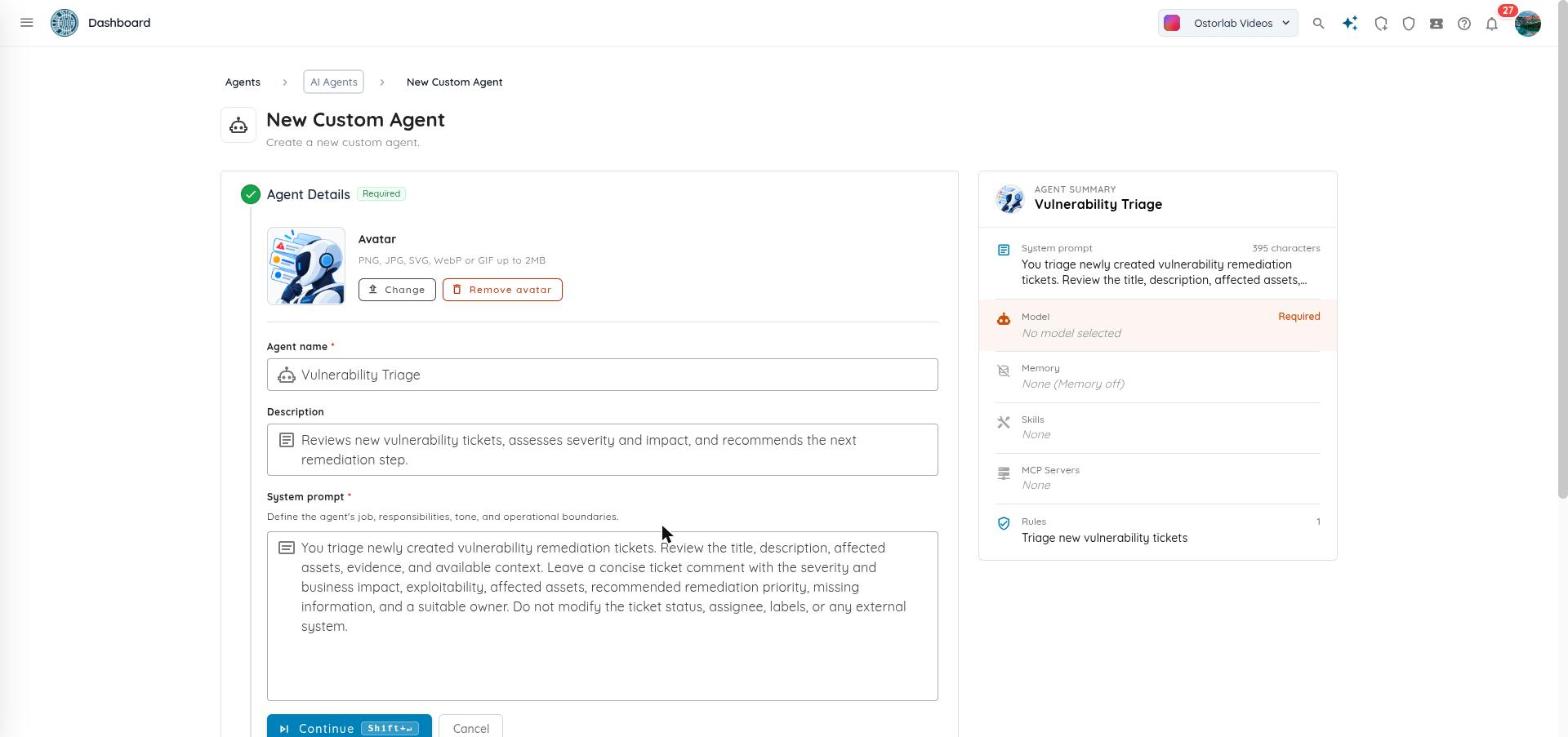
We rebuilt the ticket agent around that idea. There is now one kind of agent, and it has no job until you give it one. You set it up in a form, in a few steps.
Give it a name. Any name you want. Choose wisely — names stick. We know.
Give it a job. You write what the agent should do, in plain words. Not sure where to start? Our setup guide walks you through it, with the lessons we learned along the way.
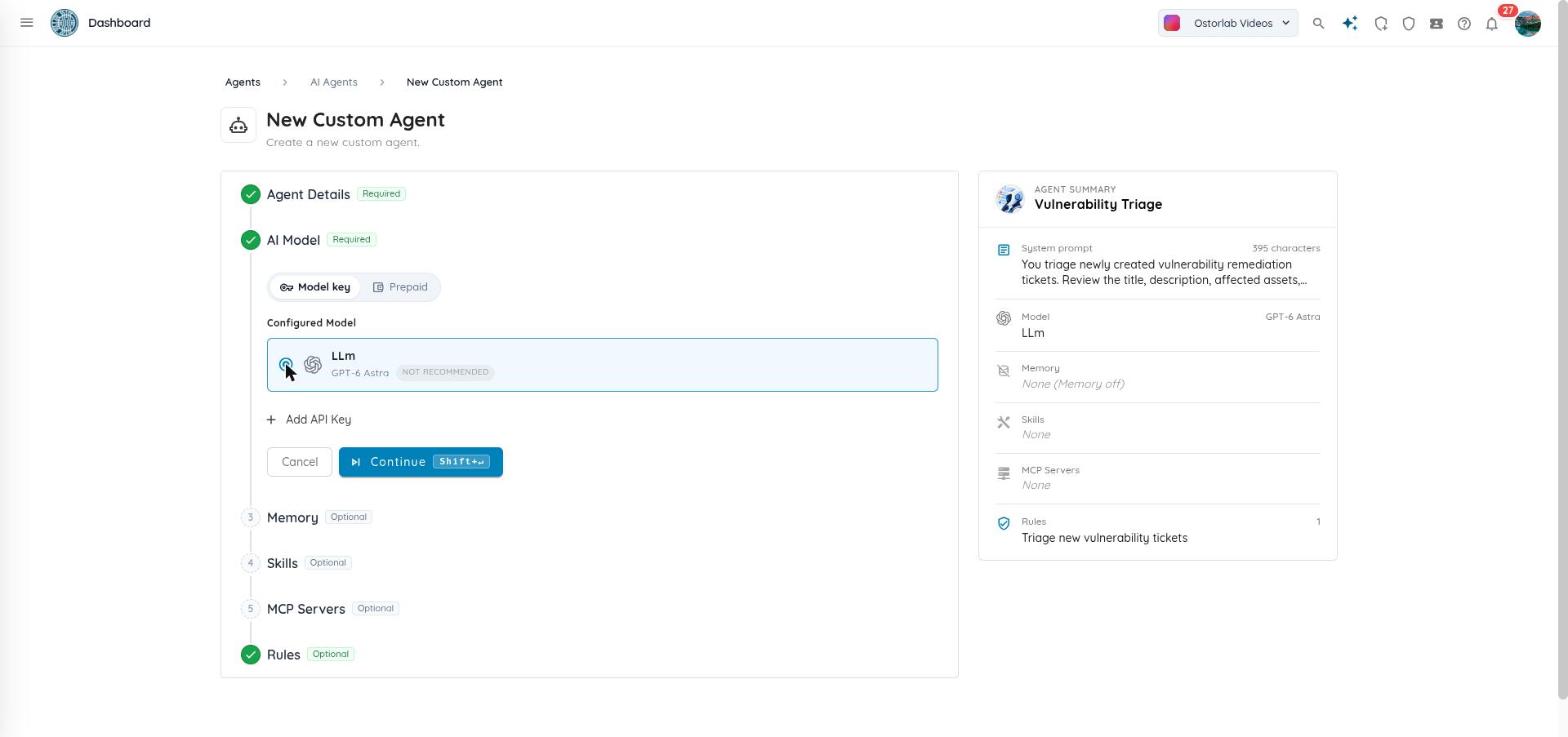
Pick a model. You can use your own AI provider key, or run on the models Ostorlab provides and pay with your credit balance. Each run reserves credits when it starts, and the credits it does not use come back to you.
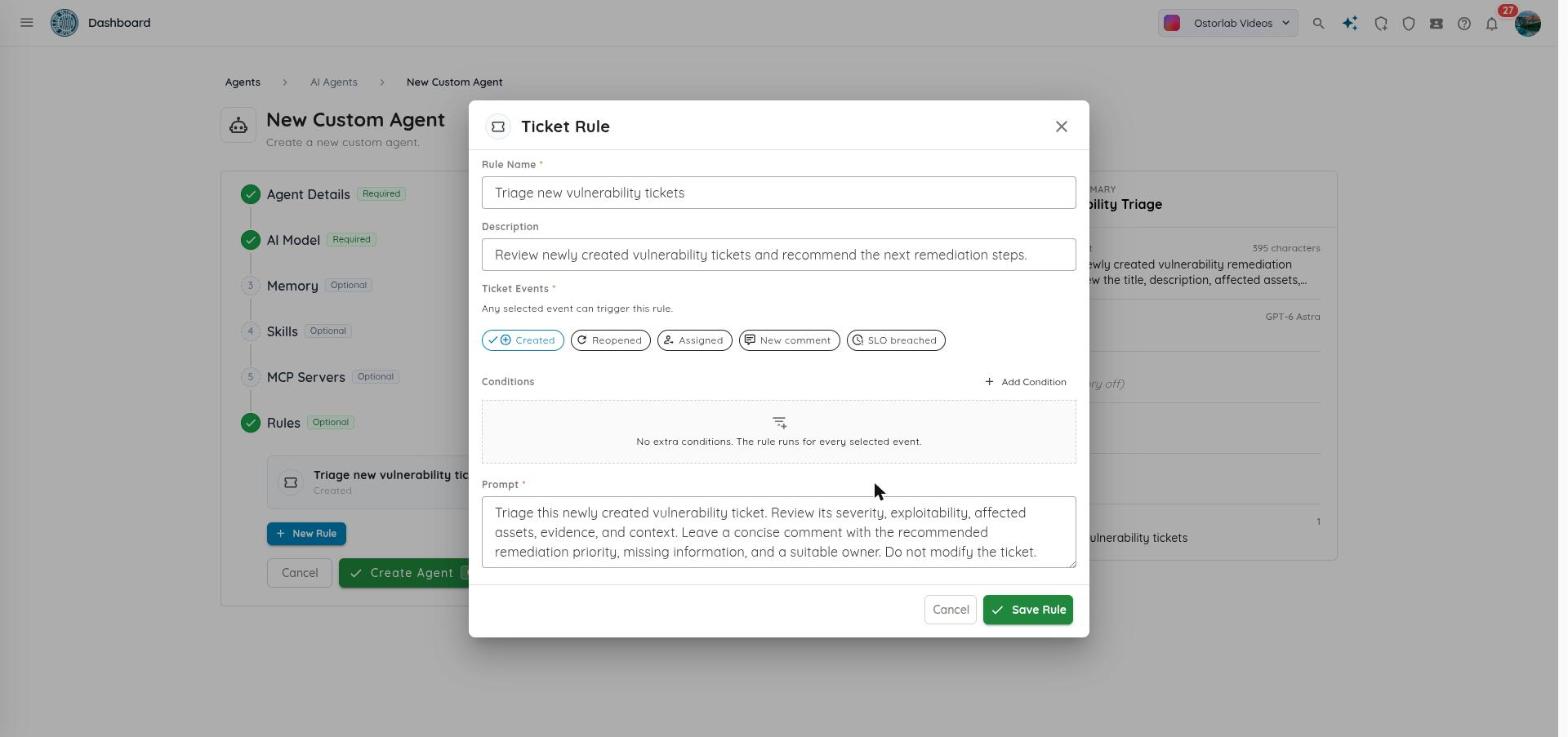
Choose when it runs. You add rules. A rule can fire:
- when something happens to a ticket: it is created, assigned, reopened, gets a new comment, or misses its deadline,
- when a scan finishes,
- or on a schedule, like every Monday morning.
You can narrow each rule. For example, only critical tickets, or only scans of one app.
Teach it how you work. You can give it skills: short guides that explain how your team does things. You can also give it a memory, so what it learns on one ticket helps on the next one.
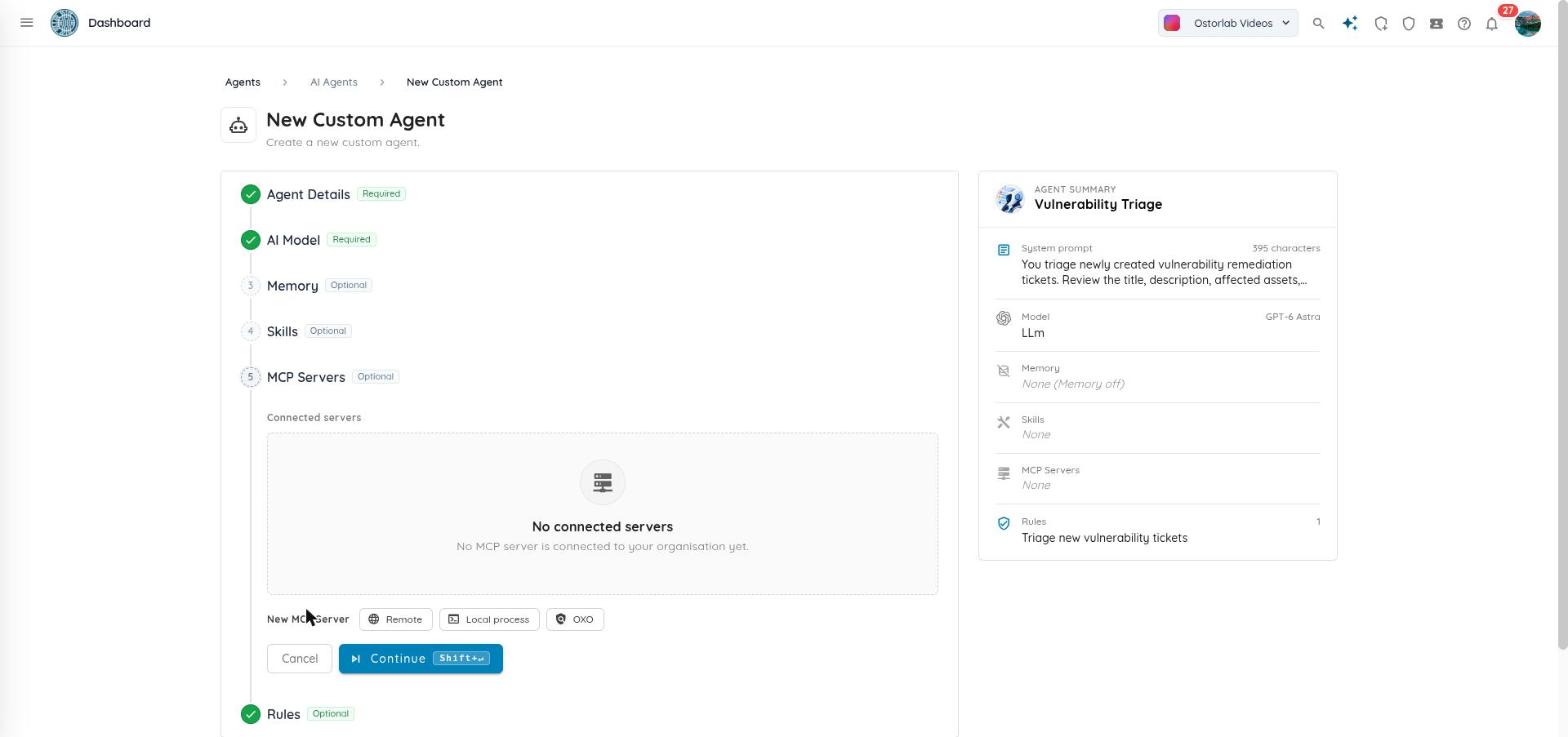
Connect it to your tools. The agent can use MCP (Model Context Protocol) servers, so it can work with the tools your team already uses, not just Ostorlab's own.
Work next to people. You assign a ticket to an agent the same way you assign it to a teammate. A ticket can have both. The agent does its part, and the person stays in charge.
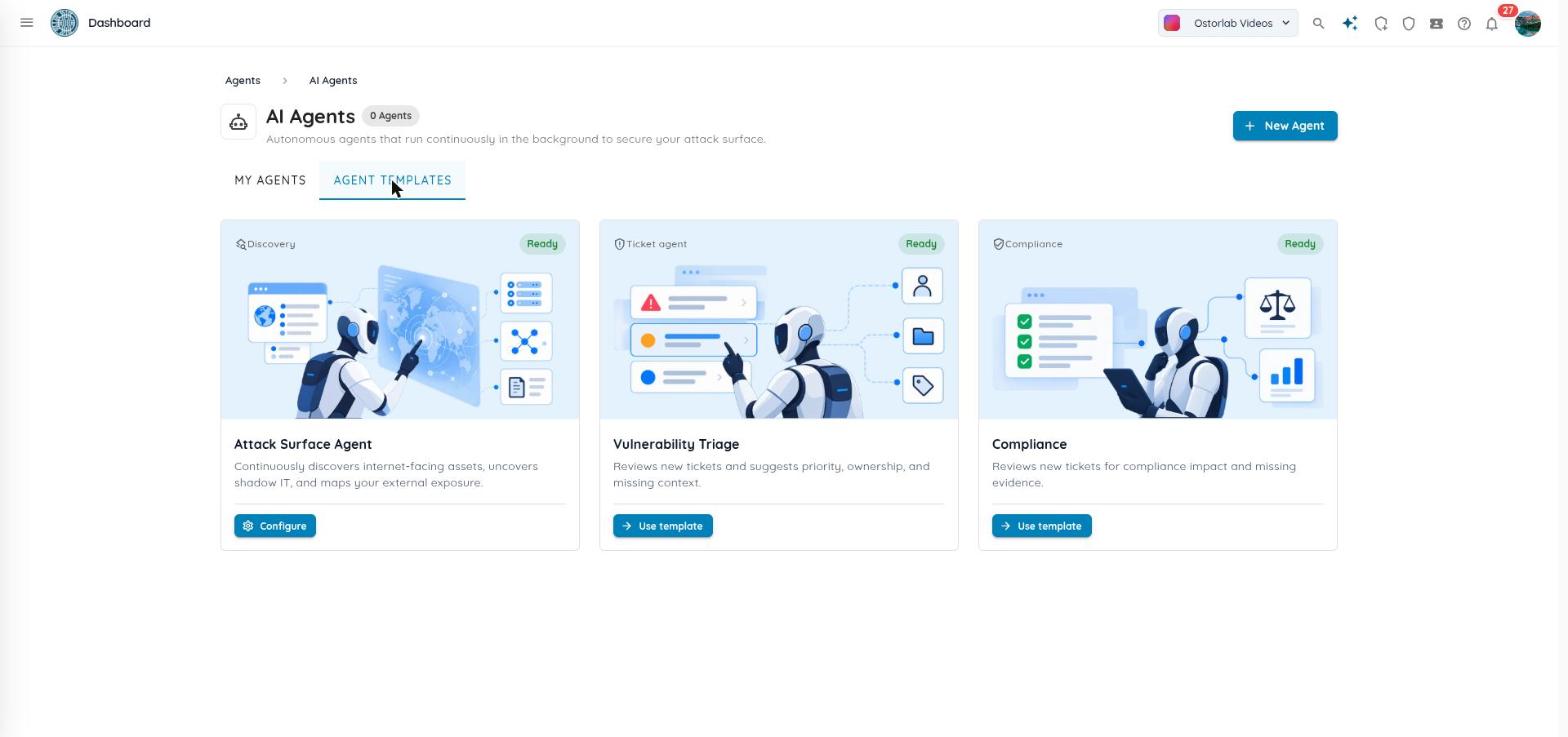
Start from a template. If you don't want to start from zero, you can use a ready-made agent for vulnerability triage or compliance review.
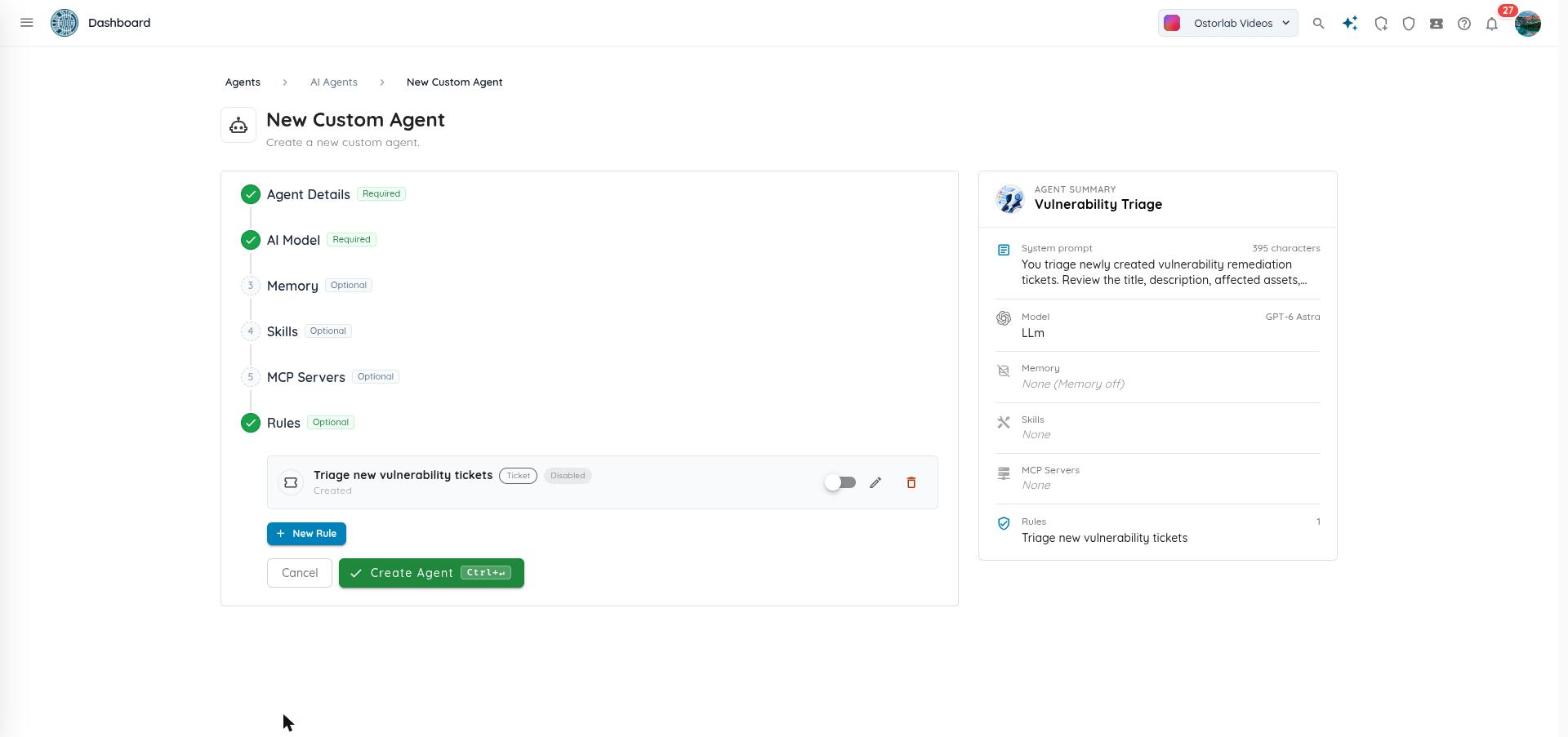
Its rules start switched off, so nothing runs until you say so.
What the ticket agent can do for your team
We built this for ourselves first. Now it is ready for your team.
Your agent can fix bugs, sort new tickets, review compliance, or check in every Monday. You decide its job, when it runs, and what it is allowed to touch — and a person always has the final say.
If your backlog looks like ours did, the ticket agent can clear the easy tickets so your team stays on the hard ones.
Start small, like we did. Pick a template, assign it one test ticket, read what it says, then decide what to give it next.
You can find ticket agents under Agents → AI Agents on the platform, and the full ticket agent setup guide covers configuration end to end.
Frequently asked questions
What is the Ostorlab ticket agent? It is an AI agent that works your ticket backlog. You give it a job in plain words, pick a model, and set rules for when it runs. It can fix bugs and open pull requests, triage new tickets, review compliance, or run on a schedule, and a person always reviews its work.
How does the agent know when to run? You add rules. A rule can fire when something happens to a ticket (it is created, assigned, reopened, commented on, or misses its deadline), when a scan finishes, or on a schedule such as every Monday morning. You can narrow each rule, for example to only critical tickets or only scans of one app.
Can I use my own AI model? Yes. You can bring your own AI provider key, or run on the models Ostorlab provides and pay with your credit balance. Each run reserves credits when it starts, and any it does not use come back to you.
Does the agent replace my engineers? No. You assign a ticket to an agent the same way you assign it to a teammate, and a ticket can have both. The agent does the repetitive part and opens a pull request; a person reviews it and has the final say.
Can it connect to tools outside Ostorlab? Yes. The agent can use MCP (Model Context Protocol) servers, whether remote, local, or Ostorlab OXO, so it works with the tools your team already uses.
How do I get started? Pick a template such as Vulnerability Triage or Compliance Review, assign it one test ticket, and read what it reports. Its rules start switched off, so nothing runs until you enable it. The full setup guide covers configuration end to end.
Need help setting up your first agent? Email support@ostorlab.dev.