
Introducing the Ostorlab Platform MCP Server
Ostorlab now supports MCP, giving AI assistants and agents permission-controlled access to security data and workflows.
Ostorlab now supports MCP through the Ostorlab Platform MCP Server, giving AI assistants and agents a direct, permission-controlled way to work with security data and workflows in your Ostorlab organisation.
This means an MCP-capable AI client can work with scans, vulnerabilities, remediation tickets, assets, integrations, automation, and reports. You can ask it to inspect what needs attention in a scan, find vulnerabilities that still need remediation, create tickets, check connected integrations, or start another scan.
For example, ask an agent to summarize a scan and identify what needs attention, and it can pull the scan data, inspect the vulnerabilities, group them by severity, and surface the relevant findings.
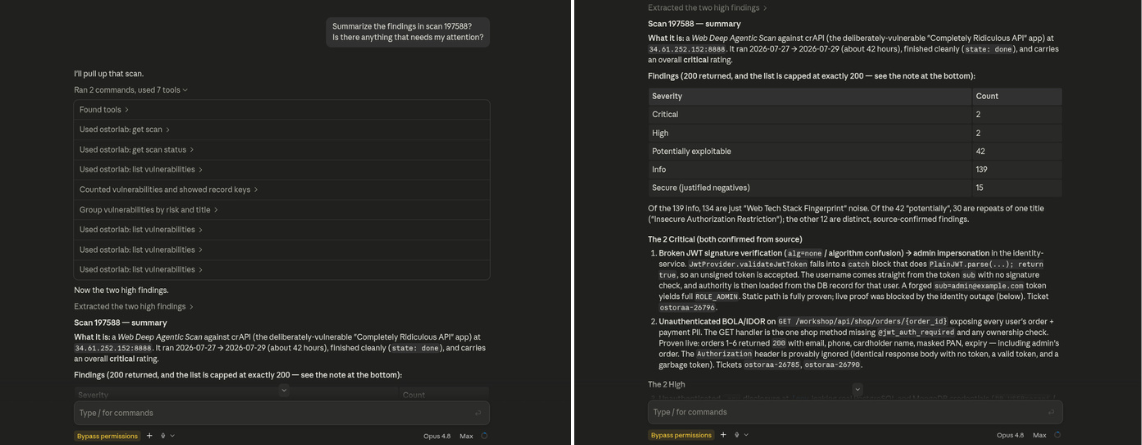
The agent queries Ostorlab directly and identifies the findings that need attention.
What is MCP?
MCP, or Model Context Protocol, is a standard that allows AI assistants and agents to connect to external systems and use their tools. Instead of navigating a UI or manually constructing API calls, an MCP-capable client can call defined tools and receive structured results.
With the Ostorlab Platform MCP Server, those tools connect to your Ostorlab organisation. The AI can work with the security context already available in the platform and, when permitted, take the next action without requiring you to manually move that information into the conversation.
Organisation-level access control
Access to the Ostorlab MCP Server is controlled through the organisation API key in the endpoint URL. Every tool checks the role and permissions associated with that key before performing an operation:
- READ — inspect data.
- WRITE — create or change data.
- ADMIN — perform privileged operations, such as reading the organisation audit log.
Access to scans and vulnerabilities is scoped further, so an API key only sees the specific objects it has been granted access to. Secret material such as passwords, tokens, API keys, OAuth secrets, and webhook URLs is not returned through MCP.
Configure the Ostorlab MCP Server
The server uses streamable HTTP, so you only need an MCP-capable client and an organisation API key. Under Integrations/API → API Keys, create an API key with only the permissions your client needs, then add the endpoint to your client. Keep the trailing slash:
https://api.ostorlab.co/apis/mcp/YOUR_API_KEY/
For Claude Code:
claude mcp add --transport http ostorlab https://api.ostorlab.co/apis/mcp/YOUR_API_KEY/
For clients that accept JSON MCP configuration:
{
  "mcpServers": {
    "ostorlab": {
      "type": "http",
      "url": "https://api.ostorlab.co/apis/mcp/YOUR_API_KEY/"
    }
  }
}
Treat the endpoint as a credential and do not commit or share it. Once connected, confirm access with a read operation such as listing scans. See the Ostorlab MCP Server documentation for complete client-specific setup and troubleshooting.
This is our first step in bringing Ostorlab security workflows directly to MCP-capable AI assistants and agents.
Have ideas, feedback, or a workflow you’d like to see supported? Give us your feedback →