
Announcing Ostorlab’s On-Premises Vulnerability Scanner
Announcing the general availability of the Ostorlab On-Premises Vulnerability Scanner, designed to identify and contextualize security flaws within your local infrastructure.
Announcing Ostorlab’s On-Premises Vulnerability Scanner: Local Reach, Centralized Control
We are thrilled to announce the general availability of Ostorlab On-Premises Scanning.
Many business-critical systems are not accessible from the public internet—they are hosted inside private networks, protected by strict firewalls, restricted to a VPN, or isolated within development environments. Traditional cloud scanners cannot reach these assets unless you compromise your network boundaries and expose them externally.
We built our new execution engine to solve this: you can now test private applications, APIs, and networks using scanner nodes deployed directly inside your own infrastructure, all while managing scans and reviewing findings from the centralized Ostorlab platform you already use.
The Core Advantage: Local Reach Meets Centralized Operations
Our on-premises scanner turns the problem of "this asset cannot be reached by our security scanner" into "we can test it continuously without making it public."
It prevents the creation of disconnected "operational islands." Scans run from your local infrastructure, interacting with internal targets exactly as an attacker would. However, your team continues to use the unified Ostorlab platform to orchestrate scans, monitor activity, review findings, and manage remediation alongside your external assets.
What You Can Scan Locally
Depending on your plan and deployment configuration, the on-premises scanner seamlessly supports:
| Target Area | Examples of Scannable Assets |
|---|---|
| Private Networks | Internal IP addresses, network ranges, hosts, and services. |
| Internal Web Apps | Intranets, administration portals, staging applications, and private dashboards. |
| Private APIs | Internal REST, GraphQL, and other API services. |
| Source Code & Repository Archives | Source-code repositories and archives requiring controlled access or packaged for scanning. |
How It Works
Using on-premises scanning is designed to fit naturally into your existing workflows:
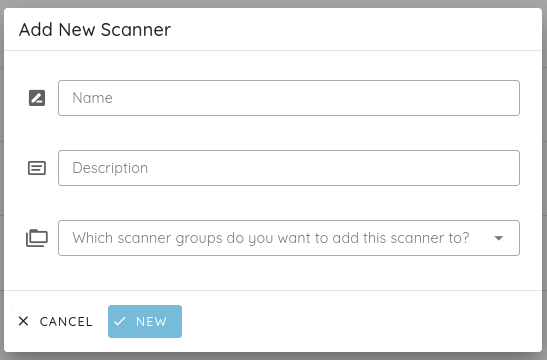
- Register a Scanner: An administrator creates a scanner from the Ostorlab platform, assigning it a recognizable name and description.
New Capabilities for Scalable Management
Managing enterprise networks often means dealing with distinct data centers or heavily segmented environments. To support distributed fleets, we are introducing major architectural upgrades to the Ostorlab platform:
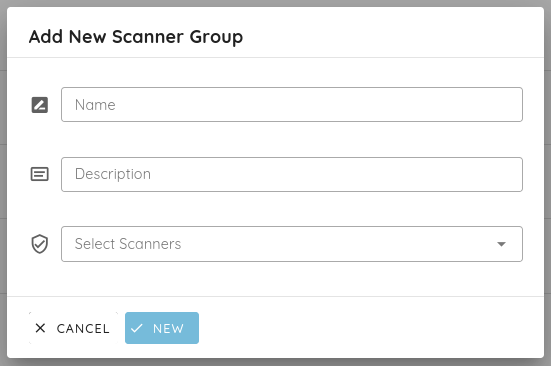
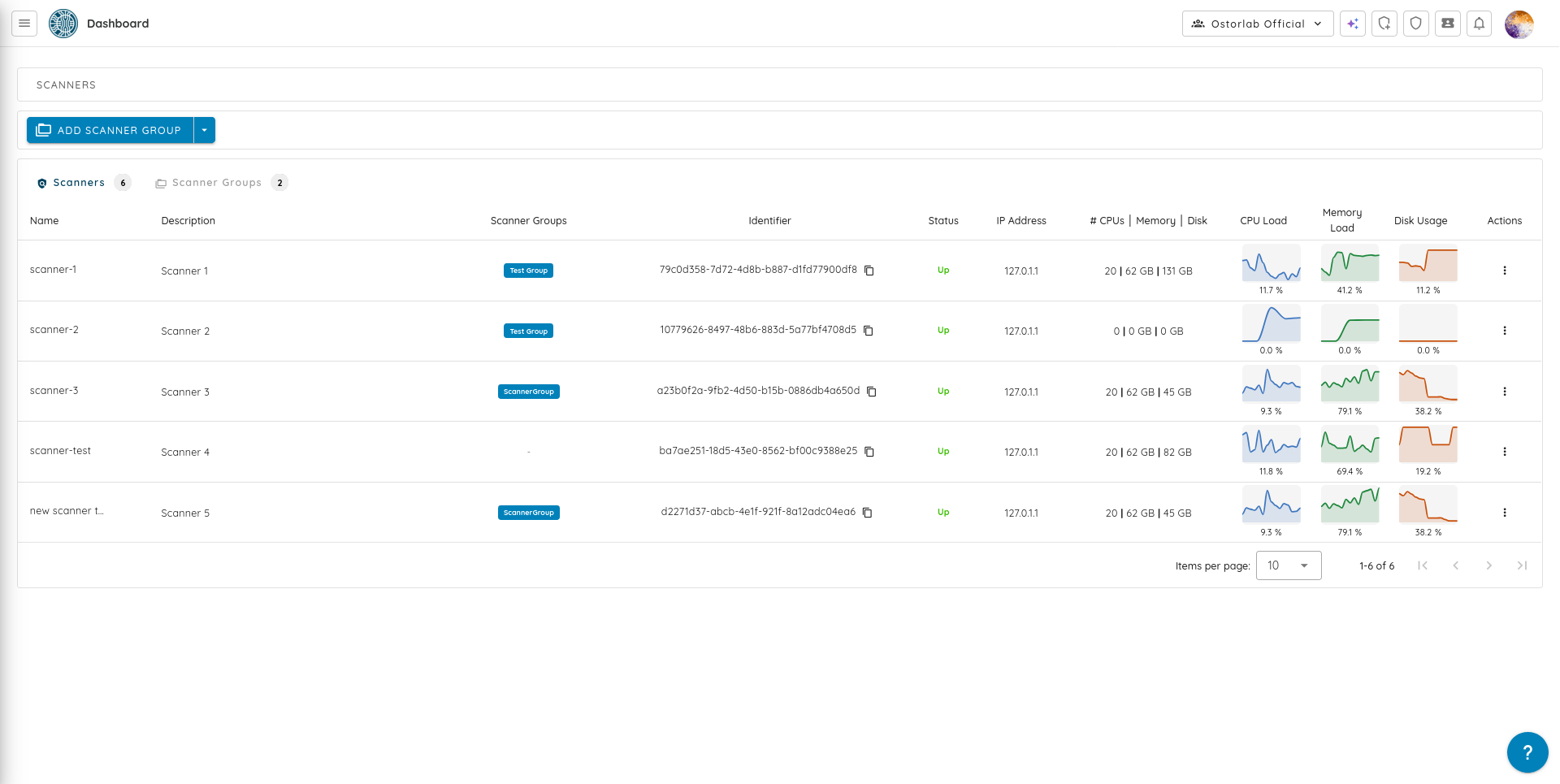
- Scanner Groups for Load Balancing: Instead of assigning work to one specific machine, combine multiple scanner nodes into a group. When a scan is initiated, it is routed to an available, eligible scanner in that group. This allows you to add capacity, organize nodes by region or business unit, and eliminate single points of failure.
The Same Trusted Engine, Executed Locally
While the execution is now entirely local, the brain powering the scanner remains the same Ostorlab engine our users trust. By bringing our existing scan profiles on-premises, your team benefits from:
- Risk-Based Prioritization Beyond CVSS: We continue to prove exploitability to filter out false positives and prioritize findings by actual exposure.
- Safe Network Scanning: The engine actively throttles its network requests and paces its probes to prevent DoS-like conditions on fragile internal systems.
- Native Remediation Workflows: Push enriched, context-heavy tickets—complete with step-by-step remediation advice—directly into your existing SIEM, SOAR, and ticketing platforms.
Who is it For?
On-Premises Scanning is purpose-built for organizations operating highly valuable systems that cannot or should not be publicly reachable. This includes:
- Financial Services & Digital Banking
- Healthcare & Life Sciences
- Government & Public-Sector Organizations
- Large Enterprises with segmented internal networks
- Industrial & Operational Environments
- Software Vendors testing development and staging systems
- Any organization operating under strict security, privacy, or compliance requirements.
Frequently Asked Questions
Does the scanner require internal systems to be exposed to the internet? No. The scanner is deployed inside the environment that already has access to the private asset. Your internal systems remain entirely private.
Is this a fully air-gapped solution? No. Ostorlab operates on a hybrid model. The scanner node requires controlled, encrypted outbound connectivity to the Ostorlab platform strictly for fetching scan schedules and pushing encrypted reporting data. All active scanning and payload execution remains confined to your internal network.
What permissions are required for an authenticated scan? For internal web applications, scanners typically only require standard user credentials or session tokens (like JWTs or cookies) to log in and assess post-authentication attack surfaces. They do not require dangerous Domain Admin privileges.
Ready to secure your internal infrastructure? Request a Demo or Contact our Sales Team today to see the Ostorlab On-Premises Vulnerability Scanner in action.