
Introducing Ostorlab’s Single Vulnerability Assessment and Dig Deeper
Ostorlab is launching a powerful, highly targeted AI orchestration engine accessible through two distinct UI workflows: Single Vulnerability Assessment (SVA) and Dig Deeper. While both features share the exact same underlying AI logic, capabilities, and "Bring-Your-Own-Key" structure, they are tailored for different entry points in your workflow. SVA is launched as a fresh, standalone scan for targeted, cost-efficient assessments, fix validations, or bug bounty verifications. Dig Deeper is triggered directly from an existing finding within a scan report to instantly investigate false positives or trace exploit paths. Together, they give teams surgical control over how they test and validate individual vulnerabilities.
Traditional security scanning often forces a "boil the ocean" approach: running massive, broad-spectrum checks that consume heavy computing resources and generate overwhelming noise. But in a fast-paced threat landscape, precision and speed matter most. Sometimes you don't need a comprehensive, full-scale assessment; you need to answer a single, critical question with absolute clarity.
Today, we are launching a powerful, highly targeted AI orchestration engine designed to give security teams, developers, and bug bounty hunters surgical control over their security workflows. This engine is accessible through two distinct entry points depending on your immediate need: Single Vulnerability Assessment (SVA) and Dig Deeper.
Driven by the exact same advanced AI logic under the hood, these features allow you to execute a laser-focused check, changing only how the investigation is triggered in the user interface.
One Engine, Two Entry Points
Because SVA and Dig Deeper utilize the exact same underlying AI agent infrastructure, they deliver identical depth and precision. The difference lies entirely in where you are in your workflow when you need them:
- Single Vulnerability Assessment (SVA): Triggered as a fresh, standalone scan from the asset dashboard. You define the asset and the specific target flaw from scratch.
- Dig Deeper: Triggered reactively from an existing scan report. You see a specific finding that looks suspicious, and you launch the engine directly from that vulnerability page to investigate further.
1. Single Vulnerability Assessment (SVA)
Standalone, Targeted Testing
When you know exactly what you are looking for, running a comprehensive scan is overkill. SVA allows you to configure a fresh scan that bypasses broad-spectrum testing profiles entirely, pointing the AI engine at a single objective. It is designed to be a highly localized, cost-effective way to run spot checks without the overhead of a full assessment.
SVA Use Cases at a Glance
| Scenario | How SVA Helps |
|---|---|
| Bug Bounty Validation | Replicate and validate an external researcher's submission instantly before routing it to developers. |
| Fix Validation | Double-check that a development team's patch successfully closed a specific vulnerability before closing the ticket. |
| Targeted Cost-Efficient Assessment | Audit a single asset for a highly specific risk or CVE quickly, minimizing computational resource consumption. |
2. Dig Deeper
Inline Triage and Context Preservation
Finding a vulnerability is rarely the hardest part of security triage; the real friction lies in what comes next. Historically, verifying if a flagged issue was a false positive or proving its exploitability meant leaving your dashboard, opening new tabs, pulling down code, and trying to manually reproduce the issue, which meant losing critical context along the way.
Dig Deeper brings the exact same targeted AI engine directly into your existing scan results. Instead of configuring a new scan from scratch, a single click passes the context of your current finding straight to the AI agent.
Three Tailored Paths to Certainty
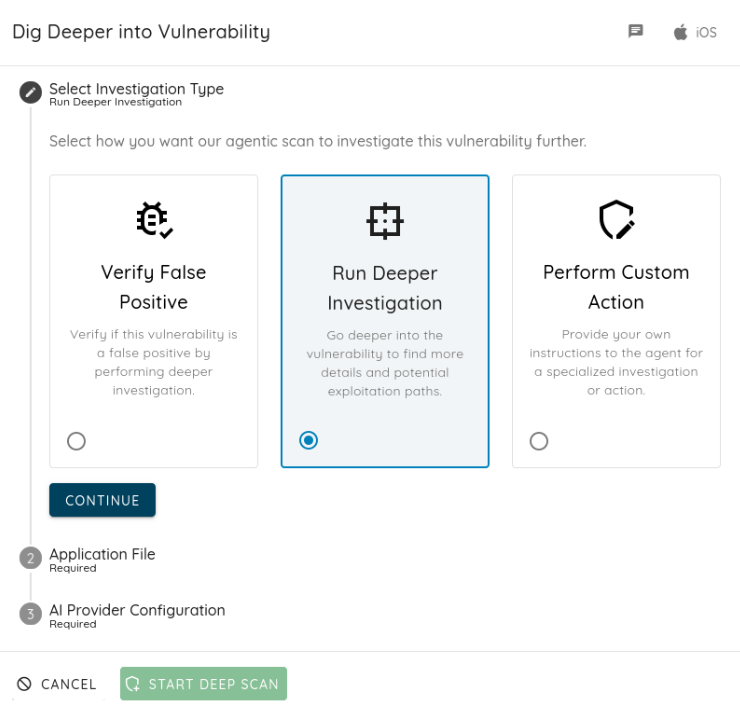
When you trigger Dig Deeper from a finding, you can direct the AI agent along three distinct investigative tracks:
- Verify False Positive: Let the agent systematically evaluate the context to prove whether the flaw poses a real threat or is merely background noise.
- Run Deeper Investigation: Instruct the engine to dive deep into the technical nuances of the vulnerability, mapping out potential exploit vectors.
- Perform Custom Action: Take complete control by guiding the investigation path to match your internal security parameters.
Bring-Your-Own-Key AI Orchestration
Whether you launch an SVA scan or trigger a Dig Deeper session, you are utilizing Ostorlab's next-generation AI agent framework. Because these investigations rely heavily on deep reasoning and multimodal analysis, providing an AI provider API key is a mandatory step.
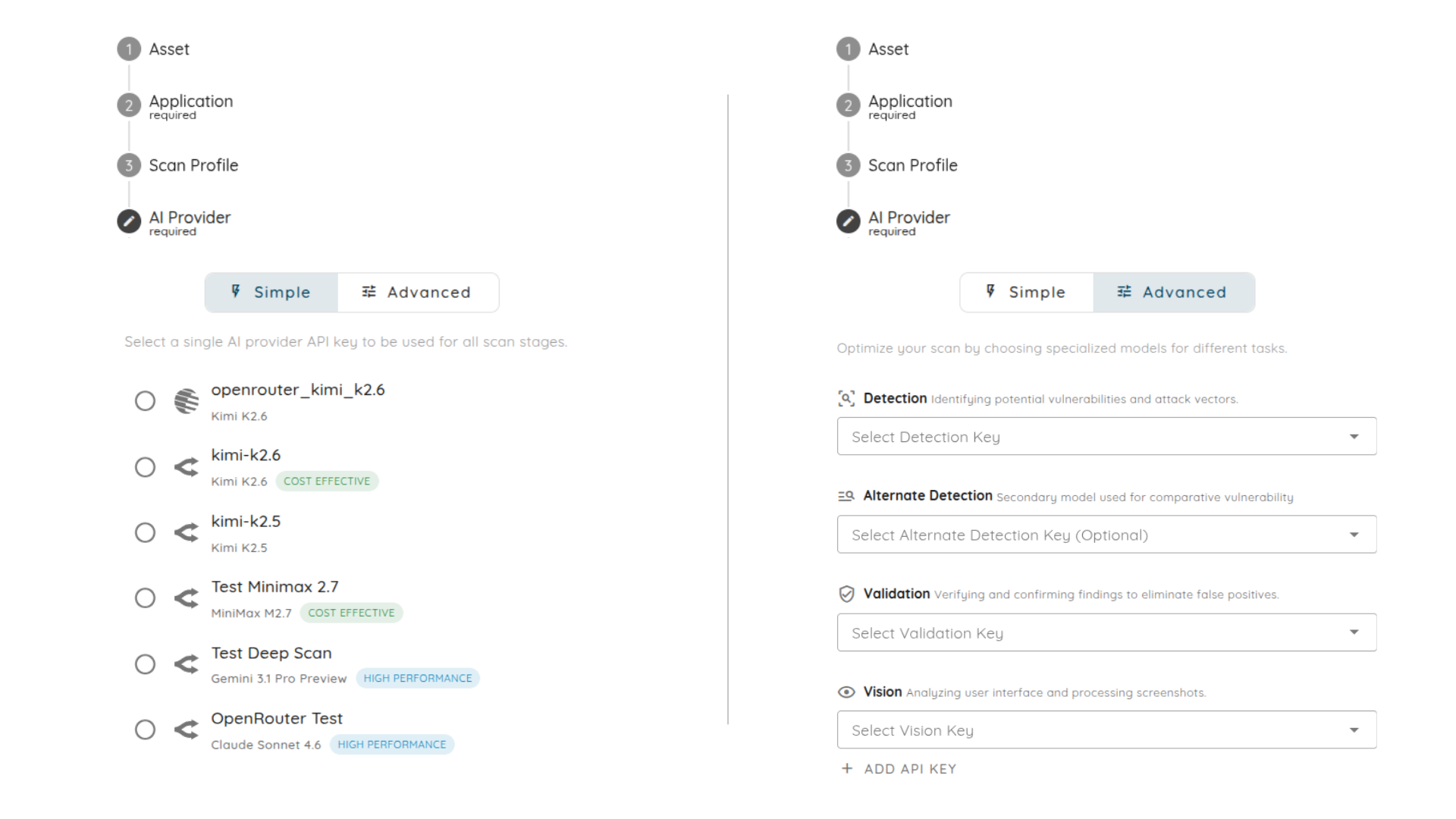
To balance rapid deployment with expert-level auditing, both workflows offer two configuration tiers:
- Simple Setup: Provide a single API key from your preferred AI provider to power the standard automated investigation logic from end to end.
- Advanced Setup: For teams demanding maximum precision, you can split distinct cognitive tasks across specialized models to optimize performance and reduce blind spots:
- Detection & Alternate Detection: Primary and secondary models work in tandem to identify attack vectors and perform comparative analysis.
- Validation: A dedicated model steps in strictly to verify findings, filter out noise, and reject findings that do not hold up.
- Vision: A multimodal model handles visual analysis, parsing application screenshots and evaluating user interface context just like a human reviewer.
How to Run These Scans
Setting up a targeted assessment or deep dive takes only a few minutes. Below is the step-by-step process to get these workflows up and running in your dashboard.
Launching an SVA Scan
1. Define the Asset:
Start by locating the application you want to test. Use the search bar to find the application name and specify the platform where it's hosted. Keep in mind that while most major environments are supported, HarmonyOS and AppGallery are not yet available.
2. Configure the Scan Profile:
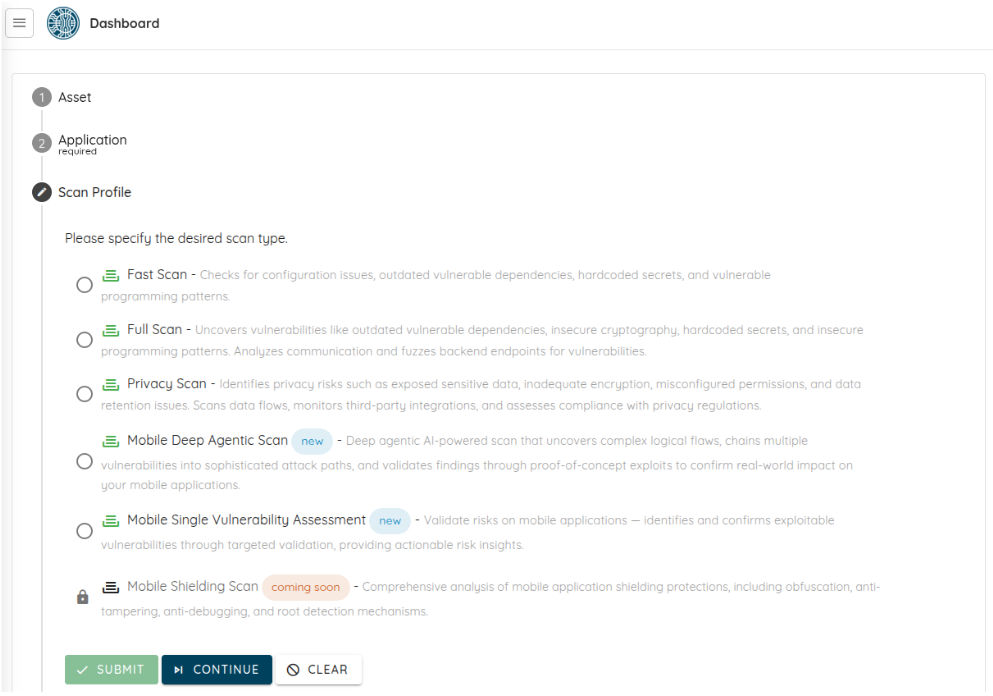
Once your asset is selected, navigate to the Scan Profile section and choose Single Vulnerability Assessment. This tells the engine to bypass the standard broad-spectrum checks and focus exclusively on the specific flaw you're hunting.
3. Select Your AI Provider:
Provide your API key in either the Simple or Advanced mode.
4. Guide the Behavior with Prompts:
The final step is to define exactly how you want the scan to behave. Select one or multiple prompts to guide the agent's logic, tailoring the investigation to the specific nuances of your target flaw.
Triggering a Dig Deeper Session
1. Start from any finding:
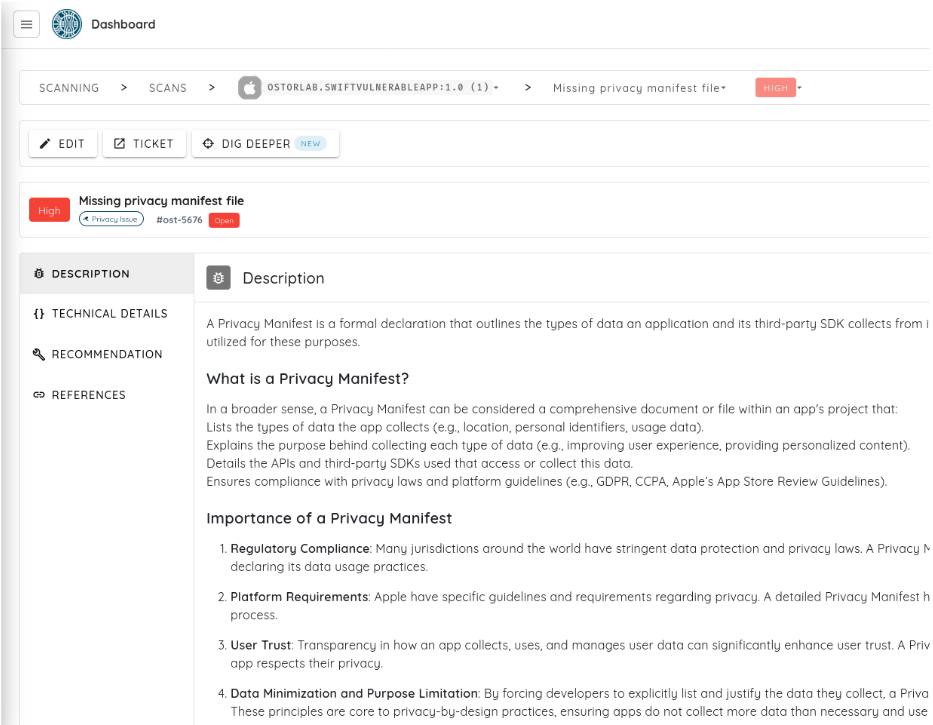
From the scan results page, open the individual vulnerability you want to investigate further and click the Dig Deeper button.
2. Choose your investigation path:
Once inside the configuration view, select your desired path (Verify False Positive, Run Deeper Investigation, or Perform Custom Action).
3. Provide your AI API key:
Enter your preferred provider key or use the Optional Advanced Setup to assign specialized models for detection, validation, and vision tasks. Start the deep scan to immediately turn a flagged issue into actionable risk insight without leaving your current tab.
Experience Precision Security Today
Full-scale assessments will always remain a core foundation of a healthy security posture. But when you need to act with agility, speed, and focus, SVA and Dig Deeper are your new operational standard.
Log in to your Ostorlab dashboard today to run your first targeted SVA scan or to dive beneath the surface of your findings with Dig Deeper.
Security, simplified. Risk, eliminated.
— The Ostorlab Security Team